mirror of
https://github.com/alibaba/higress.git
synced 2026-05-30 23:57:28 +08:00

307 lines
9.1 KiB
Markdown
307 lines
9.1 KiB
Markdown
# MCP 服务器实现指南
|
||
|
||
## 背景
|
||
|
||
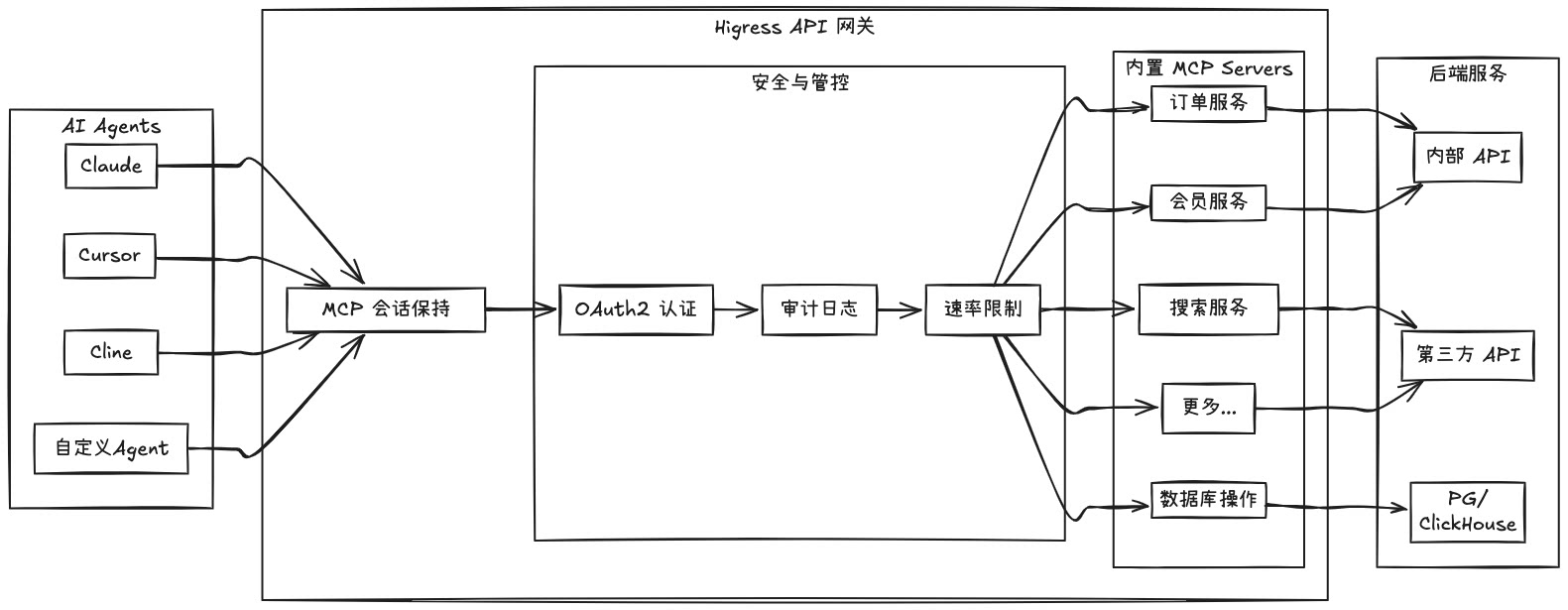
Higress 作为基于 Envoy 的 API 网关,支持通过插件方式托管 MCP Server。MCP(Model Context Protocol)本质是面向 AI 更友好的 API,使 AI Agent 能够更容易地调用各种工具和服务。Higress 可以统一处理工具调用的认证/鉴权/限流/观测等能力,简化 AI 应用的开发和部署。
|
||
|
||
|
||
|
||
通过 Higress 托管 MCP Server,可以实现:
|
||
- 统一的认证和鉴权机制,确保 AI 工具调用的安全性
|
||
- 精细化的速率限制,防止滥用和资源耗尽
|
||
- 完整的审计日志,记录所有工具调用行为
|
||
- 丰富的可观测性,监控工具调用的性能和健康状况
|
||
- 简化的部署和管理,通过 Higress 插件机制快速添加新的 MCP Server
|
||
|
||
下面介绍如何使用 Higress WASM Go SDK 实现 Model Context Protocol (MCP) 服务器。MCP 服务器提供工具和资源,扩展 AI 助手的能力。
|
||
|
||
## 概述
|
||
|
||
MCP 服务器是一个独立的应用程序,通过 Model Context Protocol 与 AI 助手通信。它可以提供:
|
||
|
||
- **工具**:可以被 AI 调用以执行特定任务的函数
|
||
- **资源**:可以被 AI 访问的数据
|
||
|
||
> **注意**:MCP 服务器插件需要 Higress 2.1.0 或更高版本才能使用。
|
||
|
||
## 项目结构
|
||
|
||
一个典型的 MCP 服务器项目具有以下结构:
|
||
|
||
```
|
||
my-mcp-server/
|
||
├── go.mod # Go 模块定义
|
||
├── go.sum # Go 模块校验和
|
||
├── main.go # 注册工具和资源的入口点
|
||
└── tools/
|
||
└── my_tool.go # 工具实现
|
||
```
|
||
|
||
## 服务器配置
|
||
|
||
为您的 MCP 服务器定义一个配置结构,用于存储 API 密钥等设置:
|
||
|
||
```go
|
||
// config/config.go
|
||
package config
|
||
|
||
type MyServerConfig struct {
|
||
ApiKey string `json:"apiKey"`
|
||
}
|
||
```
|
||
|
||
## 工具实现
|
||
|
||
每个工具应该实现为一个具有以下方法的结构体:
|
||
|
||
1. `Description()`:返回工具的描述
|
||
2. `InputSchema()`:返回工具输入参数的 JSON schema
|
||
3. `Create()`:使用提供的参数创建工具的新实例
|
||
4. `Call()`:执行工具的功能
|
||
|
||
示例:
|
||
|
||
```go
|
||
// tools/my_tool.go
|
||
package tools
|
||
|
||
import (
|
||
"encoding/json"
|
||
"errors"
|
||
"fmt"
|
||
"net/http"
|
||
|
||
"my-mcp-server/config"
|
||
"github.com/alibaba/higress/plugins/wasm-go/pkg/mcp/server"
|
||
"github.com/alibaba/higress/plugins/wasm-go/pkg/mcp/utils"
|
||
)
|
||
|
||
// 定义带有输入参数的工具结构
|
||
type MyTool struct {
|
||
Param1 string `json:"param1" jsonschema_description:"参数1的描述" jsonschema:"example=示例值"`
|
||
Param2 int `json:"param2,omitempty" jsonschema_description:"参数2的描述" jsonschema:"default=5"`
|
||
}
|
||
|
||
// Description 返回 MCP 工具定义的描述字段。
|
||
// 这对应于 MCP 工具 JSON 响应中的 "description" 字段,
|
||
// 提供了工具目的和用法的人类可读解释。
|
||
func (t MyTool) Description() string {
|
||
return `详细描述这个工具做什么以及何时使用它。`
|
||
}
|
||
|
||
// InputSchema 返回 MCP 工具定义的 inputSchema 字段。
|
||
// 这对应于 MCP 工具 JSON 响应中的 "inputSchema" 字段,
|
||
// 定义了工具输入参数的 JSON Schema,包括属性类型、描述和必填字段。
|
||
func (t MyTool) InputSchema() map[string]any {
|
||
return server.ToInputSchema(&MyTool{})
|
||
}
|
||
|
||
// Create 基于 MCP 工具调用的输入参数实例化一个新的工具实例。
|
||
// 它将 JSON 参数反序列化为结构体,为可选字段应用默认值,并返回配置好的工具实例。
|
||
func (t MyTool) Create(params []byte) server.Tool {
|
||
myTool := &MyTool{
|
||
Param2: 5, // 默认值
|
||
}
|
||
json.Unmarshal(params, &myTool)
|
||
return myTool
|
||
}
|
||
|
||
// Call 实现处理 MCP 工具调用的核心逻辑。当通过 MCP 框架调用工具时,执行此方法。
|
||
// 它处理配置的参数,进行必要的 API 请求,并格式化返回给调用者的结果。
|
||
func (t MyTool) Call(ctx server.HttpContext, s server.Server) error {
|
||
// 获取服务器配置
|
||
serverConfig := &config.MyServerConfig{}
|
||
s.GetConfig(serverConfig)
|
||
if serverConfig.ApiKey == "" {
|
||
return errors.New("服务器配置中缺少 API 密钥")
|
||
}
|
||
|
||
// 在这里实现工具的逻辑
|
||
// ...
|
||
|
||
// 返回结果
|
||
utils.SendMCPToolTextResult(ctx, fmt.Sprintf("结果: %s, %d", t.Param1, t.Param2))
|
||
return nil
|
||
}
|
||
```
|
||
|
||
## 工具加载
|
||
|
||
为了更好地组织代码,您可以创建一个单独的文件来加载所有工具:
|
||
|
||
```go
|
||
// tools/load_tools.go
|
||
package tools
|
||
|
||
import (
|
||
"github.com/alibaba/higress/plugins/wasm-go/pkg/mcp"
|
||
"github.com/alibaba/higress/plugins/wasm-go/pkg/mcp/server"
|
||
)
|
||
|
||
func LoadTools(server *mcp.MCPServer) server.Server {
|
||
return server.AddMCPTool("my_tool", &MyTool{}).
|
||
AddMCPTool("another_tool", &AnotherTool{})
|
||
// 根据需要添加更多工具
|
||
}
|
||
```
|
||
|
||
以这种方式组织代码,可以方便被 all-in-one 目录下的 MCP server 插件集成。all-in-one 插件将所有 MCP server 的逻辑打包到一个插件里,从而降低网关上部署多个插件带来的额外开销。
|
||
|
||
### All-in-One 集成
|
||
|
||
all-in-one 插件将多个 MCP server 打包到一个 WASM 二进制文件中。每个 MCP server 保持自己的身份和配置,但它们共享同一个插件实例。以下是 all-in-one 插件中集成多个 MCP server 的示例:
|
||
|
||
```go
|
||
// all-in-one/main.go
|
||
package main
|
||
|
||
import (
|
||
amap "amap-tools/tools"
|
||
quark "quark-search/tools"
|
||
|
||
"github.com/alibaba/higress/plugins/wasm-go/pkg/mcp"
|
||
)
|
||
|
||
func main() {}
|
||
|
||
func init() {
|
||
mcp.LoadMCPServer(mcp.AddMCPServer("quark-search",
|
||
quark.LoadTools(&mcp.MCPServer{})))
|
||
mcp.LoadMCPServer(mcp.AddMCPServer("amap-tools",
|
||
amap.LoadTools(&mcp.MCPServer{})))
|
||
mcp.InitMCPServer()
|
||
}
|
||
```
|
||
|
||
all-in-one 插件的配置方式与所有 MCP server 插件都是一样的,都是通过 server 配置中的 name 字段来找到对应的 MCP server。
|
||
|
||
## 主入口点
|
||
|
||
main.go 文件是 MCP 服务器的入口点。它注册工具和资源:
|
||
|
||
```go
|
||
// main.go
|
||
package main
|
||
|
||
import (
|
||
"my-mcp-server/tools"
|
||
|
||
"github.com/alibaba/higress/plugins/wasm-go/pkg/mcp"
|
||
)
|
||
|
||
func main() {}
|
||
|
||
func init() {
|
||
mcp.LoadMCPServer(mcp.AddMCPServer("my-mcp-server",
|
||
tools.LoadTools(&mcp.MCPServer{})))
|
||
mcp.InitMCPServer()
|
||
}
|
||
```
|
||
|
||
## 插件配置
|
||
|
||
当将您的 MCP 服务器部署为 Higress 插件时,您需要在 Higress 配置中进行配置。以下是一个示例配置:
|
||
|
||
```yaml
|
||
server:
|
||
# MCP 服务器名称 - 必须与代码中 mcp.AddMCPServer() 调用时使用的名称完全一致
|
||
name: my-mcp-server
|
||
# MCP 服务器配置
|
||
config:
|
||
apiKey: 您的API密钥
|
||
# 可选:如果配置了,则起到白名单作用 - 只有列在这里的工具才能被调用
|
||
tools:
|
||
- my_tool
|
||
- another_tool
|
||
```
|
||
|
||
> **重要提示**:server 配置中的 `name` 字段必须与代码中 `mcp.AddMCPServer()` 调用时使用的服务器名称完全一致。系统通过这个名称来识别应该由哪个 MCP 服务器处理请求。
|
||
|
||
## 依赖项
|
||
|
||
您的 MCP 服务器必须使用支持 Go 1.24 WebAssembly 编译功能的特定版本的 wasm-go SDK:
|
||
|
||
```bash
|
||
# 添加必需的依赖项
|
||
go get github.com/alibaba/higress/plugins/wasm-go
|
||
```
|
||
|
||
确保您的 go.mod 文件指定 Go 1.24:
|
||
|
||
```
|
||
module my-mcp-server
|
||
|
||
go 1.24
|
||
|
||
require (
|
||
github.com/alibaba/higress/plugins/wasm-go v1.4.4-0.20250324133957-dab499f6ade6
|
||
// 其他依赖项
|
||
)
|
||
```
|
||
|
||
## 构建 WASM 二进制文件
|
||
|
||
要将 Go 代码编译为 WebAssembly (WASM) 文件,请使用以下命令:
|
||
|
||
```bash
|
||
GOOS=wasip1 GOARCH=wasm go build -buildmode=c-shared -o main.wasm main.go
|
||
```
|
||
|
||
此命令将目标操作系统设置为 `wasip1`(WebAssembly 系统接口)和架构设置为 `wasm`(WebAssembly),然后将代码构建为 C 共享库并输出为 `main.wasm`。
|
||
|
||
## 使用 Makefile
|
||
|
||
提供了 Makefile 以简化构建过程。它包括以下目标:
|
||
|
||
- `make build`:为 MCP 服务器构建 WASM 二进制文件
|
||
- `make build-image`:构建包含 MCP 服务器的 Docker 镜像
|
||
- `make build-push`:构建并将 Docker 镜像推送到注册表
|
||
- `make clean`:删除构建产物
|
||
- `make help`:显示可用的目标和变量
|
||
|
||
您可以通过设置以下变量来自定义构建:
|
||
|
||
```bash
|
||
# 使用自定义服务器名称构建
|
||
make SERVER_NAME=my-mcp-server build
|
||
|
||
# 使用自定义注册表构建
|
||
make REGISTRY=my-registry.example.com/ build-image
|
||
|
||
# 使用特定版本标签构建
|
||
make SERVER_VERSION=1.0.0 build-image
|
||
```
|
||
|
||
## 测试
|
||
|
||
您可以为工具创建单元测试以验证其功能:
|
||
|
||
```go
|
||
// tools/my_tool_test.go
|
||
package tools
|
||
|
||
import (
|
||
"encoding/json"
|
||
"fmt"
|
||
"testing"
|
||
)
|
||
|
||
// TestMyToolInputSchema 测试 MyTool 的 InputSchema 方法
|
||
// 以验证 JSON schema 配置是否正确。
|
||
func TestMyToolInputSchema(t *testing.T) {
|
||
myTool := MyTool{}
|
||
schema := myTool.InputSchema()
|
||
|
||
schemaJSON, err := json.MarshalIndent(schema, "", " ")
|
||
if err != nil {
|
||
t.Fatalf("无法将 schema 序列化为 JSON: %v", err)
|
||
}
|
||
|
||
fmt.Printf("MyTool InputSchema:\n%s\n", string(schemaJSON))
|
||
|
||
if len(schema) == 0 {
|
||
t.Error("InputSchema 返回了空 schema")
|
||
}
|
||
}
|
||
```
|