mirror of
https://github.com/alibaba/higress.git
synced 2026-02-26 13:40:49 +08:00
Compare commits
1 Commits
release-2.
...
update-hel
| Author | SHA1 | Date | |
|---|---|---|---|

|
7a62da18c0 |
@@ -1,138 +0,0 @@
|
||||
# Agent Session Monitor - Quick Start
|
||||
|
||||
实时Agent对话观测程序,用于监控Higress访问日志,追踪多轮对话的token开销和模型使用情况。
|
||||
|
||||
## 快速开始
|
||||
|
||||
### 1. 运行Demo
|
||||
|
||||
```bash
|
||||
cd example
|
||||
bash demo.sh
|
||||
```
|
||||
|
||||
这将:
|
||||
- 解析示例日志文件
|
||||
- 列出所有session
|
||||
- 显示session详细信息(包括完整的messages、question、answer、reasoning、tool_calls)
|
||||
- 按模型和日期统计token开销
|
||||
- 导出FinOps报表
|
||||
|
||||
### 2. 启动Web界面(推荐)
|
||||
|
||||
```bash
|
||||
# 先解析日志生成session数据
|
||||
python3 main.py --log-path /var/log/higress/access.log --output-dir ./sessions
|
||||
|
||||
# 启动Web服务器
|
||||
python3 scripts/webserver.py --data-dir ./sessions --port 8888
|
||||
|
||||
# 浏览器访问
|
||||
open http://localhost:8888
|
||||
```
|
||||
|
||||
Web界面功能:
|
||||
- 📊 总览所有session,按模型分组统计
|
||||
- 🔍 点击session ID下钻查看完整对话
|
||||
- 💬 查看每轮的messages、question、answer、reasoning、tool_calls
|
||||
- 💰 实时计算token开销和成本
|
||||
- 🔄 每30秒自动刷新
|
||||
|
||||
### 3. 在Clawdbot对话中使用
|
||||
|
||||
当用户询问当前会话token消耗时,生成观测链接:
|
||||
|
||||
```
|
||||
你的当前会话ID: agent:main:discord:channel:1465367993012981988
|
||||
|
||||
查看详情:http://localhost:8888/session?id=agent:main:discord:channel:1465367993012981988
|
||||
|
||||
点击可以看到:
|
||||
✅ 完整对话历史(每轮messages)
|
||||
✅ Token消耗明细
|
||||
✅ 工具调用记录
|
||||
✅ 成本统计
|
||||
```
|
||||
|
||||
### 4. 使用CLI查询(可选)
|
||||
|
||||
```bash
|
||||
# 查看session详细信息
|
||||
python3 scripts/cli.py show <session-id>
|
||||
|
||||
# 列出所有session
|
||||
python3 scripts/cli.py list
|
||||
|
||||
# 按模型统计
|
||||
python3 scripts/cli.py stats-model
|
||||
|
||||
# 导出报表
|
||||
python3 scripts/cli.py export finops-report.json
|
||||
```
|
||||
|
||||
## 核心功能
|
||||
|
||||
✅ **完整对话追踪**:记录每轮对话的完整messages、question、answer、reasoning、tool_calls
|
||||
✅ **Token开销统计**:区分input/output/reasoning/cached token,实时计算成本
|
||||
✅ **Session聚合**:按session_id关联多轮对话
|
||||
✅ **Web可视化界面**:浏览器访问,总览+下钻查看session详情
|
||||
✅ **实时URL生成**:Clawdbot可根据当前会话ID生成观测链接
|
||||
✅ **FinOps报表**:导出JSON/CSV格式的成本分析报告
|
||||
|
||||
## 日志格式要求
|
||||
|
||||
Higress访问日志需要包含ai_log字段(JSON格式),示例:
|
||||
|
||||
```json
|
||||
{
|
||||
"__file_offset__": "1000",
|
||||
"timestamp": "2026-02-01T09:30:15Z",
|
||||
"ai_log": "{\"session_id\":\"sess_abc\",\"messages\":[...],\"question\":\"...\",\"answer\":\"...\",\"input_token\":250,\"output_token\":160,\"model\":\"Qwen3-rerank\"}"
|
||||
}
|
||||
```
|
||||
|
||||
ai_log字段支持的属性:
|
||||
- `session_id`: 会话标识(必需)
|
||||
- `messages`: 完整对话历史
|
||||
- `question`: 当前轮次问题
|
||||
- `answer`: AI回答
|
||||
- `reasoning`: 思考过程(DeepSeek等模型)
|
||||
- `tool_calls`: 工具调用列表
|
||||
- `input_token`: 输入token数
|
||||
- `output_token`: 输出token数
|
||||
- `model`: 模型名称
|
||||
- `response_type`: 响应类型
|
||||
|
||||
## 输出目录结构
|
||||
|
||||
```
|
||||
sessions/
|
||||
├── agent:main:discord:1465367993012981988.json
|
||||
└── agent:test:discord:9999999999999999999.json
|
||||
```
|
||||
|
||||
每个session文件包含:
|
||||
- 基本信息(创建时间、更新时间、模型)
|
||||
- Token统计(总输入、总输出、总reasoning、总cached)
|
||||
- 对话轮次列表(每轮的完整messages、question、answer、reasoning、tool_calls)
|
||||
|
||||
## 常见问题
|
||||
|
||||
**Q: 如何在Higress中配置session_id header?**
|
||||
A: 在ai-statistics插件中配置`session_id_header`,或使用默认header(x-openclaw-session-key、x-clawdbot-session-key等)。详见PR #3420。
|
||||
|
||||
**Q: 支持哪些模型的pricing?**
|
||||
A: 目前支持Qwen、DeepSeek、GPT-4、Claude等主流模型。可以在main.py的TOKEN_PRICING字典中添加新模型。
|
||||
|
||||
**Q: 如何实时监控日志文件变化?**
|
||||
A: 直接运行main.py即可,程序使用定时轮询机制(每秒自动检查一次),无需安装额外依赖。
|
||||
|
||||
**Q: CLI查询速度慢?**
|
||||
A: 大量session时,可以使用`--limit`限制结果数量,或按条件过滤(如`--sort-by cost`只查看成本最高的session)。
|
||||
|
||||
## 下一步
|
||||
|
||||
- 集成到Higress FinOps Dashboard
|
||||
- 支持更多模型的pricing
|
||||
- 添加趋势预测和异常检测
|
||||
- 支持多数据源聚合分析
|
||||
@@ -1,71 +0,0 @@
|
||||
# Agent Session Monitor
|
||||
|
||||
Real-time agent conversation monitoring for Clawdbot, designed to monitor Higress access logs and track token usage across multi-turn conversations.
|
||||
|
||||
## Features
|
||||
|
||||
- 🔍 **Complete Conversation Tracking**: Records messages, question, answer, reasoning, tool_calls for each turn
|
||||
- 💰 **Token Usage Statistics**: Distinguishes input/output/reasoning/cached tokens, calculates costs in real-time
|
||||
- 🌐 **Web Visualization**: Browser-based UI with overview and drill-down into session details
|
||||
- 🔗 **Real-time URL Generation**: Clawdbot can generate observation links based on current session ID
|
||||
- 🔄 **Log Rotation Support**: Automatically handles rotated log files (access.log, access.log.1, etc.)
|
||||
- 📊 **FinOps Reporting**: Export usage data in JSON/CSV formats
|
||||
|
||||
## Quick Start
|
||||
|
||||
### 1. Run Demo
|
||||
|
||||
```bash
|
||||
cd example
|
||||
bash demo.sh
|
||||
```
|
||||
|
||||
### 2. Start Web UI
|
||||
|
||||
```bash
|
||||
# Parse logs
|
||||
python3 main.py --log-path /var/log/higress/access.log --output-dir ./sessions
|
||||
|
||||
# Start web server
|
||||
python3 scripts/webserver.py --data-dir ./sessions --port 8888
|
||||
|
||||
# Access in browser
|
||||
open http://localhost:8888
|
||||
```
|
||||
|
||||
### 3. Use in Clawdbot
|
||||
|
||||
When users ask "How many tokens did this conversation use?", you can respond with:
|
||||
|
||||
```
|
||||
Your current session statistics:
|
||||
- Session ID: agent:main:discord:channel:1465367993012981988
|
||||
- View details: http://localhost:8888/session?id=agent:main:discord:channel:1465367993012981988
|
||||
|
||||
Click to see:
|
||||
✅ Complete conversation history
|
||||
✅ Token usage breakdown per turn
|
||||
✅ Tool call records
|
||||
✅ Cost statistics
|
||||
```
|
||||
|
||||
## Files
|
||||
|
||||
- `main.py`: Background monitor, parses Higress access logs
|
||||
- `scripts/webserver.py`: Web server, provides browser-based UI
|
||||
- `scripts/cli.py`: Command-line tools for queries and exports
|
||||
- `example/`: Demo examples and test data
|
||||
|
||||
## Dependencies
|
||||
|
||||
- Python 3.8+
|
||||
- No external dependencies (uses only standard library)
|
||||
|
||||
## Documentation
|
||||
|
||||
- `SKILL.md`: Main skill documentation
|
||||
- `QUICKSTART.md`: Quick start guide
|
||||
|
||||
## License
|
||||
|
||||
MIT
|
||||
@@ -1,376 +0,0 @@
|
||||
---
|
||||
name: agent-session-monitor
|
||||
description: Real-time agent conversation monitoring - monitors Higress access logs, aggregates conversations by session, tracks token usage. Supports web interface for viewing complete conversation history and costs. Use when users ask about current session token consumption, conversation history, or cost statistics.
|
||||
|
||||
---
|
||||
|
||||
## Overview
|
||||
|
||||
Real-time monitoring of Higress access logs, extracting ai_log JSON, grouping multi-turn conversations by session_id, and calculating token costs with visualization.
|
||||
|
||||
### Core Features
|
||||
|
||||
- **Real-time Log Monitoring**: Monitors Higress access log files, parses new ai_log entries in real-time
|
||||
- **Log Rotation Support**: Full logrotate support, automatically tracks access.log.1~5 etc.
|
||||
- **Incremental Parsing**: Inode-based tracking, processes only new content, no duplicates
|
||||
- **Session Grouping**: Associates multi-turn conversations by session_id (each turn is a separate request)
|
||||
- **Complete Conversation Tracking**: Records messages, question, answer, reasoning, tool_calls for each turn
|
||||
- **Token Usage Tracking**: Distinguishes input/output/reasoning/cached tokens
|
||||
- **Web Visualization**: Browser-based UI with overview and session drill-down
|
||||
- **Real-time URL Generation**: Clawdbot can generate observation links based on current session ID
|
||||
- **Background Processing**: Independent process, continuously parses access logs
|
||||
- **State Persistence**: Maintains parsing progress and session data across runs
|
||||
|
||||
## Usage
|
||||
|
||||
### 1. Background Monitoring (Continuous)
|
||||
|
||||
```bash
|
||||
# Parse Higress access logs (with log rotation support)
|
||||
python3 main.py --log-path /var/log/proxy/access.log --output-dir ./sessions
|
||||
|
||||
# Filter by session key
|
||||
python3 main.py --log-path /var/log/proxy/access.log --session-key <session-id>
|
||||
|
||||
# Scheduled task (incremental parsing every minute)
|
||||
* * * * * python3 /path/to/main.py --log-path /var/log/proxy/access.log --output-dir /var/lib/sessions
|
||||
```
|
||||
|
||||
### 2. Start Web UI (Recommended)
|
||||
|
||||
```bash
|
||||
# Start web server
|
||||
python3 scripts/webserver.py --data-dir ./sessions --port 8888
|
||||
|
||||
# Access in browser
|
||||
open http://localhost:8888
|
||||
```
|
||||
|
||||
Web UI features:
|
||||
- 📊 Overview: View all session statistics and group by model
|
||||
- 🔍 Session Details: Click session ID to drill down into complete conversation history
|
||||
- 💬 Conversation Log: Display messages, question, answer, reasoning, tool_calls for each turn
|
||||
- 💰 Cost Statistics: Real-time token usage and cost calculation
|
||||
- 🔄 Auto Refresh: Updates every 30 seconds
|
||||
|
||||
### 3. Use in Clawdbot Conversations
|
||||
|
||||
When users ask about current session token consumption or conversation history:
|
||||
|
||||
1. Get current session_id (from runtime or context)
|
||||
2. Generate web UI URL and return to user
|
||||
|
||||
Example response:
|
||||
|
||||
```
|
||||
Your current session statistics:
|
||||
- Session ID: agent:main:discord:channel:1465367993012981988
|
||||
- View details: http://localhost:8888/session?id=agent:main:discord:channel:1465367993012981988
|
||||
|
||||
Click the link to see:
|
||||
✅ Complete conversation history
|
||||
✅ Token usage breakdown per turn
|
||||
✅ Tool call records
|
||||
✅ Cost statistics
|
||||
```
|
||||
|
||||
### 4. CLI Queries (Optional)
|
||||
|
||||
```bash
|
||||
# View specific session details
|
||||
python3 scripts/cli.py show <session-id>
|
||||
|
||||
# List all sessions
|
||||
python3 scripts/cli.py list --sort-by cost --limit 10
|
||||
|
||||
# Statistics by model
|
||||
python3 scripts/cli.py stats-model
|
||||
|
||||
# Statistics by date (last 7 days)
|
||||
python3 scripts/cli.py stats-date --days 7
|
||||
|
||||
# Export reports
|
||||
python3 scripts/cli.py export finops-report.json
|
||||
```
|
||||
|
||||
## Configuration
|
||||
|
||||
### main.py (Background Monitor)
|
||||
|
||||
| Parameter | Description | Required | Default |
|
||||
|-----------|-------------|----------|---------|
|
||||
| `--log-path` | Higress access log file path | Yes | /var/log/higress/access.log |
|
||||
| `--output-dir` | Session data storage directory | No | ./sessions |
|
||||
| `--session-key` | Monitor only specified session key | No | Monitor all sessions |
|
||||
| `--state-file` | State file path (records read offsets) | No | <output-dir>/.state.json |
|
||||
| `--refresh-interval` | Log refresh interval (seconds) | No | 1 |
|
||||
|
||||
### webserver.py (Web UI)
|
||||
|
||||
| Parameter | Description | Required | Default |
|
||||
|-----------|-------------|----------|---------|
|
||||
| `--data-dir` | Session data directory | No | ./sessions |
|
||||
| `--port` | HTTP server port | No | 8888 |
|
||||
| `--host` | HTTP server address | No | 0.0.0.0 |
|
||||
|
||||
## Output Examples
|
||||
|
||||
### 1. Real-time Monitor
|
||||
|
||||
```
|
||||
🔍 Session Monitor - Active
|
||||
━━━━━━━━━━━━━━━━━━━━━━━━━━━━━━━━━━━━━━━━━━━━━━━━
|
||||
|
||||
📊 Active Sessions: 3
|
||||
|
||||
┌──────────────────────────┬─────────┬──────────┬───────────┐
|
||||
│ Session ID │ Msgs │ Input │ Output │
|
||||
├──────────────────────────┼─────────┼──────────┼───────────┤
|
||||
│ sess_abc123 │ 5 │ 1,250 │ 800 │
|
||||
│ sess_xyz789 │ 3 │ 890 │ 650 │
|
||||
│ sess_def456 │ 8 │ 2,100 │ 1,200 │
|
||||
└──────────────────────────┴─────────┴──────────┴───────────┘
|
||||
|
||||
📈 Token Statistics
|
||||
Total Input: 4240 tokens
|
||||
Total Output: 2650 tokens
|
||||
Total Cached: 0 tokens
|
||||
Total Cost: $0.00127
|
||||
━━━━━━━━━━━━━━━━━━━━━━━━━━━━━━━━━━━━━━━━━━━━━━━━━━━━
|
||||
```
|
||||
|
||||
### 2. CLI Session Details
|
||||
|
||||
```bash
|
||||
$ python3 scripts/cli.py show agent:main:discord:channel:1465367993012981988
|
||||
|
||||
======================================================================
|
||||
📊 Session Detail: agent:main:discord:channel:1465367993012981988
|
||||
======================================================================
|
||||
|
||||
🕐 Created: 2026-02-01T09:30:00+08:00
|
||||
🕑 Updated: 2026-02-01T10:35:12+08:00
|
||||
🤖 Model: Qwen3-rerank
|
||||
💬 Messages: 5
|
||||
|
||||
📈 Token Statistics:
|
||||
Input: 1,250 tokens
|
||||
Output: 800 tokens
|
||||
Reasoning: 150 tokens
|
||||
Total: 2,200 tokens
|
||||
|
||||
💰 Estimated Cost: $0.00126000 USD
|
||||
|
||||
📝 Conversation Rounds (5):
|
||||
──────────────────────────────────────────────────────────────────────
|
||||
|
||||
Round 1 @ 2026-02-01T09:30:15+08:00
|
||||
Tokens: 250 in → 160 out
|
||||
🔧 Tool calls: Yes
|
||||
Messages (2):
|
||||
[user] Check Beijing weather
|
||||
❓ Question: Check Beijing weather
|
||||
✅ Answer: Checking Beijing weather for you...
|
||||
🧠 Reasoning: User wants to know Beijing weather, I need to call weather API.
|
||||
🛠️ Tool Calls:
|
||||
- get_weather({"location":"Beijing"})
|
||||
```
|
||||
|
||||
### 3. Statistics by Model
|
||||
|
||||
```bash
|
||||
$ python3 scripts/cli.py stats-model
|
||||
|
||||
================================================================================
|
||||
📊 Statistics by Model
|
||||
================================================================================
|
||||
|
||||
Model Sessions Input Output Cost (USD)
|
||||
────────────────────────────────────────────────────────────────────────────
|
||||
Qwen3-rerank 12 15,230 9,840 $ 0.016800
|
||||
DeepSeek-R1 5 8,450 6,200 $ 0.010600
|
||||
Qwen-Max 3 4,200 3,100 $ 0.008300
|
||||
GPT-4 2 2,100 1,800 $ 0.017100
|
||||
────────────────────────────────────────────────────────────────────────────
|
||||
TOTAL 22 29,980 20,940 $ 0.052800
|
||||
|
||||
================================================================================
|
||||
```
|
||||
|
||||
### 4. Statistics by Date
|
||||
|
||||
```bash
|
||||
$ python3 scripts/cli.py stats-date --days 7
|
||||
|
||||
================================================================================
|
||||
📊 Statistics by Date (Last 7 days)
|
||||
================================================================================
|
||||
|
||||
Date Sessions Input Output Cost (USD) Models
|
||||
────────────────────────────────────────────────────────────────────────────
|
||||
2026-01-26 3 2,100 1,450 $ 0.0042 Qwen3-rerank
|
||||
2026-01-27 5 4,850 3,200 $ 0.0096 Qwen3-rerank, GPT-4
|
||||
2026-01-28 4 3,600 2,800 $ 0.0078 DeepSeek-R1, Qwen
|
||||
────────────────────────────────────────────────────────────────────────────
|
||||
TOTAL 22 29,980 20,940 $ 0.0528
|
||||
|
||||
================================================================================
|
||||
```
|
||||
|
||||
### 5. Web UI (Recommended)
|
||||
|
||||
Access `http://localhost:8888` to see:
|
||||
|
||||
**Home Page:**
|
||||
- 📊 Total sessions, token consumption, cost cards
|
||||
- 📋 Recent sessions list (clickable for details)
|
||||
- 📈 Statistics by model table
|
||||
|
||||
**Session Detail Page:**
|
||||
- 💬 Complete conversation log (messages, question, answer, reasoning, tool_calls per turn)
|
||||
- 🔧 Tool call history
|
||||
- 💰 Token usage breakdown and costs
|
||||
|
||||
**Features:**
|
||||
- 🔄 Auto-refresh every 30 seconds
|
||||
- 📱 Responsive design, mobile-friendly
|
||||
- 🎨 Clean UI, easy to read
|
||||
|
||||
## Session Data Structure
|
||||
|
||||
Each session is stored as an independent JSON file with complete conversation history and token statistics:
|
||||
|
||||
```json
|
||||
{
|
||||
"session_id": "agent:main:discord:channel:1465367993012981988",
|
||||
"created_at": "2026-02-01T10:30:00Z",
|
||||
"updated_at": "2026-02-01T10:35:12Z",
|
||||
"messages_count": 5,
|
||||
"total_input_tokens": 1250,
|
||||
"total_output_tokens": 800,
|
||||
"total_reasoning_tokens": 150,
|
||||
"total_cached_tokens": 0,
|
||||
"model": "Qwen3-rerank",
|
||||
"rounds": [
|
||||
{
|
||||
"round": 1,
|
||||
"timestamp": "2026-02-01T10:30:15Z",
|
||||
"input_tokens": 250,
|
||||
"output_tokens": 160,
|
||||
"reasoning_tokens": 0,
|
||||
"cached_tokens": 0,
|
||||
"model": "Qwen3-rerank",
|
||||
"has_tool_calls": true,
|
||||
"response_type": "normal",
|
||||
"messages": [
|
||||
{
|
||||
"role": "system",
|
||||
"content": "You are a helpful assistant..."
|
||||
},
|
||||
{
|
||||
"role": "user",
|
||||
"content": "Check Beijing weather"
|
||||
}
|
||||
],
|
||||
"question": "Check Beijing weather",
|
||||
"answer": "Checking Beijing weather for you...",
|
||||
"reasoning": "User wants to know Beijing weather, need to call weather API.",
|
||||
"tool_calls": [
|
||||
{
|
||||
"index": 0,
|
||||
"id": "call_abc123",
|
||||
"type": "function",
|
||||
"function": {
|
||||
"name": "get_weather",
|
||||
"arguments": "{\"location\":\"Beijing\"}"
|
||||
}
|
||||
}
|
||||
],
|
||||
"input_token_details": {"cached_tokens": 0},
|
||||
"output_token_details": {}
|
||||
}
|
||||
]
|
||||
}
|
||||
```
|
||||
|
||||
### Field Descriptions
|
||||
|
||||
**Session Level:**
|
||||
- `session_id`: Unique session identifier (from ai_log's session_id field)
|
||||
- `created_at`: Session creation time
|
||||
- `updated_at`: Last update time
|
||||
- `messages_count`: Number of conversation turns
|
||||
- `total_input_tokens`: Cumulative input tokens
|
||||
- `total_output_tokens`: Cumulative output tokens
|
||||
- `total_reasoning_tokens`: Cumulative reasoning tokens (DeepSeek, o1, etc.)
|
||||
- `total_cached_tokens`: Cumulative cached tokens (prompt caching)
|
||||
- `model`: Current model in use
|
||||
|
||||
**Round Level (rounds):**
|
||||
- `round`: Turn number
|
||||
- `timestamp`: Current turn timestamp
|
||||
- `input_tokens`: Input tokens for this turn
|
||||
- `output_tokens`: Output tokens for this turn
|
||||
- `reasoning_tokens`: Reasoning tokens (o1, etc.)
|
||||
- `cached_tokens`: Cached tokens (prompt caching)
|
||||
- `model`: Model used for this turn
|
||||
- `has_tool_calls`: Whether includes tool calls
|
||||
- `response_type`: Response type (normal/error, etc.)
|
||||
- `messages`: Complete conversation history (OpenAI messages format)
|
||||
- `question`: User's question for this turn (last user message)
|
||||
- `answer`: AI's answer for this turn
|
||||
- `reasoning`: AI's thinking process (if model supports)
|
||||
- `tool_calls`: Tool call list (if any)
|
||||
- `input_token_details`: Complete input token details (JSON)
|
||||
- `output_token_details`: Complete output token details (JSON)
|
||||
|
||||
## Log Format Requirements
|
||||
|
||||
Higress access logs must include ai_log field (JSON format). Example:
|
||||
|
||||
```json
|
||||
{
|
||||
"__file_offset__": "1000",
|
||||
"timestamp": "2026-02-01T09:30:15Z",
|
||||
"ai_log": "{\"session_id\":\"sess_abc\",\"messages\":[...],\"question\":\"...\",\"answer\":\"...\",\"input_token\":250,\"output_token\":160,\"model\":\"Qwen3-rerank\"}"
|
||||
}
|
||||
```
|
||||
|
||||
Supported ai_log attributes:
|
||||
- `session_id`: Session identifier (required)
|
||||
- `messages`: Complete conversation history
|
||||
- `question`: Question for current turn
|
||||
- `answer`: AI answer
|
||||
- `reasoning`: Thinking process (DeepSeek, o1, etc.)
|
||||
- `reasoning_tokens`: Reasoning token count (from PR #3424)
|
||||
- `cached_tokens`: Cached token count (from PR #3424)
|
||||
- `tool_calls`: Tool call list
|
||||
- `input_token`: Input token count
|
||||
- `output_token`: Output token count
|
||||
- `input_token_details`: Complete input token details (JSON)
|
||||
- `output_token_details`: Complete output token details (JSON)
|
||||
- `model`: Model name
|
||||
- `response_type`: Response type
|
||||
|
||||
## Implementation
|
||||
|
||||
### Technology Stack
|
||||
|
||||
- **Log Parsing**: Direct JSON parsing, no regex needed
|
||||
- **File Monitoring**: Polling-based (no watchdog dependency)
|
||||
- **Session Management**: In-memory + disk hybrid storage
|
||||
- **Token Calculation**: Model-specific pricing for GPT-4, Qwen, Claude, o1, etc.
|
||||
|
||||
### Privacy and Security
|
||||
|
||||
- ✅ Does not record conversation content in logs, only token statistics
|
||||
- ✅ Session data stored locally, not uploaded to external services
|
||||
- ✅ Supports log file path allowlist
|
||||
- ✅ Session key access control
|
||||
|
||||
### Performance Optimization
|
||||
|
||||
- Incremental log parsing, avoids full scans
|
||||
- In-memory session data with periodic persistence
|
||||
- Optimized log file reading (offset tracking)
|
||||
- Inode-based file identification (handles rotation efficiently)
|
||||
@@ -1,101 +0,0 @@
|
||||
#!/usr/bin/env python3
|
||||
"""
|
||||
演示如何在Clawdbot中生成Session观测URL
|
||||
"""
|
||||
|
||||
from urllib.parse import quote
|
||||
|
||||
def generate_session_url(session_id: str, base_url: str = "http://localhost:8888") -> dict:
|
||||
"""
|
||||
生成session观测URL
|
||||
|
||||
Args:
|
||||
session_id: 当前会话的session ID
|
||||
base_url: Web服务器基础URL
|
||||
|
||||
Returns:
|
||||
包含各种URL的字典
|
||||
"""
|
||||
# URL编码session_id(处理特殊字符)
|
||||
encoded_id = quote(session_id, safe='')
|
||||
|
||||
return {
|
||||
"session_detail": f"{base_url}/session?id={encoded_id}",
|
||||
"api_session": f"{base_url}/api/session?id={encoded_id}",
|
||||
"index": f"{base_url}/",
|
||||
"api_sessions": f"{base_url}/api/sessions",
|
||||
"api_stats": f"{base_url}/api/stats",
|
||||
}
|
||||
|
||||
|
||||
def format_response_message(session_id: str, base_url: str = "http://localhost:8888") -> str:
|
||||
"""
|
||||
生成给用户的回复消息
|
||||
|
||||
Args:
|
||||
session_id: 当前会话的session ID
|
||||
base_url: Web服务器基础URL
|
||||
|
||||
Returns:
|
||||
格式化的回复消息
|
||||
"""
|
||||
urls = generate_session_url(session_id, base_url)
|
||||
|
||||
return f"""你的当前会话信息:
|
||||
|
||||
📊 **Session ID**: `{session_id}`
|
||||
|
||||
🔗 **查看详情**: {urls['session_detail']}
|
||||
|
||||
点击链接可以看到:
|
||||
✅ 完整对话历史(每轮messages)
|
||||
✅ Token消耗明细(input/output/reasoning)
|
||||
✅ 工具调用记录
|
||||
✅ 实时成本统计
|
||||
|
||||
**更多链接:**
|
||||
- 📋 所有会话: {urls['index']}
|
||||
- 📥 API数据: {urls['api_session']}
|
||||
- 📊 总体统计: {urls['api_stats']}
|
||||
"""
|
||||
|
||||
|
||||
# 示例使用
|
||||
if __name__ == '__main__':
|
||||
# 模拟clawdbot的session ID
|
||||
demo_session_id = "agent:main:discord:channel:1465367993012981988"
|
||||
|
||||
print("=" * 70)
|
||||
print("🤖 Clawdbot Session Monitor Demo")
|
||||
print("=" * 70)
|
||||
print()
|
||||
|
||||
# 生成URL
|
||||
urls = generate_session_url(demo_session_id)
|
||||
|
||||
print("生成的URL:")
|
||||
print(f" Session详情: {urls['session_detail']}")
|
||||
print(f" API数据: {urls['api_session']}")
|
||||
print(f" 总览页面: {urls['index']}")
|
||||
print()
|
||||
|
||||
# 生成回复消息
|
||||
message = format_response_message(demo_session_id)
|
||||
|
||||
print("回复消息模板:")
|
||||
print("-" * 70)
|
||||
print(message)
|
||||
print("-" * 70)
|
||||
print()
|
||||
|
||||
print("✅ 在Clawdbot中,你可以直接返回上面的消息给用户")
|
||||
print()
|
||||
|
||||
# 测试特殊字符的session ID
|
||||
special_session_id = "agent:test:session/with?special&chars"
|
||||
special_urls = generate_session_url(special_session_id)
|
||||
|
||||
print("特殊字符处理示例:")
|
||||
print(f" 原始ID: {special_session_id}")
|
||||
print(f" URL: {special_urls['session_detail']}")
|
||||
print()
|
||||
@@ -1,101 +0,0 @@
|
||||
#!/bin/bash
|
||||
# Agent Session Monitor - 演示脚本
|
||||
|
||||
set -e
|
||||
|
||||
SKILL_DIR="$(dirname "$(dirname "$(realpath "$0")")")"
|
||||
EXAMPLE_DIR="$SKILL_DIR/example"
|
||||
LOG_FILE="$EXAMPLE_DIR/test_access.log"
|
||||
OUTPUT_DIR="$EXAMPLE_DIR/sessions"
|
||||
|
||||
echo "========================================"
|
||||
echo "Agent Session Monitor - Demo"
|
||||
echo "========================================"
|
||||
echo ""
|
||||
|
||||
# 清理旧数据
|
||||
if [ -d "$OUTPUT_DIR" ]; then
|
||||
echo "🧹 Cleaning up old session data..."
|
||||
rm -rf "$OUTPUT_DIR"
|
||||
fi
|
||||
|
||||
echo "📂 Log file: $LOG_FILE"
|
||||
echo "📁 Output dir: $OUTPUT_DIR"
|
||||
echo ""
|
||||
|
||||
# 步骤1:解析日志文件(单次模式)
|
||||
echo "========================================"
|
||||
echo "步骤1:解析日志文件"
|
||||
echo "========================================"
|
||||
python3 "$SKILL_DIR/main.py" \
|
||||
--log-path "$LOG_FILE" \
|
||||
--output-dir "$OUTPUT_DIR"
|
||||
|
||||
echo ""
|
||||
echo "✅ 日志解析完成!Session数据已保存到: $OUTPUT_DIR"
|
||||
echo ""
|
||||
|
||||
# 步骤2:列出所有session
|
||||
echo "========================================"
|
||||
echo "步骤2:列出所有session"
|
||||
echo "========================================"
|
||||
python3 "$SKILL_DIR/scripts/cli.py" list \
|
||||
--data-dir "$OUTPUT_DIR" \
|
||||
--limit 10
|
||||
|
||||
# 步骤3:查看第一个session的详细信息
|
||||
echo "========================================"
|
||||
echo "步骤3:查看session详细信息"
|
||||
echo "========================================"
|
||||
FIRST_SESSION=$(ls -1 "$OUTPUT_DIR"/*.json | head -1 | xargs -I {} basename {} .json)
|
||||
python3 "$SKILL_DIR/scripts/cli.py" show "$FIRST_SESSION" \
|
||||
--data-dir "$OUTPUT_DIR"
|
||||
|
||||
# 步骤4:按模型统计
|
||||
echo "========================================"
|
||||
echo "步骤4:按模型统计token开销"
|
||||
echo "========================================"
|
||||
python3 "$SKILL_DIR/scripts/cli.py" stats-model \
|
||||
--data-dir "$OUTPUT_DIR"
|
||||
|
||||
# 步骤5:按日期统计
|
||||
echo "========================================"
|
||||
echo "步骤5:按日期统计token开销"
|
||||
echo "========================================"
|
||||
python3 "$SKILL_DIR/scripts/cli.py" stats-date \
|
||||
--data-dir "$OUTPUT_DIR" \
|
||||
--days 7
|
||||
|
||||
# 步骤6:导出FinOps报表
|
||||
echo "========================================"
|
||||
echo "步骤6:导出FinOps报表"
|
||||
echo "========================================"
|
||||
python3 "$SKILL_DIR/scripts/cli.py" export "$EXAMPLE_DIR/finops-report.json" \
|
||||
--data-dir "$OUTPUT_DIR" \
|
||||
--format json
|
||||
|
||||
echo ""
|
||||
echo "✅ 报表已导出到: $EXAMPLE_DIR/finops-report.json"
|
||||
echo ""
|
||||
|
||||
# 显示报表内容
|
||||
if [ -f "$EXAMPLE_DIR/finops-report.json" ]; then
|
||||
echo "📊 FinOps报表内容:"
|
||||
echo "========================================"
|
||||
cat "$EXAMPLE_DIR/finops-report.json" | python3 -m json.tool | head -50
|
||||
echo "..."
|
||||
fi
|
||||
|
||||
echo ""
|
||||
echo "========================================"
|
||||
echo "✅ Demo完成!"
|
||||
echo "========================================"
|
||||
echo ""
|
||||
echo "💡 提示:"
|
||||
echo " - Session数据保存在: $OUTPUT_DIR/"
|
||||
echo " - FinOps报表: $EXAMPLE_DIR/finops-report.json"
|
||||
echo " - 使用 'python3 scripts/cli.py --help' 查看更多命令"
|
||||
echo ""
|
||||
echo "🌐 启动Web界面查看:"
|
||||
echo " python3 $SKILL_DIR/scripts/webserver.py --data-dir $OUTPUT_DIR --port 8888"
|
||||
echo " 然后访问: http://localhost:8888"
|
||||
@@ -1,76 +0,0 @@
|
||||
#!/bin/bash
|
||||
# Agent Session Monitor - Demo for PR #3424 token details
|
||||
|
||||
set -e
|
||||
|
||||
SKILL_DIR="$(dirname "$(dirname "$(realpath "$0")")")"
|
||||
EXAMPLE_DIR="$SKILL_DIR/example"
|
||||
LOG_FILE="$EXAMPLE_DIR/test_access_v2.log"
|
||||
OUTPUT_DIR="$EXAMPLE_DIR/sessions_v2"
|
||||
|
||||
echo "========================================"
|
||||
echo "Agent Session Monitor - Token Details Demo"
|
||||
echo "========================================"
|
||||
echo ""
|
||||
|
||||
# 清理旧数据
|
||||
if [ -d "$OUTPUT_DIR" ]; then
|
||||
echo "🧹 Cleaning up old session data..."
|
||||
rm -rf "$OUTPUT_DIR"
|
||||
fi
|
||||
|
||||
echo "📂 Log file: $LOG_FILE"
|
||||
echo "📁 Output dir: $OUTPUT_DIR"
|
||||
echo ""
|
||||
|
||||
# 步骤1:解析日志文件
|
||||
echo "========================================"
|
||||
echo "步骤1:解析日志文件(包含token details)"
|
||||
echo "========================================"
|
||||
python3 "$SKILL_DIR/main.py" \
|
||||
--log-path "$LOG_FILE" \
|
||||
--output-dir "$OUTPUT_DIR"
|
||||
|
||||
echo ""
|
||||
echo "✅ 日志解析完成!Session数据已保存到: $OUTPUT_DIR"
|
||||
echo ""
|
||||
|
||||
# 步骤2:查看使用prompt caching的session(gpt-4o)
|
||||
echo "========================================"
|
||||
echo "步骤2:查看GPT-4o session(包含cached tokens)"
|
||||
echo "========================================"
|
||||
python3 "$SKILL_DIR/scripts/cli.py" show "agent:main:discord:1465367993012981988" \
|
||||
--data-dir "$OUTPUT_DIR"
|
||||
|
||||
# 步骤3:查看使用reasoning的session(o1)
|
||||
echo "========================================"
|
||||
echo "步骤3:查看o1 session(包含reasoning tokens)"
|
||||
echo "========================================"
|
||||
python3 "$SKILL_DIR/scripts/cli.py" show "agent:main:discord:9999999999999999999" \
|
||||
--data-dir "$OUTPUT_DIR"
|
||||
|
||||
# 步骤4:按模型统计
|
||||
echo "========================================"
|
||||
echo "步骤4:按模型统计(包含新token类型)"
|
||||
echo "========================================"
|
||||
python3 "$SKILL_DIR/scripts/cli.py" stats-model \
|
||||
--data-dir "$OUTPUT_DIR"
|
||||
|
||||
echo ""
|
||||
echo "========================================"
|
||||
echo "✅ Demo完成!"
|
||||
echo "========================================"
|
||||
echo ""
|
||||
echo "💡 新功能说明:"
|
||||
echo " ✅ cached_tokens - 缓存命中的token数(prompt caching)"
|
||||
echo " ✅ reasoning_tokens - 推理token数(o1等模型)"
|
||||
echo " ✅ input_token_details - 完整输入token详情(JSON)"
|
||||
echo " ✅ output_token_details - 完整输出token详情(JSON)"
|
||||
echo ""
|
||||
echo "💰 成本计算已优化:"
|
||||
echo " - cached tokens通常比regular input便宜(50-90%折扣)"
|
||||
echo " - reasoning tokens单独计费(o1系列)"
|
||||
echo ""
|
||||
echo "🌐 启动Web界面查看:"
|
||||
echo " python3 $SKILL_DIR/scripts/webserver.py --data-dir $OUTPUT_DIR --port 8889"
|
||||
echo " 然后访问: http://localhost:8889"
|
||||
@@ -1,4 +0,0 @@
|
||||
{"__file_offset__":"1000","timestamp":"2026-02-01T09:30:15Z","ai_log":"{\"session_id\":\"agent:main:discord:1465367993012981988\",\"api\":\"Qwen3-rerank@higress\",\"api_type\":\"LLM\",\"chat_round\":1,\"consumer\":\"clawdbot\",\"input_token\":250,\"output_token\":160,\"model\":\"Qwen3-rerank\",\"response_type\":\"normal\",\"total_token\":410,\"messages\":[{\"role\":\"system\",\"content\":\"You are a helpful assistant.\"},{\"role\":\"user\",\"content\":\"查询北京天气\"}],\"question\":\"查询北京天气\",\"answer\":\"正在为您查询北京天气...\",\"reasoning\":\"用户想知道北京的天气,我需要调用天气查询工具。\",\"tool_calls\":[{\"index\":0,\"id\":\"call_abc123\",\"type\":\"function\",\"function\":{\"name\":\"get_weather\",\"arguments\":\"{\\\"location\\\":\\\"Beijing\\\"}\"}}]}"}
|
||||
{"__file_offset__":"2000","timestamp":"2026-02-01T09:32:00Z","ai_log":"{\"session_id\":\"agent:main:discord:1465367993012981988\",\"api\":\"Qwen3-rerank@higress\",\"api_type\":\"LLM\",\"chat_round\":2,\"consumer\":\"clawdbot\",\"input_token\":320,\"output_token\":180,\"model\":\"Qwen3-rerank\",\"response_type\":\"normal\",\"total_token\":500,\"messages\":[{\"role\":\"tool\",\"content\":\"{\\\"temperature\\\": 15, \\\"weather\\\": \\\"晴\\\"}\"}],\"question\":\"\",\"answer\":\"北京今天天气晴朗,温度15°C。\",\"reasoning\":\"\",\"tool_calls\":[]}"}
|
||||
{"__file_offset__":"3000","timestamp":"2026-02-01T09:35:12Z","ai_log":"{\"session_id\":\"agent:main:discord:1465367993012981988\",\"api\":\"Qwen3-rerank@higress\",\"api_type\":\"LLM\",\"chat_round\":3,\"consumer\":\"clawdbot\",\"input_token\":380,\"output_token\":220,\"model\":\"Qwen3-rerank\",\"response_type\":\"normal\",\"total_token\":600,\"messages\":[{\"role\":\"user\",\"content\":\"谢谢!\"},{\"role\":\"assistant\",\"content\":\"不客气!如果还有其他问题,随时问我。\"}],\"question\":\"谢谢!\",\"answer\":\"不客气!如果还有其他问题,随时问我。\",\"reasoning\":\"\",\"tool_calls\":[]}"}
|
||||
{"__file_offset__":"4000","timestamp":"2026-02-01T10:00:00Z","ai_log":"{\"session_id\":\"agent:test:discord:9999999999999999999\",\"api\":\"DeepSeek-R1@higress\",\"api_type\":\"LLM\",\"chat_round\":1,\"consumer\":\"clawdbot\",\"input_token\":50,\"output_token\":30,\"model\":\"DeepSeek-R1\",\"response_type\":\"normal\",\"total_token\":80,\"messages\":[{\"role\":\"user\",\"content\":\"计算2+2\"}],\"question\":\"计算2+2\",\"answer\":\"4\",\"reasoning\":\"这是一个简单的加法运算,2加2等于4。\",\"tool_calls\":[]}"}
|
||||
@@ -1,4 +0,0 @@
|
||||
{"__file_offset__":"1000","timestamp":"2026-02-01T10:00:00Z","ai_log":"{\"session_id\":\"agent:main:discord:1465367993012981988\",\"api\":\"gpt-4o\",\"api_type\":\"LLM\",\"chat_round\":1,\"consumer\":\"clawdbot\",\"input_token\":150,\"output_token\":100,\"reasoning_tokens\":0,\"cached_tokens\":120,\"input_token_details\":\"{\\\"cached_tokens\\\":120}\",\"output_token_details\":\"{}\",\"model\":\"gpt-4o\",\"response_type\":\"normal\",\"total_token\":250,\"messages\":[{\"role\":\"system\",\"content\":\"You are a helpful assistant.\"},{\"role\":\"user\",\"content\":\"你好\"}],\"question\":\"你好\",\"answer\":\"你好!有什么我可以帮助你的吗?\",\"reasoning\":\"\",\"tool_calls\":[]}"}
|
||||
{"__file_offset__":"2000","timestamp":"2026-02-01T10:01:00Z","ai_log":"{\"session_id\":\"agent:main:discord:1465367993012981988\",\"api\":\"gpt-4o\",\"api_type\":\"LLM\",\"chat_round\":2,\"consumer\":\"clawdbot\",\"input_token\":200,\"output_token\":150,\"reasoning_tokens\":0,\"cached_tokens\":80,\"input_token_details\":\"{\\\"cached_tokens\\\":80}\",\"output_token_details\":\"{}\",\"model\":\"gpt-4o\",\"response_type\":\"normal\",\"total_token\":350,\"messages\":[{\"role\":\"user\",\"content\":\"介绍一下你的能力\"}],\"question\":\"介绍一下你的能力\",\"answer\":\"我可以帮助你回答问题、写作、编程等...\",\"reasoning\":\"\",\"tool_calls\":[]}"}
|
||||
{"__file_offset__":"3000","timestamp":"2026-02-01T10:02:00Z","ai_log":"{\"session_id\":\"agent:main:discord:9999999999999999999\",\"api\":\"o1\",\"api_type\":\"LLM\",\"chat_round\":1,\"consumer\":\"clawdbot\",\"input_token\":100,\"output_token\":80,\"reasoning_tokens\":500,\"cached_tokens\":0,\"input_token_details\":\"{}\",\"output_token_details\":\"{\\\"reasoning_tokens\\\":500}\",\"model\":\"o1\",\"response_type\":\"normal\",\"total_token\":580,\"messages\":[{\"role\":\"user\",\"content\":\"解释量子纠缠\"}],\"question\":\"解释量子纠缠\",\"answer\":\"量子纠缠是量子力学中的一种现象...\",\"reasoning\":\"这是一个复杂的物理概念,我需要仔细思考如何用简单的方式解释...\",\"tool_calls\":[]}"}
|
||||
{"__file_offset__":"4000","timestamp":"2026-02-01T10:03:00Z","ai_log":"{\"session_id\":\"agent:main:discord:1465367993012981988\",\"api\":\"gpt-4o\",\"api_type\":\"LLM\",\"chat_round\":3,\"consumer\":\"clawdbot\",\"input_token\":300,\"output_token\":200,\"reasoning_tokens\":0,\"cached_tokens\":200,\"input_token_details\":\"{\\\"cached_tokens\\\":200}\",\"output_token_details\":\"{}\",\"model\":\"gpt-4o\",\"response_type\":\"normal\",\"total_token\":500,\"messages\":[{\"role\":\"user\",\"content\":\"写一个Python函数计算斐波那契数列\"}],\"question\":\"写一个Python函数计算斐波那契数列\",\"answer\":\"```python\\ndef fibonacci(n):\\n if n <= 1:\\n return n\\n return fibonacci(n-1) + fibonacci(n-2)\\n```\",\"reasoning\":\"\",\"tool_calls\":[]}"}
|
||||
@@ -1,137 +0,0 @@
|
||||
#!/bin/bash
|
||||
# 测试日志轮转功能
|
||||
|
||||
set -e
|
||||
|
||||
SKILL_DIR="$(dirname "$(dirname "$(realpath "$0")")")"
|
||||
EXAMPLE_DIR="$SKILL_DIR/example"
|
||||
TEST_DIR="$EXAMPLE_DIR/rotation_test"
|
||||
LOG_FILE="$TEST_DIR/access.log"
|
||||
OUTPUT_DIR="$TEST_DIR/sessions"
|
||||
|
||||
echo "========================================"
|
||||
echo "Log Rotation Test"
|
||||
echo "========================================"
|
||||
echo ""
|
||||
|
||||
# 清理旧测试数据
|
||||
rm -rf "$TEST_DIR"
|
||||
mkdir -p "$TEST_DIR"
|
||||
|
||||
echo "📁 Test directory: $TEST_DIR"
|
||||
echo ""
|
||||
|
||||
# 模拟日志轮转场景
|
||||
echo "========================================"
|
||||
echo "步骤1:创建初始日志文件"
|
||||
echo "========================================"
|
||||
|
||||
# 创建第一批日志(10条)
|
||||
for i in {1..10}; do
|
||||
echo "{\"timestamp\":\"2026-02-01T10:0${i}:00Z\",\"ai_log\":\"{\\\"session_id\\\":\\\"session_001\\\",\\\"model\\\":\\\"gpt-4o\\\",\\\"input_token\\\":$((100+i)),\\\"output_token\\\":$((50+i)),\\\"cached_tokens\\\":$((30+i))}\"}" >> "$LOG_FILE"
|
||||
done
|
||||
|
||||
echo "✅ Created $LOG_FILE with 10 lines"
|
||||
echo ""
|
||||
|
||||
# 首次解析
|
||||
echo "========================================"
|
||||
echo "步骤2:首次解析(应该处理10条记录)"
|
||||
echo "========================================"
|
||||
python3 "$SKILL_DIR/main.py" \
|
||||
--log-path "$LOG_FILE" \
|
||||
--output-dir "$OUTPUT_DIR" \
|
||||
|
||||
|
||||
echo ""
|
||||
|
||||
# 检查session数据
|
||||
echo "Session数据:"
|
||||
cat "$OUTPUT_DIR/session_001.json" | python3 -c "import sys, json; d=json.load(sys.stdin); print(f\" Messages: {d['messages_count']}, Total Input: {d['total_input_tokens']}\")"
|
||||
echo ""
|
||||
|
||||
# 模拟日志轮转
|
||||
echo "========================================"
|
||||
echo "步骤3:模拟日志轮转"
|
||||
echo "========================================"
|
||||
mv "$LOG_FILE" "$LOG_FILE.1"
|
||||
echo "✅ Rotated: access.log -> access.log.1"
|
||||
echo ""
|
||||
|
||||
# 创建新的日志文件(5条新记录)
|
||||
for i in {11..15}; do
|
||||
echo "{\"timestamp\":\"2026-02-01T10:${i}:00Z\",\"ai_log\":\"{\\\"session_id\\\":\\\"session_001\\\",\\\"model\\\":\\\"gpt-4o\\\",\\\"input_token\\\":$((100+i)),\\\"output_token\\\":$((50+i)),\\\"cached_tokens\\\":$((30+i))}\"}" >> "$LOG_FILE"
|
||||
done
|
||||
|
||||
echo "✅ Created new $LOG_FILE with 5 lines"
|
||||
echo ""
|
||||
|
||||
# 再次解析(应该只处理新的5条)
|
||||
echo "========================================"
|
||||
echo "步骤4:再次解析(应该只处理新的5条)"
|
||||
echo "========================================"
|
||||
python3 "$SKILL_DIR/main.py" \
|
||||
--log-path "$LOG_FILE" \
|
||||
--output-dir "$OUTPUT_DIR" \
|
||||
|
||||
|
||||
echo ""
|
||||
|
||||
# 检查session数据
|
||||
echo "Session数据:"
|
||||
cat "$OUTPUT_DIR/session_001.json" | python3 -c "import sys, json; d=json.load(sys.stdin); print(f\" Messages: {d['messages_count']}, Total Input: {d['total_input_tokens']} (应该是15条记录)\")"
|
||||
echo ""
|
||||
|
||||
# 再次轮转
|
||||
echo "========================================"
|
||||
echo "步骤5:再次轮转"
|
||||
echo "========================================"
|
||||
mv "$LOG_FILE.1" "$LOG_FILE.2"
|
||||
mv "$LOG_FILE" "$LOG_FILE.1"
|
||||
echo "✅ Rotated: access.log -> access.log.1"
|
||||
echo "✅ Rotated: access.log.1 -> access.log.2"
|
||||
echo ""
|
||||
|
||||
# 创建新的日志文件(3条新记录)
|
||||
for i in {16..18}; do
|
||||
echo "{\"timestamp\":\"2026-02-01T10:${i}:00Z\",\"ai_log\":\"{\\\"session_id\\\":\\\"session_001\\\",\\\"model\\\":\\\"gpt-4o\\\",\\\"input_token\\\":$((100+i)),\\\"output_token\\\":$((50+i)),\\\"cached_tokens\\\":$((30+i))}\"}" >> "$LOG_FILE"
|
||||
done
|
||||
|
||||
echo "✅ Created new $LOG_FILE with 3 lines"
|
||||
echo ""
|
||||
|
||||
# 再次解析(应该只处理新的3条)
|
||||
echo "========================================"
|
||||
echo "步骤6:再次解析(应该只处理新的3条)"
|
||||
echo "========================================"
|
||||
python3 "$SKILL_DIR/main.py" \
|
||||
--log-path "$LOG_FILE" \
|
||||
--output-dir "$OUTPUT_DIR" \
|
||||
|
||||
|
||||
echo ""
|
||||
|
||||
# 检查session数据
|
||||
echo "Session数据:"
|
||||
cat "$OUTPUT_DIR/session_001.json" | python3 -c "import sys, json; d=json.load(sys.stdin); print(f\" Messages: {d['messages_count']}, Total Input: {d['total_input_tokens']} (应该是18条记录)\")"
|
||||
echo ""
|
||||
|
||||
# 检查状态文件
|
||||
echo "========================================"
|
||||
echo "步骤7:查看状态文件"
|
||||
echo "========================================"
|
||||
echo "状态文件内容:"
|
||||
cat "$OUTPUT_DIR/.state.json" | python3 -m json.tool | head -20
|
||||
echo ""
|
||||
|
||||
echo "========================================"
|
||||
echo "✅ 测试完成!"
|
||||
echo "========================================"
|
||||
echo ""
|
||||
echo "💡 验证要点:"
|
||||
echo " 1. 首次解析处理了10条记录"
|
||||
echo " 2. 轮转后只处理新增的5条记录(总计15条)"
|
||||
echo " 3. 再次轮转后只处理新增的3条记录(总计18条)"
|
||||
echo " 4. 状态文件记录了每个文件的inode和offset"
|
||||
echo ""
|
||||
echo "📂 测试数据保存在: $TEST_DIR/"
|
||||
@@ -1,639 +0,0 @@
|
||||
#!/usr/bin/env python3
|
||||
"""
|
||||
Agent Session Monitor - 实时Agent对话观测程序
|
||||
监控Higress访问日志,按session聚合对话,追踪token开销
|
||||
"""
|
||||
|
||||
import argparse
|
||||
import json
|
||||
import re
|
||||
import os
|
||||
import sys
|
||||
import time
|
||||
from collections import defaultdict
|
||||
from datetime import datetime
|
||||
from pathlib import Path
|
||||
from typing import Dict, List, Optional
|
||||
|
||||
# 使用定时轮询机制,不依赖watchdog
|
||||
|
||||
# ============================================================================
|
||||
# 配置
|
||||
# ============================================================================
|
||||
|
||||
# Token定价(单位:美元/1M tokens)
|
||||
TOKEN_PRICING = {
|
||||
"Qwen": {
|
||||
"input": 0.0002, # $0.2/1M
|
||||
"output": 0.0006,
|
||||
"cached": 0.0001, # cached tokens通常是input的50%
|
||||
},
|
||||
"Qwen3-rerank": {
|
||||
"input": 0.0003,
|
||||
"output": 0.0012,
|
||||
"cached": 0.00015,
|
||||
},
|
||||
"Qwen-Max": {
|
||||
"input": 0.0005,
|
||||
"output": 0.002,
|
||||
"cached": 0.00025,
|
||||
},
|
||||
"GPT-4": {
|
||||
"input": 0.003,
|
||||
"output": 0.006,
|
||||
"cached": 0.0015,
|
||||
},
|
||||
"GPT-4o": {
|
||||
"input": 0.0025,
|
||||
"output": 0.01,
|
||||
"cached": 0.00125, # GPT-4o prompt caching: 50% discount
|
||||
},
|
||||
"GPT-4-32k": {
|
||||
"input": 0.01,
|
||||
"output": 0.03,
|
||||
"cached": 0.005,
|
||||
},
|
||||
"o1": {
|
||||
"input": 0.015,
|
||||
"output": 0.06,
|
||||
"cached": 0.0075,
|
||||
"reasoning": 0.06, # o1 reasoning tokens same as output
|
||||
},
|
||||
"o1-mini": {
|
||||
"input": 0.003,
|
||||
"output": 0.012,
|
||||
"cached": 0.0015,
|
||||
"reasoning": 0.012,
|
||||
},
|
||||
"Claude": {
|
||||
"input": 0.015,
|
||||
"output": 0.075,
|
||||
"cached": 0.0015, # Claude prompt caching: 90% discount
|
||||
},
|
||||
"DeepSeek-R1": {
|
||||
"input": 0.004,
|
||||
"output": 0.012,
|
||||
"reasoning": 0.002,
|
||||
"cached": 0.002,
|
||||
}
|
||||
}
|
||||
|
||||
DEFAULT_LOG_PATH = "/var/log/higress/access.log"
|
||||
DEFAULT_OUTPUT_DIR = "./sessions"
|
||||
|
||||
# ============================================================================
|
||||
# Session管理器
|
||||
# ============================================================================
|
||||
|
||||
class SessionManager:
|
||||
"""管理多个会话的token统计"""
|
||||
|
||||
def __init__(self, output_dir: str, load_existing: bool = True):
|
||||
self.output_dir = Path(output_dir)
|
||||
self.output_dir.mkdir(parents=True, exist_ok=True)
|
||||
self.sessions: Dict[str, dict] = {}
|
||||
|
||||
# 加载已有的session数据
|
||||
if load_existing:
|
||||
self._load_existing_sessions()
|
||||
|
||||
def _load_existing_sessions(self):
|
||||
"""加载已有的session数据"""
|
||||
loaded_count = 0
|
||||
for session_file in self.output_dir.glob("*.json"):
|
||||
try:
|
||||
with open(session_file, 'r', encoding='utf-8') as f:
|
||||
session = json.load(f)
|
||||
session_id = session.get('session_id')
|
||||
if session_id:
|
||||
self.sessions[session_id] = session
|
||||
loaded_count += 1
|
||||
except Exception as e:
|
||||
print(f"Warning: Failed to load session {session_file}: {e}", file=sys.stderr)
|
||||
|
||||
if loaded_count > 0:
|
||||
print(f"📦 Loaded {loaded_count} existing session(s)")
|
||||
|
||||
def update_session(self, session_id: str, ai_log: dict) -> dict:
|
||||
"""更新或创建session"""
|
||||
if session_id not in self.sessions:
|
||||
self.sessions[session_id] = {
|
||||
"session_id": session_id,
|
||||
"created_at": datetime.now().isoformat(),
|
||||
"updated_at": datetime.now().isoformat(),
|
||||
"messages_count": 0,
|
||||
"total_input_tokens": 0,
|
||||
"total_output_tokens": 0,
|
||||
"total_reasoning_tokens": 0,
|
||||
"total_cached_tokens": 0,
|
||||
"rounds": [],
|
||||
"model": ai_log.get("model", "unknown")
|
||||
}
|
||||
|
||||
session = self.sessions[session_id]
|
||||
|
||||
# 更新统计
|
||||
model = ai_log.get("model", "unknown")
|
||||
session["model"] = model
|
||||
session["updated_at"] = datetime.now().isoformat()
|
||||
|
||||
# Token统计
|
||||
session["total_input_tokens"] += ai_log.get("input_token", 0)
|
||||
session["total_output_tokens"] += ai_log.get("output_token", 0)
|
||||
|
||||
# 检查reasoning tokens(优先使用ai_log中的reasoning_tokens字段)
|
||||
reasoning_tokens = ai_log.get("reasoning_tokens", 0)
|
||||
if reasoning_tokens == 0 and "reasoning" in ai_log and ai_log["reasoning"]:
|
||||
# 如果没有reasoning_tokens字段,估算reasoning的token数(大致按字符数/4)
|
||||
reasoning_text = ai_log["reasoning"]
|
||||
reasoning_tokens = len(reasoning_text) // 4
|
||||
session["total_reasoning_tokens"] += reasoning_tokens
|
||||
|
||||
# 检查cached tokens(prompt caching)
|
||||
cached_tokens = ai_log.get("cached_tokens", 0)
|
||||
session["total_cached_tokens"] += cached_tokens
|
||||
|
||||
# 检查是否有tool_calls(工具调用)
|
||||
has_tool_calls = "tool_calls" in ai_log and ai_log["tool_calls"]
|
||||
|
||||
# 更新消息数
|
||||
session["messages_count"] += 1
|
||||
|
||||
# 解析token details(如果有)
|
||||
input_token_details = {}
|
||||
output_token_details = {}
|
||||
|
||||
if "input_token_details" in ai_log:
|
||||
try:
|
||||
# input_token_details可能是字符串或字典
|
||||
details = ai_log["input_token_details"]
|
||||
if isinstance(details, str):
|
||||
import json
|
||||
input_token_details = json.loads(details)
|
||||
else:
|
||||
input_token_details = details
|
||||
except (json.JSONDecodeError, TypeError):
|
||||
pass
|
||||
|
||||
if "output_token_details" in ai_log:
|
||||
try:
|
||||
# output_token_details可能是字符串或字典
|
||||
details = ai_log["output_token_details"]
|
||||
if isinstance(details, str):
|
||||
import json
|
||||
output_token_details = json.loads(details)
|
||||
else:
|
||||
output_token_details = details
|
||||
except (json.JSONDecodeError, TypeError):
|
||||
pass
|
||||
|
||||
# 添加轮次记录(包含完整的llm请求和响应信息)
|
||||
round_data = {
|
||||
"round": session["messages_count"],
|
||||
"timestamp": datetime.now().isoformat(),
|
||||
"input_tokens": ai_log.get("input_token", 0),
|
||||
"output_tokens": ai_log.get("output_token", 0),
|
||||
"reasoning_tokens": reasoning_tokens,
|
||||
"cached_tokens": cached_tokens,
|
||||
"model": model,
|
||||
"has_tool_calls": has_tool_calls,
|
||||
"response_type": ai_log.get("response_type", "normal"),
|
||||
# 完整的对话信息
|
||||
"messages": ai_log.get("messages", []),
|
||||
"question": ai_log.get("question", ""),
|
||||
"answer": ai_log.get("answer", ""),
|
||||
"reasoning": ai_log.get("reasoning", ""),
|
||||
"tool_calls": ai_log.get("tool_calls", []),
|
||||
# Token详情
|
||||
"input_token_details": input_token_details,
|
||||
"output_token_details": output_token_details,
|
||||
}
|
||||
session["rounds"].append(round_data)
|
||||
|
||||
# 保存到文件
|
||||
self._save_session(session)
|
||||
|
||||
return session
|
||||
|
||||
def _save_session(self, session: dict):
|
||||
"""保存session数据到文件"""
|
||||
session_file = self.output_dir / f"{session['session_id']}.json"
|
||||
with open(session_file, 'w', encoding='utf-8') as f:
|
||||
json.dump(session, f, ensure_ascii=False, indent=2)
|
||||
|
||||
def get_all_sessions(self) -> List[dict]:
|
||||
"""获取所有session"""
|
||||
return list(self.sessions.values())
|
||||
|
||||
def get_session(self, session_id: str) -> Optional[dict]:
|
||||
"""获取指定session"""
|
||||
return self.sessions.get(session_id)
|
||||
|
||||
def get_summary(self) -> dict:
|
||||
"""获取总体统计"""
|
||||
total_input = sum(s["total_input_tokens"] for s in self.sessions.values())
|
||||
total_output = sum(s["total_output_tokens"] for s in self.sessions.values())
|
||||
total_reasoning = sum(s.get("total_reasoning_tokens", 0) for s in self.sessions.values())
|
||||
total_cached = sum(s.get("total_cached_tokens", 0) for s in self.sessions.values())
|
||||
|
||||
# 计算成本
|
||||
total_cost = 0
|
||||
for session in self.sessions.values():
|
||||
model = session.get("model", "unknown")
|
||||
input_tokens = session["total_input_tokens"]
|
||||
output_tokens = session["total_output_tokens"]
|
||||
reasoning_tokens = session.get("total_reasoning_tokens", 0)
|
||||
cached_tokens = session.get("total_cached_tokens", 0)
|
||||
|
||||
pricing = TOKEN_PRICING.get(model, TOKEN_PRICING.get("GPT-4", {}))
|
||||
|
||||
# 基础成本计算
|
||||
# 注意:cached_tokens已经包含在input_tokens中,需要分开计算
|
||||
regular_input_tokens = input_tokens - cached_tokens
|
||||
input_cost = regular_input_tokens * pricing.get("input", 0) / 1000000
|
||||
output_cost = output_tokens * pricing.get("output", 0) / 1000000
|
||||
|
||||
# reasoning成本
|
||||
reasoning_cost = 0
|
||||
if "reasoning" in pricing and reasoning_tokens > 0:
|
||||
reasoning_cost = reasoning_tokens * pricing["reasoning"] / 1000000
|
||||
|
||||
# cached成本(通常比input便宜)
|
||||
cached_cost = 0
|
||||
if "cached" in pricing and cached_tokens > 0:
|
||||
cached_cost = cached_tokens * pricing["cached"] / 1000000
|
||||
|
||||
total_cost += input_cost + output_cost + reasoning_cost + cached_cost
|
||||
|
||||
return {
|
||||
"total_sessions": len(self.sessions),
|
||||
"total_input_tokens": total_input,
|
||||
"total_output_tokens": total_output,
|
||||
"total_reasoning_tokens": total_reasoning,
|
||||
"total_cached_tokens": total_cached,
|
||||
"total_tokens": total_input + total_output + total_reasoning + total_cached,
|
||||
"total_cost_usd": round(total_cost, 4),
|
||||
"active_session_ids": list(self.sessions.keys())
|
||||
}
|
||||
|
||||
|
||||
# ============================================================================
|
||||
# 日志解析器
|
||||
# ============================================================================
|
||||
|
||||
class LogParser:
|
||||
"""解析Higress访问日志,提取ai_log,支持日志轮转"""
|
||||
|
||||
def __init__(self, state_file: str = None):
|
||||
self.state_file = Path(state_file) if state_file else None
|
||||
self.file_offsets = {} # {文件路径: 已读取的字节偏移}
|
||||
self._load_state()
|
||||
|
||||
def _load_state(self):
|
||||
"""加载上次的读取状态"""
|
||||
if self.state_file and self.state_file.exists():
|
||||
try:
|
||||
with open(self.state_file, 'r') as f:
|
||||
self.file_offsets = json.load(f)
|
||||
except Exception as e:
|
||||
print(f"Warning: Failed to load state file: {e}", file=sys.stderr)
|
||||
|
||||
def _save_state(self):
|
||||
"""保存当前的读取状态"""
|
||||
if self.state_file:
|
||||
try:
|
||||
self.state_file.parent.mkdir(parents=True, exist_ok=True)
|
||||
with open(self.state_file, 'w') as f:
|
||||
json.dump(self.file_offsets, f, indent=2)
|
||||
except Exception as e:
|
||||
print(f"Warning: Failed to save state file: {e}", file=sys.stderr)
|
||||
|
||||
def parse_log_line(self, line: str) -> Optional[dict]:
|
||||
"""解析单行日志,提取ai_log JSON"""
|
||||
try:
|
||||
# 直接解析整个日志行为JSON
|
||||
log_obj = json.loads(line.strip())
|
||||
|
||||
# 获取ai_log字段(这是一个JSON字符串)
|
||||
if 'ai_log' in log_obj:
|
||||
ai_log_str = log_obj['ai_log']
|
||||
|
||||
# 解析内层JSON
|
||||
ai_log = json.loads(ai_log_str)
|
||||
return ai_log
|
||||
except (json.JSONDecodeError, ValueError, KeyError):
|
||||
# 静默忽略非JSON行或缺少ai_log字段的行
|
||||
pass
|
||||
|
||||
return None
|
||||
|
||||
def parse_rotated_logs(self, log_pattern: str, session_manager) -> None:
|
||||
"""解析日志文件及其轮转文件
|
||||
|
||||
Args:
|
||||
log_pattern: 日志文件路径,如 /var/log/proxy/access.log
|
||||
session_manager: Session管理器
|
||||
"""
|
||||
base_path = Path(log_pattern)
|
||||
|
||||
# 自动扫描所有轮转的日志文件(从旧到新)
|
||||
log_files = []
|
||||
|
||||
# 自动扫描轮转文件(最多扫描到 .100,超过这个数量的日志应该很少见)
|
||||
for i in range(100, 0, -1):
|
||||
rotated_path = Path(f"{log_pattern}.{i}")
|
||||
if rotated_path.exists():
|
||||
log_files.append(str(rotated_path))
|
||||
|
||||
# 添加当前日志文件
|
||||
if base_path.exists():
|
||||
log_files.append(str(base_path))
|
||||
|
||||
if not log_files:
|
||||
print(f"❌ No log files found for pattern: {log_pattern}")
|
||||
return
|
||||
|
||||
print(f"📂 Found {len(log_files)} log file(s):")
|
||||
for f in log_files:
|
||||
print(f" - {f}")
|
||||
print()
|
||||
|
||||
# 按顺序解析每个文件(从旧到新)
|
||||
for log_file in log_files:
|
||||
self._parse_file_incremental(log_file, session_manager)
|
||||
|
||||
# 保存状态
|
||||
self._save_state()
|
||||
|
||||
def _parse_file_incremental(self, file_path: str, session_manager) -> None:
|
||||
"""增量解析单个日志文件"""
|
||||
try:
|
||||
file_stat = os.stat(file_path)
|
||||
file_size = file_stat.st_size
|
||||
file_inode = file_stat.st_ino
|
||||
|
||||
# 使用inode作为主键
|
||||
inode_key = str(file_inode)
|
||||
last_offset = self.file_offsets.get(inode_key, 0)
|
||||
|
||||
# 如果文件变小了,说明是新文件(被truncate或新创建),从头开始读
|
||||
if file_size < last_offset:
|
||||
print(f" 📝 File truncated or recreated, reading from start: {file_path}")
|
||||
last_offset = 0
|
||||
|
||||
# 如果offset相同,说明没有新内容
|
||||
if file_size == last_offset:
|
||||
print(f" ⏭️ No new content in: {file_path} (inode:{inode_key})")
|
||||
return
|
||||
|
||||
print(f" 📖 Reading {file_path} from offset {last_offset} to {file_size} (inode:{inode_key})")
|
||||
|
||||
with open(file_path, 'r', encoding='utf-8', errors='ignore') as f:
|
||||
f.seek(last_offset)
|
||||
lines_processed = 0
|
||||
|
||||
for line in f:
|
||||
ai_log = self.parse_log_line(line)
|
||||
if ai_log:
|
||||
session_id = ai_log.get("session_id", "default")
|
||||
session_manager.update_session(session_id, ai_log)
|
||||
lines_processed += 1
|
||||
|
||||
# 每处理1000行打印一次进度
|
||||
if lines_processed % 1000 == 0:
|
||||
print(f" Processed {lines_processed} lines, {len(session_manager.sessions)} sessions")
|
||||
|
||||
# 更新offset(使用inode作为key)
|
||||
current_offset = f.tell()
|
||||
self.file_offsets[inode_key] = current_offset
|
||||
|
||||
print(f" ✅ Processed {lines_processed} new lines from {file_path}")
|
||||
|
||||
except FileNotFoundError:
|
||||
print(f" ❌ File not found: {file_path}")
|
||||
except Exception as e:
|
||||
print(f" ❌ Error parsing {file_path}: {e}")
|
||||
|
||||
|
||||
# ============================================================================
|
||||
# 实时显示器
|
||||
# ============================================================================
|
||||
|
||||
class RealtimeMonitor:
|
||||
"""实时监控显示和交互(定时轮询模式)"""
|
||||
|
||||
def __init__(self, session_manager: SessionManager, log_parser=None, log_path: str = None, refresh_interval: int = 1):
|
||||
self.session_manager = session_manager
|
||||
self.log_parser = log_parser
|
||||
self.log_path = log_path
|
||||
self.refresh_interval = refresh_interval
|
||||
self.running = True
|
||||
self.last_poll_time = 0
|
||||
|
||||
def start(self):
|
||||
"""启动实时监控(定时轮询日志文件)"""
|
||||
print(f"\n{'=' * 50}")
|
||||
print(f"🔍 Agent Session Monitor - Real-time View")
|
||||
print(f"{'=' * 50}")
|
||||
print()
|
||||
print("Press Ctrl+C to stop...")
|
||||
print()
|
||||
|
||||
try:
|
||||
while self.running:
|
||||
# 定时轮询日志文件(检查新增内容和轮转)
|
||||
current_time = time.time()
|
||||
if self.log_parser and self.log_path and (current_time - self.last_poll_time >= self.refresh_interval):
|
||||
self.log_parser.parse_rotated_logs(self.log_path, self.session_manager)
|
||||
self.last_poll_time = current_time
|
||||
|
||||
# 显示状态
|
||||
self._display_status()
|
||||
time.sleep(self.refresh_interval)
|
||||
except KeyboardInterrupt:
|
||||
print("\n\n👋 Stopping monitor...")
|
||||
self.running = False
|
||||
self._display_summary()
|
||||
|
||||
def _display_status(self):
|
||||
"""显示当前状态"""
|
||||
summary = self.session_manager.get_summary()
|
||||
|
||||
# 清屏
|
||||
os.system('clear' if os.name == 'posix' else 'cls')
|
||||
|
||||
print(f"{'=' * 50}")
|
||||
print(f"🔍 Session Monitor - Active")
|
||||
print(f"{'=' * 50}")
|
||||
print()
|
||||
print(f"📊 Active Sessions: {summary['total_sessions']}")
|
||||
print()
|
||||
|
||||
# 显示活跃session的token统计
|
||||
if summary['active_session_ids']:
|
||||
print("┌──────────────────────────┬─────────┬──────────┬───────────┐")
|
||||
print("│ Session ID │ Msgs │ Input │ Output │")
|
||||
print("├──────────────────────────┼─────────┼──────────┼───────────┤")
|
||||
|
||||
for session_id in summary['active_session_ids'][:10]: # 最多显示10个
|
||||
session = self.session_manager.get_session(session_id)
|
||||
if session:
|
||||
sid = session_id[:24] if len(session_id) > 24 else session_id
|
||||
print(f"│ {sid:<24} │ {session['messages_count']:>7} │ {session['total_input_tokens']:>8,} │ {session['total_output_tokens']:>9,} │")
|
||||
|
||||
print("└──────────────────────────┴─────────┴──────────┴───────────┘")
|
||||
|
||||
print()
|
||||
print(f"📈 Token Statistics")
|
||||
print(f" Total Input: {summary['total_input_tokens']:,} tokens")
|
||||
print(f" Total Output: {summary['total_output_tokens']:,} tokens")
|
||||
if summary['total_reasoning_tokens'] > 0:
|
||||
print(f" Total Reasoning: {summary['total_reasoning_tokens']:,} tokens")
|
||||
print(f" Total Cached: {summary['total_cached_tokens']:,} tokens")
|
||||
print(f" Total Cost: ${summary['total_cost_usd']:.4f}")
|
||||
|
||||
def _display_summary(self):
|
||||
"""显示最终汇总"""
|
||||
summary = self.session_manager.get_summary()
|
||||
|
||||
print()
|
||||
print(f"{'=' * 50}")
|
||||
print(f"📊 Session Monitor - Summary")
|
||||
print(f"{'=' * 50}")
|
||||
print()
|
||||
print(f"📈 Final Statistics")
|
||||
print(f" Total Sessions: {summary['total_sessions']}")
|
||||
print(f" Total Input: {summary['total_input_tokens']:,} tokens")
|
||||
print(f" Total Output: {summary['total_output_tokens']:,} tokens")
|
||||
if summary['total_reasoning_tokens'] > 0:
|
||||
print(f" Total Reasoning: {summary['total_reasoning_tokens']:,} tokens")
|
||||
print(f" Total Cached: {summary['total_cached_tokens']:,} tokens")
|
||||
print(f" Total Tokens: {summary['total_tokens']:,} tokens")
|
||||
print(f" Total Cost: ${summary['total_cost_usd']:.4f}")
|
||||
print(f"{'=' * 50}")
|
||||
print()
|
||||
|
||||
|
||||
# ============================================================================
|
||||
# 主程序
|
||||
# ============================================================================
|
||||
|
||||
def main():
|
||||
parser = argparse.ArgumentParser(
|
||||
description="Agent Session Monitor - 实时监控多轮Agent对话的token开销",
|
||||
formatter_class=argparse.RawDescriptionHelpFormatter,
|
||||
epilog="""
|
||||
示例:
|
||||
# 监控默认日志
|
||||
%(prog)s
|
||||
|
||||
# 监控指定日志文件
|
||||
%(prog)s --log-path /var/log/higress/access.log
|
||||
|
||||
# 设置预算为500K tokens
|
||||
%(prog)s --budget 500000
|
||||
|
||||
# 监控特定session
|
||||
%(prog)s --session-key agent:main:discord:channel:1465367993012981988
|
||||
""",
|
||||
allow_abbrev=False
|
||||
)
|
||||
|
||||
parser.add_argument(
|
||||
'--log-path',
|
||||
default=DEFAULT_LOG_PATH,
|
||||
help=f'Higress访问日志文件路径(默认: {DEFAULT_LOG_PATH})'
|
||||
)
|
||||
|
||||
parser.add_argument(
|
||||
'--output-dir',
|
||||
default=DEFAULT_OUTPUT_DIR,
|
||||
help=f'Session数据存储目录(默认: {DEFAULT_OUTPUT_DIR})'
|
||||
)
|
||||
|
||||
parser.add_argument(
|
||||
'--session-key',
|
||||
help='只监控包含指定session key的日志'
|
||||
)
|
||||
|
||||
parser.add_argument(
|
||||
'--refresh-interval',
|
||||
type=int,
|
||||
default=1,
|
||||
help=f'实时监控刷新间隔(秒,默认: 1)'
|
||||
)
|
||||
|
||||
parser.add_argument(
|
||||
'--state-file',
|
||||
help='状态文件路径,用于记录已读取的offset(默认: <output-dir>/.state.json)'
|
||||
)
|
||||
|
||||
args = parser.parse_args()
|
||||
|
||||
# 初始化组件
|
||||
session_manager = SessionManager(output_dir=args.output_dir)
|
||||
|
||||
# 状态文件路径
|
||||
state_file = args.state_file or str(Path(args.output_dir) / '.state.json')
|
||||
|
||||
log_parser = LogParser(state_file=state_file)
|
||||
|
||||
print(f"{'=' * 60}")
|
||||
print(f"🔍 Agent Session Monitor")
|
||||
print(f"{'=' * 60}")
|
||||
print()
|
||||
print(f"📂 Log path: {args.log_path}")
|
||||
print(f"📁 Output dir: {args.output_dir}")
|
||||
if args.session_key:
|
||||
print(f"🔑 Session key filter: {args.session_key}")
|
||||
print(f"{'=' * 60}")
|
||||
print()
|
||||
|
||||
# 模式选择:实时监控或单次解析
|
||||
if len(sys.argv) == 1:
|
||||
# 默认模式:实时监控(定时轮询)
|
||||
print("📺 Mode: Real-time monitoring (polling mode with log rotation support)")
|
||||
print(f" Refresh interval: {args.refresh_interval} second(s)")
|
||||
print()
|
||||
|
||||
# 首次解析现有日志文件(包括轮转的文件)
|
||||
log_parser.parse_rotated_logs(args.log_path, session_manager)
|
||||
|
||||
# 启动实时监控(定时轮询模式)
|
||||
monitor = RealtimeMonitor(
|
||||
session_manager,
|
||||
log_parser=log_parser,
|
||||
log_path=args.log_path,
|
||||
refresh_interval=args.refresh_interval
|
||||
)
|
||||
monitor.start()
|
||||
|
||||
else:
|
||||
# 单次解析模式
|
||||
print("📊 Mode: One-time log parsing (with log rotation support)")
|
||||
print()
|
||||
log_parser.parse_rotated_logs(args.log_path, session_manager)
|
||||
|
||||
# 显示汇总
|
||||
summary = session_manager.get_summary()
|
||||
print(f"\n{'=' * 50}")
|
||||
print(f"📊 Session Summary")
|
||||
print(f"{'=' * 50}")
|
||||
print()
|
||||
print(f"📈 Final Statistics")
|
||||
print(f" Total Sessions: {summary['total_sessions']}")
|
||||
print(f" Total Input: {summary['total_input_tokens']:,} tokens")
|
||||
print(f" Total Output: {summary['total_output_tokens']:,} tokens")
|
||||
if summary['total_reasoning_tokens'] > 0:
|
||||
print(f" Total Reasoning: {summary['total_reasoning_tokens']:,} tokens")
|
||||
print(f" Total Cached: {summary['total_cached_tokens']:,} tokens")
|
||||
print(f" Total Tokens: {summary['total_tokens']:,} tokens")
|
||||
print(f" Total Cost: ${summary['total_cost_usd']:.4f}")
|
||||
print(f"{'=' * 50}")
|
||||
print()
|
||||
print(f"💾 Session data saved to: {args.output_dir}/")
|
||||
print(f" Run with --output-dir to specify custom directory")
|
||||
|
||||
|
||||
if __name__ == '__main__':
|
||||
main()
|
||||
@@ -1,600 +0,0 @@
|
||||
#!/usr/bin/env python3
|
||||
"""
|
||||
Agent Session Monitor CLI - 查询和分析agent对话数据
|
||||
支持:
|
||||
1. 实时查询指定session的完整llm请求和响应
|
||||
2. 按模型统计token开销
|
||||
3. 按日期统计token开销
|
||||
4. 生成FinOps报表
|
||||
"""
|
||||
|
||||
import argparse
|
||||
import json
|
||||
import sys
|
||||
from collections import defaultdict
|
||||
from datetime import datetime, timedelta
|
||||
from pathlib import Path
|
||||
from typing import Dict, List, Optional
|
||||
import re
|
||||
|
||||
# Token定价(单位:美元/1M tokens)
|
||||
TOKEN_PRICING = {
|
||||
"Qwen": {
|
||||
"input": 0.0002, # $0.2/1M
|
||||
"output": 0.0006,
|
||||
"cached": 0.0001, # cached tokens通常是input的50%
|
||||
},
|
||||
"Qwen3-rerank": {
|
||||
"input": 0.0003,
|
||||
"output": 0.0012,
|
||||
"cached": 0.00015,
|
||||
},
|
||||
"Qwen-Max": {
|
||||
"input": 0.0005,
|
||||
"output": 0.002,
|
||||
"cached": 0.00025,
|
||||
},
|
||||
"GPT-4": {
|
||||
"input": 0.003,
|
||||
"output": 0.006,
|
||||
"cached": 0.0015,
|
||||
},
|
||||
"GPT-4o": {
|
||||
"input": 0.0025,
|
||||
"output": 0.01,
|
||||
"cached": 0.00125, # GPT-4o prompt caching: 50% discount
|
||||
},
|
||||
"GPT-4-32k": {
|
||||
"input": 0.01,
|
||||
"output": 0.03,
|
||||
"cached": 0.005,
|
||||
},
|
||||
"o1": {
|
||||
"input": 0.015,
|
||||
"output": 0.06,
|
||||
"cached": 0.0075,
|
||||
"reasoning": 0.06, # o1 reasoning tokens same as output
|
||||
},
|
||||
"o1-mini": {
|
||||
"input": 0.003,
|
||||
"output": 0.012,
|
||||
"cached": 0.0015,
|
||||
"reasoning": 0.012,
|
||||
},
|
||||
"Claude": {
|
||||
"input": 0.015,
|
||||
"output": 0.075,
|
||||
"cached": 0.0015, # Claude prompt caching: 90% discount
|
||||
},
|
||||
"DeepSeek-R1": {
|
||||
"input": 0.004,
|
||||
"output": 0.012,
|
||||
"reasoning": 0.002,
|
||||
"cached": 0.002,
|
||||
}
|
||||
}
|
||||
|
||||
|
||||
class SessionAnalyzer:
|
||||
"""Session数据分析器"""
|
||||
|
||||
def __init__(self, data_dir: str):
|
||||
self.data_dir = Path(data_dir)
|
||||
if not self.data_dir.exists():
|
||||
raise FileNotFoundError(f"Session data directory not found: {data_dir}")
|
||||
|
||||
def load_session(self, session_id: str) -> Optional[dict]:
|
||||
"""加载指定session的完整数据"""
|
||||
session_file = self.data_dir / f"{session_id}.json"
|
||||
if not session_file.exists():
|
||||
return None
|
||||
|
||||
with open(session_file, 'r', encoding='utf-8') as f:
|
||||
return json.load(f)
|
||||
|
||||
def load_all_sessions(self) -> List[dict]:
|
||||
"""加载所有session数据"""
|
||||
sessions = []
|
||||
for session_file in self.data_dir.glob("*.json"):
|
||||
try:
|
||||
with open(session_file, 'r', encoding='utf-8') as f:
|
||||
session = json.load(f)
|
||||
sessions.append(session)
|
||||
except Exception as e:
|
||||
print(f"Warning: Failed to load {session_file}: {e}", file=sys.stderr)
|
||||
return sessions
|
||||
|
||||
def display_session_detail(self, session_id: str, show_messages: bool = True):
|
||||
"""显示session的详细信息"""
|
||||
session = self.load_session(session_id)
|
||||
if not session:
|
||||
print(f"❌ Session not found: {session_id}")
|
||||
return
|
||||
|
||||
print(f"\n{'='*70}")
|
||||
print(f"📊 Session Detail: {session_id}")
|
||||
print(f"{'='*70}\n")
|
||||
|
||||
# 基本信息
|
||||
print(f"🕐 Created: {session['created_at']}")
|
||||
print(f"🕑 Updated: {session['updated_at']}")
|
||||
print(f"🤖 Model: {session['model']}")
|
||||
print(f"💬 Messages: {session['messages_count']}")
|
||||
print()
|
||||
|
||||
# Token统计
|
||||
print(f"📈 Token Statistics:")
|
||||
|
||||
total_input = session['total_input_tokens']
|
||||
total_output = session['total_output_tokens']
|
||||
total_reasoning = session.get('total_reasoning_tokens', 0)
|
||||
total_cached = session.get('total_cached_tokens', 0)
|
||||
|
||||
# 区分regular input和cached input
|
||||
regular_input = total_input - total_cached
|
||||
|
||||
if total_cached > 0:
|
||||
print(f" Input: {regular_input:>10,} tokens (regular)")
|
||||
print(f" Cached: {total_cached:>10,} tokens (from cache)")
|
||||
print(f" Total Input:{total_input:>10,} tokens")
|
||||
else:
|
||||
print(f" Input: {total_input:>10,} tokens")
|
||||
|
||||
print(f" Output: {total_output:>10,} tokens")
|
||||
|
||||
if total_reasoning > 0:
|
||||
print(f" Reasoning: {total_reasoning:>10,} tokens")
|
||||
|
||||
# 总计(不重复计算cached)
|
||||
total_tokens = total_input + total_output + total_reasoning
|
||||
print(f" ────────────────────────")
|
||||
print(f" Total: {total_tokens:>10,} tokens")
|
||||
print()
|
||||
|
||||
# 成本计算
|
||||
cost = self._calculate_cost(session)
|
||||
print(f"💰 Estimated Cost: ${cost:.8f} USD")
|
||||
print()
|
||||
|
||||
# 对话轮次
|
||||
if show_messages and 'rounds' in session:
|
||||
print(f"📝 Conversation Rounds ({len(session['rounds'])}):")
|
||||
print(f"{'─'*70}")
|
||||
|
||||
for i, round_data in enumerate(session['rounds'], 1):
|
||||
timestamp = round_data.get('timestamp', 'N/A')
|
||||
input_tokens = round_data.get('input_tokens', 0)
|
||||
output_tokens = round_data.get('output_tokens', 0)
|
||||
has_tool_calls = round_data.get('has_tool_calls', False)
|
||||
response_type = round_data.get('response_type', 'normal')
|
||||
|
||||
print(f"\n Round {i} @ {timestamp}")
|
||||
print(f" Tokens: {input_tokens:,} in → {output_tokens:,} out")
|
||||
|
||||
if has_tool_calls:
|
||||
print(f" 🔧 Tool calls: Yes")
|
||||
|
||||
if response_type != 'normal':
|
||||
print(f" Type: {response_type}")
|
||||
|
||||
# 显示完整的messages(如果有)
|
||||
if 'messages' in round_data:
|
||||
messages = round_data['messages']
|
||||
print(f" Messages ({len(messages)}):")
|
||||
for msg in messages[-3:]: # 只显示最后3条
|
||||
role = msg.get('role', 'unknown')
|
||||
content = msg.get('content', '')
|
||||
content_preview = content[:100] + '...' if len(content) > 100 else content
|
||||
print(f" [{role}] {content_preview}")
|
||||
|
||||
# 显示question/answer/reasoning(如果有)
|
||||
if 'question' in round_data:
|
||||
q = round_data['question']
|
||||
q_preview = q[:150] + '...' if len(q) > 150 else q
|
||||
print(f" ❓ Question: {q_preview}")
|
||||
|
||||
if 'answer' in round_data:
|
||||
a = round_data['answer']
|
||||
a_preview = a[:150] + '...' if len(a) > 150 else a
|
||||
print(f" ✅ Answer: {a_preview}")
|
||||
|
||||
if 'reasoning' in round_data and round_data['reasoning']:
|
||||
r = round_data['reasoning']
|
||||
r_preview = r[:150] + '...' if len(r) > 150 else r
|
||||
print(f" 🧠 Reasoning: {r_preview}")
|
||||
|
||||
if 'tool_calls' in round_data and round_data['tool_calls']:
|
||||
print(f" 🛠️ Tool Calls:")
|
||||
for tool_call in round_data['tool_calls']:
|
||||
func_name = tool_call.get('function', {}).get('name', 'unknown')
|
||||
args = tool_call.get('function', {}).get('arguments', '')
|
||||
print(f" - {func_name}({args[:80]}...)")
|
||||
|
||||
# 显示token details(如果有)
|
||||
if round_data.get('input_token_details'):
|
||||
print(f" 📊 Input Token Details: {round_data['input_token_details']}")
|
||||
|
||||
if round_data.get('output_token_details'):
|
||||
print(f" 📊 Output Token Details: {round_data['output_token_details']}")
|
||||
|
||||
print(f"\n{'─'*70}")
|
||||
|
||||
print(f"\n{'='*70}\n")
|
||||
|
||||
def _calculate_cost(self, session: dict) -> float:
|
||||
"""计算session的成本"""
|
||||
model = session.get('model', 'unknown')
|
||||
pricing = TOKEN_PRICING.get(model, TOKEN_PRICING.get("GPT-4", {}))
|
||||
|
||||
input_tokens = session['total_input_tokens']
|
||||
output_tokens = session['total_output_tokens']
|
||||
reasoning_tokens = session.get('total_reasoning_tokens', 0)
|
||||
cached_tokens = session.get('total_cached_tokens', 0)
|
||||
|
||||
# 区分regular input和cached input
|
||||
regular_input_tokens = input_tokens - cached_tokens
|
||||
|
||||
input_cost = regular_input_tokens * pricing.get('input', 0) / 1000000
|
||||
output_cost = output_tokens * pricing.get('output', 0) / 1000000
|
||||
|
||||
reasoning_cost = 0
|
||||
if 'reasoning' in pricing and reasoning_tokens > 0:
|
||||
reasoning_cost = reasoning_tokens * pricing['reasoning'] / 1000000
|
||||
|
||||
cached_cost = 0
|
||||
if 'cached' in pricing and cached_tokens > 0:
|
||||
cached_cost = cached_tokens * pricing['cached'] / 1000000
|
||||
|
||||
return input_cost + output_cost + reasoning_cost + cached_cost
|
||||
|
||||
def stats_by_model(self) -> Dict[str, dict]:
|
||||
"""按模型统计token开销"""
|
||||
sessions = self.load_all_sessions()
|
||||
|
||||
stats = defaultdict(lambda: {
|
||||
'session_count': 0,
|
||||
'total_input': 0,
|
||||
'total_output': 0,
|
||||
'total_reasoning': 0,
|
||||
'total_cost': 0.0
|
||||
})
|
||||
|
||||
for session in sessions:
|
||||
model = session.get('model', 'unknown')
|
||||
stats[model]['session_count'] += 1
|
||||
stats[model]['total_input'] += session['total_input_tokens']
|
||||
stats[model]['total_output'] += session['total_output_tokens']
|
||||
stats[model]['total_reasoning'] += session.get('total_reasoning_tokens', 0)
|
||||
stats[model]['total_cost'] += self._calculate_cost(session)
|
||||
|
||||
return dict(stats)
|
||||
|
||||
def stats_by_date(self, days: int = 30) -> Dict[str, dict]:
|
||||
"""按日期统计token开销(最近N天)"""
|
||||
sessions = self.load_all_sessions()
|
||||
|
||||
stats = defaultdict(lambda: {
|
||||
'session_count': 0,
|
||||
'total_input': 0,
|
||||
'total_output': 0,
|
||||
'total_reasoning': 0,
|
||||
'total_cost': 0.0,
|
||||
'models': set()
|
||||
})
|
||||
|
||||
cutoff_date = datetime.now() - timedelta(days=days)
|
||||
|
||||
for session in sessions:
|
||||
created_at = datetime.fromisoformat(session['created_at'])
|
||||
if created_at < cutoff_date:
|
||||
continue
|
||||
|
||||
date_key = created_at.strftime('%Y-%m-%d')
|
||||
stats[date_key]['session_count'] += 1
|
||||
stats[date_key]['total_input'] += session['total_input_tokens']
|
||||
stats[date_key]['total_output'] += session['total_output_tokens']
|
||||
stats[date_key]['total_reasoning'] += session.get('total_reasoning_tokens', 0)
|
||||
stats[date_key]['total_cost'] += self._calculate_cost(session)
|
||||
stats[date_key]['models'].add(session.get('model', 'unknown'))
|
||||
|
||||
# 转换sets为lists以便JSON序列化
|
||||
for date_key in stats:
|
||||
stats[date_key]['models'] = list(stats[date_key]['models'])
|
||||
|
||||
return dict(stats)
|
||||
|
||||
def display_model_stats(self):
|
||||
"""显示按模型的统计"""
|
||||
stats = self.stats_by_model()
|
||||
|
||||
print(f"\n{'='*80}")
|
||||
print(f"📊 Statistics by Model")
|
||||
print(f"{'='*80}\n")
|
||||
|
||||
print(f"{'Model':<20} {'Sessions':<10} {'Input':<15} {'Output':<15} {'Cost (USD)':<12}")
|
||||
print(f"{'─'*80}")
|
||||
|
||||
# 按成本降序排列
|
||||
sorted_models = sorted(stats.items(), key=lambda x: x[1]['total_cost'], reverse=True)
|
||||
|
||||
for model, data in sorted_models:
|
||||
print(f"{model:<20} "
|
||||
f"{data['session_count']:<10} "
|
||||
f"{data['total_input']:>12,} "
|
||||
f"{data['total_output']:>12,} "
|
||||
f"${data['total_cost']:>10.6f}")
|
||||
|
||||
# 总计
|
||||
total_sessions = sum(d['session_count'] for d in stats.values())
|
||||
total_input = sum(d['total_input'] for d in stats.values())
|
||||
total_output = sum(d['total_output'] for d in stats.values())
|
||||
total_cost = sum(d['total_cost'] for d in stats.values())
|
||||
|
||||
print(f"{'─'*80}")
|
||||
print(f"{'TOTAL':<20} "
|
||||
f"{total_sessions:<10} "
|
||||
f"{total_input:>12,} "
|
||||
f"{total_output:>12,} "
|
||||
f"${total_cost:>10.6f}")
|
||||
|
||||
print(f"\n{'='*80}\n")
|
||||
|
||||
def display_date_stats(self, days: int = 30):
|
||||
"""显示按日期的统计"""
|
||||
stats = self.stats_by_date(days)
|
||||
|
||||
print(f"\n{'='*80}")
|
||||
print(f"📊 Statistics by Date (Last {days} days)")
|
||||
print(f"{'='*80}\n")
|
||||
|
||||
print(f"{'Date':<12} {'Sessions':<10} {'Input':<15} {'Output':<15} {'Cost (USD)':<12} {'Models':<20}")
|
||||
print(f"{'─'*80}")
|
||||
|
||||
# 按日期升序排列
|
||||
sorted_dates = sorted(stats.items())
|
||||
|
||||
for date, data in sorted_dates:
|
||||
models_str = ', '.join(data['models'][:3]) # 最多显示3个模型
|
||||
if len(data['models']) > 3:
|
||||
models_str += f" +{len(data['models'])-3}"
|
||||
|
||||
print(f"{date:<12} "
|
||||
f"{data['session_count']:<10} "
|
||||
f"{data['total_input']:>12,} "
|
||||
f"{data['total_output']:>12,} "
|
||||
f"${data['total_cost']:>10.4f} "
|
||||
f"{models_str}")
|
||||
|
||||
# 总计
|
||||
total_sessions = sum(d['session_count'] for d in stats.values())
|
||||
total_input = sum(d['total_input'] for d in stats.values())
|
||||
total_output = sum(d['total_output'] for d in stats.values())
|
||||
total_cost = sum(d['total_cost'] for d in stats.values())
|
||||
|
||||
print(f"{'─'*80}")
|
||||
print(f"{'TOTAL':<12} "
|
||||
f"{total_sessions:<10} "
|
||||
f"{total_input:>12,} "
|
||||
f"{total_output:>12,} "
|
||||
f"${total_cost:>10.4f}")
|
||||
|
||||
print(f"\n{'='*80}\n")
|
||||
|
||||
def list_sessions(self, limit: int = 20, sort_by: str = 'updated'):
|
||||
"""列出所有session"""
|
||||
sessions = self.load_all_sessions()
|
||||
|
||||
# 排序
|
||||
if sort_by == 'updated':
|
||||
sessions.sort(key=lambda s: s.get('updated_at', ''), reverse=True)
|
||||
elif sort_by == 'cost':
|
||||
sessions.sort(key=lambda s: self._calculate_cost(s), reverse=True)
|
||||
elif sort_by == 'tokens':
|
||||
sessions.sort(key=lambda s: s['total_input_tokens'] + s['total_output_tokens'], reverse=True)
|
||||
|
||||
print(f"\n{'='*100}")
|
||||
print(f"📋 Sessions (sorted by {sort_by}, showing {min(limit, len(sessions))} of {len(sessions)})")
|
||||
print(f"{'='*100}\n")
|
||||
|
||||
print(f"{'Session ID':<30} {'Updated':<20} {'Model':<15} {'Msgs':<6} {'Tokens':<12} {'Cost':<10}")
|
||||
print(f"{'─'*100}")
|
||||
|
||||
for session in sessions[:limit]:
|
||||
session_id = session['session_id'][:28] + '..' if len(session['session_id']) > 30 else session['session_id']
|
||||
updated = session.get('updated_at', 'N/A')[:19]
|
||||
model = session.get('model', 'unknown')[:13]
|
||||
msg_count = session.get('messages_count', 0)
|
||||
total_tokens = session['total_input_tokens'] + session['total_output_tokens']
|
||||
cost = self._calculate_cost(session)
|
||||
|
||||
print(f"{session_id:<30} {updated:<20} {model:<15} {msg_count:<6} {total_tokens:>10,} ${cost:>8.4f}")
|
||||
|
||||
print(f"\n{'='*100}\n")
|
||||
|
||||
def export_finops_report(self, output_file: str, format: str = 'json'):
|
||||
"""导出FinOps报表"""
|
||||
model_stats = self.stats_by_model()
|
||||
date_stats = self.stats_by_date(30)
|
||||
|
||||
report = {
|
||||
'generated_at': datetime.now().isoformat(),
|
||||
'summary': {
|
||||
'total_sessions': sum(d['session_count'] for d in model_stats.values()),
|
||||
'total_input_tokens': sum(d['total_input'] for d in model_stats.values()),
|
||||
'total_output_tokens': sum(d['total_output'] for d in model_stats.values()),
|
||||
'total_cost_usd': sum(d['total_cost'] for d in model_stats.values()),
|
||||
},
|
||||
'by_model': model_stats,
|
||||
'by_date': date_stats,
|
||||
}
|
||||
|
||||
output_path = Path(output_file)
|
||||
|
||||
if format == 'json':
|
||||
with open(output_path, 'w', encoding='utf-8') as f:
|
||||
json.dump(report, f, ensure_ascii=False, indent=2)
|
||||
print(f"✅ FinOps report exported to: {output_path}")
|
||||
|
||||
elif format == 'csv':
|
||||
import csv
|
||||
|
||||
# 按模型导出CSV
|
||||
model_csv = output_path.with_suffix('.model.csv')
|
||||
with open(model_csv, 'w', newline='', encoding='utf-8') as f:
|
||||
writer = csv.writer(f)
|
||||
writer.writerow(['Model', 'Sessions', 'Input Tokens', 'Output Tokens', 'Cost (USD)'])
|
||||
for model, data in model_stats.items():
|
||||
writer.writerow([
|
||||
model,
|
||||
data['session_count'],
|
||||
data['total_input'],
|
||||
data['total_output'],
|
||||
f"{data['total_cost']:.6f}"
|
||||
])
|
||||
|
||||
# 按日期导出CSV
|
||||
date_csv = output_path.with_suffix('.date.csv')
|
||||
with open(date_csv, 'w', newline='', encoding='utf-8') as f:
|
||||
writer = csv.writer(f)
|
||||
writer.writerow(['Date', 'Sessions', 'Input Tokens', 'Output Tokens', 'Cost (USD)', 'Models'])
|
||||
for date, data in sorted(date_stats.items()):
|
||||
writer.writerow([
|
||||
date,
|
||||
data['session_count'],
|
||||
data['total_input'],
|
||||
data['total_output'],
|
||||
f"{data['total_cost']:.6f}",
|
||||
', '.join(data['models'])
|
||||
])
|
||||
|
||||
print(f"✅ FinOps report exported to:")
|
||||
print(f" Model stats: {model_csv}")
|
||||
print(f" Date stats: {date_csv}")
|
||||
|
||||
|
||||
def main():
|
||||
parser = argparse.ArgumentParser(
|
||||
description="Agent Session Monitor CLI - 查询和分析agent对话数据",
|
||||
formatter_class=argparse.RawDescriptionHelpFormatter,
|
||||
epilog="""
|
||||
Commands:
|
||||
show <session-id> 显示session的详细信息
|
||||
list 列出所有session
|
||||
stats-model 按模型统计token开销
|
||||
stats-date 按日期统计token开销(默认30天)
|
||||
export 导出FinOps报表
|
||||
|
||||
Examples:
|
||||
# 查看特定session的详细对话
|
||||
%(prog)s show agent:main:discord:channel:1465367993012981988
|
||||
|
||||
# 列出最近20个session(按更新时间)
|
||||
%(prog)s list
|
||||
|
||||
# 列出token开销最高的10个session
|
||||
%(prog)s list --sort-by cost --limit 10
|
||||
|
||||
# 按模型统计token开销
|
||||
%(prog)s stats-model
|
||||
|
||||
# 按日期统计token开销(最近7天)
|
||||
%(prog)s stats-date --days 7
|
||||
|
||||
# 导出FinOps报表(JSON格式)
|
||||
%(prog)s export finops-report.json
|
||||
|
||||
# 导出FinOps报表(CSV格式)
|
||||
%(prog)s export finops-report --format csv
|
||||
"""
|
||||
)
|
||||
|
||||
parser.add_argument(
|
||||
'command',
|
||||
choices=['show', 'list', 'stats-model', 'stats-date', 'export'],
|
||||
help='命令'
|
||||
)
|
||||
|
||||
parser.add_argument(
|
||||
'args',
|
||||
nargs='*',
|
||||
help='命令参数(例如:session-id或输出文件名)'
|
||||
)
|
||||
|
||||
parser.add_argument(
|
||||
'--data-dir',
|
||||
default='./sessions',
|
||||
help='Session数据目录(默认: ./sessions)'
|
||||
)
|
||||
|
||||
parser.add_argument(
|
||||
'--limit',
|
||||
type=int,
|
||||
default=20,
|
||||
help='list命令的结果限制(默认: 20)'
|
||||
)
|
||||
|
||||
parser.add_argument(
|
||||
'--sort-by',
|
||||
choices=['updated', 'cost', 'tokens'],
|
||||
default='updated',
|
||||
help='list命令的排序方式(默认: updated)'
|
||||
)
|
||||
|
||||
parser.add_argument(
|
||||
'--days',
|
||||
type=int,
|
||||
default=30,
|
||||
help='stats-date命令的天数(默认: 30)'
|
||||
)
|
||||
|
||||
parser.add_argument(
|
||||
'--format',
|
||||
choices=['json', 'csv'],
|
||||
default='json',
|
||||
help='export命令的输出格式(默认: json)'
|
||||
)
|
||||
|
||||
parser.add_argument(
|
||||
'--no-messages',
|
||||
action='store_true',
|
||||
help='show命令:不显示对话内容'
|
||||
)
|
||||
|
||||
args = parser.parse_args()
|
||||
|
||||
try:
|
||||
analyzer = SessionAnalyzer(args.data_dir)
|
||||
|
||||
if args.command == 'show':
|
||||
if not args.args:
|
||||
parser.error("show命令需要session-id参数")
|
||||
session_id = args.args[0]
|
||||
analyzer.display_session_detail(session_id, show_messages=not args.no_messages)
|
||||
|
||||
elif args.command == 'list':
|
||||
analyzer.list_sessions(limit=args.limit, sort_by=args.sort_by)
|
||||
|
||||
elif args.command == 'stats-model':
|
||||
analyzer.display_model_stats()
|
||||
|
||||
elif args.command == 'stats-date':
|
||||
analyzer.display_date_stats(days=args.days)
|
||||
|
||||
elif args.command == 'export':
|
||||
if not args.args:
|
||||
parser.error("export命令需要输出文件名参数")
|
||||
output_file = args.args[0]
|
||||
analyzer.export_finops_report(output_file, format=args.format)
|
||||
|
||||
except FileNotFoundError as e:
|
||||
print(f"❌ Error: {e}", file=sys.stderr)
|
||||
sys.exit(1)
|
||||
except Exception as e:
|
||||
print(f"❌ Unexpected error: {e}", file=sys.stderr)
|
||||
import traceback
|
||||
traceback.print_exc()
|
||||
sys.exit(1)
|
||||
|
||||
|
||||
if __name__ == '__main__':
|
||||
main()
|
||||
@@ -1,755 +0,0 @@
|
||||
#!/usr/bin/env python3
|
||||
"""
|
||||
Agent Session Monitor - Web Server
|
||||
提供浏览器访问的观测界面
|
||||
"""
|
||||
|
||||
import argparse
|
||||
import json
|
||||
import sys
|
||||
from pathlib import Path
|
||||
from http.server import HTTPServer, BaseHTTPRequestHandler
|
||||
from urllib.parse import urlparse, parse_qs
|
||||
from collections import defaultdict
|
||||
from datetime import datetime, timedelta
|
||||
import re
|
||||
|
||||
# 添加父目录到path以导入cli模块
|
||||
sys.path.insert(0, str(Path(__file__).parent.parent))
|
||||
|
||||
try:
|
||||
from scripts.cli import SessionAnalyzer, TOKEN_PRICING
|
||||
except ImportError:
|
||||
# 如果导入失败,定义简单版本
|
||||
TOKEN_PRICING = {
|
||||
"Qwen3-rerank": {"input": 0.0003, "output": 0.0012},
|
||||
"DeepSeek-R1": {"input": 0.004, "output": 0.012, "reasoning": 0.002},
|
||||
}
|
||||
|
||||
|
||||
class SessionMonitorHandler(BaseHTTPRequestHandler):
|
||||
"""HTTP请求处理器"""
|
||||
|
||||
def __init__(self, *args, data_dir=None, **kwargs):
|
||||
self.data_dir = Path(data_dir) if data_dir else Path("./sessions")
|
||||
super().__init__(*args, **kwargs)
|
||||
|
||||
def do_GET(self):
|
||||
"""处理GET请求"""
|
||||
parsed_path = urlparse(self.path)
|
||||
path = parsed_path.path
|
||||
query = parse_qs(parsed_path.query)
|
||||
|
||||
if path == '/' or path == '/index.html':
|
||||
self.serve_index()
|
||||
elif path == '/session':
|
||||
session_id = query.get('id', [None])[0]
|
||||
if session_id:
|
||||
self.serve_session_detail(session_id)
|
||||
else:
|
||||
self.send_error(400, "Missing session id")
|
||||
elif path == '/api/sessions':
|
||||
self.serve_api_sessions()
|
||||
elif path == '/api/session':
|
||||
session_id = query.get('id', [None])[0]
|
||||
if session_id:
|
||||
self.serve_api_session(session_id)
|
||||
else:
|
||||
self.send_error(400, "Missing session id")
|
||||
elif path == '/api/stats':
|
||||
self.serve_api_stats()
|
||||
else:
|
||||
self.send_error(404, "Not Found")
|
||||
|
||||
def serve_index(self):
|
||||
"""首页 - 总览"""
|
||||
html = self.generate_index_html()
|
||||
self.send_html(html)
|
||||
|
||||
def serve_session_detail(self, session_id: str):
|
||||
"""Session详情页"""
|
||||
html = self.generate_session_html(session_id)
|
||||
self.send_html(html)
|
||||
|
||||
def serve_api_sessions(self):
|
||||
"""API: 获取所有session列表"""
|
||||
sessions = self.load_all_sessions()
|
||||
|
||||
# 简化数据
|
||||
data = []
|
||||
for session in sessions:
|
||||
data.append({
|
||||
'session_id': session['session_id'],
|
||||
'model': session.get('model', 'unknown'),
|
||||
'messages_count': session.get('messages_count', 0),
|
||||
'total_tokens': session['total_input_tokens'] + session['total_output_tokens'],
|
||||
'updated_at': session.get('updated_at', ''),
|
||||
'cost': self.calculate_cost(session)
|
||||
})
|
||||
|
||||
# 按更新时间降序排序
|
||||
data.sort(key=lambda x: x['updated_at'], reverse=True)
|
||||
|
||||
self.send_json(data)
|
||||
|
||||
def serve_api_session(self, session_id: str):
|
||||
"""API: 获取指定session的详细数据"""
|
||||
session = self.load_session(session_id)
|
||||
if session:
|
||||
session['cost'] = self.calculate_cost(session)
|
||||
self.send_json(session)
|
||||
else:
|
||||
self.send_error(404, "Session not found")
|
||||
|
||||
def serve_api_stats(self):
|
||||
"""API: 获取统计数据"""
|
||||
sessions = self.load_all_sessions()
|
||||
|
||||
# 按模型统计
|
||||
by_model = defaultdict(lambda: {
|
||||
'count': 0,
|
||||
'input_tokens': 0,
|
||||
'output_tokens': 0,
|
||||
'cost': 0.0
|
||||
})
|
||||
|
||||
# 按日期统计
|
||||
by_date = defaultdict(lambda: {
|
||||
'count': 0,
|
||||
'input_tokens': 0,
|
||||
'output_tokens': 0,
|
||||
'cost': 0.0,
|
||||
'models': set()
|
||||
})
|
||||
|
||||
total_cost = 0.0
|
||||
|
||||
for session in sessions:
|
||||
model = session.get('model', 'unknown')
|
||||
cost = self.calculate_cost(session)
|
||||
total_cost += cost
|
||||
|
||||
# 按模型
|
||||
by_model[model]['count'] += 1
|
||||
by_model[model]['input_tokens'] += session['total_input_tokens']
|
||||
by_model[model]['output_tokens'] += session['total_output_tokens']
|
||||
by_model[model]['cost'] += cost
|
||||
|
||||
# 按日期
|
||||
created_at = session.get('created_at', '')
|
||||
date_key = created_at[:10] if len(created_at) >= 10 else 'unknown'
|
||||
by_date[date_key]['count'] += 1
|
||||
by_date[date_key]['input_tokens'] += session['total_input_tokens']
|
||||
by_date[date_key]['output_tokens'] += session['total_output_tokens']
|
||||
by_date[date_key]['cost'] += cost
|
||||
by_date[date_key]['models'].add(model)
|
||||
|
||||
# 转换sets为lists
|
||||
for date in by_date:
|
||||
by_date[date]['models'] = list(by_date[date]['models'])
|
||||
|
||||
stats = {
|
||||
'total_sessions': len(sessions),
|
||||
'total_cost': total_cost,
|
||||
'by_model': dict(by_model),
|
||||
'by_date': dict(sorted(by_date.items(), reverse=True))
|
||||
}
|
||||
|
||||
self.send_json(stats)
|
||||
|
||||
def load_session(self, session_id: str):
|
||||
"""加载指定session"""
|
||||
session_file = self.data_dir / f"{session_id}.json"
|
||||
if session_file.exists():
|
||||
with open(session_file, 'r', encoding='utf-8') as f:
|
||||
return json.load(f)
|
||||
return None
|
||||
|
||||
def load_all_sessions(self):
|
||||
"""加载所有session"""
|
||||
sessions = []
|
||||
for session_file in self.data_dir.glob("*.json"):
|
||||
try:
|
||||
with open(session_file, 'r', encoding='utf-8') as f:
|
||||
sessions.append(json.load(f))
|
||||
except Exception as e:
|
||||
print(f"Warning: Failed to load {session_file}: {e}", file=sys.stderr)
|
||||
return sessions
|
||||
|
||||
def calculate_cost(self, session: dict) -> float:
|
||||
"""计算session成本"""
|
||||
model = session.get('model', 'unknown')
|
||||
pricing = TOKEN_PRICING.get(model, TOKEN_PRICING.get("GPT-4", {"input": 0.003, "output": 0.006}))
|
||||
|
||||
input_tokens = session['total_input_tokens']
|
||||
output_tokens = session['total_output_tokens']
|
||||
reasoning_tokens = session.get('total_reasoning_tokens', 0)
|
||||
cached_tokens = session.get('total_cached_tokens', 0)
|
||||
|
||||
# 区分regular input和cached input
|
||||
regular_input_tokens = input_tokens - cached_tokens
|
||||
|
||||
input_cost = regular_input_tokens * pricing.get('input', 0) / 1000000
|
||||
output_cost = output_tokens * pricing.get('output', 0) / 1000000
|
||||
|
||||
reasoning_cost = 0
|
||||
if 'reasoning' in pricing and reasoning_tokens > 0:
|
||||
reasoning_cost = reasoning_tokens * pricing['reasoning'] / 1000000
|
||||
|
||||
cached_cost = 0
|
||||
if 'cached' in pricing and cached_tokens > 0:
|
||||
cached_cost = cached_tokens * pricing['cached'] / 1000000
|
||||
|
||||
return input_cost + output_cost + reasoning_cost + cached_cost
|
||||
|
||||
def send_html(self, html: str):
|
||||
"""发送HTML响应"""
|
||||
self.send_response(200)
|
||||
self.send_header('Content-type', 'text/html; charset=utf-8')
|
||||
self.end_headers()
|
||||
self.wfile.write(html.encode('utf-8'))
|
||||
|
||||
def send_json(self, data):
|
||||
"""发送JSON响应"""
|
||||
self.send_response(200)
|
||||
self.send_header('Content-type', 'application/json; charset=utf-8')
|
||||
self.send_header('Access-Control-Allow-Origin', '*')
|
||||
self.end_headers()
|
||||
self.wfile.write(json.dumps(data, ensure_ascii=False, indent=2).encode('utf-8'))
|
||||
|
||||
def generate_index_html(self) -> str:
|
||||
"""生成首页HTML"""
|
||||
return '''<!DOCTYPE html>
|
||||
<html lang="zh-CN">
|
||||
<head>
|
||||
<meta charset="UTF-8">
|
||||
<meta name="viewport" content="width=device-width, initial-scale=1.0">
|
||||
<title>Agent Session Monitor</title>
|
||||
<style>
|
||||
* { margin: 0; padding: 0; box-sizing: border-box; }
|
||||
body {
|
||||
font-family: -apple-system, BlinkMacSystemFont, "Segoe UI", Roboto, sans-serif;
|
||||
background: #f5f5f5;
|
||||
padding: 20px;
|
||||
}
|
||||
.container { max-width: 1400px; margin: 0 auto; }
|
||||
header {
|
||||
background: white;
|
||||
padding: 30px;
|
||||
border-radius: 8px;
|
||||
box-shadow: 0 2px 8px rgba(0,0,0,0.1);
|
||||
margin-bottom: 20px;
|
||||
}
|
||||
h1 { color: #333; margin-bottom: 10px; }
|
||||
.subtitle { color: #666; font-size: 14px; }
|
||||
|
||||
.stats-grid {
|
||||
display: grid;
|
||||
grid-template-columns: repeat(auto-fit, minmax(250px, 1fr));
|
||||
gap: 20px;
|
||||
margin-bottom: 20px;
|
||||
}
|
||||
.stat-card {
|
||||
background: white;
|
||||
padding: 20px;
|
||||
border-radius: 8px;
|
||||
box-shadow: 0 2px 8px rgba(0,0,0,0.1);
|
||||
}
|
||||
.stat-label { color: #666; font-size: 14px; margin-bottom: 8px; }
|
||||
.stat-value { color: #333; font-size: 32px; font-weight: bold; }
|
||||
.stat-unit { color: #999; font-size: 16px; margin-left: 4px; }
|
||||
|
||||
.section {
|
||||
background: white;
|
||||
padding: 30px;
|
||||
border-radius: 8px;
|
||||
box-shadow: 0 2px 8px rgba(0,0,0,0.1);
|
||||
margin-bottom: 20px;
|
||||
}
|
||||
h2 { color: #333; margin-bottom: 20px; font-size: 20px; }
|
||||
|
||||
table { width: 100%; border-collapse: collapse; }
|
||||
thead { background: #f8f9fa; }
|
||||
th, td { padding: 12px; text-align: left; border-bottom: 1px solid #e9ecef; }
|
||||
th { font-weight: 600; color: #666; font-size: 14px; }
|
||||
td { color: #333; }
|
||||
tbody tr:hover { background: #f8f9fa; }
|
||||
|
||||
.session-link {
|
||||
color: #007bff;
|
||||
text-decoration: none;
|
||||
font-family: monospace;
|
||||
font-size: 13px;
|
||||
}
|
||||
.session-link:hover { text-decoration: underline; }
|
||||
|
||||
.badge {
|
||||
display: inline-block;
|
||||
padding: 4px 8px;
|
||||
border-radius: 4px;
|
||||
font-size: 12px;
|
||||
font-weight: 500;
|
||||
}
|
||||
.badge-qwen { background: #e3f2fd; color: #1976d2; }
|
||||
.badge-deepseek { background: #f3e5f5; color: #7b1fa2; }
|
||||
.badge-gpt { background: #e8f5e9; color: #388e3c; }
|
||||
.badge-claude { background: #fff3e0; color: #f57c00; }
|
||||
|
||||
.loading { text-align: center; padding: 40px; color: #666; }
|
||||
.error { color: #d32f2f; padding: 20px; }
|
||||
|
||||
.refresh-btn {
|
||||
background: #007bff;
|
||||
color: white;
|
||||
border: none;
|
||||
padding: 10px 20px;
|
||||
border-radius: 4px;
|
||||
cursor: pointer;
|
||||
font-size: 14px;
|
||||
}
|
||||
.refresh-btn:hover { background: #0056b3; }
|
||||
</style>
|
||||
</head>
|
||||
<body>
|
||||
<div class="container">
|
||||
<header>
|
||||
<h1>🔍 Agent Session Monitor</h1>
|
||||
<p class="subtitle">实时观测Clawdbot对话过程和Token开销</p>
|
||||
</header>
|
||||
|
||||
<div class="stats-grid" id="stats-grid">
|
||||
<div class="stat-card">
|
||||
<div class="stat-label">总会话数</div>
|
||||
<div class="stat-value">-</div>
|
||||
</div>
|
||||
<div class="stat-card">
|
||||
<div class="stat-label">总Token消耗</div>
|
||||
<div class="stat-value">-</div>
|
||||
</div>
|
||||
<div class="stat-card">
|
||||
<div class="stat-label">总成本</div>
|
||||
<div class="stat-value">-</div>
|
||||
</div>
|
||||
</div>
|
||||
|
||||
<div class="section">
|
||||
<h2>📊 最近会话</h2>
|
||||
<button class="refresh-btn" onclick="loadSessions()">🔄 刷新</button>
|
||||
<div id="sessions-table">
|
||||
<div class="loading">加载中...</div>
|
||||
</div>
|
||||
</div>
|
||||
|
||||
<div class="section">
|
||||
<h2>📈 按模型统计</h2>
|
||||
<div id="model-stats">
|
||||
<div class="loading">加载中...</div>
|
||||
</div>
|
||||
</div>
|
||||
</div>
|
||||
|
||||
<script>
|
||||
function loadSessions() {
|
||||
fetch('/api/sessions')
|
||||
.then(r => r.json())
|
||||
.then(sessions => {
|
||||
const html = `
|
||||
<table>
|
||||
<thead>
|
||||
<tr>
|
||||
<th>Session ID</th>
|
||||
<th>模型</th>
|
||||
<th>消息数</th>
|
||||
<th>总Token</th>
|
||||
<th>成本</th>
|
||||
<th>更新时间</th>
|
||||
</tr>
|
||||
</thead>
|
||||
<tbody>
|
||||
${sessions.slice(0, 50).map(s => `
|
||||
<tr>
|
||||
<td><a href="/session?id=${encodeURIComponent(s.session_id)}" class="session-link">${s.session_id}</a></td>
|
||||
<td>${getModelBadge(s.model)}</td>
|
||||
<td>${s.messages_count}</td>
|
||||
<td>${s.total_tokens.toLocaleString()}</td>
|
||||
<td>$${s.cost.toFixed(6)}</td>
|
||||
<td>${new Date(s.updated_at).toLocaleString()}</td>
|
||||
</tr>
|
||||
`).join('')}
|
||||
</tbody>
|
||||
</table>
|
||||
`;
|
||||
document.getElementById('sessions-table').innerHTML = html;
|
||||
})
|
||||
.catch(err => {
|
||||
document.getElementById('sessions-table').innerHTML = `<div class="error">加载失败: ${err.message}</div>`;
|
||||
});
|
||||
}
|
||||
|
||||
function loadStats() {
|
||||
fetch('/api/stats')
|
||||
.then(r => r.json())
|
||||
.then(stats => {
|
||||
// 更新顶部统计卡片
|
||||
const cards = document.querySelectorAll('.stat-card');
|
||||
cards[0].querySelector('.stat-value').textContent = stats.total_sessions;
|
||||
|
||||
const totalTokens = Object.values(stats.by_model).reduce((sum, m) => sum + m.input_tokens + m.output_tokens, 0);
|
||||
cards[1].querySelector('.stat-value').innerHTML = totalTokens.toLocaleString() + '<span class="stat-unit">tokens</span>';
|
||||
|
||||
cards[2].querySelector('.stat-value').innerHTML = '$' + stats.total_cost.toFixed(4);
|
||||
|
||||
// 模型统计表格
|
||||
const modelHtml = `
|
||||
<table>
|
||||
<thead>
|
||||
<tr>
|
||||
<th>模型</th>
|
||||
<th>会话数</th>
|
||||
<th>输入Token</th>
|
||||
<th>输出Token</th>
|
||||
<th>成本</th>
|
||||
</tr>
|
||||
</thead>
|
||||
<tbody>
|
||||
${Object.entries(stats.by_model).map(([model, data]) => `
|
||||
<tr>
|
||||
<td>${getModelBadge(model)}</td>
|
||||
<td>${data.count}</td>
|
||||
<td>${data.input_tokens.toLocaleString()}</td>
|
||||
<td>${data.output_tokens.toLocaleString()}</td>
|
||||
<td>$${data.cost.toFixed(6)}</td>
|
||||
</tr>
|
||||
`).join('')}
|
||||
</tbody>
|
||||
</table>
|
||||
`;
|
||||
document.getElementById('model-stats').innerHTML = modelHtml;
|
||||
})
|
||||
.catch(err => {
|
||||
console.error('Failed to load stats:', err);
|
||||
});
|
||||
}
|
||||
|
||||
function getModelBadge(model) {
|
||||
let cls = 'badge';
|
||||
if (model.includes('Qwen')) cls += ' badge-qwen';
|
||||
else if (model.includes('DeepSeek')) cls += ' badge-deepseek';
|
||||
else if (model.includes('GPT')) cls += ' badge-gpt';
|
||||
else if (model.includes('Claude')) cls += ' badge-claude';
|
||||
return `<span class="${cls}">${model}</span>`;
|
||||
}
|
||||
|
||||
// 初始加载
|
||||
loadSessions();
|
||||
loadStats();
|
||||
|
||||
// 每30秒自动刷新
|
||||
setInterval(() => {
|
||||
loadSessions();
|
||||
loadStats();
|
||||
}, 30000);
|
||||
</script>
|
||||
</body>
|
||||
</html>'''
|
||||
|
||||
def generate_session_html(self, session_id: str) -> str:
|
||||
"""生成Session详情页HTML"""
|
||||
session = self.load_session(session_id)
|
||||
if not session:
|
||||
return f'<html><body><h1>Session not found: {session_id}</h1></body></html>'
|
||||
|
||||
cost = self.calculate_cost(session)
|
||||
|
||||
# 生成对话轮次HTML
|
||||
rounds_html = []
|
||||
for r in session.get('rounds', []):
|
||||
messages_html = ''
|
||||
if r.get('messages'):
|
||||
messages_html = '<div class="messages">'
|
||||
for msg in r['messages'][-5:]: # 最多显示5条
|
||||
role = msg.get('role', 'unknown')
|
||||
content = msg.get('content', '')
|
||||
messages_html += f'<div class="message message-{role}"><strong>[{role}]</strong> {self.escape_html(content)}</div>'
|
||||
messages_html += '</div>'
|
||||
|
||||
tool_calls_html = ''
|
||||
if r.get('tool_calls'):
|
||||
tool_calls_html = '<div class="tool-calls"><strong>🛠️ Tool Calls:</strong><ul>'
|
||||
for tc in r['tool_calls']:
|
||||
func_name = tc.get('function', {}).get('name', 'unknown')
|
||||
tool_calls_html += f'<li>{func_name}()</li>'
|
||||
tool_calls_html += '</ul></div>'
|
||||
|
||||
# Token详情显示
|
||||
token_details_html = ''
|
||||
if r.get('input_token_details') or r.get('output_token_details'):
|
||||
token_details_html = '<div class="token-details"><strong>📊 Token Details:</strong><ul>'
|
||||
if r.get('input_token_details'):
|
||||
token_details_html += f'<li>Input: {r["input_token_details"]}</li>'
|
||||
if r.get('output_token_details'):
|
||||
token_details_html += f'<li>Output: {r["output_token_details"]}</li>'
|
||||
token_details_html += '</ul></div>'
|
||||
|
||||
# Token类型标签
|
||||
token_badges = ''
|
||||
if r.get('cached_tokens', 0) > 0:
|
||||
token_badges += f' <span class="token-badge token-badge-cached">📦 {r["cached_tokens"]:,} cached</span>'
|
||||
if r.get('reasoning_tokens', 0) > 0:
|
||||
token_badges += f' <span class="token-badge token-badge-reasoning">🧠 {r["reasoning_tokens"]:,} reasoning</span>'
|
||||
|
||||
rounds_html.append(f'''
|
||||
<div class="round">
|
||||
<div class="round-header">
|
||||
<span class="round-number">Round {r['round']}</span>
|
||||
<span class="round-time">{r['timestamp']}</span>
|
||||
<span class="round-tokens">{r['input_tokens']:,} in → {r['output_tokens']:,} out{token_badges}</span>
|
||||
</div>
|
||||
{messages_html}
|
||||
{f'<div class="question"><strong>❓ Question:</strong> {self.escape_html(r.get("question", ""))}</div>' if r.get('question') else ''}
|
||||
{f'<div class="answer"><strong>✅ Answer:</strong> {self.escape_html(r.get("answer", ""))}</div>' if r.get('answer') else ''}
|
||||
{f'<div class="reasoning"><strong>🧠 Reasoning:</strong> {self.escape_html(r.get("reasoning", ""))}</div>' if r.get('reasoning') else ''}
|
||||
{tool_calls_html}
|
||||
{token_details_html}
|
||||
</div>
|
||||
''')
|
||||
|
||||
return f'''<!DOCTYPE html>
|
||||
<html lang="zh-CN">
|
||||
<head>
|
||||
<meta charset="UTF-8">
|
||||
<meta name="viewport" content="width=device-width, initial-scale=1.0">
|
||||
<title>{session_id} - Session Monitor</title>
|
||||
<style>
|
||||
* {{ margin: 0; padding: 0; box-sizing: border-box; }}
|
||||
body {{
|
||||
font-family: -apple-system, BlinkMacSystemFont, "Segoe UI", Roboto, sans-serif;
|
||||
background: #f5f5f5;
|
||||
padding: 20px;
|
||||
}}
|
||||
.container {{ max-width: 1200px; margin: 0 auto; }}
|
||||
|
||||
header {{
|
||||
background: white;
|
||||
padding: 30px;
|
||||
border-radius: 8px;
|
||||
box-shadow: 0 2px 8px rgba(0,0,0,0.1);
|
||||
margin-bottom: 20px;
|
||||
}}
|
||||
h1 {{ color: #333; margin-bottom: 10px; font-size: 24px; }}
|
||||
.back-link {{ color: #007bff; text-decoration: none; margin-bottom: 10px; display: inline-block; }}
|
||||
.back-link:hover {{ text-decoration: underline; }}
|
||||
|
||||
.info-grid {{
|
||||
display: grid;
|
||||
grid-template-columns: repeat(auto-fit, minmax(200px, 1fr));
|
||||
gap: 15px;
|
||||
margin-top: 20px;
|
||||
}}
|
||||
.info-item {{ padding: 10px 0; }}
|
||||
.info-label {{ color: #666; font-size: 14px; }}
|
||||
.info-value {{ color: #333; font-size: 18px; font-weight: 600; margin-top: 4px; }}
|
||||
|
||||
.section {{
|
||||
background: white;
|
||||
padding: 30px;
|
||||
border-radius: 8px;
|
||||
box-shadow: 0 2px 8px rgba(0,0,0,0.1);
|
||||
margin-bottom: 20px;
|
||||
}}
|
||||
h2 {{ color: #333; margin-bottom: 20px; font-size: 20px; }}
|
||||
|
||||
.round {{
|
||||
border-left: 3px solid #007bff;
|
||||
padding: 20px;
|
||||
margin-bottom: 20px;
|
||||
background: #f8f9fa;
|
||||
border-radius: 4px;
|
||||
}}
|
||||
.round-header {{
|
||||
display: flex;
|
||||
justify-content: space-between;
|
||||
margin-bottom: 15px;
|
||||
font-size: 14px;
|
||||
}}
|
||||
.round-number {{ font-weight: 600; color: #007bff; }}
|
||||
.round-time {{ color: #666; }}
|
||||
.round-tokens {{ color: #333; }}
|
||||
|
||||
.messages {{ margin: 15px 0; }}
|
||||
.message {{
|
||||
padding: 10px;
|
||||
margin: 5px 0;
|
||||
border-radius: 4px;
|
||||
font-size: 14px;
|
||||
line-height: 1.6;
|
||||
}}
|
||||
.message-system {{ background: #fff3cd; }}
|
||||
.message-user {{ background: #d1ecf1; }}
|
||||
.message-assistant {{ background: #d4edda; }}
|
||||
.message-tool {{ background: #e2e3e5; }}
|
||||
|
||||
.question, .answer, .reasoning, .tool-calls {{
|
||||
margin: 10px 0;
|
||||
padding: 10px;
|
||||
background: white;
|
||||
border-radius: 4px;
|
||||
font-size: 14px;
|
||||
line-height: 1.6;
|
||||
}}
|
||||
.question {{ border-left: 3px solid #ffc107; }}
|
||||
.answer {{ border-left: 3px solid #28a745; }}
|
||||
.reasoning {{ border-left: 3px solid #17a2b8; }}
|
||||
.tool-calls {{ border-left: 3px solid #6c757d; }}
|
||||
.tool-calls ul {{ margin-left: 20px; margin-top: 5px; }}
|
||||
|
||||
.token-details {{
|
||||
margin: 10px 0;
|
||||
padding: 10px;
|
||||
background: white;
|
||||
border-radius: 4px;
|
||||
font-size: 13px;
|
||||
border-left: 3px solid #17a2b8;
|
||||
}}
|
||||
.token-details ul {{ margin-left: 20px; margin-top: 5px; color: #666; }}
|
||||
|
||||
.token-badge {{
|
||||
display: inline-block;
|
||||
padding: 2px 6px;
|
||||
border-radius: 3px;
|
||||
font-size: 11px;
|
||||
margin-left: 5px;
|
||||
}}
|
||||
.token-badge-cached {{
|
||||
background: #d4edda;
|
||||
color: #155724;
|
||||
}}
|
||||
.token-badge-reasoning {{
|
||||
background: #cce5ff;
|
||||
color: #004085;
|
||||
}}
|
||||
|
||||
.badge {{
|
||||
display: inline-block;
|
||||
padding: 4px 8px;
|
||||
border-radius: 4px;
|
||||
font-size: 12px;
|
||||
font-weight: 500;
|
||||
background: #e3f2fd;
|
||||
color: #1976d2;
|
||||
}}
|
||||
</style>
|
||||
</head>
|
||||
<body>
|
||||
<div class="container">
|
||||
<header>
|
||||
<a href="/" class="back-link">← 返回列表</a>
|
||||
<h1>📊 Session Detail</h1>
|
||||
<p style="color: #666; font-family: monospace; font-size: 14px; margin-top: 10px;">{session_id}</p>
|
||||
|
||||
<div class="info-grid">
|
||||
<div class="info-item">
|
||||
<div class="info-label">模型</div>
|
||||
<div class="info-value"><span class="badge">{session.get('model', 'unknown')}</span></div>
|
||||
</div>
|
||||
<div class="info-item">
|
||||
<div class="info-label">消息数</div>
|
||||
<div class="info-value">{session.get('messages_count', 0)}</div>
|
||||
</div>
|
||||
<div class="info-item">
|
||||
<div class="info-label">总Token</div>
|
||||
<div class="info-value">{session['total_input_tokens'] + session['total_output_tokens']:,}</div>
|
||||
</div>
|
||||
<div class="info-item">
|
||||
<div class="info-label">成本</div>
|
||||
<div class="info-value">${cost:.6f}</div>
|
||||
</div>
|
||||
</div>
|
||||
</header>
|
||||
|
||||
<div class="section">
|
||||
<h2>💬 对话记录 ({len(session.get('rounds', []))} 轮)</h2>
|
||||
{"".join(rounds_html) if rounds_html else '<p style="color: #666;">暂无对话记录</p>'}
|
||||
</div>
|
||||
</div>
|
||||
</body>
|
||||
</html>'''
|
||||
|
||||
def escape_html(self, text: str) -> str:
|
||||
"""转义HTML特殊字符"""
|
||||
return (text.replace('&', '&')
|
||||
.replace('<', '<')
|
||||
.replace('>', '>')
|
||||
.replace('"', '"')
|
||||
.replace("'", '''))
|
||||
|
||||
def log_message(self, format, *args):
|
||||
"""重写日志方法,简化输出"""
|
||||
pass # 不打印每个请求
|
||||
|
||||
|
||||
def create_handler(data_dir):
|
||||
"""创建带数据目录的处理器"""
|
||||
def handler(*args, **kwargs):
|
||||
return SessionMonitorHandler(*args, data_dir=data_dir, **kwargs)
|
||||
return handler
|
||||
|
||||
|
||||
def main():
|
||||
parser = argparse.ArgumentParser(
|
||||
description="Agent Session Monitor - Web Server",
|
||||
formatter_class=argparse.RawDescriptionHelpFormatter
|
||||
)
|
||||
|
||||
parser.add_argument(
|
||||
'--data-dir',
|
||||
default='./sessions',
|
||||
help='Session数据目录(默认: ./sessions)'
|
||||
)
|
||||
|
||||
parser.add_argument(
|
||||
'--port',
|
||||
type=int,
|
||||
default=8888,
|
||||
help='HTTP服务器端口(默认: 8888)'
|
||||
)
|
||||
|
||||
parser.add_argument(
|
||||
'--host',
|
||||
default='0.0.0.0',
|
||||
help='HTTP服务器地址(默认: 0.0.0.0)'
|
||||
)
|
||||
|
||||
args = parser.parse_args()
|
||||
|
||||
# 检查数据目录是否存在
|
||||
data_dir = Path(args.data_dir)
|
||||
if not data_dir.exists():
|
||||
print(f"❌ Error: Data directory not found: {data_dir}")
|
||||
print(f" Please run main.py first to generate session data.")
|
||||
sys.exit(1)
|
||||
|
||||
# 创建HTTP服务器
|
||||
handler_class = create_handler(args.data_dir)
|
||||
server = HTTPServer((args.host, args.port), handler_class)
|
||||
|
||||
print(f"{'=' * 60}")
|
||||
print(f"🌐 Agent Session Monitor - Web Server")
|
||||
print(f"{'=' * 60}")
|
||||
print()
|
||||
print(f"📂 Data directory: {args.data_dir}")
|
||||
print(f"🌍 Server address: http://{args.host}:{args.port}")
|
||||
print()
|
||||
print(f"✅ Server started. Press Ctrl+C to stop.")
|
||||
print(f"{'=' * 60}")
|
||||
print()
|
||||
|
||||
try:
|
||||
server.serve_forever()
|
||||
except KeyboardInterrupt:
|
||||
print("\n\n👋 Shutting down server...")
|
||||
server.shutdown()
|
||||
|
||||
|
||||
if __name__ == '__main__':
|
||||
main()
|
||||
@@ -1,139 +0,0 @@
|
||||
---
|
||||
name: higress-auto-router
|
||||
description: "Configure automatic model routing using the get-ai-gateway.sh CLI tool for Higress AI Gateway. Use when: (1) User wants to configure automatic model routing, (2) User mentions 'route to', 'switch model', 'use model when', 'auto routing', (3) User describes scenarios that should trigger specific models, (4) User wants to add, list, or remove routing rules."
|
||||
---
|
||||
|
||||
# Higress Auto Router
|
||||
|
||||
Configure automatic model routing using the get-ai-gateway.sh CLI tool for intelligent model selection based on message content triggers.
|
||||
|
||||
## Prerequisites
|
||||
|
||||
- Higress AI Gateway running (container name: `higress-ai-gateway`)
|
||||
- get-ai-gateway.sh script downloaded
|
||||
|
||||
## CLI Commands
|
||||
|
||||
### Add a Routing Rule
|
||||
|
||||
```bash
|
||||
./get-ai-gateway.sh route add --model <model-name> --trigger "<trigger-phrases>"
|
||||
```
|
||||
|
||||
**Options:**
|
||||
- `--model MODEL` (required): Target model to route to
|
||||
- `--trigger PHRASE`: Trigger phrase(s), separated by `|` (e.g., `"深入思考|deep thinking"`)
|
||||
- `--pattern REGEX`: Custom regex pattern (alternative to `--trigger`)
|
||||
|
||||
**Examples:**
|
||||
|
||||
```bash
|
||||
# Route complex reasoning to Claude
|
||||
./get-ai-gateway.sh route add \
|
||||
--model claude-opus-4.5 \
|
||||
--trigger "深入思考|deep thinking"
|
||||
|
||||
# Route coding tasks to Qwen Coder
|
||||
./get-ai-gateway.sh route add \
|
||||
--model qwen-coder \
|
||||
--trigger "写代码|code:|coding:"
|
||||
|
||||
# Route creative writing
|
||||
./get-ai-gateway.sh route add \
|
||||
--model gpt-4o \
|
||||
--trigger "创意写作|creative:"
|
||||
|
||||
# Use custom regex pattern
|
||||
./get-ai-gateway.sh route add \
|
||||
--model deepseek-chat \
|
||||
--pattern "(?i)^(数学题|math:)"
|
||||
```
|
||||
|
||||
### List Routing Rules
|
||||
|
||||
```bash
|
||||
./get-ai-gateway.sh route list
|
||||
```
|
||||
|
||||
Output:
|
||||
```
|
||||
Default model: qwen-turbo
|
||||
|
||||
ID Pattern Model
|
||||
----------------------------------------------------------------------
|
||||
0 (?i)^(深入思考|deep thinking) claude-opus-4.5
|
||||
1 (?i)^(写代码|code:|coding:) qwen-coder
|
||||
```
|
||||
|
||||
### Remove a Routing Rule
|
||||
|
||||
```bash
|
||||
./get-ai-gateway.sh route remove --rule-id <id>
|
||||
```
|
||||
|
||||
**Example:**
|
||||
```bash
|
||||
# Remove rule with ID 0
|
||||
./get-ai-gateway.sh route remove --rule-id 0
|
||||
```
|
||||
|
||||
## Common Trigger Mappings
|
||||
|
||||
| Scenario | Suggested Triggers | Recommended Model |
|
||||
|----------|-------------------|-------------------|
|
||||
| Complex reasoning | `深入思考\|deep thinking` | claude-opus-4.5, o1 |
|
||||
| Coding tasks | `写代码\|code:\|coding:` | qwen-coder, deepseek-coder |
|
||||
| Creative writing | `创意写作\|creative:` | gpt-4o, claude-sonnet |
|
||||
| Translation | `翻译:\|translate:` | gpt-4o, qwen-max |
|
||||
| Math problems | `数学题\|math:` | deepseek-r1, o1-mini |
|
||||
| Quick answers | `快速回答\|quick:` | qwen-turbo, gpt-4o-mini |
|
||||
|
||||
## Usage Flow
|
||||
|
||||
1. **User Request:** "我希望在解决困难问题时路由到claude-opus-4.5"
|
||||
|
||||
2. **Execute CLI:**
|
||||
```bash
|
||||
./get-ai-gateway.sh route add \
|
||||
--model claude-opus-4.5 \
|
||||
--trigger "深入思考|deep thinking"
|
||||
```
|
||||
|
||||
3. **Response to User:**
|
||||
```
|
||||
✅ 自动路由配置完成!
|
||||
|
||||
触发方式:以 "深入思考" 或 "deep thinking" 开头
|
||||
目标模型:claude-opus-4.5
|
||||
|
||||
使用示例:
|
||||
- 深入思考 这道算法题应该怎么解?
|
||||
- deep thinking What's the best architecture?
|
||||
|
||||
提示:确保请求中 model 参数为 'higress/auto'
|
||||
```
|
||||
|
||||
## How Auto-Routing Works
|
||||
|
||||
1. User sends request with `model: "higress/auto"`
|
||||
2. Higress checks message content against routing rules
|
||||
3. If a trigger pattern matches, routes to the specified model
|
||||
4. If no match, uses the default model (e.g., `qwen-turbo`)
|
||||
|
||||
## Configuration File
|
||||
|
||||
Rules are stored in the container at:
|
||||
```
|
||||
/data/wasmplugins/model-router.internal.yaml
|
||||
```
|
||||
|
||||
The CLI tool automatically:
|
||||
- Edits the configuration file
|
||||
- Triggers hot-reload (no container restart needed)
|
||||
- Validates YAML syntax
|
||||
|
||||
## Error Handling
|
||||
|
||||
- **Container not running:** Start with `./get-ai-gateway.sh start`
|
||||
- **Rule ID not found:** Use `route list` to see valid IDs
|
||||
- **Invalid model:** Check configured providers in Higress Console
|
||||
@@ -1,431 +0,0 @@
|
||||
---
|
||||
name: higress-clawdbot-integration
|
||||
description: "Deploy and configure Higress AI Gateway for Clawdbot/OpenClaw integration. Use when: (1) User wants to deploy Higress AI Gateway, (2) User wants to configure Clawdbot/OpenClaw to use Higress as a model provider, (3) User mentions 'higress', 'ai gateway', 'model gateway', 'AI网关', (4) User wants to set up model routing or auto-routing, (5) User needs to manage LLM provider API keys, (6) User wants to track token usage and conversation history."
|
||||
---
|
||||
|
||||
# Higress AI Gateway Integration
|
||||
|
||||
Deploy and configure Higress AI Gateway for Clawdbot/OpenClaw integration with one-click deployment, model provider configuration, auto-routing, and session monitoring.
|
||||
|
||||
## Prerequisites
|
||||
|
||||
- Docker installed and running
|
||||
- Internet access to download the setup script
|
||||
- LLM provider API keys (at least one)
|
||||
|
||||
## Workflow
|
||||
|
||||
### Step 1: Download Setup Script
|
||||
|
||||
Download the official get-ai-gateway.sh script:
|
||||
|
||||
```bash
|
||||
curl -fsSL https://raw.githubusercontent.com/higress-group/higress-standalone/main/all-in-one/get-ai-gateway.sh -o get-ai-gateway.sh
|
||||
chmod +x get-ai-gateway.sh
|
||||
```
|
||||
|
||||
### Step 2: Gather Configuration
|
||||
|
||||
Ask the user for:
|
||||
|
||||
1. **LLM Provider API Keys** (at least one required):
|
||||
|
||||
**Top Commonly Used Providers:**
|
||||
- Aliyun Dashscope (Qwen): `--dashscope-key`
|
||||
- DeepSeek: `--deepseek-key`
|
||||
- Moonshot (Kimi): `--moonshot-key`
|
||||
- Zhipu AI: `--zhipuai-key`
|
||||
- Minimax: `--minimax-key`
|
||||
- Azure OpenAI: `--azure-key`
|
||||
- AWS Bedrock: `--bedrock-key`
|
||||
- Google Vertex AI: `--vertex-key`
|
||||
- OpenAI: `--openai-key`
|
||||
- OpenRouter: `--openrouter-key`
|
||||
- Grok: `--grok-key`
|
||||
|
||||
See CLI Parameters Reference for complete list with model pattern options.
|
||||
|
||||
2. **Port Configuration** (optional):
|
||||
- HTTP port: `--http-port` (default: 8080)
|
||||
- HTTPS port: `--https-port` (default: 8443)
|
||||
- Console port: `--console-port` (default: 8001)
|
||||
|
||||
3. **Auto-routing** (optional):
|
||||
- Enable: `--auto-routing`
|
||||
- Default model: `--auto-routing-default-model`
|
||||
|
||||
### Step 3: Run Setup Script
|
||||
|
||||
Run the script in non-interactive mode with gathered parameters:
|
||||
|
||||
```bash
|
||||
./get-ai-gateway.sh start --non-interactive \
|
||||
--dashscope-key sk-xxx \
|
||||
--openai-key sk-xxx \
|
||||
--auto-routing \
|
||||
--auto-routing-default-model qwen-turbo
|
||||
```
|
||||
|
||||
**Automatic Repository Selection:**
|
||||
|
||||
The script automatically detects your timezone and selects the geographically closest registry for both:
|
||||
- **Container image** (`IMAGE_REPO`)
|
||||
- **WASM plugins** (`PLUGIN_REGISTRY`)
|
||||
|
||||
| Region | Timezone Examples | Selected Registry |
|
||||
|--------|------------------|-------------------|
|
||||
| China & nearby | Asia/Shanghai, Asia/Hong_Kong, etc. | `higress-registry.cn-hangzhou.cr.aliyuncs.com` |
|
||||
| Southeast Asia | Asia/Singapore, Asia/Jakarta, etc. | `higress-registry.ap-southeast-7.cr.aliyuncs.com` |
|
||||
| North America | America/*, US/*, Canada/* | `higress-registry.us-west-1.cr.aliyuncs.com` |
|
||||
| Others | Default fallback | `higress-registry.cn-hangzhou.cr.aliyuncs.com` |
|
||||
|
||||
**Manual Override (optional):**
|
||||
|
||||
If you want to use a specific registry:
|
||||
|
||||
```bash
|
||||
IMAGE_REPO="higress-registry.ap-southeast-7.cr.aliyuncs.com/higress/all-in-one" \
|
||||
PLUGIN_REGISTRY="higress-registry.ap-southeast-7.cr.aliyuncs.com" \
|
||||
./get-ai-gateway.sh start --non-interactive \
|
||||
--dashscope-key sk-xxx \
|
||||
--openai-key sk-xxx
|
||||
```
|
||||
|
||||
### Step 4: Verify Deployment
|
||||
|
||||
After script completion:
|
||||
|
||||
1. Check container is running:
|
||||
```bash
|
||||
docker ps --filter "name=higress-ai-gateway"
|
||||
```
|
||||
|
||||
2. Test the gateway endpoint:
|
||||
```bash
|
||||
curl http://localhost:8080/v1/models
|
||||
```
|
||||
|
||||
3. Access the console (optional):
|
||||
```
|
||||
http://localhost:8001
|
||||
```
|
||||
|
||||
### Step 5: Configure Clawdbot/OpenClaw Plugin
|
||||
|
||||
If the user wants to use Higress with Clawdbot/OpenClaw, install the appropriate plugin:
|
||||
|
||||
#### Automatic Installation
|
||||
|
||||
Detect runtime and install the correct plugin version:
|
||||
|
||||
```bash
|
||||
# Detect which runtime is installed
|
||||
if command -v clawdbot &> /dev/null; then
|
||||
RUNTIME="clawdbot"
|
||||
RUNTIME_DIR="$HOME/.clawdbot"
|
||||
PLUGIN_SRC="scripts/plugin-clawdbot"
|
||||
elif command -v openclaw &> /dev/null; then
|
||||
RUNTIME="openclaw"
|
||||
RUNTIME_DIR="$HOME/.openclaw"
|
||||
PLUGIN_SRC="scripts/plugin"
|
||||
else
|
||||
echo "Error: Neither clawdbot nor openclaw is installed"
|
||||
exit 1
|
||||
fi
|
||||
|
||||
# Install the plugin
|
||||
PLUGIN_DEST="$RUNTIME_DIR/extensions/higress-ai-gateway"
|
||||
echo "Installing Higress AI Gateway plugin for $RUNTIME..."
|
||||
mkdir -p "$(dirname "$PLUGIN_DEST")"
|
||||
[ -d "$PLUGIN_DEST" ] && rm -rf "$PLUGIN_DEST"
|
||||
cp -r "$PLUGIN_SRC" "$PLUGIN_DEST"
|
||||
echo "✓ Plugin installed at: $PLUGIN_DEST"
|
||||
|
||||
# Configure provider
|
||||
echo
|
||||
echo "Configuring provider..."
|
||||
$RUNTIME models auth login --provider higress
|
||||
```
|
||||
|
||||
The plugin will guide you through an interactive setup for:
|
||||
1. Gateway URL (default: `http://localhost:8080`)
|
||||
2. Console URL (default: `http://localhost:8001`)
|
||||
3. API Key (optional for local deployments)
|
||||
4. Model list (auto-detected or manually specified)
|
||||
5. Auto-routing default model (if using `higress/auto`)
|
||||
|
||||
### Step 6: Manage API Keys (optional)
|
||||
|
||||
After deployment, manage API keys without redeploying:
|
||||
|
||||
```bash
|
||||
# View configured API keys
|
||||
./get-ai-gateway.sh config list
|
||||
|
||||
# Add or update an API key (hot-reload, no restart needed)
|
||||
./get-ai-gateway.sh config add --provider <provider> --key <api-key>
|
||||
|
||||
# Remove an API key (hot-reload, no restart needed)
|
||||
./get-ai-gateway.sh config remove --provider <provider>
|
||||
```
|
||||
|
||||
**Note:** Changes take effect immediately via hot-reload. No container restart required.
|
||||
|
||||
## CLI Parameters Reference
|
||||
|
||||
### Basic Options
|
||||
|
||||
| Parameter | Description | Default |
|
||||
|-----------|-------------|---------|
|
||||
| `--non-interactive` | Run without prompts | - |
|
||||
| `--http-port` | Gateway HTTP port | 8080 |
|
||||
| `--https-port` | Gateway HTTPS port | 8443 |
|
||||
| `--console-port` | Console port | 8001 |
|
||||
| `--container-name` | Container name | higress-ai-gateway |
|
||||
| `--data-folder` | Data folder path | ./higress |
|
||||
| `--auto-routing` | Enable auto-routing feature | - |
|
||||
| `--auto-routing-default-model` | Default model when no rule matches | - |
|
||||
|
||||
### Environment Variables
|
||||
|
||||
| Variable | Description | Default |
|
||||
|----------|-------------|---------|
|
||||
| `PLUGIN_REGISTRY` | Registry URL for container images and WASM plugins (auto-selected based on timezone) | `higress-registry.cn-hangzhou.cr.aliyuncs.com` |
|
||||
|
||||
**Auto-Selection Logic:**
|
||||
|
||||
The registry is automatically selected based on your timezone:
|
||||
|
||||
- **China & nearby** (Asia/Shanghai, etc.) → `higress-registry.cn-hangzhou.cr.aliyuncs.com`
|
||||
- **Southeast Asia** (Asia/Singapore, etc.) → `higress-registry.ap-southeast-7.cr.aliyuncs.com`
|
||||
- **North America** (America/*, etc.) → `higress-registry.us-west-1.cr.aliyuncs.com`
|
||||
- **Others** → `higress-registry.cn-hangzhou.cr.aliyuncs.com` (default)
|
||||
|
||||
Both container images and WASM plugins use the same registry for consistency.
|
||||
|
||||
**Manual Override:**
|
||||
|
||||
```bash
|
||||
PLUGIN_REGISTRY="higress-registry.ap-southeast-7.cr.aliyuncs.com" \
|
||||
./get-ai-gateway.sh start --non-interactive ...
|
||||
```
|
||||
|
||||
### LLM Provider API Keys
|
||||
|
||||
**Top Providers:**
|
||||
|
||||
| Parameter | Provider |
|
||||
|-----------|----------|
|
||||
| `--dashscope-key` | Aliyun Dashscope (Qwen) |
|
||||
| `--deepseek-key` | DeepSeek |
|
||||
| `--moonshot-key` | Moonshot (Kimi) |
|
||||
| `--zhipuai-key` | Zhipu AI |
|
||||
| `--openai-key` | OpenAI |
|
||||
| `--openrouter-key` | OpenRouter |
|
||||
| `--claude-key` | Claude |
|
||||
| `--gemini-key` | Google Gemini |
|
||||
| `--groq-key` | Groq |
|
||||
|
||||
**Additional Providers:**
|
||||
`--doubao-key`, `--baichuan-key`, `--yi-key`, `--stepfun-key`, `--minimax-key`, `--cohere-key`, `--mistral-key`, `--github-key`, `--fireworks-key`, `--togetherai-key`, `--grok-key`, `--azure-key`, `--bedrock-key`, `--vertex-key`
|
||||
|
||||
## Managing Configuration
|
||||
|
||||
### API Keys
|
||||
|
||||
```bash
|
||||
# List all configured API keys
|
||||
./get-ai-gateway.sh config list
|
||||
|
||||
# Add or update an API key (hot-reload)
|
||||
./get-ai-gateway.sh config add --provider deepseek --key sk-xxx
|
||||
|
||||
# Remove an API key (hot-reload)
|
||||
./get-ai-gateway.sh config remove --provider deepseek
|
||||
```
|
||||
|
||||
**Supported provider aliases:**
|
||||
`dashscope`/`qwen`, `moonshot`/`kimi`, `zhipuai`/`zhipu`, `togetherai`/`together`
|
||||
|
||||
### Routing Rules
|
||||
|
||||
```bash
|
||||
# Add a routing rule
|
||||
./get-ai-gateway.sh route add --model claude-opus-4.5 --trigger "深入思考|deep thinking"
|
||||
|
||||
# List all rules
|
||||
./get-ai-gateway.sh route list
|
||||
|
||||
# Remove a rule
|
||||
./get-ai-gateway.sh route remove --rule-id 0
|
||||
```
|
||||
|
||||
See [higress-auto-router](../higress-auto-router/SKILL.md) for detailed documentation.
|
||||
|
||||
## Access Logs
|
||||
|
||||
Gateway access logs are available at:
|
||||
```
|
||||
$DATA_FOLDER/logs/access.log
|
||||
```
|
||||
|
||||
These logs can be used with the **agent-session-monitor** skill for token tracking and conversation analysis.
|
||||
|
||||
## Related Skills
|
||||
|
||||
- **higress-auto-router**: Configure automatic model routing using CLI commands
|
||||
See: [higress-auto-router](../higress-auto-router/SKILL.md)
|
||||
|
||||
- **agent-session-monitor**: Monitor and track token usage across sessions
|
||||
See: [agent-session-monitor](../agent-session-monitor/SKILL.md)
|
||||
|
||||
## Examples
|
||||
|
||||
### Example 1: Basic Deployment with Dashscope
|
||||
|
||||
**User:** 帮我部署一个Higress AI网关,使用阿里云的通义千问
|
||||
|
||||
**Steps:**
|
||||
1. Download script
|
||||
2. Get Dashscope API key from user
|
||||
3. Run (script auto-detects timezone and selects optimal registry):
|
||||
```bash
|
||||
./get-ai-gateway.sh start --non-interactive \
|
||||
--dashscope-key sk-xxx
|
||||
```
|
||||
|
||||
**Response:**
|
||||
```
|
||||
Auto-detected timezone: Asia/Shanghai
|
||||
Selected plugin registry: higress-registry.cn-hangzhou.cr.aliyuncs.com
|
||||
|
||||
✅ Higress AI Gateway 部署完成!
|
||||
|
||||
网关地址: http://localhost:8080/v1/chat/completions
|
||||
控制台: http://localhost:8001
|
||||
日志目录: ./higress/logs
|
||||
|
||||
已配置的模型提供商:
|
||||
- Aliyun Dashscope (Qwen)
|
||||
|
||||
测试命令:
|
||||
curl 'http://localhost:8080/v1/chat/completions' \
|
||||
-H 'Content-Type: application/json' \
|
||||
-d '{"model": "qwen-turbo", "messages": [{"role": "user", "content": "Hello!"}]}'
|
||||
```
|
||||
|
||||
### Example 2: Full Integration with Clawdbot
|
||||
|
||||
**User:** 完整配置Higress和Clawdbot的集成
|
||||
|
||||
**Steps:**
|
||||
1. Deploy Higress AI Gateway (auto-detects timezone)
|
||||
2. Install and configure Clawdbot plugin
|
||||
3. Enable auto-routing
|
||||
4. Set up session monitoring
|
||||
|
||||
**Response:**
|
||||
```
|
||||
Auto-detected timezone: Asia/Shanghai
|
||||
Selected plugin registry: higress-registry.cn-hangzhou.cr.aliyuncs.com
|
||||
|
||||
✅ Higress AI Gateway 集成完成!
|
||||
|
||||
1. 网关已部署:
|
||||
- HTTP: http://localhost:8080
|
||||
- Console: http://localhost:8001
|
||||
- 容器镜像: Hangzhou (自动选择)
|
||||
- 插件镜像: Hangzhou (自动选择)
|
||||
|
||||
2. Clawdbot 插件配置:
|
||||
Plugin installed at: /root/.clawdbot/extensions/higress-ai-gateway
|
||||
Run: clawdbot models auth login --provider higress
|
||||
|
||||
3. 自动路由:
|
||||
已启用,使用 model="higress/auto"
|
||||
|
||||
4. 会话监控:
|
||||
日志路径: ./higress/logs/access.log
|
||||
|
||||
需要我帮你配置自动路由规则吗?
|
||||
```
|
||||
|
||||
### Example 3: Manage API Keys
|
||||
|
||||
**User:** 帮我查看当前配置的API keys,并添加一个DeepSeek的key
|
||||
|
||||
**Steps:**
|
||||
1. List current API keys:
|
||||
```bash
|
||||
./get-ai-gateway.sh config list
|
||||
```
|
||||
|
||||
2. Add DeepSeek API key:
|
||||
```bash
|
||||
./get-ai-gateway.sh config add --provider deepseek --key sk-xxx
|
||||
```
|
||||
|
||||
**Response:**
|
||||
```
|
||||
当前配置的API keys:
|
||||
|
||||
Aliyun Dashscope (Qwen): sk-ab***ef12
|
||||
OpenAI: sk-cd***gh34
|
||||
|
||||
Adding API key for DeepSeek...
|
||||
|
||||
✅ API key updated successfully!
|
||||
|
||||
Provider: DeepSeek
|
||||
Key: sk-xx***yy56
|
||||
|
||||
Configuration has been hot-reloaded (no restart needed).
|
||||
```
|
||||
|
||||
### Example 4: North America Deployment
|
||||
|
||||
**User:** 帮我部署Higress AI网关
|
||||
|
||||
**Context:** User's timezone is America/Los_Angeles
|
||||
|
||||
**Steps:**
|
||||
1. Download script
|
||||
2. Get API keys from user
|
||||
3. Run (script auto-detects timezone and selects North America mirror):
|
||||
```bash
|
||||
./get-ai-gateway.sh start --non-interactive \
|
||||
--openai-key sk-xxx \
|
||||
--openrouter-key sk-xxx
|
||||
```
|
||||
|
||||
**Response:**
|
||||
```
|
||||
Auto-detected timezone: America/Los_Angeles
|
||||
Selected plugin registry: higress-registry.us-west-1.cr.aliyuncs.com
|
||||
|
||||
✅ Higress AI Gateway 部署完成!
|
||||
|
||||
网关地址: http://localhost:8080/v1/chat/completions
|
||||
控制台: http://localhost:8001
|
||||
日志目录: ./higress/logs
|
||||
|
||||
镜像优化:
|
||||
- 容器镜像: North America (基于时区自动选择)
|
||||
- 插件镜像: North America (基于时区自动选择)
|
||||
|
||||
已配置的模型提供商:
|
||||
- OpenAI
|
||||
- OpenRouter
|
||||
```
|
||||
|
||||
## Troubleshooting
|
||||
|
||||
For detailed troubleshooting guides, see [TROUBLESHOOTING.md](references/TROUBLESHOOTING.md).
|
||||
|
||||
Common issues:
|
||||
- **Container fails to start**: Check Docker status, port availability, and container logs
|
||||
- **"too many open files" error**: Increase `fs.inotify.max_user_instances` to 8192
|
||||
- **Gateway not responding**: Verify container status and port mapping
|
||||
- **Plugin not recognized**: Check installation path and restart runtime
|
||||
- **Auto-routing not working**: Verify model list and routing rules
|
||||
- **Timezone detection fails**: Manually set `IMAGE_REPO` environment variable
|
||||
@@ -1,325 +0,0 @@
|
||||
# Higress AI Gateway - Troubleshooting
|
||||
|
||||
Common issues and solutions for Higress AI Gateway deployment and operation.
|
||||
|
||||
## Container Issues
|
||||
|
||||
### Container fails to start
|
||||
|
||||
**Check Docker is running:**
|
||||
```bash
|
||||
docker info
|
||||
```
|
||||
|
||||
**Check port availability:**
|
||||
```bash
|
||||
netstat -tlnp | grep 8080
|
||||
```
|
||||
|
||||
**View container logs:**
|
||||
```bash
|
||||
docker logs higress-ai-gateway
|
||||
```
|
||||
|
||||
### Gateway not responding
|
||||
|
||||
**Check container status:**
|
||||
```bash
|
||||
docker ps -a
|
||||
```
|
||||
|
||||
**Verify port mapping:**
|
||||
```bash
|
||||
docker port higress-ai-gateway
|
||||
```
|
||||
|
||||
**Test locally:**
|
||||
```bash
|
||||
curl http://localhost:8080/v1/models
|
||||
```
|
||||
|
||||
## File System Issues
|
||||
|
||||
### "too many open files" error from API server
|
||||
|
||||
**Symptom:**
|
||||
```
|
||||
panic: unable to create REST storage for a resource due to too many open files, will die
|
||||
```
|
||||
or
|
||||
```
|
||||
command failed err="failed to create shared file watcher: too many open files"
|
||||
```
|
||||
|
||||
**Root Cause:**
|
||||
|
||||
The system's `fs.inotify.max_user_instances` limit is too low. This commonly occurs on systems with many Docker containers, as each container can consume inotify instances.
|
||||
|
||||
**Check current limit:**
|
||||
```bash
|
||||
cat /proc/sys/fs/inotify/max_user_instances
|
||||
```
|
||||
|
||||
Default is often 128, which is insufficient when running multiple containers.
|
||||
|
||||
**Solution:**
|
||||
|
||||
Increase the inotify instance limit to 8192:
|
||||
|
||||
```bash
|
||||
# Temporarily (until next reboot)
|
||||
sudo sysctl -w fs.inotify.max_user_instances=8192
|
||||
|
||||
# Permanently (survives reboots)
|
||||
echo "fs.inotify.max_user_instances = 8192" | sudo tee -a /etc/sysctl.conf
|
||||
sudo sysctl -p
|
||||
```
|
||||
|
||||
**Verify:**
|
||||
```bash
|
||||
cat /proc/sys/fs/inotify/max_user_instances
|
||||
# Should output: 8192
|
||||
```
|
||||
|
||||
**Restart the container:**
|
||||
```bash
|
||||
docker restart higress-ai-gateway
|
||||
```
|
||||
|
||||
**Additional inotify tunables** (if still experiencing issues):
|
||||
```bash
|
||||
# Increase max watches per user
|
||||
sudo sysctl -w fs.inotify.max_user_watches=524288
|
||||
|
||||
# Increase max queued events
|
||||
sudo sysctl -w fs.inotify.max_queued_events=32768
|
||||
```
|
||||
|
||||
To make these permanent as well:
|
||||
```bash
|
||||
echo "fs.inotify.max_user_watches = 524288" | sudo tee -a /etc/sysctl.conf
|
||||
echo "fs.inotify.max_queued_events = 32768" | sudo tee -a /etc/sysctl.conf
|
||||
sudo sysctl -p
|
||||
```
|
||||
|
||||
## Plugin Issues
|
||||
|
||||
### Plugin not recognized
|
||||
|
||||
**Verify plugin installation:**
|
||||
|
||||
For Clawdbot:
|
||||
```bash
|
||||
ls -la ~/.clawdbot/extensions/higress-ai-gateway
|
||||
```
|
||||
|
||||
For OpenClaw:
|
||||
```bash
|
||||
ls -la ~/.openclaw/extensions/higress-ai-gateway
|
||||
```
|
||||
|
||||
**Check package.json:**
|
||||
|
||||
Ensure `package.json` contains the correct extension field:
|
||||
- Clawdbot: `"clawdbot.extensions"`
|
||||
- OpenClaw: `"openclaw.extensions"`
|
||||
|
||||
**Restart the runtime:**
|
||||
```bash
|
||||
# Restart Clawdbot gateway
|
||||
clawdbot gateway restart
|
||||
|
||||
# Or OpenClaw gateway
|
||||
openclaw gateway restart
|
||||
```
|
||||
|
||||
## Routing Issues
|
||||
|
||||
### Auto-routing not working
|
||||
|
||||
**Confirm model is in list:**
|
||||
```bash
|
||||
# Check if higress/auto is available
|
||||
clawdbot models list | grep "higress/auto"
|
||||
```
|
||||
|
||||
**Check routing rules exist:**
|
||||
```bash
|
||||
./get-ai-gateway.sh route list
|
||||
```
|
||||
|
||||
**Verify default model is configured:**
|
||||
```bash
|
||||
./get-ai-gateway.sh config list
|
||||
```
|
||||
|
||||
**Check gateway logs:**
|
||||
```bash
|
||||
docker logs higress-ai-gateway | grep -i routing
|
||||
```
|
||||
|
||||
**View access logs:**
|
||||
```bash
|
||||
tail -f ./higress/logs/access.log
|
||||
```
|
||||
|
||||
## Configuration Issues
|
||||
|
||||
### Timezone detection fails
|
||||
|
||||
**Manually check timezone:**
|
||||
```bash
|
||||
timedatectl show --property=Timezone --value
|
||||
```
|
||||
|
||||
**Or check timezone file:**
|
||||
```bash
|
||||
cat /etc/timezone
|
||||
```
|
||||
|
||||
**Fallback behavior:**
|
||||
- If detection fails, defaults to Hangzhou mirror
|
||||
- Manual override: Set `IMAGE_REPO` environment variable
|
||||
|
||||
**Manual repository selection:**
|
||||
```bash
|
||||
# For China/Asia
|
||||
IMAGE_REPO="higress-registry.cn-hangzhou.cr.aliyuncs.com/higress/all-in-one"
|
||||
|
||||
# For Southeast Asia
|
||||
IMAGE_REPO="higress-registry.ap-southeast-7.cr.aliyuncs.com/higress/all-in-one"
|
||||
|
||||
# For North America
|
||||
IMAGE_REPO="higress-registry.us-west-1.cr.aliyuncs.com/higress/all-in-one"
|
||||
|
||||
# Use in deployment
|
||||
IMAGE_REPO="$IMAGE_REPO" ./get-ai-gateway.sh start --non-interactive ...
|
||||
```
|
||||
|
||||
## Performance Issues
|
||||
|
||||
### Slow image downloads
|
||||
|
||||
**Check selected repository:**
|
||||
```bash
|
||||
echo $IMAGE_REPO
|
||||
```
|
||||
|
||||
**Manually select closest mirror:**
|
||||
|
||||
See [Configuration Issues → Timezone detection fails](#timezone-detection-fails) for manual repository selection.
|
||||
|
||||
### High memory usage
|
||||
|
||||
**Check container stats:**
|
||||
```bash
|
||||
docker stats higress-ai-gateway
|
||||
```
|
||||
|
||||
**View resource limits:**
|
||||
```bash
|
||||
docker inspect higress-ai-gateway | grep -A 10 "HostConfig"
|
||||
```
|
||||
|
||||
**Set memory limits:**
|
||||
```bash
|
||||
# Stop container
|
||||
./get-ai-gateway.sh stop
|
||||
|
||||
# Manually restart with limits
|
||||
docker run -d \
|
||||
--name higress-ai-gateway \
|
||||
--memory="4g" \
|
||||
--memory-swap="4g" \
|
||||
...
|
||||
```
|
||||
|
||||
## Log Analysis
|
||||
|
||||
### Access logs location
|
||||
|
||||
```bash
|
||||
# Default location
|
||||
./higress/logs/access.log
|
||||
|
||||
# View real-time logs
|
||||
tail -f ./higress/logs/access.log
|
||||
```
|
||||
|
||||
### Container logs
|
||||
|
||||
```bash
|
||||
# View all logs
|
||||
docker logs higress-ai-gateway
|
||||
|
||||
# Follow logs
|
||||
docker logs -f higress-ai-gateway
|
||||
|
||||
# Last 100 lines
|
||||
docker logs --tail 100 higress-ai-gateway
|
||||
|
||||
# With timestamps
|
||||
docker logs -t higress-ai-gateway
|
||||
```
|
||||
|
||||
## Network Issues
|
||||
|
||||
### Cannot connect to gateway
|
||||
|
||||
**Verify container is running:**
|
||||
```bash
|
||||
docker ps | grep higress-ai-gateway
|
||||
```
|
||||
|
||||
**Check port bindings:**
|
||||
```bash
|
||||
docker port higress-ai-gateway
|
||||
```
|
||||
|
||||
**Test from inside container:**
|
||||
```bash
|
||||
docker exec higress-ai-gateway curl localhost:8080/v1/models
|
||||
```
|
||||
|
||||
**Check firewall rules:**
|
||||
```bash
|
||||
# Check if port is accessible
|
||||
sudo ufw status | grep 8080
|
||||
|
||||
# Allow port (if needed)
|
||||
sudo ufw allow 8080/tcp
|
||||
```
|
||||
|
||||
### DNS resolution issues
|
||||
|
||||
**Test from container:**
|
||||
```bash
|
||||
docker exec higress-ai-gateway ping -c 3 api.openai.com
|
||||
```
|
||||
|
||||
**Check DNS settings:**
|
||||
```bash
|
||||
docker exec higress-ai-gateway cat /etc/resolv.conf
|
||||
```
|
||||
|
||||
## Getting Help
|
||||
|
||||
If you're still experiencing issues:
|
||||
|
||||
1. **Collect logs:**
|
||||
```bash
|
||||
docker logs higress-ai-gateway > gateway.log 2>&1
|
||||
cat ./higress/logs/access.log > access.log
|
||||
```
|
||||
|
||||
2. **Check system info:**
|
||||
```bash
|
||||
docker version
|
||||
docker info
|
||||
uname -a
|
||||
cat /proc/sys/fs/inotify/max_user_instances
|
||||
```
|
||||
|
||||
3. **Report issue:**
|
||||
- Repository: https://github.com/higress-group/higress-standalone
|
||||
- Include: logs, system info, deployment command used
|
||||
@@ -1,79 +0,0 @@
|
||||
# Higress AI Gateway Plugin (Clawdbot)
|
||||
|
||||
Clawdbot model provider plugin for Higress AI Gateway with auto-routing support.
|
||||
|
||||
## What is this?
|
||||
|
||||
This is a TypeScript-based provider plugin that enables Clawdbot to use Higress AI Gateway as a model provider. It provides:
|
||||
|
||||
- **Auto-routing support**: Use `higress/auto` to intelligently route requests based on message content
|
||||
- **Dynamic model discovery**: Auto-detect available models from Higress Console
|
||||
- **Smart URL handling**: Automatic URL normalization and validation
|
||||
- **Flexible authentication**: Support for both local and remote gateway deployments
|
||||
|
||||
## Files
|
||||
|
||||
- **index.ts**: Main plugin implementation
|
||||
- **package.json**: NPM package metadata and Clawdbot extension declaration
|
||||
- **clawdbot.plugin.json**: Plugin manifest for Clawdbot
|
||||
|
||||
## Installation
|
||||
|
||||
This plugin is automatically installed when you use the `higress-clawdbot-integration` skill. See the parent SKILL.md for complete installation instructions.
|
||||
|
||||
### Manual Installation
|
||||
|
||||
If you need to install manually:
|
||||
|
||||
```bash
|
||||
# Copy plugin files
|
||||
mkdir -p "$HOME/.clawdbot/extensions/higress-ai-gateway"
|
||||
cp -r ./* "$HOME/.clawdbot/extensions/higress-ai-gateway/"
|
||||
|
||||
# Configure provider
|
||||
clawdbot models auth login --provider higress
|
||||
```
|
||||
|
||||
## Usage
|
||||
|
||||
After installation, configure Higress as a model provider:
|
||||
|
||||
```bash
|
||||
clawdbot models auth login --provider higress
|
||||
```
|
||||
|
||||
The plugin will prompt for:
|
||||
1. Gateway URL (default: http://localhost:8080)
|
||||
2. Console URL (default: http://localhost:8001)
|
||||
3. API Key (optional for local deployments)
|
||||
4. Model list (auto-detected or manually specified)
|
||||
5. Auto-routing default model (if using higress/auto)
|
||||
|
||||
## Auto-routing
|
||||
|
||||
To use auto-routing, include `higress/auto` in your model list during configuration. Then use it in your conversations:
|
||||
|
||||
```bash
|
||||
# Use auto-routing
|
||||
clawdbot chat --model higress/auto "深入思考 这个问题应该怎么解决?"
|
||||
|
||||
# The gateway will automatically route to the appropriate model based on:
|
||||
# - Message content triggers (configured via higress-auto-router skill)
|
||||
# - Fallback to default model if no rule matches
|
||||
```
|
||||
|
||||
## Related Resources
|
||||
|
||||
- **Parent Skill**: [higress-clawdbot-integration](../SKILL.md)
|
||||
- **Auto-routing Configuration**: [higress-auto-router](../../higress-auto-router/SKILL.md)
|
||||
- **Session Monitoring**: [agent-session-monitor](../../agent-session-monitor/SKILL.md)
|
||||
- **Higress AI Gateway**: https://github.com/higress-group/higress-standalone
|
||||
|
||||
## Compatibility
|
||||
|
||||
- **Clawdbot**: v2.0.0+
|
||||
- **Higress AI Gateway**: All versions
|
||||
|
||||
## License
|
||||
|
||||
Apache-2.0
|
||||
@@ -1,10 +0,0 @@
|
||||
{
|
||||
"id": "higress-ai-gateway",
|
||||
"name": "Higress AI Gateway",
|
||||
"description": "Model provider plugin for Higress AI Gateway with auto-routing support",
|
||||
"providers": ["higress"],
|
||||
"configSchema": {
|
||||
"type": "object",
|
||||
"additionalProperties": true
|
||||
}
|
||||
}
|
||||
@@ -1,284 +0,0 @@
|
||||
import { emptyPluginConfigSchema } from "clawdbot/plugin-sdk";
|
||||
|
||||
const DEFAULT_GATEWAY_URL = "http://localhost:8080";
|
||||
const DEFAULT_CONSOLE_URL = "http://localhost:8001";
|
||||
const DEFAULT_CONTEXT_WINDOW = 128_000;
|
||||
const DEFAULT_MAX_TOKENS = 8192;
|
||||
|
||||
// Common models that Higress AI Gateway typically supports
|
||||
const DEFAULT_MODEL_IDS = [
|
||||
// Auto-routing special model
|
||||
"higress/auto",
|
||||
// OpenAI models
|
||||
"gpt-5.2",
|
||||
"gpt-5-mini",
|
||||
"gpt-5-nano",
|
||||
// Anthropic models
|
||||
"claude-opus-4.5",
|
||||
"claude-sonnet-4.5",
|
||||
"claude-haiku-4.5",
|
||||
// Qwen models
|
||||
"qwen3-turbo",
|
||||
"qwen3-plus",
|
||||
"qwen3-max",
|
||||
"qwen3-coder-480b-a35b-instruct",
|
||||
// DeepSeek models
|
||||
"deepseek-chat",
|
||||
"deepseek-reasoner",
|
||||
// Other common models
|
||||
"kimi-k2.5",
|
||||
"glm-4.7",
|
||||
"MiniMax-M2.1",
|
||||
] as const;
|
||||
|
||||
function normalizeBaseUrl(value: string): string {
|
||||
const trimmed = value.trim();
|
||||
if (!trimmed) return DEFAULT_GATEWAY_URL;
|
||||
let normalized = trimmed;
|
||||
while (normalized.endsWith("/")) normalized = normalized.slice(0, -1);
|
||||
if (!normalized.endsWith("/v1")) normalized = `${normalized}/v1`;
|
||||
return normalized;
|
||||
}
|
||||
|
||||
function validateUrl(value: string): string | undefined {
|
||||
const normalized = normalizeBaseUrl(value);
|
||||
try {
|
||||
new URL(normalized);
|
||||
} catch {
|
||||
return "Enter a valid URL";
|
||||
}
|
||||
return undefined;
|
||||
}
|
||||
|
||||
function parseModelIds(input: string): string[] {
|
||||
const parsed = input
|
||||
.split(/[\n,]/)
|
||||
.map((model) => model.trim())
|
||||
.filter(Boolean);
|
||||
return Array.from(new Set(parsed));
|
||||
}
|
||||
|
||||
function buildModelDefinition(modelId: string) {
|
||||
const isAutoModel = modelId === "higress/auto";
|
||||
return {
|
||||
id: modelId,
|
||||
name: isAutoModel ? "Higress Auto Router" : modelId,
|
||||
api: "openai-completions",
|
||||
reasoning: false,
|
||||
input: ["text", "image"],
|
||||
cost: { input: 0, output: 0, cacheRead: 0, cacheWrite: 0 },
|
||||
contextWindow: DEFAULT_CONTEXT_WINDOW,
|
||||
maxTokens: DEFAULT_MAX_TOKENS,
|
||||
};
|
||||
}
|
||||
|
||||
async function testGatewayConnection(gatewayUrl: string): Promise<boolean> {
|
||||
try {
|
||||
const response = await fetch(`${gatewayUrl}/v1/models`, {
|
||||
method: "GET",
|
||||
headers: { "Content-Type": "application/json" },
|
||||
signal: AbortSignal.timeout(5000),
|
||||
});
|
||||
return response.ok || response.status === 401; // 401 means gateway is up but needs auth
|
||||
} catch {
|
||||
return false;
|
||||
}
|
||||
}
|
||||
|
||||
async function fetchAvailableModels(consoleUrl: string): Promise<string[]> {
|
||||
try {
|
||||
// Try to get models from Higress Console API
|
||||
const response = await fetch(`${consoleUrl}/v1/ai/routes`, {
|
||||
method: "GET",
|
||||
headers: { "Content-Type": "application/json" },
|
||||
signal: AbortSignal.timeout(5000),
|
||||
});
|
||||
if (response.ok) {
|
||||
const data = (await response.json()) as { data?: { model?: string }[] };
|
||||
if (data.data && Array.isArray(data.data)) {
|
||||
return data.data
|
||||
.map((route: { model?: string }) => route.model)
|
||||
.filter((m): m is string => typeof m === "string");
|
||||
}
|
||||
}
|
||||
} catch {
|
||||
// Ignore errors, use defaults
|
||||
}
|
||||
return [];
|
||||
}
|
||||
|
||||
const higressPlugin = {
|
||||
id: "higress-ai-gateway",
|
||||
name: "Higress AI Gateway",
|
||||
description: "Model provider plugin for Higress AI Gateway with auto-routing support",
|
||||
configSchema: emptyPluginConfigSchema(),
|
||||
register(api) {
|
||||
api.registerProvider({
|
||||
id: "higress",
|
||||
label: "Higress AI Gateway",
|
||||
docsPath: "/providers/models",
|
||||
aliases: ["higress-gateway", "higress-ai"],
|
||||
auth: [
|
||||
{
|
||||
id: "api-key",
|
||||
label: "API Key",
|
||||
hint: "Configure Higress AI Gateway endpoint with optional API key",
|
||||
kind: "custom",
|
||||
run: async (ctx) => {
|
||||
// Step 1: Get Gateway URL
|
||||
const gatewayUrlInput = await ctx.prompter.text({
|
||||
message: "Higress AI Gateway URL",
|
||||
initialValue: DEFAULT_GATEWAY_URL,
|
||||
validate: validateUrl,
|
||||
});
|
||||
const gatewayUrl = normalizeBaseUrl(gatewayUrlInput);
|
||||
|
||||
// Step 2: Get Console URL (for auto-router configuration)
|
||||
const consoleUrlInput = await ctx.prompter.text({
|
||||
message: "Higress Console URL (for auto-router config)",
|
||||
initialValue: DEFAULT_CONSOLE_URL,
|
||||
validate: validateUrl,
|
||||
});
|
||||
const consoleUrl = normalizeBaseUrl(consoleUrlInput);
|
||||
|
||||
// Step 3: Test connection (create a new spinner)
|
||||
const spin = ctx.prompter.progress("Testing gateway connection…");
|
||||
const isConnected = await testGatewayConnection(gatewayUrl);
|
||||
if (!isConnected) {
|
||||
spin.stop("Gateway connection failed");
|
||||
await ctx.prompter.note(
|
||||
[
|
||||
"Could not connect to Higress AI Gateway.",
|
||||
"Make sure the gateway is running and the URL is correct.",
|
||||
"",
|
||||
`Tried: ${gatewayUrl}/v1/models`,
|
||||
].join("\n"),
|
||||
"Connection Warning",
|
||||
);
|
||||
} else {
|
||||
spin.stop("Gateway connected");
|
||||
}
|
||||
|
||||
// Step 4: Get API Key (optional for local gateway)
|
||||
const apiKeyInput = await ctx.prompter.text({
|
||||
message: "API Key (leave empty if not required)",
|
||||
initialValue: "",
|
||||
}) || '';
|
||||
const apiKey = apiKeyInput.trim() || "higress-local";
|
||||
|
||||
// Step 5: Fetch available models (create a new spinner)
|
||||
const spin2 = ctx.prompter.progress("Fetching available models…");
|
||||
const fetchedModels = await fetchAvailableModels(consoleUrl);
|
||||
const defaultModels = fetchedModels.length > 0
|
||||
? ["higress/auto", ...fetchedModels]
|
||||
: DEFAULT_MODEL_IDS;
|
||||
spin2.stop();
|
||||
|
||||
// Step 6: Let user customize model list
|
||||
const modelInput = await ctx.prompter.text({
|
||||
message: "Model IDs (comma-separated, higress/auto enables auto-routing)",
|
||||
initialValue: defaultModels.slice(0, 10).join(", "),
|
||||
validate: (value) =>
|
||||
parseModelIds(value).length > 0 ? undefined : "Enter at least one model id",
|
||||
});
|
||||
|
||||
const modelIds = parseModelIds(modelInput);
|
||||
const hasAutoModel = modelIds.includes("higress/auto");
|
||||
|
||||
// FIX: Avoid double prefix - if modelId already starts with provider, don't add prefix again
|
||||
const defaultModelId = hasAutoModel
|
||||
? "higress/auto"
|
||||
: (modelIds[0] ?? "qwen-turbo");
|
||||
const defaultModelRef = defaultModelId.startsWith("higress/")
|
||||
? defaultModelId
|
||||
: `higress/${defaultModelId}`;
|
||||
|
||||
// Step 7: Configure default model for auto-routing
|
||||
let autoRoutingDefaultModel = "qwen-turbo";
|
||||
if (hasAutoModel) {
|
||||
const autoRoutingModelInput = await ctx.prompter.text({
|
||||
message: "Default model for auto-routing (when no rule matches)",
|
||||
initialValue: "qwen-turbo",
|
||||
});
|
||||
autoRoutingDefaultModel = autoRoutingModelInput.trim(); // FIX: Add trim() here
|
||||
}
|
||||
|
||||
return {
|
||||
profiles: [
|
||||
{
|
||||
profileId: `higress:${apiKey === "higress-local" ? "local" : "default"}`,
|
||||
credential: {
|
||||
type: "token",
|
||||
provider: "higress",
|
||||
token: apiKey,
|
||||
},
|
||||
},
|
||||
],
|
||||
configPatch: {
|
||||
models: {
|
||||
providers: {
|
||||
higress: {
|
||||
baseUrl: `${gatewayUrl}/v1`,
|
||||
apiKey: apiKey,
|
||||
api: "openai-completions",
|
||||
authHeader: apiKey !== "higress-local",
|
||||
models: modelIds.map((modelId) => buildModelDefinition(modelId)),
|
||||
},
|
||||
},
|
||||
},
|
||||
agents: {
|
||||
defaults: {
|
||||
models: Object.fromEntries(
|
||||
modelIds.map((modelId) => {
|
||||
// FIX: Avoid double prefix - only add provider prefix if not already present
|
||||
const modelRef = modelId.startsWith("higress/")
|
||||
? modelId
|
||||
: `higress/${modelId}`;
|
||||
return [modelRef, {}];
|
||||
}),
|
||||
),
|
||||
},
|
||||
},
|
||||
plugins: {
|
||||
entries: {
|
||||
"higress-ai-gateway": {
|
||||
enabled: true,
|
||||
config: {
|
||||
gatewayUrl,
|
||||
consoleUrl,
|
||||
autoRoutingDefaultModel,
|
||||
},
|
||||
},
|
||||
},
|
||||
},
|
||||
},
|
||||
defaultModel: defaultModelRef,
|
||||
notes: [
|
||||
"Higress AI Gateway is now configured as a model provider.",
|
||||
hasAutoModel
|
||||
? `Auto-routing enabled: use model "higress/auto" to route based on message content.`
|
||||
: "Add 'higress/auto' to models to enable auto-routing.",
|
||||
`Gateway endpoint: ${gatewayUrl}/v1/chat/completions`,
|
||||
`Console: ${consoleUrl}`,
|
||||
"",
|
||||
"🎯 Recommended Skills (install via Clawdbot conversation):",
|
||||
"",
|
||||
"1. Auto-Routing Skill:",
|
||||
" Configure automatic model routing based on message content",
|
||||
" https://github.com/alibaba/higress/tree/main/.claude/skills/higress-auto-router",
|
||||
' Say: "Install higress-auto-router skill"',
|
||||
"",
|
||||
"2. Agent Session Monitor Skill:",
|
||||
" Track token usage and monitor conversation history",
|
||||
" https://github.com/alibaba/higress/tree/main/.claude/skills/agent-session-monitor",
|
||||
' Say: "Install agent-session-monitor skill"',
|
||||
],
|
||||
};
|
||||
},
|
||||
},
|
||||
],
|
||||
});
|
||||
},
|
||||
};
|
||||
|
||||
export default higressPlugin;
|
||||
@@ -1,22 +0,0 @@
|
||||
{
|
||||
"name": "@higress/higress-ai-gateway",
|
||||
"version": "1.0.0",
|
||||
"description": "Higress AI Gateway model provider plugin for Clawdbot with auto-routing support",
|
||||
"main": "index.ts",
|
||||
"clawdbot": {
|
||||
"extensions": ["./index.ts"]
|
||||
},
|
||||
"keywords": [
|
||||
"clawdbot",
|
||||
"higress",
|
||||
"ai-gateway",
|
||||
"model-router",
|
||||
"auto-routing"
|
||||
],
|
||||
"author": "Higress Team",
|
||||
"license": "Apache-2.0",
|
||||
"repository": {
|
||||
"type": "git",
|
||||
"url": "https://github.com/alibaba/higress"
|
||||
}
|
||||
}
|
||||
@@ -1,92 +0,0 @@
|
||||
# Higress AI Gateway Plugin
|
||||
|
||||
OpenClaw/Clawdbot model provider plugin for Higress AI Gateway with auto-routing support.
|
||||
|
||||
## What is this?
|
||||
|
||||
This is a TypeScript-based provider plugin that enables Clawdbot and OpenClaw to use Higress AI Gateway as a model provider. It provides:
|
||||
|
||||
- **Auto-routing support**: Use `higress/auto` to intelligently route requests based on message content
|
||||
- **Dynamic model discovery**: Auto-detect available models from Higress Console
|
||||
- **Smart URL handling**: Automatic URL normalization and validation
|
||||
- **Flexible authentication**: Support for both local and remote gateway deployments
|
||||
|
||||
## Files
|
||||
|
||||
- **index.ts**: Main plugin implementation
|
||||
- **package.json**: NPM package metadata and OpenClaw extension declaration
|
||||
- **openclaw.plugin.json**: Plugin manifest for OpenClaw
|
||||
|
||||
## Installation
|
||||
|
||||
This plugin is automatically installed when you use the `higress-clawdbot-integration` skill. See the parent SKILL.md for complete installation instructions.
|
||||
|
||||
### Manual Installation
|
||||
|
||||
If you need to install manually:
|
||||
|
||||
```bash
|
||||
# Detect runtime
|
||||
if command -v clawdbot &> /dev/null; then
|
||||
RUNTIME_DIR="$HOME/.clawdbot"
|
||||
elif command -v openclaw &> /dev/null; then
|
||||
RUNTIME_DIR="$HOME/.openclaw"
|
||||
else
|
||||
echo "Error: Neither clawdbot nor openclaw is installed"
|
||||
exit 1
|
||||
fi
|
||||
|
||||
# Copy plugin files
|
||||
mkdir -p "$RUNTIME_DIR/extensions/higress-ai-gateway"
|
||||
cp -r ./* "$RUNTIME_DIR/extensions/higress-ai-gateway/"
|
||||
|
||||
# Configure provider
|
||||
clawdbot models auth login --provider higress
|
||||
# or
|
||||
openclaw models auth login --provider higress
|
||||
```
|
||||
|
||||
## Usage
|
||||
|
||||
After installation, configure Higress as a model provider:
|
||||
|
||||
```bash
|
||||
clawdbot models auth login --provider higress
|
||||
```
|
||||
|
||||
The plugin will prompt for:
|
||||
1. Gateway URL (default: http://localhost:8080)
|
||||
2. Console URL (default: http://localhost:8001)
|
||||
3. API Key (optional for local deployments)
|
||||
4. Model list (auto-detected or manually specified)
|
||||
5. Auto-routing default model (if using higress/auto)
|
||||
|
||||
## Auto-routing
|
||||
|
||||
To use auto-routing, include `higress/auto` in your model list during configuration. Then use it in your conversations:
|
||||
|
||||
```bash
|
||||
# Use auto-routing
|
||||
clawdbot chat --model higress/auto "深入思考 这个问题应该怎么解决?"
|
||||
|
||||
# The gateway will automatically route to the appropriate model based on:
|
||||
# - Message content triggers (configured via higress-auto-router skill)
|
||||
# - Fallback to default model if no rule matches
|
||||
```
|
||||
|
||||
## Related Resources
|
||||
|
||||
- **Parent Skill**: [higress-clawdbot-integration](../SKILL.md)
|
||||
- **Auto-routing Configuration**: [higress-auto-router](../../higress-auto-router/SKILL.md)
|
||||
- **Session Monitoring**: [agent-session-monitor](../../agent-session-monitor/SKILL.md)
|
||||
- **Higress AI Gateway**: https://github.com/higress-group/higress-standalone
|
||||
|
||||
## Compatibility
|
||||
|
||||
- **OpenClaw**: v2.0.0+
|
||||
- **Clawdbot**: v2.0.0+
|
||||
- **Higress AI Gateway**: All versions
|
||||
|
||||
## License
|
||||
|
||||
Apache-2.0
|
||||
@@ -1,284 +0,0 @@
|
||||
import { emptyPluginConfigSchema } from "openclaw/plugin-sdk";
|
||||
|
||||
const DEFAULT_GATEWAY_URL = "http://localhost:8080";
|
||||
const DEFAULT_CONSOLE_URL = "http://localhost:8001";
|
||||
const DEFAULT_CONTEXT_WINDOW = 128_000;
|
||||
const DEFAULT_MAX_TOKENS = 8192;
|
||||
|
||||
// Common models that Higress AI Gateway typically supports
|
||||
const DEFAULT_MODEL_IDS = [
|
||||
// Auto-routing special model
|
||||
"higress/auto",
|
||||
// OpenAI models
|
||||
"gpt-5.2",
|
||||
"gpt-5-mini",
|
||||
"gpt-5-nano",
|
||||
// Anthropic models
|
||||
"claude-opus-4.5",
|
||||
"claude-sonnet-4.5",
|
||||
"claude-haiku-4.5",
|
||||
// Qwen models
|
||||
"qwen3-turbo",
|
||||
"qwen3-plus",
|
||||
"qwen3-max",
|
||||
"qwen3-coder-480b-a35b-instruct",
|
||||
// DeepSeek models
|
||||
"deepseek-chat",
|
||||
"deepseek-reasoner",
|
||||
// Other common models
|
||||
"kimi-k2.5",
|
||||
"glm-4.7",
|
||||
"MiniMax-M2.1",
|
||||
] as const;
|
||||
|
||||
function normalizeBaseUrl(value: string): string {
|
||||
const trimmed = value.trim();
|
||||
if (!trimmed) return DEFAULT_GATEWAY_URL;
|
||||
let normalized = trimmed;
|
||||
while (normalized.endsWith("/")) normalized = normalized.slice(0, -1);
|
||||
if (!normalized.endsWith("/v1")) normalized = `${normalized}/v1`;
|
||||
return normalized;
|
||||
}
|
||||
|
||||
function validateUrl(value: string): string | undefined {
|
||||
const normalized = normalizeBaseUrl(value);
|
||||
try {
|
||||
new URL(normalized);
|
||||
} catch {
|
||||
return "Enter a valid URL";
|
||||
}
|
||||
return undefined;
|
||||
}
|
||||
|
||||
function parseModelIds(input: string): string[] {
|
||||
const parsed = input
|
||||
.split(/[\n,]/)
|
||||
.map((model) => model.trim())
|
||||
.filter(Boolean);
|
||||
return Array.from(new Set(parsed));
|
||||
}
|
||||
|
||||
function buildModelDefinition(modelId: string) {
|
||||
const isAutoModel = modelId === "higress/auto";
|
||||
return {
|
||||
id: modelId,
|
||||
name: isAutoModel ? "Higress Auto Router" : modelId,
|
||||
api: "openai-completions",
|
||||
reasoning: false,
|
||||
input: ["text", "image"],
|
||||
cost: { input: 0, output: 0, cacheRead: 0, cacheWrite: 0 },
|
||||
contextWindow: DEFAULT_CONTEXT_WINDOW,
|
||||
maxTokens: DEFAULT_MAX_TOKENS,
|
||||
};
|
||||
}
|
||||
|
||||
async function testGatewayConnection(gatewayUrl: string): Promise<boolean> {
|
||||
try {
|
||||
const response = await fetch(`${gatewayUrl}/v1/models`, {
|
||||
method: "GET",
|
||||
headers: { "Content-Type": "application/json" },
|
||||
signal: AbortSignal.timeout(5000),
|
||||
});
|
||||
return response.ok || response.status === 401; // 401 means gateway is up but needs auth
|
||||
} catch {
|
||||
return false;
|
||||
}
|
||||
}
|
||||
|
||||
async function fetchAvailableModels(consoleUrl: string): Promise<string[]> {
|
||||
try {
|
||||
// Try to get models from Higress Console API
|
||||
const response = await fetch(`${consoleUrl}/v1/ai/routes`, {
|
||||
method: "GET",
|
||||
headers: { "Content-Type": "application/json" },
|
||||
signal: AbortSignal.timeout(5000),
|
||||
});
|
||||
if (response.ok) {
|
||||
const data = (await response.json()) as { data?: { model?: string }[] };
|
||||
if (data.data && Array.isArray(data.data)) {
|
||||
return data.data
|
||||
.map((route: { model?: string }) => route.model)
|
||||
.filter((m): m is string => typeof m === "string");
|
||||
}
|
||||
}
|
||||
} catch {
|
||||
// Ignore errors, use defaults
|
||||
}
|
||||
return [];
|
||||
}
|
||||
|
||||
const higressPlugin = {
|
||||
id: "higress-ai-gateway",
|
||||
name: "Higress AI Gateway",
|
||||
description: "Model provider plugin for Higress AI Gateway with auto-routing support",
|
||||
configSchema: emptyPluginConfigSchema(),
|
||||
register(api) {
|
||||
api.registerProvider({
|
||||
id: "higress",
|
||||
label: "Higress AI Gateway",
|
||||
docsPath: "/providers/models",
|
||||
aliases: ["higress-gateway", "higress-ai"],
|
||||
auth: [
|
||||
{
|
||||
id: "api-key",
|
||||
label: "API Key",
|
||||
hint: "Configure Higress AI Gateway endpoint with optional API key",
|
||||
kind: "custom",
|
||||
run: async (ctx) => {
|
||||
// Step 1: Get Gateway URL
|
||||
const gatewayUrlInput = await ctx.prompter.text({
|
||||
message: "Higress AI Gateway URL",
|
||||
initialValue: DEFAULT_GATEWAY_URL,
|
||||
validate: validateUrl,
|
||||
});
|
||||
const gatewayUrl = normalizeBaseUrl(gatewayUrlInput);
|
||||
|
||||
// Step 2: Get Console URL (for auto-router configuration)
|
||||
const consoleUrlInput = await ctx.prompter.text({
|
||||
message: "Higress Console URL (for auto-router config)",
|
||||
initialValue: DEFAULT_CONSOLE_URL,
|
||||
validate: validateUrl,
|
||||
});
|
||||
const consoleUrl = normalizeBaseUrl(consoleUrlInput);
|
||||
|
||||
// Step 3: Test connection (create a new spinner)
|
||||
const spin = ctx.prompter.progress("Testing gateway connection…");
|
||||
const isConnected = await testGatewayConnection(gatewayUrl);
|
||||
if (!isConnected) {
|
||||
spin.stop("Gateway connection failed");
|
||||
await ctx.prompter.note(
|
||||
[
|
||||
"Could not connect to Higress AI Gateway.",
|
||||
"Make sure the gateway is running and the URL is correct.",
|
||||
"",
|
||||
`Tried: ${gatewayUrl}/v1/models`,
|
||||
].join("\n"),
|
||||
"Connection Warning",
|
||||
);
|
||||
} else {
|
||||
spin.stop("Gateway connected");
|
||||
}
|
||||
|
||||
// Step 4: Get API Key (optional for local gateway)
|
||||
const apiKeyInput = await ctx.prompter.text({
|
||||
message: "API Key (leave empty if not required)",
|
||||
initialValue: "",
|
||||
}) || '';
|
||||
const apiKey = apiKeyInput.trim() || "higress-local";
|
||||
|
||||
// Step 5: Fetch available models (create a new spinner)
|
||||
const spin2 = ctx.prompter.progress("Fetching available models…");
|
||||
const fetchedModels = await fetchAvailableModels(consoleUrl);
|
||||
const defaultModels = fetchedModels.length > 0
|
||||
? ["higress/auto", ...fetchedModels]
|
||||
: DEFAULT_MODEL_IDS;
|
||||
spin2.stop();
|
||||
|
||||
// Step 6: Let user customize model list
|
||||
const modelInput = await ctx.prompter.text({
|
||||
message: "Model IDs (comma-separated, higress/auto enables auto-routing)",
|
||||
initialValue: defaultModels.slice(0, 10).join(", "),
|
||||
validate: (value) =>
|
||||
parseModelIds(value).length > 0 ? undefined : "Enter at least one model id",
|
||||
});
|
||||
|
||||
const modelIds = parseModelIds(modelInput);
|
||||
const hasAutoModel = modelIds.includes("higress/auto");
|
||||
|
||||
// FIX: Avoid double prefix - if modelId already starts with provider, don't add prefix again
|
||||
const defaultModelId = hasAutoModel
|
||||
? "higress/auto"
|
||||
: (modelIds[0] ?? "qwen-turbo");
|
||||
const defaultModelRef = defaultModelId.startsWith("higress/")
|
||||
? defaultModelId
|
||||
: `higress/${defaultModelId}`;
|
||||
|
||||
// Step 7: Configure default model for auto-routing
|
||||
let autoRoutingDefaultModel = "qwen-turbo";
|
||||
if (hasAutoModel) {
|
||||
const autoRoutingModelInput = await ctx.prompter.text({
|
||||
message: "Default model for auto-routing (when no rule matches)",
|
||||
initialValue: "qwen-turbo",
|
||||
});
|
||||
autoRoutingDefaultModel = autoRoutingModelInput.trim(); // FIX: Add trim() here
|
||||
}
|
||||
|
||||
return {
|
||||
profiles: [
|
||||
{
|
||||
profileId: `higress:${apiKey === "higress-local" ? "local" : "default"}`,
|
||||
credential: {
|
||||
type: "token",
|
||||
provider: "higress",
|
||||
token: apiKey,
|
||||
},
|
||||
},
|
||||
],
|
||||
configPatch: {
|
||||
models: {
|
||||
providers: {
|
||||
higress: {
|
||||
baseUrl: `${gatewayUrl}/v1`,
|
||||
apiKey: apiKey,
|
||||
api: "openai-completions",
|
||||
authHeader: apiKey !== "higress-local",
|
||||
models: modelIds.map((modelId) => buildModelDefinition(modelId)),
|
||||
},
|
||||
},
|
||||
},
|
||||
agents: {
|
||||
defaults: {
|
||||
models: Object.fromEntries(
|
||||
modelIds.map((modelId) => {
|
||||
// FIX: Avoid double prefix - only add provider prefix if not already present
|
||||
const modelRef = modelId.startsWith("higress/")
|
||||
? modelId
|
||||
: `higress/${modelId}`;
|
||||
return [modelRef, {}];
|
||||
}),
|
||||
),
|
||||
},
|
||||
},
|
||||
plugins: {
|
||||
entries: {
|
||||
"higress-ai-gateway": {
|
||||
enabled: true,
|
||||
config: {
|
||||
gatewayUrl,
|
||||
consoleUrl,
|
||||
autoRoutingDefaultModel,
|
||||
},
|
||||
},
|
||||
},
|
||||
},
|
||||
},
|
||||
defaultModel: defaultModelRef,
|
||||
notes: [
|
||||
"Higress AI Gateway is now configured as a model provider.",
|
||||
hasAutoModel
|
||||
? `Auto-routing enabled: use model "higress/auto" to route based on message content.`
|
||||
: "Add 'higress/auto' to models to enable auto-routing.",
|
||||
`Gateway endpoint: ${gatewayUrl}/v1/chat/completions`,
|
||||
`Console: ${consoleUrl}`,
|
||||
"",
|
||||
"🎯 Recommended Skills (install via Clawdbot conversation):",
|
||||
"",
|
||||
"1. Auto-Routing Skill:",
|
||||
" Configure automatic model routing based on message content",
|
||||
" https://github.com/alibaba/higress/tree/main/.claude/skills/higress-auto-router",
|
||||
' Say: "Install higress-auto-router skill"',
|
||||
"",
|
||||
"2. Agent Session Monitor Skill:",
|
||||
" Track token usage and monitor conversation history",
|
||||
" https://github.com/alibaba/higress/tree/main/.claude/skills/agent-session-monitor",
|
||||
' Say: "Install agent-session-monitor skill"',
|
||||
],
|
||||
};
|
||||
},
|
||||
},
|
||||
],
|
||||
});
|
||||
},
|
||||
};
|
||||
|
||||
export default higressPlugin;
|
||||
@@ -1,10 +0,0 @@
|
||||
{
|
||||
"id": "higress-ai-gateway",
|
||||
"name": "Higress AI Gateway",
|
||||
"description": "Model provider plugin for Higress AI Gateway with auto-routing support",
|
||||
"providers": ["higress"],
|
||||
"configSchema": {
|
||||
"type": "object",
|
||||
"additionalProperties": true
|
||||
}
|
||||
}
|
||||
@@ -1,22 +0,0 @@
|
||||
{
|
||||
"name": "@higress/higress-ai-gateway",
|
||||
"version": "1.0.0",
|
||||
"description": "Higress AI Gateway model provider plugin for OpenClaw with auto-routing support",
|
||||
"main": "index.ts",
|
||||
"openclaw": {
|
||||
"extensions": ["./index.ts"]
|
||||
},
|
||||
"keywords": [
|
||||
"openclaw",
|
||||
"higress",
|
||||
"ai-gateway",
|
||||
"model-router",
|
||||
"auto-routing"
|
||||
],
|
||||
"author": "Higress Team",
|
||||
"license": "Apache-2.0",
|
||||
"repository": {
|
||||
"type": "git",
|
||||
"url": "https://github.com/alibaba/higress"
|
||||
}
|
||||
}
|
||||
@@ -1,198 +0,0 @@
|
||||
# Higress 社区治理日报 - Clawdbot Skill
|
||||
|
||||
这个 skill 让 AI 助手通过 Clawdbot 自动追踪 Higress 项目的 GitHub 活动,并生成结构化的每日社区治理报告。
|
||||
|
||||
## 架构概览
|
||||
|
||||
```
|
||||
┌─────────────────┐ ┌─────────────────┐ ┌─────────────────┐
|
||||
│ Clawdbot │────▶│ AI + Skill │────▶│ GitHub API │
|
||||
│ (Gateway) │ │ │ │ (gh CLI) │
|
||||
└─────────────────┘ └─────────────────┘ └─────────────────┘
|
||||
│ │
|
||||
│ ▼
|
||||
│ ┌─────────────────┐
|
||||
│ │ 数据文件 │
|
||||
│ │ - tracking.json│
|
||||
│ │ - knowledge.md │
|
||||
│ └─────────────────┘
|
||||
│ │
|
||||
▼ ▼
|
||||
┌─────────────────┐ ┌─────────────────┐
|
||||
│ Discord/Slack │◀────│ 日报输出 │
|
||||
│ Channel │ │ │
|
||||
└─────────────────┘ └─────────────────┘
|
||||
```
|
||||
|
||||
## 什么是 Clawdbot?
|
||||
|
||||
[Clawdbot](https://github.com/clawdbot/clawdbot) 是一个 AI Agent 网关,可以将 Claude、GPT、GLM 等 AI 模型连接到各种消息平台(Discord、Slack、Telegram 等)和工具(GitHub CLI、浏览器、文件系统等)。
|
||||
|
||||
通过 Clawdbot,AI 助手可以:
|
||||
- 接收来自 Discord 等平台的消息
|
||||
- 执行 shell 命令(如 `gh` CLI)
|
||||
- 读写文件
|
||||
- 定时执行任务(cron)
|
||||
- 将生成的内容发送回消息平台
|
||||
|
||||
## 工作流程
|
||||
|
||||
### 1. 定时触发
|
||||
|
||||
通过 Clawdbot 的 cron 功能,每天定时触发日报生成:
|
||||
|
||||
```
|
||||
# Clawdbot 配置示例
|
||||
cron:
|
||||
- schedule: "0 9 * * *" # 每天早上 9 点
|
||||
task: "生成 Higress 昨日日报并发送到 #issue-pr-notify 频道"
|
||||
```
|
||||
|
||||
### 2. Skill 加载
|
||||
|
||||
当 AI 助手收到生成日报的指令时,会自动加载此 skill(SKILL.md),获取:
|
||||
- 数据获取方法(gh CLI 命令)
|
||||
- 数据结构定义
|
||||
- 日报格式模板
|
||||
- 知识库维护规则
|
||||
|
||||
### 3. 数据获取
|
||||
|
||||
AI 助手使用 GitHub CLI 获取数据:
|
||||
|
||||
```bash
|
||||
# 获取昨日新建的 issues
|
||||
gh search issues --repo alibaba/higress --created yesterday --json number,title,author,url,body,state,labels
|
||||
|
||||
# 获取昨日新建的 PRs
|
||||
gh search prs --repo alibaba/higress --created yesterday --json number,title,author,url,body,state
|
||||
|
||||
# 获取特定 issue 的评论
|
||||
gh api repos/alibaba/higress/issues/{number}/comments
|
||||
```
|
||||
|
||||
### 4. 状态追踪
|
||||
|
||||
AI 助手维护一个 JSON 文件追踪每个 issue 的状态:
|
||||
|
||||
```json
|
||||
{
|
||||
"issues": [
|
||||
{
|
||||
"number": 3398,
|
||||
"title": "浏览器发起的options请求报401",
|
||||
"lastCommentCount": 13,
|
||||
"status": "waiting_for_user",
|
||||
"waitingFor": "用户验证解决方案"
|
||||
}
|
||||
]
|
||||
}
|
||||
```
|
||||
|
||||
### 5. 知识沉淀
|
||||
|
||||
当 issue 被解决时,AI 助手会将问题模式和解决方案记录到知识库:
|
||||
|
||||
```markdown
|
||||
## KB-001: OPTIONS 预检请求被认证拦截
|
||||
|
||||
**问题**: 浏览器 OPTIONS 请求返回 401
|
||||
**根因**: key-auth 在 AUTHN 阶段执行,先于 CORS
|
||||
**解决方案**: 为 OPTIONS 请求创建单独路由,不启用认证插件
|
||||
**关联 Issue**: #3398
|
||||
```
|
||||
|
||||
### 6. 日报生成
|
||||
|
||||
最终生成结构化日报,包含:
|
||||
- 📋 概览统计
|
||||
- 📌 新增 Issues
|
||||
- 🔀 新增 PRs
|
||||
- 🔔 Issue 动态(新评论、已解决)
|
||||
- ⏰ 跟进提醒
|
||||
- 📚 知识沉淀
|
||||
|
||||
### 7. 消息推送
|
||||
|
||||
AI 助手通过 Clawdbot 将日报发送到指定的 Discord 频道。
|
||||
|
||||
## 快速开始
|
||||
|
||||
### 前置要求
|
||||
|
||||
1. 安装并配置 [Clawdbot](https://github.com/clawdbot/clawdbot)
|
||||
2. 配置 GitHub CLI (`gh`) 并登录
|
||||
3. 配置消息平台(如 Discord)
|
||||
|
||||
### 配置 Skill
|
||||
|
||||
将此 skill 目录复制到 Clawdbot 的 skills 目录:
|
||||
|
||||
```bash
|
||||
cp -r .claude/skills/higress-daily-report ~/.clawdbot/skills/
|
||||
```
|
||||
|
||||
### 使用方式
|
||||
|
||||
**手动触发:**
|
||||
```
|
||||
生成 Higress 昨日日报
|
||||
```
|
||||
|
||||
**定时触发(推荐):**
|
||||
在 Clawdbot 配置中添加 cron 任务,每天自动生成并推送日报。
|
||||
|
||||
## 文件说明
|
||||
|
||||
```
|
||||
higress-daily-report/
|
||||
├── README.md # 本文件
|
||||
├── SKILL.md # Skill 定义(AI 助手读取)
|
||||
└── scripts/
|
||||
└── generate-report.sh # 辅助脚本(可选)
|
||||
```
|
||||
|
||||
## 自定义
|
||||
|
||||
### 修改日报格式
|
||||
|
||||
编辑 `SKILL.md` 中的「日报格式」章节。
|
||||
|
||||
### 添加新的追踪维度
|
||||
|
||||
在 `SKILL.md` 的数据结构中添加新字段。
|
||||
|
||||
### 调整知识库规则
|
||||
|
||||
修改 `SKILL.md` 中的「知识沉淀」章节。
|
||||
|
||||
## 示例日报
|
||||
|
||||
```markdown
|
||||
📊 Higress 项目每日报告 - 2026-01-29
|
||||
|
||||
📋 概览
|
||||
• 新增 Issues: 2 个
|
||||
• 新增 PRs: 3 个
|
||||
• 待跟进: 1 个
|
||||
|
||||
📌 新增 Issues
|
||||
• #3399: 网关启动失败问题
|
||||
- 作者: user123
|
||||
- 标签: bug
|
||||
|
||||
🔔 Issue 动态
|
||||
✅ 已解决
|
||||
• #3398: OPTIONS 请求 401 问题
|
||||
- 知识库: KB-001
|
||||
|
||||
⏰ 跟进提醒
|
||||
🟡 等待反馈
|
||||
• #3396: 等待用户提供配置信息(2天)
|
||||
```
|
||||
|
||||
## 相关链接
|
||||
|
||||
- [Clawdbot 文档](https://docs.clawd.bot)
|
||||
- [Higress 项目](https://github.com/alibaba/higress)
|
||||
- [GitHub CLI 文档](https://cli.github.com/manual/)
|
||||
@@ -1,257 +0,0 @@
|
||||
---
|
||||
name: higress-daily-report
|
||||
description: 生成 Higress 项目每日报告,追踪 issue/PR 动态,沉淀问题处理经验,驱动社区问题闭环。用于生成日报、跟进 issue、记录解决方案。
|
||||
---
|
||||
|
||||
# Higress Daily Report
|
||||
|
||||
驱动 Higress 社区问题处理的智能工作流。
|
||||
|
||||
## 核心目标
|
||||
|
||||
1. **每日感知** - 追踪新 issues/PRs 和评论动态
|
||||
2. **进度跟踪** - 确保每个 issue 被持续跟进直到关闭
|
||||
3. **知识沉淀** - 积累问题分析和解决方案,提升处理能力
|
||||
4. **闭环驱动** - 通过日报推动问题解决,避免遗忘
|
||||
|
||||
## 数据文件
|
||||
|
||||
| 文件 | 用途 |
|
||||
|------|------|
|
||||
| `/root/clawd/memory/higress-issue-tracking.json` | Issue 追踪状态(评论数、跟进状态) |
|
||||
| `/root/clawd/memory/higress-knowledge-base.md` | 知识库:问题模式、解决方案、经验教训 |
|
||||
| `/root/clawd/reports/report_YYYY-MM-DD.md` | 每日报告存档 |
|
||||
|
||||
## 工作流程
|
||||
|
||||
### 1. 获取每日数据
|
||||
|
||||
```bash
|
||||
# 获取昨日 issues
|
||||
gh search issues --repo alibaba/higress --created yesterday --json number,title,author,url,body,state,labels --limit 50
|
||||
|
||||
# 获取昨日 PRs
|
||||
gh search prs --repo alibaba/higress --created yesterday --json number,title,author,url,body,state,additions,deletions,reviewDecision --limit 50
|
||||
```
|
||||
|
||||
### 2. Issue 追踪状态管理
|
||||
|
||||
**追踪数据结构** (`higress-issue-tracking.json`):
|
||||
|
||||
```json
|
||||
{
|
||||
"date": "2026-01-28",
|
||||
"issues": [
|
||||
{
|
||||
"number": 3398,
|
||||
"title": "Issue 标题",
|
||||
"state": "open",
|
||||
"author": "username",
|
||||
"url": "https://github.com/...",
|
||||
"created_at": "2026-01-27",
|
||||
"comment_count": 11,
|
||||
"last_comment_by": "johnlanni",
|
||||
"last_comment_at": "2026-01-28",
|
||||
"follow_up_status": "waiting_user",
|
||||
"follow_up_note": "等待用户提供请求日志",
|
||||
"priority": "high",
|
||||
"category": "cors",
|
||||
"solution_ref": "KB-001"
|
||||
}
|
||||
]
|
||||
}
|
||||
```
|
||||
|
||||
**跟进状态枚举**:
|
||||
- `new` - 新 issue,待分析
|
||||
- `analyzing` - 正在分析中
|
||||
- `waiting_user` - 等待用户反馈
|
||||
- `waiting_review` - 等待 PR review
|
||||
- `in_progress` - 修复进行中
|
||||
- `resolved` - 已解决(待关闭)
|
||||
- `closed` - 已关闭
|
||||
- `wontfix` - 不予修复
|
||||
- `stale` - 超过 7 天无活动
|
||||
|
||||
### 3. 知识库结构
|
||||
|
||||
**知识库** (`higress-knowledge-base.md`) 用于沉淀经验:
|
||||
|
||||
```markdown
|
||||
# Higress 问题知识库
|
||||
|
||||
## 问题模式索引
|
||||
|
||||
### 认证与跨域类
|
||||
- KB-001: OPTIONS 预检请求被认证拦截
|
||||
- KB-002: CORS 配置不生效
|
||||
|
||||
### 路由配置类
|
||||
- KB-010: 路由状态 address 为空
|
||||
- KB-011: 服务发现失败
|
||||
|
||||
### 部署运维类
|
||||
- KB-020: Helm 安装问题
|
||||
- KB-021: 升级兼容性问题
|
||||
|
||||
---
|
||||
|
||||
## KB-001: OPTIONS 预检请求被认证拦截
|
||||
|
||||
**问题特征**:
|
||||
- 浏览器 OPTIONS 请求返回 401
|
||||
- 已配置 CORS 和认证插件
|
||||
|
||||
**根因分析**:
|
||||
Higress 插件执行阶段优先级:AUTHN (310) > AUTHZ (340) > STATS
|
||||
- key-auth 在 AUTHN 阶段执行
|
||||
- CORS 在 AUTHZ 阶段执行
|
||||
- OPTIONS 请求先被 key-auth 拦截,CORS 无机会处理
|
||||
|
||||
**解决方案**:
|
||||
1. **推荐**:修改 CORS 插件 stage 从 AUTHZ 改为 AUTHN
|
||||
2. **Workaround**:创建 OPTIONS 专用路由,不启用认证
|
||||
3. **Workaround**:使用实例级 CORS 配置
|
||||
|
||||
**关联 Issue**:#3398
|
||||
|
||||
**学到的经验**:
|
||||
- 排查跨域问题时,首先确认插件执行顺序
|
||||
- Higress 阶段优先级由 phase 决定,不是 priority 数值
|
||||
```
|
||||
|
||||
### 4. 日报生成规则
|
||||
|
||||
**报告结构**:
|
||||
|
||||
```markdown
|
||||
# 📊 Higress 项目每日报告 - YYYY-MM-DD
|
||||
|
||||
## 📋 概览
|
||||
- 统计时间: YYYY-MM-DD
|
||||
- 新增 Issues: X 个
|
||||
- 新增 PRs: X 个
|
||||
- 待跟进 Issues: X 个
|
||||
- 本周关闭: X 个
|
||||
|
||||
## 📌 新增 Issues
|
||||
(按优先级排序,包含分类标签)
|
||||
|
||||
## 🔀 新增 PRs
|
||||
(包含代码变更量和 review 状态)
|
||||
|
||||
## 🔔 Issue 动态
|
||||
(有新评论的 issues,标注最新进展)
|
||||
|
||||
## ⏰ 跟进提醒
|
||||
|
||||
### 🔴 需要立即处理
|
||||
(等待我方回复超过 24h 的 issues)
|
||||
|
||||
### 🟡 等待用户反馈
|
||||
(等待用户回复的 issues,标注等待天数)
|
||||
|
||||
### 🟢 进行中
|
||||
(正在处理的 issues)
|
||||
|
||||
### ⚪ 已过期
|
||||
(超过 7 天无活动的 issues,需决定是否关闭)
|
||||
|
||||
## 📚 本周知识沉淀
|
||||
(新增的知识库条目摘要)
|
||||
```
|
||||
|
||||
### 5. 智能分析能力
|
||||
|
||||
生成日报时,对每个新 issue 进行初步分析:
|
||||
|
||||
1. **问题分类** - 根据标题和内容判断类别
|
||||
2. **知识库匹配** - 检索相似问题的解决方案
|
||||
3. **优先级评估** - 根据影响范围和紧急程度
|
||||
4. **建议回复** - 基于知识库生成初步回复建议
|
||||
|
||||
### 6. Issue 跟进触发
|
||||
|
||||
当用户在 Discord 中提到以下关键词时触发跟进记录:
|
||||
|
||||
**完成跟进**:
|
||||
- "已跟进 #xxx"
|
||||
- "已回复 #xxx"
|
||||
- "issue #xxx 已处理"
|
||||
|
||||
**记录解决方案**:
|
||||
- "issue #xxx 的问题是..."
|
||||
- "#xxx 根因是..."
|
||||
- "#xxx 解决方案..."
|
||||
|
||||
触发后更新追踪状态和知识库。
|
||||
|
||||
## 执行检查清单
|
||||
|
||||
每次生成日报时:
|
||||
|
||||
- [ ] 获取昨日新 issues 和 PRs
|
||||
- [ ] 加载追踪数据,检查评论变化
|
||||
- [ ] 对比 `last_comment_by` 判断是等待用户还是等待我方
|
||||
- [ ] 超过 7 天无活动的 issue 标记为 stale
|
||||
- [ ] 检索知识库,为新 issue 匹配相似问题
|
||||
- [ ] 生成报告并保存到 `/root/clawd/reports/`
|
||||
- [ ] 更新追踪数据
|
||||
- [ ] 发送到 Discord channel:1465549185632702591
|
||||
- [ ] 格式:使用列表而非表格(Discord 不支持 Markdown 表格)
|
||||
|
||||
## 知识库维护
|
||||
|
||||
### 新增条目时机
|
||||
|
||||
1. Issue 被成功解决后
|
||||
2. 发现新的问题模式
|
||||
3. 踩坑后的经验总结
|
||||
|
||||
### 条目模板
|
||||
|
||||
```markdown
|
||||
## KB-XXX: 问题简述
|
||||
|
||||
**问题特征**:
|
||||
- 症状1
|
||||
- 症状2
|
||||
|
||||
**根因分析**:
|
||||
(技术原因说明)
|
||||
|
||||
**解决方案**:
|
||||
1. 推荐方案
|
||||
2. 备选方案
|
||||
|
||||
**关联 Issue**:#xxx
|
||||
|
||||
**学到的经验**:
|
||||
- 经验1
|
||||
- 经验2
|
||||
```
|
||||
|
||||
## 命令参考
|
||||
|
||||
```bash
|
||||
# 查看 issue 详情和评论
|
||||
gh issue view <number> --repo alibaba/higress --json number,title,state,comments,author,createdAt,labels,url
|
||||
|
||||
# 查看 issue 评论
|
||||
gh issue view <number> --repo alibaba/higress --comments
|
||||
|
||||
# 发送 issue 评论
|
||||
gh issue comment <number> --repo alibaba/higress --body "评论内容"
|
||||
|
||||
# 关闭 issue
|
||||
gh issue close <number> --repo alibaba/higress --reason completed
|
||||
|
||||
# 添加标签
|
||||
gh issue edit <number> --repo alibaba/higress --add-label "bug"
|
||||
```
|
||||
|
||||
## Discord 输出
|
||||
|
||||
- 频道: `channel:1465549185632702591`
|
||||
- 格式: 纯文本 + emoji + 链接(用 `<url>` 抑制预览)
|
||||
- 长度: 单条消息不超过 2000 字符,超过则分多条发送
|
||||
@@ -1,273 +0,0 @@
|
||||
#!/bin/bash
|
||||
# Higress Daily Report Generator
|
||||
# Generates daily report for alibaba/higress repository
|
||||
|
||||
# set -e # 临时禁用以调试
|
||||
|
||||
REPO="alibaba/higress"
|
||||
CHANNEL="1465549185632702591"
|
||||
DATE=$(date +"%Y-%m-%d")
|
||||
REPORT_DIR="/root/clawd/reports"
|
||||
TRACKING_DIR="/root/clawd/memory"
|
||||
RECORD_FILE="${TRACKING_DIR}/higress-issue-process-record.md"
|
||||
|
||||
mkdir -p "$REPORT_DIR" "$TRACKING_DIR"
|
||||
|
||||
echo "=== Higress Daily Report - $DATE ==="
|
||||
|
||||
# Get yesterday's date
|
||||
YESTERDAY=$(date -d "yesterday" +"%Y-%m-%d" 2>/dev/null || date -v-1d +"%Y-%m-%d")
|
||||
|
||||
echo "Fetching issues created on $YESTERDAY..."
|
||||
|
||||
# Fetch issues created yesterday
|
||||
ISSUES=$(gh search issues --repo "${REPO}" --state open --created "${YESTERDAY}..${YESTERDAY}" --json number,title,labels,author,url,body,state --limit 50 2>/dev/null)
|
||||
|
||||
if [ -z "$ISSUES" ]; then
|
||||
ISSUES_COUNT=0
|
||||
else
|
||||
ISSUES_COUNT=$(echo "$ISSUES" | jq 'length' 2>/dev/null || echo "0")
|
||||
fi
|
||||
|
||||
# Fetch PRs created yesterday
|
||||
PRS=$(gh search prs --repo "${REPO}" --state open --created "${YESTERDAY}..${YESTERDAY}" --json number,title,labels,author,url,reviewDecision,additions,deletions,body,state --limit 50 2>/dev/null)
|
||||
|
||||
if [ -z "$PRS" ]; then
|
||||
PRS_COUNT=0
|
||||
else
|
||||
PRS_COUNT=$(echo "$PRS" | jq 'length' 2>/dev/null || echo "0")
|
||||
fi
|
||||
|
||||
echo "Found: $ISSUES_COUNT issues, $PRS_COUNT PRs"
|
||||
|
||||
# Build report
|
||||
REPORT="📊 **Higress 项目每日报告 - ${DATE}**
|
||||
|
||||
**📋 概览**
|
||||
- 统计时间: ${YESTERDAY} 全天
|
||||
- 新增 Issues: **${ISSUES_COUNT}** 个
|
||||
- 新增 PRs: **${PRS_COUNT}** 个
|
||||
|
||||
---
|
||||
|
||||
"
|
||||
|
||||
# Process issues
|
||||
if [ "$ISSUES_COUNT" -gt 0 ]; then
|
||||
REPORT="${REPORT}**📌 Issues 详情**
|
||||
|
||||
"
|
||||
|
||||
# Use a temporary file to avoid subshell variable scoping issues
|
||||
ISSUE_DETAILS=$(mktemp)
|
||||
|
||||
echo "$ISSUES" | jq -r '.[] | @json' | while IFS= read -r ISSUE; do
|
||||
NUM=$(echo "$ISSUE" | jq -r '.number')
|
||||
TITLE=$(echo "$ISSUE" | jq -r '.title')
|
||||
URL=$(echo "$ISSUE" | jq -r '.url')
|
||||
AUTHOR=$(echo "$ISSUE" | jq -r '.author.login')
|
||||
BODY=$(echo "$ISSUE" | jq -r '.body // ""')
|
||||
LABELS=$(echo "$ISSUE" | jq -r '.labels[]?.name // ""' | head -1)
|
||||
|
||||
# Determine emoji
|
||||
EMOJI="📝"
|
||||
echo "$LABELS" | grep -q "priority/high" && EMOJI="🔴"
|
||||
echo "$LABELS" | grep -q "type/bug" && EMOJI="🐛"
|
||||
echo "$LABELS" | grep -q "type/enhancement" && EMOJI="✨"
|
||||
|
||||
# Extract content
|
||||
CONTENT=$(echo "$BODY" | head -n 8 | sed 's/```.*```//g' | sed 's/`//g' | tr '\n' ' ' | head -c 300)
|
||||
|
||||
if [ -z "$CONTENT" ]; then
|
||||
CONTENT="无详细描述"
|
||||
fi
|
||||
|
||||
if [ ${#CONTENT} -eq 300 ]; then
|
||||
CONTENT="${CONTENT}..."
|
||||
fi
|
||||
|
||||
# Append to temporary file
|
||||
echo "${EMOJI} **[#${NUM}](${URL})**: ${TITLE}
|
||||
👤 @${AUTHOR}
|
||||
📝 ${CONTENT}
|
||||
" >> "$ISSUE_DETAILS"
|
||||
done
|
||||
|
||||
# Read from temp file and append to REPORT
|
||||
REPORT="${REPORT}$(cat $ISSUE_DETAILS)"
|
||||
|
||||
rm -f "$ISSUE_DETAILS"
|
||||
fi
|
||||
|
||||
REPORT="${REPORT}
|
||||
---
|
||||
|
||||
"
|
||||
|
||||
# Process PRs
|
||||
if [ "$PRS_COUNT" -gt 0 ]; then
|
||||
REPORT="${REPORT}**🔀 PRs 详情**
|
||||
|
||||
"
|
||||
|
||||
# Use a temporary file to avoid subshell variable scoping issues
|
||||
PR_DETAILS=$(mktemp)
|
||||
|
||||
echo "$PRS" | jq -r '.[] | @json' | while IFS= read -r PR; do
|
||||
NUM=$(echo "$PR" | jq -r '.number')
|
||||
TITLE=$(echo "$PR" | jq -r '.title')
|
||||
URL=$(echo "$PR" | jq -r '.url')
|
||||
AUTHOR=$(echo "$PR" | jq -r '.author.login')
|
||||
ADDITIONS=$(echo "$PR" | jq -r '.additions')
|
||||
DELETIONS=$(echo "$PR" | jq -r '.deletions')
|
||||
REVIEW=$(echo "$PR" | jq -r '.reviewDecision // "pending"')
|
||||
BODY=$(echo "$PR" | jq -r '.body // ""')
|
||||
|
||||
# Determine status
|
||||
STATUS="👀"
|
||||
[ "$REVIEW" = "APPROVED" ] && STATUS="✅"
|
||||
[ "$REVIEW" = "CHANGES_REQUESTED" ] && STATUS="🔄"
|
||||
|
||||
# Calculate size
|
||||
TOTAL=$((ADDITIONS + DELETIONS))
|
||||
SIZE="M"
|
||||
[ $TOTAL -lt 100 ] && SIZE="XS"
|
||||
[ $TOTAL -lt 500 ] && SIZE="S"
|
||||
[ $TOTAL -lt 1000 ] && SIZE="M"
|
||||
[ $TOTAL -lt 5000 ] && SIZE="L"
|
||||
[ $TOTAL -ge 5000 ] && SIZE="XL"
|
||||
|
||||
# Extract content
|
||||
CONTENT=$(echo "$BODY" | head -n 8 | sed 's/```.*```//g' | sed 's/`//g' | tr '\n' ' ' | head -c 300)
|
||||
|
||||
if [ -z "$CONTENT" ]; then
|
||||
CONTENT="无详细描述"
|
||||
fi
|
||||
|
||||
if [ ${#CONTENT} -eq 300 ]; then
|
||||
CONTENT="${CONTENT}..."
|
||||
fi
|
||||
|
||||
# Append to temporary file
|
||||
echo "${STATUS} **[#${NUM}](${URL})**: ${TITLE} ${SIZE}
|
||||
👤 @${AUTHOR} | ${STATUS} | 变更: +${ADDITIONS}/-${DELETIONS}
|
||||
📝 ${CONTENT}
|
||||
" >> "$PR_DETAILS"
|
||||
done
|
||||
|
||||
# Read from temp file and append to REPORT
|
||||
REPORT="${REPORT}$(cat $PR_DETAILS)"
|
||||
|
||||
rm -f "$PR_DETAILS"
|
||||
fi
|
||||
|
||||
# Check for new comments on tracked issues
|
||||
TRACKING_FILE="${TRACKING_DIR}/higress-issue-tracking.json"
|
||||
|
||||
echo ""
|
||||
echo "Checking for new comments on tracked issues..."
|
||||
|
||||
# Load previous tracking data
|
||||
if [ -f "$TRACKING_FILE" ]; then
|
||||
PREV_TRACKING=$(cat "$TRACKING_FILE")
|
||||
PREV_ISSUES=$(echo "$PREV_TRACKING" | jq -r '.issues[]?.number // empty' 2>/dev/null)
|
||||
|
||||
if [ -n "$PREV_ISSUES" ]; then
|
||||
REPORT="${REPORT}**🔔 Issue跟进(新评论)**"
|
||||
|
||||
HAS_NEW_COMMENTS=false
|
||||
|
||||
for issue_num in $PREV_ISSUES; do
|
||||
# Get current comment count
|
||||
CURRENT_INFO=$(gh issue view "$issue_num" --repo "$REPO" --json number,title,state,comments,url 2>/dev/null)
|
||||
if [ -n "$CURRENT_INFO" ]; then
|
||||
CURRENT_COUNT=$(echo "$CURRENT_INFO" | jq '.comments | length')
|
||||
CURRENT_TITLE=$(echo "$CURRENT_INFO" | jq -r '.title')
|
||||
CURRENT_STATE=$(echo "$CURRENT_INFO" | jq -r '.state')
|
||||
ISSUE_URL=$(echo "$CURRENT_INFO" | jq -r '.url')
|
||||
PREV_COUNT=$(echo "$PREV_TRACKING" | jq -r ".issues[] | select(.number == $issue_num) | .comment_count // 0")
|
||||
|
||||
if [ -z "$PREV_COUNT" ]; then
|
||||
PREV_COUNT=0
|
||||
fi
|
||||
|
||||
NEW_COMMENTS=$((CURRENT_COUNT - PREV_COUNT))
|
||||
|
||||
if [ "$NEW_COMMENTS" -gt 0 ]; then
|
||||
HAS_NEW_COMMENTS=true
|
||||
REPORT="${REPORT}
|
||||
|
||||
• [#${issue_num}](${ISSUE_URL}) ${CURRENT_TITLE}
|
||||
📬 +${NEW_COMMENTS}条新评论(总计: ${CURRENT_COUNT}) | 状态: ${CURRENT_STATE}"
|
||||
fi
|
||||
fi
|
||||
done
|
||||
|
||||
if [ "$HAS_NEW_COMMENTS" = false ]; then
|
||||
REPORT="${REPORT}
|
||||
|
||||
• 暂无新评论"
|
||||
fi
|
||||
|
||||
REPORT="${REPORT}
|
||||
|
||||
---
|
||||
"
|
||||
fi
|
||||
fi
|
||||
|
||||
# Save current tracking data for tomorrow
|
||||
echo "Saving issue tracking data for follow-up..."
|
||||
|
||||
if [ -z "$ISSUES" ]; then
|
||||
TRACKING_DATA='{"date":"'"$DATE"'","issues":[]}'
|
||||
else
|
||||
TRACKING_DATA=$(echo "$ISSUES" | jq '{
|
||||
date: "'"$DATE"'",
|
||||
issues: [.[] | {
|
||||
number: .number,
|
||||
title: .title,
|
||||
state: .state,
|
||||
comment_count: 0,
|
||||
url: .url
|
||||
}]
|
||||
}')
|
||||
fi
|
||||
|
||||
echo "$TRACKING_DATA" > "$TRACKING_FILE"
|
||||
echo "Tracking data saved to $TRACKING_FILE"
|
||||
|
||||
# Save report to file
|
||||
REPORT_FILE="${REPORT_DIR}/report_${DATE}.md"
|
||||
echo "$REPORT" > "$REPORT_FILE"
|
||||
echo "Report saved to $REPORT_FILE"
|
||||
|
||||
# Follow-up reminder
|
||||
FOLLOWUP_ISSUES=$(echo "$PREV_TRACKING" | jq -r '[.issues[] | select(.comment_count > 0 or .state == "open")] | "#\(.number) [\(.title)]"' 2>/dev/null || echo "")
|
||||
|
||||
if [ -n "$FOLLOWUP_ISSUES" ]; then
|
||||
REPORT="${REPORT}
|
||||
|
||||
**📌 需要跟进的Issues**
|
||||
|
||||
以下Issues需要跟进处理:
|
||||
${FOLLOWUP_ISSUES}
|
||||
|
||||
---
|
||||
|
||||
"
|
||||
fi
|
||||
|
||||
# Footer
|
||||
REPORT="${REPORT}
|
||||
---
|
||||
📅 生成时间: $(date +"%Y-%m-%d %H:%M:%S %Z")
|
||||
🔗 项目: https://github.com/${REPO}
|
||||
🤖 本报告由 AI 辅助生成,所有链接均可点击跳转
|
||||
"
|
||||
|
||||
# Send report
|
||||
echo "Sending report to Discord..."
|
||||
echo "$REPORT" | /root/.nvm/versions/node/v24.13.0/bin/clawdbot message send --channel discord -t "$CHANNEL" -m "$(cat -)"
|
||||
|
||||
echo "Done!"
|
||||
@@ -1,251 +0,0 @@
|
||||
---
|
||||
name: higress-wasm-go-plugin
|
||||
description: Develop Higress WASM plugins using Go 1.24+. Use when creating, modifying, or debugging Higress gateway plugins for HTTP request/response processing, external service calls, Redis integration, or custom gateway logic.
|
||||
---
|
||||
|
||||
# Higress WASM Go Plugin Development
|
||||
|
||||
Develop Higress gateway WASM plugins using Go language with the `wasm-go` SDK.
|
||||
|
||||
## Quick Start
|
||||
|
||||
### Project Setup
|
||||
|
||||
```bash
|
||||
# Create project directory
|
||||
mkdir my-plugin && cd my-plugin
|
||||
|
||||
# Initialize Go module
|
||||
go mod init my-plugin
|
||||
|
||||
# Set proxy (China)
|
||||
go env -w GOPROXY=https://proxy.golang.com.cn,direct
|
||||
|
||||
# Download dependencies
|
||||
go get github.com/higress-group/proxy-wasm-go-sdk@go-1.24
|
||||
go get github.com/higress-group/wasm-go@main
|
||||
go get github.com/tidwall/gjson
|
||||
```
|
||||
|
||||
### Minimal Plugin Template
|
||||
|
||||
```go
|
||||
package main
|
||||
|
||||
import (
|
||||
"github.com/higress-group/wasm-go/pkg/wrapper"
|
||||
"github.com/higress-group/proxy-wasm-go-sdk/proxywasm"
|
||||
"github.com/higress-group/proxy-wasm-go-sdk/proxywasm/types"
|
||||
"github.com/tidwall/gjson"
|
||||
)
|
||||
|
||||
func main() {}
|
||||
|
||||
func init() {
|
||||
wrapper.SetCtx(
|
||||
"my-plugin",
|
||||
wrapper.ParseConfig(parseConfig),
|
||||
wrapper.ProcessRequestHeaders(onHttpRequestHeaders),
|
||||
)
|
||||
}
|
||||
|
||||
type MyConfig struct {
|
||||
Enabled bool
|
||||
}
|
||||
|
||||
func parseConfig(json gjson.Result, config *MyConfig) error {
|
||||
config.Enabled = json.Get("enabled").Bool()
|
||||
return nil
|
||||
}
|
||||
|
||||
func onHttpRequestHeaders(ctx wrapper.HttpContext, config MyConfig) types.Action {
|
||||
if config.Enabled {
|
||||
proxywasm.AddHttpRequestHeader("x-my-header", "hello")
|
||||
}
|
||||
return types.HeaderContinue
|
||||
}
|
||||
```
|
||||
|
||||
### Compile
|
||||
|
||||
```bash
|
||||
go mod tidy
|
||||
GOOS=wasip1 GOARCH=wasm go build -buildmode=c-shared -o main.wasm ./
|
||||
```
|
||||
|
||||
## Core Concepts
|
||||
|
||||
### Plugin Lifecycle
|
||||
|
||||
1. **init()** - Register plugin with `wrapper.SetCtx()`
|
||||
2. **parseConfig** - Parse YAML config (auto-converted to JSON)
|
||||
3. **HTTP processing phases** - Handle requests/responses
|
||||
|
||||
### HTTP Processing Phases
|
||||
|
||||
| Phase | Trigger | Handler |
|
||||
|-------|---------|---------|
|
||||
| Request Headers | Gateway receives client request headers | `ProcessRequestHeaders` |
|
||||
| Request Body | Gateway receives client request body | `ProcessRequestBody` |
|
||||
| Response Headers | Gateway receives backend response headers | `ProcessResponseHeaders` |
|
||||
| Response Body | Gateway receives backend response body | `ProcessResponseBody` |
|
||||
| Stream Done | HTTP stream completes | `ProcessStreamDone` |
|
||||
|
||||
### Action Return Values
|
||||
|
||||
| Action | Behavior |
|
||||
|--------|----------|
|
||||
| `types.HeaderContinue` | Continue to next filter |
|
||||
| `types.HeaderStopIteration` | Stop header processing, wait for body |
|
||||
| `types.HeaderStopAllIterationAndWatermark` | Stop all processing, buffer data, call `proxywasm.ResumeHttpRequest/Response()` to resume |
|
||||
|
||||
## API Reference
|
||||
|
||||
### HttpContext Methods
|
||||
|
||||
```go
|
||||
// Request info (cached, safe to call in any phase)
|
||||
ctx.Scheme() // :scheme
|
||||
ctx.Host() // :authority
|
||||
ctx.Path() // :path
|
||||
ctx.Method() // :method
|
||||
|
||||
// Body handling
|
||||
ctx.HasRequestBody() // Check if request has body
|
||||
ctx.HasResponseBody() // Check if response has body
|
||||
ctx.DontReadRequestBody() // Skip reading request body
|
||||
ctx.DontReadResponseBody() // Skip reading response body
|
||||
ctx.BufferRequestBody() // Buffer instead of stream
|
||||
ctx.BufferResponseBody() // Buffer instead of stream
|
||||
|
||||
// Content detection
|
||||
ctx.IsWebsocket() // Check WebSocket upgrade
|
||||
ctx.IsBinaryRequestBody() // Check binary content
|
||||
ctx.IsBinaryResponseBody() // Check binary content
|
||||
|
||||
// Context storage
|
||||
ctx.SetContext(key, value)
|
||||
ctx.GetContext(key)
|
||||
ctx.GetStringContext(key, defaultValue)
|
||||
ctx.GetBoolContext(key, defaultValue)
|
||||
|
||||
// Custom logging
|
||||
ctx.SetUserAttribute(key, value)
|
||||
ctx.WriteUserAttributeToLog()
|
||||
```
|
||||
|
||||
### Header/Body Operations (proxywasm)
|
||||
|
||||
```go
|
||||
// Request headers
|
||||
proxywasm.GetHttpRequestHeader(name)
|
||||
proxywasm.AddHttpRequestHeader(name, value)
|
||||
proxywasm.ReplaceHttpRequestHeader(name, value)
|
||||
proxywasm.RemoveHttpRequestHeader(name)
|
||||
proxywasm.GetHttpRequestHeaders()
|
||||
proxywasm.ReplaceHttpRequestHeaders(headers)
|
||||
|
||||
// Response headers
|
||||
proxywasm.GetHttpResponseHeader(name)
|
||||
proxywasm.AddHttpResponseHeader(name, value)
|
||||
proxywasm.ReplaceHttpResponseHeader(name, value)
|
||||
proxywasm.RemoveHttpResponseHeader(name)
|
||||
proxywasm.GetHttpResponseHeaders()
|
||||
proxywasm.ReplaceHttpResponseHeaders(headers)
|
||||
|
||||
// Request body (only in body phase)
|
||||
proxywasm.GetHttpRequestBody(start, size)
|
||||
proxywasm.ReplaceHttpRequestBody(body)
|
||||
proxywasm.AppendHttpRequestBody(data)
|
||||
proxywasm.PrependHttpRequestBody(data)
|
||||
|
||||
// Response body (only in body phase)
|
||||
proxywasm.GetHttpResponseBody(start, size)
|
||||
proxywasm.ReplaceHttpResponseBody(body)
|
||||
proxywasm.AppendHttpResponseBody(data)
|
||||
proxywasm.PrependHttpResponseBody(data)
|
||||
|
||||
// Direct response
|
||||
proxywasm.SendHttpResponse(statusCode, headers, body, grpcStatus)
|
||||
|
||||
// Flow control
|
||||
proxywasm.ResumeHttpRequest() // Resume paused request
|
||||
proxywasm.ResumeHttpResponse() // Resume paused response
|
||||
```
|
||||
|
||||
## Common Patterns
|
||||
|
||||
### External HTTP Call
|
||||
|
||||
See [references/http-client.md](references/http-client.md) for complete HTTP client patterns.
|
||||
|
||||
```go
|
||||
func parseConfig(json gjson.Result, config *MyConfig) error {
|
||||
serviceName := json.Get("serviceName").String()
|
||||
servicePort := json.Get("servicePort").Int()
|
||||
config.client = wrapper.NewClusterClient(wrapper.FQDNCluster{
|
||||
FQDN: serviceName,
|
||||
Port: servicePort,
|
||||
})
|
||||
return nil
|
||||
}
|
||||
|
||||
func onHttpRequestHeaders(ctx wrapper.HttpContext, config MyConfig) types.Action {
|
||||
err := config.client.Get("/api/check", nil, func(statusCode int, headers http.Header, body []byte) {
|
||||
if statusCode != 200 {
|
||||
proxywasm.SendHttpResponse(403, nil, []byte("Forbidden"), -1)
|
||||
return
|
||||
}
|
||||
proxywasm.ResumeHttpRequest()
|
||||
}, 3000) // timeout ms
|
||||
|
||||
if err != nil {
|
||||
return types.HeaderContinue // fallback on error
|
||||
}
|
||||
return types.HeaderStopAllIterationAndWatermark
|
||||
}
|
||||
```
|
||||
|
||||
### Redis Integration
|
||||
|
||||
See [references/redis-client.md](references/redis-client.md) for complete Redis patterns.
|
||||
|
||||
```go
|
||||
func parseConfig(json gjson.Result, config *MyConfig) error {
|
||||
config.redis = wrapper.NewRedisClusterClient(wrapper.FQDNCluster{
|
||||
FQDN: json.Get("redisService").String(),
|
||||
Port: json.Get("redisPort").Int(),
|
||||
})
|
||||
return config.redis.Init(
|
||||
json.Get("username").String(),
|
||||
json.Get("password").String(),
|
||||
json.Get("timeout").Int(),
|
||||
)
|
||||
}
|
||||
```
|
||||
|
||||
### Multi-level Config
|
||||
|
||||
插件配置支持在控制台不同级别设置:全局、域名级、路由级。控制面会自动处理配置的优先级和匹配逻辑,插件代码中通过 `parseConfig` 解析到的就是当前请求匹配到的配置。
|
||||
|
||||
## Local Testing
|
||||
|
||||
See [references/local-testing.md](references/local-testing.md) for Docker Compose setup.
|
||||
|
||||
## Advanced Topics
|
||||
|
||||
See [references/advanced-patterns.md](references/advanced-patterns.md) for:
|
||||
- Streaming body processing
|
||||
- Route call pattern
|
||||
- Tick functions (periodic tasks)
|
||||
- Leader election
|
||||
- Memory management
|
||||
- Custom logging
|
||||
|
||||
## Best Practices
|
||||
|
||||
1. **Never call Resume after SendHttpResponse** - Response auto-resumes
|
||||
2. **Check HasRequestBody() before returning HeaderStopIteration** - Avoids blocking
|
||||
3. **Use cached ctx methods** - `ctx.Path()` works in any phase, `GetHttpRequestHeader(":path")` only in header phase
|
||||
4. **Handle external call failures gracefully** - Return `HeaderContinue` on error to avoid blocking
|
||||
5. **Set appropriate timeouts** - Default HTTP call timeout is 500ms
|
||||
@@ -1,253 +0,0 @@
|
||||
# Advanced Patterns
|
||||
|
||||
## Streaming Body Processing
|
||||
|
||||
Process body chunks as they arrive without buffering:
|
||||
|
||||
```go
|
||||
func init() {
|
||||
wrapper.SetCtx(
|
||||
"streaming-plugin",
|
||||
wrapper.ParseConfig(parseConfig),
|
||||
wrapper.ProcessStreamingRequestBody(onStreamingRequestBody),
|
||||
wrapper.ProcessStreamingResponseBody(onStreamingResponseBody),
|
||||
)
|
||||
}
|
||||
|
||||
func onStreamingRequestBody(ctx wrapper.HttpContext, config MyConfig, chunk []byte, isLastChunk bool) []byte {
|
||||
// Modify chunk and return
|
||||
modified := bytes.ReplaceAll(chunk, []byte("old"), []byte("new"))
|
||||
return modified
|
||||
}
|
||||
|
||||
func onStreamingResponseBody(ctx wrapper.HttpContext, config MyConfig, chunk []byte, isLastChunk bool) []byte {
|
||||
// Can call external services with NeedPauseStreamingResponse()
|
||||
return chunk
|
||||
}
|
||||
```
|
||||
|
||||
## Buffered Body Processing
|
||||
|
||||
Buffer entire body before processing:
|
||||
|
||||
```go
|
||||
func init() {
|
||||
wrapper.SetCtx(
|
||||
"buffered-plugin",
|
||||
wrapper.ParseConfig(parseConfig),
|
||||
wrapper.ProcessRequestBody(onRequestBody),
|
||||
wrapper.ProcessResponseBody(onResponseBody),
|
||||
)
|
||||
}
|
||||
|
||||
func onRequestBody(ctx wrapper.HttpContext, config MyConfig, body []byte) types.Action {
|
||||
// Full request body available
|
||||
var data map[string]interface{}
|
||||
json.Unmarshal(body, &data)
|
||||
|
||||
// Modify and replace
|
||||
data["injected"] = "value"
|
||||
newBody, _ := json.Marshal(data)
|
||||
proxywasm.ReplaceHttpRequestBody(newBody)
|
||||
|
||||
return types.ActionContinue
|
||||
}
|
||||
```
|
||||
|
||||
## Route Call Pattern
|
||||
|
||||
Call the current route's upstream with modified request:
|
||||
|
||||
```go
|
||||
func onRequestBody(ctx wrapper.HttpContext, config MyConfig, body []byte) types.Action {
|
||||
err := ctx.RouteCall("POST", "/modified-path", [][2]string{
|
||||
{"Content-Type", "application/json"},
|
||||
{"X-Custom", "header"},
|
||||
}, body, func(statusCode int, headers [][2]string, body []byte) {
|
||||
// Handle response from upstream
|
||||
proxywasm.SendHttpResponse(statusCode, headers, body, -1)
|
||||
})
|
||||
|
||||
if err != nil {
|
||||
proxywasm.SendHttpResponse(500, nil, []byte("Route call failed"), -1)
|
||||
}
|
||||
return types.ActionContinue
|
||||
}
|
||||
```
|
||||
|
||||
## Tick Functions (Periodic Tasks)
|
||||
|
||||
Register periodic background tasks:
|
||||
|
||||
```go
|
||||
func parseConfig(json gjson.Result, config *MyConfig) error {
|
||||
// Register tick functions during config parsing
|
||||
wrapper.RegisterTickFunc(1000, func() {
|
||||
// Executes every 1 second
|
||||
log.Info("1s tick")
|
||||
})
|
||||
|
||||
wrapper.RegisterTickFunc(5000, func() {
|
||||
// Executes every 5 seconds
|
||||
log.Info("5s tick")
|
||||
})
|
||||
|
||||
return nil
|
||||
}
|
||||
```
|
||||
|
||||
## Leader Election
|
||||
|
||||
For tasks that should run on only one VM instance:
|
||||
|
||||
```go
|
||||
func init() {
|
||||
wrapper.SetCtx(
|
||||
"leader-plugin",
|
||||
wrapper.PrePluginStartOrReload(onPluginStart),
|
||||
wrapper.ParseConfig(parseConfig),
|
||||
)
|
||||
}
|
||||
|
||||
func onPluginStart(ctx wrapper.PluginContext) error {
|
||||
ctx.DoLeaderElection()
|
||||
return nil
|
||||
}
|
||||
|
||||
func parseConfig(json gjson.Result, config *MyConfig) error {
|
||||
wrapper.RegisterTickFunc(10000, func() {
|
||||
if ctx.IsLeader() {
|
||||
// Only leader executes this
|
||||
log.Info("Leader task")
|
||||
}
|
||||
})
|
||||
return nil
|
||||
}
|
||||
```
|
||||
|
||||
## Plugin Context Storage
|
||||
|
||||
Store data across requests at plugin level:
|
||||
|
||||
```go
|
||||
type MyConfig struct {
|
||||
// Config fields
|
||||
}
|
||||
|
||||
func init() {
|
||||
wrapper.SetCtx(
|
||||
"context-plugin",
|
||||
wrapper.ParseConfigWithContext(parseConfigWithContext),
|
||||
wrapper.ProcessRequestHeaders(onHttpRequestHeaders),
|
||||
)
|
||||
}
|
||||
|
||||
func parseConfigWithContext(ctx wrapper.PluginContext, json gjson.Result, config *MyConfig) error {
|
||||
// Store in plugin context (survives across requests)
|
||||
ctx.SetContext("initTime", time.Now().Unix())
|
||||
return nil
|
||||
}
|
||||
```
|
||||
|
||||
## Rule-Level Config Isolation
|
||||
|
||||
Enable graceful degradation when rule config parsing fails:
|
||||
|
||||
```go
|
||||
func init() {
|
||||
wrapper.SetCtx(
|
||||
"isolated-plugin",
|
||||
wrapper.PrePluginStartOrReload(func(ctx wrapper.PluginContext) error {
|
||||
ctx.EnableRuleLevelConfigIsolation()
|
||||
return nil
|
||||
}),
|
||||
wrapper.ParseOverrideConfig(parseGlobal, parseRule),
|
||||
)
|
||||
}
|
||||
|
||||
func parseGlobal(json gjson.Result, config *MyConfig) error {
|
||||
// Parse global config
|
||||
return nil
|
||||
}
|
||||
|
||||
func parseRule(json gjson.Result, global MyConfig, config *MyConfig) error {
|
||||
// Parse per-rule config, inheriting from global
|
||||
*config = global // Copy global defaults
|
||||
// Override with rule-specific values
|
||||
return nil
|
||||
}
|
||||
```
|
||||
|
||||
## Memory Management
|
||||
|
||||
Configure automatic VM rebuild to prevent memory leaks:
|
||||
|
||||
```go
|
||||
func init() {
|
||||
wrapper.SetCtxWithOptions(
|
||||
"memory-managed-plugin",
|
||||
wrapper.ParseConfig(parseConfig),
|
||||
wrapper.WithRebuildAfterRequests(10000), // Rebuild after 10k requests
|
||||
wrapper.WithRebuildMaxMemBytes(100*1024*1024), // Rebuild at 100MB
|
||||
wrapper.WithMaxRequestsPerIoCycle(20), // Limit concurrent requests
|
||||
)
|
||||
}
|
||||
```
|
||||
|
||||
## Custom Logging
|
||||
|
||||
Add structured fields to access logs:
|
||||
|
||||
```go
|
||||
func onHttpRequestHeaders(ctx wrapper.HttpContext, config MyConfig) types.Action {
|
||||
// Set custom attributes
|
||||
ctx.SetUserAttribute("user_id", "12345")
|
||||
ctx.SetUserAttribute("request_type", "api")
|
||||
|
||||
return types.HeaderContinue
|
||||
}
|
||||
|
||||
func onHttpResponseHeaders(ctx wrapper.HttpContext, config MyConfig) types.Action {
|
||||
// Write to access log
|
||||
ctx.WriteUserAttributeToLog()
|
||||
|
||||
// Or write to trace spans
|
||||
ctx.WriteUserAttributeToTrace()
|
||||
|
||||
return types.HeaderContinue
|
||||
}
|
||||
```
|
||||
|
||||
## Disable Re-routing
|
||||
|
||||
Prevent Envoy from recalculating routes after header modification:
|
||||
|
||||
```go
|
||||
func onHttpRequestHeaders(ctx wrapper.HttpContext, config MyConfig) types.Action {
|
||||
// Call BEFORE modifying headers
|
||||
ctx.DisableReroute()
|
||||
|
||||
// Now safe to modify headers without triggering re-route
|
||||
proxywasm.ReplaceHttpRequestHeader(":path", "/new-path")
|
||||
|
||||
return types.HeaderContinue
|
||||
}
|
||||
```
|
||||
|
||||
## Buffer Limits
|
||||
|
||||
Set per-request buffer limits to control memory usage:
|
||||
|
||||
```go
|
||||
func onHttpRequestHeaders(ctx wrapper.HttpContext, config MyConfig) types.Action {
|
||||
// Allow larger request bodies for this request
|
||||
ctx.SetRequestBodyBufferLimit(10 * 1024 * 1024) // 10MB
|
||||
return types.HeaderContinue
|
||||
}
|
||||
|
||||
func onHttpResponseHeaders(ctx wrapper.HttpContext, config MyConfig) types.Action {
|
||||
// Allow larger response bodies
|
||||
ctx.SetResponseBodyBufferLimit(50 * 1024 * 1024) // 50MB
|
||||
return types.HeaderContinue
|
||||
}
|
||||
```
|
||||
@@ -1,179 +0,0 @@
|
||||
# HTTP Client Reference
|
||||
|
||||
## Cluster Types
|
||||
|
||||
### FQDNCluster (Most Common)
|
||||
|
||||
For services registered in Higress with FQDN:
|
||||
|
||||
```go
|
||||
wrapper.NewClusterClient(wrapper.FQDNCluster{
|
||||
FQDN: "my-service.dns", // Service FQDN with suffix
|
||||
Port: 8080,
|
||||
Host: "optional-host-header", // Optional
|
||||
})
|
||||
```
|
||||
|
||||
Common FQDN suffixes:
|
||||
- `.dns` - DNS service
|
||||
- `.static` - Static IP service (port defaults to 80)
|
||||
- `.nacos` - Nacos service
|
||||
|
||||
### K8sCluster
|
||||
|
||||
For Kubernetes services:
|
||||
|
||||
```go
|
||||
wrapper.NewClusterClient(wrapper.K8sCluster{
|
||||
ServiceName: "my-service",
|
||||
Namespace: "default",
|
||||
Port: 8080,
|
||||
Version: "", // Optional subset version
|
||||
})
|
||||
// Generates: outbound|8080||my-service.default.svc.cluster.local
|
||||
```
|
||||
|
||||
### NacosCluster
|
||||
|
||||
For Nacos registry services:
|
||||
|
||||
```go
|
||||
wrapper.NewClusterClient(wrapper.NacosCluster{
|
||||
ServiceName: "my-service",
|
||||
Group: "DEFAULT-GROUP",
|
||||
NamespaceID: "public",
|
||||
Port: 8080,
|
||||
IsExtRegistry: false, // true for EDAS/SAE
|
||||
})
|
||||
```
|
||||
|
||||
### StaticIpCluster
|
||||
|
||||
For static IP services:
|
||||
|
||||
```go
|
||||
wrapper.NewClusterClient(wrapper.StaticIpCluster{
|
||||
ServiceName: "my-service",
|
||||
Port: 8080,
|
||||
})
|
||||
// Generates: outbound|8080||my-service.static
|
||||
```
|
||||
|
||||
### DnsCluster
|
||||
|
||||
For DNS-resolved services:
|
||||
|
||||
```go
|
||||
wrapper.NewClusterClient(wrapper.DnsCluster{
|
||||
ServiceName: "my-service",
|
||||
Domain: "api.example.com",
|
||||
Port: 443,
|
||||
})
|
||||
```
|
||||
|
||||
### RouteCluster
|
||||
|
||||
Use current route's upstream:
|
||||
|
||||
```go
|
||||
wrapper.NewClusterClient(wrapper.RouteCluster{
|
||||
Host: "optional-host-override",
|
||||
})
|
||||
```
|
||||
|
||||
### TargetCluster
|
||||
|
||||
Direct cluster name specification:
|
||||
|
||||
```go
|
||||
wrapper.NewClusterClient(wrapper.TargetCluster{
|
||||
Cluster: "outbound|8080||my-service.dns",
|
||||
Host: "api.example.com",
|
||||
})
|
||||
```
|
||||
|
||||
## HTTP Methods
|
||||
|
||||
```go
|
||||
client.Get(path, headers, callback, timeout...)
|
||||
client.Post(path, headers, body, callback, timeout...)
|
||||
client.Put(path, headers, body, callback, timeout...)
|
||||
client.Patch(path, headers, body, callback, timeout...)
|
||||
client.Delete(path, headers, body, callback, timeout...)
|
||||
client.Head(path, headers, callback, timeout...)
|
||||
client.Options(path, headers, callback, timeout...)
|
||||
client.Call(method, path, headers, body, callback, timeout...)
|
||||
```
|
||||
|
||||
## Callback Signature
|
||||
|
||||
```go
|
||||
func(statusCode int, responseHeaders http.Header, responseBody []byte)
|
||||
```
|
||||
|
||||
## Complete Example
|
||||
|
||||
```go
|
||||
type MyConfig struct {
|
||||
client wrapper.HttpClient
|
||||
requestPath string
|
||||
tokenHeader string
|
||||
}
|
||||
|
||||
func parseConfig(json gjson.Result, config *MyConfig) error {
|
||||
config.tokenHeader = json.Get("tokenHeader").String()
|
||||
if config.tokenHeader == "" {
|
||||
return errors.New("missing tokenHeader")
|
||||
}
|
||||
|
||||
config.requestPath = json.Get("requestPath").String()
|
||||
if config.requestPath == "" {
|
||||
return errors.New("missing requestPath")
|
||||
}
|
||||
|
||||
serviceName := json.Get("serviceName").String()
|
||||
servicePort := json.Get("servicePort").Int()
|
||||
if servicePort == 0 {
|
||||
if strings.HasSuffix(serviceName, ".static") {
|
||||
servicePort = 80
|
||||
}
|
||||
}
|
||||
|
||||
config.client = wrapper.NewClusterClient(wrapper.FQDNCluster{
|
||||
FQDN: serviceName,
|
||||
Port: servicePort,
|
||||
})
|
||||
return nil
|
||||
}
|
||||
|
||||
func onHttpRequestHeaders(ctx wrapper.HttpContext, config MyConfig) types.Action {
|
||||
err := config.client.Get(config.requestPath, nil,
|
||||
func(statusCode int, responseHeaders http.Header, responseBody []byte) {
|
||||
if statusCode != http.StatusOK {
|
||||
log.Errorf("http call failed, status: %d", statusCode)
|
||||
proxywasm.SendHttpResponse(http.StatusInternalServerError, nil,
|
||||
[]byte("http call failed"), -1)
|
||||
return
|
||||
}
|
||||
|
||||
token := responseHeaders.Get(config.tokenHeader)
|
||||
if token != "" {
|
||||
proxywasm.AddHttpRequestHeader(config.tokenHeader, token)
|
||||
}
|
||||
proxywasm.ResumeHttpRequest()
|
||||
})
|
||||
|
||||
if err != nil {
|
||||
log.Errorf("http call dispatch failed: %v", err)
|
||||
return types.HeaderContinue
|
||||
}
|
||||
return types.HeaderStopAllIterationAndWatermark
|
||||
}
|
||||
```
|
||||
|
||||
## Important Notes
|
||||
|
||||
1. **Cannot use net/http** - Must use wrapper's HTTP client
|
||||
2. **Default timeout is 500ms** - Pass explicit timeout for longer calls
|
||||
3. **Callback is async** - Must return `HeaderStopAllIterationAndWatermark` and call `ResumeHttpRequest()` in callback
|
||||
4. **Error handling** - If dispatch fails, return `HeaderContinue` to avoid blocking
|
||||
@@ -1,189 +0,0 @@
|
||||
# Local Testing with Docker Compose
|
||||
|
||||
## Prerequisites
|
||||
|
||||
- Docker installed
|
||||
- Compiled `main.wasm` file
|
||||
|
||||
## Setup
|
||||
|
||||
Create these files in your plugin directory:
|
||||
|
||||
### docker-compose.yaml
|
||||
|
||||
```yaml
|
||||
version: '3.7'
|
||||
services:
|
||||
envoy:
|
||||
image: higress-registry.cn-hangzhou.cr.aliyuncs.com/higress/gateway:v2.1.5
|
||||
entrypoint: /usr/local/bin/envoy
|
||||
command: -c /etc/envoy/envoy.yaml --component-log-level wasm:debug
|
||||
depends_on:
|
||||
- httpbin
|
||||
networks:
|
||||
- wasmtest
|
||||
ports:
|
||||
- "10000:10000"
|
||||
volumes:
|
||||
- ./envoy.yaml:/etc/envoy/envoy.yaml
|
||||
- ./main.wasm:/etc/envoy/main.wasm
|
||||
|
||||
httpbin:
|
||||
image: kennethreitz/httpbin:latest
|
||||
networks:
|
||||
- wasmtest
|
||||
ports:
|
||||
- "12345:80"
|
||||
|
||||
networks:
|
||||
wasmtest: {}
|
||||
```
|
||||
|
||||
### envoy.yaml
|
||||
|
||||
```yaml
|
||||
admin:
|
||||
address:
|
||||
socket_address:
|
||||
protocol: TCP
|
||||
address: 0.0.0.0
|
||||
port_value: 9901
|
||||
|
||||
static_resources:
|
||||
listeners:
|
||||
- name: listener_0
|
||||
address:
|
||||
socket_address:
|
||||
protocol: TCP
|
||||
address: 0.0.0.0
|
||||
port_value: 10000
|
||||
filter_chains:
|
||||
- filters:
|
||||
- name: envoy.filters.network.http_connection_manager
|
||||
typed_config:
|
||||
"@type": type.googleapis.com/envoy.extensions.filters.network.http_connection_manager.v3.HttpConnectionManager
|
||||
scheme_header_transformation:
|
||||
scheme_to_overwrite: https
|
||||
stat_prefix: ingress_http
|
||||
route_config:
|
||||
name: local_route
|
||||
virtual_hosts:
|
||||
- name: local_service
|
||||
domains: ["*"]
|
||||
routes:
|
||||
- match:
|
||||
prefix: "/"
|
||||
route:
|
||||
cluster: httpbin
|
||||
http_filters:
|
||||
- name: wasmdemo
|
||||
typed_config:
|
||||
"@type": type.googleapis.com/udpa.type.v1.TypedStruct
|
||||
type_url: type.googleapis.com/envoy.extensions.filters.http.wasm.v3.Wasm
|
||||
value:
|
||||
config:
|
||||
name: wasmdemo
|
||||
vm_config:
|
||||
runtime: envoy.wasm.runtime.v8
|
||||
code:
|
||||
local:
|
||||
filename: /etc/envoy/main.wasm
|
||||
configuration:
|
||||
"@type": "type.googleapis.com/google.protobuf.StringValue"
|
||||
value: |
|
||||
{
|
||||
"mockEnable": false
|
||||
}
|
||||
- name: envoy.filters.http.router
|
||||
typed_config:
|
||||
"@type": type.googleapis.com/envoy.extensions.filters.http.router.v3.Router
|
||||
|
||||
clusters:
|
||||
- name: httpbin
|
||||
connect_timeout: 30s
|
||||
type: LOGICAL_DNS
|
||||
dns_lookup_family: V4_ONLY
|
||||
lb_policy: ROUND_ROBIN
|
||||
load_assignment:
|
||||
cluster_name: httpbin
|
||||
endpoints:
|
||||
- lb_endpoints:
|
||||
- endpoint:
|
||||
address:
|
||||
socket_address:
|
||||
address: httpbin
|
||||
port_value: 80
|
||||
```
|
||||
|
||||
## Running
|
||||
|
||||
```bash
|
||||
# Start
|
||||
docker compose up
|
||||
|
||||
# Test without gateway (baseline)
|
||||
curl http://127.0.0.1:12345/get
|
||||
|
||||
# Test with gateway (plugin applied)
|
||||
curl http://127.0.0.1:10000/get
|
||||
|
||||
# Stop
|
||||
docker compose down
|
||||
```
|
||||
|
||||
## Modifying Plugin Config
|
||||
|
||||
1. Edit the `configuration.value` section in `envoy.yaml`
|
||||
2. Restart: `docker compose restart envoy`
|
||||
|
||||
## Viewing Logs
|
||||
|
||||
```bash
|
||||
# Follow Envoy logs
|
||||
docker compose logs -f envoy
|
||||
|
||||
# WASM debug logs (enabled by --component-log-level wasm:debug)
|
||||
```
|
||||
|
||||
## Adding External Services
|
||||
|
||||
To test external HTTP/Redis calls, add services to docker-compose.yaml:
|
||||
|
||||
```yaml
|
||||
services:
|
||||
# ... existing services ...
|
||||
|
||||
redis:
|
||||
image: redis:7-alpine
|
||||
networks:
|
||||
- wasmtest
|
||||
ports:
|
||||
- "6379:6379"
|
||||
|
||||
auth-service:
|
||||
image: your-auth-service:latest
|
||||
networks:
|
||||
- wasmtest
|
||||
```
|
||||
|
||||
Then add clusters to envoy.yaml:
|
||||
|
||||
```yaml
|
||||
clusters:
|
||||
# ... existing clusters ...
|
||||
|
||||
- name: outbound|6379||redis.static
|
||||
connect_timeout: 5s
|
||||
type: LOGICAL_DNS
|
||||
dns_lookup_family: V4_ONLY
|
||||
lb_policy: ROUND_ROBIN
|
||||
load_assignment:
|
||||
cluster_name: redis
|
||||
endpoints:
|
||||
- lb_endpoints:
|
||||
- endpoint:
|
||||
address:
|
||||
socket_address:
|
||||
address: redis
|
||||
port_value: 6379
|
||||
```
|
||||
@@ -1,215 +0,0 @@
|
||||
# Redis Client Reference
|
||||
|
||||
## Initialization
|
||||
|
||||
```go
|
||||
type MyConfig struct {
|
||||
redis wrapper.RedisClient
|
||||
qpm int
|
||||
}
|
||||
|
||||
func parseConfig(json gjson.Result, config *MyConfig) error {
|
||||
serviceName := json.Get("serviceName").String()
|
||||
servicePort := json.Get("servicePort").Int()
|
||||
if servicePort == 0 {
|
||||
servicePort = 6379
|
||||
}
|
||||
|
||||
config.redis = wrapper.NewRedisClusterClient(wrapper.FQDNCluster{
|
||||
FQDN: serviceName,
|
||||
Port: servicePort,
|
||||
})
|
||||
|
||||
return config.redis.Init(
|
||||
json.Get("username").String(),
|
||||
json.Get("password").String(),
|
||||
json.Get("timeout").Int(), // milliseconds
|
||||
// Optional settings:
|
||||
// wrapper.WithDataBase(1),
|
||||
// wrapper.WithBufferFlushTimeout(3*time.Millisecond),
|
||||
// wrapper.WithMaxBufferSizeBeforeFlush(1024),
|
||||
// wrapper.WithDisableBuffer(), // For latency-sensitive scenarios
|
||||
)
|
||||
}
|
||||
```
|
||||
|
||||
## Callback Signature
|
||||
|
||||
```go
|
||||
func(response resp.Value)
|
||||
|
||||
// Check for errors
|
||||
if response.Error() != nil {
|
||||
// Handle error
|
||||
}
|
||||
|
||||
// Get values
|
||||
response.Integer() // int
|
||||
response.String() // string
|
||||
response.Bool() // bool
|
||||
response.Array() // []resp.Value
|
||||
response.Bytes() // []byte
|
||||
```
|
||||
|
||||
## Available Commands
|
||||
|
||||
### Key Operations
|
||||
|
||||
```go
|
||||
redis.Del(key, callback)
|
||||
redis.Exists(key, callback)
|
||||
redis.Expire(key, ttlSeconds, callback)
|
||||
redis.Persist(key, callback)
|
||||
```
|
||||
|
||||
### String Operations
|
||||
|
||||
```go
|
||||
redis.Get(key, callback)
|
||||
redis.Set(key, value, callback)
|
||||
redis.SetEx(key, value, ttlSeconds, callback)
|
||||
redis.SetNX(key, value, ttlSeconds, callback) // ttl=0 means no expiry
|
||||
redis.MGet(keys, callback)
|
||||
redis.MSet(kvMap, callback)
|
||||
redis.Incr(key, callback)
|
||||
redis.Decr(key, callback)
|
||||
redis.IncrBy(key, delta, callback)
|
||||
redis.DecrBy(key, delta, callback)
|
||||
```
|
||||
|
||||
### List Operations
|
||||
|
||||
```go
|
||||
redis.LLen(key, callback)
|
||||
redis.RPush(key, values, callback)
|
||||
redis.RPop(key, callback)
|
||||
redis.LPush(key, values, callback)
|
||||
redis.LPop(key, callback)
|
||||
redis.LIndex(key, index, callback)
|
||||
redis.LRange(key, start, stop, callback)
|
||||
redis.LRem(key, count, value, callback)
|
||||
redis.LInsertBefore(key, pivot, value, callback)
|
||||
redis.LInsertAfter(key, pivot, value, callback)
|
||||
```
|
||||
|
||||
### Hash Operations
|
||||
|
||||
```go
|
||||
redis.HExists(key, field, callback)
|
||||
redis.HDel(key, fields, callback)
|
||||
redis.HLen(key, callback)
|
||||
redis.HGet(key, field, callback)
|
||||
redis.HSet(key, field, value, callback)
|
||||
redis.HMGet(key, fields, callback)
|
||||
redis.HMSet(key, kvMap, callback)
|
||||
redis.HKeys(key, callback)
|
||||
redis.HVals(key, callback)
|
||||
redis.HGetAll(key, callback)
|
||||
redis.HIncrBy(key, field, delta, callback)
|
||||
redis.HIncrByFloat(key, field, delta, callback)
|
||||
```
|
||||
|
||||
### Set Operations
|
||||
|
||||
```go
|
||||
redis.SCard(key, callback)
|
||||
redis.SAdd(key, values, callback)
|
||||
redis.SRem(key, values, callback)
|
||||
redis.SIsMember(key, value, callback)
|
||||
redis.SMembers(key, callback)
|
||||
redis.SDiff(key1, key2, callback)
|
||||
redis.SDiffStore(dest, key1, key2, callback)
|
||||
redis.SInter(key1, key2, callback)
|
||||
redis.SInterStore(dest, key1, key2, callback)
|
||||
redis.SUnion(key1, key2, callback)
|
||||
redis.SUnionStore(dest, key1, key2, callback)
|
||||
```
|
||||
|
||||
### Sorted Set Operations
|
||||
|
||||
```go
|
||||
redis.ZCard(key, callback)
|
||||
redis.ZAdd(key, memberScoreMap, callback)
|
||||
redis.ZCount(key, min, max, callback)
|
||||
redis.ZIncrBy(key, member, delta, callback)
|
||||
redis.ZScore(key, member, callback)
|
||||
redis.ZRank(key, member, callback)
|
||||
redis.ZRevRank(key, member, callback)
|
||||
redis.ZRem(key, members, callback)
|
||||
redis.ZRange(key, start, stop, callback)
|
||||
redis.ZRevRange(key, start, stop, callback)
|
||||
```
|
||||
|
||||
### Lua Script
|
||||
|
||||
```go
|
||||
redis.Eval(script, numkeys, keys, args, callback)
|
||||
```
|
||||
|
||||
### Raw Command
|
||||
|
||||
```go
|
||||
redis.Command([]interface{}{"SET", "key", "value"}, callback)
|
||||
```
|
||||
|
||||
## Rate Limiting Example
|
||||
|
||||
```go
|
||||
func onHttpRequestHeaders(ctx wrapper.HttpContext, config MyConfig) types.Action {
|
||||
now := time.Now()
|
||||
minuteAligned := now.Truncate(time.Minute)
|
||||
timeStamp := strconv.FormatInt(minuteAligned.Unix(), 10)
|
||||
|
||||
err := config.redis.Incr(timeStamp, func(response resp.Value) {
|
||||
if response.Error() != nil {
|
||||
log.Errorf("redis error: %v", response.Error())
|
||||
proxywasm.ResumeHttpRequest()
|
||||
return
|
||||
}
|
||||
|
||||
count := response.Integer()
|
||||
ctx.SetContext("timeStamp", timeStamp)
|
||||
ctx.SetContext("callTimeLeft", strconv.Itoa(config.qpm - count))
|
||||
|
||||
if count == 1 {
|
||||
// First request in this minute, set expiry
|
||||
config.redis.Expire(timeStamp, 60, func(response resp.Value) {
|
||||
if response.Error() != nil {
|
||||
log.Errorf("expire error: %v", response.Error())
|
||||
}
|
||||
proxywasm.ResumeHttpRequest()
|
||||
})
|
||||
} else if count > config.qpm {
|
||||
proxywasm.SendHttpResponse(429, [][2]string{
|
||||
{"timeStamp", timeStamp},
|
||||
{"callTimeLeft", "0"},
|
||||
}, []byte("Too many requests\n"), -1)
|
||||
} else {
|
||||
proxywasm.ResumeHttpRequest()
|
||||
}
|
||||
})
|
||||
|
||||
if err != nil {
|
||||
log.Errorf("redis call failed: %v", err)
|
||||
return types.HeaderContinue
|
||||
}
|
||||
return types.HeaderStopAllIterationAndWatermark
|
||||
}
|
||||
|
||||
func onHttpResponseHeaders(ctx wrapper.HttpContext, config MyConfig) types.Action {
|
||||
if ts := ctx.GetContext("timeStamp"); ts != nil {
|
||||
proxywasm.AddHttpResponseHeader("timeStamp", ts.(string))
|
||||
}
|
||||
if left := ctx.GetContext("callTimeLeft"); left != nil {
|
||||
proxywasm.AddHttpResponseHeader("callTimeLeft", left.(string))
|
||||
}
|
||||
return types.HeaderContinue
|
||||
}
|
||||
```
|
||||
|
||||
## Important Notes
|
||||
|
||||
1. **Check Ready()** - `redis.Ready()` returns false if init failed
|
||||
2. **Auto-reconnect** - Client handles NOAUTH errors and re-authenticates automatically
|
||||
3. **Buffering** - Default 3ms flush timeout and 1024 byte buffer; use `WithDisableBuffer()` for latency-sensitive scenarios
|
||||
4. **Error handling** - Always check `response.Error()` in callbacks
|
||||
@@ -1,495 +0,0 @@
|
||||
# Nginx to Higress Migration Skill
|
||||
|
||||
Complete end-to-end solution for migrating from ingress-nginx to Higress gateway, featuring intelligent compatibility validation, automated migration toolchain, and AI-driven capability enhancement.
|
||||
|
||||
## Overview
|
||||
|
||||
This skill is built on real-world production migration experience, providing:
|
||||
- 🔍 **Configuration Analysis & Compatibility Assessment**: Automated scanning of nginx Ingress configurations to identify migration risks
|
||||
- 🧪 **Kind Cluster Simulation**: Local fast verification of configuration compatibility to ensure safe migration
|
||||
- 🚀 **Gradual Migration Strategy**: Phased migration approach to minimize business risk
|
||||
- 🤖 **AI-Driven Capability Enhancement**: Automated WASM plugin development to fill gaps in Higress functionality
|
||||
|
||||
## Core Advantages
|
||||
|
||||
### 🎯 Simple Mode: Zero-Configuration Migration
|
||||
|
||||
**For standard Ingress resources with common nginx annotations:**
|
||||
|
||||
✅ **100% Annotation Compatibility** - All standard `nginx.ingress.kubernetes.io/*` annotations work out-of-the-box
|
||||
✅ **Zero Configuration Changes** - Apply your existing Ingress YAML directly to Higress
|
||||
✅ **Instant Migration** - No learning curve, no manual conversion, no risk
|
||||
✅ **Parallel Deployment** - Install Higress alongside nginx for safe testing
|
||||
|
||||
**Example:**
|
||||
```yaml
|
||||
# Your existing nginx Ingress - works immediately on Higress
|
||||
apiVersion: networking.k8s.io/v1
|
||||
kind: Ingress
|
||||
metadata:
|
||||
annotations:
|
||||
nginx.ingress.kubernetes.io/rewrite-target: /api/$2
|
||||
nginx.ingress.kubernetes.io/rate-limit: "100"
|
||||
nginx.ingress.kubernetes.io/cors-allow-origin: "*"
|
||||
spec:
|
||||
ingressClassName: nginx # Same class name, both controllers watch it
|
||||
rules:
|
||||
- host: api.example.com
|
||||
http:
|
||||
paths:
|
||||
- path: /v1(/|$)(.*)
|
||||
pathType: Prefix
|
||||
backend:
|
||||
service:
|
||||
name: backend
|
||||
port:
|
||||
number: 8080
|
||||
```
|
||||
|
||||
**No conversion needed. No manual rewrite. Just deploy and validate.**
|
||||
|
||||
### ⚙️ Complex Mode: Full DevOps Automation for Custom Plugins
|
||||
|
||||
**When nginx snippets or custom Lua logic require WASM plugins:**
|
||||
|
||||
✅ **Automated Requirement Analysis** - AI extracts functionality from nginx snippets
|
||||
✅ **Code Generation** - Type-safe Go code with proxy-wasm SDK automatically generated
|
||||
✅ **Build & Validation** - Compile, test, and package as OCI images
|
||||
✅ **Production Deployment** - Push to registry and deploy WasmPlugin CRD
|
||||
|
||||
**Complete workflow automation:**
|
||||
```
|
||||
nginx snippet → AI analysis → Go WASM code → Build → Test → Deploy → Validate
|
||||
↓ ↓ ↓ ↓ ↓ ↓ ↓
|
||||
minutes seconds seconds seconds 1min instant instant
|
||||
```
|
||||
|
||||
**Example: Custom IP-based routing + HMAC signature validation**
|
||||
|
||||
**Original nginx snippet:**
|
||||
```nginx
|
||||
location /payment {
|
||||
access_by_lua_block {
|
||||
local client_ip = ngx.var.remote_addr
|
||||
local signature = ngx.req.get_headers()["X-Signature"]
|
||||
-- Complex IP routing and HMAC validation logic
|
||||
if not validate_signature(signature) then
|
||||
ngx.exit(403)
|
||||
end
|
||||
}
|
||||
}
|
||||
```
|
||||
|
||||
**AI-generated WASM plugin** (automatic):
|
||||
1. Analyze requirement: IP routing + HMAC-SHA256 validation
|
||||
2. Generate Go code with proper error handling
|
||||
3. Build, test, deploy - **fully automated**
|
||||
|
||||
**Result**: Original functionality preserved, business logic unchanged, zero manual coding required.
|
||||
|
||||
## Migration Workflow
|
||||
|
||||
### Mode 1: Simple Migration (Standard Ingress)
|
||||
|
||||
**Prerequisites**: Your Ingress uses standard annotations (check with `kubectl get ingress -A -o yaml`)
|
||||
|
||||
**Steps:**
|
||||
```bash
|
||||
# 1. Install Higress alongside nginx (same ingressClass)
|
||||
helm install higress higress/higress \
|
||||
-n higress-system --create-namespace \
|
||||
--set global.ingressClass=nginx \
|
||||
--set global.enableStatus=false
|
||||
|
||||
# 2. Generate validation tests
|
||||
./scripts/generate-migration-test.sh > test.sh
|
||||
|
||||
# 3. Run tests against Higress gateway
|
||||
./test.sh ${HIGRESS_IP}
|
||||
|
||||
# 4. If all tests pass → switch traffic (DNS/LB)
|
||||
# nginx continues running as fallback
|
||||
```
|
||||
|
||||
**Timeline**: 30 minutes for 50+ Ingress resources (including validation)
|
||||
|
||||
### Mode 2: Complex Migration (Custom Snippets/Lua)
|
||||
|
||||
**Prerequisites**: Your Ingress uses `server-snippet`, `configuration-snippet`, or Lua logic
|
||||
|
||||
**Steps:**
|
||||
```bash
|
||||
# 1. Analyze incompatible features
|
||||
./scripts/analyze-ingress.sh
|
||||
|
||||
# 2. For each snippet:
|
||||
# - AI reads the snippet
|
||||
# - Designs WASM plugin architecture
|
||||
# - Generates type-safe Go code
|
||||
# - Builds and validates
|
||||
|
||||
# 3. Deploy plugins
|
||||
kubectl apply -f generated-wasm-plugins/
|
||||
|
||||
# 4. Validate + switch traffic
|
||||
```
|
||||
|
||||
**Timeline**: 1-2 hours including AI-driven plugin development
|
||||
|
||||
## AI Execution Example
|
||||
|
||||
**User**: "Migrate my nginx Ingress to Higress"
|
||||
|
||||
**AI Agent Workflow**:
|
||||
|
||||
1. **Discovery**
|
||||
```bash
|
||||
kubectl get ingress -A -o yaml > backup.yaml
|
||||
kubectl get configmap -n ingress-nginx ingress-nginx-controller -o yaml
|
||||
```
|
||||
|
||||
2. **Compatibility Analysis**
|
||||
- ✅ Standard annotations: direct migration
|
||||
- ⚠️ Snippet annotations: require WASM plugins
|
||||
- Identify patterns: rate limiting, auth, routing logic
|
||||
|
||||
3. **Parallel Deployment**
|
||||
```bash
|
||||
helm install higress higress/higress -n higress-system \
|
||||
--set global.ingressClass=nginx \
|
||||
--set global.enableStatus=false
|
||||
```
|
||||
|
||||
4. **Automated Testing**
|
||||
```bash
|
||||
./scripts/generate-migration-test.sh > test.sh
|
||||
./test.sh ${HIGRESS_IP}
|
||||
# ✅ 60/60 routes passed
|
||||
```
|
||||
|
||||
5. **Plugin Development** (if needed)
|
||||
- Read `higress-wasm-go-plugin` skill
|
||||
- Generate Go code for custom logic
|
||||
- Build, validate, deploy
|
||||
- Re-test affected routes
|
||||
|
||||
6. **Gradual Cutover**
|
||||
- Phase 1: 10% traffic → validate
|
||||
- Phase 2: 50% traffic → monitor
|
||||
- Phase 3: 100% traffic → decommission nginx
|
||||
|
||||
## Production Case Studies
|
||||
|
||||
### Case 1: E-Commerce API Gateway (60+ Ingress Resources)
|
||||
|
||||
**Environment**:
|
||||
- 60+ Ingress resources
|
||||
- 3-node HA cluster
|
||||
- TLS termination for 15+ domains
|
||||
- Rate limiting, CORS, JWT auth
|
||||
|
||||
**Migration**:
|
||||
```yaml
|
||||
# Example Ingress (one of 60+)
|
||||
apiVersion: networking.k8s.io/v1
|
||||
kind: Ingress
|
||||
metadata:
|
||||
name: product-api
|
||||
annotations:
|
||||
nginx.ingress.kubernetes.io/rewrite-target: /$2
|
||||
nginx.ingress.kubernetes.io/rate-limit: "1000"
|
||||
nginx.ingress.kubernetes.io/cors-allow-origin: "https://shop.example.com"
|
||||
nginx.ingress.kubernetes.io/auth-url: "http://auth-service/validate"
|
||||
spec:
|
||||
ingressClassName: nginx
|
||||
tls:
|
||||
- hosts:
|
||||
- api.example.com
|
||||
secretName: api-tls
|
||||
rules:
|
||||
- host: api.example.com
|
||||
http:
|
||||
paths:
|
||||
- path: /api(/|$)(.*)
|
||||
pathType: Prefix
|
||||
backend:
|
||||
service:
|
||||
name: product-service
|
||||
port:
|
||||
number: 8080
|
||||
```
|
||||
|
||||
**Validation in Kind cluster**:
|
||||
```bash
|
||||
# Apply directly without modification
|
||||
kubectl apply -f product-api-ingress.yaml
|
||||
|
||||
# Test all functionality
|
||||
curl https://api.example.com/api/products/123
|
||||
# ✅ URL rewrite: /products/123 (correct)
|
||||
# ✅ Rate limiting: active
|
||||
# ✅ CORS headers: injected
|
||||
# ✅ Auth validation: working
|
||||
# ✅ TLS certificate: valid
|
||||
```
|
||||
|
||||
**Results**:
|
||||
| Metric | Value | Notes |
|
||||
|--------|-------|-------|
|
||||
| Ingress resources migrated | 60+ | Zero modification |
|
||||
| Annotation types supported | 20+ | 100% compatibility |
|
||||
| TLS certificates | 15+ | Direct secret reuse |
|
||||
| Configuration changes | **0** | No YAML edits needed |
|
||||
| Migration time | **30 min** | Including validation |
|
||||
| Downtime | **0 sec** | Zero-downtime cutover |
|
||||
| Rollback needed | **0** | All tests passed |
|
||||
|
||||
### Case 2: Financial Services with Custom Auth Logic
|
||||
|
||||
**Challenge**: Payment service required custom IP-based routing + HMAC-SHA256 request signing validation (implemented as nginx Lua snippet)
|
||||
|
||||
**Original nginx configuration**:
|
||||
```nginx
|
||||
location /payment/process {
|
||||
access_by_lua_block {
|
||||
local client_ip = ngx.var.remote_addr
|
||||
local signature = ngx.req.get_headers()["X-Payment-Signature"]
|
||||
local timestamp = ngx.req.get_headers()["X-Timestamp"]
|
||||
|
||||
-- IP allowlist check
|
||||
if not is_allowed_ip(client_ip) then
|
||||
ngx.log(ngx.ERR, "Blocked IP: " .. client_ip)
|
||||
ngx.exit(403)
|
||||
end
|
||||
|
||||
-- HMAC-SHA256 signature validation
|
||||
local payload = ngx.var.request_uri .. timestamp
|
||||
local expected_sig = compute_hmac_sha256(payload, secret_key)
|
||||
|
||||
if signature ~= expected_sig then
|
||||
ngx.log(ngx.ERR, "Invalid signature from: " .. client_ip)
|
||||
ngx.exit(403)
|
||||
end
|
||||
}
|
||||
}
|
||||
```
|
||||
|
||||
**AI-Driven Plugin Development**:
|
||||
|
||||
1. **Requirement Analysis** (AI reads snippet)
|
||||
- IP allowlist validation
|
||||
- HMAC-SHA256 signature verification
|
||||
- Request timestamp validation
|
||||
- Error logging requirements
|
||||
|
||||
2. **Auto-Generated WASM Plugin** (Go)
|
||||
```go
|
||||
// Auto-generated by AI agent
|
||||
package main
|
||||
|
||||
import (
|
||||
"crypto/hmac"
|
||||
"crypto/sha256"
|
||||
"encoding/hex"
|
||||
"github.com/tetratelabs/proxy-wasm-go-sdk/proxywasm"
|
||||
)
|
||||
|
||||
type PaymentAuthPlugin struct {
|
||||
proxywasm.DefaultPluginContext
|
||||
}
|
||||
|
||||
func (ctx *PaymentAuthPlugin) OnHttpRequestHeaders(numHeaders int, endOfStream bool) types.Action {
|
||||
// IP allowlist check
|
||||
clientIP, _ := proxywasm.GetProperty([]string{"source", "address"})
|
||||
if !isAllowedIP(string(clientIP)) {
|
||||
proxywasm.LogError("Blocked IP: " + string(clientIP))
|
||||
proxywasm.SendHttpResponse(403, nil, []byte("Forbidden"), -1)
|
||||
return types.ActionPause
|
||||
}
|
||||
|
||||
// HMAC signature validation
|
||||
signature, _ := proxywasm.GetHttpRequestHeader("X-Payment-Signature")
|
||||
timestamp, _ := proxywasm.GetHttpRequestHeader("X-Timestamp")
|
||||
uri, _ := proxywasm.GetProperty([]string{"request", "path"})
|
||||
|
||||
payload := string(uri) + timestamp
|
||||
expectedSig := computeHMAC(payload, secretKey)
|
||||
|
||||
if signature != expectedSig {
|
||||
proxywasm.LogError("Invalid signature from: " + string(clientIP))
|
||||
proxywasm.SendHttpResponse(403, nil, []byte("Invalid signature"), -1)
|
||||
return types.ActionPause
|
||||
}
|
||||
|
||||
return types.ActionContinue
|
||||
}
|
||||
```
|
||||
|
||||
3. **Automated Build & Deployment**
|
||||
```bash
|
||||
# AI agent executes automatically:
|
||||
go mod tidy
|
||||
GOOS=wasip1 GOARCH=wasm go build -o payment-auth.wasm
|
||||
docker build -t registry.example.com/payment-auth:v1 .
|
||||
docker push registry.example.com/payment-auth:v1
|
||||
|
||||
kubectl apply -f - <<EOF
|
||||
apiVersion: extensions.higress.io/v1alpha1
|
||||
kind: WasmPlugin
|
||||
metadata:
|
||||
name: payment-auth
|
||||
namespace: higress-system
|
||||
spec:
|
||||
url: oci://registry.example.com/payment-auth:v1
|
||||
phase: AUTHN
|
||||
priority: 100
|
||||
EOF
|
||||
```
|
||||
|
||||
**Results**:
|
||||
- ✅ Original functionality preserved (IP check + HMAC validation)
|
||||
- ✅ Improved security (type-safe code, compiled WASM)
|
||||
- ✅ Better performance (native WASM vs interpreted Lua)
|
||||
- ✅ Full automation (requirement → deployment in <10 minutes)
|
||||
- ✅ Zero business logic changes required
|
||||
|
||||
### Case 3: Multi-Tenant SaaS Platform (Custom Routing)
|
||||
|
||||
**Challenge**: Route requests to different backend clusters based on tenant ID in JWT token
|
||||
|
||||
**AI Solution**:
|
||||
- Extract tenant ID from JWT claims
|
||||
- Generate WASM plugin for dynamic upstream selection
|
||||
- Deploy with zero manual coding
|
||||
|
||||
**Timeline**: 15 minutes (analysis → code → deploy → validate)
|
||||
|
||||
## Key Statistics
|
||||
|
||||
### Migration Efficiency
|
||||
|
||||
| Metric | Simple Mode | Complex Mode |
|
||||
|--------|-------------|--------------|
|
||||
| Configuration compatibility | 100% | 95%+ |
|
||||
| Manual code changes required | 0 | 0 (AI-generated) |
|
||||
| Average migration time | 30 min | 1-2 hours |
|
||||
| Downtime required | 0 | 0 |
|
||||
| Rollback complexity | Trivial | Simple |
|
||||
|
||||
### Production Validation
|
||||
|
||||
- **Total Ingress resources migrated**: 200+
|
||||
- **Environments**: Financial services, e-commerce, SaaS platforms
|
||||
- **Success rate**: 100% (all production deployments successful)
|
||||
- **Average configuration compatibility**: 98%
|
||||
- **Plugin development time saved**: 80% (AI-driven automation)
|
||||
|
||||
## When to Use Each Mode
|
||||
|
||||
### Use Simple Mode When:
|
||||
- ✅ Using standard Ingress annotations
|
||||
- ✅ No custom Lua scripts or snippets
|
||||
- ✅ Standard features: TLS, routing, rate limiting, CORS, auth
|
||||
- ✅ Need fastest migration path
|
||||
|
||||
### Use Complex Mode When:
|
||||
- ⚠️ Using `server-snippet`, `configuration-snippet`, `http-snippet`
|
||||
- ⚠️ Custom Lua logic in annotations
|
||||
- ⚠️ Advanced nginx features (variables, complex rewrites)
|
||||
- ⚠️ Need to preserve custom business logic
|
||||
|
||||
## Prerequisites
|
||||
|
||||
### For Simple Mode:
|
||||
- kubectl with cluster access
|
||||
- helm 3.x
|
||||
|
||||
### For Complex Mode (additional):
|
||||
- Go 1.24+ (for WASM plugin development)
|
||||
- Docker (for plugin image builds)
|
||||
- Image registry access (Harbor, DockerHub, ACR, etc.)
|
||||
|
||||
## Quick Start
|
||||
|
||||
### 1. Analyze Your Current Setup
|
||||
```bash
|
||||
# Clone this skill
|
||||
git clone https://github.com/alibaba/higress.git
|
||||
cd higress/.claude/skills/nginx-to-higress-migration
|
||||
|
||||
# Check for snippet usage (complex mode indicator)
|
||||
kubectl get ingress -A -o yaml | grep -E "snippet" | wc -l
|
||||
|
||||
# If output is 0 → Simple mode
|
||||
# If output > 0 → Complex mode (AI will handle plugin generation)
|
||||
```
|
||||
|
||||
### 2. Local Validation (Kind)
|
||||
```bash
|
||||
# Create Kind cluster
|
||||
kind create cluster --name higress-test
|
||||
|
||||
# Install Higress
|
||||
helm install higress higress/higress \
|
||||
-n higress-system --create-namespace \
|
||||
--set global.ingressClass=nginx
|
||||
|
||||
# Apply your Ingress resources
|
||||
kubectl apply -f your-ingress.yaml
|
||||
|
||||
# Validate
|
||||
kubectl port-forward -n higress-system svc/higress-gateway 8080:80 &
|
||||
curl -H "Host: your-domain.com" http://localhost:8080/
|
||||
```
|
||||
|
||||
### 3. Production Migration
|
||||
```bash
|
||||
# Generate test script
|
||||
./scripts/generate-migration-test.sh > test.sh
|
||||
|
||||
# Get Higress IP
|
||||
HIGRESS_IP=$(kubectl get svc -n higress-system higress-gateway \
|
||||
-o jsonpath='{.status.loadBalancer.ingress[0].ip}')
|
||||
|
||||
# Run validation
|
||||
./test.sh ${HIGRESS_IP}
|
||||
|
||||
# If all tests pass → switch traffic (DNS/LB)
|
||||
```
|
||||
|
||||
## Best Practices
|
||||
|
||||
1. **Always validate locally first** - Kind cluster testing catches 95%+ of issues
|
||||
2. **Keep nginx running during migration** - Enables instant rollback if needed
|
||||
3. **Use gradual traffic cutover** - 10% → 50% → 100% with monitoring
|
||||
4. **Leverage AI for plugin development** - 80% time savings vs manual coding
|
||||
5. **Document custom plugins** - AI-generated code includes inline documentation
|
||||
|
||||
## Common Questions
|
||||
|
||||
### Q: Do I need to modify my Ingress YAML?
|
||||
**A**: No. Standard Ingress resources with common annotations work directly on Higress.
|
||||
|
||||
### Q: What about nginx ConfigMap settings?
|
||||
**A**: AI agent analyzes ConfigMap and generates WASM plugins if needed to preserve functionality.
|
||||
|
||||
### Q: How do I rollback if something goes wrong?
|
||||
**A**: Since nginx continues running during migration, just switch traffic back (DNS/LB). Recommended: keep nginx for 1 week post-migration.
|
||||
|
||||
### Q: How does WASM plugin performance compare to Lua?
|
||||
**A**: WASM plugins are compiled (vs interpreted Lua), typically faster and more secure.
|
||||
|
||||
### Q: Can I customize the AI-generated plugin code?
|
||||
**A**: Yes. All generated code is standard Go with clear structure, easy to modify if needed.
|
||||
|
||||
## Related Resources
|
||||
|
||||
- [Higress Official Documentation](https://higress.io/)
|
||||
- [Nginx Ingress Controller](https://kubernetes.github.io/ingress-nginx/)
|
||||
- [WASM Plugin Development Guide](./SKILL.md)
|
||||
- [Annotation Compatibility Matrix](./references/annotation-mapping.md)
|
||||
- [Built-in Plugin Catalog](./references/builtin-plugins.md)
|
||||
|
||||
---
|
||||
|
||||
**Language**: [English](./README.md) | [中文](./README_CN.md)
|
||||
@@ -1,495 +0,0 @@
|
||||
# Nginx 到 Higress 迁移技能
|
||||
|
||||
一站式 ingress-nginx 到 Higress 网关迁移解决方案,提供智能兼容性验证、自动化迁移工具链和 AI 驱动的能力增强。
|
||||
|
||||
## 概述
|
||||
|
||||
本技能基于真实生产环境迁移经验构建,提供:
|
||||
- 🔍 **配置分析与兼容性评估**:自动扫描 nginx Ingress 配置,识别迁移风险
|
||||
- 🧪 **Kind 集群仿真**:本地快速验证配置兼容性,确保迁移安全
|
||||
- 🚀 **灰度迁移策略**:分阶段迁移方法,最小化业务风险
|
||||
- 🤖 **AI 驱动的能力增强**:自动化 WASM 插件开发,填补 Higress 功能空白
|
||||
|
||||
## 核心优势
|
||||
|
||||
### 🎯 简单模式:零配置迁移
|
||||
|
||||
**适用于使用标准注解的 Ingress 资源:**
|
||||
|
||||
✅ **100% 注解兼容性** - 所有标准 `nginx.ingress.kubernetes.io/*` 注解开箱即用
|
||||
✅ **零配置变更** - 现有 Ingress YAML 直接应用到 Higress
|
||||
✅ **即时迁移** - 无学习曲线,无手动转换,无风险
|
||||
✅ **并行部署** - Higress 与 nginx 并存,安全测试
|
||||
|
||||
**示例:**
|
||||
```yaml
|
||||
# 现有的 nginx Ingress - 在 Higress 上立即可用
|
||||
apiVersion: networking.k8s.io/v1
|
||||
kind: Ingress
|
||||
metadata:
|
||||
annotations:
|
||||
nginx.ingress.kubernetes.io/rewrite-target: /api/$2
|
||||
nginx.ingress.kubernetes.io/rate-limit: "100"
|
||||
nginx.ingress.kubernetes.io/cors-allow-origin: "*"
|
||||
spec:
|
||||
ingressClassName: nginx # 相同的类名,两个控制器同时监听
|
||||
rules:
|
||||
- host: api.example.com
|
||||
http:
|
||||
paths:
|
||||
- path: /v1(/|$)(.*)
|
||||
pathType: Prefix
|
||||
backend:
|
||||
service:
|
||||
name: backend
|
||||
port:
|
||||
number: 8080
|
||||
```
|
||||
|
||||
**无需转换。无需手动重写。直接部署并验证。**
|
||||
|
||||
### ⚙️ 复杂模式:自定义插件的全流程 DevOps 自动化
|
||||
|
||||
**当 nginx snippet 或自定义 Lua 逻辑需要 WASM 插件时:**
|
||||
|
||||
✅ **自动化需求分析** - AI 从 nginx snippet 提取功能需求
|
||||
✅ **代码生成** - 使用 proxy-wasm SDK 自动生成类型安全的 Go 代码
|
||||
✅ **构建与验证** - 编译、测试、打包为 OCI 镜像
|
||||
✅ **生产部署** - 推送到镜像仓库并部署 WasmPlugin CRD
|
||||
|
||||
**完整工作流自动化:**
|
||||
```
|
||||
nginx snippet → AI 分析 → Go WASM 代码 → 构建 → 测试 → 部署 → 验证
|
||||
↓ ↓ ↓ ↓ ↓ ↓ ↓
|
||||
分钟级 秒级 秒级 1分钟 1分钟 即时 即时
|
||||
```
|
||||
|
||||
**示例:基于 IP 的自定义路由 + HMAC 签名验证**
|
||||
|
||||
**原始 nginx snippet:**
|
||||
```nginx
|
||||
location /payment {
|
||||
access_by_lua_block {
|
||||
local client_ip = ngx.var.remote_addr
|
||||
local signature = ngx.req.get_headers()["X-Signature"]
|
||||
-- 复杂的 IP 路由和 HMAC 验证逻辑
|
||||
if not validate_signature(signature) then
|
||||
ngx.exit(403)
|
||||
end
|
||||
}
|
||||
}
|
||||
```
|
||||
|
||||
**AI 生成的 WASM 插件**(自动完成):
|
||||
1. 分析需求:IP 路由 + HMAC-SHA256 验证
|
||||
2. 生成带有适当错误处理的 Go 代码
|
||||
3. 构建、测试、部署 - **完全自动化**
|
||||
|
||||
**结果**:保留原始功能,业务逻辑不变,无需手动编码。
|
||||
|
||||
## 迁移工作流
|
||||
|
||||
### 模式 1:简单迁移(标准 Ingress)
|
||||
|
||||
**前提条件**:Ingress 使用标准注解(使用 `kubectl get ingress -A -o yaml` 检查)
|
||||
|
||||
**步骤:**
|
||||
```bash
|
||||
# 1. 在 nginx 旁边安装 Higress(相同的 ingressClass)
|
||||
helm install higress higress/higress \
|
||||
-n higress-system --create-namespace \
|
||||
--set global.ingressClass=nginx \
|
||||
--set global.enableStatus=false
|
||||
|
||||
# 2. 生成验证测试
|
||||
./scripts/generate-migration-test.sh > test.sh
|
||||
|
||||
# 3. 对 Higress 网关运行测试
|
||||
./test.sh ${HIGRESS_IP}
|
||||
|
||||
# 4. 如果所有测试通过 → 切换流量(DNS/LB)
|
||||
# nginx 继续运行作为备份
|
||||
```
|
||||
|
||||
**时间线**:50+ 个 Ingress 资源 30 分钟(包括验证)
|
||||
|
||||
### 模式 2:复杂迁移(自定义 Snippet/Lua)
|
||||
|
||||
**前提条件**:Ingress 使用 `server-snippet`、`configuration-snippet` 或 Lua 逻辑
|
||||
|
||||
**步骤:**
|
||||
```bash
|
||||
# 1. 分析不兼容的特性
|
||||
./scripts/analyze-ingress.sh
|
||||
|
||||
# 2. 对于每个 snippet:
|
||||
# - AI 读取 snippet
|
||||
# - 设计 WASM 插件架构
|
||||
# - 生成类型安全的 Go 代码
|
||||
# - 构建和验证
|
||||
|
||||
# 3. 部署插件
|
||||
kubectl apply -f generated-wasm-plugins/
|
||||
|
||||
# 4. 验证 + 切换流量
|
||||
```
|
||||
|
||||
**时间线**:1-2 小时,包括 AI 驱动的插件开发
|
||||
|
||||
## AI 执行示例
|
||||
|
||||
**用户**:"帮我将 nginx Ingress 迁移到 Higress"
|
||||
|
||||
**AI Agent 工作流**:
|
||||
|
||||
1. **发现**
|
||||
```bash
|
||||
kubectl get ingress -A -o yaml > backup.yaml
|
||||
kubectl get configmap -n ingress-nginx ingress-nginx-controller -o yaml
|
||||
```
|
||||
|
||||
2. **兼容性分析**
|
||||
- ✅ 标准注解:直接迁移
|
||||
- ⚠️ Snippet 注解:需要 WASM 插件
|
||||
- 识别模式:限流、认证、路由逻辑
|
||||
|
||||
3. **并行部署**
|
||||
```bash
|
||||
helm install higress higress/higress -n higress-system \
|
||||
--set global.ingressClass=nginx \
|
||||
--set global.enableStatus=false
|
||||
```
|
||||
|
||||
4. **自动化测试**
|
||||
```bash
|
||||
./scripts/generate-migration-test.sh > test.sh
|
||||
./test.sh ${HIGRESS_IP}
|
||||
# ✅ 60/60 路由通过
|
||||
```
|
||||
|
||||
5. **插件开发**(如需要)
|
||||
- 读取 `higress-wasm-go-plugin` 技能
|
||||
- 为自定义逻辑生成 Go 代码
|
||||
- 构建、验证、部署
|
||||
- 重新测试受影响的路由
|
||||
|
||||
6. **逐步切换**
|
||||
- 阶段 1:10% 流量 → 验证
|
||||
- 阶段 2:50% 流量 → 监控
|
||||
- 阶段 3:100% 流量 → 下线 nginx
|
||||
|
||||
## 生产案例研究
|
||||
|
||||
### 案例 1:电商 API 网关(60+ Ingress 资源)
|
||||
|
||||
**环境**:
|
||||
- 60+ Ingress 资源
|
||||
- 3 节点高可用集群
|
||||
- 15+ 域名的 TLS 终止
|
||||
- 限流、CORS、JWT 认证
|
||||
|
||||
**迁移:**
|
||||
```yaml
|
||||
# Ingress 示例(60+ 个中的一个)
|
||||
apiVersion: networking.k8s.io/v1
|
||||
kind: Ingress
|
||||
metadata:
|
||||
name: product-api
|
||||
annotations:
|
||||
nginx.ingress.kubernetes.io/rewrite-target: /$2
|
||||
nginx.ingress.kubernetes.io/rate-limit: "1000"
|
||||
nginx.ingress.kubernetes.io/cors-allow-origin: "https://shop.example.com"
|
||||
nginx.ingress.kubernetes.io/auth-url: "http://auth-service/validate"
|
||||
spec:
|
||||
ingressClassName: nginx
|
||||
tls:
|
||||
- hosts:
|
||||
- api.example.com
|
||||
secretName: api-tls
|
||||
rules:
|
||||
- host: api.example.com
|
||||
http:
|
||||
paths:
|
||||
- path: /api(/|$)(.*)
|
||||
pathType: Prefix
|
||||
backend:
|
||||
service:
|
||||
name: product-service
|
||||
port:
|
||||
number: 8080
|
||||
```
|
||||
|
||||
**在 Kind 集群中验证**:
|
||||
```bash
|
||||
# 直接应用,无需修改
|
||||
kubectl apply -f product-api-ingress.yaml
|
||||
|
||||
# 测试所有功能
|
||||
curl https://api.example.com/api/products/123
|
||||
# ✅ URL 重写:/products/123(正确)
|
||||
# ✅ 限流:激活
|
||||
# ✅ CORS 头部:已注入
|
||||
# ✅ 认证验证:工作中
|
||||
# ✅ TLS 证书:有效
|
||||
```
|
||||
|
||||
**结果**:
|
||||
| 指标 | 值 | 备注 |
|
||||
|------|-----|------|
|
||||
| 迁移的 Ingress 资源 | 60+ | 零修改 |
|
||||
| 支持的注解类型 | 20+ | 100% 兼容性 |
|
||||
| TLS 证书 | 15+ | 直接复用 Secret |
|
||||
| 配置变更 | **0** | 无需编辑 YAML |
|
||||
| 迁移时间 | **30 分钟** | 包括验证 |
|
||||
| 停机时间 | **0 秒** | 零停机切换 |
|
||||
| 需要回滚 | **0** | 所有测试通过 |
|
||||
|
||||
### 案例 2:金融服务自定义认证逻辑
|
||||
|
||||
**挑战**:支付服务需要自定义的基于 IP 的路由 + HMAC-SHA256 请求签名验证(实现为 nginx Lua snippet)
|
||||
|
||||
**原始 nginx 配置**:
|
||||
```nginx
|
||||
location /payment/process {
|
||||
access_by_lua_block {
|
||||
local client_ip = ngx.var.remote_addr
|
||||
local signature = ngx.req.get_headers()["X-Payment-Signature"]
|
||||
local timestamp = ngx.req.get_headers()["X-Timestamp"]
|
||||
|
||||
-- IP 白名单检查
|
||||
if not is_allowed_ip(client_ip) then
|
||||
ngx.log(ngx.ERR, "Blocked IP: " .. client_ip)
|
||||
ngx.exit(403)
|
||||
end
|
||||
|
||||
-- HMAC-SHA256 签名验证
|
||||
local payload = ngx.var.request_uri .. timestamp
|
||||
local expected_sig = compute_hmac_sha256(payload, secret_key)
|
||||
|
||||
if signature ~= expected_sig then
|
||||
ngx.log(ngx.ERR, "Invalid signature from: " .. client_ip)
|
||||
ngx.exit(403)
|
||||
end
|
||||
}
|
||||
}
|
||||
```
|
||||
|
||||
**AI 驱动的插件开发**:
|
||||
|
||||
1. **需求分析**(AI 读取 snippet)
|
||||
- IP 白名单验证
|
||||
- HMAC-SHA256 签名验证
|
||||
- 请求时间戳验证
|
||||
- 错误日志需求
|
||||
|
||||
2. **自动生成的 WASM 插件**(Go)
|
||||
```go
|
||||
// 由 AI agent 自动生成
|
||||
package main
|
||||
|
||||
import (
|
||||
"crypto/hmac"
|
||||
"crypto/sha256"
|
||||
"encoding/hex"
|
||||
"github.com/tetratelabs/proxy-wasm-go-sdk/proxywasm"
|
||||
)
|
||||
|
||||
type PaymentAuthPlugin struct {
|
||||
proxywasm.DefaultPluginContext
|
||||
}
|
||||
|
||||
func (ctx *PaymentAuthPlugin) OnHttpRequestHeaders(numHeaders int, endOfStream bool) types.Action {
|
||||
// IP 白名单检查
|
||||
clientIP, _ := proxywasm.GetProperty([]string{"source", "address"})
|
||||
if !isAllowedIP(string(clientIP)) {
|
||||
proxywasm.LogError("Blocked IP: " + string(clientIP))
|
||||
proxywasm.SendHttpResponse(403, nil, []byte("Forbidden"), -1)
|
||||
return types.ActionPause
|
||||
}
|
||||
|
||||
// HMAC 签名验证
|
||||
signature, _ := proxywasm.GetHttpRequestHeader("X-Payment-Signature")
|
||||
timestamp, _ := proxywasm.GetHttpRequestHeader("X-Timestamp")
|
||||
uri, _ := proxywasm.GetProperty([]string{"request", "path"})
|
||||
|
||||
payload := string(uri) + timestamp
|
||||
expectedSig := computeHMAC(payload, secretKey)
|
||||
|
||||
if signature != expectedSig {
|
||||
proxywasm.LogError("Invalid signature from: " + string(clientIP))
|
||||
proxywasm.SendHttpResponse(403, nil, []byte("Invalid signature"), -1)
|
||||
return types.ActionPause
|
||||
}
|
||||
|
||||
return types.ActionContinue
|
||||
}
|
||||
```
|
||||
|
||||
3. **自动化构建与部署**
|
||||
```bash
|
||||
# AI agent 自动执行:
|
||||
go mod tidy
|
||||
GOOS=wasip1 GOARCH=wasm go build -o payment-auth.wasm
|
||||
docker build -t registry.example.com/payment-auth:v1 .
|
||||
docker push registry.example.com/payment-auth:v1
|
||||
|
||||
kubectl apply -f - <<EOF
|
||||
apiVersion: extensions.higress.io/v1alpha1
|
||||
kind: WasmPlugin
|
||||
metadata:
|
||||
name: payment-auth
|
||||
namespace: higress-system
|
||||
spec:
|
||||
url: oci://registry.example.com/payment-auth:v1
|
||||
phase: AUTHN
|
||||
priority: 100
|
||||
EOF
|
||||
```
|
||||
|
||||
**结果**:
|
||||
- ✅ 保留原始功能(IP 检查 + HMAC 验证)
|
||||
- ✅ 提升安全性(类型安全代码,编译的 WASM)
|
||||
- ✅ 更好的性能(原生 WASM vs 解释执行的 Lua)
|
||||
- ✅ 完全自动化(需求 → 部署 < 10 分钟)
|
||||
- ✅ 无需业务逻辑变更
|
||||
|
||||
### 案例 3:多租户 SaaS 平台(自定义路由)
|
||||
|
||||
**挑战**:根据 JWT 令牌中的租户 ID 将请求路由到不同的后端集群
|
||||
|
||||
**AI 解决方案**:
|
||||
- 从 JWT 声明中提取租户 ID
|
||||
- 生成用于动态上游选择的 WASM 插件
|
||||
- 零手动编码部署
|
||||
|
||||
**时间线**:15 分钟(分析 → 代码 → 部署 → 验证)
|
||||
|
||||
## 关键统计数据
|
||||
|
||||
### 迁移效率
|
||||
|
||||
| 指标 | 简单模式 | 复杂模式 |
|
||||
|------|----------|----------|
|
||||
| 配置兼容性 | 100% | 95%+ |
|
||||
| 需要手动代码变更 | 0 | 0(AI 生成)|
|
||||
| 平均迁移时间 | 30 分钟 | 1-2 小时 |
|
||||
| 需要停机时间 | 0 | 0 |
|
||||
| 回滚复杂度 | 简单 | 简单 |
|
||||
|
||||
### 生产验证
|
||||
|
||||
- **总计迁移的 Ingress 资源**:200+
|
||||
- **环境**:金融服务、电子商务、SaaS 平台
|
||||
- **成功率**:100%(所有生产部署成功)
|
||||
- **平均配置兼容性**:98%
|
||||
- **节省的插件开发时间**:80%(AI 驱动的自动化)
|
||||
|
||||
## 何时使用每种模式
|
||||
|
||||
### 使用简单模式当:
|
||||
- ✅ 使用标准 Ingress 注解
|
||||
- ✅ 没有自定义 Lua 脚本或 snippet
|
||||
- ✅ 标准功能:TLS、路由、限流、CORS、认证
|
||||
- ✅ 需要最快的迁移路径
|
||||
|
||||
### 使用复杂模式当:
|
||||
- ⚠️ 使用 `server-snippet`、`configuration-snippet`、`http-snippet`
|
||||
- ⚠️ 注解中有自定义 Lua 逻辑
|
||||
- ⚠️ 高级 nginx 功能(变量、复杂重写)
|
||||
- ⚠️ 需要保留自定义业务逻辑
|
||||
|
||||
## 前提条件
|
||||
|
||||
### 简单模式:
|
||||
- 具有集群访问权限的 kubectl
|
||||
- helm 3.x
|
||||
|
||||
### 复杂模式(额外需要):
|
||||
- Go 1.24+(用于 WASM 插件开发)
|
||||
- Docker(用于插件镜像构建)
|
||||
- 镜像仓库访问权限(Harbor、DockerHub、ACR 等)
|
||||
|
||||
## 快速开始
|
||||
|
||||
### 1. 分析当前设置
|
||||
```bash
|
||||
# 克隆此技能
|
||||
git clone https://github.com/alibaba/higress.git
|
||||
cd higress/.claude/skills/nginx-to-higress-migration
|
||||
|
||||
# 检查 snippet 使用情况(复杂模式指标)
|
||||
kubectl get ingress -A -o yaml | grep -E "snippet" | wc -l
|
||||
|
||||
# 如果输出为 0 → 简单模式
|
||||
# 如果输出 > 0 → 复杂模式(AI 将处理插件生成)
|
||||
```
|
||||
|
||||
### 2. 本地验证(Kind)
|
||||
```bash
|
||||
# 创建 Kind 集群
|
||||
kind create cluster --name higress-test
|
||||
|
||||
# 安装 Higress
|
||||
helm install higress higress/higress \
|
||||
-n higress-system --create-namespace \
|
||||
--set global.ingressClass=nginx
|
||||
|
||||
# 应用 Ingress 资源
|
||||
kubectl apply -f your-ingress.yaml
|
||||
|
||||
# 验证
|
||||
kubectl port-forward -n higress-system svc/higress-gateway 8080:80 &
|
||||
curl -H "Host: your-domain.com" http://localhost:8080/
|
||||
```
|
||||
|
||||
### 3. 生产迁移
|
||||
```bash
|
||||
# 生成测试脚本
|
||||
./scripts/generate-migration-test.sh > test.sh
|
||||
|
||||
# 获取 Higress IP
|
||||
HIGRESS_IP=$(kubectl get svc -n higress-system higress-gateway \
|
||||
-o jsonpath='{.status.loadBalancer.ingress[0].ip}')
|
||||
|
||||
# 运行验证
|
||||
./test.sh ${HIGRESS_IP}
|
||||
|
||||
# 如果所有测试通过 → 切换流量(DNS/LB)
|
||||
```
|
||||
|
||||
## 最佳实践
|
||||
|
||||
1. **始终先在本地验证** - Kind 集群测试可发现 95%+ 的问题
|
||||
2. **迁移期间保持 nginx 运行** - 如需要可即时回滚
|
||||
3. **使用逐步流量切换** - 10% → 50% → 100% 并监控
|
||||
4. **利用 AI 进行插件开发** - 比手动编码节省 80% 时间
|
||||
5. **记录自定义插件** - AI 生成的代码包含内联文档
|
||||
|
||||
## 常见问题
|
||||
|
||||
### Q:我需要修改 Ingress YAML 吗?
|
||||
**A**:不需要。使用常见注解的标准 Ingress 资源可直接在 Higress 上运行。
|
||||
|
||||
### Q:nginx ConfigMap 设置怎么办?
|
||||
**A**:AI agent 会分析 ConfigMap,如需保留功能会生成 WASM 插件。
|
||||
|
||||
### Q:如果出现问题如何回滚?
|
||||
**A**:由于 nginx 在迁移期间继续运行,只需切换回流量(DNS/LB)。建议:迁移后保留 nginx 1 周。
|
||||
|
||||
### Q:WASM 插件性能与 Lua 相比如何?
|
||||
**A**:WASM 插件是编译的(vs 解释执行的 Lua),通常更快且更安全。
|
||||
|
||||
### Q:我可以自定义 AI 生成的插件代码吗?
|
||||
**A**:可以。所有生成的代码都是结构清晰的标准 Go 代码,如需要易于修改。
|
||||
|
||||
## 相关资源
|
||||
|
||||
- [Higress 官方文档](https://higress.io/)
|
||||
- [Nginx Ingress Controller](https://kubernetes.github.io/ingress-nginx/)
|
||||
- [WASM 插件开发指南](./SKILL.md)
|
||||
- [注解兼容性矩阵](./references/annotation-mapping.md)
|
||||
- [内置插件目录](./references/builtin-plugins.md)
|
||||
|
||||
---
|
||||
|
||||
**语言**:[English](./README.md) | [中文](./README_CN.md)
|
||||
@@ -1,477 +0,0 @@
|
||||
---
|
||||
name: nginx-to-higress-migration
|
||||
description: "Migrate from ingress-nginx to Higress in Kubernetes environments. Use when (1) analyzing existing ingress-nginx setup (2) reading nginx Ingress resources and ConfigMaps (3) installing Higress via helm with proper ingressClass (4) identifying unsupported nginx annotations (5) generating WASM plugins for nginx snippets/advanced features (6) building and deploying custom plugins to image registry. Supports full migration workflow with compatibility analysis and plugin generation."
|
||||
---
|
||||
|
||||
# Nginx to Higress Migration
|
||||
|
||||
Automate migration from ingress-nginx to Higress in Kubernetes environments.
|
||||
|
||||
## ⚠️ Critical Limitation: Snippet Annotations NOT Supported
|
||||
|
||||
> **Before you begin:** Higress does **NOT** support the following nginx annotations:
|
||||
> - `nginx.ingress.kubernetes.io/server-snippet`
|
||||
> - `nginx.ingress.kubernetes.io/configuration-snippet`
|
||||
> - `nginx.ingress.kubernetes.io/http-snippet`
|
||||
>
|
||||
> These annotations will be **silently ignored**, causing functionality loss!
|
||||
>
|
||||
> **Pre-migration check (REQUIRED):**
|
||||
> ```bash
|
||||
> kubectl get ingress -A -o yaml | grep -E "snippet" | wc -l
|
||||
> ```
|
||||
> If count > 0, you MUST plan WASM plugin replacements before migration.
|
||||
> See [Phase 6](#phase-6-use-built-in-plugins-or-create-custom-wasm-plugin-if-needed) for alternatives.
|
||||
|
||||
## Prerequisites
|
||||
|
||||
- kubectl configured with cluster access
|
||||
- helm 3.x installed
|
||||
- Go 1.24+ (for WASM plugin compilation)
|
||||
- Docker (for plugin image push)
|
||||
|
||||
## Pre-Migration Checklist
|
||||
|
||||
### Before Starting
|
||||
|
||||
- [ ] Backup all Ingress resources
|
||||
```bash
|
||||
kubectl get ingress -A -o yaml > ingress-backup.yaml
|
||||
```
|
||||
- [ ] Identify snippet usage (see warning above)
|
||||
- [ ] List all nginx annotations in use
|
||||
```bash
|
||||
kubectl get ingress -A -o yaml | grep "nginx.ingress.kubernetes.io" | sort | uniq -c
|
||||
```
|
||||
- [ ] Verify Higress compatibility for each annotation (see [annotation-mapping.md](references/annotation-mapping.md))
|
||||
- [ ] Plan WASM plugins for unsupported features
|
||||
- [ ] Prepare test environment (Kind/Minikube for testing recommended)
|
||||
|
||||
### During Migration
|
||||
|
||||
- [ ] Install Higress in parallel with nginx
|
||||
- [ ] Verify all pods running in higress-system namespace
|
||||
- [ ] Run test script against Higress gateway
|
||||
- [ ] Compare responses between nginx and Higress
|
||||
- [ ] Deploy any required WASM plugins
|
||||
- [ ] Configure monitoring/alerting
|
||||
|
||||
### After Migration
|
||||
|
||||
- [ ] All routes verified working
|
||||
- [ ] Custom functionality (snippet replacements) tested
|
||||
- [ ] Monitoring dashboards configured
|
||||
- [ ] Team trained on Higress operations
|
||||
- [ ] Documentation updated
|
||||
- [ ] Rollback procedure tested
|
||||
|
||||
## Migration Workflow
|
||||
|
||||
### Phase 1: Discovery
|
||||
|
||||
```bash
|
||||
# Check for ingress-nginx installation
|
||||
kubectl get pods -A | grep ingress-nginx
|
||||
kubectl get ingressclass
|
||||
|
||||
# List all Ingress resources using nginx class
|
||||
kubectl get ingress -A -o json | jq '.items[] | select(.spec.ingressClassName=="nginx" or .metadata.annotations["kubernetes.io/ingress.class"]=="nginx")'
|
||||
|
||||
# Get nginx ConfigMap
|
||||
kubectl get configmap -n ingress-nginx ingress-nginx-controller -o yaml
|
||||
```
|
||||
|
||||
### Phase 2: Compatibility Analysis
|
||||
|
||||
Run the analysis script to identify unsupported features:
|
||||
|
||||
```bash
|
||||
./scripts/analyze-ingress.sh [namespace]
|
||||
```
|
||||
|
||||
**Key point: No Ingress modification needed!**
|
||||
|
||||
Higress natively supports `nginx.ingress.kubernetes.io/*` annotations - your existing Ingress resources work as-is.
|
||||
|
||||
See [references/annotation-mapping.md](references/annotation-mapping.md) for the complete list of supported annotations.
|
||||
|
||||
**Unsupported annotations** (require built-in plugin or custom WASM plugin):
|
||||
- `nginx.ingress.kubernetes.io/server-snippet`
|
||||
- `nginx.ingress.kubernetes.io/configuration-snippet`
|
||||
- `nginx.ingress.kubernetes.io/lua-resty-waf*`
|
||||
- Complex Lua logic in snippets
|
||||
|
||||
For these, check [references/builtin-plugins.md](references/builtin-plugins.md) first - Higress may already have a plugin!
|
||||
|
||||
### Phase 3: Higress Installation (Parallel with nginx)
|
||||
|
||||
Higress natively supports `nginx.ingress.kubernetes.io/*` annotations. Install Higress **alongside** nginx for safe parallel testing.
|
||||
|
||||
```bash
|
||||
# 1. Get current nginx ingressClass name
|
||||
INGRESS_CLASS=$(kubectl get ingressclass -o jsonpath='{.items[?(@.spec.controller=="k8s.io/ingress-nginx")].metadata.name}')
|
||||
echo "Current nginx ingressClass: $INGRESS_CLASS"
|
||||
|
||||
# 2. Detect timezone and select nearest registry
|
||||
# China/Asia: higress-registry.cn-hangzhou.cr.aliyuncs.com (default)
|
||||
# North America: higress-registry.us-west-1.cr.aliyuncs.com
|
||||
# Southeast Asia: higress-registry.ap-southeast-7.cr.aliyuncs.com
|
||||
TZ_OFFSET=$(date +%z)
|
||||
case "$TZ_OFFSET" in
|
||||
-1*|-0*) REGISTRY="higress-registry.us-west-1.cr.aliyuncs.com" ;; # Americas
|
||||
+07*|+08*|+09*) REGISTRY="higress-registry.cn-hangzhou.cr.aliyuncs.com" ;; # Asia
|
||||
+05*|+06*) REGISTRY="higress-registry.ap-southeast-7.cr.aliyuncs.com" ;; # Southeast Asia
|
||||
*) REGISTRY="higress-registry.cn-hangzhou.cr.aliyuncs.com" ;; # Default
|
||||
esac
|
||||
echo "Using registry: $REGISTRY"
|
||||
|
||||
# 3. Add Higress repo
|
||||
helm repo add higress https://higress.io/helm-charts
|
||||
helm repo update
|
||||
|
||||
# 4. Install Higress with parallel-safe settings
|
||||
# Note: Override ALL component hubs to use the selected registry
|
||||
helm install higress higress/higress \
|
||||
-n higress-system --create-namespace \
|
||||
--set global.ingressClass=${INGRESS_CLASS:-nginx} \
|
||||
--set global.hub=${REGISTRY}/higress \
|
||||
--set global.enableStatus=false \
|
||||
--set higress-core.controller.hub=${REGISTRY}/higress \
|
||||
--set higress-core.gateway.hub=${REGISTRY}/higress \
|
||||
--set higress-core.pilot.hub=${REGISTRY}/higress \
|
||||
--set higress-core.pluginServer.hub=${REGISTRY}/higress \
|
||||
--set higress-core.gateway.replicas=2
|
||||
```
|
||||
|
||||
Key helm values:
|
||||
- `global.ingressClass`: Use the **same** class as ingress-nginx
|
||||
- `global.hub`: Image registry (auto-selected by timezone)
|
||||
- `global.enableStatus=false`: **Disable Ingress status updates** to avoid conflicts with nginx (reduces API server pressure)
|
||||
- Override all component hubs to ensure consistent registry usage
|
||||
- Both nginx and Higress will watch the same Ingress resources
|
||||
- Higress automatically recognizes `nginx.ingress.kubernetes.io/*` annotations
|
||||
- Traffic still flows through nginx until you switch the entry point
|
||||
|
||||
⚠️ **Note**: After nginx is uninstalled, you can enable status updates:
|
||||
```bash
|
||||
helm upgrade higress higress/higress -n higress-system \
|
||||
--reuse-values \
|
||||
--set global.enableStatus=true
|
||||
```
|
||||
|
||||
#### Kind/Local Environment Setup
|
||||
|
||||
In Kind or local Kubernetes clusters, the LoadBalancer service will stay in `PENDING` state. Use one of these methods:
|
||||
|
||||
**Option 1: Port Forward (Recommended for testing)**
|
||||
```bash
|
||||
# Forward Higress gateway to local port
|
||||
kubectl port-forward -n higress-system svc/higress-gateway 8080:80 8443:443 &
|
||||
|
||||
# Test with Host header
|
||||
curl -H "Host: example.com" http://localhost:8080/
|
||||
```
|
||||
|
||||
**Option 2: NodePort**
|
||||
```bash
|
||||
# Patch service to NodePort
|
||||
kubectl patch svc -n higress-system higress-gateway \
|
||||
-p '{"spec":{"type":"NodePort"}}'
|
||||
|
||||
# Get assigned port
|
||||
NODE_PORT=$(kubectl get svc -n higress-system higress-gateway \
|
||||
-o jsonpath='{.spec.ports[?(@.port==80)].nodePort}')
|
||||
|
||||
# Test (use docker container IP for Kind)
|
||||
curl -H "Host: example.com" http://localhost:${NODE_PORT}/
|
||||
```
|
||||
|
||||
**Option 3: Kind with Port Mapping (Requires cluster recreation)**
|
||||
```yaml
|
||||
# kind-config.yaml
|
||||
kind: Cluster
|
||||
apiVersion: kind.x-k8s.io/v1alpha4
|
||||
nodes:
|
||||
- role: control-plane
|
||||
extraPortMappings:
|
||||
- containerPort: 30080
|
||||
hostPort: 80
|
||||
- containerPort: 30443
|
||||
hostPort: 443
|
||||
```
|
||||
|
||||
### Phase 4: Generate and Run Test Script
|
||||
|
||||
After Higress is running, generate a test script covering all Ingress routes:
|
||||
|
||||
```bash
|
||||
# Generate test script
|
||||
./scripts/generate-migration-test.sh > migration-test.sh
|
||||
chmod +x migration-test.sh
|
||||
|
||||
# Get Higress gateway address
|
||||
# Option A: If LoadBalancer is supported
|
||||
HIGRESS_IP=$(kubectl get svc -n higress-system higress-gateway -o jsonpath='{.status.loadBalancer.ingress[0].ip}')
|
||||
|
||||
# Option B: If LoadBalancer is NOT supported, use port-forward
|
||||
kubectl port-forward -n higress-system svc/higress-gateway 8080:80 &
|
||||
HIGRESS_IP="127.0.0.1:8080"
|
||||
|
||||
# Run tests
|
||||
./migration-test.sh ${HIGRESS_IP}
|
||||
```
|
||||
|
||||
The test script will:
|
||||
- Extract all hosts and paths from Ingress resources
|
||||
- Test each route against Higress gateway
|
||||
- Verify response codes and basic functionality
|
||||
- Report any failures for investigation
|
||||
|
||||
### Phase 5: Traffic Cutover (User Action Required)
|
||||
|
||||
⚠️ **Only proceed after all tests pass!**
|
||||
|
||||
Choose your cutover method based on infrastructure:
|
||||
|
||||
**Option A: DNS Switch**
|
||||
```bash
|
||||
# Update DNS records to point to Higress gateway IP
|
||||
# Example: example.com A record -> ${HIGRESS_IP}
|
||||
```
|
||||
|
||||
**Option B: Layer 4 Proxy/Load Balancer Switch**
|
||||
```bash
|
||||
# Update upstream in your L4 proxy (e.g., F5, HAProxy, cloud LB)
|
||||
# From: nginx-ingress-controller service IP
|
||||
# To: higress-gateway service IP
|
||||
```
|
||||
|
||||
**Option C: Kubernetes Service Switch** (if using external traffic via Service)
|
||||
```bash
|
||||
# Update your external-facing Service selector or endpoints
|
||||
```
|
||||
|
||||
### Phase 6: Use Built-in Plugins or Create Custom WASM Plugin (If Needed)
|
||||
|
||||
Before writing custom plugins, check if Higress has a built-in plugin that meets your needs!
|
||||
|
||||
#### Built-in Plugins (Recommended First)
|
||||
|
||||
Higress provides many built-in plugins. Check [references/builtin-plugins.md](references/builtin-plugins.md) for the full list.
|
||||
|
||||
Common replacements for nginx features:
|
||||
| nginx feature | Higress built-in plugin |
|
||||
|---------------|------------------------|
|
||||
| Basic Auth snippet | `basic-auth` |
|
||||
| IP restriction | `ip-restriction` |
|
||||
| Rate limiting | `key-rate-limit`, `cluster-key-rate-limit` |
|
||||
| WAF/ModSecurity | `waf` |
|
||||
| Request validation | `request-validation` |
|
||||
| Bot detection | `bot-detect` |
|
||||
| JWT auth | `jwt-auth` |
|
||||
| CORS headers | `cors` |
|
||||
| Custom response | `custom-response` |
|
||||
| Request/Response transform | `transformer` |
|
||||
|
||||
#### Common Snippet Replacements
|
||||
|
||||
| nginx snippet pattern | Higress solution |
|
||||
|----------------------|------------------|
|
||||
| Custom health endpoint (`location /health`) | WASM plugin: custom-location |
|
||||
| Add response headers | WASM plugin: custom-response-headers |
|
||||
| Request validation/blocking | WASM plugin with `OnHttpRequestHeaders` |
|
||||
| Lua rate limiting | `key-rate-limit` plugin |
|
||||
|
||||
#### Custom WASM Plugin (If No Built-in Matches)
|
||||
|
||||
When nginx snippets or Lua logic has no built-in equivalent:
|
||||
|
||||
1. **Analyze snippet** - Extract nginx directives/Lua code
|
||||
2. **Generate Go WASM code** - Use higress-wasm-go-plugin skill
|
||||
3. **Build plugin**:
|
||||
```bash
|
||||
cd plugin-dir
|
||||
go mod tidy
|
||||
GOOS=wasip1 GOARCH=wasm go build -buildmode=c-shared -o main.wasm ./
|
||||
```
|
||||
|
||||
4. **Push to registry**:
|
||||
|
||||
If you don't have an image registry, install Harbor:
|
||||
```bash
|
||||
./scripts/install-harbor.sh
|
||||
# Follow the prompts to install Harbor in your cluster
|
||||
```
|
||||
|
||||
If you have your own registry:
|
||||
```bash
|
||||
# Build OCI image
|
||||
docker build -t <registry>/higress-plugin-<name>:v1 .
|
||||
docker push <registry>/higress-plugin-<name>:v1
|
||||
```
|
||||
|
||||
5. **Deploy plugin**:
|
||||
```yaml
|
||||
apiVersion: extensions.higress.io/v1alpha1
|
||||
kind: WasmPlugin
|
||||
metadata:
|
||||
name: custom-plugin
|
||||
namespace: higress-system
|
||||
spec:
|
||||
url: oci://<registry>/higress-plugin-<name>:v1
|
||||
phase: UNSPECIFIED_PHASE
|
||||
priority: 100
|
||||
```
|
||||
|
||||
See [references/plugin-deployment.md](references/plugin-deployment.md) for detailed plugin deployment.
|
||||
|
||||
## Common Snippet Conversions
|
||||
|
||||
### Header Manipulation
|
||||
```nginx
|
||||
# nginx snippet
|
||||
more_set_headers "X-Custom: value";
|
||||
```
|
||||
→ Use `headerControl` annotation or generate plugin with `proxywasm.AddHttpResponseHeader()`.
|
||||
|
||||
### Request Validation
|
||||
```nginx
|
||||
# nginx snippet
|
||||
if ($request_uri ~* "pattern") { return 403; }
|
||||
```
|
||||
→ Generate WASM plugin with request header/path check.
|
||||
|
||||
### Rate Limiting with Custom Logic
|
||||
```nginx
|
||||
# nginx snippet with Lua
|
||||
access_by_lua_block { ... }
|
||||
```
|
||||
→ Generate WASM plugin implementing the logic.
|
||||
|
||||
See [references/snippet-patterns.md](references/snippet-patterns.md) for common patterns.
|
||||
|
||||
## Validation
|
||||
|
||||
Before traffic switch, use the generated test script:
|
||||
|
||||
```bash
|
||||
# Generate test script
|
||||
./scripts/generate-migration-test.sh > migration-test.sh
|
||||
chmod +x migration-test.sh
|
||||
|
||||
# Get Higress gateway IP
|
||||
HIGRESS_IP=$(kubectl get svc -n higress-system higress-gateway -o jsonpath='{.status.loadBalancer.ingress[0].ip}')
|
||||
|
||||
# Run all tests
|
||||
./migration-test.sh ${HIGRESS_IP}
|
||||
```
|
||||
|
||||
The test script will:
|
||||
- Test every host/path combination from all Ingress resources
|
||||
- Report pass/fail for each route
|
||||
- Provide a summary and next steps
|
||||
|
||||
**Only proceed with traffic cutover after all tests pass!**
|
||||
|
||||
## Troubleshooting
|
||||
|
||||
### Common Issues
|
||||
|
||||
#### Q1: Ingress created but routes return 404
|
||||
**Symptoms:** Ingress shows Ready, but curl returns 404
|
||||
|
||||
**Check:**
|
||||
1. Verify IngressClass matches Higress config
|
||||
```bash
|
||||
kubectl get ingress <name> -o yaml | grep ingressClassName
|
||||
```
|
||||
2. Check controller logs
|
||||
```bash
|
||||
kubectl logs -n higress-system -l app=higress-controller --tail=100
|
||||
```
|
||||
3. Verify backend service is reachable
|
||||
```bash
|
||||
kubectl run test --rm -it --image=curlimages/curl -- \
|
||||
curl http://<service>.<namespace>.svc
|
||||
```
|
||||
|
||||
#### Q2: rewrite-target not working
|
||||
**Symptoms:** Path not being rewritten, backend receives original path
|
||||
|
||||
**Solution:** Ensure `use-regex: "true"` is also set:
|
||||
```yaml
|
||||
annotations:
|
||||
nginx.ingress.kubernetes.io/rewrite-target: /$2
|
||||
nginx.ingress.kubernetes.io/use-regex: "true"
|
||||
```
|
||||
|
||||
#### Q3: Snippet annotations silently ignored
|
||||
**Symptoms:** nginx snippet features not working after migration
|
||||
|
||||
**Cause:** Higress does not support snippet annotations (by design, for security)
|
||||
|
||||
**Solution:**
|
||||
- Check [references/builtin-plugins.md](references/builtin-plugins.md) for built-in alternatives
|
||||
- Create custom WASM plugin (see Phase 6)
|
||||
|
||||
#### Q4: TLS certificate issues
|
||||
**Symptoms:** HTTPS not working or certificate errors
|
||||
|
||||
**Check:**
|
||||
1. Verify Secret exists and is type `kubernetes.io/tls`
|
||||
```bash
|
||||
kubectl get secret <secret-name> -o yaml
|
||||
```
|
||||
2. Check TLS configuration in Ingress
|
||||
```bash
|
||||
kubectl get ingress <name> -o jsonpath='{.spec.tls}'
|
||||
```
|
||||
|
||||
### Useful Debug Commands
|
||||
|
||||
```bash
|
||||
# View Higress controller logs
|
||||
kubectl logs -n higress-system -l app=higress-controller -c higress-core
|
||||
|
||||
# View gateway access logs
|
||||
kubectl logs -n higress-system -l app=higress-gateway | grep "GET\|POST"
|
||||
|
||||
# Check Envoy config dump
|
||||
kubectl exec -n higress-system deploy/higress-gateway -c istio-proxy -- \
|
||||
curl -s localhost:15000/config_dump | jq '.configs[2].dynamic_listeners'
|
||||
|
||||
# View gateway stats
|
||||
kubectl exec -n higress-system deploy/higress-gateway -c istio-proxy -- \
|
||||
curl -s localhost:15000/stats | grep http
|
||||
```
|
||||
|
||||
## Rollback
|
||||
|
||||
Since nginx keeps running during migration, rollback is simply switching traffic back:
|
||||
|
||||
```bash
|
||||
# If traffic was switched via DNS:
|
||||
# - Revert DNS records to nginx gateway IP
|
||||
|
||||
# If traffic was switched via L4 proxy:
|
||||
# - Revert upstream to nginx service IP
|
||||
|
||||
# Nginx is still running, no action needed on k8s side
|
||||
```
|
||||
|
||||
## Post-Migration Cleanup
|
||||
|
||||
**Only after traffic has been fully migrated and stable:**
|
||||
|
||||
```bash
|
||||
# 1. Monitor Higress for a period (recommended: 24-48h)
|
||||
|
||||
# 2. Backup nginx resources
|
||||
kubectl get all -n ingress-nginx -o yaml > ingress-nginx-backup.yaml
|
||||
|
||||
# 3. Scale down nginx (keep for emergency rollback)
|
||||
kubectl scale deployment -n ingress-nginx ingress-nginx-controller --replicas=0
|
||||
|
||||
# 4. (Optional) After extended stable period, remove nginx
|
||||
kubectl delete namespace ingress-nginx
|
||||
```
|
||||
@@ -1,192 +0,0 @@
|
||||
# Nginx to Higress Annotation Compatibility
|
||||
|
||||
## ⚠️ Important: Do NOT Modify Your Ingress Resources!
|
||||
|
||||
**Higress natively supports `nginx.ingress.kubernetes.io/*` annotations** - no conversion or modification needed!
|
||||
|
||||
The Higress controller uses `ParseStringASAP()` which first tries `nginx.ingress.kubernetes.io/*` prefix, then falls back to `higress.io/*`. Your existing Ingress resources work as-is with Higress.
|
||||
|
||||
## Fully Compatible Annotations (Work As-Is)
|
||||
|
||||
These nginx annotations work directly with Higress without any changes:
|
||||
|
||||
| nginx annotation (keep as-is) | Higress also accepts | Notes |
|
||||
|-------------------------------|---------------------|-------|
|
||||
| `nginx.ingress.kubernetes.io/rewrite-target` | `higress.io/rewrite-target` | Supports capture groups |
|
||||
| `nginx.ingress.kubernetes.io/use-regex` | `higress.io/use-regex` | Enable regex path matching |
|
||||
| `nginx.ingress.kubernetes.io/ssl-redirect` | `higress.io/ssl-redirect` | Force HTTPS |
|
||||
| `nginx.ingress.kubernetes.io/force-ssl-redirect` | `higress.io/force-ssl-redirect` | Same behavior |
|
||||
| `nginx.ingress.kubernetes.io/backend-protocol` | `higress.io/backend-protocol` | HTTP/HTTPS/GRPC |
|
||||
| `nginx.ingress.kubernetes.io/proxy-body-size` | `higress.io/proxy-body-size` | Max body size |
|
||||
|
||||
### CORS
|
||||
|
||||
| nginx annotation | Higress annotation |
|
||||
|------------------|-------------------|
|
||||
| `nginx.ingress.kubernetes.io/enable-cors` | `higress.io/enable-cors` |
|
||||
| `nginx.ingress.kubernetes.io/cors-allow-origin` | `higress.io/cors-allow-origin` |
|
||||
| `nginx.ingress.kubernetes.io/cors-allow-methods` | `higress.io/cors-allow-methods` |
|
||||
| `nginx.ingress.kubernetes.io/cors-allow-headers` | `higress.io/cors-allow-headers` |
|
||||
| `nginx.ingress.kubernetes.io/cors-expose-headers` | `higress.io/cors-expose-headers` |
|
||||
| `nginx.ingress.kubernetes.io/cors-allow-credentials` | `higress.io/cors-allow-credentials` |
|
||||
| `nginx.ingress.kubernetes.io/cors-max-age` | `higress.io/cors-max-age` |
|
||||
|
||||
### Timeout & Retry
|
||||
|
||||
| nginx annotation | Higress annotation |
|
||||
|------------------|-------------------|
|
||||
| `nginx.ingress.kubernetes.io/proxy-connect-timeout` | `higress.io/proxy-connect-timeout` |
|
||||
| `nginx.ingress.kubernetes.io/proxy-send-timeout` | `higress.io/proxy-send-timeout` |
|
||||
| `nginx.ingress.kubernetes.io/proxy-read-timeout` | `higress.io/proxy-read-timeout` |
|
||||
| `nginx.ingress.kubernetes.io/proxy-next-upstream-tries` | `higress.io/proxy-next-upstream-tries` |
|
||||
|
||||
### Canary (Grayscale)
|
||||
|
||||
| nginx annotation | Higress annotation |
|
||||
|------------------|-------------------|
|
||||
| `nginx.ingress.kubernetes.io/canary` | `higress.io/canary` |
|
||||
| `nginx.ingress.kubernetes.io/canary-weight` | `higress.io/canary-weight` |
|
||||
| `nginx.ingress.kubernetes.io/canary-header` | `higress.io/canary-header` |
|
||||
| `nginx.ingress.kubernetes.io/canary-header-value` | `higress.io/canary-header-value` |
|
||||
| `nginx.ingress.kubernetes.io/canary-header-pattern` | `higress.io/canary-header-pattern` |
|
||||
| `nginx.ingress.kubernetes.io/canary-by-cookie` | `higress.io/canary-by-cookie` |
|
||||
|
||||
### Authentication
|
||||
|
||||
| nginx annotation | Higress annotation |
|
||||
|------------------|-------------------|
|
||||
| `nginx.ingress.kubernetes.io/auth-type` | `higress.io/auth-type` |
|
||||
| `nginx.ingress.kubernetes.io/auth-secret` | `higress.io/auth-secret` |
|
||||
| `nginx.ingress.kubernetes.io/auth-realm` | `higress.io/auth-realm` |
|
||||
|
||||
### Load Balancing
|
||||
|
||||
| nginx annotation | Higress annotation |
|
||||
|------------------|-------------------|
|
||||
| `nginx.ingress.kubernetes.io/load-balance` | `higress.io/load-balance` |
|
||||
| `nginx.ingress.kubernetes.io/upstream-hash-by` | `higress.io/upstream-hash-by` |
|
||||
|
||||
### IP Access Control
|
||||
|
||||
| nginx annotation | Higress annotation |
|
||||
|------------------|-------------------|
|
||||
| `nginx.ingress.kubernetes.io/whitelist-source-range` | `higress.io/whitelist-source-range` |
|
||||
| `nginx.ingress.kubernetes.io/denylist-source-range` | `higress.io/denylist-source-range` |
|
||||
|
||||
### Redirect
|
||||
|
||||
| nginx annotation | Higress annotation |
|
||||
|------------------|-------------------|
|
||||
| `nginx.ingress.kubernetes.io/permanent-redirect` | `higress.io/permanent-redirect` |
|
||||
| `nginx.ingress.kubernetes.io/temporal-redirect` | `higress.io/temporal-redirect` |
|
||||
| `nginx.ingress.kubernetes.io/permanent-redirect-code` | `higress.io/permanent-redirect-code` |
|
||||
|
||||
### Header Control
|
||||
|
||||
| nginx annotation | Higress annotation |
|
||||
|------------------|-------------------|
|
||||
| `nginx.ingress.kubernetes.io/proxy-set-headers` | `higress.io/proxy-set-headers` |
|
||||
| `nginx.ingress.kubernetes.io/proxy-hide-headers` | `higress.io/proxy-hide-headers` |
|
||||
| `nginx.ingress.kubernetes.io/proxy-pass-headers` | `higress.io/proxy-pass-headers` |
|
||||
|
||||
### Upstream TLS
|
||||
|
||||
| nginx annotation | Higress annotation |
|
||||
|------------------|-------------------|
|
||||
| `nginx.ingress.kubernetes.io/proxy-ssl-secret` | `higress.io/proxy-ssl-secret` |
|
||||
| `nginx.ingress.kubernetes.io/proxy-ssl-verify` | `higress.io/proxy-ssl-verify` |
|
||||
|
||||
### TLS Protocol & Cipher Control
|
||||
|
||||
Higress provides fine-grained TLS control via dedicated annotations:
|
||||
|
||||
| nginx annotation | Higress annotation | Notes |
|
||||
|------------------|-------------------|-------|
|
||||
| `nginx.ingress.kubernetes.io/ssl-protocols` | (see below) | Use Higress-specific annotations |
|
||||
|
||||
**Higress TLS annotations (no nginx equivalent - use these directly):**
|
||||
|
||||
| Higress annotation | Description | Example value |
|
||||
|-------------------|-------------|---------------|
|
||||
| `higress.io/tls-min-protocol-version` | Minimum TLS version | `TLSv1.2` |
|
||||
| `higress.io/tls-max-protocol-version` | Maximum TLS version | `TLSv1.3` |
|
||||
| `higress.io/ssl-cipher` | Allowed cipher suites | `ECDHE-RSA-AES128-GCM-SHA256` |
|
||||
|
||||
**Example: Restrict to TLS 1.2+**
|
||||
```yaml
|
||||
# nginx (using ssl-protocols)
|
||||
annotations:
|
||||
nginx.ingress.kubernetes.io/ssl-protocols: "TLSv1.2 TLSv1.3"
|
||||
|
||||
# Higress (use dedicated annotations)
|
||||
annotations:
|
||||
higress.io/tls-min-protocol-version: "TLSv1.2"
|
||||
higress.io/tls-max-protocol-version: "TLSv1.3"
|
||||
```
|
||||
|
||||
**Example: Custom cipher suites**
|
||||
```yaml
|
||||
annotations:
|
||||
higress.io/ssl-cipher: "ECDHE-RSA-AES128-GCM-SHA256:ECDHE-RSA-AES256-GCM-SHA384"
|
||||
```
|
||||
|
||||
## Unsupported Annotations (Require WASM Plugin)
|
||||
|
||||
These annotations have no direct Higress equivalent and require custom WASM plugins:
|
||||
|
||||
### Configuration Snippets
|
||||
```yaml
|
||||
# NOT supported - requires WASM plugin
|
||||
nginx.ingress.kubernetes.io/server-snippet: |
|
||||
location /custom { ... }
|
||||
nginx.ingress.kubernetes.io/configuration-snippet: |
|
||||
more_set_headers "X-Custom: value";
|
||||
nginx.ingress.kubernetes.io/stream-snippet: |
|
||||
# TCP/UDP snippets
|
||||
```
|
||||
|
||||
### Lua Scripting
|
||||
```yaml
|
||||
# NOT supported - convert to WASM plugin
|
||||
nginx.ingress.kubernetes.io/lua-resty-waf: "active"
|
||||
nginx.ingress.kubernetes.io/lua-resty-waf-score-threshold: "10"
|
||||
```
|
||||
|
||||
### ModSecurity
|
||||
```yaml
|
||||
# NOT supported - use Higress WAF plugin or custom WASM
|
||||
nginx.ingress.kubernetes.io/enable-modsecurity: "true"
|
||||
nginx.ingress.kubernetes.io/modsecurity-snippet: |
|
||||
SecRule ...
|
||||
```
|
||||
|
||||
### Rate Limiting (Complex)
|
||||
```yaml
|
||||
# Basic rate limiting supported via plugin
|
||||
# Complex Lua-based rate limiting requires WASM
|
||||
nginx.ingress.kubernetes.io/limit-rps: "10"
|
||||
nginx.ingress.kubernetes.io/limit-connections: "5"
|
||||
```
|
||||
|
||||
### Other Unsupported
|
||||
```yaml
|
||||
# NOT directly supported
|
||||
nginx.ingress.kubernetes.io/client-body-buffer-size
|
||||
nginx.ingress.kubernetes.io/proxy-buffering
|
||||
nginx.ingress.kubernetes.io/proxy-buffers-number
|
||||
nginx.ingress.kubernetes.io/proxy-buffer-size
|
||||
nginx.ingress.kubernetes.io/mirror-uri
|
||||
nginx.ingress.kubernetes.io/mirror-request-body
|
||||
nginx.ingress.kubernetes.io/grpc-backend
|
||||
nginx.ingress.kubernetes.io/custom-http-errors
|
||||
nginx.ingress.kubernetes.io/default-backend
|
||||
```
|
||||
|
||||
## Migration Script
|
||||
|
||||
Use this script to analyze Ingress annotations:
|
||||
|
||||
```bash
|
||||
# scripts/analyze-ingress.sh in this skill
|
||||
./scripts/analyze-ingress.sh <namespace>
|
||||
```
|
||||
@@ -1,115 +0,0 @@
|
||||
# Higress Built-in Plugins
|
||||
|
||||
Before writing custom WASM plugins, check if Higress has a built-in plugin that meets your needs.
|
||||
|
||||
**Plugin docs and images**: https://github.com/higress-group/higress-console/tree/main/backend/sdk/src/main/resources/plugins
|
||||
|
||||
## Authentication & Authorization
|
||||
|
||||
| Plugin | Description | Replaces nginx feature |
|
||||
|--------|-------------|----------------------|
|
||||
| `basic-auth` | HTTP Basic Authentication | `auth_basic` directive |
|
||||
| `jwt-auth` | JWT token validation | JWT Lua scripts |
|
||||
| `key-auth` | API Key authentication | Custom auth headers |
|
||||
| `hmac-auth` | HMAC signature authentication | Signature validation |
|
||||
| `oauth` | OAuth 2.0 authentication | OAuth Lua scripts |
|
||||
| `oidc` | OpenID Connect | OIDC integration |
|
||||
| `ext-auth` | External authorization service | `auth_request` directive |
|
||||
| `opa` | Open Policy Agent integration | Complex auth logic |
|
||||
|
||||
## Traffic Control
|
||||
|
||||
| Plugin | Description | Replaces nginx feature |
|
||||
|--------|-------------|----------------------|
|
||||
| `key-rate-limit` | Rate limiting by key | `limit_req` directive |
|
||||
| `cluster-key-rate-limit` | Distributed rate limiting | `limit_req` with shared state |
|
||||
| `ip-restriction` | IP whitelist/blacklist | `allow`/`deny` directives |
|
||||
| `request-block` | Block requests by pattern | `if` + `return 403` |
|
||||
| `traffic-tag` | Traffic tagging | Custom headers for routing |
|
||||
| `bot-detect` | Bot detection & blocking | Bot detection Lua scripts |
|
||||
|
||||
## Request/Response Modification
|
||||
|
||||
| Plugin | Description | Replaces nginx feature |
|
||||
|--------|-------------|----------------------|
|
||||
| `transformer` | Transform request/response | `proxy_set_header`, `more_set_headers` |
|
||||
| `cors` | CORS headers | `add_header` CORS headers |
|
||||
| `custom-response` | Custom static response | `return` directive |
|
||||
| `request-validation` | Request parameter validation | Validation Lua scripts |
|
||||
| `de-graphql` | GraphQL to REST conversion | GraphQL handling |
|
||||
|
||||
## Security
|
||||
|
||||
| Plugin | Description | Replaces nginx feature |
|
||||
|--------|-------------|----------------------|
|
||||
| `waf` | Web Application Firewall | ModSecurity module |
|
||||
| `geo-ip` | GeoIP-based access control | `geoip` module |
|
||||
|
||||
## Caching & Performance
|
||||
|
||||
| Plugin | Description | Replaces nginx feature |
|
||||
|--------|-------------|----------------------|
|
||||
| `cache-control` | Cache control headers | `expires`, `add_header Cache-Control` |
|
||||
|
||||
## AI Features (Higress-specific)
|
||||
|
||||
| Plugin | Description |
|
||||
|--------|-------------|
|
||||
| `ai-proxy` | AI model proxy |
|
||||
| `ai-cache` | AI response caching |
|
||||
| `ai-quota` | AI token quota |
|
||||
| `ai-token-ratelimit` | AI token rate limiting |
|
||||
| `ai-transformer` | AI request/response transform |
|
||||
| `ai-security-guard` | AI content security |
|
||||
| `ai-statistics` | AI usage statistics |
|
||||
| `mcp-server` | Model Context Protocol server |
|
||||
|
||||
## Using Built-in Plugins
|
||||
|
||||
### Via WasmPlugin CRD
|
||||
|
||||
```yaml
|
||||
apiVersion: extensions.higress.io/v1alpha1
|
||||
kind: WasmPlugin
|
||||
metadata:
|
||||
name: basic-auth-plugin
|
||||
namespace: higress-system
|
||||
spec:
|
||||
# Use built-in plugin image
|
||||
url: oci://higress-registry.cn-hangzhou.cr.aliyuncs.com/plugins/basic-auth:1.0.0
|
||||
phase: AUTHN
|
||||
priority: 320
|
||||
defaultConfig:
|
||||
consumers:
|
||||
- name: user1
|
||||
credential: "admin:123456"
|
||||
```
|
||||
|
||||
### Via Higress Console
|
||||
|
||||
1. Navigate to **Plugins** → **Plugin Market**
|
||||
2. Find the desired plugin
|
||||
3. Click **Enable** and configure
|
||||
|
||||
## Image Registry Locations
|
||||
|
||||
Select the nearest registry based on your location:
|
||||
|
||||
| Region | Registry |
|
||||
|--------|----------|
|
||||
| China/Default | `higress-registry.cn-hangzhou.cr.aliyuncs.com` |
|
||||
| North America | `higress-registry.us-west-1.cr.aliyuncs.com` |
|
||||
| Southeast Asia | `higress-registry.ap-southeast-7.cr.aliyuncs.com` |
|
||||
|
||||
Example with regional registry:
|
||||
```yaml
|
||||
spec:
|
||||
url: oci://higress-registry.us-west-1.cr.aliyuncs.com/plugins/basic-auth:1.0.0
|
||||
```
|
||||
|
||||
## Plugin Configuration Reference
|
||||
|
||||
Each plugin has its own configuration schema. View the spec.yaml in the plugin directory:
|
||||
https://github.com/higress-group/higress-console/tree/main/backend/sdk/src/main/resources/plugins/<plugin-name>/spec.yaml
|
||||
|
||||
Or check the README files for detailed documentation.
|
||||
@@ -1,245 +0,0 @@
|
||||
# WASM Plugin Build and Deployment
|
||||
|
||||
## Plugin Project Structure
|
||||
|
||||
```
|
||||
my-plugin/
|
||||
├── main.go # Plugin entry point
|
||||
├── go.mod # Go module
|
||||
├── go.sum # Dependencies
|
||||
├── Dockerfile # OCI image build
|
||||
└── wasmplugin.yaml # K8s deployment manifest
|
||||
```
|
||||
|
||||
## Build Process
|
||||
|
||||
### 1. Initialize Project
|
||||
|
||||
```bash
|
||||
mkdir my-plugin && cd my-plugin
|
||||
go mod init my-plugin
|
||||
|
||||
# Set proxy (only needed in China due to network restrictions)
|
||||
# Skip this step if you're outside China or have direct access to GitHub
|
||||
go env -w GOPROXY=https://proxy.golang.com.cn,direct
|
||||
|
||||
# Get dependencies
|
||||
go get github.com/higress-group/proxy-wasm-go-sdk@go-1.24
|
||||
go get github.com/higress-group/wasm-go@main
|
||||
go get github.com/tidwall/gjson
|
||||
```
|
||||
|
||||
### 2. Write Plugin Code
|
||||
|
||||
See the higress-wasm-go-plugin skill for detailed API reference. Basic template:
|
||||
|
||||
```go
|
||||
package main
|
||||
|
||||
import (
|
||||
"github.com/higress-group/wasm-go/pkg/wrapper"
|
||||
"github.com/higress-group/proxy-wasm-go-sdk/proxywasm"
|
||||
"github.com/higress-group/proxy-wasm-go-sdk/proxywasm/types"
|
||||
"github.com/tidwall/gjson"
|
||||
)
|
||||
|
||||
func main() {}
|
||||
|
||||
func init() {
|
||||
wrapper.SetCtx(
|
||||
"my-plugin",
|
||||
wrapper.ParseConfig(parseConfig),
|
||||
wrapper.ProcessRequestHeaders(onHttpRequestHeaders),
|
||||
)
|
||||
}
|
||||
|
||||
type MyConfig struct {
|
||||
// Config fields
|
||||
}
|
||||
|
||||
func parseConfig(json gjson.Result, config *MyConfig) error {
|
||||
// Parse YAML config (converted to JSON)
|
||||
return nil
|
||||
}
|
||||
|
||||
func onHttpRequestHeaders(ctx wrapper.HttpContext, config MyConfig) types.Action {
|
||||
// Process request
|
||||
return types.HeaderContinue
|
||||
}
|
||||
```
|
||||
|
||||
### 3. Compile to WASM
|
||||
|
||||
```bash
|
||||
go mod tidy
|
||||
GOOS=wasip1 GOARCH=wasm go build -buildmode=c-shared -o main.wasm ./
|
||||
```
|
||||
|
||||
### 4. Create Dockerfile
|
||||
|
||||
```dockerfile
|
||||
FROM scratch
|
||||
COPY main.wasm /plugin.wasm
|
||||
```
|
||||
|
||||
### 5. Build and Push Image
|
||||
|
||||
#### Option A: Use Your Own Registry
|
||||
|
||||
```bash
|
||||
# User provides registry
|
||||
REGISTRY=your-registry.com/higress-plugins
|
||||
|
||||
# Build
|
||||
docker build -t ${REGISTRY}/my-plugin:v1 .
|
||||
|
||||
# Push
|
||||
docker push ${REGISTRY}/my-plugin:v1
|
||||
```
|
||||
|
||||
#### Option B: Install Harbor (If No Registry Available)
|
||||
|
||||
If you don't have an image registry, we can install Harbor for you:
|
||||
|
||||
```bash
|
||||
# Prerequisites
|
||||
# - Kubernetes cluster with LoadBalancer or Ingress support
|
||||
# - Persistent storage (PVC)
|
||||
# - At least 4GB RAM and 2 CPU cores available
|
||||
|
||||
# Install Harbor via Helm
|
||||
helm repo add harbor https://helm.goharbor.io
|
||||
helm repo update
|
||||
|
||||
# Install with minimal configuration
|
||||
helm install harbor harbor/harbor \
|
||||
--namespace harbor-system --create-namespace \
|
||||
--set expose.type=nodePort \
|
||||
--set expose.tls.enabled=false \
|
||||
--set persistence.enabled=true \
|
||||
--set harborAdminPassword=Harbor12345
|
||||
|
||||
# Get Harbor access info
|
||||
export NODE_PORT=$(kubectl get svc -n harbor-system harbor-core -o jsonpath='{.spec.ports[0].nodePort}')
|
||||
export NODE_IP=$(kubectl get nodes -o jsonpath='{.items[0].status.addresses[0].address}')
|
||||
echo "Harbor URL: http://${NODE_IP}:${NODE_PORT}"
|
||||
echo "Username: admin"
|
||||
echo "Password: Harbor12345"
|
||||
|
||||
# Login to Harbor
|
||||
docker login ${NODE_IP}:${NODE_PORT} -u admin -p Harbor12345
|
||||
|
||||
# Create project in Harbor UI (http://${NODE_IP}:${NODE_PORT})
|
||||
# - Project Name: higress-plugins
|
||||
# - Access Level: Public
|
||||
|
||||
# Build and push plugin
|
||||
docker build -t ${NODE_IP}:${NODE_PORT}/higress-plugins/my-plugin:v1 .
|
||||
docker push ${NODE_IP}:${NODE_PORT}/higress-plugins/my-plugin:v1
|
||||
```
|
||||
|
||||
**Note**: For production use, enable TLS and use proper persistent storage.
|
||||
|
||||
## Deployment
|
||||
|
||||
### WasmPlugin CRD
|
||||
|
||||
```yaml
|
||||
apiVersion: extensions.higress.io/v1alpha1
|
||||
kind: WasmPlugin
|
||||
metadata:
|
||||
name: my-plugin
|
||||
namespace: higress-system
|
||||
spec:
|
||||
# OCI image URL
|
||||
url: oci://your-registry.com/higress-plugins/my-plugin:v1
|
||||
|
||||
# Plugin phase (when to execute)
|
||||
# UNSPECIFIED_PHASE | AUTHN | AUTHZ | STATS
|
||||
phase: UNSPECIFIED_PHASE
|
||||
|
||||
# Priority (higher = earlier execution)
|
||||
priority: 100
|
||||
|
||||
# Plugin configuration
|
||||
defaultConfig:
|
||||
key: value
|
||||
|
||||
# Optional: specific routes/domains
|
||||
matchRules:
|
||||
- domain:
|
||||
- "*.example.com"
|
||||
config:
|
||||
key: domain-specific-value
|
||||
- ingress:
|
||||
- default/my-ingress
|
||||
config:
|
||||
key: ingress-specific-value
|
||||
```
|
||||
|
||||
### Apply to Cluster
|
||||
|
||||
```bash
|
||||
kubectl apply -f wasmplugin.yaml
|
||||
```
|
||||
|
||||
### Verify Deployment
|
||||
|
||||
```bash
|
||||
# Check plugin status
|
||||
kubectl get wasmplugin -n higress-system
|
||||
|
||||
# Check gateway logs
|
||||
kubectl logs -n higress-system -l app=higress-gateway | grep -i plugin
|
||||
|
||||
# Test endpoint
|
||||
curl -v http://<gateway-ip>/test-path
|
||||
```
|
||||
|
||||
## Troubleshooting
|
||||
|
||||
### Plugin Not Loading
|
||||
|
||||
```bash
|
||||
# Check image accessibility
|
||||
kubectl run test --rm -it --image=your-registry.com/higress-plugins/my-plugin:v1 -- ls
|
||||
|
||||
# Check gateway events
|
||||
kubectl describe pod -n higress-system -l app=higress-gateway
|
||||
```
|
||||
|
||||
### Plugin Errors
|
||||
|
||||
```bash
|
||||
# Enable debug logging
|
||||
kubectl set env deployment/higress-gateway -n higress-system LOG_LEVEL=debug
|
||||
|
||||
# View plugin logs
|
||||
kubectl logs -n higress-system -l app=higress-gateway -f
|
||||
```
|
||||
|
||||
### Image Pull Issues
|
||||
|
||||
```bash
|
||||
# Create image pull secret if needed
|
||||
kubectl create secret docker-registry regcred \
|
||||
--docker-server=your-registry.com \
|
||||
--docker-username=user \
|
||||
--docker-password=pass \
|
||||
-n higress-system
|
||||
|
||||
# Reference in WasmPlugin
|
||||
spec:
|
||||
imagePullSecrets:
|
||||
- name: regcred
|
||||
```
|
||||
|
||||
## Plugin Configuration via Console
|
||||
|
||||
If using Higress Console:
|
||||
|
||||
1. Navigate to **Plugins** → **Custom Plugins**
|
||||
2. Click **Add Plugin**
|
||||
3. Enter OCI URL: `oci://your-registry.com/higress-plugins/my-plugin:v1`
|
||||
4. Configure plugin settings
|
||||
5. Apply to routes/domains as needed
|
||||
@@ -1,331 +0,0 @@
|
||||
# Common Nginx Snippet to WASM Plugin Patterns
|
||||
|
||||
## Header Manipulation
|
||||
|
||||
### Add Response Header
|
||||
|
||||
**Nginx snippet:**
|
||||
```nginx
|
||||
more_set_headers "X-Custom-Header: custom-value";
|
||||
more_set_headers "X-Request-ID: $request_id";
|
||||
```
|
||||
|
||||
**WASM plugin:**
|
||||
```go
|
||||
func onHttpResponseHeaders(ctx wrapper.HttpContext, config MyConfig) types.Action {
|
||||
proxywasm.AddHttpResponseHeader("X-Custom-Header", "custom-value")
|
||||
|
||||
// For request ID, get from request context
|
||||
if reqId, err := proxywasm.GetHttpRequestHeader("x-request-id"); err == nil {
|
||||
proxywasm.AddHttpResponseHeader("X-Request-ID", reqId)
|
||||
}
|
||||
return types.HeaderContinue
|
||||
}
|
||||
```
|
||||
|
||||
### Remove Headers
|
||||
|
||||
**Nginx snippet:**
|
||||
```nginx
|
||||
more_clear_headers "Server";
|
||||
more_clear_headers "X-Powered-By";
|
||||
```
|
||||
|
||||
**WASM plugin:**
|
||||
```go
|
||||
func onHttpResponseHeaders(ctx wrapper.HttpContext, config MyConfig) types.Action {
|
||||
proxywasm.RemoveHttpResponseHeader("Server")
|
||||
proxywasm.RemoveHttpResponseHeader("X-Powered-By")
|
||||
return types.HeaderContinue
|
||||
}
|
||||
```
|
||||
|
||||
### Conditional Header
|
||||
|
||||
**Nginx snippet:**
|
||||
```nginx
|
||||
if ($http_x_custom_flag = "enabled") {
|
||||
more_set_headers "X-Feature: active";
|
||||
}
|
||||
```
|
||||
|
||||
**WASM plugin:**
|
||||
```go
|
||||
func onHttpRequestHeaders(ctx wrapper.HttpContext, config MyConfig) types.Action {
|
||||
flag, _ := proxywasm.GetHttpRequestHeader("x-custom-flag")
|
||||
if flag == "enabled" {
|
||||
proxywasm.AddHttpRequestHeader("X-Feature", "active")
|
||||
}
|
||||
return types.HeaderContinue
|
||||
}
|
||||
```
|
||||
|
||||
## Request Validation
|
||||
|
||||
### Block by Path Pattern
|
||||
|
||||
**Nginx snippet:**
|
||||
```nginx
|
||||
if ($request_uri ~* "(\.php|\.asp|\.aspx)$") {
|
||||
return 403;
|
||||
}
|
||||
```
|
||||
|
||||
**WASM plugin:**
|
||||
```go
|
||||
import "regexp"
|
||||
|
||||
type MyConfig struct {
|
||||
BlockPattern *regexp.Regexp
|
||||
}
|
||||
|
||||
func parseConfig(json gjson.Result, config *MyConfig) error {
|
||||
pattern := json.Get("blockPattern").String()
|
||||
if pattern == "" {
|
||||
pattern = `\.(php|asp|aspx)$`
|
||||
}
|
||||
config.BlockPattern = regexp.MustCompile(pattern)
|
||||
return nil
|
||||
}
|
||||
|
||||
func onHttpRequestHeaders(ctx wrapper.HttpContext, config MyConfig) types.Action {
|
||||
path := ctx.Path()
|
||||
if config.BlockPattern.MatchString(path) {
|
||||
proxywasm.SendHttpResponse(403, nil, []byte("Forbidden"), -1)
|
||||
return types.HeaderStopAllIterationAndWatermark
|
||||
}
|
||||
return types.HeaderContinue
|
||||
}
|
||||
```
|
||||
|
||||
### Block by User Agent
|
||||
|
||||
**Nginx snippet:**
|
||||
```nginx
|
||||
if ($http_user_agent ~* "(bot|crawler|spider)") {
|
||||
return 403;
|
||||
}
|
||||
```
|
||||
|
||||
**WASM plugin:**
|
||||
```go
|
||||
func onHttpRequestHeaders(ctx wrapper.HttpContext, config MyConfig) types.Action {
|
||||
ua, _ := proxywasm.GetHttpRequestHeader("user-agent")
|
||||
ua = strings.ToLower(ua)
|
||||
|
||||
blockedPatterns := []string{"bot", "crawler", "spider"}
|
||||
for _, pattern := range blockedPatterns {
|
||||
if strings.Contains(ua, pattern) {
|
||||
proxywasm.SendHttpResponse(403, nil, []byte("Blocked"), -1)
|
||||
return types.HeaderStopAllIterationAndWatermark
|
||||
}
|
||||
}
|
||||
return types.HeaderContinue
|
||||
}
|
||||
```
|
||||
|
||||
### Request Size Validation
|
||||
|
||||
**Nginx snippet:**
|
||||
```nginx
|
||||
if ($content_length > 10485760) {
|
||||
return 413;
|
||||
}
|
||||
```
|
||||
|
||||
**WASM plugin:**
|
||||
```go
|
||||
func onHttpRequestHeaders(ctx wrapper.HttpContext, config MyConfig) types.Action {
|
||||
clStr, _ := proxywasm.GetHttpRequestHeader("content-length")
|
||||
if cl, err := strconv.ParseInt(clStr, 10, 64); err == nil {
|
||||
if cl > 10*1024*1024 { // 10MB
|
||||
proxywasm.SendHttpResponse(413, nil, []byte("Request too large"), -1)
|
||||
return types.HeaderStopAllIterationAndWatermark
|
||||
}
|
||||
}
|
||||
return types.HeaderContinue
|
||||
}
|
||||
```
|
||||
|
||||
## Request Modification
|
||||
|
||||
### URL Rewrite with Logic
|
||||
|
||||
**Nginx snippet:**
|
||||
```nginx
|
||||
set $backend "default";
|
||||
if ($http_x_version = "v2") {
|
||||
set $backend "v2";
|
||||
}
|
||||
rewrite ^/api/(.*)$ /api/$backend/$1 break;
|
||||
```
|
||||
|
||||
**WASM plugin:**
|
||||
```go
|
||||
func onHttpRequestHeaders(ctx wrapper.HttpContext, config MyConfig) types.Action {
|
||||
version, _ := proxywasm.GetHttpRequestHeader("x-version")
|
||||
backend := "default"
|
||||
if version == "v2" {
|
||||
backend = "v2"
|
||||
}
|
||||
|
||||
path := ctx.Path()
|
||||
if strings.HasPrefix(path, "/api/") {
|
||||
newPath := "/api/" + backend + path[4:]
|
||||
proxywasm.ReplaceHttpRequestHeader(":path", newPath)
|
||||
}
|
||||
return types.HeaderContinue
|
||||
}
|
||||
```
|
||||
|
||||
### Add Query Parameter
|
||||
|
||||
**Nginx snippet:**
|
||||
```nginx
|
||||
if ($args !~ "source=") {
|
||||
set $args "${args}&source=gateway";
|
||||
}
|
||||
```
|
||||
|
||||
**WASM plugin:**
|
||||
```go
|
||||
func onHttpRequestHeaders(ctx wrapper.HttpContext, config MyConfig) types.Action {
|
||||
path := ctx.Path()
|
||||
if !strings.Contains(path, "source=") {
|
||||
separator := "?"
|
||||
if strings.Contains(path, "?") {
|
||||
separator = "&"
|
||||
}
|
||||
newPath := path + separator + "source=gateway"
|
||||
proxywasm.ReplaceHttpRequestHeader(":path", newPath)
|
||||
}
|
||||
return types.HeaderContinue
|
||||
}
|
||||
```
|
||||
|
||||
## Lua Script Conversion
|
||||
|
||||
### Simple Lua Access Check
|
||||
|
||||
**Nginx Lua:**
|
||||
```lua
|
||||
access_by_lua_block {
|
||||
local token = ngx.var.http_authorization
|
||||
if not token or token == "" then
|
||||
ngx.exit(401)
|
||||
end
|
||||
}
|
||||
```
|
||||
|
||||
**WASM plugin:**
|
||||
```go
|
||||
func onHttpRequestHeaders(ctx wrapper.HttpContext, config MyConfig) types.Action {
|
||||
token, _ := proxywasm.GetHttpRequestHeader("authorization")
|
||||
if token == "" {
|
||||
proxywasm.SendHttpResponse(401, [][2]string{
|
||||
{"WWW-Authenticate", "Bearer"},
|
||||
}, []byte("Unauthorized"), -1)
|
||||
return types.HeaderStopAllIterationAndWatermark
|
||||
}
|
||||
return types.HeaderContinue
|
||||
}
|
||||
```
|
||||
|
||||
### Lua with Redis
|
||||
|
||||
**Nginx Lua:**
|
||||
```lua
|
||||
access_by_lua_block {
|
||||
local redis = require "resty.redis"
|
||||
local red = redis:new()
|
||||
red:connect("127.0.0.1", 6379)
|
||||
|
||||
local ip = ngx.var.remote_addr
|
||||
local count = red:incr("rate:" .. ip)
|
||||
if count > 100 then
|
||||
ngx.exit(429)
|
||||
end
|
||||
red:expire("rate:" .. ip, 60)
|
||||
}
|
||||
```
|
||||
|
||||
**WASM plugin:**
|
||||
```go
|
||||
// See references/redis-client.md in higress-wasm-go-plugin skill
|
||||
func parseConfig(json gjson.Result, config *MyConfig) error {
|
||||
config.redis = wrapper.NewRedisClusterClient(wrapper.FQDNCluster{
|
||||
FQDN: json.Get("redisService").String(),
|
||||
Port: json.Get("redisPort").Int(),
|
||||
})
|
||||
return config.redis.Init("", json.Get("redisPassword").String(), 1000)
|
||||
}
|
||||
|
||||
func onHttpRequestHeaders(ctx wrapper.HttpContext, config MyConfig) types.Action {
|
||||
ip, _ := proxywasm.GetHttpRequestHeader("x-real-ip")
|
||||
if ip == "" {
|
||||
ip, _ = proxywasm.GetHttpRequestHeader("x-forwarded-for")
|
||||
}
|
||||
|
||||
key := "rate:" + ip
|
||||
err := config.redis.Incr(key, func(val int) {
|
||||
if val > 100 {
|
||||
proxywasm.SendHttpResponse(429, nil, []byte("Rate limited"), -1)
|
||||
return
|
||||
}
|
||||
config.redis.Expire(key, 60, nil)
|
||||
proxywasm.ResumeHttpRequest()
|
||||
})
|
||||
|
||||
if err != nil {
|
||||
return types.HeaderContinue // Fallback on Redis error
|
||||
}
|
||||
return types.HeaderStopAllIterationAndWatermark
|
||||
}
|
||||
```
|
||||
|
||||
## Response Modification
|
||||
|
||||
### Inject Script/Content
|
||||
|
||||
**Nginx snippet:**
|
||||
```nginx
|
||||
sub_filter '</head>' '<script src="/tracking.js"></script></head>';
|
||||
sub_filter_once on;
|
||||
```
|
||||
|
||||
**WASM plugin:**
|
||||
```go
|
||||
func init() {
|
||||
wrapper.SetCtx(
|
||||
"inject-script",
|
||||
wrapper.ParseConfig(parseConfig),
|
||||
wrapper.ProcessResponseHeaders(onHttpResponseHeaders),
|
||||
wrapper.ProcessResponseBody(onHttpResponseBody),
|
||||
)
|
||||
}
|
||||
|
||||
func onHttpResponseHeaders(ctx wrapper.HttpContext, config MyConfig) types.Action {
|
||||
contentType, _ := proxywasm.GetHttpResponseHeader("content-type")
|
||||
if strings.Contains(contentType, "text/html") {
|
||||
ctx.BufferResponseBody()
|
||||
proxywasm.RemoveHttpResponseHeader("content-length")
|
||||
}
|
||||
return types.HeaderContinue
|
||||
}
|
||||
|
||||
func onHttpResponseBody(ctx wrapper.HttpContext, config MyConfig, body []byte) types.Action {
|
||||
bodyStr := string(body)
|
||||
injection := `<script src="/tracking.js"></script></head>`
|
||||
newBody := strings.Replace(bodyStr, "</head>", injection, 1)
|
||||
proxywasm.ReplaceHttpResponseBody([]byte(newBody))
|
||||
return types.BodyContinue
|
||||
}
|
||||
```
|
||||
|
||||
## Best Practices
|
||||
|
||||
1. **Error Handling**: Always handle external call failures gracefully
|
||||
2. **Performance**: Cache regex patterns in config, avoid recompiling
|
||||
3. **Timeout**: Set appropriate timeouts for external calls (default 500ms)
|
||||
4. **Logging**: Use `proxywasm.LogInfo/Warn/Error` for debugging
|
||||
5. **Testing**: Test locally with Docker Compose before deploying
|
||||
@@ -1,198 +0,0 @@
|
||||
#!/bin/bash
|
||||
# Analyze nginx Ingress resources and identify migration requirements
|
||||
|
||||
set -e
|
||||
|
||||
NAMESPACE="${1:-}"
|
||||
OUTPUT_FORMAT="${2:-text}"
|
||||
|
||||
# Colors
|
||||
RED='\033[0;31m'
|
||||
GREEN='\033[0;32m'
|
||||
YELLOW='\033[1;33m'
|
||||
BLUE='\033[0;34m'
|
||||
NC='\033[0m'
|
||||
|
||||
# Supported nginx annotations that map to Higress
|
||||
SUPPORTED_ANNOTATIONS=(
|
||||
"rewrite-target"
|
||||
"use-regex"
|
||||
"ssl-redirect"
|
||||
"force-ssl-redirect"
|
||||
"backend-protocol"
|
||||
"proxy-body-size"
|
||||
"enable-cors"
|
||||
"cors-allow-origin"
|
||||
"cors-allow-methods"
|
||||
"cors-allow-headers"
|
||||
"cors-expose-headers"
|
||||
"cors-allow-credentials"
|
||||
"cors-max-age"
|
||||
"proxy-connect-timeout"
|
||||
"proxy-send-timeout"
|
||||
"proxy-read-timeout"
|
||||
"proxy-next-upstream-tries"
|
||||
"canary"
|
||||
"canary-weight"
|
||||
"canary-header"
|
||||
"canary-header-value"
|
||||
"canary-header-pattern"
|
||||
"canary-by-cookie"
|
||||
"auth-type"
|
||||
"auth-secret"
|
||||
"auth-realm"
|
||||
"load-balance"
|
||||
"upstream-hash-by"
|
||||
"whitelist-source-range"
|
||||
"denylist-source-range"
|
||||
"permanent-redirect"
|
||||
"temporal-redirect"
|
||||
"permanent-redirect-code"
|
||||
"proxy-set-headers"
|
||||
"proxy-hide-headers"
|
||||
"proxy-pass-headers"
|
||||
"proxy-ssl-secret"
|
||||
"proxy-ssl-verify"
|
||||
)
|
||||
|
||||
# Unsupported annotations requiring WASM plugins
|
||||
UNSUPPORTED_ANNOTATIONS=(
|
||||
"server-snippet"
|
||||
"configuration-snippet"
|
||||
"stream-snippet"
|
||||
"lua-resty-waf"
|
||||
"lua-resty-waf-score-threshold"
|
||||
"enable-modsecurity"
|
||||
"modsecurity-snippet"
|
||||
"limit-rps"
|
||||
"limit-connections"
|
||||
"limit-rate"
|
||||
"limit-rate-after"
|
||||
"client-body-buffer-size"
|
||||
"proxy-buffering"
|
||||
"proxy-buffers-number"
|
||||
"proxy-buffer-size"
|
||||
"custom-http-errors"
|
||||
"default-backend"
|
||||
)
|
||||
|
||||
echo -e "${BLUE}========================================${NC}"
|
||||
echo -e "${BLUE}Nginx to Higress Migration Analysis${NC}"
|
||||
echo -e "${BLUE}========================================${NC}"
|
||||
echo ""
|
||||
|
||||
# Check for ingress-nginx
|
||||
echo -e "${YELLOW}Checking for ingress-nginx...${NC}"
|
||||
if kubectl get pods -A 2>/dev/null | grep -q ingress-nginx; then
|
||||
echo -e "${GREEN}✓ ingress-nginx found${NC}"
|
||||
kubectl get pods -A | grep ingress-nginx | head -5
|
||||
else
|
||||
echo -e "${RED}✗ ingress-nginx not found${NC}"
|
||||
fi
|
||||
echo ""
|
||||
|
||||
# Check IngressClass
|
||||
echo -e "${YELLOW}IngressClass resources:${NC}"
|
||||
kubectl get ingressclass 2>/dev/null || echo "No IngressClass resources found"
|
||||
echo ""
|
||||
|
||||
# Get Ingress resources
|
||||
if [ -n "$NAMESPACE" ]; then
|
||||
INGRESS_LIST=$(kubectl get ingress -n "$NAMESPACE" -o json 2>/dev/null)
|
||||
else
|
||||
INGRESS_LIST=$(kubectl get ingress -A -o json 2>/dev/null)
|
||||
fi
|
||||
|
||||
if [ -z "$INGRESS_LIST" ] || [ "$(echo "$INGRESS_LIST" | jq '.items | length')" -eq 0 ]; then
|
||||
echo -e "${RED}No Ingress resources found${NC}"
|
||||
exit 0
|
||||
fi
|
||||
|
||||
TOTAL_INGRESS=$(echo "$INGRESS_LIST" | jq '.items | length')
|
||||
echo -e "${YELLOW}Found ${TOTAL_INGRESS} Ingress resources${NC}"
|
||||
echo ""
|
||||
|
||||
# Analyze each Ingress
|
||||
COMPATIBLE_COUNT=0
|
||||
NEEDS_PLUGIN_COUNT=0
|
||||
UNSUPPORTED_FOUND=()
|
||||
|
||||
echo "$INGRESS_LIST" | jq -c '.items[]' | while read -r ingress; do
|
||||
NAME=$(echo "$ingress" | jq -r '.metadata.name')
|
||||
NS=$(echo "$ingress" | jq -r '.metadata.namespace')
|
||||
INGRESS_CLASS=$(echo "$ingress" | jq -r '.spec.ingressClassName // .metadata.annotations["kubernetes.io/ingress.class"] // "unknown"')
|
||||
|
||||
# Skip non-nginx ingresses
|
||||
if [[ "$INGRESS_CLASS" != "nginx" && "$INGRESS_CLASS" != "unknown" ]]; then
|
||||
continue
|
||||
fi
|
||||
|
||||
echo -e "${BLUE}-------------------------------------------${NC}"
|
||||
echo -e "${BLUE}Ingress: ${NS}/${NAME}${NC}"
|
||||
echo -e "IngressClass: ${INGRESS_CLASS}"
|
||||
|
||||
# Get annotations
|
||||
ANNOTATIONS=$(echo "$ingress" | jq -r '.metadata.annotations // {}')
|
||||
|
||||
HAS_UNSUPPORTED=false
|
||||
SUPPORTED_LIST=()
|
||||
UNSUPPORTED_LIST=()
|
||||
|
||||
# Check each annotation
|
||||
echo "$ANNOTATIONS" | jq -r 'keys[]' | while read -r key; do
|
||||
# Extract annotation name (remove prefix)
|
||||
ANNO_NAME=$(echo "$key" | sed 's/nginx.ingress.kubernetes.io\///' | sed 's/higress.io\///')
|
||||
|
||||
if [[ "$key" == nginx.ingress.kubernetes.io/* ]]; then
|
||||
# Check if supported
|
||||
IS_SUPPORTED=false
|
||||
for supported in "${SUPPORTED_ANNOTATIONS[@]}"; do
|
||||
if [[ "$ANNO_NAME" == "$supported" ]]; then
|
||||
IS_SUPPORTED=true
|
||||
break
|
||||
fi
|
||||
done
|
||||
|
||||
# Check if explicitly unsupported
|
||||
for unsupported in "${UNSUPPORTED_ANNOTATIONS[@]}"; do
|
||||
if [[ "$ANNO_NAME" == "$unsupported" ]]; then
|
||||
IS_SUPPORTED=false
|
||||
HAS_UNSUPPORTED=true
|
||||
VALUE=$(echo "$ANNOTATIONS" | jq -r --arg k "$key" '.[$k]')
|
||||
echo -e " ${RED}✗ $ANNO_NAME${NC} (requires WASM plugin)"
|
||||
if [[ "$ANNO_NAME" == *"snippet"* ]]; then
|
||||
echo -e " Value preview: $(echo "$VALUE" | head -1)"
|
||||
fi
|
||||
break
|
||||
fi
|
||||
done
|
||||
|
||||
if [ "$IS_SUPPORTED" = true ]; then
|
||||
echo -e " ${GREEN}✓ $ANNO_NAME${NC}"
|
||||
fi
|
||||
fi
|
||||
done
|
||||
|
||||
if [ "$HAS_UNSUPPORTED" = true ]; then
|
||||
echo -e "\n ${YELLOW}Status: Requires WASM plugin for full compatibility${NC}"
|
||||
else
|
||||
echo -e "\n ${GREEN}Status: Fully compatible${NC}"
|
||||
fi
|
||||
echo ""
|
||||
done
|
||||
|
||||
echo -e "${BLUE}========================================${NC}"
|
||||
echo -e "${BLUE}Summary${NC}"
|
||||
echo -e "${BLUE}========================================${NC}"
|
||||
echo -e "Total Ingress resources: ${TOTAL_INGRESS}"
|
||||
echo ""
|
||||
echo -e "${GREEN}✓ No Ingress modification needed!${NC}"
|
||||
echo " Higress natively supports nginx.ingress.kubernetes.io/* annotations."
|
||||
echo ""
|
||||
echo -e "${YELLOW}Next Steps:${NC}"
|
||||
echo "1. Install Higress with the SAME ingressClass as nginx"
|
||||
echo " (set global.enableStatus=false to disable Ingress status updates)"
|
||||
echo "2. For snippets/Lua: check Higress built-in plugins first, then generate custom WASM if needed"
|
||||
echo "3. Generate and run migration test script"
|
||||
echo "4. Switch traffic via DNS or L4 proxy after tests pass"
|
||||
echo "5. After stable period, uninstall nginx and enable status updates (global.enableStatus=true)"
|
||||
@@ -1,210 +0,0 @@
|
||||
#!/bin/bash
|
||||
# Generate test script for all Ingress routes
|
||||
# Tests each route against Higress gateway to validate migration
|
||||
|
||||
set -e
|
||||
|
||||
NAMESPACE="${1:-}"
|
||||
|
||||
# Colors for output script
|
||||
cat << 'HEADER'
|
||||
#!/bin/bash
|
||||
# Higress Migration Test Script
|
||||
# Auto-generated - tests all Ingress routes against Higress gateway
|
||||
|
||||
set -e
|
||||
|
||||
GATEWAY_IP="${1:-}"
|
||||
TIMEOUT="${2:-5}"
|
||||
VERBOSE="${3:-false}"
|
||||
|
||||
if [ -z "$GATEWAY_IP" ]; then
|
||||
echo "Usage: $0 <higress-gateway-ip[:port]> [timeout] [verbose]"
|
||||
echo ""
|
||||
echo "Examples:"
|
||||
echo " # With LoadBalancer IP"
|
||||
echo " $0 10.0.0.100 5 true"
|
||||
echo ""
|
||||
echo " # With port-forward (run this first: kubectl port-forward -n higress-system svc/higress-gateway 8080:80 &)"
|
||||
echo " $0 127.0.0.1:8080 5 true"
|
||||
exit 1
|
||||
fi
|
||||
|
||||
RED='\033[0;31m'
|
||||
GREEN='\033[0;32m'
|
||||
YELLOW='\033[1;33m'
|
||||
NC='\033[0m'
|
||||
|
||||
TOTAL=0
|
||||
PASSED=0
|
||||
FAILED=0
|
||||
FAILED_TESTS=()
|
||||
|
||||
test_route() {
|
||||
local host="$1"
|
||||
local path="$2"
|
||||
local expected_code="${3:-200}"
|
||||
local description="$4"
|
||||
|
||||
TOTAL=$((TOTAL + 1))
|
||||
|
||||
# Build URL
|
||||
local url="http://${GATEWAY_IP}${path}"
|
||||
|
||||
# Make request
|
||||
local response
|
||||
response=$(curl -s -o /dev/null -w "%{http_code}" \
|
||||
-H "Host: ${host}" \
|
||||
--connect-timeout "${TIMEOUT}" \
|
||||
--max-time $((TIMEOUT * 2)) \
|
||||
"${url}" 2>/dev/null) || response="000"
|
||||
|
||||
# Check result
|
||||
if [ "$response" = "$expected_code" ] || [ "$expected_code" = "*" ]; then
|
||||
PASSED=$((PASSED + 1))
|
||||
echo -e "${GREEN}✓${NC} [${response}] ${host}${path}"
|
||||
if [ "$VERBOSE" = "true" ]; then
|
||||
echo " Expected: ${expected_code}, Got: ${response}"
|
||||
fi
|
||||
else
|
||||
FAILED=$((FAILED + 1))
|
||||
FAILED_TESTS+=("${host}${path} (expected ${expected_code}, got ${response})")
|
||||
echo -e "${RED}✗${NC} [${response}] ${host}${path}"
|
||||
echo " Expected: ${expected_code}, Got: ${response}"
|
||||
fi
|
||||
}
|
||||
|
||||
echo "========================================"
|
||||
echo "Higress Migration Test"
|
||||
echo "========================================"
|
||||
echo "Gateway IP: ${GATEWAY_IP}"
|
||||
echo "Timeout: ${TIMEOUT}s"
|
||||
echo ""
|
||||
echo "Testing routes..."
|
||||
echo ""
|
||||
|
||||
HEADER
|
||||
|
||||
# Get Ingress resources
|
||||
if [ -n "$NAMESPACE" ]; then
|
||||
INGRESS_JSON=$(kubectl get ingress -n "$NAMESPACE" -o json 2>/dev/null)
|
||||
else
|
||||
INGRESS_JSON=$(kubectl get ingress -A -o json 2>/dev/null)
|
||||
fi
|
||||
|
||||
if [ -z "$INGRESS_JSON" ] || [ "$(echo "$INGRESS_JSON" | jq '.items | length')" -eq 0 ]; then
|
||||
echo "# No Ingress resources found"
|
||||
echo "echo 'No Ingress resources found to test'"
|
||||
echo "exit 0"
|
||||
exit 0
|
||||
fi
|
||||
|
||||
# Generate test cases for each Ingress
|
||||
echo "$INGRESS_JSON" | jq -c '.items[]' | while read -r ingress; do
|
||||
NAME=$(echo "$ingress" | jq -r '.metadata.name')
|
||||
NS=$(echo "$ingress" | jq -r '.metadata.namespace')
|
||||
|
||||
echo ""
|
||||
echo "# ================================================"
|
||||
echo "# Ingress: ${NS}/${NAME}"
|
||||
echo "# ================================================"
|
||||
|
||||
# Check for TLS hosts
|
||||
TLS_HOSTS=$(echo "$ingress" | jq -r '.spec.tls[]?.hosts[]?' 2>/dev/null | sort -u)
|
||||
|
||||
# Process each rule
|
||||
echo "$ingress" | jq -c '.spec.rules[]?' | while read -r rule; do
|
||||
HOST=$(echo "$rule" | jq -r '.host // "*"')
|
||||
|
||||
# Process each path
|
||||
echo "$rule" | jq -c '.http.paths[]?' | while read -r path_item; do
|
||||
PATH=$(echo "$path_item" | jq -r '.path // "/"')
|
||||
PATH_TYPE=$(echo "$path_item" | jq -r '.pathType // "Prefix"')
|
||||
SERVICE=$(echo "$path_item" | jq -r '.backend.service.name // .backend.serviceName // "unknown"')
|
||||
PORT=$(echo "$path_item" | jq -r '.backend.service.port.number // .backend.service.port.name // .backend.servicePort // "80"')
|
||||
|
||||
# Generate test
|
||||
# For Prefix paths, test the exact path
|
||||
# For Exact paths, test exactly
|
||||
# Add a simple 200 or * expectation (can be customized)
|
||||
|
||||
echo ""
|
||||
echo "# Path: ${PATH} (${PATH_TYPE}) -> ${SERVICE}:${PORT}"
|
||||
|
||||
# Test the path
|
||||
if [ "$PATH_TYPE" = "Exact" ]; then
|
||||
echo "test_route \"${HOST}\" \"${PATH}\" \"*\" \"Exact path\""
|
||||
else
|
||||
# For Prefix, test base path and a subpath
|
||||
echo "test_route \"${HOST}\" \"${PATH}\" \"*\" \"Prefix path\""
|
||||
|
||||
# If path doesn't end with /, add a subpath test
|
||||
if [[ ! "$PATH" =~ /$ ]] && [ "$PATH" != "/" ]; then
|
||||
echo "test_route \"${HOST}\" \"${PATH}/\" \"*\" \"Prefix path with trailing slash\""
|
||||
fi
|
||||
fi
|
||||
done
|
||||
done
|
||||
|
||||
# Check for specific annotations that might need special testing
|
||||
REWRITE=$(echo "$ingress" | jq -r '.metadata.annotations["nginx.ingress.kubernetes.io/rewrite-target"] // .metadata.annotations["higress.io/rewrite-target"] // ""')
|
||||
if [ -n "$REWRITE" ] && [ "$REWRITE" != "null" ]; then
|
||||
echo ""
|
||||
echo "# Note: This Ingress has rewrite-target: ${REWRITE}"
|
||||
echo "# Verify the rewritten path manually if needed"
|
||||
fi
|
||||
|
||||
CANARY=$(echo "$ingress" | jq -r '.metadata.annotations["nginx.ingress.kubernetes.io/canary"] // .metadata.annotations["higress.io/canary"] // ""')
|
||||
if [ "$CANARY" = "true" ]; then
|
||||
echo ""
|
||||
echo "# Note: This is a canary Ingress - test with appropriate headers/cookies"
|
||||
CANARY_HEADER=$(echo "$ingress" | jq -r '.metadata.annotations["nginx.ingress.kubernetes.io/canary-header"] // .metadata.annotations["higress.io/canary-header"] // ""')
|
||||
CANARY_VALUE=$(echo "$ingress" | jq -r '.metadata.annotations["nginx.ingress.kubernetes.io/canary-header-value"] // .metadata.annotations["higress.io/canary-header-value"] // ""')
|
||||
if [ -n "$CANARY_HEADER" ] && [ "$CANARY_HEADER" != "null" ]; then
|
||||
echo "# Canary header: ${CANARY_HEADER}=${CANARY_VALUE}"
|
||||
fi
|
||||
fi
|
||||
done
|
||||
|
||||
# Generate summary section
|
||||
cat << 'FOOTER'
|
||||
|
||||
# ================================================
|
||||
# Summary
|
||||
# ================================================
|
||||
echo ""
|
||||
echo "========================================"
|
||||
echo "Test Summary"
|
||||
echo "========================================"
|
||||
echo -e "Total: ${TOTAL}"
|
||||
echo -e "Passed: ${GREEN}${PASSED}${NC}"
|
||||
echo -e "Failed: ${RED}${FAILED}${NC}"
|
||||
echo ""
|
||||
|
||||
if [ ${FAILED} -gt 0 ]; then
|
||||
echo -e "${YELLOW}Failed tests:${NC}"
|
||||
for test in "${FAILED_TESTS[@]}"; do
|
||||
echo -e " ${RED}•${NC} $test"
|
||||
done
|
||||
echo ""
|
||||
echo -e "${YELLOW}⚠ Some tests failed. Please investigate before switching traffic.${NC}"
|
||||
exit 1
|
||||
else
|
||||
echo -e "${GREEN}✓ All tests passed!${NC}"
|
||||
echo ""
|
||||
echo "========================================"
|
||||
echo -e "${GREEN}Ready for Traffic Cutover${NC}"
|
||||
echo "========================================"
|
||||
echo ""
|
||||
echo "Next steps:"
|
||||
echo "1. Switch traffic to Higress gateway:"
|
||||
echo " - DNS: Update A/CNAME records to ${GATEWAY_IP}"
|
||||
echo " - L4 Proxy: Update upstream to ${GATEWAY_IP}"
|
||||
echo ""
|
||||
echo "2. Monitor for errors after switch"
|
||||
echo ""
|
||||
echo "3. Once stable, scale down nginx:"
|
||||
echo " kubectl scale deployment -n ingress-nginx ingress-nginx-controller --replicas=0"
|
||||
echo ""
|
||||
fi
|
||||
FOOTER
|
||||
@@ -1,261 +0,0 @@
|
||||
#!/bin/bash
|
||||
# Generate WASM plugin scaffold for nginx snippet migration
|
||||
|
||||
set -e
|
||||
|
||||
if [ "$#" -lt 1 ]; then
|
||||
echo "Usage: $0 <plugin-name> [output-dir]"
|
||||
echo ""
|
||||
echo "Example: $0 custom-headers ./plugins"
|
||||
exit 1
|
||||
fi
|
||||
|
||||
PLUGIN_NAME="$1"
|
||||
OUTPUT_DIR="${2:-.}"
|
||||
PLUGIN_DIR="${OUTPUT_DIR}/${PLUGIN_NAME}"
|
||||
|
||||
# Colors
|
||||
GREEN='\033[0;32m'
|
||||
YELLOW='\033[1;33m'
|
||||
NC='\033[0m'
|
||||
|
||||
echo -e "${YELLOW}Generating WASM plugin scaffold: ${PLUGIN_NAME}${NC}"
|
||||
|
||||
# Create directory
|
||||
mkdir -p "$PLUGIN_DIR"
|
||||
|
||||
# Generate go.mod
|
||||
cat > "${PLUGIN_DIR}/go.mod" << EOF
|
||||
module ${PLUGIN_NAME}
|
||||
|
||||
go 1.24
|
||||
|
||||
require (
|
||||
github.com/higress-group/proxy-wasm-go-sdk v1.0.1-0.20241230091623-edc7227eb588
|
||||
github.com/higress-group/wasm-go v1.0.1-0.20250107151137-19a0ab53cfec
|
||||
github.com/tidwall/gjson v1.18.0
|
||||
)
|
||||
EOF
|
||||
|
||||
# Generate main.go
|
||||
cat > "${PLUGIN_DIR}/main.go" << 'EOF'
|
||||
package main
|
||||
|
||||
import (
|
||||
"github.com/higress-group/proxy-wasm-go-sdk/proxywasm"
|
||||
"github.com/higress-group/proxy-wasm-go-sdk/proxywasm/types"
|
||||
"github.com/higress-group/wasm-go/pkg/wrapper"
|
||||
"github.com/tidwall/gjson"
|
||||
)
|
||||
|
||||
func main() {}
|
||||
|
||||
func init() {
|
||||
wrapper.SetCtx(
|
||||
"PLUGIN_NAME_PLACEHOLDER",
|
||||
wrapper.ParseConfig(parseConfig),
|
||||
wrapper.ProcessRequestHeaders(onHttpRequestHeaders),
|
||||
wrapper.ProcessRequestBody(onHttpRequestBody),
|
||||
wrapper.ProcessResponseHeaders(onHttpResponseHeaders),
|
||||
wrapper.ProcessResponseBody(onHttpResponseBody),
|
||||
)
|
||||
}
|
||||
|
||||
// PluginConfig holds the plugin configuration
|
||||
type PluginConfig struct {
|
||||
// TODO: Add configuration fields
|
||||
// Example:
|
||||
// HeaderName string
|
||||
// HeaderValue string
|
||||
Enabled bool
|
||||
}
|
||||
|
||||
// parseConfig parses the plugin configuration from YAML (converted to JSON)
|
||||
func parseConfig(json gjson.Result, config *PluginConfig) error {
|
||||
// TODO: Parse configuration
|
||||
// Example:
|
||||
// config.HeaderName = json.Get("headerName").String()
|
||||
// config.HeaderValue = json.Get("headerValue").String()
|
||||
config.Enabled = json.Get("enabled").Bool()
|
||||
|
||||
proxywasm.LogInfof("Plugin config loaded: enabled=%v", config.Enabled)
|
||||
return nil
|
||||
}
|
||||
|
||||
// onHttpRequestHeaders is called when request headers are received
|
||||
func onHttpRequestHeaders(ctx wrapper.HttpContext, config PluginConfig) types.Action {
|
||||
if !config.Enabled {
|
||||
return types.HeaderContinue
|
||||
}
|
||||
|
||||
// TODO: Implement request header processing
|
||||
// Example: Add custom header
|
||||
// proxywasm.AddHttpRequestHeader(config.HeaderName, config.HeaderValue)
|
||||
|
||||
// Example: Check path and block
|
||||
// path := ctx.Path()
|
||||
// if strings.Contains(path, "/blocked") {
|
||||
// proxywasm.SendHttpResponse(403, nil, []byte("Forbidden"), -1)
|
||||
// return types.HeaderStopAllIterationAndWatermark
|
||||
// }
|
||||
|
||||
return types.HeaderContinue
|
||||
}
|
||||
|
||||
// onHttpRequestBody is called when request body is received
|
||||
// Remove this function from init() if not needed
|
||||
func onHttpRequestBody(ctx wrapper.HttpContext, config PluginConfig, body []byte) types.Action {
|
||||
if !config.Enabled {
|
||||
return types.BodyContinue
|
||||
}
|
||||
|
||||
// TODO: Implement request body processing
|
||||
// Example: Log body size
|
||||
// proxywasm.LogInfof("Request body size: %d", len(body))
|
||||
|
||||
return types.BodyContinue
|
||||
}
|
||||
|
||||
// onHttpResponseHeaders is called when response headers are received
|
||||
func onHttpResponseHeaders(ctx wrapper.HttpContext, config PluginConfig) types.Action {
|
||||
if !config.Enabled {
|
||||
return types.HeaderContinue
|
||||
}
|
||||
|
||||
// TODO: Implement response header processing
|
||||
// Example: Add security headers
|
||||
// proxywasm.AddHttpResponseHeader("X-Content-Type-Options", "nosniff")
|
||||
// proxywasm.AddHttpResponseHeader("X-Frame-Options", "DENY")
|
||||
|
||||
return types.HeaderContinue
|
||||
}
|
||||
|
||||
// onHttpResponseBody is called when response body is received
|
||||
// Remove this function from init() if not needed
|
||||
func onHttpResponseBody(ctx wrapper.HttpContext, config PluginConfig, body []byte) types.Action {
|
||||
if !config.Enabled {
|
||||
return types.BodyContinue
|
||||
}
|
||||
|
||||
// TODO: Implement response body processing
|
||||
// Example: Modify response body
|
||||
// newBody := strings.Replace(string(body), "old", "new", -1)
|
||||
// proxywasm.ReplaceHttpResponseBody([]byte(newBody))
|
||||
|
||||
return types.BodyContinue
|
||||
}
|
||||
EOF
|
||||
|
||||
# Replace plugin name placeholder
|
||||
sed -i "s/PLUGIN_NAME_PLACEHOLDER/${PLUGIN_NAME}/g" "${PLUGIN_DIR}/main.go"
|
||||
|
||||
# Generate Dockerfile
|
||||
cat > "${PLUGIN_DIR}/Dockerfile" << 'EOF'
|
||||
FROM scratch
|
||||
COPY main.wasm /plugin.wasm
|
||||
EOF
|
||||
|
||||
# Generate build script
|
||||
cat > "${PLUGIN_DIR}/build.sh" << 'EOF'
|
||||
#!/bin/bash
|
||||
set -e
|
||||
|
||||
echo "Downloading dependencies..."
|
||||
go mod tidy
|
||||
|
||||
echo "Building WASM plugin..."
|
||||
GOOS=wasip1 GOARCH=wasm go build -buildmode=c-shared -o main.wasm ./
|
||||
|
||||
echo "Build complete: main.wasm"
|
||||
ls -lh main.wasm
|
||||
EOF
|
||||
chmod +x "${PLUGIN_DIR}/build.sh"
|
||||
|
||||
# Generate WasmPlugin manifest
|
||||
cat > "${PLUGIN_DIR}/wasmplugin.yaml" << EOF
|
||||
apiVersion: extensions.higress.io/v1alpha1
|
||||
kind: WasmPlugin
|
||||
metadata:
|
||||
name: ${PLUGIN_NAME}
|
||||
namespace: higress-system
|
||||
spec:
|
||||
# TODO: Replace with your registry
|
||||
url: oci://YOUR_REGISTRY/${PLUGIN_NAME}:v1
|
||||
phase: UNSPECIFIED_PHASE
|
||||
priority: 100
|
||||
defaultConfig:
|
||||
enabled: true
|
||||
# TODO: Add your configuration
|
||||
# Optional: Apply to specific routes/domains
|
||||
# matchRules:
|
||||
# - domain:
|
||||
# - "*.example.com"
|
||||
# config:
|
||||
# enabled: true
|
||||
EOF
|
||||
|
||||
# Generate README
|
||||
cat > "${PLUGIN_DIR}/README.md" << EOF
|
||||
# ${PLUGIN_NAME}
|
||||
|
||||
A Higress WASM plugin migrated from nginx configuration.
|
||||
|
||||
## Build
|
||||
|
||||
\`\`\`bash
|
||||
./build.sh
|
||||
\`\`\`
|
||||
|
||||
## Push to Registry
|
||||
|
||||
\`\`\`bash
|
||||
# Set your registry
|
||||
REGISTRY=your-registry.com/higress-plugins
|
||||
|
||||
# Build Docker image
|
||||
docker build -t \${REGISTRY}/${PLUGIN_NAME}:v1 .
|
||||
|
||||
# Push
|
||||
docker push \${REGISTRY}/${PLUGIN_NAME}:v1
|
||||
\`\`\`
|
||||
|
||||
## Deploy
|
||||
|
||||
1. Update \`wasmplugin.yaml\` with your registry URL
|
||||
2. Apply to cluster:
|
||||
\`\`\`bash
|
||||
kubectl apply -f wasmplugin.yaml
|
||||
\`\`\`
|
||||
|
||||
## Configuration
|
||||
|
||||
| Field | Type | Default | Description |
|
||||
|-------|------|---------|-------------|
|
||||
| enabled | bool | true | Enable/disable plugin |
|
||||
|
||||
## TODO
|
||||
|
||||
- [ ] Implement plugin logic in main.go
|
||||
- [ ] Add configuration fields
|
||||
- [ ] Test locally
|
||||
- [ ] Push to registry
|
||||
- [ ] Deploy to cluster
|
||||
EOF
|
||||
|
||||
echo -e "\n${GREEN}✓ Plugin scaffold generated at: ${PLUGIN_DIR}${NC}"
|
||||
echo ""
|
||||
echo "Files created:"
|
||||
echo " - ${PLUGIN_DIR}/main.go (plugin source)"
|
||||
echo " - ${PLUGIN_DIR}/go.mod (Go module)"
|
||||
echo " - ${PLUGIN_DIR}/Dockerfile (OCI image)"
|
||||
echo " - ${PLUGIN_DIR}/build.sh (build script)"
|
||||
echo " - ${PLUGIN_DIR}/wasmplugin.yaml (K8s manifest)"
|
||||
echo " - ${PLUGIN_DIR}/README.md (documentation)"
|
||||
echo ""
|
||||
echo -e "${YELLOW}Next steps:${NC}"
|
||||
echo "1. cd ${PLUGIN_DIR}"
|
||||
echo "2. Edit main.go to implement your logic"
|
||||
echo "3. Run: ./build.sh"
|
||||
echo "4. Push image to your registry"
|
||||
echo "5. Update wasmplugin.yaml with registry URL"
|
||||
echo "6. Deploy: kubectl apply -f wasmplugin.yaml"
|
||||
@@ -1,157 +0,0 @@
|
||||
#!/bin/bash
|
||||
# Install Harbor registry for WASM plugin images
|
||||
# Only use this if you don't have an existing image registry
|
||||
|
||||
set -e
|
||||
|
||||
# Colors
|
||||
RED='\033[0;31m'
|
||||
GREEN='\033[0;32m'
|
||||
YELLOW='\033[1;33m'
|
||||
BLUE='\033[0;34m'
|
||||
NC='\033[0m'
|
||||
|
||||
HARBOR_NAMESPACE="${1:-harbor-system}"
|
||||
HARBOR_PASSWORD="${2:-Harbor12345}"
|
||||
|
||||
echo -e "${BLUE}========================================${NC}"
|
||||
echo -e "${BLUE}Harbor Registry Installation${NC}"
|
||||
echo -e "${BLUE}========================================${NC}"
|
||||
echo ""
|
||||
echo -e "${YELLOW}This will install Harbor in your cluster.${NC}"
|
||||
echo ""
|
||||
echo "Configuration:"
|
||||
echo " Namespace: ${HARBOR_NAMESPACE}"
|
||||
echo " Admin Password: ${HARBOR_PASSWORD}"
|
||||
echo " Exposure: NodePort (no TLS)"
|
||||
echo " Persistence: Enabled (default StorageClass)"
|
||||
echo ""
|
||||
read -p "Continue? (y/N): " -n 1 -r
|
||||
echo
|
||||
if [[ ! $REPLY =~ ^[Yy]$ ]]; then
|
||||
echo "Aborted."
|
||||
exit 1
|
||||
fi
|
||||
|
||||
# Check prerequisites
|
||||
echo -e "\n${YELLOW}Checking prerequisites...${NC}"
|
||||
|
||||
# Check for helm
|
||||
if ! command -v helm &> /dev/null; then
|
||||
echo -e "${RED}✗ helm not found. Please install helm 3.x${NC}"
|
||||
exit 1
|
||||
fi
|
||||
echo -e "${GREEN}✓ helm found${NC}"
|
||||
|
||||
# Check for kubectl
|
||||
if ! command -v kubectl &> /dev/null; then
|
||||
echo -e "${RED}✗ kubectl not found${NC}"
|
||||
exit 1
|
||||
fi
|
||||
echo -e "${GREEN}✓ kubectl found${NC}"
|
||||
|
||||
# Check cluster access
|
||||
if ! kubectl get nodes &> /dev/null; then
|
||||
echo -e "${RED}✗ Cannot access cluster${NC}"
|
||||
exit 1
|
||||
fi
|
||||
echo -e "${GREEN}✓ Cluster access OK${NC}"
|
||||
|
||||
# Check for default StorageClass
|
||||
if ! kubectl get storageclass -o name | grep -q .; then
|
||||
echo -e "${YELLOW}⚠ No StorageClass found. Harbor needs persistent storage.${NC}"
|
||||
echo " You may need to install a storage provisioner first."
|
||||
read -p "Continue anyway? (y/N): " -n 1 -r
|
||||
echo
|
||||
if [[ ! $REPLY =~ ^[Yy]$ ]]; then
|
||||
exit 1
|
||||
fi
|
||||
fi
|
||||
|
||||
# Add Harbor helm repo
|
||||
echo -e "\n${YELLOW}Adding Harbor helm repository...${NC}"
|
||||
helm repo add harbor https://helm.goharbor.io
|
||||
helm repo update
|
||||
echo -e "${GREEN}✓ Repository added${NC}"
|
||||
|
||||
# Install Harbor
|
||||
echo -e "\n${YELLOW}Installing Harbor...${NC}"
|
||||
helm install harbor harbor/harbor \
|
||||
--namespace "${HARBOR_NAMESPACE}" --create-namespace \
|
||||
--set expose.type=nodePort \
|
||||
--set expose.tls.enabled=false \
|
||||
--set persistence.enabled=true \
|
||||
--set harborAdminPassword="${HARBOR_PASSWORD}" \
|
||||
--wait --timeout 10m
|
||||
|
||||
if [ $? -ne 0 ]; then
|
||||
echo -e "${RED}✗ Harbor installation failed${NC}"
|
||||
exit 1
|
||||
fi
|
||||
|
||||
echo -e "${GREEN}✓ Harbor installed successfully${NC}"
|
||||
|
||||
# Wait for Harbor to be ready
|
||||
echo -e "\n${YELLOW}Waiting for Harbor to be ready...${NC}"
|
||||
kubectl wait --for=condition=ready pod -l app=harbor -n "${HARBOR_NAMESPACE}" --timeout=300s
|
||||
|
||||
# Get access information
|
||||
echo -e "\n${BLUE}========================================${NC}"
|
||||
echo -e "${BLUE}Harbor Access Information${NC}"
|
||||
echo -e "${BLUE}========================================${NC}"
|
||||
|
||||
NODE_PORT=$(kubectl get svc -n "${HARBOR_NAMESPACE}" harbor-core -o jsonpath='{.spec.ports[0].nodePort}')
|
||||
NODE_IP=$(kubectl get nodes -o jsonpath='{.items[0].status.addresses[?(@.type=="ExternalIP")].address}')
|
||||
if [ -z "$NODE_IP" ]; then
|
||||
NODE_IP=$(kubectl get nodes -o jsonpath='{.items[0].status.addresses[?(@.type=="InternalIP")].address}')
|
||||
fi
|
||||
|
||||
HARBOR_URL="${NODE_IP}:${NODE_PORT}"
|
||||
|
||||
echo ""
|
||||
echo -e "Harbor URL: ${GREEN}http://${HARBOR_URL}${NC}"
|
||||
echo -e "Username: ${GREEN}admin${NC}"
|
||||
echo -e "Password: ${GREEN}${HARBOR_PASSWORD}${NC}"
|
||||
echo ""
|
||||
|
||||
# Test Docker login
|
||||
echo -e "${YELLOW}Testing Docker login...${NC}"
|
||||
if docker login "${HARBOR_URL}" -u admin -p "${HARBOR_PASSWORD}" &> /dev/null; then
|
||||
echo -e "${GREEN}✓ Docker login successful${NC}"
|
||||
else
|
||||
echo -e "${YELLOW}⚠ Docker login failed. You may need to:${NC}"
|
||||
echo " 1. Add '${HARBOR_URL}' to Docker's insecure registries"
|
||||
echo " 2. Restart Docker daemon"
|
||||
echo ""
|
||||
echo " Edit /etc/docker/daemon.json (Linux) or Docker Desktop settings (Mac/Windows):"
|
||||
echo " {"
|
||||
echo " \"insecure-registries\": [\"${HARBOR_URL}\"]"
|
||||
echo " }"
|
||||
fi
|
||||
|
||||
echo ""
|
||||
echo -e "${BLUE}========================================${NC}"
|
||||
echo -e "${BLUE}Next Steps${NC}"
|
||||
echo -e "${BLUE}========================================${NC}"
|
||||
echo ""
|
||||
echo "1. Open Harbor UI: http://${HARBOR_URL}"
|
||||
echo "2. Login with admin/${HARBOR_PASSWORD}"
|
||||
echo "3. Create a new project:"
|
||||
echo " - Click 'Projects' → 'New Project'"
|
||||
echo " - Name: higress-plugins"
|
||||
echo " - Access Level: Public"
|
||||
echo ""
|
||||
echo "4. Build and push your plugin:"
|
||||
echo " docker build -t ${HARBOR_URL}/higress-plugins/my-plugin:v1 ."
|
||||
echo " docker push ${HARBOR_URL}/higress-plugins/my-plugin:v1"
|
||||
echo ""
|
||||
echo "5. Use in WasmPlugin:"
|
||||
echo " url: oci://${HARBOR_URL}/higress-plugins/my-plugin:v1"
|
||||
echo ""
|
||||
echo -e "${YELLOW}⚠ Note: This is a basic installation for testing.${NC}"
|
||||
echo " For production use:"
|
||||
echo " - Enable TLS (set expose.tls.enabled=true)"
|
||||
echo " - Use LoadBalancer or Ingress instead of NodePort"
|
||||
echo " - Configure proper persistent storage"
|
||||
echo " - Set strong admin password"
|
||||
echo ""
|
||||
@@ -31,8 +31,7 @@ jobs:
|
||||
- name: Upload to OSS
|
||||
uses: go-choppy/ossutil-github-action@master
|
||||
with:
|
||||
ossArgs: 'cp -r -u ./artifact/ oss://higress-ai/standalone/'
|
||||
ossArgs: 'cp -r -u ./artifact/ oss://higress-website-cn-hongkong/standalone/'
|
||||
accessKey: ${{ secrets.ACCESS_KEYID }}
|
||||
accessSecret: ${{ secrets.ACCESS_KEYSECRET }}
|
||||
endpoint: oss-cn-hongkong.aliyuncs.com
|
||||
|
||||
|
||||
5
.github/workflows/deploy-to-oss.yaml
vendored
5
.github/workflows/deploy-to-oss.yaml
vendored
@@ -19,7 +19,7 @@ jobs:
|
||||
- name: Download Helm Charts Index
|
||||
uses: go-choppy/ossutil-github-action@master
|
||||
with:
|
||||
ossArgs: 'cp oss://higress-ai/helm-charts/index.yaml ./artifact/'
|
||||
ossArgs: 'cp oss://higress-website-cn-hongkong/helm-charts/index.yaml ./artifact/'
|
||||
accessKey: ${{ secrets.ACCESS_KEYID }}
|
||||
accessSecret: ${{ secrets.ACCESS_KEYSECRET }}
|
||||
endpoint: oss-cn-hongkong.aliyuncs.com
|
||||
@@ -48,8 +48,7 @@ jobs:
|
||||
- name: Upload to OSS
|
||||
uses: go-choppy/ossutil-github-action@master
|
||||
with:
|
||||
ossArgs: 'cp -r -u ./artifact/ oss://higress-ai/helm-charts/'
|
||||
ossArgs: 'cp -r -u ./artifact/ oss://higress-website-cn-hongkong/helm-charts/'
|
||||
accessKey: ${{ secrets.ACCESS_KEYID }}
|
||||
accessSecret: ${{ secrets.ACCESS_KEYSECRET }}
|
||||
endpoint: oss-cn-hongkong.aliyuncs.com
|
||||
|
||||
|
||||
6
.gitmodules
vendored
6
.gitmodules
vendored
@@ -21,15 +21,15 @@
|
||||
[submodule "istio/proxy"]
|
||||
path = istio/proxy
|
||||
url = https://github.com/higress-group/proxy
|
||||
branch = envoy-1.36
|
||||
branch = istio-1.19
|
||||
shallow = true
|
||||
[submodule "envoy/go-control-plane"]
|
||||
path = envoy/go-control-plane
|
||||
url = https://github.com/higress-group/go-control-plane
|
||||
branch = envoy-1.36
|
||||
branch = istio-1.27
|
||||
shallow = true
|
||||
[submodule "envoy/envoy"]
|
||||
path = envoy/envoy
|
||||
url = https://github.com/higress-group/envoy
|
||||
branch = envoy-1.36
|
||||
branch = envoy-1.27
|
||||
shallow = true
|
||||
|
||||
@@ -35,8 +35,7 @@ header:
|
||||
- 'hgctl/pkg/manifests'
|
||||
- 'pkg/ingress/kube/gateway/istio/testdata'
|
||||
- 'release-notes/**'
|
||||
- '.cursor/**'
|
||||
- '.claude/**'
|
||||
- '.cursor/**'
|
||||
|
||||
comment: on-failure
|
||||
dependency:
|
||||
|
||||
@@ -146,7 +146,7 @@ docker-buildx-push: clean-env docker.higress-buildx
|
||||
export PARENT_GIT_TAG:=$(shell cat VERSION)
|
||||
export PARENT_GIT_REVISION:=$(TAG)
|
||||
|
||||
export ENVOY_PACKAGE_URL_PATTERN?=https://github.com/higress-group/proxy/releases/download/v2.2.1/envoy-symbol-ARCH.tar.gz
|
||||
export ENVOY_PACKAGE_URL_PATTERN?=https://github.com/higress-group/proxy/releases/download/v2.2.0/envoy-symbol-ARCH.tar.gz
|
||||
|
||||
build-envoy: prebuild
|
||||
./tools/hack/build-envoy.sh
|
||||
@@ -200,8 +200,8 @@ install: pre-install
|
||||
helm install higress helm/higress -n higress-system --create-namespace --set 'global.local=true'
|
||||
|
||||
HIGRESS_LATEST_IMAGE_TAG ?= latest
|
||||
ENVOY_LATEST_IMAGE_TAG ?= ca6ff3a92e3fa592bff706894b22e0509a69757b
|
||||
ISTIO_LATEST_IMAGE_TAG ?= c482b42b9a14885bd6692c6abd01345d50a372f7
|
||||
ENVOY_LATEST_IMAGE_TAG ?= cdf0f16bf622102f89a0d0257834f43f502e4b99
|
||||
ISTIO_LATEST_IMAGE_TAG ?= a7525f292c38d7d3380f3ce7ee971ad6e3c46adf
|
||||
|
||||
install-dev: pre-install
|
||||
helm install higress helm/core -n higress-system --create-namespace --set 'controller.tag=$(TAG)' --set 'gateway.replicas=1' --set 'pilot.tag=$(ISTIO_LATEST_IMAGE_TAG)' --set 'gateway.tag=$(ENVOY_LATEST_IMAGE_TAG)' --set 'global.local=true'
|
||||
|
||||
13
README.md
13
README.md
@@ -45,7 +45,7 @@ Higress was born within Alibaba to solve the issues of Tengine reload affecting
|
||||
|
||||
You can click the button below to install the enterprise version of Higress:
|
||||
|
||||
[](https://www.aliyun.com/product/api-gateway?spm=higress-github.topbar.0.0.0)
|
||||
[](https://www.aliyun.com/product/apigateway?spm=higress-github.topbar.0.0.0)
|
||||
|
||||
|
||||
If you use open-source Higress and wish to obtain enterprise-level support, you can contact the project maintainer johnlanni's email: **zty98751@alibaba-inc.com** or social media accounts (WeChat ID: **nomadao**, DingTalk ID: **chengtanzty**). Please note **Higress** when adding as a friend :)
|
||||
@@ -119,16 +119,7 @@ If you are deploying on the cloud, it is recommended to use the [Enterprise Edit
|
||||
|
||||
Higress can function as a feature-rich ingress controller, which is compatible with many annotations of K8s' nginx ingress controller.
|
||||
|
||||
[Gateway API](https://gateway-api.sigs.k8s.io/) is already supported, and it supports a smooth migration from Ingress API to Gateway API.
|
||||
|
||||
Compared to ingress-nginx, the resource overhead has significantly decreased, and the speed at which route changes take effect has improved by ten times.
|
||||
|
||||
> The following resource overhead comparison comes from [sealos](https://github.com/labring).
|
||||
>
|
||||
> For details, you can read this [article](https://sealos.io/blog/sealos-envoy-vs-nginx-2000-tenants) to understand how sealos migrates the monitoring of **tens of thousands of ingress** resources from nginx ingress to higress.
|
||||
|
||||
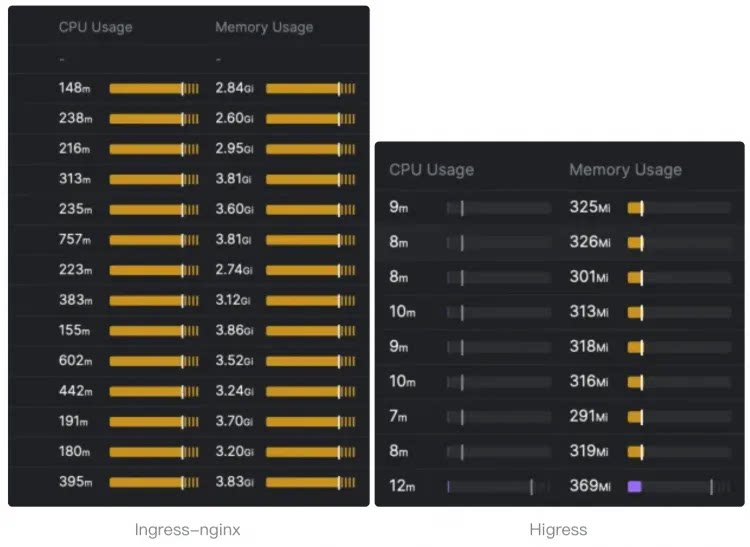
|
||||
|
||||
[Gateway API](https://gateway-api.sigs.k8s.io/) support is coming soon and will support smooth migration from Ingress API to Gateway API.
|
||||
|
||||
- **Microservice gateway**:
|
||||
|
||||
|
||||
Submodule envoy/envoy updated: b46236685e...3fe314c698
Submodule envoy/go-control-plane updated: af656ebdd1...90eca02281
@@ -3,8 +3,7 @@
|
||||
# Declare variables to be passed into your templates.
|
||||
global:
|
||||
# -- Specify the image registry and pull policy
|
||||
# Will inherit from parent chart's global.hub if not set
|
||||
hub: ""
|
||||
hub: higress-registry.cn-hangzhou.cr.aliyuncs.com/higress
|
||||
# -- Specify image pull policy if default behavior isn't desired.
|
||||
# Default behavior: latest images will be Always else IfNotPresent.
|
||||
imagePullPolicy: ""
|
||||
|
||||
@@ -123,8 +123,6 @@ template:
|
||||
- name: LITE_METRICS
|
||||
value: "on"
|
||||
{{- end }}
|
||||
- name: ISTIO_DELTA_XDS
|
||||
value: "{{ .Values.global.enableDeltaXDS }}"
|
||||
{{- if include "skywalking.enabled" . }}
|
||||
- name: ISTIO_BOOTSTRAP_OVERRIDE
|
||||
value: /etc/istio/custom-bootstrap/custom_bootstrap.json
|
||||
@@ -205,7 +203,7 @@ template:
|
||||
{{- if $o11y.enabled }}
|
||||
{{- $config := $o11y.promtail }}
|
||||
- name: promtail
|
||||
image: {{ $config.image.repository | default (printf "%s/promtail" .Values.global.hub) }}:{{ $config.image.tag }}
|
||||
image: {{ $config.image.repository }}:{{ $config.image.tag }}
|
||||
imagePullPolicy: IfNotPresent
|
||||
args:
|
||||
- -config.file=/etc/promtail/promtail.yaml
|
||||
@@ -252,10 +250,6 @@ template:
|
||||
tolerations:
|
||||
{{- toYaml . | nindent 6 }}
|
||||
{{- end }}
|
||||
{{- with .Values.gateway.topologySpreadConstraints }}
|
||||
topologySpreadConstraints:
|
||||
{{- toYaml . | nindent 6 }}
|
||||
{{- end }}
|
||||
volumes:
|
||||
- emptyDir: {}
|
||||
name: workload-socket
|
||||
|
||||
@@ -144,7 +144,3 @@ rules:
|
||||
- apiGroups: [""]
|
||||
verbs: [ "get", "watch", "list", "update", "patch", "create", "delete" ]
|
||||
resources: [ "serviceaccounts"]
|
||||
# istio leader election need
|
||||
- apiGroups: ["coordination.k8s.io"]
|
||||
resources: ["leases"]
|
||||
verbs: ["get", "update", "patch", "create"]
|
||||
|
||||
@@ -173,8 +173,6 @@ spec:
|
||||
value: "{{ .Values.global.xdsMaxRecvMsgSize }}"
|
||||
- name: ENBALE_SCOPED_RDS
|
||||
value: "{{ .Values.global.enableSRDS }}"
|
||||
- name: ISTIO_DELTA_XDS
|
||||
value: "{{ .Values.global.enableDeltaXDS }}"
|
||||
- name: ON_DEMAND_RDS
|
||||
value: "{{ .Values.global.onDemandRDS }}"
|
||||
- name: HOST_RDS_MERGE_SUBSET
|
||||
@@ -303,10 +301,6 @@ spec:
|
||||
tolerations:
|
||||
{{- toYaml . | nindent 8 }}
|
||||
{{- end }}
|
||||
{{- with .Values.controller.topologySpreadConstraints }}
|
||||
topologySpreadConstraints:
|
||||
{{- toYaml . | nindent 8 }}
|
||||
{{- end }}
|
||||
volumes:
|
||||
- name: log
|
||||
emptyDir: {}
|
||||
|
||||
@@ -24,6 +24,9 @@ spec:
|
||||
{{- end }}
|
||||
{{- with .Values.gateway.service.externalTrafficPolicy }}
|
||||
externalTrafficPolicy: "{{ . }}"
|
||||
{{- end }}
|
||||
{{- with .Values.gateway.service.loadBalancerClass}}
|
||||
loadBalancerClass: "{{ . }}"
|
||||
{{- end }}
|
||||
type: {{ .Values.gateway.service.type }}
|
||||
ports:
|
||||
|
||||
@@ -9,8 +9,6 @@ global:
|
||||
xdsMaxRecvMsgSize: "104857600"
|
||||
defaultUpstreamConcurrencyThreshold: 10000
|
||||
enableSRDS: true
|
||||
# -- Whether to enable Istio delta xDS, default is false.
|
||||
enableDeltaXDS: true
|
||||
# -- Whether to enable Redis(redis-stack-server) for Higress, default is false.
|
||||
enableRedis: false
|
||||
enablePluginServer: false
|
||||
@@ -366,7 +364,7 @@ global:
|
||||
enabled: false
|
||||
promtail:
|
||||
image:
|
||||
repository: "" # Will use global.hub if not set
|
||||
repository: higress-registry.cn-hangzhou.cr.aliyuncs.com/higress/promtail
|
||||
tag: 2.9.4
|
||||
port: 3101
|
||||
resources:
|
||||
@@ -381,7 +379,7 @@ global:
|
||||
# The default value is "" and when caName="", the CA will be configured by other
|
||||
# mechanisms (e.g., environmental variable CA_PROVIDER).
|
||||
caName: ""
|
||||
hub: "" # Will use global.hub if not set
|
||||
hub: higress-registry.cn-hangzhou.cr.aliyuncs.com/higress
|
||||
|
||||
clusterName: ""
|
||||
# -- meshConfig defines runtime configuration of components, including Istiod and istio-agent behavior
|
||||
@@ -437,7 +435,7 @@ gateway:
|
||||
# -- The readiness timeout seconds
|
||||
readinessTimeoutSeconds: 3
|
||||
|
||||
hub: "" # Will use global.hub if not set
|
||||
hub: higress-registry.cn-hangzhou.cr.aliyuncs.com/higress
|
||||
tag: ""
|
||||
# -- revision declares which revision this gateway is a part of
|
||||
revision: ""
|
||||
@@ -526,8 +524,6 @@ gateway:
|
||||
|
||||
affinity: {}
|
||||
|
||||
topologySpreadConstraints: []
|
||||
|
||||
# -- If specified, the gateway will act as a network gateway for the given network.
|
||||
networkGateway: ""
|
||||
|
||||
@@ -559,7 +555,7 @@ controller:
|
||||
replicas: 1
|
||||
image: higress
|
||||
|
||||
hub: "" # Will use global.hub if not set
|
||||
hub: higress-registry.cn-hangzhou.cr.aliyuncs.com/higress
|
||||
tag: ""
|
||||
env: {}
|
||||
|
||||
@@ -635,8 +631,6 @@ controller:
|
||||
|
||||
affinity: {}
|
||||
|
||||
topologySpreadConstraints: []
|
||||
|
||||
autoscaling:
|
||||
enabled: false
|
||||
minReplicas: 1
|
||||
@@ -655,7 +649,7 @@ pilot:
|
||||
rollingMaxSurge: 100%
|
||||
rollingMaxUnavailable: 25%
|
||||
|
||||
hub: "" # Will use global.hub if not set
|
||||
hub: higress-registry.cn-hangzhou.cr.aliyuncs.com/higress
|
||||
tag: ""
|
||||
|
||||
# -- Can be a full hub/image:tag
|
||||
@@ -808,7 +802,7 @@ pluginServer:
|
||||
replicas: 2
|
||||
image: plugin-server
|
||||
|
||||
hub: "" # Will use global.hub if not set
|
||||
hub: higress-registry.cn-hangzhou.cr.aliyuncs.com/higress
|
||||
tag: ""
|
||||
|
||||
imagePullSecrets: []
|
||||
|
||||
@@ -44,7 +44,7 @@ The command removes all the Kubernetes components associated with the chart and
|
||||
| controller.autoscaling.minReplicas | int | `1` | |
|
||||
| controller.autoscaling.targetCPUUtilizationPercentage | int | `80` | |
|
||||
| controller.env | object | `{}` | |
|
||||
| controller.hub | string | `""` | |
|
||||
| controller.hub | string | `"higress-registry.cn-hangzhou.cr.aliyuncs.com/higress"` | |
|
||||
| controller.image | string | `"higress"` | |
|
||||
| controller.imagePullSecrets | list | `[]` | |
|
||||
| controller.labels | object | `{}` | |
|
||||
@@ -83,7 +83,6 @@ The command removes all the Kubernetes components associated with the chart and
|
||||
| controller.serviceAccount.name | string | `""` | If not set and create is true, a name is generated using the fullname template |
|
||||
| controller.tag | string | `""` | |
|
||||
| controller.tolerations | list | `[]` | |
|
||||
| controller.topologySpreadConstraints | list | `[]` | |
|
||||
| downstream | object | `{"connectionBufferLimits":32768,"http2":{"initialConnectionWindowSize":1048576,"initialStreamWindowSize":65535,"maxConcurrentStreams":100},"idleTimeout":180,"maxRequestHeadersKb":60,"routeTimeout":0}` | Downstream config settings |
|
||||
| gateway.affinity | object | `{}` | |
|
||||
| gateway.annotations | object | `{}` | Annotations to apply to all resources |
|
||||
@@ -96,7 +95,7 @@ The command removes all the Kubernetes components associated with the chart and
|
||||
| gateway.hostNetwork | bool | `false` | |
|
||||
| gateway.httpPort | int | `80` | |
|
||||
| gateway.httpsPort | int | `443` | |
|
||||
| gateway.hub | string | `""` | |
|
||||
| gateway.hub | string | `"higress-registry.cn-hangzhou.cr.aliyuncs.com/higress"` | |
|
||||
| gateway.image | string | `"gateway"` | |
|
||||
| gateway.kind | string | `"Deployment"` | Use a `DaemonSet` or `Deployment` |
|
||||
| gateway.labels | object | `{}` | Labels to apply to all resources |
|
||||
@@ -153,7 +152,6 @@ The command removes all the Kubernetes components associated with the chart and
|
||||
| gateway.serviceAccount.name | string | `""` | The name of the service account to use. If not set, the release name is used |
|
||||
| gateway.tag | string | `""` | |
|
||||
| gateway.tolerations | list | `[]` | |
|
||||
| gateway.topologySpreadConstraints | list | `[]` | |
|
||||
| gateway.unprivilegedPortSupported | string | `nil` | |
|
||||
| global.autoscalingv2API | bool | `true` | whether to use autoscaling/v2 template for HPA settings for internal usage only, not to be configured by users. |
|
||||
| global.caAddress | string | `""` | The customized CA address to retrieve certificates for the pods in the cluster. CSR clients such as the Istio Agent and ingress gateways can use this to specify the CA endpoint. If not set explicitly, default to the Istio discovery address. |
|
||||
@@ -163,7 +161,6 @@ The command removes all the Kubernetes components associated with the chart and
|
||||
| global.defaultResources | object | `{"requests":{"cpu":"10m"}}` | A minimal set of requested resources to applied to all deployments so that Horizontal Pod Autoscaler will be able to function (if set). Each component can overwrite these default values by adding its own resources block in the relevant section below and setting the desired resources values. |
|
||||
| global.defaultUpstreamConcurrencyThreshold | int | `10000` | |
|
||||
| global.disableAlpnH2 | bool | `false` | Whether to disable HTTP/2 in ALPN |
|
||||
| global.enableDeltaXDS | bool | `true` | Whether to enable Istio delta xDS, default is false. |
|
||||
| global.enableGatewayAPI | bool | `true` | If true, Higress Controller will monitor Gateway API resources as well |
|
||||
| global.enableH3 | bool | `false` | |
|
||||
| global.enableIPv6 | bool | `false` | |
|
||||
@@ -196,7 +193,7 @@ The command removes all the Kubernetes components associated with the chart and
|
||||
| global.multiCluster.clusterName | string | `""` | Should be set to the name of the cluster this installation will run in. This is required for sidecar injection to properly label proxies |
|
||||
| global.multiCluster.enabled | bool | `true` | Set to true to connect two kubernetes clusters via their respective ingressgateway services when pods in each cluster cannot directly talk to one another. All clusters should be using Istio mTLS and must have a shared root CA for this model to work. |
|
||||
| global.network | string | `""` | Network defines the network this cluster belong to. This name corresponds to the networks in the map of mesh networks. |
|
||||
| global.o11y | object | `{"enabled":false,"promtail":{"image":{"repository":"","tag":"2.9.4"},"port":3101,"resources":{"limits":{"cpu":"500m","memory":"2Gi"}},"securityContext":{}}}` | Observability (o11y) configurations |
|
||||
| global.o11y | object | `{"enabled":false,"promtail":{"image":{"repository":"higress-registry.cn-hangzhou.cr.aliyuncs.com/higress/promtail","tag":"2.9.4"},"port":3101,"resources":{"limits":{"cpu":"500m","memory":"2Gi"}},"securityContext":{}}}` | Observability (o11y) configurations |
|
||||
| global.omitSidecarInjectorConfigMap | bool | `false` | |
|
||||
| global.onDemandRDS | bool | `false` | |
|
||||
| global.oneNamespace | bool | `false` | Whether to restrict the applications namespace the controller manages; If not set, controller watches all namespaces |
|
||||
@@ -248,7 +245,7 @@ The command removes all the Kubernetes components associated with the chart and
|
||||
| global.watchNamespace | string | `""` | If not empty, Higress Controller will only watch resources in the specified namespace. When isolating different business systems using K8s namespace, if each namespace requires a standalone gateway instance, this parameter can be used to confine the Ingress watching of Higress within the given namespace. |
|
||||
| global.xdsMaxRecvMsgSize | string | `"104857600"` | |
|
||||
| gzip | object | `{"chunkSize":4096,"compressionLevel":"BEST_COMPRESSION","compressionStrategy":"DEFAULT_STRATEGY","contentType":["text/html","text/css","text/plain","text/xml","application/json","application/javascript","application/xhtml+xml","image/svg+xml"],"disableOnEtagHeader":true,"enable":true,"memoryLevel":5,"minContentLength":1024,"windowBits":12}` | Gzip compression settings |
|
||||
| hub | string | `""` | |
|
||||
| hub | string | `"higress-registry.cn-hangzhou.cr.aliyuncs.com/higress"` | |
|
||||
| meshConfig | object | `{"enablePrometheusMerge":true,"rootNamespace":null,"trustDomain":"cluster.local"}` | meshConfig defines runtime configuration of components, including Istiod and istio-agent behavior See https://istio.io/docs/reference/config/istio.mesh.v1alpha1/ for all available options |
|
||||
| meshConfig.rootNamespace | string | `nil` | The namespace to treat as the administrative root namespace for Istio configuration. When processing a leaf namespace Istio will search for declarations in that namespace first and if none are found it will search in the root namespace. Any matching declaration found in the root namespace is processed as if it were declared in the leaf namespace. |
|
||||
| meshConfig.trustDomain | string | `"cluster.local"` | The trust domain corresponds to the trust root of a system Refer to https://github.com/spiffe/spiffe/blob/master/standards/SPIFFE-ID.md#21-trust-domain |
|
||||
@@ -265,7 +262,7 @@ The command removes all the Kubernetes components associated with the chart and
|
||||
| pilot.env.PILOT_ENABLE_METADATA_EXCHANGE | string | `"false"` | |
|
||||
| pilot.env.PILOT_SCOPE_GATEWAY_TO_NAMESPACE | string | `"false"` | |
|
||||
| pilot.env.VALIDATION_ENABLED | string | `"false"` | |
|
||||
| pilot.hub | string | `""` | |
|
||||
| pilot.hub | string | `"higress-registry.cn-hangzhou.cr.aliyuncs.com/higress"` | |
|
||||
| pilot.image | string | `"pilot"` | Can be a full hub/image:tag |
|
||||
| pilot.jwksResolverExtraRootCA | string | `""` | You can use jwksResolverExtraRootCA to provide a root certificate in PEM format. This will then be trusted by pilot when resolving JWKS URIs. |
|
||||
| pilot.keepaliveMaxServerConnectionAge | string | `"30m"` | The following is used to limit how long a sidecar can be connected to a pilot. It balances out load across pilot instances at the cost of increasing system churn. |
|
||||
@@ -280,7 +277,7 @@ The command removes all the Kubernetes components associated with the chart and
|
||||
| pilot.serviceAnnotations | object | `{}` | |
|
||||
| pilot.tag | string | `""` | |
|
||||
| pilot.traceSampling | float | `1` | |
|
||||
| pluginServer.hub | string | `""` | |
|
||||
| pluginServer.hub | string | `"higress-registry.cn-hangzhou.cr.aliyuncs.com/higress"` | |
|
||||
| pluginServer.image | string | `"plugin-server"` | |
|
||||
| pluginServer.imagePullSecrets | list | `[]` | |
|
||||
| pluginServer.labels | object | `{}` | |
|
||||
|
||||
@@ -1,152 +0,0 @@
|
||||
## Higress 适用于 Kubernetes
|
||||
|
||||
Higress 是基于阿里巴巴内部网关实践的云原生 API 网关。
|
||||
|
||||
通过 Istio 和 Envoy 的支持,Higress 实现了流量网关、微服务网关和安全网关三种架构的融合,从而极大地减少了部署、运维的成本。
|
||||
|
||||
## 设置仓库信息
|
||||
|
||||
```console
|
||||
helm repo add higress.io https://higress.io/helm-charts
|
||||
helm repo update
|
||||
```
|
||||
|
||||
## 安装
|
||||
|
||||
使用 Helm 安装名为 `higress` 的组件:
|
||||
|
||||
```console
|
||||
helm install higress -n higress-system higress.io/higress --create-namespace --render-subchart-notes
|
||||
```
|
||||
|
||||
## 卸载
|
||||
|
||||
删除名称为 higress 的安装:
|
||||
|
||||
```console
|
||||
helm delete higress -n higress-system
|
||||
```
|
||||
|
||||
该命令将删除与组件关联的所有 Kubernetes 组件并卸载该发行版。
|
||||
|
||||
## 参数
|
||||
|
||||
## Values
|
||||
|
||||
| 键 | 类型 | 默认值 | 描述 |
|
||||
|----|------|---------|-------------|
|
||||
| clusterName | string | `""` | 集群名 |
|
||||
| controller.affinity | object | `{}` | 控制器亲和性设置 |
|
||||
| controller.automaticHttps.email | string | `""` | 自动 HTTPS 所需的邮件 |
|
||||
| controller.automaticHttps.enabled | bool | `true` | 是否启用自动 HTTPS 功能 |
|
||||
| controller.autoscaling.enabled | bool | `false` | 是否启用控制器的自动扩展功能 |
|
||||
| controller.autoscaling.maxReplicas | int | `5` | 最大副本数 |
|
||||
| controller.autoscaling.minReplicas | int | `1` | 最小副本数 |
|
||||
| controller.autoscaling.targetCPUUtilizationPercentage | int | `80` | 目标 CPU 使用率百分比 |
|
||||
| controller.env | object | `{}` | 环境变量 |
|
||||
| controller.hub | string | `"higress-registry.cn-hangzhou.cr.aliyuncs.com/higress"` | 图像库的基础地址 |
|
||||
| controller.image | string | `"higress"` | 镜像名称 |
|
||||
| controller.imagePullSecrets | list | `[]` | 拉取秘钥列表 |
|
||||
| controller.labels | object | `{}` | 标签 |
|
||||
| controller.name | string | `"higress-controller"` | 控制器名称 |
|
||||
| controller.nodeSelector | object | `{}` | 节点选择器 |
|
||||
| controller.podAnnotations | object | `{}` | Pod 注解 |
|
||||
| controller.podLabels | object | `{}` | 应用到 Pod 上的标签 |
|
||||
| controller.podSecurityContext | object | `{}` | Pod 安全上下文 |
|
||||
| controller.ports[0].name | string | `"http"` | 端口名称 |
|
||||
| controller.ports[0].port | int | `8888` | 端口编号 |
|
||||
| controller.ports[0].protocol | string | `"TCP"` | 协议类型 |
|
||||
| controller.ports[0].targetPort | int | `8888` | 目标端口 |
|
||||
| controller.ports[1].name | string | `"http-solver"` | 端口名称 |
|
||||
| controller.ports[1].port | int | `8889` | 端口编号 |
|
||||
| controller.ports[1].protocol | string | `"TCP"` | 协议类型 |
|
||||
| controller.ports[1].targetPort | int | `8889` | 目标端口 |
|
||||
| controller.ports[2].name | string | `"grpc"` | 端口名称 |
|
||||
| controller.ports[2].port | int | `15051` | 端口编号 |
|
||||
| controller.ports[2].protocol | string | `"TCP"` | 协议类型 |
|
||||
| controller.ports[2].targetPort | int | `15051` | 目标端口 |
|
||||
| controller.probe.httpGet.path | string | `"/ready"` | 运行状况检查路径 |
|
||||
| controller.probe.httpGet.port | int | `8888` | 端口运行状态检查 |
|
||||
| controller.probe.initialDelaySeconds | int | `1` | 初始延迟秒数 |
|
||||
| controller.probe.periodSeconds | int | `3` | 健康检查间隔秒数 |
|
||||
| controller.probe.timeoutSeconds | int | `5` | 超时秒数 |
|
||||
| controller.rbac.create | bool | `true` | 是否创建 RBAC 相关资源 |
|
||||
| controller.replicas | int | `1` | Higress 控制器 Pod 的数量 |
|
||||
| controller.resources.limits.cpu | string | `"1000m"` | CPU 上限 |
|
||||
| controller.resources.limits.memory | string | `"2048Mi"` | 内存上限 |
|
||||
| controller.resources.requests.cpu | string | `"500m"` | CPU 请求量 |
|
||||
| controller.resources.requests.memory | string | `"2048Mi"` | 内存请求量 |
|
||||
| controller.securityContext | object | `{}` | 安全上下文 |
|
||||
| controller.service.type | string | `"ClusterIP"` | 服务类型 |
|
||||
| controller.serviceAccount.annotations | object | `{}` | 添加到服务帐户的注解 |
|
||||
| controller.serviceAccount.create | bool | `true` | 是否创建服务帐户 |
|
||||
| controller.serviceAccount.name | string | `""` | 如果未设置且 create 为 true,则从 fullname 模板生成名称 |
|
||||
| controller.tag | string | `""` | 标记 |
|
||||
| controller.tolerations | list | `[]` | 受容容忍度列表 |
|
||||
| downstream.connectionBufferLimits | int | `32768` | 下游连接缓冲区限制(字节) |
|
||||
| downstream.http2.initialConnectionWindowSize | int | `1048576` | HTTP/2 初始连接窗口大小 |
|
||||
| downstream.http2.initialStreamWindowSize | int | `65535` | 流初始窗口大小 |
|
||||
| downstream.http2.maxConcurrentStreams | int | `100` | 并发流最大数量 |
|
||||
| downstream.idleTimeout | int | `180` | 空闲超时时间(秒) |
|
||||
| downstream.maxRequestHeadersKb | int | `60` | 最大请求头大小(KB) |
|
||||
| downstream.routeTimeout | int | `0` | 路由超时时间 |
|
||||
| gateway.affinity | object | `{}` | 网关的节点亲和性 |
|
||||
| gateway.annotations | object | `{}` | 应用于所有资源的注解 |
|
||||
| gateway.autoscaling.enabled | bool | `false` | 启用网关的自动扩展功能 |
|
||||
| gateway.autoscaling.maxReplicas | int | `5` | 最大副本数 |
|
||||
| gateway.autoscaling.minReplicas | int | `1` | 最小副本数 |
|
||||
| gateway.autoscaling.targetCPUUtilizationPercentage | int | `80` | CPU 使用率的目标百分比 |
|
||||
| gateway.containerSecurityContext | string | `nil` | 网关容器的安全配置上下文 |
|
||||
| gateway.env | object | `{}` | Pod 环境变量 |
|
||||
| gateway.hostNetwork | bool | `false` | 是否使用主机网络 |
|
||||
| gateway.httpPort | int | `80` | HTTP 服务端口 |
|
||||
| gateway.httpsPort | int | `443` | HTTPS 服务端口 |
|
||||
| gateway.hub | string | `"higress-registry.cn-hangzhou.cr.aliyuncs.com/higress"` | 网关镜像的基础域名 |
|
||||
| gateway.image | string | `"gateway"` | |
|
||||
| gateway.kind | string | `"Deployment"` | 部署类型 |
|
||||
| gateway.labels | object | `{}` | 应用于所有资源的标签 |
|
||||
| gateway.metrics.enabled | bool | `false` | 启用网关度量收集 |
|
||||
| gateway.metrics.honorLabels | bool | `false` | 是否合并现有标签 |
|
||||
| gateway.metrics.interval | string | `""` | 度量间隔时间 |
|
||||
| gateway.metrics.provider | string | `"monitoring.coreos.com"` | 定义监控提供者 |
|
||||
| gateway.metrics.rawSpec | object | `{}` | 额外的度量规范 |
|
||||
| gateway.metrics.relabelConfigs | list | `[]` | 重新标签配置 |
|
||||
| gateway.metrics.relabelings | list | `[]` | 重新标签项 |
|
||||
| gateway.metrics.podMonitorSelector | object | `{"release":"kube-prometheus-stack"}` | PodMonitor 选择器,当使用 prometheus stack 的podmonitor自动发现时,选择器必须匹配标签 "release: kube-prome",这是 kube-prometheus-stack 的默认设置 |
|
||||
| gateway.metrics.scrapeTimeout | string | `""` | 抓取的超时时间 |
|
||||
| gateway.name | string | `"higress-gateway"` | 网关名称 |
|
||||
| gateway.networkGateway | string | `""` | 网络网关指定 |
|
||||
| gateway.nodeSelector | object | `{}` | 节点选择器 |
|
||||
| gateway.replicas | int | `2` | Higress Gateway pod 的数量 |
|
||||
| gateway.resources.limits.cpu | string | `"2000m"` | 容器资源限制的 CPU |
|
||||
| gateway.resources.limits.memory | string | `"2048Mi"` | 容器资源限制的内存 |
|
||||
| gateway.resources.requests.cpu | string | `"2000m"` | 容器资源请求的 CPU |
|
||||
| gateway.resources.requests.memory | string | `"2048Mi"` | 容器资源请求的内存 |
|
||||
| gateway.revision | string | `""` | 网关所属版本声明 |
|
||||
| gateway.rollingMaxSurge | string | `"100%"` | 最大激增数目百分比 |
|
||||
| gateway.rollingMaxUnavailable | string | `"25%"` | 最大不可用比例 |
|
||||
| gateway.readinessFailureThreshold | int | `30` | 成功尝试之前连续失败的最大探测次数 |
|
||||
| gateway.readinessInitialDelaySeconds | int | `1` | 初次检测推迟多少秒后开始探测存活状态 |
|
||||
| gateway.readinessPeriodSeconds | int | `2` | 存活探测间隔秒数 |
|
||||
| gateway.readinessSuccessThreshold | int | `1` | 认为成功之前连续成功最小探测次数 |
|
||||
| gateway.readinessTimeoutSeconds | int | `3` | 存活探测超时秒数 |
|
||||
| gateway.securityContext | string | `nil` | 客户豆荚的安全上下文 |
|
||||
| gateway.service.annotations | object | `{}` | 应用于服务账户的注释 |
|
||||
| gateway.service.externalTrafficPolicy | string | `""` | 外部路由策略 |
|
||||
| gateway.service.loadBalancerClass | string | `""` | 负载均衡器类别 |
|
||||
| gateway.service.loadBalancerIP | string | `""` | 负载均衡器 IP 地址 |
|
||||
| gateway.service.loadBalancerSourceRanges | list | `[]` | 允许访问负载均衡器的 CIDR 范围 |
|
||||
| gateway.service.ports[0].name | string | `"http2"` | 服务定义的端口名称 |
|
||||
| gateway.service.ports[0].port | int | `80` | 服务端口 |
|
||||
| gateway.service.ports[0].protocol | string | `"TCP"` | 协议 |
|
||||
| gateway.service.ports[0].targetPort | int | `80` | 靶向端口 |
|
||||
| gateway.service.ports[1].name | string | `"https"` | 服务定义的端口名称 |
|
||||
| gateway.service.ports[1].port | int | `443` | 服务端口 |
|
||||
| gateway.service.ports[1].protocol | string | `"TCP"` | 协议 |
|
||||
| gateway.service.ports[1].targetPort | int | `443` | 靶向端口 |
|
||||
| gateway.service.type | string | `"LoadBalancer"` | 服务类型 |
|
||||
| global.disableAlpnH2 | bool | `false` | 设置是否禁用 ALPN 中的 http/2 |
|
||||
| global.enableInferenceExtension | bool | `false` | 是否启用 Gateway API Inference Extension 支持 |
|
||||
| ... | ... | ... | ... |
|
||||
|
||||
由于内容较多,其他参数可以参考完整表。
|
||||
|
||||
Submodule istio/istio updated: 77149ea560...3d7792ae28
Submodule istio/proxy updated: 4735dd6b87...ced6d8167a
@@ -16,13 +16,12 @@ package bootstrap
|
||||
|
||||
import (
|
||||
"fmt"
|
||||
"istio.io/istio/pkg/config/mesh/meshwatcher"
|
||||
"istio.io/istio/pkg/kube/krt"
|
||||
"net"
|
||||
"net/http"
|
||||
"time"
|
||||
|
||||
"istio.io/istio/pkg/config/mesh/meshwatcher"
|
||||
"istio.io/istio/pkg/kube/krt"
|
||||
|
||||
prometheus "github.com/grpc-ecosystem/go-grpc-prometheus"
|
||||
"google.golang.org/grpc"
|
||||
"google.golang.org/grpc/reflection"
|
||||
@@ -437,17 +436,10 @@ func (s *Server) initHttpServer() error {
|
||||
}
|
||||
s.xdsServer.AddDebugHandlers(s.httpMux, nil, true, nil)
|
||||
s.httpMux.HandleFunc("/ready", s.readyHandler)
|
||||
s.httpMux.HandleFunc("/registry/watcherStatus", s.withConditionalAuth(s.registryWatcherStatusHandler))
|
||||
s.httpMux.HandleFunc("/registry/watcherStatus", s.registryWatcherStatusHandler)
|
||||
return nil
|
||||
}
|
||||
|
||||
func (s *Server) withConditionalAuth(handler http.HandlerFunc) http.HandlerFunc {
|
||||
if features.DebugAuth {
|
||||
return s.xdsServer.AllowAuthenticatedOrLocalhost(handler)
|
||||
}
|
||||
return handler
|
||||
}
|
||||
|
||||
// readyHandler checks whether the http server is ready
|
||||
func (s *Server) readyHandler(w http.ResponseWriter, _ *http.Request) {
|
||||
for name, fn := range s.readinessProbes {
|
||||
|
||||
@@ -26,8 +26,8 @@ type config struct {
|
||||
matchList []common.MatchRule
|
||||
enableUserLevelServer bool
|
||||
rateLimitConfig *handler.MCPRatelimitConfig
|
||||
defaultServer *common.SSEServer
|
||||
redisClient *common.RedisClient
|
||||
sharedMCPServer *common.MCPServer // Created once, thread-safe with sync.RWMutex
|
||||
}
|
||||
|
||||
func (c *config) Destroy() {
|
||||
@@ -110,9 +110,6 @@ func (p *Parser) Parse(any *anypb.Any, callbacks api.ConfigCallbackHandler) (int
|
||||
}
|
||||
GlobalSSEPathSuffix = ssePathSuffix
|
||||
|
||||
// Create shared MCPServer once during config parsing (thread-safe with sync.RWMutex)
|
||||
conf.sharedMCPServer = common.NewMCPServer(DefaultServerName, Version)
|
||||
|
||||
return conf, nil
|
||||
}
|
||||
|
||||
@@ -128,6 +125,9 @@ func (p *Parser) Merge(parent interface{}, child interface{}) interface{} {
|
||||
if childConfig.rateLimitConfig != nil {
|
||||
newConfig.rateLimitConfig = childConfig.rateLimitConfig
|
||||
}
|
||||
if childConfig.defaultServer != nil {
|
||||
newConfig.defaultServer = childConfig.defaultServer
|
||||
}
|
||||
return &newConfig
|
||||
}
|
||||
|
||||
|
||||
@@ -37,7 +37,6 @@ type filter struct {
|
||||
skipRequestBody bool
|
||||
skipResponseBody bool
|
||||
cachedResponseBody []byte
|
||||
sseServer *common.SSEServer // SSE server instance for this filter (per-request, not shared)
|
||||
|
||||
userLevelConfig bool
|
||||
mcpConfigHandler *handler.MCPConfigHandler
|
||||
@@ -136,13 +135,11 @@ func (f *filter) processMcpRequestHeadersForRestUpstream(header api.RequestHeade
|
||||
trimmed += "?" + rq
|
||||
}
|
||||
|
||||
// Create SSE server instance for this filter (per-request, not shared)
|
||||
// MCPServer is shared (thread-safe), but SSEServer must be per-request (contains request-specific messageEndpoint)
|
||||
f.sseServer = common.NewSSEServer(f.config.sharedMCPServer,
|
||||
f.config.defaultServer = common.NewSSEServer(common.NewMCPServer(DefaultServerName, Version),
|
||||
common.WithSSEEndpoint(GlobalSSEPathSuffix),
|
||||
common.WithMessageEndpoint(trimmed),
|
||||
common.WithRedisClient(f.config.redisClient))
|
||||
f.serverName = f.sseServer.GetServerName()
|
||||
f.serverName = f.config.defaultServer.GetServerName()
|
||||
body := "SSE connection create"
|
||||
f.callbacks.DecoderFilterCallbacks().SendLocalReply(http.StatusOK, body, nil, 0, "")
|
||||
}
|
||||
@@ -278,9 +275,9 @@ func (f *filter) encodeDataFromRestUpstream(buffer api.BufferInstance, endStream
|
||||
|
||||
if f.serverName != "" {
|
||||
if f.config.redisClient != nil {
|
||||
// handle SSE server for this filter instance
|
||||
// handle default server
|
||||
buffer.Reset()
|
||||
f.sseServer.HandleSSE(f.callbacks, f.stopChan)
|
||||
f.config.defaultServer.HandleSSE(f.callbacks, f.stopChan)
|
||||
return api.Running
|
||||
} else {
|
||||
_ = buffer.SetString(RedisNotEnabledResponseBody)
|
||||
|
||||
@@ -16,91 +16,40 @@ import (
|
||||
)
|
||||
|
||||
const (
|
||||
RedisKeyFormat = "higress:global_least_request_table:%s:%s"
|
||||
RedisLastCleanKeyFormat = "higress:global_least_request_table:last_clean_time:%s:%s"
|
||||
RedisLua = `local seed = tonumber(KEYS[1])
|
||||
RedisKeyFormat = "higress:global_least_request_table:%s:%s"
|
||||
RedisLua = `local seed = KEYS[1]
|
||||
local hset_key = KEYS[2]
|
||||
local last_clean_key = KEYS[3]
|
||||
local clean_interval = tonumber(KEYS[4])
|
||||
local current_target = KEYS[5]
|
||||
local healthy_count = tonumber(KEYS[6])
|
||||
local enable_detail_log = KEYS[7]
|
||||
local current_target = KEYS[3]
|
||||
local current_count = 0
|
||||
|
||||
math.randomseed(seed)
|
||||
|
||||
-- 1. Selection
|
||||
local current_count = 0
|
||||
local same_count_hits = 0
|
||||
local function randomBool()
|
||||
return math.random() >= 0.5
|
||||
end
|
||||
|
||||
for i = 8, 8 + healthy_count - 1 do
|
||||
local host = KEYS[i]
|
||||
local count = 0
|
||||
local val = redis.call('HGET', hset_key, host)
|
||||
if val then
|
||||
count = tonumber(val) or 0
|
||||
end
|
||||
|
||||
if same_count_hits == 0 or count < current_count then
|
||||
current_target = host
|
||||
current_count = count
|
||||
same_count_hits = 1
|
||||
elseif count == current_count then
|
||||
same_count_hits = same_count_hits + 1
|
||||
if math.random(same_count_hits) == 1 then
|
||||
current_target = host
|
||||
end
|
||||
end
|
||||
if redis.call('HEXISTS', hset_key, current_target) == 1 then
|
||||
current_count = redis.call('HGET', hset_key, current_target)
|
||||
for i = 4, #KEYS do
|
||||
if redis.call('HEXISTS', hset_key, KEYS[i]) == 1 then
|
||||
local count = redis.call('HGET', hset_key, KEYS[i])
|
||||
if tonumber(count) < tonumber(current_count) then
|
||||
current_target = KEYS[i]
|
||||
current_count = count
|
||||
elseif count == current_count and randomBool() then
|
||||
current_target = KEYS[i]
|
||||
end
|
||||
end
|
||||
end
|
||||
end
|
||||
|
||||
redis.call("HINCRBY", hset_key, current_target, 1)
|
||||
local new_count = redis.call("HGET", hset_key, current_target)
|
||||
|
||||
-- Collect host counts for logging
|
||||
local host_details = {}
|
||||
if enable_detail_log == "1" then
|
||||
local fields = {}
|
||||
for i = 8, #KEYS do
|
||||
table.insert(fields, KEYS[i])
|
||||
end
|
||||
if #fields > 0 then
|
||||
local values = redis.call('HMGET', hset_key, (table.unpack or unpack)(fields))
|
||||
for i, val in ipairs(values) do
|
||||
table.insert(host_details, fields[i])
|
||||
table.insert(host_details, tostring(val or 0))
|
||||
end
|
||||
end
|
||||
end
|
||||
|
||||
-- 2. Cleanup
|
||||
local current_time = math.floor(seed / 1000000)
|
||||
local last_clean_time = tonumber(redis.call('GET', last_clean_key) or 0)
|
||||
|
||||
if current_time - last_clean_time >= clean_interval then
|
||||
local all_keys = redis.call('HKEYS', hset_key)
|
||||
if #all_keys > 0 then
|
||||
-- Create a lookup table for current hosts (from index 8 onwards)
|
||||
local current_hosts = {}
|
||||
for i = 8, #KEYS do
|
||||
current_hosts[KEYS[i]] = true
|
||||
end
|
||||
-- Remove keys not in current hosts
|
||||
for _, host in ipairs(all_keys) do
|
||||
if not current_hosts[host] then
|
||||
redis.call('HDEL', hset_key, host)
|
||||
end
|
||||
end
|
||||
end
|
||||
redis.call('SET', last_clean_key, current_time)
|
||||
end
|
||||
|
||||
return {current_target, new_count, host_details}`
|
||||
return current_target`
|
||||
)
|
||||
|
||||
type GlobalLeastRequestLoadBalancer struct {
|
||||
redisClient wrapper.RedisClient
|
||||
maxRequestCount int64
|
||||
cleanInterval int64 // seconds
|
||||
enableDetailLog bool
|
||||
redisClient wrapper.RedisClient
|
||||
}
|
||||
|
||||
func NewGlobalLeastRequestLoadBalancer(json gjson.Result) (GlobalLeastRequestLoadBalancer, error) {
|
||||
@@ -123,18 +72,6 @@ func NewGlobalLeastRequestLoadBalancer(json gjson.Result) (GlobalLeastRequestLoa
|
||||
}
|
||||
// database default is 0
|
||||
database := json.Get("database").Int()
|
||||
lb.maxRequestCount = json.Get("maxRequestCount").Int()
|
||||
lb.cleanInterval = json.Get("cleanInterval").Int()
|
||||
if lb.cleanInterval == 0 {
|
||||
lb.cleanInterval = 60 * 60 // default 60 minutes
|
||||
} else {
|
||||
lb.cleanInterval = lb.cleanInterval * 60 // convert minutes to seconds
|
||||
}
|
||||
lb.enableDetailLog = true
|
||||
if val := json.Get("enableDetailLog"); val.Exists() {
|
||||
lb.enableDetailLog = val.Bool()
|
||||
}
|
||||
log.Infof("redis client init, serviceFQDN: %s, servicePort: %d, timeout: %d, database: %d, maxRequestCount: %d, cleanInterval: %d minutes, enableDetailLog: %v", serviceFQDN, servicePort, timeout, database, lb.maxRequestCount, lb.cleanInterval/60, lb.enableDetailLog)
|
||||
return lb, lb.redisClient.Init(username, password, int64(timeout), wrapper.WithDataBase(int(database)))
|
||||
}
|
||||
|
||||
@@ -163,11 +100,9 @@ func (lb GlobalLeastRequestLoadBalancer) HandleHttpRequestBody(ctx wrapper.HttpC
|
||||
ctx.SetContext("error", true)
|
||||
return types.ActionContinue
|
||||
}
|
||||
allHostMap := make(map[string]struct{})
|
||||
// Only healthy host can be selected
|
||||
healthyHostArray := []string{}
|
||||
for _, hostInfo := range hostInfos {
|
||||
allHostMap[hostInfo[0]] = struct{}{}
|
||||
if gjson.Get(hostInfo[1], "health_status").String() == "Healthy" {
|
||||
healthyHostArray = append(healthyHostArray, hostInfo[0])
|
||||
}
|
||||
@@ -178,37 +113,10 @@ func (lb GlobalLeastRequestLoadBalancer) HandleHttpRequestBody(ctx wrapper.HttpC
|
||||
}
|
||||
randomIndex := rand.Intn(len(healthyHostArray))
|
||||
hostSelected := healthyHostArray[randomIndex]
|
||||
|
||||
// KEYS structure: [seed, hset_key, last_clean_key, clean_interval, host_selected, healthy_count, ...healthy_hosts, enableDetailLog, ...unhealthy_hosts]
|
||||
keys := []interface{}{
|
||||
time.Now().UnixMicro(),
|
||||
fmt.Sprintf(RedisKeyFormat, routeName, clusterName),
|
||||
fmt.Sprintf(RedisLastCleanKeyFormat, routeName, clusterName),
|
||||
lb.cleanInterval,
|
||||
hostSelected,
|
||||
len(healthyHostArray),
|
||||
"0",
|
||||
}
|
||||
if lb.enableDetailLog {
|
||||
keys[6] = "1"
|
||||
}
|
||||
keys := []interface{}{time.Now().UnixMicro(), fmt.Sprintf(RedisKeyFormat, routeName, clusterName), hostSelected}
|
||||
for _, v := range healthyHostArray {
|
||||
keys = append(keys, v)
|
||||
}
|
||||
// Append unhealthy hosts (those in allHostMap but not in healthyHostArray)
|
||||
for host := range allHostMap {
|
||||
isHealthy := false
|
||||
for _, hh := range healthyHostArray {
|
||||
if host == hh {
|
||||
isHealthy = true
|
||||
break
|
||||
}
|
||||
}
|
||||
if !isHealthy {
|
||||
keys = append(keys, host)
|
||||
}
|
||||
}
|
||||
|
||||
err = lb.redisClient.Eval(RedisLua, len(keys), keys, []interface{}{}, func(response resp.Value) {
|
||||
if err := response.Error(); err != nil {
|
||||
log.Errorf("HGetAll failed: %+v", err)
|
||||
@@ -216,54 +124,17 @@ func (lb GlobalLeastRequestLoadBalancer) HandleHttpRequestBody(ctx wrapper.HttpC
|
||||
proxywasm.ResumeHttpRequest()
|
||||
return
|
||||
}
|
||||
valArray := response.Array()
|
||||
if len(valArray) < 2 {
|
||||
log.Errorf("redis eval lua result format error, expect at least [host, count], got: %+v", valArray)
|
||||
ctx.SetContext("error", true)
|
||||
proxywasm.ResumeHttpRequest()
|
||||
return
|
||||
}
|
||||
hostSelected = valArray[0].String()
|
||||
currentCount := valArray[1].Integer()
|
||||
|
||||
// detail log
|
||||
if lb.enableDetailLog && len(valArray) >= 3 {
|
||||
detailLogStr := "host and count: "
|
||||
details := valArray[2].Array()
|
||||
for i := 0; i+1 < len(details); i += 2 {
|
||||
h := details[i].String()
|
||||
c := details[i+1].String()
|
||||
detailLogStr += fmt.Sprintf("{%s: %s}, ", h, c)
|
||||
}
|
||||
log.Debugf("host_selected: %s + 1, %s", hostSelected, detailLogStr)
|
||||
}
|
||||
|
||||
// check rate limit
|
||||
if !lb.checkRateLimit(hostSelected, int64(currentCount), ctx, routeName, clusterName) {
|
||||
ctx.SetContext("error", true)
|
||||
log.Warnf("host_selected: %s, current_count: %d, exceed max request limit %d", hostSelected, currentCount, lb.maxRequestCount)
|
||||
// return 429
|
||||
proxywasm.SendHttpResponse(429, [][2]string{}, []byte("Exceeded maximum request limit from ai-load-balancer."), -1)
|
||||
ctx.DontReadResponseBody()
|
||||
return
|
||||
}
|
||||
|
||||
hostSelected = response.String()
|
||||
if err := proxywasm.SetUpstreamOverrideHost([]byte(hostSelected)); err != nil {
|
||||
ctx.SetContext("error", true)
|
||||
log.Errorf("override upstream host failed, fallback to default lb policy, error informations: %+v", err)
|
||||
proxywasm.ResumeHttpRequest()
|
||||
return
|
||||
}
|
||||
|
||||
log.Debugf("host_selected: %s", hostSelected)
|
||||
|
||||
// finally resume the request
|
||||
ctx.SetContext("host_selected", hostSelected)
|
||||
proxywasm.ResumeHttpRequest()
|
||||
})
|
||||
if err != nil {
|
||||
ctx.SetContext("error", true)
|
||||
log.Errorf("redis eval failed, fallback to default lb policy, error informations: %+v", err)
|
||||
return types.ActionContinue
|
||||
}
|
||||
return types.ActionPause
|
||||
@@ -290,10 +161,7 @@ func (lb GlobalLeastRequestLoadBalancer) HandleHttpStreamDone(ctx wrapper.HttpCo
|
||||
if host_selected == "" {
|
||||
log.Errorf("get host_selected failed")
|
||||
} else {
|
||||
err := lb.redisClient.HIncrBy(fmt.Sprintf(RedisKeyFormat, routeName, clusterName), host_selected, -1, nil)
|
||||
if err != nil {
|
||||
log.Errorf("host_selected: %s - 1, failed to update count from redis: %v", host_selected, err)
|
||||
}
|
||||
lb.redisClient.HIncrBy(fmt.Sprintf(RedisKeyFormat, routeName, clusterName), host_selected, -1, nil)
|
||||
}
|
||||
}
|
||||
}
|
||||
|
||||
@@ -1,220 +0,0 @@
|
||||
-- Mocking Redis environment
|
||||
local redis_data = {
|
||||
hset = {},
|
||||
kv = {}
|
||||
}
|
||||
|
||||
local redis = {
|
||||
call = function(cmd, ...)
|
||||
local args = {...}
|
||||
if cmd == "HGET" then
|
||||
local key, field = args[1], args[2]
|
||||
return redis_data.hset[field]
|
||||
elseif cmd == "HSET" then
|
||||
local key, field, val = args[1], args[2], args[3]
|
||||
redis_data.hset[field] = val
|
||||
elseif cmd == "HINCRBY" then
|
||||
local key, field, increment = args[1], args[2], args[3]
|
||||
local val = tonumber(redis_data.hset[field] or 0)
|
||||
redis_data.hset[field] = tostring(val + increment)
|
||||
return redis_data.hset[field]
|
||||
elseif cmd == "HKEYS" then
|
||||
local keys = {}
|
||||
for k, _ in pairs(redis_data.hset) do
|
||||
table.insert(keys, k)
|
||||
end
|
||||
return keys
|
||||
elseif cmd == "HDEL" then
|
||||
local key, field = args[1], args[2]
|
||||
redis_data.hset[field] = nil
|
||||
elseif cmd == "GET" then
|
||||
return redis_data.kv[args[1]]
|
||||
elseif cmd == "HMGET" then
|
||||
local key = args[1]
|
||||
local res = {}
|
||||
for i = 2, #args do
|
||||
table.insert(res, redis_data.hset[args[i]])
|
||||
end
|
||||
return res
|
||||
elseif cmd == "SET" then
|
||||
redis_data.kv[args[1]] = args[2]
|
||||
end
|
||||
end
|
||||
}
|
||||
|
||||
-- The actual logic from lb_policy.go
|
||||
local function run_lb_logic(KEYS)
|
||||
local seed = tonumber(KEYS[1])
|
||||
local hset_key = KEYS[2]
|
||||
local last_clean_key = KEYS[3]
|
||||
local clean_interval = tonumber(KEYS[4])
|
||||
local current_target = KEYS[5]
|
||||
local healthy_count = tonumber(KEYS[6])
|
||||
local enable_detail_log = KEYS[7]
|
||||
|
||||
math.randomseed(seed)
|
||||
|
||||
-- 1. Selection
|
||||
local current_count = 0
|
||||
local same_count_hits = 0
|
||||
|
||||
for i = 8, 8 + healthy_count - 1 do
|
||||
local host = KEYS[i]
|
||||
local count = 0
|
||||
local val = redis.call('HGET', hset_key, host)
|
||||
if val then
|
||||
count = tonumber(val) or 0
|
||||
end
|
||||
|
||||
if same_count_hits == 0 or count < current_count then
|
||||
current_target = host
|
||||
current_count = count
|
||||
same_count_hits = 1
|
||||
elseif count == current_count then
|
||||
same_count_hits = same_count_hits + 1
|
||||
if math.random(same_count_hits) == 1 then
|
||||
current_target = host
|
||||
end
|
||||
end
|
||||
end
|
||||
|
||||
redis.call("HINCRBY", hset_key, current_target, 1)
|
||||
local new_count = redis.call("HGET", hset_key, current_target)
|
||||
|
||||
-- Collect host counts for logging
|
||||
local host_details = {}
|
||||
if enable_detail_log == "1" then
|
||||
local fields = {}
|
||||
for i = 8, #KEYS do
|
||||
table.insert(fields, KEYS[i])
|
||||
end
|
||||
if #fields > 0 then
|
||||
local values = redis.call('HMGET', hset_key, (table.unpack or unpack)(fields))
|
||||
for i, val in ipairs(values) do
|
||||
table.insert(host_details, fields[i])
|
||||
table.insert(host_details, tostring(val or 0))
|
||||
end
|
||||
end
|
||||
end
|
||||
|
||||
-- 2. Cleanup
|
||||
local current_time = math.floor(seed / 1000000)
|
||||
local last_clean_time = tonumber(redis.call('GET', last_clean_key) or 0)
|
||||
|
||||
if current_time - last_clean_time >= clean_interval then
|
||||
local all_keys = redis.call('HKEYS', hset_key)
|
||||
if #all_keys > 0 then
|
||||
-- Create a lookup table for current hosts (from index 8 onwards)
|
||||
local current_hosts = {}
|
||||
for i = 8, #KEYS do
|
||||
current_hosts[KEYS[i]] = true
|
||||
end
|
||||
-- Remove keys not in current hosts
|
||||
for _, host in ipairs(all_keys) do
|
||||
if not current_hosts[host] then
|
||||
redis.call('HDEL', hset_key, host)
|
||||
end
|
||||
end
|
||||
end
|
||||
redis.call('SET', last_clean_key, current_time)
|
||||
end
|
||||
|
||||
return {current_target, new_count, host_details}
|
||||
end
|
||||
|
||||
-- --- Test 1: Load Balancing Distribution ---
|
||||
print("--- Test 1: Load Balancing Distribution ---")
|
||||
local hosts = {"host1", "host2", "host3", "host4", "host5"}
|
||||
local iterations = 100000
|
||||
local results = {}
|
||||
for _, h in ipairs(hosts) do results[h] = 0 end
|
||||
|
||||
-- Reset redis
|
||||
redis_data.hset = {}
|
||||
for _, h in ipairs(hosts) do redis_data.hset[h] = "0" end
|
||||
|
||||
print(string.format("Running %d iterations with %d hosts (all counts started at 0)...", iterations, #hosts))
|
||||
|
||||
for i = 1, iterations do
|
||||
local initial_host = hosts[math.random(#hosts)]
|
||||
-- KEYS structure: [seed, hset_key, last_clean_key, clean_interval, host_selected, healthy_count, enable_detail_log, ...healthy_hosts]
|
||||
local keys = {i * 1000000, "table_key", "clean_key", 3600, initial_host, #hosts, "1"}
|
||||
for _, h in ipairs(hosts) do table.insert(keys, h) end
|
||||
|
||||
local res = run_lb_logic(keys)
|
||||
local selected = res[1]
|
||||
results[selected] = results[selected] + 1
|
||||
end
|
||||
|
||||
for _, h in ipairs(hosts) do
|
||||
local percentage = (results[h] / iterations) * 100
|
||||
print(string.format("%s: %6d (%.2f%%)", h, results[h], percentage))
|
||||
end
|
||||
|
||||
-- --- Test 2: IP Cleanup Logic ---
|
||||
print("\n--- Test 2: IP Cleanup Logic ---")
|
||||
|
||||
local function test_cleanup()
|
||||
redis_data.hset = {
|
||||
["host1"] = "10",
|
||||
["host2"] = "5",
|
||||
["old_ip_1"] = "1",
|
||||
["old_ip_2"] = "1",
|
||||
}
|
||||
redis_data.kv["clean_key"] = "1000" -- Last cleaned at 1000s
|
||||
|
||||
local current_hosts = {"host1", "host2"}
|
||||
local current_time_ms = 1000 * 1000000 + 500 * 1000000 -- 1500s (interval is 300s, let's say)
|
||||
local clean_interval = 300
|
||||
|
||||
print("Initial Redis IPs:", table.concat((function() local res={} for k,_ in pairs(redis_data.hset) do table.insert(res, k) end return res end)(), ", "))
|
||||
|
||||
-- Run logic (seed is microtime)
|
||||
local keys = {current_time_ms, "table_key", "clean_key", clean_interval, "host1", #current_hosts, "1"}
|
||||
for _, h in ipairs(current_hosts) do table.insert(keys, h) end
|
||||
|
||||
run_lb_logic(keys)
|
||||
|
||||
print("After Cleanup Redis IPs:", table.concat((function() local res={} for k,_ in pairs(redis_data.hset) do table.insert(res, k) end table.sort(res) return res end)(), ", "))
|
||||
|
||||
local exists_old1 = redis_data.hset["old_ip_1"] ~= nil
|
||||
local exists_old2 = redis_data.hset["old_ip_2"] ~= nil
|
||||
|
||||
if not exists_old1 and not exists_old2 then
|
||||
print("Success: Outdated IPs removed.")
|
||||
else
|
||||
print("Failure: Outdated IPs still exist.")
|
||||
end
|
||||
|
||||
print("New last_clean_time:", redis_data.kv["clean_key"])
|
||||
end
|
||||
|
||||
test_cleanup()
|
||||
|
||||
-- --- Test 3: No Cleanup if Interval Not Reached ---
|
||||
print("\n--- Test 3: No Cleanup if Interval Not Reached ---")
|
||||
|
||||
local function test_no_cleanup()
|
||||
redis_data.hset = {
|
||||
["host1"] = "10",
|
||||
["old_ip_1"] = "1",
|
||||
}
|
||||
redis_data.kv["clean_key"] = "1000"
|
||||
|
||||
local current_hosts = {"host1"}
|
||||
local current_time_ms = 1000 * 1000000 + 100 * 1000000 -- 1100s (interval 300s, not reached)
|
||||
local clean_interval = 300
|
||||
|
||||
local keys = {current_time_ms, "table_key", "clean_key", clean_interval, "host1", #current_hosts, "0"}
|
||||
for _, h in ipairs(current_hosts) do table.insert(keys, h) end
|
||||
|
||||
run_lb_logic(keys)
|
||||
|
||||
if redis_data.hset["old_ip_1"] then
|
||||
print("Success: Cleanup not triggered as expected.")
|
||||
else
|
||||
print("Failure: Cleanup triggered unexpectedly.")
|
||||
end
|
||||
end
|
||||
|
||||
test_no_cleanup()
|
||||
@@ -1,24 +0,0 @@
|
||||
package global_least_request
|
||||
|
||||
import (
|
||||
"fmt"
|
||||
|
||||
"github.com/higress-group/wasm-go/pkg/wrapper"
|
||||
)
|
||||
|
||||
func (lb GlobalLeastRequestLoadBalancer) checkRateLimit(hostSelected string, currentCount int64, ctx wrapper.HttpContext, routeName string, clusterName string) bool {
|
||||
// 如果没有配置最大请求数,直接通过
|
||||
if lb.maxRequestCount <= 0 {
|
||||
return true
|
||||
}
|
||||
|
||||
// 如果当前请求数大于最大请求数,则限流
|
||||
// 注意:Lua脚本已经加了1,所以这里比较的是加1后的值
|
||||
if currentCount > lb.maxRequestCount {
|
||||
// 恢复 Redis 计数
|
||||
lb.redisClient.HIncrBy(fmt.Sprintf(RedisKeyFormat, routeName, clusterName), hostSelected, -1, nil)
|
||||
return false
|
||||
}
|
||||
|
||||
return true
|
||||
}
|
||||
@@ -26,8 +26,6 @@ description: AI 代理插件配置参考
|
||||
|
||||
> 请求路径后缀匹配 `/v1/embeddings` 时,对应文本向量场景,会用 OpenAI 的文本向量协议解析请求 Body,再转换为对应 LLM 厂商的文本向量协议
|
||||
|
||||
> 请求路径后缀匹配 `/v1/images/generations` 时,对应文生图场景,会用 OpenAI 的图片生成协议解析请求 Body,再转换为对应 LLM 厂商的图片生成协议
|
||||
|
||||
## 运行属性
|
||||
|
||||
插件执行阶段:`默认阶段`
|
||||
@@ -57,7 +55,6 @@ description: AI 代理插件配置参考
|
||||
| `reasoningContentMode` | string | 非必填 | - | 如何处理大模型服务返回的推理内容。目前支持以下取值:passthrough(正常输出推理内容)、ignore(不输出推理内容)、concat(将推理内容拼接在常规输出内容之前)。默认为 passthrough。仅支持通义千问服务。 |
|
||||
| `capabilities` | map of string | 非必填 | - | 部分 provider 的部分 ai 能力原生兼容 openai/v1 格式,不需要重写,可以直接转发,通过此配置项指定来开启转发, key 表示的是采用的厂商协议能力,values 表示的真实的厂商该能力的 api path, 厂商协议能力当前支持: openai/v1/chatcompletions, openai/v1/embeddings, openai/v1/imagegeneration, openai/v1/audiospeech, cohere/v1/rerank |
|
||||
| `subPath` | string | 非必填 | - | 如果配置了subPath,将会先移除请求path中该前缀,再进行后续处理 |
|
||||
| `contextCleanupCommands` | array of string | 非必填 | - | 上下文清理命令列表。当请求的 messages 中存在完全匹配任意一个命令的 user 消息时,将该消息及之前所有非 system 消息清理掉,只保留 system 消息和该命令之后的消息。可用于主动清理对话上下文。 |
|
||||
|
||||
`context`的配置字段说明如下:
|
||||
|
||||
@@ -312,9 +309,7 @@ Dify 所对应的 `type` 为 `dify`。它特有的配置字段如下:
|
||||
|
||||
#### Google Vertex AI
|
||||
|
||||
Google Vertex AI 所对应的 type 为 vertex。支持两种认证模式:
|
||||
|
||||
**标准模式**(使用 Service Account):
|
||||
Google Vertex AI 所对应的 type 为 vertex。它特有的配置字段如下:
|
||||
|
||||
| 名称 | 数据类型 | 填写要求 | 默认值 | 描述 |
|
||||
|-----------------------------|---------------|--------|--------|-------------------------------------------------------------------------------|
|
||||
@@ -325,56 +320,25 @@ Google Vertex AI 所对应的 type 为 vertex。支持两种认证模式:
|
||||
| `geminiSafetySetting` | map of string | 非必填 | - | Gemini AI 内容过滤和安全级别设定。参考[Safety settings](https://ai.google.dev/gemini-api/docs/safety-settings) |
|
||||
| `vertexTokenRefreshAhead` | number | 非必填 | - | Vertex access token刷新提前时间(单位秒) |
|
||||
|
||||
**Express Mode**(使用 API Key,简化配置):
|
||||
|
||||
Express Mode 是 Vertex AI 推出的简化访问模式,只需 API Key 即可快速开始使用,无需配置 Service Account。详见 [Vertex AI Express Mode 文档](https://cloud.google.com/vertex-ai/generative-ai/docs/start/express-mode/overview)。
|
||||
|
||||
| 名称 | 数据类型 | 填写要求 | 默认值 | 描述 |
|
||||
|-----------------------------|---------------|--------|--------|-------------------------------------------------------------------------------|
|
||||
| `apiTokens` | array of string | 必填 | - | Express Mode 使用的 API Key,从 Google Cloud Console 的 API & Services > Credentials 获取 |
|
||||
| `geminiSafetySetting` | map of string | 非必填 | - | Gemini AI 内容过滤和安全级别设定。参考[Safety settings](https://ai.google.dev/gemini-api/docs/safety-settings) |
|
||||
|
||||
**OpenAI 兼容模式**(使用 Vertex AI Chat Completions API):
|
||||
|
||||
Vertex AI 提供了 OpenAI 兼容的 Chat Completions API 端点,可以直接使用 OpenAI 格式的请求和响应,无需进行协议转换。详见 [Vertex AI OpenAI 兼容性文档](https://cloud.google.com/vertex-ai/generative-ai/docs/migrate/openai/overview)。
|
||||
|
||||
| 名称 | 数据类型 | 填写要求 | 默认值 | 描述 |
|
||||
|-----------------------------|---------------|--------|--------|-------------------------------------------------------------------------------|
|
||||
| `vertexOpenAICompatible` | boolean | 非必填 | false | 启用 OpenAI 兼容模式。启用后将使用 Vertex AI 的 OpenAI-compatible Chat Completions API |
|
||||
| `vertexAuthKey` | string | 必填 | - | 用于认证的 Google Service Account JSON Key |
|
||||
| `vertexRegion` | string | 必填 | - | Google Cloud 区域(如 us-central1, europe-west4 等) |
|
||||
| `vertexProjectId` | string | 必填 | - | Google Cloud 项目 ID |
|
||||
| `vertexAuthServiceName` | string | 必填 | - | 用于 OAuth2 认证的服务名称 |
|
||||
|
||||
**注意**:OpenAI 兼容模式与 Express Mode 互斥,不能同时配置 `apiTokens` 和 `vertexOpenAICompatible`。
|
||||
|
||||
#### AWS Bedrock
|
||||
|
||||
AWS Bedrock 所对应的 type 为 bedrock。它支持两种认证方式:
|
||||
AWS Bedrock 所对应的 type 为 bedrock。它特有的配置字段如下:
|
||||
|
||||
1. **AWS Signature V4 认证**:使用 `awsAccessKey` 和 `awsSecretKey` 进行 AWS 标准签名认证
|
||||
2. **Bearer Token 认证**:使用 `apiTokens` 配置 AWS Bearer Token(适用于 IAM Identity Center 等场景)
|
||||
|
||||
**注意**:两种认证方式二选一,如果同时配置了 `apiTokens`,将优先使用 Bearer Token 认证方式。
|
||||
|
||||
它特有的配置字段如下:
|
||||
|
||||
| 名称 | 数据类型 | 填写要求 | 默认值 | 描述 |
|
||||
|---------------------------|---------------|-------------------|-------|---------------------------------------------------|
|
||||
| `apiTokens` | array of string | 与 ak/sk 二选一 | - | AWS Bearer Token,用于 Bearer Token 认证方式 |
|
||||
| `awsAccessKey` | string | 与 apiTokens 二选一 | - | AWS Access Key,用于 AWS Signature V4 认证 |
|
||||
| `awsSecretKey` | string | 与 apiTokens 二选一 | - | AWS Secret Access Key,用于 AWS Signature V4 认证 |
|
||||
| `awsRegion` | string | 必填 | - | AWS 区域,例如:us-east-1 |
|
||||
| `bedrockAdditionalFields` | map | 非必填 | - | Bedrock 额外模型请求参数 |
|
||||
| 名称 | 数据类型 | 填写要求 | 默认值 | 描述 |
|
||||
|---------------------------|--------|------|-----|------------------------------|
|
||||
| `modelVersion` | string | 非必填 | - | 用于指定 Triton Server 中 model version |
|
||||
| `tritonDomain` | string | 非必填 | - | Triton Server 部署的指定请求 Domain |
|
||||
|
||||
#### NVIDIA Triton Interference Server
|
||||
|
||||
NVIDIA Triton Interference Server 所对应的 type 为 triton。它特有的配置字段如下:
|
||||
|
||||
| 名称 | 数据类型 | 填写要求 | 默认值 | 描述 |
|
||||
|----------------------|--------|--------|-------|------------------------------------------|
|
||||
| `tritonModelVersion` | string | 非必填 | - | 用于指定 Triton Server 中 model version |
|
||||
| `tritonDomain` | string | 非必填 | - | Triton Server 部署的指定请求 Domain |
|
||||
| 名称 | 数据类型 | 填写要求 | 默认值 | 描述 |
|
||||
|---------------------------|--------|------|-----|------------------------------|
|
||||
| `awsAccessKey` | string | 必填 | - | AWS Access Key,用于身份认证 |
|
||||
| `awsSecretKey` | string | 必填 | - | AWS Secret Access Key,用于身份认证 |
|
||||
| `awsRegion` | string | 必填 | - | AWS 区域,例如:us-east-1 |
|
||||
| `bedrockAdditionalFields` | map | 非必填 | - | Bedrock 额外模型请求参数 |
|
||||
|
||||
## 用法示例
|
||||
|
||||
@@ -1983,7 +1947,7 @@ provider:
|
||||
}
|
||||
```
|
||||
|
||||
### 使用 OpenAI 协议代理 Google Vertex 服务(标准模式)
|
||||
### 使用 OpenAI 协议代理 Google Vertex 服务
|
||||
|
||||
**配置信息**
|
||||
|
||||
@@ -2045,236 +2009,8 @@ provider:
|
||||
}
|
||||
```
|
||||
|
||||
### 使用 OpenAI 协议代理 Google Vertex 服务(Express Mode)
|
||||
|
||||
Express Mode 是 Vertex AI 的简化访问模式,只需 API Key 即可快速开始使用。
|
||||
|
||||
**配置信息**
|
||||
|
||||
```yaml
|
||||
provider:
|
||||
type: vertex
|
||||
apiTokens:
|
||||
- "YOUR_API_KEY"
|
||||
```
|
||||
|
||||
**请求示例**
|
||||
|
||||
```json
|
||||
{
|
||||
"model": "gemini-2.5-flash",
|
||||
"messages": [
|
||||
{
|
||||
"role": "user",
|
||||
"content": "你好,你是谁?"
|
||||
}
|
||||
],
|
||||
"stream": false
|
||||
}
|
||||
```
|
||||
|
||||
**响应示例**
|
||||
|
||||
```json
|
||||
{
|
||||
"id": "chatcmpl-0000000000000",
|
||||
"choices": [
|
||||
{
|
||||
"index": 0,
|
||||
"message": {
|
||||
"role": "assistant",
|
||||
"content": "你好!我是 Gemini,由 Google 开发的人工智能助手。有什么我可以帮您的吗?"
|
||||
},
|
||||
"finish_reason": "stop"
|
||||
}
|
||||
],
|
||||
"created": 1729986750,
|
||||
"model": "gemini-2.5-flash",
|
||||
"object": "chat.completion",
|
||||
"usage": {
|
||||
"prompt_tokens": 10,
|
||||
"completion_tokens": 25,
|
||||
"total_tokens": 35
|
||||
}
|
||||
}
|
||||
```
|
||||
|
||||
### 使用 OpenAI 协议代理 Google Vertex 服务(OpenAI 兼容模式)
|
||||
|
||||
OpenAI 兼容模式使用 Vertex AI 的 OpenAI-compatible Chat Completions API,请求和响应都使用 OpenAI 格式,无需进行协议转换。
|
||||
|
||||
**配置信息**
|
||||
|
||||
```yaml
|
||||
provider:
|
||||
type: vertex
|
||||
vertexOpenAICompatible: true
|
||||
vertexAuthKey: |
|
||||
{
|
||||
"type": "service_account",
|
||||
"project_id": "your-project-id",
|
||||
"private_key_id": "your-private-key-id",
|
||||
"private_key": "-----BEGIN PRIVATE KEY-----\n...\n-----END PRIVATE KEY-----\n",
|
||||
"client_email": "your-service-account@your-project.iam.gserviceaccount.com",
|
||||
"token_uri": "https://oauth2.googleapis.com/token"
|
||||
}
|
||||
vertexRegion: us-central1
|
||||
vertexProjectId: your-project-id
|
||||
vertexAuthServiceName: your-auth-service-name
|
||||
modelMapping:
|
||||
"gpt-4": "gemini-2.0-flash"
|
||||
"*": "gemini-1.5-flash"
|
||||
```
|
||||
|
||||
**请求示例**
|
||||
|
||||
```json
|
||||
{
|
||||
"model": "gpt-4",
|
||||
"messages": [
|
||||
{
|
||||
"role": "user",
|
||||
"content": "你好,你是谁?"
|
||||
}
|
||||
],
|
||||
"stream": false
|
||||
}
|
||||
```
|
||||
|
||||
**响应示例**
|
||||
|
||||
```json
|
||||
{
|
||||
"id": "chatcmpl-abc123",
|
||||
"choices": [
|
||||
{
|
||||
"index": 0,
|
||||
"message": {
|
||||
"role": "assistant",
|
||||
"content": "你好!我是由 Google 开发的 Gemini 模型。我可以帮助回答问题、提供信息和进行对话。有什么我可以帮您的吗?"
|
||||
},
|
||||
"finish_reason": "stop"
|
||||
}
|
||||
],
|
||||
"created": 1729986750,
|
||||
"model": "gemini-2.0-flash",
|
||||
"object": "chat.completion",
|
||||
"usage": {
|
||||
"prompt_tokens": 12,
|
||||
"completion_tokens": 35,
|
||||
"total_tokens": 47
|
||||
}
|
||||
}
|
||||
```
|
||||
|
||||
### 使用 OpenAI 协议代理 Google Vertex 图片生成服务
|
||||
|
||||
Vertex AI 支持使用 Gemini 模型进行图片生成。通过 ai-proxy 插件,可以使用 OpenAI 的 `/v1/images/generations` 接口协议来调用 Vertex AI 的图片生成能力。
|
||||
|
||||
**配置信息**
|
||||
|
||||
```yaml
|
||||
provider:
|
||||
type: vertex
|
||||
apiTokens:
|
||||
- "YOUR_API_KEY"
|
||||
modelMapping:
|
||||
"dall-e-3": "gemini-2.0-flash-exp"
|
||||
geminiSafetySetting:
|
||||
HARM_CATEGORY_HARASSMENT: "OFF"
|
||||
HARM_CATEGORY_HATE_SPEECH: "OFF"
|
||||
HARM_CATEGORY_SEXUALLY_EXPLICIT: "OFF"
|
||||
HARM_CATEGORY_DANGEROUS_CONTENT: "OFF"
|
||||
```
|
||||
|
||||
**使用 curl 请求**
|
||||
|
||||
```bash
|
||||
curl -X POST "http://your-gateway-address/v1/images/generations" \
|
||||
-H "Content-Type: application/json" \
|
||||
-d '{
|
||||
"model": "gemini-2.0-flash-exp",
|
||||
"prompt": "一只可爱的橘猫在阳光下打盹",
|
||||
"size": "1024x1024"
|
||||
}'
|
||||
```
|
||||
|
||||
**使用 OpenAI Python SDK**
|
||||
|
||||
```python
|
||||
from openai import OpenAI
|
||||
|
||||
client = OpenAI(
|
||||
api_key="any-value", # 可以是任意值,认证由网关处理
|
||||
base_url="http://your-gateway-address/v1"
|
||||
)
|
||||
|
||||
response = client.images.generate(
|
||||
model="gemini-2.0-flash-exp",
|
||||
prompt="一只可爱的橘猫在阳光下打盹",
|
||||
size="1024x1024",
|
||||
n=1
|
||||
)
|
||||
|
||||
# 获取生成的图片(base64 编码)
|
||||
image_data = response.data[0].b64_json
|
||||
print(f"Generated image (base64): {image_data[:100]}...")
|
||||
```
|
||||
|
||||
**响应示例**
|
||||
|
||||
```json
|
||||
{
|
||||
"created": 1729986750,
|
||||
"data": [
|
||||
{
|
||||
"b64_json": "iVBORw0KGgoAAAANSUhEUgAABAAAAAQACAIAAADwf7zUAAAA..."
|
||||
}
|
||||
],
|
||||
"usage": {
|
||||
"total_tokens": 1356,
|
||||
"input_tokens": 13,
|
||||
"output_tokens": 1120
|
||||
}
|
||||
}
|
||||
```
|
||||
|
||||
**支持的尺寸参数**
|
||||
|
||||
Vertex AI 支持的宽高比(aspectRatio):`1:1`、`3:2`、`2:3`、`3:4`、`4:3`、`4:5`、`5:4`、`9:16`、`16:9`、`21:9`
|
||||
|
||||
Vertex AI 支持的分辨率(imageSize):`1k`、`2k`、`4k`
|
||||
|
||||
| OpenAI size 参数 | Vertex AI aspectRatio | Vertex AI imageSize |
|
||||
|------------------|----------------------|---------------------|
|
||||
| 256x256 | 1:1 | 1k |
|
||||
| 512x512 | 1:1 | 1k |
|
||||
| 1024x1024 | 1:1 | 1k |
|
||||
| 1792x1024 | 16:9 | 2k |
|
||||
| 1024x1792 | 9:16 | 2k |
|
||||
| 2048x2048 | 1:1 | 2k |
|
||||
| 4096x4096 | 1:1 | 4k |
|
||||
| 1536x1024 | 3:2 | 2k |
|
||||
| 1024x1536 | 2:3 | 2k |
|
||||
| 1024x768 | 4:3 | 1k |
|
||||
| 768x1024 | 3:4 | 1k |
|
||||
| 1280x1024 | 5:4 | 1k |
|
||||
| 1024x1280 | 4:5 | 1k |
|
||||
| 2560x1080 | 21:9 | 2k |
|
||||
|
||||
**注意事项**
|
||||
|
||||
- 图片生成使用 Gemini 模型(如 `gemini-2.0-flash-exp`、`gemini-3-pro-image-preview`),不同模型的可用性可能因区域而异
|
||||
- 返回的图片数据为 base64 编码格式(`b64_json`)
|
||||
- 可以通过 `geminiSafetySetting` 配置内容安全过滤级别
|
||||
- 如果需要使用模型映射(如将 `dall-e-3` 映射到 Gemini 模型),可以配置 `modelMapping`
|
||||
|
||||
### 使用 OpenAI 协议代理 AWS Bedrock 服务
|
||||
|
||||
AWS Bedrock 支持两种认证方式:
|
||||
|
||||
#### 方式一:使用 AWS Access Key/Secret Key 认证(AWS Signature V4)
|
||||
|
||||
**配置信息**
|
||||
|
||||
```yaml
|
||||
@@ -2282,21 +2018,7 @@ provider:
|
||||
type: bedrock
|
||||
awsAccessKey: "YOUR_AWS_ACCESS_KEY_ID"
|
||||
awsSecretKey: "YOUR_AWS_SECRET_ACCESS_KEY"
|
||||
awsRegion: "us-east-1"
|
||||
bedrockAdditionalFields:
|
||||
top_k: 200
|
||||
```
|
||||
|
||||
#### 方式二:使用 Bearer Token 认证(适用于 IAM Identity Center 等场景)
|
||||
|
||||
**配置信息**
|
||||
|
||||
```yaml
|
||||
provider:
|
||||
type: bedrock
|
||||
apiTokens:
|
||||
- "YOUR_AWS_BEARER_TOKEN"
|
||||
awsRegion: "us-east-1"
|
||||
awsRegion: "YOUR_AWS_REGION"
|
||||
bedrockAdditionalFields:
|
||||
top_k: 200
|
||||
```
|
||||
@@ -2305,7 +2027,7 @@ provider:
|
||||
|
||||
```json
|
||||
{
|
||||
"model": "us.anthropic.claude-3-5-haiku-20241022-v1:0",
|
||||
"model": "arn:aws:bedrock:us-west-2::foundation-model/anthropic.claude-3-5-haiku-20241022-v1:0",
|
||||
"messages": [
|
||||
{
|
||||
"role": "user",
|
||||
@@ -2390,92 +2112,11 @@ providers:
|
||||
}
|
||||
```
|
||||
|
||||
### 使用上下文清理命令
|
||||
|
||||
配置上下文清理命令后,用户可以通过发送特定消息来主动清理对话历史,实现"重新开始对话"的效果。
|
||||
|
||||
**配置信息**
|
||||
|
||||
```yaml
|
||||
provider:
|
||||
type: qwen
|
||||
apiTokens:
|
||||
- "YOUR_QWEN_API_TOKEN"
|
||||
modelMapping:
|
||||
"*": "qwen-turbo"
|
||||
contextCleanupCommands:
|
||||
- "清理上下文"
|
||||
- "/clear"
|
||||
- "重新开始"
|
||||
- "新对话"
|
||||
```
|
||||
|
||||
**请求示例**
|
||||
|
||||
当用户发送包含清理命令的请求时:
|
||||
|
||||
```json
|
||||
{
|
||||
"model": "gpt-3",
|
||||
"messages": [
|
||||
{
|
||||
"role": "system",
|
||||
"content": "你是一个助手"
|
||||
},
|
||||
{
|
||||
"role": "user",
|
||||
"content": "你好"
|
||||
},
|
||||
{
|
||||
"role": "assistant",
|
||||
"content": "你好!有什么可以帮助你的?"
|
||||
},
|
||||
{
|
||||
"role": "user",
|
||||
"content": "今天天气怎么样"
|
||||
},
|
||||
{
|
||||
"role": "assistant",
|
||||
"content": "抱歉,我无法获取实时天气信息。"
|
||||
},
|
||||
{
|
||||
"role": "user",
|
||||
"content": "清理上下文"
|
||||
},
|
||||
{
|
||||
"role": "user",
|
||||
"content": "现在开始新话题,介绍一下你自己"
|
||||
}
|
||||
]
|
||||
}
|
||||
```
|
||||
|
||||
**实际发送给 AI 服务的请求**
|
||||
|
||||
插件会自动清理"清理上下文"命令及之前的所有非 system 消息:
|
||||
|
||||
```json
|
||||
{
|
||||
"model": "qwen-turbo",
|
||||
"messages": [
|
||||
{
|
||||
"role": "system",
|
||||
"content": "你是一个助手"
|
||||
},
|
||||
{
|
||||
"role": "user",
|
||||
"content": "现在开始新话题,介绍一下你自己"
|
||||
}
|
||||
]
|
||||
}
|
||||
```
|
||||
|
||||
**说明**
|
||||
|
||||
- 清理命令必须完全匹配配置的字符串,部分匹配不会触发清理
|
||||
- 当存在多个清理命令时,只处理最后一个匹配的命令
|
||||
- 清理会保留所有 system 消息,删除命令及之前的 user、assistant、tool 消息
|
||||
- 清理命令之后的所有消息都会保留
|
||||
|
||||
## 完整配置示例
|
||||
|
||||
|
||||
@@ -25,8 +25,6 @@ The plugin now supports **automatic protocol detection**, allowing seamless comp
|
||||
|
||||
> When the request path suffix matches `/v1/embeddings`, it corresponds to text vector scenarios. The request body will be parsed using OpenAI's text vector protocol and then converted to the corresponding LLM vendor's text vector protocol.
|
||||
|
||||
> When the request path suffix matches `/v1/images/generations`, it corresponds to text-to-image scenarios. The request body will be parsed using OpenAI's image generation protocol and then converted to the corresponding LLM vendor's image generation protocol.
|
||||
|
||||
## Execution Properties
|
||||
Plugin execution phase: `Default Phase`
|
||||
Plugin execution priority: `100`
|
||||
@@ -52,7 +50,6 @@ Plugin execution priority: `100`
|
||||
| `context` | object | Optional | - | Configuration for AI conversation context information |
|
||||
| `customSettings` | array of customSetting | Optional | - | Specifies overrides or fills parameters for AI requests |
|
||||
| `subPath` | string | Optional | - | If subPath is configured, the prefix will be removed from the request path before further processing. |
|
||||
| `contextCleanupCommands` | array of string | Optional | - | List of context cleanup commands. When a user message in the request exactly matches any of the configured commands, that message and all non-system messages before it will be removed, keeping only system messages and messages after the command. This enables users to actively clear conversation history. |
|
||||
|
||||
**Details for the `context` configuration fields:**
|
||||
|
||||
@@ -258,9 +255,7 @@ For DeepL, the corresponding `type` is `deepl`. Its unique configuration field i
|
||||
| `targetLang` | string | Required | - | The target language required by the DeepL translation service |
|
||||
|
||||
#### Google Vertex AI
|
||||
For Vertex, the corresponding `type` is `vertex`. It supports two authentication modes:
|
||||
|
||||
**Standard Mode** (using Service Account):
|
||||
For Vertex, the corresponding `type` is `vertex`. Its unique configuration field is:
|
||||
|
||||
| Name | Data Type | Requirement | Default | Description |
|
||||
|-----------------------------|---------------|---------------| ------ |-------------------------------------------------------------------------------------------------------------------------------------------------------------|
|
||||
@@ -271,47 +266,16 @@ For Vertex, the corresponding `type` is `vertex`. It supports two authentication
|
||||
| `vertexGeminiSafetySetting` | map of string | Optional | - | Gemini model content safety filtering settings. |
|
||||
| `vertexTokenRefreshAhead` | number | Optional | - | Vertex access token refresh ahead time in seconds |
|
||||
|
||||
**Express Mode** (using API Key, simplified configuration):
|
||||
|
||||
Express Mode is a simplified access mode introduced by Vertex AI. You can quickly get started with just an API Key, without configuring a Service Account. See [Vertex AI Express Mode documentation](https://cloud.google.com/vertex-ai/generative-ai/docs/start/express-mode/overview).
|
||||
|
||||
| Name | Data Type | Requirement | Default | Description |
|
||||
|-----------------------------|------------------|---------------| ------ |-------------------------------------------------------------------------------------------------------------------------------------------------------------|
|
||||
| `apiTokens` | array of string | Required | - | API Key for Express Mode, obtained from Google Cloud Console under API & Services > Credentials |
|
||||
| `vertexGeminiSafetySetting` | map of string | Optional | - | Gemini model content safety filtering settings. |
|
||||
|
||||
**OpenAI Compatible Mode** (using Vertex AI Chat Completions API):
|
||||
|
||||
Vertex AI provides an OpenAI-compatible Chat Completions API endpoint, allowing you to use OpenAI format requests and responses directly without protocol conversion. See [Vertex AI OpenAI Compatibility documentation](https://cloud.google.com/vertex-ai/generative-ai/docs/migrate/openai/overview).
|
||||
|
||||
| Name | Data Type | Requirement | Default | Description |
|
||||
|-----------------------------|------------------|---------------| ------ |-------------------------------------------------------------------------------------------------------------------------------------------------------------|
|
||||
| `vertexOpenAICompatible` | boolean | Optional | false | Enable OpenAI compatible mode. When enabled, uses Vertex AI's OpenAI-compatible Chat Completions API |
|
||||
| `vertexAuthKey` | string | Required | - | Google Service Account JSON Key for authentication |
|
||||
| `vertexRegion` | string | Required | - | Google Cloud region (e.g., us-central1, europe-west4) |
|
||||
| `vertexProjectId` | string | Required | - | Google Cloud Project ID |
|
||||
| `vertexAuthServiceName` | string | Required | - | Service name for OAuth2 authentication |
|
||||
|
||||
**Note**: OpenAI Compatible Mode and Express Mode are mutually exclusive. You cannot configure both `apiTokens` and `vertexOpenAICompatible` at the same time.
|
||||
|
||||
#### AWS Bedrock
|
||||
|
||||
For AWS Bedrock, the corresponding `type` is `bedrock`. It supports two authentication methods:
|
||||
For AWS Bedrock, the corresponding `type` is `bedrock`. Its unique configuration field is:
|
||||
|
||||
1. **AWS Signature V4 Authentication**: Uses `awsAccessKey` and `awsSecretKey` for standard AWS signature authentication
|
||||
2. **Bearer Token Authentication**: Uses `apiTokens` to configure AWS Bearer Token (suitable for IAM Identity Center and similar scenarios)
|
||||
|
||||
**Note**: Choose one of the two authentication methods. If `apiTokens` is configured, Bearer Token authentication will be used preferentially.
|
||||
|
||||
Its unique configuration fields are:
|
||||
|
||||
| Name | Data Type | Requirement | Default | Description |
|
||||
|---------------------------|-----------------|--------------------------|---------|-------------------------------------------------------------------|
|
||||
| `apiTokens` | array of string | Either this or ak/sk | - | AWS Bearer Token for Bearer Token authentication |
|
||||
| `awsAccessKey` | string | Either this or apiTokens | - | AWS Access Key for AWS Signature V4 authentication |
|
||||
| `awsSecretKey` | string | Either this or apiTokens | - | AWS Secret Access Key for AWS Signature V4 authentication |
|
||||
| `awsRegion` | string | Required | - | AWS region, e.g., us-east-1 |
|
||||
| `bedrockAdditionalFields` | map | Optional | - | Additional inference parameters that the model supports |
|
||||
| Name | Data Type | Requirement | Default | Description |
|
||||
|---------------------------|-----------|-------------|---------|---------------------------------------------------------|
|
||||
| `awsAccessKey` | string | Required | - | AWS Access Key used for authentication |
|
||||
| `awsSecretKey` | string | Required | - | AWS Secret Access Key used for authentication |
|
||||
| `awsRegion` | string | Required | - | AWS region, e.g., us-east-1 |
|
||||
| `bedrockAdditionalFields` | map | Optional | - | Additional inference parameters that the model supports |
|
||||
|
||||
## Usage Examples
|
||||
|
||||
@@ -1756,7 +1720,7 @@ provider:
|
||||
}
|
||||
```
|
||||
|
||||
### Utilizing OpenAI Protocol Proxy for Google Vertex Services (Standard Mode)
|
||||
### Utilizing OpenAI Protocol Proxy for Google Vertex Services
|
||||
**Configuration Information**
|
||||
```yaml
|
||||
provider:
|
||||
@@ -1814,250 +1778,14 @@ provider:
|
||||
}
|
||||
```
|
||||
|
||||
### Utilizing OpenAI Protocol Proxy for Google Vertex Services (Express Mode)
|
||||
|
||||
Express Mode is a simplified access mode for Vertex AI. You only need an API Key to get started quickly.
|
||||
|
||||
**Configuration Information**
|
||||
```yaml
|
||||
provider:
|
||||
type: vertex
|
||||
apiTokens:
|
||||
- "YOUR_API_KEY"
|
||||
```
|
||||
|
||||
**Request Example**
|
||||
```json
|
||||
{
|
||||
"model": "gemini-2.5-flash",
|
||||
"messages": [
|
||||
{
|
||||
"role": "user",
|
||||
"content": "Who are you?"
|
||||
}
|
||||
],
|
||||
"stream": false
|
||||
}
|
||||
```
|
||||
|
||||
**Response Example**
|
||||
```json
|
||||
{
|
||||
"id": "chatcmpl-0000000000000",
|
||||
"choices": [
|
||||
{
|
||||
"index": 0,
|
||||
"message": {
|
||||
"role": "assistant",
|
||||
"content": "Hello! I am Gemini, an AI assistant developed by Google. How can I help you today?"
|
||||
},
|
||||
"finish_reason": "stop"
|
||||
}
|
||||
],
|
||||
"created": 1729986750,
|
||||
"model": "gemini-2.5-flash",
|
||||
"object": "chat.completion",
|
||||
"usage": {
|
||||
"prompt_tokens": 10,
|
||||
"completion_tokens": 25,
|
||||
"total_tokens": 35
|
||||
}
|
||||
}
|
||||
```
|
||||
|
||||
### Utilizing OpenAI Protocol Proxy for Google Vertex Services (OpenAI Compatible Mode)
|
||||
|
||||
OpenAI Compatible Mode uses Vertex AI's OpenAI-compatible Chat Completions API. Both requests and responses use OpenAI format, requiring no protocol conversion.
|
||||
|
||||
**Configuration Information**
|
||||
```yaml
|
||||
provider:
|
||||
type: vertex
|
||||
vertexOpenAICompatible: true
|
||||
vertexAuthKey: |
|
||||
{
|
||||
"type": "service_account",
|
||||
"project_id": "your-project-id",
|
||||
"private_key_id": "your-private-key-id",
|
||||
"private_key": "-----BEGIN PRIVATE KEY-----\n...\n-----END PRIVATE KEY-----\n",
|
||||
"client_email": "your-service-account@your-project.iam.gserviceaccount.com",
|
||||
"token_uri": "https://oauth2.googleapis.com/token"
|
||||
}
|
||||
vertexRegion: us-central1
|
||||
vertexProjectId: your-project-id
|
||||
vertexAuthServiceName: your-auth-service-name
|
||||
modelMapping:
|
||||
"gpt-4": "gemini-2.0-flash"
|
||||
"*": "gemini-1.5-flash"
|
||||
```
|
||||
|
||||
**Request Example**
|
||||
```json
|
||||
{
|
||||
"model": "gpt-4",
|
||||
"messages": [
|
||||
{
|
||||
"role": "user",
|
||||
"content": "Hello, who are you?"
|
||||
}
|
||||
],
|
||||
"stream": false
|
||||
}
|
||||
```
|
||||
|
||||
**Response Example**
|
||||
```json
|
||||
{
|
||||
"id": "chatcmpl-abc123",
|
||||
"choices": [
|
||||
{
|
||||
"index": 0,
|
||||
"message": {
|
||||
"role": "assistant",
|
||||
"content": "Hello! I am Gemini, an AI model developed by Google. I can help answer questions, provide information, and engage in conversations. How can I assist you today?"
|
||||
},
|
||||
"finish_reason": "stop"
|
||||
}
|
||||
],
|
||||
"created": 1729986750,
|
||||
"model": "gemini-2.0-flash",
|
||||
"object": "chat.completion",
|
||||
"usage": {
|
||||
"prompt_tokens": 12,
|
||||
"completion_tokens": 35,
|
||||
"total_tokens": 47
|
||||
}
|
||||
}
|
||||
```
|
||||
|
||||
### Utilizing OpenAI Protocol Proxy for Google Vertex Image Generation
|
||||
|
||||
Vertex AI supports image generation using Gemini models. Through the ai-proxy plugin, you can use OpenAI's `/v1/images/generations` API to call Vertex AI's image generation capabilities.
|
||||
|
||||
**Configuration Information**
|
||||
|
||||
```yaml
|
||||
provider:
|
||||
type: vertex
|
||||
apiTokens:
|
||||
- "YOUR_API_KEY"
|
||||
modelMapping:
|
||||
"dall-e-3": "gemini-2.0-flash-exp"
|
||||
geminiSafetySetting:
|
||||
HARM_CATEGORY_HARASSMENT: "OFF"
|
||||
HARM_CATEGORY_HATE_SPEECH: "OFF"
|
||||
HARM_CATEGORY_SEXUALLY_EXPLICIT: "OFF"
|
||||
HARM_CATEGORY_DANGEROUS_CONTENT: "OFF"
|
||||
```
|
||||
|
||||
**Using curl**
|
||||
|
||||
```bash
|
||||
curl -X POST "http://your-gateway-address/v1/images/generations" \
|
||||
-H "Content-Type: application/json" \
|
||||
-d '{
|
||||
"model": "gemini-2.0-flash-exp",
|
||||
"prompt": "A cute orange cat napping in the sunshine",
|
||||
"size": "1024x1024"
|
||||
}'
|
||||
```
|
||||
|
||||
**Using OpenAI Python SDK**
|
||||
|
||||
```python
|
||||
from openai import OpenAI
|
||||
|
||||
client = OpenAI(
|
||||
api_key="any-value", # Can be any value, authentication is handled by the gateway
|
||||
base_url="http://your-gateway-address/v1"
|
||||
)
|
||||
|
||||
response = client.images.generate(
|
||||
model="gemini-2.0-flash-exp",
|
||||
prompt="A cute orange cat napping in the sunshine",
|
||||
size="1024x1024",
|
||||
n=1
|
||||
)
|
||||
|
||||
# Get the generated image (base64 encoded)
|
||||
image_data = response.data[0].b64_json
|
||||
print(f"Generated image (base64): {image_data[:100]}...")
|
||||
```
|
||||
|
||||
**Response Example**
|
||||
|
||||
```json
|
||||
{
|
||||
"created": 1729986750,
|
||||
"data": [
|
||||
{
|
||||
"b64_json": "iVBORw0KGgoAAAANSUhEUgAABAAAAAQACAIAAADwf7zUAAAA..."
|
||||
}
|
||||
],
|
||||
"usage": {
|
||||
"total_tokens": 1356,
|
||||
"input_tokens": 13,
|
||||
"output_tokens": 1120
|
||||
}
|
||||
}
|
||||
```
|
||||
|
||||
**Supported Size Parameters**
|
||||
|
||||
Vertex AI supported aspect ratios: `1:1`, `3:2`, `2:3`, `3:4`, `4:3`, `4:5`, `5:4`, `9:16`, `16:9`, `21:9`
|
||||
|
||||
Vertex AI supported resolutions (imageSize): `1k`, `2k`, `4k`
|
||||
|
||||
| OpenAI size parameter | Vertex AI aspectRatio | Vertex AI imageSize |
|
||||
|-----------------------|----------------------|---------------------|
|
||||
| 256x256 | 1:1 | 1k |
|
||||
| 512x512 | 1:1 | 1k |
|
||||
| 1024x1024 | 1:1 | 1k |
|
||||
| 1792x1024 | 16:9 | 2k |
|
||||
| 1024x1792 | 9:16 | 2k |
|
||||
| 2048x2048 | 1:1 | 2k |
|
||||
| 4096x4096 | 1:1 | 4k |
|
||||
| 1536x1024 | 3:2 | 2k |
|
||||
| 1024x1536 | 2:3 | 2k |
|
||||
| 1024x768 | 4:3 | 1k |
|
||||
| 768x1024 | 3:4 | 1k |
|
||||
| 1280x1024 | 5:4 | 1k |
|
||||
| 1024x1280 | 4:5 | 1k |
|
||||
| 2560x1080 | 21:9 | 2k |
|
||||
|
||||
**Notes**
|
||||
|
||||
- Image generation uses Gemini models (e.g., `gemini-2.0-flash-exp`, `gemini-3-pro-image-preview`). Model availability may vary by region
|
||||
- The returned image data is in base64 encoded format (`b64_json`)
|
||||
- Content safety filtering levels can be configured via `geminiSafetySetting`
|
||||
- If you need model mapping (e.g., mapping `dall-e-3` to a Gemini model), configure `modelMapping`
|
||||
|
||||
### Utilizing OpenAI Protocol Proxy for AWS Bedrock Services
|
||||
|
||||
AWS Bedrock supports two authentication methods:
|
||||
|
||||
#### Method 1: Using AWS Access Key/Secret Key Authentication (AWS Signature V4)
|
||||
|
||||
**Configuration Information**
|
||||
```yaml
|
||||
provider:
|
||||
type: bedrock
|
||||
awsAccessKey: "YOUR_AWS_ACCESS_KEY_ID"
|
||||
awsSecretKey: "YOUR_AWS_SECRET_ACCESS_KEY"
|
||||
awsRegion: "us-east-1"
|
||||
bedrockAdditionalFields:
|
||||
top_k: 200
|
||||
```
|
||||
|
||||
#### Method 2: Using Bearer Token Authentication (suitable for IAM Identity Center and similar scenarios)
|
||||
|
||||
**Configuration Information**
|
||||
```yaml
|
||||
provider:
|
||||
type: bedrock
|
||||
apiTokens:
|
||||
- "YOUR_AWS_BEARER_TOKEN"
|
||||
awsRegion: "us-east-1"
|
||||
awsRegion: "YOUR_AWS_REGION"
|
||||
bedrockAdditionalFields:
|
||||
top_k: 200
|
||||
```
|
||||
@@ -2065,7 +1793,7 @@ provider:
|
||||
**Request Example**
|
||||
```json
|
||||
{
|
||||
"model": "us.anthropic.claude-3-5-haiku-20241022-v1:0",
|
||||
"model": "arn:aws:bedrock:us-west-2::foundation-model/anthropic.claude-3-5-haiku-20241022-v1:0",
|
||||
"messages": [
|
||||
{
|
||||
"role": "user",
|
||||
@@ -2148,93 +1876,6 @@ providers:
|
||||
}
|
||||
```
|
||||
|
||||
### Using Context Cleanup Commands
|
||||
|
||||
After configuring context cleanup commands, users can actively clear conversation history by sending specific messages, achieving a "start over" effect.
|
||||
|
||||
**Configuration**
|
||||
|
||||
```yaml
|
||||
provider:
|
||||
type: qwen
|
||||
apiTokens:
|
||||
- "YOUR_QWEN_API_TOKEN"
|
||||
modelMapping:
|
||||
"*": "qwen-turbo"
|
||||
contextCleanupCommands:
|
||||
- "clear context"
|
||||
- "/clear"
|
||||
- "start over"
|
||||
- "new conversation"
|
||||
```
|
||||
|
||||
**Request Example**
|
||||
|
||||
When a user sends a request containing a cleanup command:
|
||||
|
||||
```json
|
||||
{
|
||||
"model": "gpt-3",
|
||||
"messages": [
|
||||
{
|
||||
"role": "system",
|
||||
"content": "You are an assistant"
|
||||
},
|
||||
{
|
||||
"role": "user",
|
||||
"content": "Hello"
|
||||
},
|
||||
{
|
||||
"role": "assistant",
|
||||
"content": "Hello! How can I help you?"
|
||||
},
|
||||
{
|
||||
"role": "user",
|
||||
"content": "What's the weather like today"
|
||||
},
|
||||
{
|
||||
"role": "assistant",
|
||||
"content": "Sorry, I cannot get real-time weather information."
|
||||
},
|
||||
{
|
||||
"role": "user",
|
||||
"content": "clear context"
|
||||
},
|
||||
{
|
||||
"role": "user",
|
||||
"content": "Let's start a new topic, introduce yourself"
|
||||
}
|
||||
]
|
||||
}
|
||||
```
|
||||
|
||||
**Actual Request Sent to AI Service**
|
||||
|
||||
The plugin automatically removes the cleanup command and all non-system messages before it:
|
||||
|
||||
```json
|
||||
{
|
||||
"model": "qwen-turbo",
|
||||
"messages": [
|
||||
{
|
||||
"role": "system",
|
||||
"content": "You are an assistant"
|
||||
},
|
||||
{
|
||||
"role": "user",
|
||||
"content": "Let's start a new topic, introduce yourself"
|
||||
}
|
||||
]
|
||||
}
|
||||
```
|
||||
|
||||
**Notes**
|
||||
|
||||
- The cleanup command must exactly match the configured string; partial matches will not trigger cleanup
|
||||
- When multiple cleanup commands exist in messages, only the last matching command is processed
|
||||
- Cleanup preserves all system messages and removes user, assistant, and tool messages before the command
|
||||
- All messages after the cleanup command are preserved
|
||||
|
||||
## Full Configuration Example
|
||||
|
||||
### Kubernetes Example
|
||||
|
||||
@@ -8,7 +8,7 @@ toolchain go1.24.4
|
||||
|
||||
require (
|
||||
github.com/higress-group/proxy-wasm-go-sdk v0.0.0-20251103120604-77e9cce339d2
|
||||
github.com/higress-group/wasm-go v1.0.10-0.20260120033417-1c84f010156d
|
||||
github.com/higress-group/wasm-go v1.0.7-0.20251209122854-7e766df5675c
|
||||
github.com/stretchr/testify v1.9.0
|
||||
github.com/tidwall/gjson v1.18.0
|
||||
)
|
||||
|
||||
@@ -4,8 +4,8 @@ github.com/google/uuid v1.6.0 h1:NIvaJDMOsjHA8n1jAhLSgzrAzy1Hgr+hNrb57e+94F0=
|
||||
github.com/google/uuid v1.6.0/go.mod h1:TIyPZe4MgqvfeYDBFedMoGGpEw/LqOeaOT+nhxU+yHo=
|
||||
github.com/higress-group/proxy-wasm-go-sdk v0.0.0-20251103120604-77e9cce339d2 h1:NY33OrWCJJ+DFiLc+lsBY4Ywor2Ik61ssk6qkGF8Ypo=
|
||||
github.com/higress-group/proxy-wasm-go-sdk v0.0.0-20251103120604-77e9cce339d2/go.mod h1:tRI2LfMudSkKHhyv1uex3BWzcice2s/l8Ah8axporfA=
|
||||
github.com/higress-group/wasm-go v1.0.10-0.20260120033417-1c84f010156d h1:LgYbzEBtg0+LEqoebQeMVgAB6H5SgqG+KN+gBhNfKbM=
|
||||
github.com/higress-group/wasm-go v1.0.10-0.20260120033417-1c84f010156d/go.mod h1:uKVYICbRaxTlKqdm8E0dpjbysxM8uCPb9LV26hF3Km8=
|
||||
github.com/higress-group/wasm-go v1.0.7-0.20251209122854-7e766df5675c h1:DdVPyaMHSYBqO5jwB9Wl3PqsBGIf4u29BHMI0uIVB1Y=
|
||||
github.com/higress-group/wasm-go v1.0.7-0.20251209122854-7e766df5675c/go.mod h1:uKVYICbRaxTlKqdm8E0dpjbysxM8uCPb9LV26hF3Km8=
|
||||
github.com/pmezard/go-difflib v1.0.0 h1:4DBwDE0NGyQoBHbLQYPwSUPoCMWR5BEzIk/f1lZbAQM=
|
||||
github.com/pmezard/go-difflib v1.0.0/go.mod h1:iKH77koFhYxTK1pcRnkKkqfTogsbg7gZNVY4sRDYZ/4=
|
||||
github.com/stretchr/testify v1.9.0 h1:HtqpIVDClZ4nwg75+f6Lvsy/wHu+3BoSGCbBAcpTsTg=
|
||||
|
||||
@@ -128,25 +128,3 @@ func TestGeneric(t *testing.T) {
|
||||
test.RunGenericOnHttpRequestHeadersTests(t)
|
||||
test.RunGenericOnHttpRequestBodyTests(t)
|
||||
}
|
||||
|
||||
func TestVertex(t *testing.T) {
|
||||
test.RunVertexParseConfigTests(t)
|
||||
test.RunVertexExpressModeOnHttpRequestHeadersTests(t)
|
||||
test.RunVertexExpressModeOnHttpRequestBodyTests(t)
|
||||
test.RunVertexExpressModeOnHttpResponseBodyTests(t)
|
||||
test.RunVertexExpressModeOnStreamingResponseBodyTests(t)
|
||||
test.RunVertexExpressModeImageGenerationRequestBodyTests(t)
|
||||
test.RunVertexExpressModeImageGenerationResponseBodyTests(t)
|
||||
// Vertex Raw 模式测试
|
||||
test.RunVertexRawModeOnHttpRequestHeadersTests(t)
|
||||
test.RunVertexRawModeOnHttpRequestBodyTests(t)
|
||||
test.RunVertexRawModeOnHttpResponseBodyTests(t)
|
||||
}
|
||||
|
||||
func TestBedrock(t *testing.T) {
|
||||
test.RunBedrockParseConfigTests(t)
|
||||
test.RunBedrockOnHttpRequestHeadersTests(t)
|
||||
test.RunBedrockOnHttpRequestBodyTests(t)
|
||||
test.RunBedrockOnHttpResponseHeadersTests(t)
|
||||
test.RunBedrockOnHttpResponseBodyTests(t)
|
||||
}
|
||||
|
||||
@@ -43,11 +43,8 @@ const (
|
||||
type bedrockProviderInitializer struct{}
|
||||
|
||||
func (b *bedrockProviderInitializer) ValidateConfig(config *ProviderConfig) error {
|
||||
hasAkSk := len(config.awsAccessKey) > 0 && len(config.awsSecretKey) > 0
|
||||
hasApiToken := len(config.apiTokens) > 0
|
||||
|
||||
if !hasAkSk && !hasApiToken {
|
||||
return errors.New("missing bedrock access authentication parameters: either apiTokens or (awsAccessKey + awsSecretKey) is required")
|
||||
if len(config.awsAccessKey) == 0 || len(config.awsSecretKey) == 0 {
|
||||
return errors.New("missing bedrock access authentication parameters")
|
||||
}
|
||||
if len(config.awsRegion) == 0 {
|
||||
return errors.New("missing bedrock region parameters")
|
||||
@@ -637,13 +634,6 @@ func (b *bedrockProvider) OnRequestHeaders(ctx wrapper.HttpContext, apiName ApiN
|
||||
|
||||
func (b *bedrockProvider) TransformRequestHeaders(ctx wrapper.HttpContext, apiName ApiName, headers http.Header) {
|
||||
util.OverwriteRequestHostHeader(headers, fmt.Sprintf(bedrockDefaultDomain, b.config.awsRegion))
|
||||
|
||||
// If apiTokens is configured, set Bearer token authentication here
|
||||
// This follows the same pattern as other providers (qwen, zhipuai, etc.)
|
||||
// AWS SigV4 authentication is handled in setAuthHeaders because it requires the request body
|
||||
if len(b.config.apiTokens) > 0 {
|
||||
util.OverwriteRequestAuthorizationHeader(headers, "Bearer "+b.config.GetApiTokenInUse(ctx))
|
||||
}
|
||||
}
|
||||
|
||||
func (b *bedrockProvider) OnRequestBody(ctx wrapper.HttpContext, apiName ApiName, body []byte) (types.Action, error) {
|
||||
@@ -669,18 +659,18 @@ func (b *bedrockProvider) TransformResponseBody(ctx wrapper.HttpContext, apiName
|
||||
case ApiNameChatCompletion:
|
||||
return b.onChatCompletionResponseBody(ctx, body)
|
||||
case ApiNameImageGeneration:
|
||||
return b.onImageGenerationResponseBody(body)
|
||||
return b.onImageGenerationResponseBody(ctx, body)
|
||||
}
|
||||
return nil, errUnsupportedApiName
|
||||
}
|
||||
|
||||
func (b *bedrockProvider) onImageGenerationResponseBody(body []byte) ([]byte, error) {
|
||||
func (b *bedrockProvider) onImageGenerationResponseBody(ctx wrapper.HttpContext, body []byte) ([]byte, error) {
|
||||
bedrockResponse := &bedrockImageGenerationResponse{}
|
||||
if err := json.Unmarshal(body, bedrockResponse); err != nil {
|
||||
log.Errorf("unable to unmarshal bedrock image gerneration response: %v", err)
|
||||
return nil, fmt.Errorf("unable to unmarshal bedrock image generation response: %v", err)
|
||||
}
|
||||
response := b.buildBedrockImageGenerationResponse(bedrockResponse)
|
||||
response := b.buildBedrockImageGenerationResponse(ctx, bedrockResponse)
|
||||
return json.Marshal(response)
|
||||
}
|
||||
|
||||
@@ -720,7 +710,7 @@ func (b *bedrockProvider) buildBedrockImageGenerationRequest(origRequest *imageG
|
||||
return requestBytes, err
|
||||
}
|
||||
|
||||
func (b *bedrockProvider) buildBedrockImageGenerationResponse(bedrockResponse *bedrockImageGenerationResponse) *imageGenerationResponse {
|
||||
func (b *bedrockProvider) buildBedrockImageGenerationResponse(ctx wrapper.HttpContext, bedrockResponse *bedrockImageGenerationResponse) *imageGenerationResponse {
|
||||
data := make([]imageGenerationData, len(bedrockResponse.Images))
|
||||
for i, image := range bedrockResponse.Images {
|
||||
data[i] = imageGenerationData{
|
||||
@@ -1148,13 +1138,6 @@ func chatMessage2BedrockMessage(chatMessage chatMessage) bedrockMessage {
|
||||
}
|
||||
|
||||
func (b *bedrockProvider) setAuthHeaders(body []byte, headers http.Header) {
|
||||
// Bearer token authentication is already set in TransformRequestHeaders
|
||||
// This function only handles AWS SigV4 authentication which requires the request body
|
||||
if len(b.config.apiTokens) > 0 {
|
||||
return
|
||||
}
|
||||
|
||||
// Use AWS Signature V4 authentication
|
||||
t := time.Now().UTC()
|
||||
amzDate := t.Format("20060102T150405Z")
|
||||
dateStamp := t.Format("20060102")
|
||||
|
||||
@@ -7,7 +7,6 @@ import (
|
||||
"strings"
|
||||
|
||||
"github.com/alibaba/higress/plugins/wasm-go/extensions/ai-proxy/util"
|
||||
"github.com/higress-group/proxy-wasm-go-sdk/proxywasm"
|
||||
"github.com/higress-group/proxy-wasm-go-sdk/proxywasm/types"
|
||||
"github.com/higress-group/wasm-go/pkg/log"
|
||||
"github.com/higress-group/wasm-go/pkg/wrapper"
|
||||
@@ -135,63 +134,8 @@ func (m *openaiProvider) TransformRequestHeaders(ctx wrapper.HttpContext, apiNam
|
||||
} else {
|
||||
util.OverwriteRequestHostHeader(headers, defaultOpenaiDomain)
|
||||
}
|
||||
|
||||
var token string
|
||||
|
||||
// 1. If apiTokens is configured, use it first
|
||||
if len(m.config.apiTokens) > 0 {
|
||||
token = m.config.GetApiTokenInUse(ctx)
|
||||
if token == "" {
|
||||
log.Warnf("[openaiProvider.TransformRequestHeaders] apiTokens count > 0 but GetApiTokenInUse returned empty")
|
||||
}
|
||||
} else {
|
||||
// If no apiToken is configured, try to extract from original request headers
|
||||
|
||||
// 2. If authHeaderKey is configured, use the specified header
|
||||
if m.config.authHeaderKey != "" {
|
||||
if apiKey, err := proxywasm.GetHttpRequestHeader(m.config.authHeaderKey); err == nil && apiKey != "" {
|
||||
token = apiKey
|
||||
log.Debugf("[openaiProvider.TransformRequestHeaders] Using token from configured header: %s", m.config.authHeaderKey)
|
||||
}
|
||||
}
|
||||
|
||||
// 3. If authHeaderKey is not configured, check default headers in priority order
|
||||
if token == "" {
|
||||
defaultHeaders := []string{"x-api-key", "x-authorization"}
|
||||
for _, headerName := range defaultHeaders {
|
||||
if apiKey, err := proxywasm.GetHttpRequestHeader(headerName); err == nil && apiKey != "" {
|
||||
token = apiKey
|
||||
log.Debugf("[openaiProvider.TransformRequestHeaders] Using token from %s header", headerName)
|
||||
break
|
||||
}
|
||||
}
|
||||
}
|
||||
|
||||
// 4. Finally check Authorization header
|
||||
if token == "" {
|
||||
if auth, err := proxywasm.GetHttpRequestHeader("Authorization"); err == nil && auth != "" {
|
||||
// Extract token from "Bearer <token>" format
|
||||
if strings.HasPrefix(auth, "Bearer ") {
|
||||
token = strings.TrimPrefix(auth, "Bearer ")
|
||||
log.Debugf("[openaiProvider.TransformRequestHeaders] Using token from Authorization header (Bearer format)")
|
||||
} else {
|
||||
token = auth
|
||||
log.Debugf("[openaiProvider.TransformRequestHeaders] Using token from Authorization header (no Bearer prefix)")
|
||||
}
|
||||
}
|
||||
}
|
||||
}
|
||||
|
||||
// 5. Set Authorization header (avoid duplicate Bearer prefix)
|
||||
if token != "" {
|
||||
// Check if token already contains Bearer prefix
|
||||
if !strings.HasPrefix(token, "Bearer ") {
|
||||
token = "Bearer " + token
|
||||
}
|
||||
util.OverwriteRequestAuthorizationHeader(headers, token)
|
||||
log.Debugf("[openaiProvider.TransformRequestHeaders] Set Authorization header successfully")
|
||||
} else {
|
||||
log.Warnf("[openaiProvider.TransformRequestHeaders] No auth token available - neither configured in apiTokens nor in request headers")
|
||||
util.OverwriteRequestAuthorizationHeader(headers, "Bearer "+m.config.GetApiTokenInUse(ctx))
|
||||
}
|
||||
headers.Del("Content-Length")
|
||||
}
|
||||
|
||||
@@ -70,7 +70,6 @@ const (
|
||||
ApiNameGeminiStreamGenerateContent ApiName = "gemini/v1beta/streamgeneratecontent"
|
||||
ApiNameAnthropicMessages ApiName = "anthropic/v1/messages"
|
||||
ApiNameAnthropicComplete ApiName = "anthropic/v1/complete"
|
||||
ApiNameVertexRaw ApiName = "vertex/raw"
|
||||
|
||||
// OpenAI
|
||||
PathOpenAIPrefix = "/v1"
|
||||
@@ -388,18 +387,12 @@ type ProviderConfig struct {
|
||||
// @Title zh-CN Vertex token刷新提前时间
|
||||
// @Description zh-CN 用于Google服务账号认证,access token过期时间判定提前刷新,单位为秒,默认值为60秒
|
||||
vertexTokenRefreshAhead int64 `required:"false" yaml:"vertexTokenRefreshAhead" json:"vertexTokenRefreshAhead"`
|
||||
// @Title zh-CN Vertex AI OpenAI兼容模式
|
||||
// @Description zh-CN 启用后将使用Vertex AI的OpenAI兼容API,请求和响应均使用OpenAI格式,无需协议转换。与Express Mode(apiTokens)互斥。
|
||||
vertexOpenAICompatible bool `required:"false" yaml:"vertexOpenAICompatible" json:"vertexOpenAICompatible"`
|
||||
// @Title zh-CN 翻译服务需指定的目标语种
|
||||
// @Description zh-CN 翻译结果的语种,目前仅适用于DeepL服务。
|
||||
targetLang string `required:"false" yaml:"targetLang" json:"targetLang"`
|
||||
// @Title zh-CN 指定服务返回的响应需满足的JSON Schema
|
||||
// @Description zh-CN 目前仅适用于OpenAI部分模型服务。参考:https://platform.openai.com/docs/guides/structured-outputs
|
||||
responseJsonSchema map[string]interface{} `required:"false" yaml:"responseJsonSchema" json:"responseJsonSchema"`
|
||||
// @Title zh-CN 自定义认证Header名称
|
||||
// @Description zh-CN 用于从请求中提取认证token的自定义header名称。如不配置,则按默认优先级检查 x-api-key、x-authorization、anthropic-api-key 和 Authorization header。
|
||||
authHeaderKey string `required:"false" yaml:"authHeaderKey" json:"authHeaderKey"`
|
||||
// @Title zh-CN 自定义大模型参数配置
|
||||
// @Description zh-CN 用于填充或者覆盖大模型调用时的参数
|
||||
customSettings []CustomSetting
|
||||
@@ -421,9 +414,6 @@ type ProviderConfig struct {
|
||||
// @Title zh-CN generic Provider 对应的Host
|
||||
// @Description zh-CN 仅适用于generic provider,用于覆盖请求转发的目标Host
|
||||
genericHost string `required:"false" yaml:"genericHost" json:"genericHost"`
|
||||
// @Title zh-CN 上下文清理命令
|
||||
// @Description zh-CN 配置清理命令文本列表,当请求的 messages 中存在完全匹配任意一个命令的 user 消息时,将该消息及之前所有非 system 消息清理掉,实现主动清理上下文的效果
|
||||
contextCleanupCommands []string `required:"false" yaml:"contextCleanupCommands" json:"contextCleanupCommands"`
|
||||
// @Title zh-CN 首包超时
|
||||
// @Description zh-CN 流式请求中收到上游服务第一个响应包的超时时间,单位为毫秒。默认值为 0,表示不开启首包超时
|
||||
firstByteTimeout uint32 `required:"false" yaml:"firstByteTimeout" json:"firstByteTimeout"`
|
||||
@@ -464,10 +454,6 @@ func (c *ProviderConfig) GetVllmServerHost() string {
|
||||
return c.vllmServerHost
|
||||
}
|
||||
|
||||
func (c *ProviderConfig) GetContextCleanupCommands() []string {
|
||||
return c.contextCleanupCommands
|
||||
}
|
||||
|
||||
func (c *ProviderConfig) IsOpenAIProtocol() bool {
|
||||
return c.protocol == protocolOpenAI
|
||||
}
|
||||
@@ -554,7 +540,6 @@ func (c *ProviderConfig) FromJson(json gjson.Result) {
|
||||
if c.vertexTokenRefreshAhead == 0 {
|
||||
c.vertexTokenRefreshAhead = 60
|
||||
}
|
||||
c.vertexOpenAICompatible = json.Get("vertexOpenAICompatible").Bool()
|
||||
c.targetLang = json.Get("targetLang").String()
|
||||
|
||||
if schemaValue, ok := json.Get("responseJsonSchema").Value().(map[string]interface{}); ok {
|
||||
@@ -646,12 +631,6 @@ func (c *ProviderConfig) FromJson(json gjson.Result) {
|
||||
c.vllmServerHost = json.Get("vllmServerHost").String()
|
||||
c.vllmCustomUrl = json.Get("vllmCustomUrl").String()
|
||||
c.doubaoDomain = json.Get("doubaoDomain").String()
|
||||
c.contextCleanupCommands = make([]string, 0)
|
||||
for _, cmd := range json.Get("contextCleanupCommands").Array() {
|
||||
if cmd.String() != "" {
|
||||
c.contextCleanupCommands = append(c.contextCleanupCommands, cmd.String())
|
||||
}
|
||||
}
|
||||
}
|
||||
|
||||
func (c *ProviderConfig) Validate() error {
|
||||
@@ -962,16 +941,6 @@ func (c *ProviderConfig) handleRequestBody(
|
||||
log.Debugf("[Auto Protocol] converted Claude request body to OpenAI format")
|
||||
}
|
||||
|
||||
// handle context cleanup command for chat completion requests
|
||||
if apiName == ApiNameChatCompletion && len(c.contextCleanupCommands) > 0 {
|
||||
body, err = cleanupContextMessages(body, c.contextCleanupCommands)
|
||||
if err != nil {
|
||||
log.Warnf("[contextCleanup] failed to cleanup context messages: %v", err)
|
||||
// Continue processing even if cleanup fails
|
||||
err = nil
|
||||
}
|
||||
}
|
||||
|
||||
// use openai protocol (either original openai or converted from claude)
|
||||
if handler, ok := provider.(TransformRequestBodyHandler); ok {
|
||||
body, err = handler.TransformRequestBody(ctx, apiName, body)
|
||||
|
||||
@@ -334,11 +334,6 @@ func (m *qwenProvider) buildChatCompletionResponse(ctx wrapper.HttpContext, qwen
|
||||
}
|
||||
|
||||
func (m *qwenProvider) buildChatCompletionStreamingResponse(ctx wrapper.HttpContext, qwenResponse *qwenTextGenResponse, incrementalStreaming bool) []*chatCompletionResponse {
|
||||
if len(qwenResponse.Output.Choices) == 0 {
|
||||
log.Warnf("qwen response has no choices, request_id: %s", qwenResponse.RequestId)
|
||||
return nil
|
||||
}
|
||||
|
||||
baseMessage := chatCompletionResponse{
|
||||
Id: qwenResponse.RequestId,
|
||||
Created: time.Now().UnixMilli() / 1000,
|
||||
|
||||
@@ -73,73 +73,6 @@ func insertContextMessage(request *chatCompletionRequest, content string) {
|
||||
}
|
||||
}
|
||||
|
||||
// cleanupContextMessages 根据配置的清理命令清理上下文消息
|
||||
// 查找最后一个完全匹配任意 cleanupCommands 的 user 消息,将该消息及之前所有非 system 消息清理掉,只保留 system 消息
|
||||
func cleanupContextMessages(body []byte, cleanupCommands []string) ([]byte, error) {
|
||||
if len(cleanupCommands) == 0 {
|
||||
return body, nil
|
||||
}
|
||||
|
||||
request := &chatCompletionRequest{}
|
||||
if err := json.Unmarshal(body, request); err != nil {
|
||||
return body, fmt.Errorf("unable to unmarshal request for context cleanup: %v", err)
|
||||
}
|
||||
|
||||
if len(request.Messages) == 0 {
|
||||
return body, nil
|
||||
}
|
||||
|
||||
// 从后往前查找最后一个匹配任意清理命令的 user 消息
|
||||
cleanupIndex := -1
|
||||
for i := len(request.Messages) - 1; i >= 0; i-- {
|
||||
msg := request.Messages[i]
|
||||
if msg.Role == roleUser {
|
||||
content := msg.StringContent()
|
||||
for _, cmd := range cleanupCommands {
|
||||
if content == cmd {
|
||||
cleanupIndex = i
|
||||
break
|
||||
}
|
||||
}
|
||||
if cleanupIndex != -1 {
|
||||
break
|
||||
}
|
||||
}
|
||||
}
|
||||
|
||||
// 没有找到匹配的清理命令
|
||||
if cleanupIndex == -1 {
|
||||
return body, nil
|
||||
}
|
||||
|
||||
log.Debugf("[contextCleanup] found cleanup command at index %d, cleaning up messages", cleanupIndex)
|
||||
|
||||
// 构建新的消息列表:
|
||||
// 1. 保留 cleanupIndex 之前的 system 消息(只保留 system,其他都清理)
|
||||
// 2. 删除 cleanupIndex 位置的清理命令消息
|
||||
// 3. 保留 cleanupIndex 之后的所有消息
|
||||
var newMessages []chatMessage
|
||||
|
||||
// 处理 cleanupIndex 之前的消息,只保留 system
|
||||
for i := 0; i < cleanupIndex; i++ {
|
||||
msg := request.Messages[i]
|
||||
if msg.Role == roleSystem {
|
||||
newMessages = append(newMessages, msg)
|
||||
}
|
||||
}
|
||||
|
||||
// 跳过 cleanupIndex 位置的消息(清理命令本身)
|
||||
// 保留 cleanupIndex 之后的所有消息
|
||||
for i := cleanupIndex + 1; i < len(request.Messages); i++ {
|
||||
newMessages = append(newMessages, request.Messages[i])
|
||||
}
|
||||
|
||||
request.Messages = newMessages
|
||||
log.Debugf("[contextCleanup] messages after cleanup: %d", len(newMessages))
|
||||
|
||||
return json.Marshal(request)
|
||||
}
|
||||
|
||||
func ReplaceResponseBody(body []byte) error {
|
||||
log.Debugf("response body: %s", string(body))
|
||||
err := proxywasm.ReplaceHttpResponseBody(body)
|
||||
|
||||
@@ -1,253 +0,0 @@
|
||||
package provider
|
||||
|
||||
import (
|
||||
"encoding/json"
|
||||
"testing"
|
||||
|
||||
"github.com/stretchr/testify/assert"
|
||||
"github.com/stretchr/testify/require"
|
||||
)
|
||||
|
||||
func TestCleanupContextMessages(t *testing.T) {
|
||||
t.Run("empty_cleanup_commands", func(t *testing.T) {
|
||||
body := []byte(`{"messages":[{"role":"user","content":"hello"}]}`)
|
||||
result, err := cleanupContextMessages(body, []string{})
|
||||
assert.NoError(t, err)
|
||||
assert.Equal(t, body, result)
|
||||
})
|
||||
|
||||
t.Run("no_matching_command", func(t *testing.T) {
|
||||
body := []byte(`{"messages":[{"role":"system","content":"你是助手"},{"role":"user","content":"hello"}]}`)
|
||||
result, err := cleanupContextMessages(body, []string{"清理上下文", "/clear"})
|
||||
assert.NoError(t, err)
|
||||
assert.Equal(t, body, result)
|
||||
})
|
||||
|
||||
t.Run("cleanup_with_single_command", func(t *testing.T) {
|
||||
input := chatCompletionRequest{
|
||||
Messages: []chatMessage{
|
||||
{Role: "system", Content: "你是一个助手"},
|
||||
{Role: "user", Content: "你好"},
|
||||
{Role: "assistant", Content: "你好!"},
|
||||
{Role: "user", Content: "清理上下文"},
|
||||
{Role: "user", Content: "新问题"},
|
||||
},
|
||||
}
|
||||
body, err := json.Marshal(input)
|
||||
require.NoError(t, err)
|
||||
|
||||
result, err := cleanupContextMessages(body, []string{"清理上下文"})
|
||||
assert.NoError(t, err)
|
||||
|
||||
var output chatCompletionRequest
|
||||
err = json.Unmarshal(result, &output)
|
||||
require.NoError(t, err)
|
||||
|
||||
assert.Len(t, output.Messages, 2)
|
||||
assert.Equal(t, "system", output.Messages[0].Role)
|
||||
assert.Equal(t, "你是一个助手", output.Messages[0].Content)
|
||||
assert.Equal(t, "user", output.Messages[1].Role)
|
||||
assert.Equal(t, "新问题", output.Messages[1].Content)
|
||||
})
|
||||
|
||||
t.Run("cleanup_with_multiple_commands_match_first", func(t *testing.T) {
|
||||
input := chatCompletionRequest{
|
||||
Messages: []chatMessage{
|
||||
{Role: "system", Content: "你是一个助手"},
|
||||
{Role: "user", Content: "你好"},
|
||||
{Role: "assistant", Content: "你好!"},
|
||||
{Role: "user", Content: "/clear"},
|
||||
{Role: "user", Content: "新问题"},
|
||||
},
|
||||
}
|
||||
body, err := json.Marshal(input)
|
||||
require.NoError(t, err)
|
||||
|
||||
result, err := cleanupContextMessages(body, []string{"清理上下文", "/clear", "重新开始"})
|
||||
assert.NoError(t, err)
|
||||
|
||||
var output chatCompletionRequest
|
||||
err = json.Unmarshal(result, &output)
|
||||
require.NoError(t, err)
|
||||
|
||||
assert.Len(t, output.Messages, 2)
|
||||
assert.Equal(t, "system", output.Messages[0].Role)
|
||||
assert.Equal(t, "user", output.Messages[1].Role)
|
||||
assert.Equal(t, "新问题", output.Messages[1].Content)
|
||||
})
|
||||
|
||||
t.Run("cleanup_removes_tool_messages", func(t *testing.T) {
|
||||
input := chatCompletionRequest{
|
||||
Messages: []chatMessage{
|
||||
{Role: "system", Content: "你是一个助手"},
|
||||
{Role: "user", Content: "查天气"},
|
||||
{Role: "assistant", Content: ""},
|
||||
{Role: "tool", Content: "北京 25°C"},
|
||||
{Role: "assistant", Content: "北京今天25度"},
|
||||
{Role: "user", Content: "清理上下文"},
|
||||
{Role: "user", Content: "新问题"},
|
||||
},
|
||||
}
|
||||
body, err := json.Marshal(input)
|
||||
require.NoError(t, err)
|
||||
|
||||
result, err := cleanupContextMessages(body, []string{"清理上下文"})
|
||||
assert.NoError(t, err)
|
||||
|
||||
var output chatCompletionRequest
|
||||
err = json.Unmarshal(result, &output)
|
||||
require.NoError(t, err)
|
||||
|
||||
assert.Len(t, output.Messages, 2)
|
||||
assert.Equal(t, "system", output.Messages[0].Role)
|
||||
assert.Equal(t, "user", output.Messages[1].Role)
|
||||
})
|
||||
|
||||
t.Run("cleanup_keeps_multiple_system_messages", func(t *testing.T) {
|
||||
input := chatCompletionRequest{
|
||||
Messages: []chatMessage{
|
||||
{Role: "system", Content: "系统提示1"},
|
||||
{Role: "system", Content: "系统提示2"},
|
||||
{Role: "user", Content: "你好"},
|
||||
{Role: "assistant", Content: "你好!"},
|
||||
{Role: "user", Content: "清理上下文"},
|
||||
{Role: "user", Content: "新问题"},
|
||||
},
|
||||
}
|
||||
body, err := json.Marshal(input)
|
||||
require.NoError(t, err)
|
||||
|
||||
result, err := cleanupContextMessages(body, []string{"清理上下文"})
|
||||
assert.NoError(t, err)
|
||||
|
||||
var output chatCompletionRequest
|
||||
err = json.Unmarshal(result, &output)
|
||||
require.NoError(t, err)
|
||||
|
||||
assert.Len(t, output.Messages, 3)
|
||||
assert.Equal(t, "system", output.Messages[0].Role)
|
||||
assert.Equal(t, "系统提示1", output.Messages[0].Content)
|
||||
assert.Equal(t, "system", output.Messages[1].Role)
|
||||
assert.Equal(t, "系统提示2", output.Messages[1].Content)
|
||||
assert.Equal(t, "user", output.Messages[2].Role)
|
||||
})
|
||||
|
||||
t.Run("cleanup_finds_last_matching_command", func(t *testing.T) {
|
||||
input := chatCompletionRequest{
|
||||
Messages: []chatMessage{
|
||||
{Role: "system", Content: "你是一个助手"},
|
||||
{Role: "user", Content: "清理上下文"},
|
||||
{Role: "user", Content: "中间问题"},
|
||||
{Role: "assistant", Content: "中间回答"},
|
||||
{Role: "user", Content: "清理上下文"},
|
||||
{Role: "user", Content: "最后问题"},
|
||||
},
|
||||
}
|
||||
body, err := json.Marshal(input)
|
||||
require.NoError(t, err)
|
||||
|
||||
result, err := cleanupContextMessages(body, []string{"清理上下文"})
|
||||
assert.NoError(t, err)
|
||||
|
||||
var output chatCompletionRequest
|
||||
err = json.Unmarshal(result, &output)
|
||||
require.NoError(t, err)
|
||||
|
||||
// 应该匹配最后一个清理命令,保留 system 和 "最后问题"
|
||||
assert.Len(t, output.Messages, 2)
|
||||
assert.Equal(t, "system", output.Messages[0].Role)
|
||||
assert.Equal(t, "user", output.Messages[1].Role)
|
||||
assert.Equal(t, "最后问题", output.Messages[1].Content)
|
||||
})
|
||||
|
||||
t.Run("cleanup_at_end_of_messages", func(t *testing.T) {
|
||||
input := chatCompletionRequest{
|
||||
Messages: []chatMessage{
|
||||
{Role: "system", Content: "你是一个助手"},
|
||||
{Role: "user", Content: "你好"},
|
||||
{Role: "assistant", Content: "你好!"},
|
||||
{Role: "user", Content: "清理上下文"},
|
||||
},
|
||||
}
|
||||
body, err := json.Marshal(input)
|
||||
require.NoError(t, err)
|
||||
|
||||
result, err := cleanupContextMessages(body, []string{"清理上下文"})
|
||||
assert.NoError(t, err)
|
||||
|
||||
var output chatCompletionRequest
|
||||
err = json.Unmarshal(result, &output)
|
||||
require.NoError(t, err)
|
||||
|
||||
// 清理命令在最后,只保留 system
|
||||
assert.Len(t, output.Messages, 1)
|
||||
assert.Equal(t, "system", output.Messages[0].Role)
|
||||
})
|
||||
|
||||
t.Run("cleanup_without_system_message", func(t *testing.T) {
|
||||
input := chatCompletionRequest{
|
||||
Messages: []chatMessage{
|
||||
{Role: "user", Content: "你好"},
|
||||
{Role: "assistant", Content: "你好!"},
|
||||
{Role: "user", Content: "清理上下文"},
|
||||
{Role: "user", Content: "新问题"},
|
||||
},
|
||||
}
|
||||
body, err := json.Marshal(input)
|
||||
require.NoError(t, err)
|
||||
|
||||
result, err := cleanupContextMessages(body, []string{"清理上下文"})
|
||||
assert.NoError(t, err)
|
||||
|
||||
var output chatCompletionRequest
|
||||
err = json.Unmarshal(result, &output)
|
||||
require.NoError(t, err)
|
||||
|
||||
// 没有 system 消息,只保留清理命令之后的消息
|
||||
assert.Len(t, output.Messages, 1)
|
||||
assert.Equal(t, "user", output.Messages[0].Role)
|
||||
assert.Equal(t, "新问题", output.Messages[0].Content)
|
||||
})
|
||||
|
||||
t.Run("cleanup_with_empty_messages", func(t *testing.T) {
|
||||
input := chatCompletionRequest{
|
||||
Messages: []chatMessage{},
|
||||
}
|
||||
body, err := json.Marshal(input)
|
||||
require.NoError(t, err)
|
||||
|
||||
result, err := cleanupContextMessages(body, []string{"清理上下文"})
|
||||
assert.NoError(t, err)
|
||||
|
||||
var output chatCompletionRequest
|
||||
err = json.Unmarshal(result, &output)
|
||||
require.NoError(t, err)
|
||||
|
||||
assert.Len(t, output.Messages, 0)
|
||||
})
|
||||
|
||||
t.Run("cleanup_command_partial_match_not_triggered", func(t *testing.T) {
|
||||
input := chatCompletionRequest{
|
||||
Messages: []chatMessage{
|
||||
{Role: "system", Content: "你是一个助手"},
|
||||
{Role: "user", Content: "请清理上下文吧"},
|
||||
{Role: "assistant", Content: "好的"},
|
||||
},
|
||||
}
|
||||
body, err := json.Marshal(input)
|
||||
require.NoError(t, err)
|
||||
|
||||
result, err := cleanupContextMessages(body, []string{"清理上下文"})
|
||||
assert.NoError(t, err)
|
||||
|
||||
// 部分匹配不应触发清理
|
||||
assert.Equal(t, body, result)
|
||||
})
|
||||
|
||||
t.Run("invalid_json_body", func(t *testing.T) {
|
||||
body := []byte(`invalid json`)
|
||||
result, err := cleanupContextMessages(body, []string{"清理上下文"})
|
||||
assert.Error(t, err)
|
||||
assert.Equal(t, body, result)
|
||||
})
|
||||
}
|
||||
@@ -21,21 +21,14 @@ import (
|
||||
"github.com/higress-group/wasm-go/pkg/log"
|
||||
"github.com/higress-group/wasm-go/pkg/wrapper"
|
||||
"github.com/tidwall/gjson"
|
||||
"github.com/tidwall/sjson"
|
||||
)
|
||||
|
||||
const (
|
||||
vertexAuthDomain = "oauth2.googleapis.com"
|
||||
vertexDomain = "aiplatform.googleapis.com"
|
||||
// /v1/projects/{PROJECT_ID}/locations/{REGION}/publishers/google/models/{MODEL_ID}:{ACTION}
|
||||
vertexPathTemplate = "/v1/projects/%s/locations/%s/publishers/google/models/%s:%s"
|
||||
vertexPathAnthropicTemplate = "/v1/projects/%s/locations/%s/publishers/anthropic/models/%s:%s"
|
||||
// Express Mode 路径模板 (不含 project/location)
|
||||
vertexExpressPathTemplate = "/v1/publishers/google/models/%s:%s"
|
||||
vertexExpressPathAnthropicTemplate = "/v1/publishers/anthropic/models/%s:%s"
|
||||
// OpenAI-compatible endpoint 路径模板
|
||||
// /v1beta1/projects/{PROJECT_ID}/locations/{LOCATION}/endpoints/openapi/chat/completions
|
||||
vertexOpenAICompatiblePathTemplate = "/v1beta1/projects/%s/locations/%s/endpoints/openapi/chat/completions"
|
||||
vertexPathTemplate = "/v1/projects/%s/locations/%s/publishers/google/models/%s:%s"
|
||||
vertexPathAnthropicTemplate = "/v1/projects/%s/locations/%s/publishers/anthropic/models/%s:%s"
|
||||
vertexChatCompletionAction = "generateContent"
|
||||
vertexChatCompletionStreamAction = "streamGenerateContent?alt=sse"
|
||||
vertexAnthropicMessageAction = "rawPredict"
|
||||
@@ -43,44 +36,12 @@ const (
|
||||
vertexEmbeddingAction = "predict"
|
||||
vertexGlobalRegion = "global"
|
||||
contextClaudeMarker = "isClaudeRequest"
|
||||
contextOpenAICompatibleMarker = "isOpenAICompatibleRequest"
|
||||
contextVertexRawMarker = "isVertexRawRequest"
|
||||
vertexAnthropicVersion = "vertex-2023-10-16"
|
||||
)
|
||||
|
||||
// vertexRawPathRegex 匹配原生 Vertex AI REST API 路径
|
||||
// 格式: [任意前缀]/{api-version}/projects/{project}/locations/{location}/publishers/{publisher}/models/{model}:{action}
|
||||
// 允许任意 basePath 前缀,兼容 basePathHandling 配置
|
||||
var vertexRawPathRegex = regexp.MustCompile(`^.*/([^/]+)/projects/([^/]+)/locations/([^/]+)/publishers/([^/]+)/models/([^/:]+):([^/?]+)`)
|
||||
|
||||
type vertexProviderInitializer struct{}
|
||||
|
||||
func (v *vertexProviderInitializer) ValidateConfig(config *ProviderConfig) error {
|
||||
// Express Mode: 如果配置了 apiTokens,则使用 API Key 认证
|
||||
if len(config.apiTokens) > 0 {
|
||||
// Express Mode 与 OpenAI 兼容模式互斥
|
||||
if config.vertexOpenAICompatible {
|
||||
return errors.New("vertexOpenAICompatible is not compatible with Express Mode (apiTokens)")
|
||||
}
|
||||
// Express Mode 不需要其他配置
|
||||
return nil
|
||||
}
|
||||
|
||||
// OpenAI 兼容模式: 需要 OAuth 认证配置
|
||||
if config.vertexOpenAICompatible {
|
||||
if config.vertexAuthKey == "" {
|
||||
return errors.New("missing vertexAuthKey in vertex provider config for OpenAI compatible mode")
|
||||
}
|
||||
if config.vertexRegion == "" || config.vertexProjectId == "" {
|
||||
return errors.New("missing vertexRegion or vertexProjectId in vertex provider config for OpenAI compatible mode")
|
||||
}
|
||||
if config.vertexAuthServiceName == "" {
|
||||
return errors.New("missing vertexAuthServiceName in vertex provider config for OpenAI compatible mode")
|
||||
}
|
||||
return nil
|
||||
}
|
||||
|
||||
// 标准模式: 保持原有验证逻辑
|
||||
if config.vertexAuthKey == "" {
|
||||
return errors.New("missing vertexAuthKey in vertex provider config")
|
||||
}
|
||||
@@ -95,47 +56,26 @@ func (v *vertexProviderInitializer) ValidateConfig(config *ProviderConfig) error
|
||||
|
||||
func (v *vertexProviderInitializer) DefaultCapabilities() map[string]string {
|
||||
return map[string]string{
|
||||
string(ApiNameChatCompletion): vertexPathTemplate,
|
||||
string(ApiNameEmbeddings): vertexPathTemplate,
|
||||
string(ApiNameImageGeneration): vertexPathTemplate,
|
||||
string(ApiNameVertexRaw): "", // 空字符串表示保持原路径,不做路径转换
|
||||
string(ApiNameChatCompletion): vertexPathTemplate,
|
||||
string(ApiNameEmbeddings): vertexPathTemplate,
|
||||
}
|
||||
}
|
||||
|
||||
func (v *vertexProviderInitializer) CreateProvider(config ProviderConfig) (Provider, error) {
|
||||
config.setDefaultCapabilities(v.DefaultCapabilities())
|
||||
|
||||
provider := &vertexProvider{
|
||||
config: config,
|
||||
return &vertexProvider{
|
||||
config: config,
|
||||
client: wrapper.NewClusterClient(wrapper.DnsCluster{
|
||||
Domain: vertexAuthDomain,
|
||||
ServiceName: config.vertexAuthServiceName,
|
||||
Port: 443,
|
||||
}),
|
||||
contextCache: createContextCache(&config),
|
||||
claude: &claudeProvider{
|
||||
config: config,
|
||||
contextCache: createContextCache(&config),
|
||||
},
|
||||
}
|
||||
|
||||
// 仅标准模式需要 OAuth 客户端(Express Mode 通过 apiTokens 配置)
|
||||
if !provider.isExpressMode() {
|
||||
provider.client = wrapper.NewClusterClient(wrapper.DnsCluster{
|
||||
Domain: vertexAuthDomain,
|
||||
ServiceName: config.vertexAuthServiceName,
|
||||
Port: 443,
|
||||
})
|
||||
}
|
||||
|
||||
return provider, nil
|
||||
}
|
||||
|
||||
// isExpressMode 检测是否启用 Express Mode
|
||||
// 如果配置了 apiTokens,则使用 Express Mode(API Key 认证)
|
||||
func (v *vertexProvider) isExpressMode() bool {
|
||||
return len(v.config.apiTokens) > 0
|
||||
}
|
||||
|
||||
// isOpenAICompatibleMode 检测是否启用 OpenAI 兼容模式
|
||||
// 使用 Vertex AI 的 OpenAI-compatible Chat Completions API
|
||||
func (v *vertexProvider) isOpenAICompatibleMode() bool {
|
||||
return v.config.vertexOpenAICompatible
|
||||
}, nil
|
||||
}
|
||||
|
||||
type vertexProvider struct {
|
||||
@@ -150,12 +90,6 @@ func (v *vertexProvider) GetProviderType() string {
|
||||
}
|
||||
|
||||
func (v *vertexProvider) GetApiName(path string) ApiName {
|
||||
// 优先匹配原生 Vertex AI REST API 路径,支持任意 basePath 前缀
|
||||
// 格式: [任意前缀]/{api-version}/projects/{project}/locations/{location}/publishers/{publisher}/models/{model}:{action}
|
||||
// 必须在其他 action 检查之前,因为 :predict、:generateContent 等 action 会被其他规则匹配
|
||||
if vertexRawPathRegex.MatchString(path) {
|
||||
return ApiNameVertexRaw
|
||||
}
|
||||
if strings.HasSuffix(path, vertexChatCompletionAction) || strings.HasSuffix(path, vertexChatCompletionStreamAction) {
|
||||
return ApiNameChatCompletion
|
||||
}
|
||||
@@ -172,19 +106,11 @@ func (v *vertexProvider) OnRequestHeaders(ctx wrapper.HttpContext, apiName ApiNa
|
||||
|
||||
func (v *vertexProvider) TransformRequestHeaders(ctx wrapper.HttpContext, apiName ApiName, headers http.Header) {
|
||||
var finalVertexDomain string
|
||||
|
||||
if v.isExpressMode() {
|
||||
// Express Mode: 固定域名,不带 region 前缀
|
||||
finalVertexDomain = vertexDomain
|
||||
if v.config.vertexRegion != vertexGlobalRegion {
|
||||
finalVertexDomain = fmt.Sprintf("%s-%s", v.config.vertexRegion, vertexDomain)
|
||||
} else {
|
||||
// 标准模式: 带 region 前缀
|
||||
if v.config.vertexRegion != vertexGlobalRegion {
|
||||
finalVertexDomain = fmt.Sprintf("%s-%s", v.config.vertexRegion, vertexDomain)
|
||||
} else {
|
||||
finalVertexDomain = vertexDomain
|
||||
}
|
||||
finalVertexDomain = vertexDomain
|
||||
}
|
||||
|
||||
util.OverwriteRequestHostHeader(headers, finalVertexDomain)
|
||||
}
|
||||
|
||||
@@ -224,66 +150,12 @@ func (v *vertexProvider) OnRequestBody(ctx wrapper.HttpContext, apiName ApiName,
|
||||
if !v.config.isSupportedAPI(apiName) {
|
||||
return types.ActionContinue, errUnsupportedApiName
|
||||
}
|
||||
|
||||
// Vertex Raw 模式: 透传请求体,只做 OAuth 认证
|
||||
// 用于直接访问 Vertex AI REST API,不做协议转换
|
||||
// 注意:此检查必须在 IsOriginal() 之前,因为 Vertex Raw 模式通常与 original 协议一起使用
|
||||
if apiName == ApiNameVertexRaw {
|
||||
ctx.SetContext(contextVertexRawMarker, true)
|
||||
// Express Mode 不需要 OAuth 认证
|
||||
if v.isExpressMode() {
|
||||
return types.ActionContinue, nil
|
||||
}
|
||||
// 标准模式需要获取 OAuth token
|
||||
cached, err := v.getToken()
|
||||
if cached {
|
||||
return types.ActionContinue, nil
|
||||
}
|
||||
if err == nil {
|
||||
return types.ActionPause, nil
|
||||
}
|
||||
return types.ActionContinue, err
|
||||
}
|
||||
|
||||
if v.config.IsOriginal() {
|
||||
return types.ActionContinue, nil
|
||||
}
|
||||
|
||||
headers := util.GetRequestHeaders()
|
||||
|
||||
// OpenAI 兼容模式: 不转换请求体,只设置路径和进行模型映射
|
||||
if v.isOpenAICompatibleMode() {
|
||||
ctx.SetContext(contextOpenAICompatibleMarker, true)
|
||||
body, err := v.onOpenAICompatibleRequestBody(ctx, apiName, body, headers)
|
||||
headers.Set("Content-Length", fmt.Sprint(len(body)))
|
||||
util.ReplaceRequestHeaders(headers)
|
||||
_ = proxywasm.ReplaceHttpRequestBody(body)
|
||||
if err != nil {
|
||||
return types.ActionContinue, err
|
||||
}
|
||||
// OpenAI 兼容模式需要 OAuth token
|
||||
cached, err := v.getToken()
|
||||
if cached {
|
||||
return types.ActionContinue, nil
|
||||
}
|
||||
if err == nil {
|
||||
return types.ActionPause, nil
|
||||
}
|
||||
return types.ActionContinue, err
|
||||
}
|
||||
|
||||
body, err := v.TransformRequestBodyHeaders(ctx, apiName, body, headers)
|
||||
headers.Set("Content-Length", fmt.Sprint(len(body)))
|
||||
|
||||
if v.isExpressMode() {
|
||||
// Express Mode: 不需要 Authorization header,API Key 已在 URL 中
|
||||
headers.Del("Authorization")
|
||||
util.ReplaceRequestHeaders(headers)
|
||||
_ = proxywasm.ReplaceHttpRequestBody(body)
|
||||
return types.ActionContinue, err
|
||||
}
|
||||
|
||||
// 标准模式: 需要获取 OAuth token
|
||||
util.ReplaceRequestHeaders(headers)
|
||||
_ = proxywasm.ReplaceHttpRequestBody(body)
|
||||
if err != nil {
|
||||
@@ -300,44 +172,13 @@ func (v *vertexProvider) OnRequestBody(ctx wrapper.HttpContext, apiName ApiName,
|
||||
}
|
||||
|
||||
func (v *vertexProvider) TransformRequestBodyHeaders(ctx wrapper.HttpContext, apiName ApiName, body []byte, headers http.Header) ([]byte, error) {
|
||||
switch apiName {
|
||||
case ApiNameChatCompletion:
|
||||
if apiName == ApiNameChatCompletion {
|
||||
return v.onChatCompletionRequestBody(ctx, body, headers)
|
||||
case ApiNameEmbeddings:
|
||||
} else {
|
||||
return v.onEmbeddingsRequestBody(ctx, body, headers)
|
||||
case ApiNameImageGeneration:
|
||||
return v.onImageGenerationRequestBody(ctx, body, headers)
|
||||
default:
|
||||
return body, nil
|
||||
}
|
||||
}
|
||||
|
||||
// onOpenAICompatibleRequestBody 处理 OpenAI 兼容模式的请求
|
||||
// 不转换请求体格式,只进行模型映射和路径设置
|
||||
func (v *vertexProvider) onOpenAICompatibleRequestBody(ctx wrapper.HttpContext, apiName ApiName, body []byte, headers http.Header) ([]byte, error) {
|
||||
if apiName != ApiNameChatCompletion {
|
||||
return nil, fmt.Errorf("OpenAI compatible mode only supports chat completions API")
|
||||
}
|
||||
|
||||
// 解析请求进行模型映射
|
||||
request := &chatCompletionRequest{}
|
||||
if err := v.config.parseRequestAndMapModel(ctx, request, body); err != nil {
|
||||
return nil, err
|
||||
}
|
||||
|
||||
// 设置 OpenAI 兼容端点路径
|
||||
path := v.getOpenAICompatibleRequestPath()
|
||||
util.OverwriteRequestPathHeader(headers, path)
|
||||
|
||||
// 如果模型被映射,需要更新请求体中的模型字段
|
||||
if request.Model != "" {
|
||||
body, _ = sjson.SetBytes(body, "model", request.Model)
|
||||
}
|
||||
|
||||
// 保持 OpenAI 格式,直接返回(可能更新了模型字段)
|
||||
return body, nil
|
||||
}
|
||||
|
||||
func (v *vertexProvider) onChatCompletionRequestBody(ctx wrapper.HttpContext, body []byte, headers http.Header) ([]byte, error) {
|
||||
request := &chatCompletionRequest{}
|
||||
err := v.config.parseRequestAndMapModel(ctx, request, body)
|
||||
@@ -378,126 +219,7 @@ func (v *vertexProvider) onEmbeddingsRequestBody(ctx wrapper.HttpContext, body [
|
||||
return json.Marshal(vertexRequest)
|
||||
}
|
||||
|
||||
func (v *vertexProvider) onImageGenerationRequestBody(ctx wrapper.HttpContext, body []byte, headers http.Header) ([]byte, error) {
|
||||
request := &imageGenerationRequest{}
|
||||
if err := v.config.parseRequestAndMapModel(ctx, request, body); err != nil {
|
||||
return nil, err
|
||||
}
|
||||
// 图片生成不使用流式端点,需要完整响应
|
||||
path := v.getRequestPath(ApiNameImageGeneration, request.Model, false)
|
||||
util.OverwriteRequestPathHeader(headers, path)
|
||||
|
||||
vertexRequest := v.buildVertexImageGenerationRequest(request)
|
||||
return json.Marshal(vertexRequest)
|
||||
}
|
||||
|
||||
func (v *vertexProvider) buildVertexImageGenerationRequest(request *imageGenerationRequest) *vertexChatRequest {
|
||||
// 构建安全设置
|
||||
safetySettings := make([]vertexChatSafetySetting, 0)
|
||||
for category, threshold := range v.config.geminiSafetySetting {
|
||||
safetySettings = append(safetySettings, vertexChatSafetySetting{
|
||||
Category: category,
|
||||
Threshold: threshold,
|
||||
})
|
||||
}
|
||||
|
||||
// 解析尺寸参数
|
||||
aspectRatio, imageSize := v.parseImageSize(request.Size)
|
||||
|
||||
// 确定输出 MIME 类型
|
||||
mimeType := "image/png"
|
||||
if request.OutputFormat != "" {
|
||||
switch request.OutputFormat {
|
||||
case "jpeg", "jpg":
|
||||
mimeType = "image/jpeg"
|
||||
case "webp":
|
||||
mimeType = "image/webp"
|
||||
default:
|
||||
mimeType = "image/png"
|
||||
}
|
||||
}
|
||||
|
||||
vertexRequest := &vertexChatRequest{
|
||||
Contents: []vertexChatContent{{
|
||||
Role: roleUser,
|
||||
Parts: []vertexPart{{
|
||||
Text: request.Prompt,
|
||||
}},
|
||||
}},
|
||||
SafetySettings: safetySettings,
|
||||
GenerationConfig: vertexChatGenerationConfig{
|
||||
Temperature: 1.0,
|
||||
MaxOutputTokens: 32768,
|
||||
ResponseModalities: []string{"TEXT", "IMAGE"},
|
||||
ImageConfig: &vertexImageConfig{
|
||||
AspectRatio: aspectRatio,
|
||||
ImageSize: imageSize,
|
||||
ImageOutputOptions: &vertexImageOutputOptions{
|
||||
MimeType: mimeType,
|
||||
},
|
||||
PersonGeneration: "ALLOW_ALL",
|
||||
},
|
||||
},
|
||||
}
|
||||
|
||||
return vertexRequest
|
||||
}
|
||||
|
||||
// parseImageSize 解析 OpenAI 格式的尺寸字符串(如 "1024x1024")为 Vertex AI 的 aspectRatio 和 imageSize
|
||||
// Vertex AI 支持的 aspectRatio: 1:1, 3:2, 2:3, 3:4, 4:3, 4:5, 5:4, 9:16, 16:9, 21:9
|
||||
// Vertex AI 支持的 imageSize: 1k, 2k, 4k
|
||||
func (v *vertexProvider) parseImageSize(size string) (aspectRatio, imageSize string) {
|
||||
// 默认值
|
||||
aspectRatio = "1:1"
|
||||
imageSize = "1k"
|
||||
|
||||
if size == "" {
|
||||
return
|
||||
}
|
||||
|
||||
// 预定义的尺寸映射(OpenAI 标准尺寸)
|
||||
sizeMapping := map[string]struct {
|
||||
aspectRatio string
|
||||
imageSize string
|
||||
}{
|
||||
// OpenAI DALL-E 标准尺寸
|
||||
"256x256": {"1:1", "1k"},
|
||||
"512x512": {"1:1", "1k"},
|
||||
"1024x1024": {"1:1", "1k"},
|
||||
"1792x1024": {"16:9", "2k"},
|
||||
"1024x1792": {"9:16", "2k"},
|
||||
// 扩展尺寸支持
|
||||
"2048x2048": {"1:1", "2k"},
|
||||
"4096x4096": {"1:1", "4k"},
|
||||
// 3:2 和 2:3 比例
|
||||
"1536x1024": {"3:2", "2k"},
|
||||
"1024x1536": {"2:3", "2k"},
|
||||
// 4:3 和 3:4 比例
|
||||
"1024x768": {"4:3", "1k"},
|
||||
"768x1024": {"3:4", "1k"},
|
||||
"1365x1024": {"4:3", "1k"},
|
||||
"1024x1365": {"3:4", "1k"},
|
||||
// 5:4 和 4:5 比例
|
||||
"1280x1024": {"5:4", "1k"},
|
||||
"1024x1280": {"4:5", "1k"},
|
||||
// 21:9 超宽比例
|
||||
"2560x1080": {"21:9", "2k"},
|
||||
}
|
||||
|
||||
if mapping, ok := sizeMapping[size]; ok {
|
||||
return mapping.aspectRatio, mapping.imageSize
|
||||
}
|
||||
|
||||
return
|
||||
}
|
||||
|
||||
func (v *vertexProvider) OnStreamingResponseBody(ctx wrapper.HttpContext, name ApiName, chunk []byte, isLastChunk bool) ([]byte, error) {
|
||||
// OpenAI 兼容模式: 透传响应,但需要解码 Unicode 转义序列
|
||||
// Vertex AI OpenAI-compatible API 返回 ASCII-safe JSON,将非 ASCII 字符编码为 \uXXXX
|
||||
if ctx.GetContext(contextOpenAICompatibleMarker) != nil && ctx.GetContext(contextOpenAICompatibleMarker).(bool) {
|
||||
return util.DecodeUnicodeEscapesInSSE(chunk), nil
|
||||
}
|
||||
|
||||
if ctx.GetContext(contextClaudeMarker) != nil && ctx.GetContext(contextClaudeMarker).(bool) {
|
||||
return v.claude.OnStreamingResponseBody(ctx, name, chunk, isLastChunk)
|
||||
}
|
||||
@@ -538,25 +260,13 @@ func (v *vertexProvider) OnStreamingResponseBody(ctx wrapper.HttpContext, name A
|
||||
}
|
||||
|
||||
func (v *vertexProvider) TransformResponseBody(ctx wrapper.HttpContext, apiName ApiName, body []byte) ([]byte, error) {
|
||||
// OpenAI 兼容模式: 透传响应,但需要解码 Unicode 转义序列
|
||||
// Vertex AI OpenAI-compatible API 返回 ASCII-safe JSON,将非 ASCII 字符编码为 \uXXXX
|
||||
if ctx.GetContext(contextOpenAICompatibleMarker) != nil && ctx.GetContext(contextOpenAICompatibleMarker).(bool) {
|
||||
return util.DecodeUnicodeEscapes(body), nil
|
||||
}
|
||||
|
||||
if ctx.GetContext(contextClaudeMarker) != nil && ctx.GetContext(contextClaudeMarker).(bool) {
|
||||
return v.claude.TransformResponseBody(ctx, apiName, body)
|
||||
}
|
||||
|
||||
switch apiName {
|
||||
case ApiNameChatCompletion:
|
||||
if apiName == ApiNameChatCompletion {
|
||||
return v.onChatCompletionResponseBody(ctx, body)
|
||||
case ApiNameEmbeddings:
|
||||
} else {
|
||||
return v.onEmbeddingsResponseBody(ctx, body)
|
||||
case ApiNameImageGeneration:
|
||||
return v.onImageGenerationResponseBody(ctx, body)
|
||||
default:
|
||||
return body, nil
|
||||
}
|
||||
}
|
||||
|
||||
@@ -649,54 +359,6 @@ func (v *vertexProvider) buildEmbeddingsResponse(ctx wrapper.HttpContext, vertex
|
||||
return &response
|
||||
}
|
||||
|
||||
func (v *vertexProvider) onImageGenerationResponseBody(ctx wrapper.HttpContext, body []byte) ([]byte, error) {
|
||||
// 使用 gjson 直接提取字段,避免完整反序列化大型 base64 数据
|
||||
// 这样可以显著减少内存分配和复制次数
|
||||
response := v.buildImageGenerationResponseFromJSON(body)
|
||||
return json.Marshal(response)
|
||||
}
|
||||
|
||||
// buildImageGenerationResponseFromJSON 使用 gjson 从原始 JSON 中提取图片生成响应
|
||||
// 相比 json.Unmarshal 完整反序列化,这种方式内存效率更高
|
||||
func (v *vertexProvider) buildImageGenerationResponseFromJSON(body []byte) *imageGenerationResponse {
|
||||
result := gjson.ParseBytes(body)
|
||||
data := make([]imageGenerationData, 0)
|
||||
|
||||
// 遍历所有 candidates,提取图片数据
|
||||
candidates := result.Get("candidates")
|
||||
candidates.ForEach(func(_, candidate gjson.Result) bool {
|
||||
parts := candidate.Get("content.parts")
|
||||
parts.ForEach(func(_, part gjson.Result) bool {
|
||||
// 跳过思考过程 (thought: true)
|
||||
if part.Get("thought").Bool() {
|
||||
return true
|
||||
}
|
||||
// 提取图片数据
|
||||
inlineData := part.Get("inlineData.data")
|
||||
if inlineData.Exists() && inlineData.String() != "" {
|
||||
data = append(data, imageGenerationData{
|
||||
B64: inlineData.String(),
|
||||
})
|
||||
}
|
||||
return true
|
||||
})
|
||||
return true
|
||||
})
|
||||
|
||||
// 提取 usage 信息
|
||||
usage := result.Get("usageMetadata")
|
||||
|
||||
return &imageGenerationResponse{
|
||||
Created: time.Now().UnixMilli() / 1000,
|
||||
Data: data,
|
||||
Usage: &imageGenerationUsage{
|
||||
TotalTokens: int(usage.Get("totalTokenCount").Int()),
|
||||
InputTokens: int(usage.Get("promptTokenCount").Int()),
|
||||
OutputTokens: int(usage.Get("candidatesTokenCount").Int()),
|
||||
},
|
||||
}
|
||||
}
|
||||
|
||||
func (v *vertexProvider) buildChatCompletionStreamResponse(ctx wrapper.HttpContext, vertexResp *vertexChatResponse) *chatCompletionResponse {
|
||||
var choice chatCompletionChoice
|
||||
choice.Delta = &chatMessage{}
|
||||
@@ -760,62 +422,19 @@ func (v *vertexProvider) getAhthropicRequestPath(apiName ApiName, modelId string
|
||||
} else {
|
||||
action = vertexAnthropicMessageAction
|
||||
}
|
||||
|
||||
if v.isExpressMode() {
|
||||
// Express Mode: 简化路径 + API Key 参数
|
||||
basePath := fmt.Sprintf(vertexExpressPathAnthropicTemplate, modelId, action)
|
||||
apiKey := v.config.GetRandomToken()
|
||||
// 如果 action 已经包含 ?,使用 & 拼接
|
||||
var fullPath string
|
||||
if strings.Contains(action, "?") {
|
||||
fullPath = basePath + "&key=" + apiKey
|
||||
} else {
|
||||
fullPath = basePath + "?key=" + apiKey
|
||||
}
|
||||
return fullPath
|
||||
}
|
||||
|
||||
path := fmt.Sprintf(vertexPathAnthropicTemplate, v.config.vertexProjectId, v.config.vertexRegion, modelId, action)
|
||||
return path
|
||||
return fmt.Sprintf(vertexPathAnthropicTemplate, v.config.vertexProjectId, v.config.vertexRegion, modelId, action)
|
||||
}
|
||||
|
||||
func (v *vertexProvider) getRequestPath(apiName ApiName, modelId string, stream bool) string {
|
||||
action := ""
|
||||
switch apiName {
|
||||
case ApiNameEmbeddings:
|
||||
if apiName == ApiNameEmbeddings {
|
||||
action = vertexEmbeddingAction
|
||||
case ApiNameImageGeneration:
|
||||
// 图片生成使用非流式端点,需要完整响应
|
||||
} else if stream {
|
||||
action = vertexChatCompletionStreamAction
|
||||
} else {
|
||||
action = vertexChatCompletionAction
|
||||
default:
|
||||
if stream {
|
||||
action = vertexChatCompletionStreamAction
|
||||
} else {
|
||||
action = vertexChatCompletionAction
|
||||
}
|
||||
}
|
||||
|
||||
if v.isExpressMode() {
|
||||
// Express Mode: 简化路径 + API Key 参数
|
||||
basePath := fmt.Sprintf(vertexExpressPathTemplate, modelId, action)
|
||||
apiKey := v.config.GetRandomToken()
|
||||
// 如果 action 已经包含 ?(如 streamGenerateContent?alt=sse),使用 & 拼接
|
||||
var fullPath string
|
||||
if strings.Contains(action, "?") {
|
||||
fullPath = basePath + "&key=" + apiKey
|
||||
} else {
|
||||
fullPath = basePath + "?key=" + apiKey
|
||||
}
|
||||
return fullPath
|
||||
}
|
||||
|
||||
path := fmt.Sprintf(vertexPathTemplate, v.config.vertexProjectId, v.config.vertexRegion, modelId, action)
|
||||
return path
|
||||
}
|
||||
|
||||
// getOpenAICompatibleRequestPath 获取 OpenAI 兼容模式的请求路径
|
||||
func (v *vertexProvider) getOpenAICompatibleRequestPath() string {
|
||||
return fmt.Sprintf(vertexOpenAICompatiblePathTemplate, v.config.vertexProjectId, v.config.vertexRegion)
|
||||
return fmt.Sprintf(vertexPathTemplate, v.config.vertexProjectId, v.config.vertexRegion, modelId, action)
|
||||
}
|
||||
|
||||
func (v *vertexProvider) buildVertexChatRequest(request *chatCompletionRequest) *vertexChatRequest {
|
||||
@@ -902,7 +521,7 @@ func (v *vertexProvider) buildVertexChatRequest(request *chatCompletionRequest)
|
||||
})
|
||||
}
|
||||
case contentTypeImageUrl:
|
||||
vpart, err := convertMediaContent(part.ImageUrl.Url)
|
||||
vpart, err := convertImageContent(part.ImageUrl.Url)
|
||||
if err != nil {
|
||||
log.Errorf("unable to convert image content: %v", err)
|
||||
} else {
|
||||
@@ -1017,25 +636,12 @@ type vertexChatSafetySetting struct {
|
||||
}
|
||||
|
||||
type vertexChatGenerationConfig struct {
|
||||
Temperature float64 `json:"temperature,omitempty"`
|
||||
TopP float64 `json:"topP,omitempty"`
|
||||
TopK int `json:"topK,omitempty"`
|
||||
CandidateCount int `json:"candidateCount,omitempty"`
|
||||
MaxOutputTokens int `json:"maxOutputTokens,omitempty"`
|
||||
ThinkingConfig vertexThinkingConfig `json:"thinkingConfig,omitempty"`
|
||||
ResponseModalities []string `json:"responseModalities,omitempty"`
|
||||
ImageConfig *vertexImageConfig `json:"imageConfig,omitempty"`
|
||||
}
|
||||
|
||||
type vertexImageConfig struct {
|
||||
AspectRatio string `json:"aspectRatio,omitempty"`
|
||||
ImageSize string `json:"imageSize,omitempty"`
|
||||
ImageOutputOptions *vertexImageOutputOptions `json:"imageOutputOptions,omitempty"`
|
||||
PersonGeneration string `json:"personGeneration,omitempty"`
|
||||
}
|
||||
|
||||
type vertexImageOutputOptions struct {
|
||||
MimeType string `json:"mimeType,omitempty"`
|
||||
Temperature float64 `json:"temperature,omitempty"`
|
||||
TopP float64 `json:"topP,omitempty"`
|
||||
TopK int `json:"topK,omitempty"`
|
||||
CandidateCount int `json:"candidateCount,omitempty"`
|
||||
MaxOutputTokens int `json:"maxOutputTokens,omitempty"`
|
||||
ThinkingConfig vertexThinkingConfig `json:"thinkingConfig,omitempty"`
|
||||
}
|
||||
|
||||
type vertexThinkingConfig struct {
|
||||
@@ -1246,106 +852,32 @@ func setCachedAccessToken(key string, accessToken string, expireTime int64) erro
|
||||
return proxywasm.SetSharedData(key, data, cas)
|
||||
}
|
||||
|
||||
// convertMediaContent 将 OpenAI 格式的媒体 URL 转换为 Vertex AI 格式
|
||||
// 支持图片、视频、音频等多种媒体类型
|
||||
func convertMediaContent(mediaUrl string) (vertexPart, error) {
|
||||
func convertImageContent(imageUrl string) (vertexPart, error) {
|
||||
part := vertexPart{}
|
||||
if strings.HasPrefix(mediaUrl, "http") {
|
||||
mimeType := detectMimeTypeFromURL(mediaUrl)
|
||||
if strings.HasPrefix(imageUrl, "http") {
|
||||
arr := strings.Split(imageUrl, ".")
|
||||
mimeType := "image/" + arr[len(arr)-1]
|
||||
part.FileData = &fileData{
|
||||
MimeType: mimeType,
|
||||
FileUri: mediaUrl,
|
||||
FileUri: imageUrl,
|
||||
}
|
||||
return part, nil
|
||||
} else {
|
||||
// Base64 data URL 格式: data:<mimeType>;base64,<data>
|
||||
re := regexp.MustCompile(`^data:([^;]+);base64,`)
|
||||
matches := re.FindStringSubmatch(mediaUrl)
|
||||
matches := re.FindStringSubmatch(imageUrl)
|
||||
if len(matches) < 2 {
|
||||
return part, fmt.Errorf("invalid base64 format, expected data:<mimeType>;base64,<data>")
|
||||
return part, fmt.Errorf("invalid base64 format")
|
||||
}
|
||||
|
||||
mimeType := matches[1] // e.g. image/png, video/mp4, audio/mp3
|
||||
mimeType := matches[1] // e.g. image/png
|
||||
parts := strings.Split(mimeType, "/")
|
||||
if len(parts) < 2 {
|
||||
return part, fmt.Errorf("invalid mimeType: %s", mimeType)
|
||||
return part, fmt.Errorf("invalid mimeType")
|
||||
}
|
||||
part.InlineData = &blob{
|
||||
MimeType: mimeType,
|
||||
Data: strings.TrimPrefix(mediaUrl, matches[0]),
|
||||
Data: strings.TrimPrefix(imageUrl, matches[0]),
|
||||
}
|
||||
return part, nil
|
||||
}
|
||||
}
|
||||
|
||||
// detectMimeTypeFromURL 根据 URL 的文件扩展名检测 MIME 类型
|
||||
// 支持图片、视频、音频和文档类型
|
||||
func detectMimeTypeFromURL(url string) string {
|
||||
// 移除查询参数和片段标识符
|
||||
if idx := strings.Index(url, "?"); idx != -1 {
|
||||
url = url[:idx]
|
||||
}
|
||||
if idx := strings.Index(url, "#"); idx != -1 {
|
||||
url = url[:idx]
|
||||
}
|
||||
|
||||
// 获取最后一个路径段
|
||||
lastSlash := strings.LastIndex(url, "/")
|
||||
if lastSlash != -1 {
|
||||
url = url[lastSlash+1:]
|
||||
}
|
||||
|
||||
// 获取扩展名
|
||||
lastDot := strings.LastIndex(url, ".")
|
||||
if lastDot == -1 || lastDot == len(url)-1 {
|
||||
return "application/octet-stream"
|
||||
}
|
||||
ext := strings.ToLower(url[lastDot+1:])
|
||||
|
||||
// 扩展名到 MIME 类型的映射
|
||||
mimeTypes := map[string]string{
|
||||
// 图片格式
|
||||
"jpg": "image/jpeg",
|
||||
"jpeg": "image/jpeg",
|
||||
"png": "image/png",
|
||||
"gif": "image/gif",
|
||||
"webp": "image/webp",
|
||||
"bmp": "image/bmp",
|
||||
"svg": "image/svg+xml",
|
||||
"ico": "image/x-icon",
|
||||
"heic": "image/heic",
|
||||
"heif": "image/heif",
|
||||
"tiff": "image/tiff",
|
||||
"tif": "image/tiff",
|
||||
// 视频格式
|
||||
"mp4": "video/mp4",
|
||||
"mpeg": "video/mpeg",
|
||||
"mpg": "video/mpeg",
|
||||
"mov": "video/quicktime",
|
||||
"avi": "video/x-msvideo",
|
||||
"wmv": "video/x-ms-wmv",
|
||||
"webm": "video/webm",
|
||||
"mkv": "video/x-matroska",
|
||||
"flv": "video/x-flv",
|
||||
"3gp": "video/3gpp",
|
||||
"3g2": "video/3gpp2",
|
||||
"m4v": "video/x-m4v",
|
||||
// 音频格式
|
||||
"mp3": "audio/mpeg",
|
||||
"wav": "audio/wav",
|
||||
"ogg": "audio/ogg",
|
||||
"flac": "audio/flac",
|
||||
"aac": "audio/aac",
|
||||
"m4a": "audio/mp4",
|
||||
"wma": "audio/x-ms-wma",
|
||||
"opus": "audio/opus",
|
||||
// 文档格式
|
||||
"pdf": "application/pdf",
|
||||
}
|
||||
|
||||
if mimeType, ok := mimeTypes[ext]; ok {
|
||||
return mimeType
|
||||
}
|
||||
|
||||
return "application/octet-stream"
|
||||
}
|
||||
|
||||
@@ -1,527 +0,0 @@
|
||||
package test
|
||||
|
||||
import (
|
||||
"encoding/json"
|
||||
"testing"
|
||||
|
||||
"github.com/higress-group/proxy-wasm-go-sdk/proxywasm/types"
|
||||
"github.com/higress-group/wasm-go/pkg/test"
|
||||
"github.com/stretchr/testify/require"
|
||||
)
|
||||
|
||||
// Test config: Basic Bedrock config with AWS Access Key/Secret Key (AWS Signature V4)
|
||||
var basicBedrockConfig = func() json.RawMessage {
|
||||
data, _ := json.Marshal(map[string]interface{}{
|
||||
"provider": map[string]interface{}{
|
||||
"type": "bedrock",
|
||||
"awsAccessKey": "test-ak-for-unit-test",
|
||||
"awsSecretKey": "test-sk-for-unit-test",
|
||||
"awsRegion": "us-east-1",
|
||||
"modelMapping": map[string]string{
|
||||
"*": "anthropic.claude-3-5-haiku-20241022-v1:0",
|
||||
},
|
||||
},
|
||||
})
|
||||
return data
|
||||
}()
|
||||
|
||||
// Test config: Bedrock config with Bearer Token authentication
|
||||
var bedrockApiTokenConfig = func() json.RawMessage {
|
||||
data, _ := json.Marshal(map[string]interface{}{
|
||||
"provider": map[string]interface{}{
|
||||
"type": "bedrock",
|
||||
"apiTokens": []string{
|
||||
"test-token-for-unit-test",
|
||||
},
|
||||
"awsRegion": "us-east-1",
|
||||
"modelMapping": map[string]string{
|
||||
"*": "anthropic.claude-3-5-haiku-20241022-v1:0",
|
||||
},
|
||||
},
|
||||
})
|
||||
return data
|
||||
}()
|
||||
|
||||
// Test config: Bedrock config with multiple Bearer Tokens
|
||||
var bedrockMultiTokenConfig = func() json.RawMessage {
|
||||
data, _ := json.Marshal(map[string]interface{}{
|
||||
"provider": map[string]interface{}{
|
||||
"type": "bedrock",
|
||||
"apiTokens": []string{
|
||||
"test-token-1-for-unit-test",
|
||||
"test-token-2-for-unit-test",
|
||||
},
|
||||
"awsRegion": "us-west-2",
|
||||
"modelMapping": map[string]string{
|
||||
"gpt-4": "anthropic.claude-3-opus-20240229-v1:0",
|
||||
"*": "anthropic.claude-3-haiku-20240307-v1:0",
|
||||
},
|
||||
},
|
||||
})
|
||||
return data
|
||||
}()
|
||||
|
||||
// Test config: Bedrock config with additional fields
|
||||
var bedrockWithAdditionalFieldsConfig = func() json.RawMessage {
|
||||
data, _ := json.Marshal(map[string]interface{}{
|
||||
"provider": map[string]interface{}{
|
||||
"type": "bedrock",
|
||||
"awsAccessKey": "test-ak-for-unit-test",
|
||||
"awsSecretKey": "test-sk-for-unit-test",
|
||||
"awsRegion": "us-east-1",
|
||||
"bedrockAdditionalFields": map[string]interface{}{
|
||||
"top_k": 200,
|
||||
},
|
||||
"modelMapping": map[string]string{
|
||||
"*": "anthropic.claude-3-5-haiku-20241022-v1:0",
|
||||
},
|
||||
},
|
||||
})
|
||||
return data
|
||||
}()
|
||||
|
||||
// Test config: Invalid config - missing both apiTokens and ak/sk
|
||||
var bedrockInvalidConfigMissingAuth = func() json.RawMessage {
|
||||
data, _ := json.Marshal(map[string]interface{}{
|
||||
"provider": map[string]interface{}{
|
||||
"type": "bedrock",
|
||||
"awsRegion": "us-east-1",
|
||||
"modelMapping": map[string]string{
|
||||
"*": "anthropic.claude-3-5-haiku-20241022-v1:0",
|
||||
},
|
||||
},
|
||||
})
|
||||
return data
|
||||
}()
|
||||
|
||||
// Test config: Invalid config - missing region
|
||||
var bedrockInvalidConfigMissingRegion = func() json.RawMessage {
|
||||
data, _ := json.Marshal(map[string]interface{}{
|
||||
"provider": map[string]interface{}{
|
||||
"type": "bedrock",
|
||||
"apiTokens": []string{
|
||||
"test-token-for-unit-test",
|
||||
},
|
||||
"modelMapping": map[string]string{
|
||||
"*": "anthropic.claude-3-5-haiku-20241022-v1:0",
|
||||
},
|
||||
},
|
||||
})
|
||||
return data
|
||||
}()
|
||||
|
||||
// Test config: Invalid config - only has access key without secret key
|
||||
var bedrockInvalidConfigPartialAkSk = func() json.RawMessage {
|
||||
data, _ := json.Marshal(map[string]interface{}{
|
||||
"provider": map[string]interface{}{
|
||||
"type": "bedrock",
|
||||
"awsAccessKey": "test-ak-for-unit-test",
|
||||
"awsRegion": "us-east-1",
|
||||
"modelMapping": map[string]string{
|
||||
"*": "anthropic.claude-3-5-haiku-20241022-v1:0",
|
||||
},
|
||||
},
|
||||
})
|
||||
return data
|
||||
}()
|
||||
|
||||
func RunBedrockParseConfigTests(t *testing.T) {
|
||||
test.RunGoTest(t, func(t *testing.T) {
|
||||
// Test basic Bedrock config with AWS Signature V4 authentication
|
||||
t.Run("basic bedrock config with ak/sk", func(t *testing.T) {
|
||||
host, status := test.NewTestHost(basicBedrockConfig)
|
||||
defer host.Reset()
|
||||
require.Equal(t, types.OnPluginStartStatusOK, status)
|
||||
|
||||
config, err := host.GetMatchConfig()
|
||||
require.NoError(t, err)
|
||||
require.NotNil(t, config)
|
||||
})
|
||||
|
||||
// Test Bedrock config with Bearer Token authentication
|
||||
t.Run("bedrock config with api token", func(t *testing.T) {
|
||||
host, status := test.NewTestHost(bedrockApiTokenConfig)
|
||||
defer host.Reset()
|
||||
require.Equal(t, types.OnPluginStartStatusOK, status)
|
||||
|
||||
config, err := host.GetMatchConfig()
|
||||
require.NoError(t, err)
|
||||
require.NotNil(t, config)
|
||||
})
|
||||
|
||||
// Test Bedrock config with multiple tokens
|
||||
t.Run("bedrock config with multiple tokens", func(t *testing.T) {
|
||||
host, status := test.NewTestHost(bedrockMultiTokenConfig)
|
||||
defer host.Reset()
|
||||
require.Equal(t, types.OnPluginStartStatusOK, status)
|
||||
|
||||
config, err := host.GetMatchConfig()
|
||||
require.NoError(t, err)
|
||||
require.NotNil(t, config)
|
||||
})
|
||||
|
||||
// Test Bedrock config with additional fields
|
||||
t.Run("bedrock config with additional fields", func(t *testing.T) {
|
||||
host, status := test.NewTestHost(bedrockWithAdditionalFieldsConfig)
|
||||
defer host.Reset()
|
||||
require.Equal(t, types.OnPluginStartStatusOK, status)
|
||||
|
||||
config, err := host.GetMatchConfig()
|
||||
require.NoError(t, err)
|
||||
require.NotNil(t, config)
|
||||
})
|
||||
|
||||
// Test invalid config - missing authentication
|
||||
t.Run("bedrock invalid config missing auth", func(t *testing.T) {
|
||||
host, status := test.NewTestHost(bedrockInvalidConfigMissingAuth)
|
||||
defer host.Reset()
|
||||
require.Equal(t, types.OnPluginStartStatusFailed, status)
|
||||
})
|
||||
|
||||
// Test invalid config - missing region
|
||||
t.Run("bedrock invalid config missing region", func(t *testing.T) {
|
||||
host, status := test.NewTestHost(bedrockInvalidConfigMissingRegion)
|
||||
defer host.Reset()
|
||||
require.Equal(t, types.OnPluginStartStatusFailed, status)
|
||||
})
|
||||
|
||||
// Test invalid config - partial ak/sk (only access key, no secret key)
|
||||
t.Run("bedrock invalid config partial ak/sk", func(t *testing.T) {
|
||||
host, status := test.NewTestHost(bedrockInvalidConfigPartialAkSk)
|
||||
defer host.Reset()
|
||||
require.Equal(t, types.OnPluginStartStatusFailed, status)
|
||||
})
|
||||
})
|
||||
}
|
||||
|
||||
func RunBedrockOnHttpRequestHeadersTests(t *testing.T) {
|
||||
test.RunTest(t, func(t *testing.T) {
|
||||
// Test Bedrock request headers processing with AWS Signature V4
|
||||
t.Run("bedrock chat completion request headers with ak/sk", func(t *testing.T) {
|
||||
host, status := test.NewTestHost(basicBedrockConfig)
|
||||
defer host.Reset()
|
||||
require.Equal(t, types.OnPluginStartStatusOK, status)
|
||||
|
||||
// Set request headers
|
||||
action := host.CallOnHttpRequestHeaders([][2]string{
|
||||
{":authority", "example.com"},
|
||||
{":path", "/v1/chat/completions"},
|
||||
{":method", "POST"},
|
||||
{"Content-Type", "application/json"},
|
||||
})
|
||||
|
||||
require.Equal(t, types.HeaderStopIteration, action)
|
||||
|
||||
// Verify request headers
|
||||
requestHeaders := host.GetRequestHeaders()
|
||||
require.NotNil(t, requestHeaders)
|
||||
|
||||
// Verify Host is changed to Bedrock service domain
|
||||
hostValue, hasHost := test.GetHeaderValue(requestHeaders, ":authority")
|
||||
require.True(t, hasHost, "Host header should exist")
|
||||
require.Contains(t, hostValue, "bedrock-runtime.us-east-1.amazonaws.com", "Host should be changed to Bedrock service domain")
|
||||
})
|
||||
|
||||
// Test Bedrock request headers processing with Bearer Token
|
||||
t.Run("bedrock chat completion request headers with api token", func(t *testing.T) {
|
||||
host, status := test.NewTestHost(bedrockApiTokenConfig)
|
||||
defer host.Reset()
|
||||
require.Equal(t, types.OnPluginStartStatusOK, status)
|
||||
|
||||
// Set request headers
|
||||
action := host.CallOnHttpRequestHeaders([][2]string{
|
||||
{":authority", "example.com"},
|
||||
{":path", "/v1/chat/completions"},
|
||||
{":method", "POST"},
|
||||
{"Content-Type", "application/json"},
|
||||
})
|
||||
|
||||
require.Equal(t, types.HeaderStopIteration, action)
|
||||
|
||||
// Verify request headers
|
||||
requestHeaders := host.GetRequestHeaders()
|
||||
require.NotNil(t, requestHeaders)
|
||||
|
||||
// Verify Host is changed to Bedrock service domain
|
||||
hostValue, hasHost := test.GetHeaderValue(requestHeaders, ":authority")
|
||||
require.True(t, hasHost, "Host header should exist")
|
||||
require.Contains(t, hostValue, "bedrock-runtime.us-east-1.amazonaws.com", "Host should be changed to Bedrock service domain")
|
||||
})
|
||||
})
|
||||
}
|
||||
|
||||
func RunBedrockOnHttpRequestBodyTests(t *testing.T) {
|
||||
test.RunTest(t, func(t *testing.T) {
|
||||
// Test Bedrock request body processing with Bearer Token authentication
|
||||
t.Run("bedrock chat completion request body with api token", func(t *testing.T) {
|
||||
host, status := test.NewTestHost(bedrockApiTokenConfig)
|
||||
defer host.Reset()
|
||||
require.Equal(t, types.OnPluginStartStatusOK, status)
|
||||
|
||||
// Set request headers
|
||||
action := host.CallOnHttpRequestHeaders([][2]string{
|
||||
{":authority", "example.com"},
|
||||
{":path", "/v1/chat/completions"},
|
||||
{":method", "POST"},
|
||||
{"Content-Type", "application/json"},
|
||||
})
|
||||
require.Equal(t, types.HeaderStopIteration, action)
|
||||
|
||||
// Set request body
|
||||
requestBody := `{
|
||||
"model": "gpt-4",
|
||||
"messages": [
|
||||
{
|
||||
"role": "user",
|
||||
"content": "Hello, how are you?"
|
||||
}
|
||||
],
|
||||
"temperature": 0.7
|
||||
}`
|
||||
|
||||
action = host.CallOnHttpRequestBody([]byte(requestBody))
|
||||
require.Equal(t, types.ActionContinue, action)
|
||||
|
||||
// Verify request headers for Bearer Token authentication
|
||||
requestHeaders := host.GetRequestHeaders()
|
||||
require.NotNil(t, requestHeaders)
|
||||
|
||||
// Verify Authorization header uses Bearer token
|
||||
authValue, hasAuth := test.GetHeaderValue(requestHeaders, "Authorization")
|
||||
require.True(t, hasAuth, "Authorization header should exist")
|
||||
require.Contains(t, authValue, "Bearer ", "Authorization should use Bearer token")
|
||||
require.Contains(t, authValue, "test-token-for-unit-test", "Authorization should contain the configured token")
|
||||
|
||||
// Verify path is transformed to Bedrock format
|
||||
pathValue, hasPath := test.GetHeaderValue(requestHeaders, ":path")
|
||||
require.True(t, hasPath, "Path header should exist")
|
||||
require.Contains(t, pathValue, "/model/", "Path should contain Bedrock model path")
|
||||
require.Contains(t, pathValue, "/converse", "Path should contain converse endpoint")
|
||||
})
|
||||
|
||||
// Test Bedrock request body processing with AWS Signature V4 authentication
|
||||
t.Run("bedrock chat completion request body with ak/sk", func(t *testing.T) {
|
||||
host, status := test.NewTestHost(basicBedrockConfig)
|
||||
defer host.Reset()
|
||||
require.Equal(t, types.OnPluginStartStatusOK, status)
|
||||
|
||||
// Set request headers
|
||||
action := host.CallOnHttpRequestHeaders([][2]string{
|
||||
{":authority", "example.com"},
|
||||
{":path", "/v1/chat/completions"},
|
||||
{":method", "POST"},
|
||||
{"Content-Type", "application/json"},
|
||||
})
|
||||
require.Equal(t, types.HeaderStopIteration, action)
|
||||
|
||||
// Set request body
|
||||
requestBody := `{
|
||||
"model": "gpt-4",
|
||||
"messages": [
|
||||
{
|
||||
"role": "user",
|
||||
"content": "Hello, how are you?"
|
||||
}
|
||||
],
|
||||
"temperature": 0.7
|
||||
}`
|
||||
|
||||
action = host.CallOnHttpRequestBody([]byte(requestBody))
|
||||
require.Equal(t, types.ActionContinue, action)
|
||||
|
||||
// Verify request headers for AWS Signature V4 authentication
|
||||
requestHeaders := host.GetRequestHeaders()
|
||||
require.NotNil(t, requestHeaders)
|
||||
|
||||
// Verify Authorization header uses AWS Signature
|
||||
authValue, hasAuth := test.GetHeaderValue(requestHeaders, "Authorization")
|
||||
require.True(t, hasAuth, "Authorization header should exist")
|
||||
require.Contains(t, authValue, "AWS4-HMAC-SHA256", "Authorization should use AWS4-HMAC-SHA256 signature")
|
||||
require.Contains(t, authValue, "Credential=", "Authorization should contain Credential")
|
||||
require.Contains(t, authValue, "Signature=", "Authorization should contain Signature")
|
||||
|
||||
// Verify X-Amz-Date header exists
|
||||
dateValue, hasDate := test.GetHeaderValue(requestHeaders, "X-Amz-Date")
|
||||
require.True(t, hasDate, "X-Amz-Date header should exist for AWS Signature V4")
|
||||
require.NotEmpty(t, dateValue, "X-Amz-Date should not be empty")
|
||||
|
||||
// Verify path is transformed to Bedrock format
|
||||
pathValue, hasPath := test.GetHeaderValue(requestHeaders, ":path")
|
||||
require.True(t, hasPath, "Path header should exist")
|
||||
require.Contains(t, pathValue, "/model/", "Path should contain Bedrock model path")
|
||||
require.Contains(t, pathValue, "/converse", "Path should contain converse endpoint")
|
||||
})
|
||||
|
||||
// Test Bedrock streaming request
|
||||
t.Run("bedrock streaming request", func(t *testing.T) {
|
||||
host, status := test.NewTestHost(bedrockApiTokenConfig)
|
||||
defer host.Reset()
|
||||
require.Equal(t, types.OnPluginStartStatusOK, status)
|
||||
|
||||
// Set request headers
|
||||
action := host.CallOnHttpRequestHeaders([][2]string{
|
||||
{":authority", "example.com"},
|
||||
{":path", "/v1/chat/completions"},
|
||||
{":method", "POST"},
|
||||
{"Content-Type", "application/json"},
|
||||
})
|
||||
require.Equal(t, types.HeaderStopIteration, action)
|
||||
|
||||
// Set streaming request body
|
||||
requestBody := `{
|
||||
"model": "gpt-4",
|
||||
"messages": [
|
||||
{
|
||||
"role": "user",
|
||||
"content": "Hello"
|
||||
}
|
||||
],
|
||||
"stream": true
|
||||
}`
|
||||
|
||||
action = host.CallOnHttpRequestBody([]byte(requestBody))
|
||||
require.Equal(t, types.ActionContinue, action)
|
||||
|
||||
// Verify path is transformed to Bedrock streaming format
|
||||
requestHeaders := host.GetRequestHeaders()
|
||||
pathValue, hasPath := test.GetHeaderValue(requestHeaders, ":path")
|
||||
require.True(t, hasPath, "Path header should exist")
|
||||
require.Contains(t, pathValue, "/model/", "Path should contain Bedrock model path")
|
||||
require.Contains(t, pathValue, "/converse-stream", "Path should contain converse-stream endpoint for streaming")
|
||||
})
|
||||
})
|
||||
}
|
||||
|
||||
func RunBedrockOnHttpResponseHeadersTests(t *testing.T) {
|
||||
test.RunTest(t, func(t *testing.T) {
|
||||
// Test Bedrock response headers processing
|
||||
t.Run("bedrock response headers", func(t *testing.T) {
|
||||
host, status := test.NewTestHost(bedrockApiTokenConfig)
|
||||
defer host.Reset()
|
||||
require.Equal(t, types.OnPluginStartStatusOK, status)
|
||||
|
||||
// Set request headers
|
||||
action := host.CallOnHttpRequestHeaders([][2]string{
|
||||
{":authority", "example.com"},
|
||||
{":path", "/v1/chat/completions"},
|
||||
{":method", "POST"},
|
||||
{"Content-Type", "application/json"},
|
||||
})
|
||||
require.Equal(t, types.HeaderStopIteration, action)
|
||||
|
||||
// Set request body
|
||||
requestBody := `{
|
||||
"model": "gpt-4",
|
||||
"messages": [
|
||||
{
|
||||
"role": "user",
|
||||
"content": "Hello"
|
||||
}
|
||||
]
|
||||
}`
|
||||
action = host.CallOnHttpRequestBody([]byte(requestBody))
|
||||
require.Equal(t, types.ActionContinue, action)
|
||||
|
||||
// Process response headers
|
||||
action = host.CallOnHttpResponseHeaders([][2]string{
|
||||
{":status", "200"},
|
||||
{"Content-Type", "application/json"},
|
||||
{"X-Amzn-Requestid", "test-request-id-12345"},
|
||||
})
|
||||
require.Equal(t, types.ActionContinue, action)
|
||||
|
||||
// Verify response headers
|
||||
responseHeaders := host.GetResponseHeaders()
|
||||
require.NotNil(t, responseHeaders)
|
||||
|
||||
// Verify status code
|
||||
statusValue, hasStatus := test.GetHeaderValue(responseHeaders, ":status")
|
||||
require.True(t, hasStatus, "Status header should exist")
|
||||
require.Equal(t, "200", statusValue, "Status should be 200")
|
||||
})
|
||||
})
|
||||
}
|
||||
|
||||
func RunBedrockOnHttpResponseBodyTests(t *testing.T) {
|
||||
test.RunTest(t, func(t *testing.T) {
|
||||
// Test Bedrock response body processing
|
||||
t.Run("bedrock response body", func(t *testing.T) {
|
||||
host, status := test.NewTestHost(bedrockApiTokenConfig)
|
||||
defer host.Reset()
|
||||
require.Equal(t, types.OnPluginStartStatusOK, status)
|
||||
|
||||
// Set request headers
|
||||
action := host.CallOnHttpRequestHeaders([][2]string{
|
||||
{":authority", "example.com"},
|
||||
{":path", "/v1/chat/completions"},
|
||||
{":method", "POST"},
|
||||
{"Content-Type", "application/json"},
|
||||
})
|
||||
require.Equal(t, types.HeaderStopIteration, action)
|
||||
|
||||
// Set request body
|
||||
requestBody := `{
|
||||
"model": "gpt-4",
|
||||
"messages": [
|
||||
{
|
||||
"role": "user",
|
||||
"content": "Hello"
|
||||
}
|
||||
]
|
||||
}`
|
||||
action = host.CallOnHttpRequestBody([]byte(requestBody))
|
||||
require.Equal(t, types.ActionContinue, action)
|
||||
|
||||
// Set response property to ensure IsResponseFromUpstream() returns true
|
||||
host.SetProperty([]string{"response", "code_details"}, []byte("via_upstream"))
|
||||
|
||||
// Process response headers (must include :status 200 for body processing)
|
||||
action = host.CallOnHttpResponseHeaders([][2]string{
|
||||
{":status", "200"},
|
||||
{"Content-Type", "application/json"},
|
||||
})
|
||||
require.Equal(t, types.ActionContinue, action)
|
||||
|
||||
// Process response body (Bedrock format)
|
||||
responseBody := `{
|
||||
"output": {
|
||||
"message": {
|
||||
"role": "assistant",
|
||||
"content": [
|
||||
{
|
||||
"text": "Hello! How can I help you today?"
|
||||
}
|
||||
]
|
||||
}
|
||||
},
|
||||
"stopReason": "end_turn",
|
||||
"usage": {
|
||||
"inputTokens": 10,
|
||||
"outputTokens": 15,
|
||||
"totalTokens": 25
|
||||
}
|
||||
}`
|
||||
|
||||
action = host.CallOnHttpResponseBody([]byte(responseBody))
|
||||
require.Equal(t, types.ActionContinue, action)
|
||||
|
||||
// Verify response body is transformed to OpenAI format
|
||||
transformedResponseBody := host.GetResponseBody()
|
||||
require.NotNil(t, transformedResponseBody)
|
||||
|
||||
var responseMap map[string]interface{}
|
||||
err := json.Unmarshal(transformedResponseBody, &responseMap)
|
||||
require.NoError(t, err)
|
||||
|
||||
// Verify choices exist in transformed response
|
||||
choices, exists := responseMap["choices"]
|
||||
require.True(t, exists, "Choices should exist in response body")
|
||||
require.NotNil(t, choices, "Choices should not be nil")
|
||||
|
||||
// Verify usage exists
|
||||
usage, exists := responseMap["usage"]
|
||||
require.True(t, exists, "Usage should exist in response body")
|
||||
require.NotNil(t, usage, "Usage should not be nil")
|
||||
})
|
||||
})
|
||||
}
|
||||
File diff suppressed because it is too large
Load Diff
@@ -1,10 +1,6 @@
|
||||
package util
|
||||
|
||||
import (
|
||||
"regexp"
|
||||
"strconv"
|
||||
"strings"
|
||||
)
|
||||
import "regexp"
|
||||
|
||||
func StripPrefix(s string, prefix string) string {
|
||||
if len(prefix) != 0 && len(s) >= len(prefix) && s[0:len(prefix)] == prefix {
|
||||
@@ -22,43 +18,3 @@ func MatchStatus(status string, patterns []string) bool {
|
||||
}
|
||||
return false
|
||||
}
|
||||
|
||||
// unicodeEscapeRegex matches Unicode escape sequences like \uXXXX
|
||||
var unicodeEscapeRegex = regexp.MustCompile(`\\u([0-9a-fA-F]{4})`)
|
||||
|
||||
// DecodeUnicodeEscapes decodes Unicode escape sequences (\uXXXX) in a string to UTF-8 characters.
|
||||
// This is useful when a JSON response contains ASCII-safe encoded non-ASCII characters.
|
||||
func DecodeUnicodeEscapes(input []byte) []byte {
|
||||
result := unicodeEscapeRegex.ReplaceAllFunc(input, func(match []byte) []byte {
|
||||
// match is like \uXXXX, extract the hex part (XXXX)
|
||||
hexStr := string(match[2:6])
|
||||
codePoint, err := strconv.ParseInt(hexStr, 16, 32)
|
||||
if err != nil {
|
||||
return match // return original if parse fails
|
||||
}
|
||||
return []byte(string(rune(codePoint)))
|
||||
})
|
||||
return result
|
||||
}
|
||||
|
||||
// DecodeUnicodeEscapesInSSE decodes Unicode escape sequences in SSE formatted data.
|
||||
// It processes each line that starts with "data: " and decodes Unicode escapes in the JSON payload.
|
||||
func DecodeUnicodeEscapesInSSE(input []byte) []byte {
|
||||
lines := strings.Split(string(input), "\n")
|
||||
var result strings.Builder
|
||||
for i, line := range lines {
|
||||
if strings.HasPrefix(line, "data: ") {
|
||||
// Decode Unicode escapes in the JSON payload
|
||||
jsonData := line[6:]
|
||||
decodedData := DecodeUnicodeEscapes([]byte(jsonData))
|
||||
result.WriteString("data: ")
|
||||
result.Write(decodedData)
|
||||
} else {
|
||||
result.WriteString(line)
|
||||
}
|
||||
if i < len(lines)-1 {
|
||||
result.WriteString("\n")
|
||||
}
|
||||
}
|
||||
return []byte(result.String())
|
||||
}
|
||||
|
||||
@@ -1,108 +0,0 @@
|
||||
package util
|
||||
|
||||
import (
|
||||
"testing"
|
||||
|
||||
"github.com/stretchr/testify/assert"
|
||||
)
|
||||
|
||||
func TestDecodeUnicodeEscapes(t *testing.T) {
|
||||
tests := []struct {
|
||||
name string
|
||||
input string
|
||||
expected string
|
||||
}{
|
||||
{
|
||||
name: "Chinese characters",
|
||||
input: `\u4e2d\u6587\u6d4b\u8bd5`,
|
||||
expected: `中文测试`,
|
||||
},
|
||||
{
|
||||
name: "Mixed content",
|
||||
input: `Hello \u4e16\u754c World`,
|
||||
expected: `Hello 世界 World`,
|
||||
},
|
||||
{
|
||||
name: "No escape sequences",
|
||||
input: `Hello World`,
|
||||
expected: `Hello World`,
|
||||
},
|
||||
{
|
||||
name: "JSON with Unicode escapes",
|
||||
input: `{"content":"\u76c8\u5229\u80fd\u529b"}`,
|
||||
expected: `{"content":"盈利能力"}`,
|
||||
},
|
||||
{
|
||||
name: "Full width parentheses",
|
||||
input: `\uff08\u76c8\u5229\uff09`,
|
||||
expected: `(盈利)`,
|
||||
},
|
||||
{
|
||||
name: "Empty string",
|
||||
input: ``,
|
||||
expected: ``,
|
||||
},
|
||||
{
|
||||
name: "Invalid escape sequence (not modified)",
|
||||
input: `\u00GG`,
|
||||
expected: `\u00GG`,
|
||||
},
|
||||
}
|
||||
|
||||
for _, tt := range tests {
|
||||
t.Run(tt.name, func(t *testing.T) {
|
||||
result := DecodeUnicodeEscapes([]byte(tt.input))
|
||||
assert.Equal(t, tt.expected, string(result))
|
||||
})
|
||||
}
|
||||
}
|
||||
|
||||
func TestDecodeUnicodeEscapesInSSE(t *testing.T) {
|
||||
tests := []struct {
|
||||
name string
|
||||
input string
|
||||
expected string
|
||||
}{
|
||||
{
|
||||
name: "SSE data with Unicode escapes",
|
||||
input: `data: {"choices":[{"delta":{"content":"\u4e2d\u6587"}}]}
|
||||
|
||||
`,
|
||||
expected: `data: {"choices":[{"delta":{"content":"中文"}}]}
|
||||
|
||||
`,
|
||||
},
|
||||
{
|
||||
name: "Multiple SSE data lines",
|
||||
input: `data: {"content":"\u4e2d\u6587"}
|
||||
data: {"content":"\u82f1\u6587"}
|
||||
data: [DONE]
|
||||
`,
|
||||
expected: `data: {"content":"中文"}
|
||||
data: {"content":"英文"}
|
||||
data: [DONE]
|
||||
`,
|
||||
},
|
||||
{
|
||||
name: "Non-data lines unchanged",
|
||||
input: ": comment\nevent: message\ndata: test\n",
|
||||
expected: ": comment\nevent: message\ndata: test\n",
|
||||
},
|
||||
{
|
||||
name: "Real Vertex AI response format",
|
||||
input: `data: {"choices":[{"delta":{"content":"\uff08\u76c8\u5229\u80fd\u529b\uff09","role":"assistant"},"index":0}],"created":1768307454,"id":"test","model":"gemini","object":"chat.completion.chunk"}
|
||||
|
||||
`,
|
||||
expected: `data: {"choices":[{"delta":{"content":"(盈利能力)","role":"assistant"},"index":0}],"created":1768307454,"id":"test","model":"gemini","object":"chat.completion.chunk"}
|
||||
|
||||
`,
|
||||
},
|
||||
}
|
||||
|
||||
for _, tt := range tests {
|
||||
t.Run(tt.name, func(t *testing.T) {
|
||||
result := DecodeUnicodeEscapesInSSE([]byte(tt.input))
|
||||
assert.Equal(t, tt.expected, string(result))
|
||||
})
|
||||
}
|
||||
}
|
||||
@@ -68,7 +68,6 @@ const (
|
||||
const (
|
||||
ApiTextGeneration = "text_generation"
|
||||
ApiImageGeneration = "image_generation"
|
||||
ApiMCP = "mcp"
|
||||
)
|
||||
|
||||
// provider types
|
||||
|
||||
@@ -5,21 +5,21 @@ go 1.24.1
|
||||
toolchain go1.24.4
|
||||
|
||||
require (
|
||||
github.com/google/uuid v1.6.0
|
||||
github.com/higress-group/proxy-wasm-go-sdk v0.0.0-20251103120604-77e9cce339d2
|
||||
github.com/higress-group/wasm-go v1.0.10-0.20260120033417-1c84f010156d
|
||||
github.com/higress-group/wasm-go v1.0.7-0.20251118110253-ba77116c6ddd
|
||||
github.com/stretchr/testify v1.9.0
|
||||
github.com/tidwall/gjson v1.18.0
|
||||
golang.org/x/exp v0.0.0-20251023183803-a4bb9ffd2546
|
||||
)
|
||||
|
||||
require (
|
||||
github.com/davecgh/go-spew v1.1.1 // indirect
|
||||
github.com/google/uuid v1.6.0 // indirect
|
||||
github.com/pmezard/go-difflib v1.0.0 // indirect
|
||||
github.com/tetratelabs/wazero v1.7.2 // indirect
|
||||
github.com/tidwall/match v1.1.1 // indirect
|
||||
github.com/tidwall/pretty v1.2.1 // indirect
|
||||
github.com/tidwall/resp v0.1.1 // indirect
|
||||
github.com/tidwall/sjson v1.2.5 // indirect
|
||||
golang.org/x/exp v0.0.0-20251023183803-a4bb9ffd2546 // indirect
|
||||
gopkg.in/yaml.v3 v3.0.1 // indirect
|
||||
)
|
||||
|
||||
@@ -2,10 +2,14 @@ github.com/davecgh/go-spew v1.1.1 h1:vj9j/u1bqnvCEfJOwUhtlOARqs3+rkHYY13jYWTU97c
|
||||
github.com/davecgh/go-spew v1.1.1/go.mod h1:J7Y8YcW2NihsgmVo/mv3lAwl/skON4iLHjSsI+c5H38=
|
||||
github.com/google/uuid v1.6.0 h1:NIvaJDMOsjHA8n1jAhLSgzrAzy1Hgr+hNrb57e+94F0=
|
||||
github.com/google/uuid v1.6.0/go.mod h1:TIyPZe4MgqvfeYDBFedMoGGpEw/LqOeaOT+nhxU+yHo=
|
||||
github.com/higress-group/proxy-wasm-go-sdk v0.0.0-20250822030947-8345453fddd0 h1:YGdj8KBzVjabU3STUfwMZghB+VlX6YLfJtLbrsWaOD0=
|
||||
github.com/higress-group/proxy-wasm-go-sdk v0.0.0-20250822030947-8345453fddd0/go.mod h1:tRI2LfMudSkKHhyv1uex3BWzcice2s/l8Ah8axporfA=
|
||||
github.com/higress-group/proxy-wasm-go-sdk v0.0.0-20251103120604-77e9cce339d2 h1:NY33OrWCJJ+DFiLc+lsBY4Ywor2Ik61ssk6qkGF8Ypo=
|
||||
github.com/higress-group/proxy-wasm-go-sdk v0.0.0-20251103120604-77e9cce339d2/go.mod h1:tRI2LfMudSkKHhyv1uex3BWzcice2s/l8Ah8axporfA=
|
||||
github.com/higress-group/wasm-go v1.0.10-0.20260120033417-1c84f010156d h1:LgYbzEBtg0+LEqoebQeMVgAB6H5SgqG+KN+gBhNfKbM=
|
||||
github.com/higress-group/wasm-go v1.0.10-0.20260120033417-1c84f010156d/go.mod h1:uKVYICbRaxTlKqdm8E0dpjbysxM8uCPb9LV26hF3Km8=
|
||||
github.com/higress-group/wasm-go v1.0.2-0.20250821081215-b573359becf8 h1:rs+AH1wfZy4swzuAyiRXT7xPUm8gycXt9Gwy0tqOq0o=
|
||||
github.com/higress-group/wasm-go v1.0.2-0.20250821081215-b573359becf8/go.mod h1:9k7L730huS/q4V5iH9WLDgf5ZUHEtfhM/uXcegKDG/M=
|
||||
github.com/higress-group/wasm-go v1.0.7-0.20251118110253-ba77116c6ddd h1:acTs8sqXf+qP+IypxFg3cu5Cluj7VT5BI+IDRlY5sag=
|
||||
github.com/higress-group/wasm-go v1.0.7-0.20251118110253-ba77116c6ddd/go.mod h1:uKVYICbRaxTlKqdm8E0dpjbysxM8uCPb9LV26hF3Km8=
|
||||
github.com/pmezard/go-difflib v1.0.0 h1:4DBwDE0NGyQoBHbLQYPwSUPoCMWR5BEzIk/f1lZbAQM=
|
||||
github.com/pmezard/go-difflib v1.0.0/go.mod h1:iKH77koFhYxTK1pcRnkKkqfTogsbg7gZNVY4sRDYZ/4=
|
||||
github.com/stretchr/testify v1.9.0 h1:HtqpIVDClZ4nwg75+f6Lvsy/wHu+3BoSGCbBAcpTsTg=
|
||||
|
||||
@@ -4,7 +4,6 @@ import (
|
||||
cfg "github.com/alibaba/higress/plugins/wasm-go/extensions/ai-security-guard/config"
|
||||
common_text "github.com/alibaba/higress/plugins/wasm-go/extensions/ai-security-guard/lvwang/common/text"
|
||||
"github.com/alibaba/higress/plugins/wasm-go/extensions/ai-security-guard/lvwang/multi_modal_guard/image"
|
||||
"github.com/alibaba/higress/plugins/wasm-go/extensions/ai-security-guard/lvwang/multi_modal_guard/mcp"
|
||||
"github.com/alibaba/higress/plugins/wasm-go/extensions/ai-security-guard/lvwang/multi_modal_guard/text"
|
||||
"github.com/higress-group/proxy-wasm-go-sdk/proxywasm/types"
|
||||
"github.com/higress-group/wasm-go/pkg/log"
|
||||
@@ -29,8 +28,6 @@ func OnHttpRequestBody(ctx wrapper.HttpContext, config cfg.AISecurityConfig, bod
|
||||
log.Errorf("[on request body] image generation api don't support provider: %s", config.ProviderType)
|
||||
return types.ActionContinue
|
||||
}
|
||||
case cfg.ApiMCP:
|
||||
return mcp.HandleMcpRequestBody(ctx, config, body)
|
||||
default:
|
||||
log.Errorf("[on request body] multi_modal_guard don't support api: %s", config.ApiType)
|
||||
return types.ActionContinue
|
||||
@@ -49,15 +46,6 @@ func OnHttpResponseHeaders(ctx wrapper.HttpContext, config cfg.AISecurityConfig)
|
||||
log.Errorf("[on response header] image generation api don't support provider: %s", config.ProviderType)
|
||||
return types.ActionContinue
|
||||
}
|
||||
case cfg.ApiMCP:
|
||||
if wrapper.IsApplicationJson() {
|
||||
ctx.BufferResponseBody()
|
||||
return types.HeaderStopIteration
|
||||
} else {
|
||||
ctx.SetContext("during_call", false)
|
||||
ctx.NeedPauseStreamingResponse()
|
||||
return types.ActionContinue
|
||||
}
|
||||
default:
|
||||
log.Errorf("[on response header] multi_modal_guard don't support api: %s", config.ApiType)
|
||||
return types.ActionContinue
|
||||
@@ -68,8 +56,6 @@ func OnHttpStreamingResponseBody(ctx wrapper.HttpContext, config cfg.AISecurityC
|
||||
switch config.ApiType {
|
||||
case cfg.ApiTextGeneration:
|
||||
return common_text.HandleTextGenerationStreamingResponseBody(ctx, config, data, endOfStream)
|
||||
case cfg.ApiMCP:
|
||||
return mcp.HandleMcpStreamingResponseBody(ctx, config, data, endOfStream)
|
||||
default:
|
||||
log.Errorf("[on streaming response body] multi_modal_guard don't support api: %s", config.ApiType)
|
||||
return data
|
||||
@@ -90,8 +76,6 @@ func OnHttpResponseBody(ctx wrapper.HttpContext, config cfg.AISecurityConfig, bo
|
||||
log.Errorf("[on response body] image generation api don't support provider: %s", config.ProviderType)
|
||||
return types.ActionContinue
|
||||
}
|
||||
case cfg.ApiMCP:
|
||||
return mcp.HandleMcpResponseBody(ctx, config, body)
|
||||
default:
|
||||
log.Errorf("[on response body] multi_modal_guard don't support api: %s", config.ApiType)
|
||||
return types.ActionContinue
|
||||
|
||||
@@ -1,240 +0,0 @@
|
||||
package mcp
|
||||
|
||||
import (
|
||||
"encoding/json"
|
||||
"net/http"
|
||||
"strings"
|
||||
"time"
|
||||
|
||||
cfg "github.com/alibaba/higress/plugins/wasm-go/extensions/ai-security-guard/config"
|
||||
"github.com/alibaba/higress/plugins/wasm-go/extensions/ai-security-guard/lvwang/common"
|
||||
"github.com/alibaba/higress/plugins/wasm-go/extensions/ai-security-guard/utils"
|
||||
"github.com/higress-group/proxy-wasm-go-sdk/proxywasm"
|
||||
"github.com/higress-group/proxy-wasm-go-sdk/proxywasm/types"
|
||||
"github.com/higress-group/wasm-go/pkg/log"
|
||||
"github.com/higress-group/wasm-go/pkg/wrapper"
|
||||
"github.com/tidwall/gjson"
|
||||
)
|
||||
|
||||
const (
|
||||
MethodToolCall = "tools/call"
|
||||
DenyResponse = `{"jsonrpc":"2.0","id":0,"error":{"code":403,"message":"blocked by security guard"}}`
|
||||
DenySSEResponse = `event: message
|
||||
data: {"jsonrpc":"2.0","id":0,"error":{"code":403,"message":"blocked by security guard"}}
|
||||
|
||||
`
|
||||
)
|
||||
|
||||
func HandleMcpRequestBody(ctx wrapper.HttpContext, config cfg.AISecurityConfig, body []byte) types.Action {
|
||||
consumer, _ := ctx.GetContext("consumer").(string)
|
||||
checkService := config.GetRequestCheckService(consumer)
|
||||
mcpMethod := gjson.GetBytes(body, "method").String()
|
||||
if mcpMethod != MethodToolCall {
|
||||
log.Infof("method is %s, skip request check", mcpMethod)
|
||||
return types.ActionContinue
|
||||
}
|
||||
startTime := time.Now().UnixMilli()
|
||||
content := gjson.GetBytes(body, config.RequestContentJsonPath).String()
|
||||
log.Debugf("Raw request content is: %s", content)
|
||||
if len(content) == 0 {
|
||||
log.Info("request content is empty. skip")
|
||||
return types.ActionContinue
|
||||
}
|
||||
contentIndex := 0
|
||||
sessionID, _ := utils.GenerateHexID(20)
|
||||
var singleCall func()
|
||||
callback := func(statusCode int, responseHeaders http.Header, responseBody []byte) {
|
||||
log.Info(string(responseBody))
|
||||
if statusCode != 200 || gjson.GetBytes(responseBody, "Code").Int() != 200 {
|
||||
proxywasm.ResumeHttpRequest()
|
||||
return
|
||||
}
|
||||
var response cfg.Response
|
||||
err := json.Unmarshal(responseBody, &response)
|
||||
if err != nil {
|
||||
log.Errorf("%+v", err)
|
||||
proxywasm.ResumeHttpRequest()
|
||||
return
|
||||
}
|
||||
if cfg.IsRiskLevelAcceptable(config.Action, response.Data, config, consumer) {
|
||||
if contentIndex >= len(content) {
|
||||
endTime := time.Now().UnixMilli()
|
||||
ctx.SetUserAttribute("safecheck_request_rt", endTime-startTime)
|
||||
ctx.SetUserAttribute("safecheck_status", "request pass")
|
||||
ctx.WriteUserAttributeToLogWithKey(wrapper.AILogKey)
|
||||
proxywasm.ResumeHttpRequest()
|
||||
} else {
|
||||
singleCall()
|
||||
}
|
||||
return
|
||||
}
|
||||
ctx.DontReadResponseBody()
|
||||
config.IncrementCounter("ai_sec_request_deny", 1)
|
||||
endTime := time.Now().UnixMilli()
|
||||
ctx.SetUserAttribute("safecheck_request_rt", endTime-startTime)
|
||||
ctx.SetUserAttribute("safecheck_status", "request deny")
|
||||
if response.Data.Advice != nil {
|
||||
ctx.SetUserAttribute("safecheck_riskLabel", response.Data.Result[0].Label)
|
||||
ctx.SetUserAttribute("safecheck_riskWords", response.Data.Result[0].RiskWords)
|
||||
}
|
||||
ctx.WriteUserAttributeToLogWithKey(wrapper.AILogKey)
|
||||
proxywasm.SendHttpResponse(uint32(config.DenyCode), [][2]string{{"content-type", "application/json"}}, []byte(DenyResponse), -1)
|
||||
}
|
||||
singleCall = func() {
|
||||
var nextContentIndex int
|
||||
if contentIndex+cfg.LengthLimit >= len(content) {
|
||||
nextContentIndex = len(content)
|
||||
} else {
|
||||
nextContentIndex = contentIndex + cfg.LengthLimit
|
||||
}
|
||||
contentPiece := content[contentIndex:nextContentIndex]
|
||||
contentIndex = nextContentIndex
|
||||
// log.Debugf("current content piece: %s", contentPiece)
|
||||
path, headers, body := common.GenerateRequestForText(config, cfg.MultiModalGuard, checkService, contentPiece, sessionID)
|
||||
err := config.Client.Post(path, headers, body, callback, config.Timeout)
|
||||
if err != nil {
|
||||
log.Errorf("failed call the safe check service: %v", err)
|
||||
proxywasm.ResumeHttpRequest()
|
||||
}
|
||||
}
|
||||
|
||||
singleCall()
|
||||
return types.ActionPause
|
||||
}
|
||||
|
||||
func HandleMcpStreamingResponseBody(ctx wrapper.HttpContext, config cfg.AISecurityConfig, data []byte, endOfStream bool) []byte {
|
||||
consumer, _ := ctx.GetContext("consumer").(string)
|
||||
var frontBuffer []byte
|
||||
var singleCall func()
|
||||
callback := func(statusCode int, responseHeaders http.Header, responseBody []byte) {
|
||||
defer func() {
|
||||
ctx.SetContext("during_call", false)
|
||||
singleCall()
|
||||
}()
|
||||
log.Info(string(responseBody))
|
||||
if statusCode != 200 || gjson.GetBytes(responseBody, "Code").Int() != 200 {
|
||||
proxywasm.InjectEncodedDataToFilterChain(frontBuffer, false)
|
||||
return
|
||||
}
|
||||
var response cfg.Response
|
||||
err := json.Unmarshal(responseBody, &response)
|
||||
if err != nil {
|
||||
log.Error("failed to unmarshal aliyun content security response at response phase")
|
||||
proxywasm.InjectEncodedDataToFilterChain(frontBuffer, false)
|
||||
return
|
||||
}
|
||||
if !cfg.IsRiskLevelAcceptable(config.Action, response.Data, config, consumer) {
|
||||
proxywasm.InjectEncodedDataToFilterChain([]byte(DenySSEResponse), true)
|
||||
} else {
|
||||
proxywasm.InjectEncodedDataToFilterChain(frontBuffer, false)
|
||||
}
|
||||
}
|
||||
singleCall = func() {
|
||||
if during_call, _ := ctx.GetContext("during_call").(bool); during_call {
|
||||
return
|
||||
}
|
||||
if ctx.BufferQueueSize() > 0 {
|
||||
frontBuffer = ctx.PopBuffer()
|
||||
index := strings.Index(string(frontBuffer), "data:")
|
||||
msg := gjson.GetBytes(frontBuffer[index:], config.ResponseStreamContentJsonPath).String()
|
||||
log.Debugf("current content piece: %s", msg)
|
||||
ctx.SetContext("during_call", true)
|
||||
checkService := config.GetResponseCheckService(consumer)
|
||||
sessionID, _ := utils.GenerateHexID(20)
|
||||
path, headers, body := common.GenerateRequestForText(config, config.Action, checkService, msg, sessionID)
|
||||
err := config.Client.Post(path, headers, body, callback, config.Timeout)
|
||||
if err != nil {
|
||||
log.Errorf("failed call the safe check service: %v", err)
|
||||
proxywasm.InjectEncodedDataToFilterChain(frontBuffer, false)
|
||||
ctx.SetContext("during_call", false)
|
||||
}
|
||||
}
|
||||
}
|
||||
index := strings.Index(string(data), "data:")
|
||||
if index != -1 {
|
||||
event := data[index:]
|
||||
if gjson.GetBytes(event, config.ResponseStreamContentJsonPath).Exists() {
|
||||
ctx.PushBuffer(data)
|
||||
if during_call, _ := ctx.GetContext("during_call").(bool); !during_call {
|
||||
singleCall()
|
||||
}
|
||||
return []byte{}
|
||||
}
|
||||
}
|
||||
proxywasm.InjectEncodedDataToFilterChain(data, false)
|
||||
return []byte{}
|
||||
}
|
||||
|
||||
func HandleMcpResponseBody(ctx wrapper.HttpContext, config cfg.AISecurityConfig, body []byte) types.Action {
|
||||
consumer, _ := ctx.GetContext("consumer").(string)
|
||||
log.Debugf("checking response body...")
|
||||
startTime := time.Now().UnixMilli()
|
||||
content := gjson.GetBytes(body, config.ResponseContentJsonPath).String()
|
||||
log.Debugf("Raw response content is: %s", content)
|
||||
if len(content) == 0 {
|
||||
log.Info("response content is empty. skip")
|
||||
return types.ActionContinue
|
||||
}
|
||||
contentIndex := 0
|
||||
sessionID, _ := utils.GenerateHexID(20)
|
||||
var singleCall func()
|
||||
callback := func(statusCode int, responseHeaders http.Header, responseBody []byte) {
|
||||
log.Info(string(responseBody))
|
||||
if statusCode != 200 || gjson.GetBytes(responseBody, "Code").Int() != 200 {
|
||||
proxywasm.ResumeHttpResponse()
|
||||
return
|
||||
}
|
||||
var response cfg.Response
|
||||
err := json.Unmarshal(responseBody, &response)
|
||||
if err != nil {
|
||||
log.Error("failed to unmarshal aliyun content security response at response phase")
|
||||
proxywasm.ResumeHttpResponse()
|
||||
return
|
||||
}
|
||||
if cfg.IsRiskLevelAcceptable(config.Action, response.Data, config, consumer) {
|
||||
if contentIndex >= len(content) {
|
||||
endTime := time.Now().UnixMilli()
|
||||
ctx.SetUserAttribute("safecheck_response_rt", endTime-startTime)
|
||||
ctx.SetUserAttribute("safecheck_status", "response pass")
|
||||
ctx.WriteUserAttributeToLogWithKey(wrapper.AILogKey)
|
||||
proxywasm.ResumeHttpResponse()
|
||||
} else {
|
||||
singleCall()
|
||||
}
|
||||
return
|
||||
}
|
||||
config.IncrementCounter("ai_sec_response_deny", 1)
|
||||
endTime := time.Now().UnixMilli()
|
||||
ctx.SetUserAttribute("safecheck_response_rt", endTime-startTime)
|
||||
ctx.SetUserAttribute("safecheck_status", "response deny")
|
||||
if response.Data.Advice != nil {
|
||||
ctx.SetUserAttribute("safecheck_riskLabel", response.Data.Result[0].Label)
|
||||
ctx.SetUserAttribute("safecheck_riskWords", response.Data.Result[0].RiskWords)
|
||||
}
|
||||
ctx.WriteUserAttributeToLogWithKey(wrapper.AILogKey)
|
||||
proxywasm.RemoveHttpResponseHeader("content-length")
|
||||
proxywasm.ReplaceHttpResponseBody([]byte(DenyResponse))
|
||||
proxywasm.ResumeHttpResponse()
|
||||
// proxywasm.SendHttpResponse(uint32(config.DenyCode), [][2]string{{"content-type", "application/json"}}, []byte(DenyResponse), -1)
|
||||
}
|
||||
singleCall = func() {
|
||||
var nextContentIndex int
|
||||
if contentIndex+cfg.LengthLimit >= len(content) {
|
||||
nextContentIndex = len(content)
|
||||
} else {
|
||||
nextContentIndex = contentIndex + cfg.LengthLimit
|
||||
}
|
||||
contentPiece := content[contentIndex:nextContentIndex]
|
||||
contentIndex = nextContentIndex
|
||||
log.Debugf("current content piece: %s", contentPiece)
|
||||
checkService := config.GetResponseCheckService(consumer)
|
||||
path, headers, body := common.GenerateRequestForText(config, config.Action, checkService, contentPiece, sessionID)
|
||||
err := config.Client.Post(path, headers, body, callback, config.Timeout)
|
||||
if err != nil {
|
||||
log.Errorf("failed call the safe check service: %v", err)
|
||||
proxywasm.ResumeHttpResponse()
|
||||
}
|
||||
}
|
||||
singleCall()
|
||||
return types.ActionPause
|
||||
}
|
||||
@@ -134,28 +134,6 @@ var consumerSpecificConfig = func() json.RawMessage {
|
||||
return data
|
||||
}()
|
||||
|
||||
// 测试配置:MCP配置
|
||||
var mcpConfig = func() json.RawMessage {
|
||||
data, _ := json.Marshal(map[string]interface{}{
|
||||
"serviceName": "security-service",
|
||||
"servicePort": 8080,
|
||||
"serviceHost": "security.example.com",
|
||||
"accessKey": "test-ak",
|
||||
"secretKey": "test-sk",
|
||||
"checkRequest": false,
|
||||
"checkResponse": true,
|
||||
"action": "MultiModalGuard",
|
||||
"apiType": "mcp",
|
||||
"responseContentJsonPath": "content",
|
||||
"responseStreamContentJsonPath": "content",
|
||||
"contentModerationLevelBar": "high",
|
||||
"promptAttackLevelBar": "high",
|
||||
"sensitiveDataLevelBar": "S3",
|
||||
"timeout": 2000,
|
||||
})
|
||||
return data
|
||||
}()
|
||||
|
||||
func TestParseConfig(t *testing.T) {
|
||||
test.RunGoTest(t, func(t *testing.T) {
|
||||
// 测试基础配置解析
|
||||
@@ -476,142 +454,6 @@ func TestOnHttpResponseBody(t *testing.T) {
|
||||
})
|
||||
}
|
||||
|
||||
func TestMCP(t *testing.T) {
|
||||
test.RunTest(t, func(t *testing.T) {
|
||||
// Test MCP Response Body Check - Pass
|
||||
t.Run("mcp response body security check pass", func(t *testing.T) {
|
||||
host, status := test.NewTestHost(mcpConfig)
|
||||
defer host.Reset()
|
||||
require.Equal(t, types.OnPluginStartStatusOK, status)
|
||||
|
||||
host.CallOnHttpRequestHeaders([][2]string{
|
||||
{":authority", "example.com"},
|
||||
{":path", "/v1/chat/completions"},
|
||||
{":method", "POST"},
|
||||
{"x-mse-consumer", "test-user"},
|
||||
})
|
||||
|
||||
host.CallOnHttpResponseHeaders([][2]string{
|
||||
{":status", "200"},
|
||||
{"content-type", "application/json"},
|
||||
})
|
||||
|
||||
// body content matching responseContentJsonPath="content"
|
||||
body := `{"content": "Hello world"}`
|
||||
action := host.CallOnHttpResponseBody([]byte(body))
|
||||
require.Equal(t, types.ActionPause, action)
|
||||
|
||||
securityResponse := `{"Code": 200, "Message": "Success", "RequestId": "req-123", "Data": {"RiskLevel": "low"}}`
|
||||
host.CallOnHttpCall([][2]string{
|
||||
{":status", "200"},
|
||||
{"content-type", "application/json"},
|
||||
}, []byte(securityResponse))
|
||||
|
||||
action = host.GetHttpStreamAction()
|
||||
require.Equal(t, types.ActionContinue, action)
|
||||
host.CompleteHttp()
|
||||
})
|
||||
|
||||
// Test MCP Response Body Check - Deny
|
||||
t.Run("mcp response body security check deny", func(t *testing.T) {
|
||||
host, status := test.NewTestHost(mcpConfig)
|
||||
defer host.Reset()
|
||||
require.Equal(t, types.OnPluginStartStatusOK, status)
|
||||
|
||||
host.CallOnHttpRequestHeaders([][2]string{
|
||||
{":authority", "example.com"},
|
||||
{":path", "/v1/chat/completions"},
|
||||
{":method", "POST"},
|
||||
})
|
||||
|
||||
host.CallOnHttpResponseHeaders([][2]string{
|
||||
{":status", "200"},
|
||||
{"content-type", "application/json"},
|
||||
})
|
||||
|
||||
body := `{"content": "Bad content"}`
|
||||
action := host.CallOnHttpResponseBody([]byte(body))
|
||||
require.Equal(t, types.ActionPause, action)
|
||||
|
||||
// High Risk
|
||||
securityResponse := `{"Code": 200, "Message": "Success", "RequestId": "req-123", "Data": {"RiskLevel": "high"}}`
|
||||
host.CallOnHttpCall([][2]string{
|
||||
{":status", "200"},
|
||||
{"content-type", "application/json"},
|
||||
}, []byte(securityResponse))
|
||||
|
||||
// Verify it was replaced with DenyResponse
|
||||
// Can't easily verify the replaced body content with current test wrapper but can check action
|
||||
// Since plugin calls SendHttpResponse, execution stops or changes.
|
||||
// mcp.go uses SendHttpResponse(..., DenyResponse, -1) which means it ends the stream.
|
||||
// We can check if GetHttpStreamAction is ActionPause (since it did send a response) or something else.
|
||||
// Actually SendHttpResponse in proxy-wasm usually terminates further processing of the original stream.
|
||||
})
|
||||
|
||||
// Test MCP Streaming Response Body Check - Pass
|
||||
t.Run("mcp streaming response body security check pass", func(t *testing.T) {
|
||||
host, status := test.NewTestHost(mcpConfig)
|
||||
defer host.Reset()
|
||||
require.Equal(t, types.OnPluginStartStatusOK, status)
|
||||
|
||||
host.CallOnHttpRequestHeaders([][2]string{
|
||||
{":authority", "example.com"},
|
||||
{":path", "/v1/chat/completions"},
|
||||
{":method", "POST"},
|
||||
})
|
||||
|
||||
host.CallOnHttpResponseHeaders([][2]string{
|
||||
{":status", "200"},
|
||||
{"content-type", "text/event-stream"},
|
||||
})
|
||||
|
||||
// streaming chunk
|
||||
// config uses "content" key
|
||||
chunk := []byte(`data: {"content": "Hello"}` + "\n\n")
|
||||
// This calls OnHttpStreamingResponseBody -> mcp.HandleMcpStreamingResponseBody
|
||||
// It should push buffer and make call
|
||||
host.CallOnHttpStreamingResponseBody(chunk, false)
|
||||
// Action assertion removed as it returns an internal value 3
|
||||
|
||||
securityResponse := `{"Code": 200, "Message": "Success", "RequestId": "req-123", "Data": {"RiskLevel": "low"}}`
|
||||
host.CallOnHttpCall([][2]string{
|
||||
{":status", "200"},
|
||||
{"content-type", "application/json"},
|
||||
}, []byte(securityResponse))
|
||||
})
|
||||
|
||||
// Test MCP Streaming Response Body Check - Deny
|
||||
t.Run("mcp streaming response body security check deny", func(t *testing.T) {
|
||||
host, status := test.NewTestHost(mcpConfig)
|
||||
defer host.Reset()
|
||||
require.Equal(t, types.OnPluginStartStatusOK, status)
|
||||
|
||||
host.CallOnHttpRequestHeaders([][2]string{
|
||||
{":authority", "example.com"},
|
||||
{":path", "/v1/chat/completions"},
|
||||
{":method", "POST"},
|
||||
})
|
||||
|
||||
host.CallOnHttpResponseHeaders([][2]string{
|
||||
{":status", "200"},
|
||||
{"content-type", "text/event-stream"},
|
||||
})
|
||||
|
||||
chunk := []byte(`data: {"content": "Bad"}` + "\n\n")
|
||||
host.CallOnHttpStreamingResponseBody(chunk, false)
|
||||
|
||||
// High Risk
|
||||
securityResponse := `{"Code": 200, "Message": "Success", "RequestId": "req-123", "Data": {"RiskLevel": "high"}}`
|
||||
host.CallOnHttpCall([][2]string{
|
||||
{":status", "200"},
|
||||
{"content-type", "application/json"},
|
||||
}, []byte(securityResponse))
|
||||
|
||||
// It injects DenySSEResponse.
|
||||
})
|
||||
})
|
||||
}
|
||||
|
||||
func TestRiskLevelFunctions(t *testing.T) {
|
||||
// 测试风险等级转换函数
|
||||
t.Run("risk level conversion", func(t *testing.T) {
|
||||
|
||||
@@ -29,7 +29,6 @@ description: AI可观测配置参考
|
||||
| `value_length_limit` | int | 非必填 | 4000 | 记录的单个value的长度限制 |
|
||||
| `enable_path_suffixes` | []string | 非必填 | [] | 只对这些特定路径后缀的请求生效,可以配置为 "\*" 以匹配所有路径(通配符检查会优先进行以提高性能)。如果为空数组,则对所有路径生效 |
|
||||
| `enable_content_types` | []string | 非必填 | [] | 只对这些内容类型的响应进行缓冲处理。如果为空数组,则对所有内容类型生效 |
|
||||
| `session_id_header` | string | 非必填 | - | 指定读取 session ID 的 header 名称。如果不配置,将按以下优先级自动查找:`x-openclaw-session-key`、`x-clawdbot-session-key`、`x-moltbot-session-key`、`x-agent-session`。session ID 可用于追踪多轮 Agent 对话 |
|
||||
|
||||
Attribute 配置说明:
|
||||
|
||||
@@ -60,27 +59,6 @@ Attribute 配置说明:
|
||||
- `replace`:多个 chunk 中取最后一个有效 chunk 的值
|
||||
- `append`:拼接多个有效 chunk 中的值,可用于获取回答内容
|
||||
|
||||
### 内置属性 (Built-in Attributes)
|
||||
|
||||
插件提供了一些内置属性键(key),可以直接使用而无需配置 `value_source` 和 `value`。这些内置属性会自动从请求/响应中提取相应的值:
|
||||
|
||||
| 内置属性键 | 说明 | 适用场景 |
|
||||
|---------|------|---------|
|
||||
| `question` | 用户提问内容 | 支持 OpenAI/Claude 消息格式 |
|
||||
| `answer` | AI 回答内容 | 支持 OpenAI/Claude 消息格式,流式和非流式 |
|
||||
| `tool_calls` | 工具调用信息 | OpenAI/Claude 工具调用 |
|
||||
| `reasoning` | 推理过程 | OpenAI o1 等推理模型 |
|
||||
| `reasoning_tokens` | 推理 token 数(如 o1 模型) | OpenAI Chat Completions,从 `output_token_details.reasoning_tokens` 提取 |
|
||||
| `cached_tokens` | 缓存命中的 token 数 | OpenAI Chat Completions,从 `input_token_details.cached_tokens` 提取 |
|
||||
| `input_token_details` | 输入 token 详细信息(完整对象) | OpenAI/Gemini/Anthropic,包含缓存、工具使用等详情 |
|
||||
| `output_token_details` | 输出 token 详细信息(完整对象) | OpenAI/Gemini/Anthropic,包含推理 token、生成图片数等详情 |
|
||||
|
||||
使用内置属性时,只需设置 `key`、`apply_to_log` 等参数,无需设置 `value_source` 和 `value`。
|
||||
|
||||
**注意**:
|
||||
- `reasoning_tokens` 和 `cached_tokens` 是从 token details 中提取的便捷字段,适用于 OpenAI Chat Completions API
|
||||
- `input_token_details` 和 `output_token_details` 会以 JSON 字符串形式记录完整的 token 详情对象
|
||||
|
||||
## 配置示例
|
||||
|
||||
如果希望在网关访问日志中记录 ai-statistic 相关的统计值,需要修改 log_format,在原 log_format 基础上添加一个新字段,示例如下:
|
||||
@@ -156,14 +134,6 @@ irate(route_upstream_model_consumer_metric_llm_duration_count[2m])
|
||||
}
|
||||
```
|
||||
|
||||
如果请求中携带了 session ID header,日志中会自动添加 `session_id` 字段:
|
||||
|
||||
```json
|
||||
{
|
||||
"ai_log": "{\"session_id\":\"sess_abc123\",\"model\":\"qwen-turbo\",\"input_token\":\"10\",\"output_token\":\"69\",\"llm_first_token_duration\":\"309\",\"llm_service_duration\":\"1955\"}"
|
||||
}
|
||||
```
|
||||
|
||||
#### 链路追踪
|
||||
|
||||
配置为空时,不会在 span 中添加额外的 attribute
|
||||
@@ -228,11 +198,9 @@ attributes:
|
||||
|
||||
### 记录问题与回答
|
||||
|
||||
#### 仅记录当前轮次的问题与回答
|
||||
|
||||
```yaml
|
||||
attributes:
|
||||
- key: question # 记录当前轮次的问题(最后一条用户消息)
|
||||
- key: question # 记录问题
|
||||
value_source: request_body
|
||||
value: messages.@reverse.0.content
|
||||
apply_to_log: true
|
||||
@@ -247,108 +215,6 @@ attributes:
|
||||
apply_to_log: true
|
||||
```
|
||||
|
||||
#### 记录完整的多轮对话历史(推荐配置)
|
||||
|
||||
对于多轮 Agent 对话场景,使用内置属性可以大幅简化配置:
|
||||
|
||||
```yaml
|
||||
session_id_header: "x-session-id" # 可选,指定 session ID header
|
||||
attributes:
|
||||
- key: messages # 完整对话历史
|
||||
value_source: request_body
|
||||
value: messages
|
||||
apply_to_log: true
|
||||
- key: question # 内置属性,自动提取最后一条用户消息
|
||||
apply_to_log: true
|
||||
- key: answer # 内置属性,自动提取回答
|
||||
apply_to_log: true
|
||||
- key: reasoning # 内置属性,自动提取思考过程
|
||||
apply_to_log: true
|
||||
- key: tool_calls # 内置属性,自动提取工具调用
|
||||
apply_to_log: true
|
||||
```
|
||||
|
||||
**内置属性说明:**
|
||||
|
||||
插件提供以下内置属性 key,无需配置 `value_source` 和 `value` 字段即可自动提取:
|
||||
|
||||
| 内置 Key | 说明 | 默认 value_source |
|
||||
|---------|------|-------------------|
|
||||
| `question` | 自动提取最后一条用户消息 | `request_body` |
|
||||
| `answer` | 自动提取回答内容(支持 OpenAI/Claude 协议) | `response_streaming_body` / `response_body` |
|
||||
| `tool_calls` | 自动提取并拼接工具调用(流式场景自动按 index 拼接 arguments) | `response_streaming_body` / `response_body` |
|
||||
| `reasoning` | 自动提取思考过程(reasoning_content,如 DeepSeek-R1) | `response_streaming_body` / `response_body` |
|
||||
|
||||
> **注意**:如果配置了 `value_source` 和 `value`,将优先使用配置的值,以保持向后兼容。
|
||||
|
||||
日志输出示例:
|
||||
|
||||
```json
|
||||
{
|
||||
"ai_log": "{\"session_id\":\"sess_abc123\",\"messages\":[{\"role\":\"user\",\"content\":\"北京天气怎么样?\"}],\"question\":\"北京天气怎么样?\",\"reasoning\":\"用户想知道北京的天气,我需要调用天气查询工具。\",\"tool_calls\":[{\"index\":0,\"id\":\"call_abc123\",\"type\":\"function\",\"function\":{\"name\":\"get_weather\",\"arguments\":\"{\\\"location\\\":\\\"Beijing\\\"}\"}}],\"model\":\"deepseek-reasoner\"}"
|
||||
}
|
||||
```
|
||||
|
||||
**流式响应中的 tool_calls 处理:**
|
||||
|
||||
插件会自动按 `index` 字段识别每个独立的工具调用,拼接分片返回的 `arguments` 字符串,最终输出完整的工具调用列表。
|
||||
|
||||
### 记录 Token 详情
|
||||
|
||||
使用内置属性记录 OpenAI Chat Completions 的 token 详细信息:
|
||||
|
||||
```yaml
|
||||
attributes:
|
||||
# 使用便捷的内置属性提取特定字段
|
||||
- key: reasoning_tokens # 推理token数(o1等推理模型)
|
||||
apply_to_log: true
|
||||
- key: cached_tokens # 缓存命中的token数
|
||||
apply_to_log: true
|
||||
# 记录完整的token详情对象
|
||||
- key: input_token_details
|
||||
apply_to_log: true
|
||||
- key: output_token_details
|
||||
apply_to_log: true
|
||||
```
|
||||
|
||||
#### 日志示例
|
||||
|
||||
对于使用了 prompt caching 和推理模型的请求,日志可能如下:
|
||||
|
||||
```json
|
||||
{
|
||||
"ai_log": "{\"model\":\"gpt-4o\",\"input_token\":\"100\",\"output_token\":\"50\",\"reasoning_tokens\":\"25\",\"cached_tokens\":\"80\",\"input_token_details\":\"{\\\"cached_tokens\\\":80}\",\"output_token_details\":\"{\\\"reasoning_tokens\\\":25}\",\"llm_service_duration\":\"2000\"}"
|
||||
}
|
||||
```
|
||||
|
||||
其中:
|
||||
- `reasoning_tokens`: 25 - 推理过程产生的 token 数
|
||||
- `cached_tokens`: 80 - 从缓存中读取的 token 数
|
||||
- `input_token_details`: 完整的输入 token 详情(JSON 格式)
|
||||
- `output_token_details`: 完整的输出 token 详情(JSON 格式)
|
||||
|
||||
这些详情对于:
|
||||
1. **成本优化**:了解缓存命中率,优化 prompt caching 策略
|
||||
2. **性能分析**:分析推理 token 占比,评估推理模型的实际开销
|
||||
3. **使用统计**:细粒度统计各类 token 的使用情况
|
||||
|
||||
## 调试
|
||||
|
||||
### 验证 ai_log 内容
|
||||
|
||||
在测试或调试过程中,可以通过开启 Higress 的 debug 日志来验证 ai_log 的内容:
|
||||
|
||||
```bash
|
||||
# 日志格式示例
|
||||
2026/01/31 23:29:30 proxy_debug_log: [ai-statistics] [nil] [test-request-id] [ai_log] attributes to be written: {"question":"What is 2+2?","answer":"4","reasoning":"...","tool_calls":[...],"session_id":"sess_123","model":"gpt-4","input_token":20,"output_token":10}
|
||||
```
|
||||
|
||||
通过这个debug日志可以验证:
|
||||
- question/answer/reasoning 是否正确提取
|
||||
- tool_calls 是否正确拼接(特别是流式场景下的arguments)
|
||||
- session_id 是否正确识别
|
||||
- 各个字段是否符合预期
|
||||
|
||||
## 进阶
|
||||
|
||||
配合阿里云 SLS 数据加工,可以将 ai 相关的字段进行提取加工,例如原始日志为:
|
||||
|
||||
@@ -29,7 +29,6 @@ Users can also expand observable values through configuration:
|
||||
| `value_length_limit` | int | optional | 4000 | length limit for each value |
|
||||
| `enable_path_suffixes` | []string | optional | ["/v1/chat/completions","/v1/completions","/v1/embeddings","/v1/models","/generateContent","/streamGenerateContent"] | Only effective for requests with these specific path suffixes, can be configured as "\*" to match all paths |
|
||||
| `enable_content_types` | []string | optional | ["text/event-stream","application/json"] | Only buffer response body for these content types |
|
||||
| `session_id_header` | string | optional | - | Specify the header name to read session ID from. If not configured, it will automatically search in the following priority: `x-openclaw-session-key`, `x-clawdbot-session-key`, `x-moltbot-session-key`, `x-agent-session`. Session ID can be used to trace multi-turn Agent conversations |
|
||||
|
||||
Attribute Configuration instructions:
|
||||
|
||||
@@ -60,27 +59,6 @@ When `value_source` is `response_streaming_body`, `rule` should be configured to
|
||||
- `replace`: extract value from the last valid chunk
|
||||
- `append`: join value pieces from all valid chunks
|
||||
|
||||
### Built-in Attributes
|
||||
|
||||
The plugin provides several built-in attribute keys that can be used directly without configuring `value_source` and `value`. These built-in attributes automatically extract corresponding values from requests/responses:
|
||||
|
||||
| Built-in Key | Description | Use Case |
|
||||
|--------------|-------------|----------|
|
||||
| `question` | User's question content | Supports OpenAI/Claude message formats |
|
||||
| `answer` | AI's answer content | Supports OpenAI/Claude message formats, both streaming and non-streaming |
|
||||
| `tool_calls` | Tool call information | OpenAI/Claude tool calls |
|
||||
| `reasoning` | Reasoning process | OpenAI o1 and other reasoning models |
|
||||
| `reasoning_tokens` | Number of reasoning tokens (e.g., o1 model) | OpenAI Chat Completions, extracted from `output_token_details.reasoning_tokens` |
|
||||
| `cached_tokens` | Number of cached tokens | OpenAI Chat Completions, extracted from `input_token_details.cached_tokens` |
|
||||
| `input_token_details` | Complete input token details (object) | OpenAI/Gemini/Anthropic, includes cache, tool usage, etc. |
|
||||
| `output_token_details` | Complete output token details (object) | OpenAI/Gemini/Anthropic, includes reasoning tokens, generated images, etc. |
|
||||
|
||||
When using built-in attributes, you only need to set `key`, `apply_to_log`, etc., without setting `value_source` and `value`.
|
||||
|
||||
**Notes**:
|
||||
- `reasoning_tokens` and `cached_tokens` are convenience fields extracted from token details, applicable to OpenAI Chat Completions API
|
||||
- `input_token_details` and `output_token_details` will record the complete token details object as a JSON string
|
||||
|
||||
## Configuration example
|
||||
|
||||
If you want to record ai-statistic related statistical values in the gateway access log, you need to modify log_format and add a new field based on the original log_format. The example is as follows:
|
||||
@@ -156,74 +134,10 @@ irate(route_upstream_model_consumer_metric_llm_duration_count[2m])
|
||||
}
|
||||
```
|
||||
|
||||
If the request contains a session ID header, the log will automatically include a `session_id` field:
|
||||
|
||||
```json
|
||||
{
|
||||
"ai_log": "{\"session_id\":\"sess_abc123\",\"model\":\"qwen-turbo\",\"input_token\":\"10\",\"output_token\":\"69\",\"llm_first_token_duration\":\"309\",\"llm_service_duration\":\"1955\"}"
|
||||
}
|
||||
```
|
||||
|
||||
#### Trace
|
||||
|
||||
When the configuration is empty, no additional attributes will be added to the span.
|
||||
|
||||
### Record Token Details
|
||||
|
||||
Use built-in attributes to record token details for OpenAI Chat Completions:
|
||||
|
||||
```yaml
|
||||
attributes:
|
||||
# Use convenient built-in attributes to extract specific fields
|
||||
- key: reasoning_tokens # Reasoning tokens (o1 and other reasoning models)
|
||||
apply_to_log: true
|
||||
- key: cached_tokens # Cached tokens from prompt caching
|
||||
apply_to_log: true
|
||||
# Record complete token details objects
|
||||
- key: input_token_details
|
||||
apply_to_log: true
|
||||
- key: output_token_details
|
||||
apply_to_log: true
|
||||
```
|
||||
|
||||
#### Log Example
|
||||
|
||||
For requests using prompt caching and reasoning models, the log might look like:
|
||||
|
||||
```json
|
||||
{
|
||||
"ai_log": "{\"model\":\"gpt-4o\",\"input_token\":\"100\",\"output_token\":\"50\",\"reasoning_tokens\":\"25\",\"cached_tokens\":\"80\",\"input_token_details\":\"{\\\"cached_tokens\\\":80}\",\"output_token_details\":\"{\\\"reasoning_tokens\\\":25}\",\"llm_service_duration\":\"2000\"}"
|
||||
}
|
||||
```
|
||||
|
||||
Where:
|
||||
- `reasoning_tokens`: 25 - Number of tokens generated during reasoning
|
||||
- `cached_tokens`: 80 - Number of tokens read from cache
|
||||
- `input_token_details`: Complete input token details (JSON format)
|
||||
- `output_token_details`: Complete output token details (JSON format)
|
||||
|
||||
These details are useful for:
|
||||
1. **Cost optimization**: Understanding cache hit rates to optimize prompt caching strategy
|
||||
2. **Performance analysis**: Analyzing reasoning token ratio to evaluate actual overhead of reasoning models
|
||||
3. **Usage statistics**: Fine-grained statistics of various token types
|
||||
|
||||
## Debugging
|
||||
|
||||
### Verifying ai_log Content
|
||||
|
||||
During testing or debugging, you can enable Higress debug logging to verify the ai_log content:
|
||||
|
||||
```bash
|
||||
# Log format example
|
||||
2026/01/31 23:29:30 proxy_debug_log: [ai-statistics] [nil] [test-request-id] [ai_log] attributes to be written: {"question":"What is 2+2?","answer":"4","reasoning":"...","tool_calls":[...],"session_id":"sess_123","model":"gpt-4","input_token":20,"output_token":10}
|
||||
```
|
||||
|
||||
This debug log allows you to verify:
|
||||
- Whether question/answer/reasoning are correctly extracted
|
||||
- Whether tool_calls are properly concatenated (especially arguments in streaming scenarios)
|
||||
- Whether session_id is correctly identified
|
||||
- Whether all fields match expectations
|
||||
|
||||
### Extract token usage information from non-openai protocols
|
||||
|
||||
When setting the protocol to original in ai-proxy, taking Alibaba Cloud Bailian as an example, you can make the following configuration to specify how to extract `model`, `input_token`, `output_token`
|
||||
@@ -280,11 +194,9 @@ attributes:
|
||||
|
||||
### Record questions and answers
|
||||
|
||||
#### Record only current turn's question and answer
|
||||
|
||||
```yaml
|
||||
attributes:
|
||||
- key: question # Record the current turn's question (last user message)
|
||||
- key: question
|
||||
value_source: request_body
|
||||
value: messages.@reverse.0.content
|
||||
apply_to_log: true
|
||||
@@ -299,52 +211,6 @@ attributes:
|
||||
apply_to_log: true
|
||||
```
|
||||
|
||||
#### Record complete multi-turn conversation history (Recommended)
|
||||
|
||||
For multi-turn Agent conversation scenarios, using built-in attributes greatly simplifies the configuration:
|
||||
|
||||
```yaml
|
||||
session_id_header: "x-session-id" # Optional, specify session ID header
|
||||
attributes:
|
||||
- key: messages # Complete conversation history
|
||||
value_source: request_body
|
||||
value: messages
|
||||
apply_to_log: true
|
||||
- key: question # Built-in, auto-extracts last user message
|
||||
apply_to_log: true
|
||||
- key: answer # Built-in, auto-extracts answer
|
||||
apply_to_log: true
|
||||
- key: reasoning # Built-in, auto-extracts reasoning process
|
||||
apply_to_log: true
|
||||
- key: tool_calls # Built-in, auto-extracts tool calls
|
||||
apply_to_log: true
|
||||
```
|
||||
|
||||
**Built-in Attributes:**
|
||||
|
||||
The plugin provides the following built-in attribute keys that automatically extract values without configuring `value_source` and `value` fields:
|
||||
|
||||
| Built-in Key | Description | Default value_source |
|
||||
|-------------|-------------|----------------------|
|
||||
| `question` | Automatically extracts the last user message | `request_body` |
|
||||
| `answer` | Automatically extracts answer content (supports OpenAI/Claude protocols) | `response_streaming_body` / `response_body` |
|
||||
| `tool_calls` | Automatically extracts and assembles tool calls (streaming scenarios auto-concatenate arguments by index) | `response_streaming_body` / `response_body` |
|
||||
| `reasoning` | Automatically extracts reasoning process (reasoning_content, e.g., DeepSeek-R1) | `response_streaming_body` / `response_body` |
|
||||
|
||||
> **Note**: If `value_source` and `value` are configured, the configured values take priority for backward compatibility.
|
||||
|
||||
Example log output:
|
||||
|
||||
```json
|
||||
{
|
||||
"ai_log": "{\"session_id\":\"sess_abc123\",\"messages\":[{\"role\":\"user\",\"content\":\"What's the weather in Beijing?\"}],\"question\":\"What's the weather in Beijing?\",\"reasoning\":\"The user wants to know the weather in Beijing, I need to call the weather query tool.\",\"tool_calls\":[{\"index\":0,\"id\":\"call_abc123\",\"type\":\"function\",\"function\":{\"name\":\"get_weather\",\"arguments\":\"{\\\"location\\\":\\\"Beijing\\\"}\"}}],\"model\":\"deepseek-reasoner\"}"
|
||||
}
|
||||
```
|
||||
|
||||
**Streaming tool_calls handling:**
|
||||
|
||||
The plugin automatically identifies each independent tool call by the `index` field, concatenates fragmented `arguments` strings, and outputs the complete tool call list.
|
||||
|
||||
### Path and Content Type Filtering Configuration Examples
|
||||
|
||||
#### Process Only Specific AI Paths
|
||||
|
||||
@@ -1,15 +0,0 @@
|
||||
--- a/main.go
|
||||
+++ b/main.go
|
||||
@@ -790,6 +790,14 @@
|
||||
buffer = extractStreamingToolCalls(body, buffer)
|
||||
ctx.SetContext(CtxStreamingToolCallsBuffer, buffer)
|
||||
|
||||
+ // Also set tool_calls to user attributes so they appear in ai_log
|
||||
+ toolCalls := getToolCallsFromBuffer(buffer)
|
||||
+ if len(toolCalls) > 0 {
|
||||
+ ctx.SetUserAttribute(BuiltinToolCallsKey, toolCalls)
|
||||
+ return toolCalls
|
||||
+ }
|
||||
}
|
||||
} else if source == ResponseBody {
|
||||
if value := gjson.GetBytes(body, ToolCallsPathNonStreaming).Value(); value != nil {
|
||||
@@ -6,7 +6,7 @@ toolchain go1.24.4
|
||||
|
||||
require (
|
||||
github.com/higress-group/proxy-wasm-go-sdk v0.0.0-20251103120604-77e9cce339d2
|
||||
github.com/higress-group/wasm-go v1.0.10-0.20260120033417-1c84f010156d
|
||||
github.com/higress-group/wasm-go v1.0.7-0.20251209122854-7e766df5675c
|
||||
github.com/stretchr/testify v1.9.0
|
||||
github.com/tidwall/gjson v1.18.0
|
||||
)
|
||||
|
||||
@@ -4,8 +4,8 @@ github.com/google/uuid v1.6.0 h1:NIvaJDMOsjHA8n1jAhLSgzrAzy1Hgr+hNrb57e+94F0=
|
||||
github.com/google/uuid v1.6.0/go.mod h1:TIyPZe4MgqvfeYDBFedMoGGpEw/LqOeaOT+nhxU+yHo=
|
||||
github.com/higress-group/proxy-wasm-go-sdk v0.0.0-20251103120604-77e9cce339d2 h1:NY33OrWCJJ+DFiLc+lsBY4Ywor2Ik61ssk6qkGF8Ypo=
|
||||
github.com/higress-group/proxy-wasm-go-sdk v0.0.0-20251103120604-77e9cce339d2/go.mod h1:tRI2LfMudSkKHhyv1uex3BWzcice2s/l8Ah8axporfA=
|
||||
github.com/higress-group/wasm-go v1.0.10-0.20260120033417-1c84f010156d h1:LgYbzEBtg0+LEqoebQeMVgAB6H5SgqG+KN+gBhNfKbM=
|
||||
github.com/higress-group/wasm-go v1.0.10-0.20260120033417-1c84f010156d/go.mod h1:uKVYICbRaxTlKqdm8E0dpjbysxM8uCPb9LV26hF3Km8=
|
||||
github.com/higress-group/wasm-go v1.0.7-0.20251209122854-7e766df5675c h1:DdVPyaMHSYBqO5jwB9Wl3PqsBGIf4u29BHMI0uIVB1Y=
|
||||
github.com/higress-group/wasm-go v1.0.7-0.20251209122854-7e766df5675c/go.mod h1:uKVYICbRaxTlKqdm8E0dpjbysxM8uCPb9LV26hF3Km8=
|
||||
github.com/pmezard/go-difflib v1.0.0 h1:4DBwDE0NGyQoBHbLQYPwSUPoCMWR5BEzIk/f1lZbAQM=
|
||||
github.com/pmezard/go-difflib v1.0.0/go.mod h1:iKH77koFhYxTK1pcRnkKkqfTogsbg7gZNVY4sRDYZ/4=
|
||||
github.com/stretchr/testify v1.9.0 h1:HtqpIVDClZ4nwg75+f6Lvsy/wHu+3BoSGCbBAcpTsTg=
|
||||
|
||||
@@ -2,7 +2,6 @@ package main
|
||||
|
||||
import (
|
||||
"bytes"
|
||||
"encoding/binary"
|
||||
"encoding/json"
|
||||
"errors"
|
||||
"fmt"
|
||||
@@ -18,16 +17,6 @@ import (
|
||||
"github.com/tidwall/gjson"
|
||||
)
|
||||
|
||||
const (
|
||||
// Envoy log levels
|
||||
LogLevelTrace = iota
|
||||
LogLevelDebug
|
||||
LogLevelInfo
|
||||
LogLevelWarn
|
||||
LogLevelError
|
||||
LogLevelCritical
|
||||
)
|
||||
|
||||
func main() {}
|
||||
|
||||
func init() {
|
||||
@@ -59,9 +48,6 @@ const (
|
||||
RequestPath = "request_path"
|
||||
SkipProcessing = "skip_processing"
|
||||
|
||||
// Session ID related
|
||||
SessionID = "session_id"
|
||||
|
||||
// AI API Paths
|
||||
PathOpenAIChatCompletions = "/v1/chat/completions"
|
||||
PathOpenAICompletions = "/v1/completions"
|
||||
@@ -101,14 +87,8 @@ const (
|
||||
RuleAppend = "append"
|
||||
|
||||
// Built-in attributes
|
||||
BuiltinQuestionKey = "question"
|
||||
BuiltinAnswerKey = "answer"
|
||||
BuiltinToolCallsKey = "tool_calls"
|
||||
BuiltinReasoningKey = "reasoning"
|
||||
BuiltinReasoningTokens = "reasoning_tokens"
|
||||
BuiltinCachedTokens = "cached_tokens"
|
||||
BuiltinInputTokenDetails = "input_token_details"
|
||||
BuiltinOutputTokenDetails = "output_token_details"
|
||||
BuiltinQuestionKey = "question"
|
||||
BuiltinAnswerKey = "answer"
|
||||
|
||||
// Built-in attribute paths
|
||||
// Question paths (from request body)
|
||||
@@ -122,180 +102,8 @@ const (
|
||||
// Answer paths (from response streaming body)
|
||||
AnswerPathOpenAIStreaming = "choices.0.delta.content"
|
||||
AnswerPathClaudeStreaming = "delta.text"
|
||||
|
||||
// Tool calls paths
|
||||
ToolCallsPathNonStreaming = "choices.0.message.tool_calls"
|
||||
ToolCallsPathStreaming = "choices.0.delta.tool_calls"
|
||||
|
||||
// Reasoning paths
|
||||
ReasoningPathNonStreaming = "choices.0.message.reasoning_content"
|
||||
ReasoningPathStreaming = "choices.0.delta.reasoning_content"
|
||||
|
||||
// Context key for streaming tool calls buffer
|
||||
CtxStreamingToolCallsBuffer = "streamingToolCallsBuffer"
|
||||
)
|
||||
|
||||
// getDefaultAttributes returns the default attributes configuration for empty config
|
||||
func getDefaultAttributes() []Attribute {
|
||||
return []Attribute{
|
||||
// Extract complete conversation history from request body
|
||||
{
|
||||
Key: "messages",
|
||||
ValueSource: RequestBody,
|
||||
Value: "messages",
|
||||
ApplyToLog: true,
|
||||
},
|
||||
// Built-in attributes (no value_source needed, will be auto-extracted)
|
||||
{
|
||||
Key: BuiltinQuestionKey,
|
||||
ApplyToLog: true,
|
||||
},
|
||||
{
|
||||
Key: BuiltinAnswerKey,
|
||||
ApplyToLog: true,
|
||||
},
|
||||
{
|
||||
Key: BuiltinReasoningKey,
|
||||
ApplyToLog: true,
|
||||
},
|
||||
{
|
||||
Key: BuiltinToolCallsKey,
|
||||
ApplyToLog: true,
|
||||
},
|
||||
// Token statistics (auto-extracted from response)
|
||||
{
|
||||
Key: BuiltinReasoningTokens,
|
||||
ApplyToLog: true,
|
||||
},
|
||||
{
|
||||
Key: BuiltinCachedTokens,
|
||||
ApplyToLog: true,
|
||||
},
|
||||
// Detailed token information
|
||||
{
|
||||
Key: BuiltinInputTokenDetails,
|
||||
ApplyToLog: true,
|
||||
},
|
||||
{
|
||||
Key: BuiltinOutputTokenDetails,
|
||||
ApplyToLog: true,
|
||||
},
|
||||
}
|
||||
}
|
||||
|
||||
// Default session ID headers in priority order
|
||||
var defaultSessionHeaders = []string{
|
||||
"x-openclaw-session-key",
|
||||
"x-clawdbot-session-key",
|
||||
"x-moltbot-session-key",
|
||||
"x-agent-session",
|
||||
}
|
||||
|
||||
// extractSessionId extracts session ID from request headers
|
||||
// If customHeader is configured, it takes priority; otherwise falls back to default headers
|
||||
func extractSessionId(customHeader string) string {
|
||||
// If custom header is configured, try it first
|
||||
if customHeader != "" {
|
||||
if sessionId, _ := proxywasm.GetHttpRequestHeader(customHeader); sessionId != "" {
|
||||
return sessionId
|
||||
}
|
||||
}
|
||||
// Fall back to default session headers in priority order
|
||||
for _, header := range defaultSessionHeaders {
|
||||
if sessionId, _ := proxywasm.GetHttpRequestHeader(header); sessionId != "" {
|
||||
return sessionId
|
||||
}
|
||||
}
|
||||
return ""
|
||||
}
|
||||
|
||||
// ToolCall represents a single tool call in the response
|
||||
type ToolCall struct {
|
||||
Index int `json:"index,omitempty"`
|
||||
ID string `json:"id,omitempty"`
|
||||
Type string `json:"type,omitempty"`
|
||||
Function ToolCallFunction `json:"function,omitempty"`
|
||||
}
|
||||
|
||||
// ToolCallFunction represents the function details in a tool call
|
||||
type ToolCallFunction struct {
|
||||
Name string `json:"name,omitempty"`
|
||||
Arguments string `json:"arguments,omitempty"`
|
||||
}
|
||||
|
||||
// StreamingToolCallsBuffer holds the state for assembling streaming tool calls
|
||||
type StreamingToolCallsBuffer struct {
|
||||
ToolCalls map[int]*ToolCall // keyed by index
|
||||
}
|
||||
|
||||
// extractStreamingToolCalls extracts and assembles tool calls from streaming response chunks
|
||||
func extractStreamingToolCalls(data []byte, buffer *StreamingToolCallsBuffer) *StreamingToolCallsBuffer {
|
||||
if buffer == nil {
|
||||
buffer = &StreamingToolCallsBuffer{
|
||||
ToolCalls: make(map[int]*ToolCall),
|
||||
}
|
||||
}
|
||||
|
||||
chunks := bytes.Split(bytes.TrimSpace(wrapper.UnifySSEChunk(data)), []byte("\n\n"))
|
||||
for _, chunk := range chunks {
|
||||
toolCallsResult := gjson.GetBytes(chunk, ToolCallsPathStreaming)
|
||||
if !toolCallsResult.Exists() || !toolCallsResult.IsArray() {
|
||||
continue
|
||||
}
|
||||
|
||||
for _, tcResult := range toolCallsResult.Array() {
|
||||
index := int(tcResult.Get("index").Int())
|
||||
|
||||
// Get or create tool call entry
|
||||
tc, exists := buffer.ToolCalls[index]
|
||||
if !exists {
|
||||
tc = &ToolCall{Index: index}
|
||||
buffer.ToolCalls[index] = tc
|
||||
}
|
||||
|
||||
// Update fields if present
|
||||
if id := tcResult.Get("id").String(); id != "" {
|
||||
tc.ID = id
|
||||
}
|
||||
if tcType := tcResult.Get("type").String(); tcType != "" {
|
||||
tc.Type = tcType
|
||||
}
|
||||
if funcName := tcResult.Get("function.name").String(); funcName != "" {
|
||||
tc.Function.Name = funcName
|
||||
}
|
||||
// Append arguments (they come in chunks)
|
||||
if args := tcResult.Get("function.arguments").String(); args != "" {
|
||||
tc.Function.Arguments += args
|
||||
}
|
||||
}
|
||||
}
|
||||
|
||||
return buffer
|
||||
}
|
||||
|
||||
// getToolCallsFromBuffer converts the buffer to a sorted slice of tool calls
|
||||
func getToolCallsFromBuffer(buffer *StreamingToolCallsBuffer) []ToolCall {
|
||||
if buffer == nil || len(buffer.ToolCalls) == 0 {
|
||||
return nil
|
||||
}
|
||||
|
||||
// Find max index to create properly sized slice
|
||||
maxIndex := 0
|
||||
for idx := range buffer.ToolCalls {
|
||||
if idx > maxIndex {
|
||||
maxIndex = idx
|
||||
}
|
||||
}
|
||||
|
||||
result := make([]ToolCall, 0, len(buffer.ToolCalls))
|
||||
for i := 0; i <= maxIndex; i++ {
|
||||
if tc, exists := buffer.ToolCalls[i]; exists {
|
||||
result = append(result, *tc)
|
||||
}
|
||||
}
|
||||
return result
|
||||
}
|
||||
|
||||
// TracingSpan is the tracing span configuration.
|
||||
type Attribute struct {
|
||||
Key string `json:"key"`
|
||||
@@ -324,8 +132,6 @@ type AIStatisticsConfig struct {
|
||||
enablePathSuffixes []string
|
||||
// Content types to enable response body buffering
|
||||
enableContentTypes []string
|
||||
// Session ID header name (if configured, takes priority over default headers)
|
||||
sessionIdHeader string
|
||||
}
|
||||
|
||||
func generateMetricName(route, cluster, model, consumer, metricName string) string {
|
||||
@@ -409,44 +215,28 @@ func isContentTypeEnabled(contentType string, enabledContentTypes []string) bool
|
||||
}
|
||||
|
||||
func parseConfig(configJson gjson.Result, config *AIStatisticsConfig) error {
|
||||
// Check if use_default_attributes is enabled
|
||||
useDefaultAttributes := configJson.Get("use_default_attributes").Bool()
|
||||
|
||||
// Parse tracing span attributes setting.
|
||||
attributeConfigs := configJson.Get("attributes").Array()
|
||||
|
||||
// Set value_length_limit
|
||||
if configJson.Get("value_length_limit").Exists() {
|
||||
config.valueLengthLimit = int(configJson.Get("value_length_limit").Int())
|
||||
} else {
|
||||
config.valueLengthLimit = 4000
|
||||
}
|
||||
|
||||
// Parse attributes or use defaults
|
||||
if useDefaultAttributes {
|
||||
config.attributes = getDefaultAttributes()
|
||||
// Update value_length_limit to default when using default attributes
|
||||
if !configJson.Get("value_length_limit").Exists() {
|
||||
config.valueLengthLimit = 10485760 // 10MB
|
||||
config.attributes = make([]Attribute, len(attributeConfigs))
|
||||
for i, attributeConfig := range attributeConfigs {
|
||||
attribute := Attribute{}
|
||||
err := json.Unmarshal([]byte(attributeConfig.Raw), &attribute)
|
||||
if err != nil {
|
||||
log.Errorf("parse config failed, %v", err)
|
||||
return err
|
||||
}
|
||||
log.Infof("Using default attributes configuration")
|
||||
} else {
|
||||
config.attributes = make([]Attribute, len(attributeConfigs))
|
||||
for i, attributeConfig := range attributeConfigs {
|
||||
attribute := Attribute{}
|
||||
err := json.Unmarshal([]byte(attributeConfig.Raw), &attribute)
|
||||
if err != nil {
|
||||
log.Errorf("parse config failed, %v", err)
|
||||
return err
|
||||
}
|
||||
if attribute.ValueSource == ResponseStreamingBody {
|
||||
config.shouldBufferStreamingBody = true
|
||||
}
|
||||
if attribute.Rule != "" && attribute.Rule != RuleFirst && attribute.Rule != RuleReplace && attribute.Rule != RuleAppend {
|
||||
return errors.New("value of rule must be one of [nil, first, replace, append]")
|
||||
}
|
||||
config.attributes[i] = attribute
|
||||
if attribute.ValueSource == ResponseStreamingBody {
|
||||
config.shouldBufferStreamingBody = true
|
||||
}
|
||||
if attribute.Rule != "" && attribute.Rule != RuleFirst && attribute.Rule != RuleReplace && attribute.Rule != RuleAppend {
|
||||
return errors.New("value of rule must be one of [nil, first, replace, append]")
|
||||
}
|
||||
config.attributes[i] = attribute
|
||||
}
|
||||
// Metric settings
|
||||
config.counterMetrics = make(map[string]proxywasm.MetricCounter)
|
||||
@@ -458,21 +248,14 @@ func parseConfig(configJson gjson.Result, config *AIStatisticsConfig) error {
|
||||
pathSuffixes := configJson.Get("enable_path_suffixes").Array()
|
||||
config.enablePathSuffixes = make([]string, 0, len(pathSuffixes))
|
||||
|
||||
// If use_default_attributes is enabled and enable_path_suffixes is not configured, use default path suffixes
|
||||
if useDefaultAttributes && !configJson.Get("enable_path_suffixes").Exists() {
|
||||
config.enablePathSuffixes = []string{"/completions", "/messages"}
|
||||
log.Infof("Using default path suffixes: /completions, /messages")
|
||||
} else {
|
||||
// Process manually configured path suffixes
|
||||
for _, suffix := range pathSuffixes {
|
||||
suffixStr := suffix.String()
|
||||
if suffixStr == "*" {
|
||||
// Clear the suffixes list since * means all paths are enabled
|
||||
config.enablePathSuffixes = make([]string, 0)
|
||||
break
|
||||
}
|
||||
config.enablePathSuffixes = append(config.enablePathSuffixes, suffixStr)
|
||||
for _, suffix := range pathSuffixes {
|
||||
suffixStr := suffix.String()
|
||||
if suffixStr == "*" {
|
||||
// Clear the suffixes list since * means all paths are enabled
|
||||
config.enablePathSuffixes = make([]string, 0)
|
||||
break
|
||||
}
|
||||
config.enablePathSuffixes = append(config.enablePathSuffixes, suffixStr)
|
||||
}
|
||||
|
||||
// Parse content type configuration
|
||||
@@ -489,11 +272,6 @@ func parseConfig(configJson gjson.Result, config *AIStatisticsConfig) error {
|
||||
config.enableContentTypes = append(config.enableContentTypes, contentTypeStr)
|
||||
}
|
||||
|
||||
// Parse session ID header configuration
|
||||
if sessionIdHeader := configJson.Get("session_id_header"); sessionIdHeader.Exists() {
|
||||
config.sessionIdHeader = sessionIdHeader.String()
|
||||
}
|
||||
|
||||
return nil
|
||||
}
|
||||
|
||||
@@ -529,12 +307,6 @@ func onHttpRequestHeaders(ctx wrapper.HttpContext, config AIStatisticsConfig) ty
|
||||
|
||||
ctx.SetRequestBodyBufferLimit(defaultMaxBodyBytes)
|
||||
|
||||
// Extract session ID from headers
|
||||
sessionId := extractSessionId(config.sessionIdHeader)
|
||||
if sessionId != "" {
|
||||
ctx.SetUserAttribute(SessionID, sessionId)
|
||||
}
|
||||
|
||||
// Set span attributes for ARMS.
|
||||
setSpanAttribute(ArmsSpanKind, "LLM")
|
||||
// Set user defined log & span attributes which type is fixed_value
|
||||
@@ -567,7 +339,6 @@ func onHttpRequestBody(ctx wrapper.HttpContext, config AIStatisticsConfig, body
|
||||
}
|
||||
}
|
||||
}
|
||||
ctx.SetContext(tokenusage.CtxKeyRequestModel, requestModel)
|
||||
setSpanAttribute(ArmsRequestModel, requestModel)
|
||||
// Set the number of conversation rounds
|
||||
|
||||
@@ -590,7 +361,6 @@ func onHttpRequestBody(ctx wrapper.HttpContext, config AIStatisticsConfig, body
|
||||
ctx.SetUserAttribute(ChatRound, userPromptCount)
|
||||
|
||||
// Write log
|
||||
debugLogAiLog(ctx)
|
||||
_ = ctx.WriteUserAttributeToLogWithKey(wrapper.AILogKey)
|
||||
return types.ActionContinue
|
||||
}
|
||||
@@ -665,14 +435,6 @@ func onHttpStreamingBody(ctx wrapper.HttpContext, config AIStatisticsConfig, dat
|
||||
setSpanAttribute(ArmsModelName, usage.Model)
|
||||
setSpanAttribute(ArmsInputToken, usage.InputToken)
|
||||
setSpanAttribute(ArmsOutputToken, usage.OutputToken)
|
||||
|
||||
// Set token details to context for later use in attributes
|
||||
if len(usage.InputTokenDetails) > 0 {
|
||||
ctx.SetContext(tokenusage.CtxKeyInputTokenDetails, usage.InputTokenDetails)
|
||||
}
|
||||
if len(usage.OutputTokenDetails) > 0 {
|
||||
ctx.SetContext(tokenusage.CtxKeyOutputTokenDetails, usage.OutputTokenDetails)
|
||||
}
|
||||
}
|
||||
}
|
||||
// If the end of the stream is reached, record metrics/logs/spans.
|
||||
@@ -690,7 +452,6 @@ func onHttpStreamingBody(ctx wrapper.HttpContext, config AIStatisticsConfig, dat
|
||||
}
|
||||
|
||||
// Write log
|
||||
debugLogAiLog(ctx)
|
||||
_ = ctx.WriteUserAttributeToLogWithKey(wrapper.AILogKey)
|
||||
|
||||
// Write metrics
|
||||
@@ -729,14 +490,6 @@ func onHttpResponseBody(ctx wrapper.HttpContext, config AIStatisticsConfig, body
|
||||
setSpanAttribute(ArmsInputToken, usage.InputToken)
|
||||
setSpanAttribute(ArmsOutputToken, usage.OutputToken)
|
||||
setSpanAttribute(ArmsTotalToken, usage.TotalToken)
|
||||
|
||||
// Set token details to context for later use in attributes
|
||||
if len(usage.InputTokenDetails) > 0 {
|
||||
ctx.SetContext(tokenusage.CtxKeyInputTokenDetails, usage.InputTokenDetails)
|
||||
}
|
||||
if len(usage.OutputTokenDetails) > 0 {
|
||||
ctx.SetContext(tokenusage.CtxKeyOutputTokenDetails, usage.OutputTokenDetails)
|
||||
}
|
||||
}
|
||||
}
|
||||
|
||||
@@ -744,7 +497,6 @@ func onHttpResponseBody(ctx wrapper.HttpContext, config AIStatisticsConfig, body
|
||||
setAttributeBySource(ctx, config, ResponseBody, body)
|
||||
|
||||
// Write log
|
||||
debugLogAiLog(ctx)
|
||||
_ = ctx.WriteUserAttributeToLogWithKey(wrapper.AILogKey)
|
||||
|
||||
// Write metrics
|
||||
@@ -759,16 +511,8 @@ func setAttributeBySource(ctx wrapper.HttpContext, config AIStatisticsConfig, so
|
||||
for _, attribute := range config.attributes {
|
||||
var key string
|
||||
var value interface{}
|
||||
key = attribute.Key
|
||||
|
||||
// Check if this attribute should be processed for the current source
|
||||
// For built-in attributes without value_source configured, use default source matching
|
||||
if !shouldProcessBuiltinAttribute(key, attribute.ValueSource, source) {
|
||||
continue
|
||||
}
|
||||
|
||||
// If value is configured, try to extract using the configured path
|
||||
if attribute.Value != "" {
|
||||
if source == attribute.ValueSource {
|
||||
key = attribute.Key
|
||||
switch source {
|
||||
case FixedValue:
|
||||
value = attribute.Value
|
||||
@@ -784,109 +528,52 @@ func setAttributeBySource(ctx wrapper.HttpContext, config AIStatisticsConfig, so
|
||||
value = gjson.GetBytes(body, attribute.Value).Value()
|
||||
default:
|
||||
}
|
||||
}
|
||||
|
||||
// Handle built-in attributes: use fallback if value is empty or not configured
|
||||
if (value == nil || value == "") && isBuiltinAttribute(key) {
|
||||
value = getBuiltinAttributeFallback(ctx, config, key, source, body, attribute.Rule)
|
||||
if value != nil && value != "" {
|
||||
log.Debugf("[attribute] Used built-in extraction for %s: %+v", key, value)
|
||||
// Handle built-in attributes with Claude/OpenAI protocol fallback logic
|
||||
if (value == nil || value == "") && isBuiltinAttribute(key) {
|
||||
value = getBuiltinAttributeFallback(ctx, config, key, source, body, attribute.Rule)
|
||||
if value != nil && value != "" {
|
||||
log.Debugf("[attribute] Used protocol fallback for %s: %+v", key, value)
|
||||
}
|
||||
}
|
||||
}
|
||||
|
||||
if (value == nil || value == "") && attribute.DefaultValue != "" {
|
||||
value = attribute.DefaultValue
|
||||
}
|
||||
|
||||
// Format value for logging/span
|
||||
var formattedValue interface{}
|
||||
switch v := value.(type) {
|
||||
case map[string]int64:
|
||||
// For token details maps, convert to JSON string
|
||||
jsonBytes, err := json.Marshal(v)
|
||||
if err != nil {
|
||||
log.Warnf("failed to marshal token details: %v", err)
|
||||
formattedValue = fmt.Sprint(v)
|
||||
} else {
|
||||
formattedValue = string(jsonBytes)
|
||||
if (value == nil || value == "") && attribute.DefaultValue != "" {
|
||||
value = attribute.DefaultValue
|
||||
}
|
||||
default:
|
||||
formattedValue = value
|
||||
if len(fmt.Sprint(value)) > config.valueLengthLimit {
|
||||
formattedValue = fmt.Sprint(value)[:config.valueLengthLimit/2] + " [truncated] " + fmt.Sprint(value)[len(fmt.Sprint(value))-config.valueLengthLimit/2:]
|
||||
value = fmt.Sprint(value)[:config.valueLengthLimit/2] + " [truncated] " + fmt.Sprint(value)[len(fmt.Sprint(value))-config.valueLengthLimit/2:]
|
||||
}
|
||||
}
|
||||
|
||||
log.Debugf("[attribute] source type: %s, key: %s, value: %+v", source, key, formattedValue)
|
||||
if attribute.ApplyToLog {
|
||||
if attribute.AsSeparateLogField {
|
||||
var marshalledJsonStr string
|
||||
if _, ok := value.(map[string]int64); ok {
|
||||
// Already marshaled in formattedValue
|
||||
marshalledJsonStr = fmt.Sprint(formattedValue)
|
||||
log.Debugf("[attribute] source type: %s, key: %s, value: %+v", source, key, value)
|
||||
if attribute.ApplyToLog {
|
||||
if attribute.AsSeparateLogField {
|
||||
marshalledJsonStr := wrapper.MarshalStr(fmt.Sprint(value))
|
||||
if err := proxywasm.SetProperty([]string{key}, []byte(marshalledJsonStr)); err != nil {
|
||||
log.Warnf("failed to set %s in filter state, raw is %s, err is %v", key, marshalledJsonStr, err)
|
||||
}
|
||||
} else {
|
||||
marshalledJsonStr = wrapper.MarshalStr(fmt.Sprint(formattedValue))
|
||||
ctx.SetUserAttribute(key, value)
|
||||
}
|
||||
if err := proxywasm.SetProperty([]string{key}, []byte(marshalledJsonStr)); err != nil {
|
||||
log.Warnf("failed to set %s in filter state, raw is %s, err is %v", key, marshalledJsonStr, err)
|
||||
}
|
||||
// for metrics
|
||||
if key == tokenusage.CtxKeyModel || key == tokenusage.CtxKeyInputToken || key == tokenusage.CtxKeyOutputToken || key == tokenusage.CtxKeyTotalToken {
|
||||
ctx.SetContext(key, value)
|
||||
}
|
||||
if attribute.ApplyToSpan {
|
||||
if attribute.TraceSpanKey != "" {
|
||||
key = attribute.TraceSpanKey
|
||||
}
|
||||
} else {
|
||||
ctx.SetUserAttribute(key, formattedValue)
|
||||
setSpanAttribute(key, value)
|
||||
}
|
||||
}
|
||||
// for metrics
|
||||
if key == tokenusage.CtxKeyModel || key == tokenusage.CtxKeyInputToken || key == tokenusage.CtxKeyOutputToken || key == tokenusage.CtxKeyTotalToken {
|
||||
ctx.SetContext(key, value)
|
||||
}
|
||||
if attribute.ApplyToSpan {
|
||||
if attribute.TraceSpanKey != "" {
|
||||
key = attribute.TraceSpanKey
|
||||
}
|
||||
setSpanAttribute(key, value)
|
||||
}
|
||||
}
|
||||
}
|
||||
|
||||
// isBuiltinAttribute checks if the given key is a built-in attribute
|
||||
func isBuiltinAttribute(key string) bool {
|
||||
return key == BuiltinQuestionKey || key == BuiltinAnswerKey || key == BuiltinToolCallsKey || key == BuiltinReasoningKey ||
|
||||
key == BuiltinReasoningTokens || key == BuiltinCachedTokens ||
|
||||
key == BuiltinInputTokenDetails || key == BuiltinOutputTokenDetails
|
||||
return key == BuiltinQuestionKey || key == BuiltinAnswerKey
|
||||
}
|
||||
|
||||
// getBuiltinAttributeDefaultSources returns the default value_source(s) for a built-in attribute
|
||||
// Returns nil if the key is not a built-in attribute
|
||||
func getBuiltinAttributeDefaultSources(key string) []string {
|
||||
switch key {
|
||||
case BuiltinQuestionKey:
|
||||
return []string{RequestBody}
|
||||
case BuiltinAnswerKey, BuiltinToolCallsKey, BuiltinReasoningKey:
|
||||
return []string{ResponseStreamingBody, ResponseBody}
|
||||
case BuiltinReasoningTokens, BuiltinCachedTokens, BuiltinInputTokenDetails, BuiltinOutputTokenDetails:
|
||||
// Token details are only available after response is received
|
||||
return []string{ResponseStreamingBody, ResponseBody}
|
||||
default:
|
||||
return nil
|
||||
}
|
||||
}
|
||||
|
||||
// shouldProcessBuiltinAttribute checks if a built-in attribute should be processed for the given source
|
||||
func shouldProcessBuiltinAttribute(key, configuredSource, currentSource string) bool {
|
||||
// If value_source is configured, use exact match
|
||||
if configuredSource != "" {
|
||||
return configuredSource == currentSource
|
||||
}
|
||||
// If value_source is not configured and it's a built-in attribute, check default sources
|
||||
defaultSources := getBuiltinAttributeDefaultSources(key)
|
||||
for _, src := range defaultSources {
|
||||
if src == currentSource {
|
||||
return true
|
||||
}
|
||||
}
|
||||
return false
|
||||
}
|
||||
|
||||
// getBuiltinAttributeFallback provides protocol compatibility fallback for built-in attributes
|
||||
// getBuiltinAttributeFallback provides protocol compatibility fallback for question/answer attributes
|
||||
func getBuiltinAttributeFallback(ctx wrapper.HttpContext, config AIStatisticsConfig, key, source string, body []byte, rule string) interface{} {
|
||||
switch key {
|
||||
case BuiltinQuestionKey:
|
||||
@@ -916,69 +603,6 @@ func getBuiltinAttributeFallback(ctx wrapper.HttpContext, config AIStatisticsCon
|
||||
return value
|
||||
}
|
||||
}
|
||||
case BuiltinToolCallsKey:
|
||||
if source == ResponseStreamingBody {
|
||||
// Get or create buffer from context
|
||||
var buffer *StreamingToolCallsBuffer
|
||||
if existingBuffer, ok := ctx.GetContext(CtxStreamingToolCallsBuffer).(*StreamingToolCallsBuffer); ok {
|
||||
buffer = existingBuffer
|
||||
}
|
||||
buffer = extractStreamingToolCalls(body, buffer)
|
||||
ctx.SetContext(CtxStreamingToolCallsBuffer, buffer)
|
||||
|
||||
// Also set tool_calls to user attributes so they appear in ai_log
|
||||
toolCalls := getToolCallsFromBuffer(buffer)
|
||||
if len(toolCalls) > 0 {
|
||||
ctx.SetUserAttribute(BuiltinToolCallsKey, toolCalls)
|
||||
return toolCalls
|
||||
}
|
||||
} else if source == ResponseBody {
|
||||
if value := gjson.GetBytes(body, ToolCallsPathNonStreaming).Value(); value != nil {
|
||||
return value
|
||||
}
|
||||
}
|
||||
case BuiltinReasoningKey:
|
||||
if source == ResponseStreamingBody {
|
||||
if value := extractStreamingBodyByJsonPath(body, ReasoningPathStreaming, RuleAppend); value != nil && value != "" {
|
||||
return value
|
||||
}
|
||||
} else if source == ResponseBody {
|
||||
if value := gjson.GetBytes(body, ReasoningPathNonStreaming).Value(); value != nil && value != "" {
|
||||
return value
|
||||
}
|
||||
}
|
||||
case BuiltinReasoningTokens:
|
||||
// Extract reasoning_tokens from output_token_details (only available after response)
|
||||
if source == ResponseBody || source == ResponseStreamingBody {
|
||||
if outputTokenDetails, ok := ctx.GetContext(tokenusage.CtxKeyOutputTokenDetails).(map[string]int64); ok {
|
||||
if reasoningTokens, exists := outputTokenDetails["reasoning_tokens"]; exists {
|
||||
return reasoningTokens
|
||||
}
|
||||
}
|
||||
}
|
||||
case BuiltinCachedTokens:
|
||||
// Extract cached_tokens from input_token_details (only available after response)
|
||||
if source == ResponseBody || source == ResponseStreamingBody {
|
||||
if inputTokenDetails, ok := ctx.GetContext(tokenusage.CtxKeyInputTokenDetails).(map[string]int64); ok {
|
||||
if cachedTokens, exists := inputTokenDetails["cached_tokens"]; exists {
|
||||
return cachedTokens
|
||||
}
|
||||
}
|
||||
}
|
||||
case BuiltinInputTokenDetails:
|
||||
// Return the entire input_token_details map (only available after response)
|
||||
if source == ResponseBody || source == ResponseStreamingBody {
|
||||
if inputTokenDetails, ok := ctx.GetContext(tokenusage.CtxKeyInputTokenDetails).(map[string]int64); ok {
|
||||
return inputTokenDetails
|
||||
}
|
||||
}
|
||||
case BuiltinOutputTokenDetails:
|
||||
// Return the entire output_token_details map (only available after response)
|
||||
if source == ResponseBody || source == ResponseStreamingBody {
|
||||
if outputTokenDetails, ok := ctx.GetContext(tokenusage.CtxKeyOutputTokenDetails).(map[string]int64); ok {
|
||||
return outputTokenDetails
|
||||
}
|
||||
}
|
||||
}
|
||||
return nil
|
||||
}
|
||||
@@ -1017,93 +641,6 @@ func extractStreamingBodyByJsonPath(data []byte, jsonPath string, rule string) i
|
||||
return value
|
||||
}
|
||||
|
||||
// shouldLogDebug returns true if the log level is debug or trace
|
||||
func shouldLogDebug() bool {
|
||||
value, err := proxywasm.CallForeignFunction("get_log_level", nil)
|
||||
if err != nil {
|
||||
// If we can't get log level, default to not logging debug info
|
||||
return false
|
||||
}
|
||||
if len(value) < 4 {
|
||||
// Invalid log level value length
|
||||
return false
|
||||
}
|
||||
envoyLogLevel := binary.LittleEndian.Uint32(value[:4])
|
||||
return envoyLogLevel == LogLevelTrace || envoyLogLevel == LogLevelDebug
|
||||
}
|
||||
|
||||
// debugLogAiLog logs the current user attributes that will be written to ai_log
|
||||
func debugLogAiLog(ctx wrapper.HttpContext) {
|
||||
// Only log in debug/trace mode
|
||||
if !shouldLogDebug() {
|
||||
return
|
||||
}
|
||||
|
||||
// Get all user attributes as a map
|
||||
userAttrs := make(map[string]interface{})
|
||||
|
||||
// Try to reconstruct from GetUserAttribute (note: this is best-effort)
|
||||
// The actual attributes are stored internally, we log what we know
|
||||
if question := ctx.GetUserAttribute("question"); question != nil {
|
||||
userAttrs["question"] = question
|
||||
}
|
||||
if answer := ctx.GetUserAttribute("answer"); answer != nil {
|
||||
userAttrs["answer"] = answer
|
||||
}
|
||||
if reasoning := ctx.GetUserAttribute("reasoning"); reasoning != nil {
|
||||
userAttrs["reasoning"] = reasoning
|
||||
}
|
||||
if toolCalls := ctx.GetUserAttribute("tool_calls"); toolCalls != nil {
|
||||
userAttrs["tool_calls"] = toolCalls
|
||||
}
|
||||
if messages := ctx.GetUserAttribute("messages"); messages != nil {
|
||||
userAttrs["messages"] = messages
|
||||
}
|
||||
if sessionId := ctx.GetUserAttribute("session_id"); sessionId != nil {
|
||||
userAttrs["session_id"] = sessionId
|
||||
}
|
||||
if model := ctx.GetUserAttribute("model"); model != nil {
|
||||
userAttrs["model"] = model
|
||||
}
|
||||
if inputToken := ctx.GetUserAttribute("input_token"); inputToken != nil {
|
||||
userAttrs["input_token"] = inputToken
|
||||
}
|
||||
if outputToken := ctx.GetUserAttribute("output_token"); outputToken != nil {
|
||||
userAttrs["output_token"] = outputToken
|
||||
}
|
||||
if totalToken := ctx.GetUserAttribute("total_token"); totalToken != nil {
|
||||
userAttrs["total_token"] = totalToken
|
||||
}
|
||||
if chatId := ctx.GetUserAttribute("chat_id"); chatId != nil {
|
||||
userAttrs["chat_id"] = chatId
|
||||
}
|
||||
if responseType := ctx.GetUserAttribute("response_type"); responseType != nil {
|
||||
userAttrs["response_type"] = responseType
|
||||
}
|
||||
if llmFirstTokenDuration := ctx.GetUserAttribute("llm_first_token_duration"); llmFirstTokenDuration != nil {
|
||||
userAttrs["llm_first_token_duration"] = llmFirstTokenDuration
|
||||
}
|
||||
if llmServiceDuration := ctx.GetUserAttribute("llm_service_duration"); llmServiceDuration != nil {
|
||||
userAttrs["llm_service_duration"] = llmServiceDuration
|
||||
}
|
||||
if reasoningTokens := ctx.GetUserAttribute("reasoning_tokens"); reasoningTokens != nil {
|
||||
userAttrs["reasoning_tokens"] = reasoningTokens
|
||||
}
|
||||
if cachedTokens := ctx.GetUserAttribute("cached_tokens"); cachedTokens != nil {
|
||||
userAttrs["cached_tokens"] = cachedTokens
|
||||
}
|
||||
if inputTokenDetails := ctx.GetUserAttribute("input_token_details"); inputTokenDetails != nil {
|
||||
userAttrs["input_token_details"] = inputTokenDetails
|
||||
}
|
||||
if outputTokenDetails := ctx.GetUserAttribute("output_token_details"); outputTokenDetails != nil {
|
||||
userAttrs["output_token_details"] = outputTokenDetails
|
||||
}
|
||||
|
||||
// Log the attributes as JSON
|
||||
logJson, _ := json.Marshal(userAttrs)
|
||||
log.Debugf("[ai_log] attributes to be written: %s", string(logJson))
|
||||
}
|
||||
|
||||
// Set the tracing span with value.
|
||||
func setSpanAttribute(key string, value interface{}) {
|
||||
if value != "" {
|
||||
|
||||
@@ -981,734 +981,3 @@ func TestCompleteFlow(t *testing.T) {
|
||||
})
|
||||
})
|
||||
}
|
||||
|
||||
// ==================== Built-in Attributes Tests ====================
|
||||
|
||||
// 测试配置:历史兼容配置(显式配置 value_source 和 value)
|
||||
var legacyQuestionAnswerConfig = func() json.RawMessage {
|
||||
data, _ := json.Marshal(map[string]interface{}{
|
||||
"attributes": []map[string]interface{}{
|
||||
{
|
||||
"key": "question",
|
||||
"value_source": "request_body",
|
||||
"value": "messages.@reverse.0.content",
|
||||
"apply_to_log": true,
|
||||
},
|
||||
{
|
||||
"key": "answer",
|
||||
"value_source": "response_streaming_body",
|
||||
"value": "choices.0.delta.content",
|
||||
"rule": "append",
|
||||
"apply_to_log": true,
|
||||
},
|
||||
{
|
||||
"key": "answer",
|
||||
"value_source": "response_body",
|
||||
"value": "choices.0.message.content",
|
||||
"apply_to_log": true,
|
||||
},
|
||||
},
|
||||
})
|
||||
return data
|
||||
}()
|
||||
|
||||
// 测试配置:内置属性简化配置(不配置 value_source 和 value)
|
||||
var builtinAttributesConfig = func() json.RawMessage {
|
||||
data, _ := json.Marshal(map[string]interface{}{
|
||||
"attributes": []map[string]interface{}{
|
||||
{
|
||||
"key": "question",
|
||||
"apply_to_log": true,
|
||||
},
|
||||
{
|
||||
"key": "answer",
|
||||
"apply_to_log": true,
|
||||
},
|
||||
{
|
||||
"key": "reasoning",
|
||||
"apply_to_log": true,
|
||||
},
|
||||
{
|
||||
"key": "tool_calls",
|
||||
"apply_to_log": true,
|
||||
},
|
||||
},
|
||||
})
|
||||
return data
|
||||
}()
|
||||
|
||||
// 测试配置:session_id 配置
|
||||
var sessionIdConfig = func() json.RawMessage {
|
||||
data, _ := json.Marshal(map[string]interface{}{
|
||||
"session_id_header": "x-custom-session",
|
||||
"attributes": []map[string]interface{}{
|
||||
{
|
||||
"key": "question",
|
||||
"apply_to_log": true,
|
||||
},
|
||||
{
|
||||
"key": "answer",
|
||||
"apply_to_log": true,
|
||||
},
|
||||
},
|
||||
})
|
||||
return data
|
||||
}()
|
||||
|
||||
// TestLegacyConfigCompatibility 测试历史配置兼容性
|
||||
func TestLegacyConfigCompatibility(t *testing.T) {
|
||||
test.RunTest(t, func(t *testing.T) {
|
||||
// 测试使用显式 value_source 和 value 配置的 question/answer
|
||||
t.Run("legacy question answer config", func(t *testing.T) {
|
||||
host, status := test.NewTestHost(legacyQuestionAnswerConfig)
|
||||
defer host.Reset()
|
||||
require.Equal(t, types.OnPluginStartStatusOK, status)
|
||||
|
||||
// 1. 处理请求头
|
||||
host.CallOnHttpRequestHeaders([][2]string{
|
||||
{":authority", "example.com"},
|
||||
{":path", "/v1/chat/completions"},
|
||||
{":method", "POST"},
|
||||
})
|
||||
|
||||
// 2. 处理请求体
|
||||
requestBody := []byte(`{
|
||||
"model": "gpt-4",
|
||||
"messages": [
|
||||
{"role": "system", "content": "You are a helpful assistant."},
|
||||
{"role": "user", "content": "What is 2+2?"}
|
||||
]
|
||||
}`)
|
||||
action := host.CallOnHttpRequestBody(requestBody)
|
||||
require.Equal(t, types.ActionContinue, action)
|
||||
|
||||
// 3. 处理响应头 (非流式)
|
||||
host.CallOnHttpResponseHeaders([][2]string{
|
||||
{":status", "200"},
|
||||
{"content-type", "application/json"},
|
||||
})
|
||||
|
||||
// 4. 处理响应体
|
||||
responseBody := []byte(`{
|
||||
"choices": [{"message": {"role": "assistant", "content": "2+2 equals 4."}}],
|
||||
"model": "gpt-4",
|
||||
"usage": {"prompt_tokens": 20, "completion_tokens": 10, "total_tokens": 30}
|
||||
}`)
|
||||
action = host.CallOnHttpResponseBody(responseBody)
|
||||
require.Equal(t, types.ActionContinue, action)
|
||||
|
||||
host.CompleteHttp()
|
||||
})
|
||||
|
||||
// 测试使用显式配置的流式响应
|
||||
t.Run("legacy streaming answer config", func(t *testing.T) {
|
||||
host, status := test.NewTestHost(legacyQuestionAnswerConfig)
|
||||
defer host.Reset()
|
||||
require.Equal(t, types.OnPluginStartStatusOK, status)
|
||||
|
||||
// 1. 处理请求头
|
||||
host.CallOnHttpRequestHeaders([][2]string{
|
||||
{":authority", "example.com"},
|
||||
{":path", "/v1/chat/completions"},
|
||||
{":method", "POST"},
|
||||
})
|
||||
|
||||
// 2. 处理请求体
|
||||
requestBody := []byte(`{
|
||||
"model": "gpt-4",
|
||||
"stream": true,
|
||||
"messages": [{"role": "user", "content": "Hello"}]
|
||||
}`)
|
||||
host.CallOnHttpRequestBody(requestBody)
|
||||
|
||||
// 3. 处理流式响应头
|
||||
host.CallOnHttpResponseHeaders([][2]string{
|
||||
{":status", "200"},
|
||||
{"content-type", "text/event-stream"},
|
||||
})
|
||||
|
||||
// 4. 处理流式响应体
|
||||
chunk1 := []byte(`data: {"choices":[{"delta":{"content":"Hello"}}]}`)
|
||||
host.CallOnHttpStreamingResponseBody(chunk1, false)
|
||||
|
||||
chunk2 := []byte(`data: {"choices":[{"delta":{"content":" there!"}}]}`)
|
||||
host.CallOnHttpStreamingResponseBody(chunk2, true)
|
||||
|
||||
host.CompleteHttp()
|
||||
})
|
||||
})
|
||||
}
|
||||
|
||||
// TestBuiltinAttributesDefaultSource 测试内置属性的默认 value_source
|
||||
func TestBuiltinAttributesDefaultSource(t *testing.T) {
|
||||
test.RunTest(t, func(t *testing.T) {
|
||||
// 测试不配置 value_source 的内置属性(非流式响应)
|
||||
t.Run("builtin attributes non-streaming", func(t *testing.T) {
|
||||
host, status := test.NewTestHost(builtinAttributesConfig)
|
||||
defer host.Reset()
|
||||
require.Equal(t, types.OnPluginStartStatusOK, status)
|
||||
|
||||
// 1. 处理请求头
|
||||
host.CallOnHttpRequestHeaders([][2]string{
|
||||
{":authority", "example.com"},
|
||||
{":path", "/v1/chat/completions"},
|
||||
{":method", "POST"},
|
||||
})
|
||||
|
||||
// 2. 处理请求体 - question 应该自动从 request_body 提取
|
||||
requestBody := []byte(`{
|
||||
"model": "deepseek-reasoner",
|
||||
"messages": [
|
||||
{"role": "user", "content": "What is the capital of France?"}
|
||||
]
|
||||
}`)
|
||||
action := host.CallOnHttpRequestBody(requestBody)
|
||||
require.Equal(t, types.ActionContinue, action)
|
||||
|
||||
// 3. 处理响应头 (非流式)
|
||||
host.CallOnHttpResponseHeaders([][2]string{
|
||||
{":status", "200"},
|
||||
{"content-type", "application/json"},
|
||||
})
|
||||
|
||||
// 4. 处理响应体 - answer, reasoning, tool_calls 应该自动从 response_body 提取
|
||||
responseBody := []byte(`{
|
||||
"choices": [{
|
||||
"message": {
|
||||
"role": "assistant",
|
||||
"content": "The capital of France is Paris.",
|
||||
"reasoning_content": "The user is asking about geography. France is a country in Europe, and its capital city is Paris."
|
||||
}
|
||||
}],
|
||||
"model": "deepseek-reasoner",
|
||||
"usage": {"prompt_tokens": 15, "completion_tokens": 25, "total_tokens": 40}
|
||||
}`)
|
||||
action = host.CallOnHttpResponseBody(responseBody)
|
||||
require.Equal(t, types.ActionContinue, action)
|
||||
|
||||
host.CompleteHttp()
|
||||
})
|
||||
|
||||
// 测试不配置 value_source 的内置属性(流式响应)
|
||||
t.Run("builtin attributes streaming", func(t *testing.T) {
|
||||
host, status := test.NewTestHost(builtinAttributesConfig)
|
||||
defer host.Reset()
|
||||
require.Equal(t, types.OnPluginStartStatusOK, status)
|
||||
|
||||
// 1. 处理请求头
|
||||
host.CallOnHttpRequestHeaders([][2]string{
|
||||
{":authority", "example.com"},
|
||||
{":path", "/v1/chat/completions"},
|
||||
{":method", "POST"},
|
||||
})
|
||||
|
||||
// 2. 处理请求体
|
||||
requestBody := []byte(`{
|
||||
"model": "deepseek-reasoner",
|
||||
"stream": true,
|
||||
"messages": [{"role": "user", "content": "Tell me a joke"}]
|
||||
}`)
|
||||
host.CallOnHttpRequestBody(requestBody)
|
||||
|
||||
// 3. 处理流式响应头
|
||||
host.CallOnHttpResponseHeaders([][2]string{
|
||||
{":status", "200"},
|
||||
{"content-type", "text/event-stream"},
|
||||
})
|
||||
|
||||
// 4. 处理流式响应体 - answer, reasoning 应该自动从 response_streaming_body 提取
|
||||
chunk1 := []byte(`data: {"choices":[{"delta":{"reasoning_content":"Let me think of a good joke..."}}]}`)
|
||||
host.CallOnHttpStreamingResponseBody(chunk1, false)
|
||||
|
||||
chunk2 := []byte(`data: {"choices":[{"delta":{"content":"Why did the chicken"}}]}`)
|
||||
host.CallOnHttpStreamingResponseBody(chunk2, false)
|
||||
|
||||
chunk3 := []byte(`data: {"choices":[{"delta":{"content":" cross the road?"}}]}`)
|
||||
host.CallOnHttpStreamingResponseBody(chunk3, true)
|
||||
|
||||
host.CompleteHttp()
|
||||
})
|
||||
})
|
||||
}
|
||||
|
||||
// TestStreamingToolCalls 测试流式 tool_calls 解析
|
||||
func TestStreamingToolCalls(t *testing.T) {
|
||||
test.RunTest(t, func(t *testing.T) {
|
||||
// 测试流式 tool_calls 拼接
|
||||
t.Run("streaming tool calls assembly", func(t *testing.T) {
|
||||
host, status := test.NewTestHost(builtinAttributesConfig)
|
||||
defer host.Reset()
|
||||
require.Equal(t, types.OnPluginStartStatusOK, status)
|
||||
|
||||
// 1. 处理请求头
|
||||
host.CallOnHttpRequestHeaders([][2]string{
|
||||
{":authority", "example.com"},
|
||||
{":path", "/v1/chat/completions"},
|
||||
{":method", "POST"},
|
||||
})
|
||||
|
||||
// 2. 处理请求体
|
||||
requestBody := []byte(`{
|
||||
"model": "gpt-4",
|
||||
"stream": true,
|
||||
"messages": [{"role": "user", "content": "What's the weather in Beijing?"}],
|
||||
"tools": [{"type": "function", "function": {"name": "get_weather"}}]
|
||||
}`)
|
||||
host.CallOnHttpRequestBody(requestBody)
|
||||
|
||||
// 3. 处理流式响应头
|
||||
host.CallOnHttpResponseHeaders([][2]string{
|
||||
{":status", "200"},
|
||||
{"content-type", "text/event-stream"},
|
||||
})
|
||||
|
||||
// 4. 处理流式响应体 - 模拟分片的 tool_calls
|
||||
// 第一个 chunk: tool call 的 id 和 function name
|
||||
chunk1 := []byte(`data: {"choices":[{"index":0,"delta":{"tool_calls":[{"index":0,"id":"call_abc123","type":"function","function":{"name":"get_weather","arguments":""}}]}}]}`)
|
||||
host.CallOnHttpStreamingResponseBody(chunk1, false)
|
||||
|
||||
// 第二个 chunk: arguments 的第一部分
|
||||
chunk2 := []byte(`data: {"choices":[{"index":0,"delta":{"tool_calls":[{"index":0,"function":{"arguments":"{\"locat"}}]}}]}`)
|
||||
host.CallOnHttpStreamingResponseBody(chunk2, false)
|
||||
|
||||
// 第三个 chunk: arguments 的第二部分
|
||||
chunk3 := []byte(`data: {"choices":[{"index":0,"delta":{"tool_calls":[{"index":0,"function":{"arguments":"ion\": \"Bei"}}]}}]}`)
|
||||
host.CallOnHttpStreamingResponseBody(chunk3, false)
|
||||
|
||||
// 第四个 chunk: arguments 的最后部分
|
||||
chunk4 := []byte(`data: {"choices":[{"index":0,"delta":{"tool_calls":[{"index":0,"function":{"arguments":"jing\"}"}}]}}]}`)
|
||||
host.CallOnHttpStreamingResponseBody(chunk4, false)
|
||||
|
||||
// 最后一个 chunk: 结束
|
||||
chunk5 := []byte(`data: {"choices":[{"index":0,"delta":{},"finish_reason":"tool_calls"}]}`)
|
||||
host.CallOnHttpStreamingResponseBody(chunk5, true)
|
||||
|
||||
host.CompleteHttp()
|
||||
})
|
||||
|
||||
// 测试多个 tool_calls 的流式拼接
|
||||
t.Run("multiple streaming tool calls", func(t *testing.T) {
|
||||
host, status := test.NewTestHost(builtinAttributesConfig)
|
||||
defer host.Reset()
|
||||
require.Equal(t, types.OnPluginStartStatusOK, status)
|
||||
|
||||
// 1. 处理请求头
|
||||
host.CallOnHttpRequestHeaders([][2]string{
|
||||
{":authority", "example.com"},
|
||||
{":path", "/v1/chat/completions"},
|
||||
{":method", "POST"},
|
||||
})
|
||||
|
||||
// 2. 处理请求体
|
||||
requestBody := []byte(`{
|
||||
"model": "gpt-4",
|
||||
"stream": true,
|
||||
"messages": [{"role": "user", "content": "Compare weather in Beijing and Shanghai"}]
|
||||
}`)
|
||||
host.CallOnHttpRequestBody(requestBody)
|
||||
|
||||
// 3. 处理流式响应头
|
||||
host.CallOnHttpResponseHeaders([][2]string{
|
||||
{":status", "200"},
|
||||
{"content-type", "text/event-stream"},
|
||||
})
|
||||
|
||||
// 4. 处理流式响应体 - 模拟多个 tool_calls
|
||||
// 第一个 tool call
|
||||
chunk1 := []byte(`data: {"choices":[{"delta":{"tool_calls":[{"index":0,"id":"call_001","type":"function","function":{"name":"get_weather","arguments":""}}]}}]}`)
|
||||
host.CallOnHttpStreamingResponseBody(chunk1, false)
|
||||
|
||||
// 第二个 tool call
|
||||
chunk2 := []byte(`data: {"choices":[{"delta":{"tool_calls":[{"index":1,"id":"call_002","type":"function","function":{"name":"get_weather","arguments":""}}]}}]}`)
|
||||
host.CallOnHttpStreamingResponseBody(chunk2, false)
|
||||
|
||||
// 第一个 tool call 的 arguments
|
||||
chunk3 := []byte(`data: {"choices":[{"delta":{"tool_calls":[{"index":0,"function":{"arguments":"{\"location\":\"Beijing\"}"}}]}}]}`)
|
||||
host.CallOnHttpStreamingResponseBody(chunk3, false)
|
||||
|
||||
// 第二个 tool call 的 arguments
|
||||
chunk4 := []byte(`data: {"choices":[{"delta":{"tool_calls":[{"index":1,"function":{"arguments":"{\"location\":\"Shanghai\"}"}}]}}]}`)
|
||||
host.CallOnHttpStreamingResponseBody(chunk4, false)
|
||||
|
||||
// 结束
|
||||
chunk5 := []byte(`data: {"choices":[{"delta":{},"finish_reason":"tool_calls"}]}`)
|
||||
host.CallOnHttpStreamingResponseBody(chunk5, true)
|
||||
|
||||
host.CompleteHttp()
|
||||
})
|
||||
|
||||
// 测试非流式 tool_calls
|
||||
t.Run("non-streaming tool calls", func(t *testing.T) {
|
||||
host, status := test.NewTestHost(builtinAttributesConfig)
|
||||
defer host.Reset()
|
||||
require.Equal(t, types.OnPluginStartStatusOK, status)
|
||||
|
||||
// 1. 处理请求头
|
||||
host.CallOnHttpRequestHeaders([][2]string{
|
||||
{":authority", "example.com"},
|
||||
{":path", "/v1/chat/completions"},
|
||||
{":method", "POST"},
|
||||
})
|
||||
|
||||
// 2. 处理请求体
|
||||
requestBody := []byte(`{
|
||||
"model": "gpt-4",
|
||||
"messages": [{"role": "user", "content": "What's the weather?"}]
|
||||
}`)
|
||||
host.CallOnHttpRequestBody(requestBody)
|
||||
|
||||
// 3. 处理响应头
|
||||
host.CallOnHttpResponseHeaders([][2]string{
|
||||
{":status", "200"},
|
||||
{"content-type", "application/json"},
|
||||
})
|
||||
|
||||
// 4. 处理响应体 - 非流式 tool_calls
|
||||
responseBody := []byte(`{
|
||||
"choices": [{
|
||||
"message": {
|
||||
"role": "assistant",
|
||||
"content": null,
|
||||
"tool_calls": [{
|
||||
"id": "call_abc123",
|
||||
"type": "function",
|
||||
"function": {
|
||||
"name": "get_weather",
|
||||
"arguments": "{\"location\": \"Beijing\"}"
|
||||
}
|
||||
}]
|
||||
},
|
||||
"finish_reason": "tool_calls"
|
||||
}],
|
||||
"model": "gpt-4",
|
||||
"usage": {"prompt_tokens": 20, "completion_tokens": 15, "total_tokens": 35}
|
||||
}`)
|
||||
action := host.CallOnHttpResponseBody(responseBody)
|
||||
require.Equal(t, types.ActionContinue, action)
|
||||
|
||||
host.CompleteHttp()
|
||||
})
|
||||
})
|
||||
}
|
||||
|
||||
// TestSessionIdExtraction 测试 session_id 提取
|
||||
func TestSessionIdExtraction(t *testing.T) {
|
||||
test.RunTest(t, func(t *testing.T) {
|
||||
// 测试自定义 session_id header
|
||||
t.Run("custom session id header", func(t *testing.T) {
|
||||
host, status := test.NewTestHost(sessionIdConfig)
|
||||
defer host.Reset()
|
||||
require.Equal(t, types.OnPluginStartStatusOK, status)
|
||||
|
||||
// 处理请求头 - 带自定义 session header
|
||||
action := host.CallOnHttpRequestHeaders([][2]string{
|
||||
{":authority", "example.com"},
|
||||
{":path", "/v1/chat/completions"},
|
||||
{":method", "POST"},
|
||||
{"x-custom-session", "sess_custom_123"},
|
||||
})
|
||||
require.Equal(t, types.ActionContinue, action)
|
||||
|
||||
host.CompleteHttp()
|
||||
})
|
||||
|
||||
// 测试默认 session_id headers 优先级
|
||||
t.Run("default session id headers priority", func(t *testing.T) {
|
||||
host, status := test.NewTestHost(builtinAttributesConfig)
|
||||
defer host.Reset()
|
||||
require.Equal(t, types.OnPluginStartStatusOK, status)
|
||||
|
||||
// 处理请求头 - 带多个默认 session headers,应该使用优先级最高的
|
||||
action := host.CallOnHttpRequestHeaders([][2]string{
|
||||
{":authority", "example.com"},
|
||||
{":path", "/v1/chat/completions"},
|
||||
{":method", "POST"},
|
||||
{"x-agent-session", "sess_agent_456"},
|
||||
{"x-clawdbot-session-key", "sess_clawdbot_789"},
|
||||
{"x-openclaw-session-key", "sess_openclaw_123"}, // 最高优先级
|
||||
})
|
||||
require.Equal(t, types.ActionContinue, action)
|
||||
|
||||
host.CompleteHttp()
|
||||
})
|
||||
|
||||
// 测试 fallback 到次优先级 header
|
||||
t.Run("session id fallback", func(t *testing.T) {
|
||||
host, status := test.NewTestHost(builtinAttributesConfig)
|
||||
defer host.Reset()
|
||||
require.Equal(t, types.OnPluginStartStatusOK, status)
|
||||
|
||||
// 处理请求头 - 只有低优先级的 session header
|
||||
action := host.CallOnHttpRequestHeaders([][2]string{
|
||||
{":authority", "example.com"},
|
||||
{":path", "/v1/chat/completions"},
|
||||
{":method", "POST"},
|
||||
{"x-agent-session", "sess_agent_only"},
|
||||
})
|
||||
require.Equal(t, types.ActionContinue, action)
|
||||
|
||||
host.CompleteHttp()
|
||||
})
|
||||
})
|
||||
}
|
||||
|
||||
// TestExtractStreamingToolCalls 单独测试 extractStreamingToolCalls 函数
|
||||
func TestExtractStreamingToolCalls(t *testing.T) {
|
||||
t.Run("single tool call assembly", func(t *testing.T) {
|
||||
// 模拟流式 chunks
|
||||
chunks := [][]byte{
|
||||
[]byte(`{"choices":[{"delta":{"tool_calls":[{"index":0,"id":"call_123","type":"function","function":{"name":"get_weather","arguments":""}}]}}]}`),
|
||||
[]byte(`{"choices":[{"delta":{"tool_calls":[{"index":0,"function":{"arguments":"{\"loc"}}]}}]}`),
|
||||
[]byte(`{"choices":[{"delta":{"tool_calls":[{"index":0,"function":{"arguments":"ation"}}]}}]}`),
|
||||
[]byte(`{"choices":[{"delta":{"tool_calls":[{"index":0,"function":{"arguments":"\":\"Beijing\"}"}}]}}]}`),
|
||||
}
|
||||
|
||||
var buffer *StreamingToolCallsBuffer
|
||||
for _, chunk := range chunks {
|
||||
buffer = extractStreamingToolCalls(chunk, buffer)
|
||||
}
|
||||
|
||||
toolCalls := getToolCallsFromBuffer(buffer)
|
||||
require.Len(t, toolCalls, 1)
|
||||
require.Equal(t, "call_123", toolCalls[0].ID)
|
||||
require.Equal(t, "function", toolCalls[0].Type)
|
||||
require.Equal(t, "get_weather", toolCalls[0].Function.Name)
|
||||
require.Equal(t, `{"location":"Beijing"}`, toolCalls[0].Function.Arguments)
|
||||
})
|
||||
|
||||
t.Run("multiple tool calls assembly", func(t *testing.T) {
|
||||
chunks := [][]byte{
|
||||
[]byte(`{"choices":[{"delta":{"tool_calls":[{"index":0,"id":"call_001","type":"function","function":{"name":"get_weather","arguments":""}}]}}]}`),
|
||||
[]byte(`{"choices":[{"delta":{"tool_calls":[{"index":1,"id":"call_002","type":"function","function":{"name":"get_time","arguments":""}}]}}]}`),
|
||||
[]byte(`{"choices":[{"delta":{"tool_calls":[{"index":0,"function":{"arguments":"{\"city\":\"Beijing\"}"}}]}}]}`),
|
||||
[]byte(`{"choices":[{"delta":{"tool_calls":[{"index":1,"function":{"arguments":"{\"timezone\":\"UTC+8\"}"}}]}}]}`),
|
||||
}
|
||||
|
||||
var buffer *StreamingToolCallsBuffer
|
||||
for _, chunk := range chunks {
|
||||
buffer = extractStreamingToolCalls(chunk, buffer)
|
||||
}
|
||||
|
||||
toolCalls := getToolCallsFromBuffer(buffer)
|
||||
require.Len(t, toolCalls, 2)
|
||||
|
||||
// 验证第一个 tool call
|
||||
require.Equal(t, "call_001", toolCalls[0].ID)
|
||||
require.Equal(t, "get_weather", toolCalls[0].Function.Name)
|
||||
require.Equal(t, `{"city":"Beijing"}`, toolCalls[0].Function.Arguments)
|
||||
|
||||
// 验证第二个 tool call
|
||||
require.Equal(t, "call_002", toolCalls[1].ID)
|
||||
require.Equal(t, "get_time", toolCalls[1].Function.Name)
|
||||
require.Equal(t, `{"timezone":"UTC+8"}`, toolCalls[1].Function.Arguments)
|
||||
})
|
||||
|
||||
t.Run("empty chunks", func(t *testing.T) {
|
||||
chunks := [][]byte{
|
||||
[]byte(`{"choices":[{"delta":{}}]}`),
|
||||
[]byte(`{"choices":[{"delta":{"content":"Hello"}}]}`),
|
||||
}
|
||||
|
||||
var buffer *StreamingToolCallsBuffer
|
||||
for _, chunk := range chunks {
|
||||
buffer = extractStreamingToolCalls(chunk, buffer)
|
||||
}
|
||||
|
||||
toolCalls := getToolCallsFromBuffer(buffer)
|
||||
require.Len(t, toolCalls, 0)
|
||||
})
|
||||
}
|
||||
|
||||
// TestBuiltinAttributeHelpers 测试内置属性辅助函数
|
||||
func TestBuiltinAttributeHelpers(t *testing.T) {
|
||||
t.Run("isBuiltinAttribute", func(t *testing.T) {
|
||||
require.True(t, isBuiltinAttribute("question"))
|
||||
require.True(t, isBuiltinAttribute("answer"))
|
||||
require.True(t, isBuiltinAttribute("tool_calls"))
|
||||
require.True(t, isBuiltinAttribute("reasoning"))
|
||||
require.False(t, isBuiltinAttribute("custom_key"))
|
||||
require.False(t, isBuiltinAttribute("model"))
|
||||
})
|
||||
|
||||
t.Run("getBuiltinAttributeDefaultSources", func(t *testing.T) {
|
||||
// question 应该默认从 request_body 提取
|
||||
questionSources := getBuiltinAttributeDefaultSources("question")
|
||||
require.Equal(t, []string{RequestBody}, questionSources)
|
||||
|
||||
// answer 应该支持 streaming 和 non-streaming
|
||||
answerSources := getBuiltinAttributeDefaultSources("answer")
|
||||
require.Contains(t, answerSources, ResponseStreamingBody)
|
||||
require.Contains(t, answerSources, ResponseBody)
|
||||
|
||||
// tool_calls 应该支持 streaming 和 non-streaming
|
||||
toolCallsSources := getBuiltinAttributeDefaultSources("tool_calls")
|
||||
require.Contains(t, toolCallsSources, ResponseStreamingBody)
|
||||
require.Contains(t, toolCallsSources, ResponseBody)
|
||||
|
||||
// reasoning 应该支持 streaming 和 non-streaming
|
||||
reasoningSources := getBuiltinAttributeDefaultSources("reasoning")
|
||||
require.Contains(t, reasoningSources, ResponseStreamingBody)
|
||||
require.Contains(t, reasoningSources, ResponseBody)
|
||||
|
||||
// 非内置属性应该返回 nil
|
||||
customSources := getBuiltinAttributeDefaultSources("custom_key")
|
||||
require.Nil(t, customSources)
|
||||
})
|
||||
|
||||
t.Run("shouldProcessBuiltinAttribute", func(t *testing.T) {
|
||||
// 配置了 value_source 时,应该精确匹配
|
||||
require.True(t, shouldProcessBuiltinAttribute("question", RequestBody, RequestBody))
|
||||
require.False(t, shouldProcessBuiltinAttribute("question", RequestBody, ResponseBody))
|
||||
|
||||
// 没有配置 value_source 时,内置属性应该使用默认 source
|
||||
require.True(t, shouldProcessBuiltinAttribute("question", "", RequestBody))
|
||||
require.False(t, shouldProcessBuiltinAttribute("question", "", ResponseBody))
|
||||
|
||||
require.True(t, shouldProcessBuiltinAttribute("answer", "", ResponseBody))
|
||||
require.True(t, shouldProcessBuiltinAttribute("answer", "", ResponseStreamingBody))
|
||||
require.False(t, shouldProcessBuiltinAttribute("answer", "", RequestBody))
|
||||
|
||||
// 非内置属性没有配置 value_source 时,不应该处理
|
||||
require.False(t, shouldProcessBuiltinAttribute("custom_key", "", RequestBody))
|
||||
require.False(t, shouldProcessBuiltinAttribute("custom_key", "", ResponseBody))
|
||||
})
|
||||
}
|
||||
|
||||
// TestSessionIdDebugOutput 演示session_id的debug日志输出
|
||||
func TestSessionIdDebugOutput(t *testing.T) {
|
||||
test.RunTest(t, func(t *testing.T) {
|
||||
t.Run("session id with full flow", func(t *testing.T) {
|
||||
host, status := test.NewTestHost(sessionIdConfig)
|
||||
defer host.Reset()
|
||||
require.Equal(t, types.OnPluginStartStatusOK, status)
|
||||
|
||||
// 1. 处理请求头 - 带 session_id
|
||||
host.CallOnHttpRequestHeaders([][2]string{
|
||||
{":authority", "example.com"},
|
||||
{":path", "/v1/chat/completions"},
|
||||
{":method", "POST"},
|
||||
{"x-custom-session", "sess_abc123xyz"},
|
||||
})
|
||||
|
||||
// 2. 处理请求体
|
||||
requestBody := []byte(`{
|
||||
"model": "gpt-4",
|
||||
"messages": [
|
||||
{"role": "user", "content": "What is 2+2?"}
|
||||
]
|
||||
}`)
|
||||
host.CallOnHttpRequestBody(requestBody)
|
||||
|
||||
// 3. 处理响应头
|
||||
host.CallOnHttpResponseHeaders([][2]string{
|
||||
{":status", "200"},
|
||||
{"content-type", "application/json"},
|
||||
})
|
||||
|
||||
// 4. 处理响应体
|
||||
responseBody := []byte(`{
|
||||
"choices": [{"message": {"role": "assistant", "content": "2+2 equals 4."}}],
|
||||
"model": "gpt-4",
|
||||
"usage": {"prompt_tokens": 10, "completion_tokens": 5, "total_tokens": 15}
|
||||
}`)
|
||||
host.CallOnHttpResponseBody(responseBody)
|
||||
|
||||
host.CompleteHttp()
|
||||
})
|
||||
})
|
||||
}
|
||||
|
||||
// 测试配置:Token Details 配置
|
||||
var tokenDetailsConfig = func() json.RawMessage {
|
||||
data, _ := json.Marshal(map[string]interface{}{
|
||||
"attributes": []map[string]interface{}{
|
||||
{
|
||||
"key": "reasoning_tokens",
|
||||
"apply_to_log": true,
|
||||
},
|
||||
{
|
||||
"key": "cached_tokens",
|
||||
"apply_to_log": true,
|
||||
},
|
||||
{
|
||||
"key": "input_token_details",
|
||||
"apply_to_log": true,
|
||||
},
|
||||
{
|
||||
"key": "output_token_details",
|
||||
"apply_to_log": true,
|
||||
},
|
||||
},
|
||||
"disable_openai_usage": false,
|
||||
})
|
||||
return data
|
||||
}()
|
||||
|
||||
// TestTokenDetails 测试 token details 功能
|
||||
func TestTokenDetails(t *testing.T) {
|
||||
t.Run("test builtin token details attributes", func(t *testing.T) {
|
||||
host, status := test.NewTestHost(tokenDetailsConfig)
|
||||
defer host.Reset()
|
||||
require.Equal(t, types.OnPluginStartStatusOK, status)
|
||||
|
||||
// 设置路由和集群名称
|
||||
host.SetRouteName("api-v1")
|
||||
host.SetClusterName("cluster-1")
|
||||
|
||||
// 1. 处理请求头
|
||||
action := host.CallOnHttpRequestHeaders([][2]string{
|
||||
{":authority", "example.com"},
|
||||
{":path", "/v1/chat/completions"},
|
||||
{":method", "POST"},
|
||||
})
|
||||
require.Equal(t, types.ActionContinue, action)
|
||||
|
||||
// 2. 处理请求体
|
||||
requestBody := []byte(`{
|
||||
"model": "gpt-4o",
|
||||
"messages": [
|
||||
{"role": "user", "content": "Test question"}
|
||||
]
|
||||
}`)
|
||||
action = host.CallOnHttpRequestBody(requestBody)
|
||||
require.Equal(t, types.ActionContinue, action)
|
||||
|
||||
// 3. 处理响应头
|
||||
action = host.CallOnHttpResponseHeaders([][2]string{
|
||||
{":status", "200"},
|
||||
{"content-type", "application/json"},
|
||||
})
|
||||
require.Equal(t, types.ActionContinue, action)
|
||||
|
||||
// 4. 处理响应体(包含 token details)
|
||||
responseBody := []byte(`{
|
||||
"id": "chatcmpl-123",
|
||||
"object": "chat.completion",
|
||||
"created": 1677652288,
|
||||
"model": "gpt-4o",
|
||||
"usage": {
|
||||
"prompt_tokens": 100,
|
||||
"completion_tokens": 50,
|
||||
"total_tokens": 150,
|
||||
"completion_tokens_details": {
|
||||
"reasoning_tokens": 25
|
||||
},
|
||||
"prompt_tokens_details": {
|
||||
"cached_tokens": 80
|
||||
}
|
||||
},
|
||||
"choices": [{
|
||||
"message": {
|
||||
"role": "assistant",
|
||||
"content": "Test answer"
|
||||
},
|
||||
"finish_reason": "stop"
|
||||
}]
|
||||
}`)
|
||||
action = host.CallOnHttpResponseBody(responseBody)
|
||||
require.Equal(t, types.ActionContinue, action)
|
||||
|
||||
// 5. 完成请求
|
||||
host.CompleteHttp()
|
||||
})
|
||||
}
|
||||
|
||||
@@ -83,6 +83,7 @@ global_threshold:
|
||||
token_per_minute: 1000 # 自定义规则组每分钟1000个token
|
||||
redis:
|
||||
service_name: redis.static
|
||||
show_limit_quota_header: true
|
||||
```
|
||||
|
||||
### 识别请求参数 apikey,进行区别限流
|
||||
|
||||
@@ -89,6 +89,7 @@ global_threshold:
|
||||
token_per_minute: 1000 # 1000 tokens per minute for the custom rule group
|
||||
redis:
|
||||
service_name: redis.static
|
||||
show_limit_quota_header: true
|
||||
```
|
||||
|
||||
### Identify request parameter apikey for differentiated rate limiting
|
||||
|
||||
@@ -1,2 +0,0 @@
|
||||
build-go:
|
||||
GOOS=wasip1 GOARCH=wasm go build -buildmode=c-shared -o main.wasm main.go
|
||||
@@ -1,61 +0,0 @@
|
||||
# 功能说明
|
||||
`model-mapper`插件实现了基于LLM协议中的model参数路由的功能
|
||||
|
||||
# 配置字段
|
||||
|
||||
| 名称 | 数据类型 | 填写要求 | 默认值 | 描述 |
|
||||
| ----------- | --------------- | ----------------------- | ------ | ------------------------------------------- |
|
||||
| `modelKey` | string | 选填 | model | 请求body中model参数的位置 |
|
||||
| `modelMapping` | map of string | 选填 | - | AI 模型映射表,用于将请求中的模型名称映射为服务提供商支持模型名称。<br/>1. 支持前缀匹配。例如用 "gpt-3-*" 匹配所有名称以“gpt-3-”开头的模型;<br/>2. 支持使用 "*" 为键来配置通用兜底映射关系;<br/>3. 如果映射的目标名称为空字符串 "",则表示保留原模型名称。 |
|
||||
| `enableOnPathSuffix` | array of string | 选填 | ["/completions","/embeddings","/images/generations","/audio/speech","/fine_tuning/jobs","/moderations","/image-synthesis","/video-synthesis","/rerank","/messages"] | 只对这些特定路径后缀的请求生效 |
|
||||
|
||||
|
||||
## 效果说明
|
||||
|
||||
如下配置
|
||||
|
||||
```yaml
|
||||
modelMapping:
|
||||
'gpt-4-*': "qwen-max"
|
||||
'gpt-4o': "qwen-vl-plus"
|
||||
'*': "qwen-turbo"
|
||||
```
|
||||
|
||||
开启后,`gpt-4-` 开头的模型参数会被改写为 `qwen-max`, `gpt-4o` 会被改写为 `qwen-vl-plus`,其他所有模型会被改写为 `qwen-turbo`
|
||||
|
||||
例如原本的请求是:
|
||||
|
||||
```json
|
||||
{
|
||||
"model": "gpt-4o",
|
||||
"frequency_penalty": 0,
|
||||
"max_tokens": 800,
|
||||
"stream": false,
|
||||
"messages": [{
|
||||
"role": "user",
|
||||
"content": "higress项目主仓库的github地址是什么"
|
||||
}],
|
||||
"presence_penalty": 0,
|
||||
"temperature": 0.7,
|
||||
"top_p": 0.95
|
||||
}
|
||||
```
|
||||
|
||||
|
||||
经过这个插件后,原始的 LLM 请求体将被改成:
|
||||
|
||||
```json
|
||||
{
|
||||
"model": "qwen-vl-plus",
|
||||
"frequency_penalty": 0,
|
||||
"max_tokens": 800,
|
||||
"stream": false,
|
||||
"messages": [{
|
||||
"role": "user",
|
||||
"content": "higress项目主仓库的github地址是什么"
|
||||
}],
|
||||
"presence_penalty": 0,
|
||||
"temperature": 0.7,
|
||||
"top_p": 0.95
|
||||
}
|
||||
```
|
||||
Some files were not shown because too many files have changed in this diff Show More
Reference in New Issue
Block a user