mirror of
https://github.com/nagisa77/OpenIsle.git
synced 2026-05-12 21:57:34 +08:00
Compare commits
14 Commits
codex/add-
...
codex/upda
| Author | SHA1 | Date | |
|---|---|---|---|

|
55b680ef83 | ||
|
|
024e52b763 | ||

|
536979501e | ||
|
|
85a67a6215 | ||
|
|
57a9a98da6 | ||
|
|
e8976a98d4 | ||
|
|
57e6bcaa0c | ||
|
|
c95b2ebdc2 | ||
|
|
83cf7439c9 | ||
|
|
994f4028fc | ||
|
|
2362458024 | ||
|
|
03c92d4861 | ||
|
|
8df566a9c9 | ||
|
|
870d1e2940 |
2
.github/workflows/deploy-staging.yml
vendored
2
.github/workflows/deploy-staging.yml
vendored
@@ -23,7 +23,7 @@ jobs:
|
||||
host: ${{ secrets.SSH_HOST }}
|
||||
username: root
|
||||
key: ${{ secrets.SSH_KEY }}
|
||||
script: bash /opt/openisle/deploy-staging.sh
|
||||
script: bash /opt/openisle/OpenIsle/deploy/deploy_staging.sh
|
||||
|
||||
deploy-docs:
|
||||
needs: build-and-deploy
|
||||
|
||||
2
.github/workflows/deploy.yml
vendored
2
.github/workflows/deploy.yml
vendored
@@ -19,4 +19,4 @@ jobs:
|
||||
host: ${{ secrets.SSH_HOST }}
|
||||
username: root
|
||||
key: ${{ secrets.SSH_KEY }}
|
||||
script: bash /opt/openisle/deploy.sh
|
||||
script: bash /opt/openisle/OpenIsle/deploy/deploy.sh
|
||||
|
||||
322
CONTRIBUTING.md
322
CONTRIBUTING.md
@@ -1,25 +1,19 @@
|
||||
- [前置工作](#前置工作)
|
||||
- [前端极速调试(Docker 全量环境)](#前端极速调试docker-全量环境)
|
||||
- [启动后端服务](#启动后端服务)
|
||||
- [本地 IDEA](#本地-idea)
|
||||
- [配置环境变量](#配置环境变量)
|
||||
- [配置 IDEA 参数](#配置-idea-参数)
|
||||
- [配置 MySQL](#配置-mysql)
|
||||
- [配置 Redis](#配置-redis)
|
||||
- [配置 RabbitMQ](#配置-rabbitmq)
|
||||
- [Docker 环境](#docker-环境)
|
||||
- [配置环境变量](#配置环境变量-1)
|
||||
- [构建并启动镜像](#构建并启动镜像)
|
||||
- [启动前端服务](#启动前端服务)
|
||||
- [配置环境变量](#配置环境变量-2)
|
||||
- [安装依赖和运行](#安装依赖和运行)
|
||||
- [连接预发或正式环境](#连接预发或正式环境)
|
||||
- [其他配置](#其他配置)
|
||||
- [配置第三方登录以GitHub为例](#配置第三方登录以GitHub为例)
|
||||
- [配置Resend邮箱服务](#配置Resend邮箱服务)
|
||||
- [配置第三方登录以GitHub为例](#配置第三方登录以github为例)
|
||||
- [配置Resend邮箱服务](#配置resend邮箱服务)
|
||||
- [API文档](#api文档)
|
||||
- [OpenAPI文档](#openapi文档)
|
||||
- [部署时间线以及文档时效性](#部署时间线以及文档时效性)
|
||||
- [OpenAPI文档使用](#OpenAPI文档使用)
|
||||
- [OpenAPI文档应用场景](#OpenAPI文档应用场景)
|
||||
- [OpenAPI文档使用](#openapi文档使用)
|
||||
- [OpenAPI文档应用场景](#openapi文档应用场景)
|
||||
|
||||
## 前置工作
|
||||
|
||||
@@ -35,6 +29,60 @@ cd OpenIsle
|
||||
- 前端开发环境
|
||||
- Node.JS 20+
|
||||
|
||||
## 前端极速调试(Docker 全量环境)
|
||||
|
||||
想要最快速地同时体验前端和后端,可直接使用仓库提供的 Docker Compose。该方案会一次性拉起数据库、消息队列、搜索、后端、WebSocket 以及前端 Dev Server,适合需要全链路联调的场景。
|
||||
|
||||
1. 准备环境变量文件:
|
||||
|
||||
```shell
|
||||
cp .env.example .env
|
||||
```
|
||||
|
||||
`.env.example` 是模板,可在 `.env` 中按需覆盖如端口、密钥等配置。确保 `NUXT_PUBLIC_API_BASE_URL`、`NUXT_PUBLIC_WEBSOCKET_URL` 等仍指向 `localhost`,方便前端直接访问容器映射端口。
|
||||
|
||||
2. 启动 Dev Profile:
|
||||
|
||||
```shell
|
||||
docker compose \
|
||||
-f docker/docker-compose.yaml \
|
||||
--env-file .env \
|
||||
--profile dev build
|
||||
```
|
||||
|
||||
```shell
|
||||
docker compose \
|
||||
-f docker/docker-compose.yaml \
|
||||
--env-file .env \
|
||||
--profile dev up -d
|
||||
```
|
||||
|
||||
该命令会创建名为 `frontend_dev` 的容器并运行 `npm run dev`,浏览器访问 http://127.0.0.1:3000 即可查看页面。
|
||||
|
||||
修改代码后,可以强制重新创建所有容器,执行:
|
||||
|
||||
```shell
|
||||
docker compose \
|
||||
-f docker/docker-compose.yaml \
|
||||
--env-file .env \
|
||||
--profile dev up -d --force-recreate
|
||||
```
|
||||
|
||||
3. 查看服务状态:
|
||||
|
||||
```shell
|
||||
docker compose -f docker/docker-compose.yaml --env-file .env ps
|
||||
docker compose -f docker/docker-compose.yaml --env-file .env logs -f frontend_dev
|
||||
```
|
||||
|
||||
4. 停止所有容器:
|
||||
|
||||
```shell
|
||||
docker compose -f docker/docker-compose.yaml --env-file .env --profile dev down
|
||||
```
|
||||
|
||||
如需自定义 Node 依赖缓存、数据库持久化等,可参考 `docker/docker-compose.yaml` 中各卷的定义进行调整。
|
||||
|
||||
## 启动后端服务
|
||||
|
||||
启动后端服务有多种方式,选择一种即可。
|
||||
@@ -52,183 +100,32 @@ IDEA 打开 `backend/` 文件夹。
|
||||
|
||||
#### 配置环境变量
|
||||
|
||||
1. 生成环境变量文件
|
||||
|
||||
```shell
|
||||
cp open-isle.env.example open-isle.env
|
||||
1. 在 IDEA 中配置「Environment file」:将 `Run/Debug Configuration` 的 `Environment variables` 指向刚刚复制的 `.env`,即可让 IDE 读取该文件。
|
||||
2. 需要调整端口或功能开关时,优先修改 `.env`,例如:
|
||||
```ini
|
||||
SERVER_PORT=8081
|
||||
LOG_LEVEL=DEBUG
|
||||
```
|
||||
|
||||
`open-isle.env.example` 是环境变量模板,`open-isle.env` 才是真正读取的内容
|
||||
也可以修改 `src/main/resources/application.properties`,但该文件会被 Git 追踪,通常不推荐。
|
||||
|
||||
2. 修改环境变量,留下需要的,比如你要开发 Google 登录业务,就需要谷歌相关的变量,数据库是一定要的
|
||||
|
||||

|
||||
|
||||
3. 应用环境文件,选择刚刚的 `open-isle.env`
|
||||
|
||||
可以在 `open-isle.env` 按需填写个性化的配置,该文件不会被 Git 追踪。比如你想把服务跑在 `8082`(默认为 `8080`),那么直接改 `open-isle.env` 即可:
|
||||
|
||||
```ini
|
||||
SERVER_PORT=8082
|
||||
```
|
||||
|
||||
另一种方式是修改 `.properities` 文件(但不建议),位于 `src/main/application.properties`,该配置同样来源于 `open-isle.env`,但修改 `.properties` 文件会被 Git 追踪。
|
||||
|
||||

|
||||

|
||||
|
||||
#### 配置 IDEA 参数
|
||||
|
||||
- 设置 JDK 版本为 java 17
|
||||
|
||||
- 设置 VM Option,最好运行在其他端口,非 `8080`,这里设置 `8081`
|
||||
若上面在环境变量中设置了端口,那这里就不需要再额外设置
|
||||
|
||||
- 设置 JDK 版本为 Java 17。
|
||||
- 设置 VM Option,最好运行在其他端口(例如 `8081`)。若已经在 `open-isle.env` 中调整端口,可省略此步骤。
|
||||
```shell
|
||||
-Dserver.port=8081
|
||||
```
|
||||
|
||||

|
||||

|
||||
|
||||

|
||||

|
||||
|
||||
#### 配置 MySQL
|
||||
完成环境变量和运行参数设置后,即可启动 Spring Boot 应用。
|
||||
|
||||
> [!TIP]
|
||||
> 如果不知道怎么配置数据库可以参考 [Docker 环境](#docker-环境) 章节
|
||||
|
||||
1. 本机配置 MySQL 服务(网上很多教程,忽略)
|
||||
- 可以用 Laragon,自带 MySQL 包括 Nodejs,版本建议 `6.x`,`7` 以后需要 Lisence
|
||||
- [下载地址](https://github.com/leokhoa/laragon/releases)
|
||||
|
||||
2. 填写环境变量
|
||||
|
||||

|
||||
|
||||
```ini
|
||||
MYSQL_URL=jdbc:mysql://<数据库地址>:<端口>/<数据库名>?useUnicode=yes&characterEncoding=UTF-8&useInformationSchema=true&useSSL=false&serverTimezone=UTC
|
||||
MYSQL_USER=<数据库用户名>
|
||||
MYSQL_PASSWORD=<数据库密码>
|
||||
```
|
||||
|
||||
3. 执行 [`db/init/init_script.sql`](backend/src/main/resources/db/init/init_script.sql) 脚本,导入基本的数据
|
||||
管理员:**admin/123456**
|
||||
普通用户1:**user1/123456**
|
||||
普通用户2:**user2/123456**
|
||||
|
||||

|
||||
|
||||
#### 配置 Redis
|
||||
|
||||
后端的登录态缓存、访问频控等都依赖 Redis,请确保本地有可用的 Redis 实例。
|
||||
|
||||
1. **启动 Redis 服务**(已有服务可跳过)
|
||||
|
||||
```bash
|
||||
docker run --name openisle-redis -p 6379:6379 -d redis:7-alpine
|
||||
```
|
||||
|
||||
该命令会在本机暴露 `6379` 端口。若你已有其他端口的 Redis,可以根据实际情况调整映射关系。
|
||||
|
||||
2. **在 `backend/open-isle.env` 中填写连接信息**
|
||||
|
||||
```ini
|
||||
REDIS_HOST=127.0.0.1
|
||||
REDIS_PORT=6379
|
||||
# 可选:若需要切换逻辑库,可新增此变量,默认使用 0 号库
|
||||
REDIS_DATABASE=0
|
||||
```
|
||||
|
||||
`application.properties` 中的默认值为 `localhost:6379`、数据库 `0`,如果你的环境恰好一致,也可以不额外填写;显式声明可以避免 IDE/运行时读取到意外配置。
|
||||
|
||||
3. **验证连接**
|
||||
|
||||
```bash
|
||||
redis-cli -h 127.0.0.1 -p 6379 ping
|
||||
```
|
||||
|
||||
启动后端后,日志中会出现 `Redis connection established ...`(来自 `RedisConnectionLogger`),说明已成功连通。
|
||||
|
||||
#### 配置 RabbitMQ
|
||||
|
||||
消息通知和 WebSocket 推送链路依赖 RabbitMQ。后端会自动声明交换机与队列,确保本地 RabbitMQ 可用即可。
|
||||
|
||||
1. **启动 RabbitMQ 服务**(推荐包含管理界面)
|
||||
|
||||
```bash
|
||||
docker run --name openisle-rabbitmq \
|
||||
-e RABBITMQ_DEFAULT_USER=openisle \
|
||||
-e RABBITMQ_DEFAULT_PASS=openisle \
|
||||
-p 5672:5672 -p 15672:15672 \
|
||||
-d rabbitmq:3.13-management
|
||||
```
|
||||
|
||||
管理界面位于 http://127.0.0.1:15672 ,可用于查看队列、交换机等资源。
|
||||
|
||||
2. **同步填写后端与 WebSocket 服务的环境变量**
|
||||
|
||||
```ini
|
||||
# backend/open-isle.env
|
||||
RABBITMQ_HOST=127.0.0.1
|
||||
RABBITMQ_PORT=5672
|
||||
RABBITMQ_USERNAME=openisle
|
||||
RABBITMQ_PASSWORD=openisle
|
||||
|
||||
# 如果需要启动 websocket_service,也需要在 websocket_service.env 中保持一致
|
||||
```
|
||||
|
||||
如果沿用 RabbitMQ 默认的 `guest/guest`,可以不显式设置,Spring Boot 会回退到 `application.properties` 中的默认值 (`localhost:5672`、`guest/guest`、虚拟主机 `/`)。
|
||||
|
||||
3. **确认自动声明的资源**
|
||||
|
||||
- 交换机:`openisle-exchange`
|
||||
- 旧版兼容队列:`notifications-queue`
|
||||
- 分片队列:`notifications-queue-0` ~ `notifications-queue-f`(共 16 个,对应路由键 `notifications.shard.0` ~ `notifications.shard.f`)
|
||||
- 队列持久化默认开启,来自 `rabbitmq.queue.durable=true`,如需仅在本地短暂测试,可在 `application.properties` 中调整该配置。
|
||||
|
||||
启动后端时可在日志中看到 `=== 开始主动声明 RabbitMQ 组件 ===` 与后续的声明结果,也可以在管理界面中查看是否创建成功。
|
||||
|
||||
完成 Redis 与 RabbitMQ 配置后,即可继续启动后端服务。
|
||||
|
||||

|
||||
|
||||
### Docker 环境
|
||||
|
||||
#### 配置环境变量
|
||||
|
||||
```shell
|
||||
cd docker/
|
||||
```
|
||||
|
||||
主要配置两个 `.env` 文件
|
||||
|
||||
- `backend/open-isle.env`:后端环境变量,配置同上,见 [配置环境变量](#配置环境变量)。
|
||||
- `docker/.env`:Docker Compose 环境变量,主要配置 MySQL 相关
|
||||
```shell
|
||||
cp .env.example .env
|
||||
```
|
||||
|
||||
> [!TIP]
|
||||
> 使用单独的 `.env` 文件是为了兼容线上环境或已启用 MySQL 服务的情况,如果只是想快速体验或者启动统一的环境,则推荐使用本方式。
|
||||
|
||||
在指定 `docker/.env` 后,`backend/open-isle.env` 中以下配置会被覆盖,这样就确保使用了同一份配置。
|
||||
|
||||
```ini
|
||||
MYSQL_URL=
|
||||
MYSQL_USER=
|
||||
MYSQL_PASSWORD=
|
||||
```
|
||||
|
||||
#### 构建并启动镜像
|
||||
|
||||
```shell
|
||||
docker compose up -d
|
||||
```
|
||||
|
||||
如果想了解启动过程发生了什么可以查看日志
|
||||
|
||||
```shell
|
||||
docker compose logs
|
||||
```
|
||||

|
||||
|
||||
## 启动前端服务
|
||||
|
||||
@@ -239,43 +136,29 @@ docker compose logs
|
||||
cd frontend_nuxt/
|
||||
```
|
||||
|
||||
### 配置环境变量
|
||||
|
||||
前端可以依赖本机部署的后端,也可以直接调用线上的后端接口。
|
||||
|
||||
- 利用预发环境:**(⚠️ 强烈推荐只开发前端的朋友使用该环境)**
|
||||
|
||||
```shell
|
||||
cp .env.staging.example .env
|
||||
```
|
||||
|
||||
- 利用生产环境
|
||||
|
||||
```shell
|
||||
cp .env.production.example .env
|
||||
```
|
||||
|
||||
- 利用本地环境
|
||||
|
||||
```shell
|
||||
cp .env.dev.example .env
|
||||
```
|
||||
|
||||
若依赖本机部署的后端,需要修改 `.env` 中的 `NUXT_PUBLIC_API_BASE_URL` 值与后端服务端口一致
|
||||
|
||||
### 安装依赖和运行
|
||||
|
||||
前端安装依赖并启动服务。
|
||||
安装依赖并启动开发服务器:
|
||||
|
||||
```shell
|
||||
# 安装依赖
|
||||
npm install --verbose
|
||||
|
||||
# 运行前端服务
|
||||
npm run dev
|
||||
```
|
||||
|
||||
如此一来,浏览器访问 http://127.0.0.1:3000 即可访问前端页面。
|
||||
默认情况下,浏览器访问 http://127.0.0.1:3000 即可访问前端页面。
|
||||
|
||||
### 连接预发或正式环境
|
||||
|
||||
前端默认读取 `.env` 中的接口地址,可通过修改以下变量快速切换到预发或正式环境:
|
||||
|
||||
1. 按需覆盖关键变量:
|
||||
|
||||
```ini
|
||||
NUXT_PUBLIC_API_BASE_URL=https://www.staging.open-isle.com
|
||||
NUXT_PUBLIC_WEBSOCKET_URL=https://www.staging.open-isle.com
|
||||
```
|
||||
|
||||
将 `staging` 替换为 `www` 即可连接正式环境。其他变量(如 OAuth Client ID、站点地址等)可根据需求调整。
|
||||
|
||||
2. 已经存在 `.env` 时,可直接编辑上述变量并重启 `npm run dev` 让配置生效。
|
||||
|
||||
## 其他配置
|
||||
|
||||
@@ -283,42 +166,41 @@ npm run dev
|
||||
|
||||
- 修改 `application.properties` 配置
|
||||
|
||||

|
||||

|
||||
|
||||
- 修改 `.env` 配置
|
||||
|
||||

|
||||

|
||||
|
||||
- 配置第三方登录回调地址
|
||||
|
||||

|
||||

|
||||
|
||||

|
||||

|
||||
|
||||
### 配置Resend邮箱服务
|
||||
|
||||
https://resend.com/emails 创建账号并登录
|
||||
|
||||
- `Domains` -> `Add Domain`
|
||||

|
||||
|
||||

|
||||
- 填写域名
|
||||

|
||||
|
||||

|
||||
- 等待一段时间后解析成功,创建 key
|
||||
`API Keys` -> `Create API Key`,输入名称,设置 `Permission` 为 `Sending access`
|
||||
**Key 只能查看一次,务必保存下来**
|
||||

|
||||

|
||||

|
||||

|
||||

|
||||

|
||||
- 修改 `.env` 配置中的 `RESEND_API_KEY` 和 `RESEND_FROM_EMAIL`
|
||||
`RESEND_FROM_EMAIL`: **noreply@域名**
|
||||
`RESEND_API_KEY`:**刚刚复制的 Key**
|
||||

|
||||

|
||||
|
||||
## API文档
|
||||
|
||||
### OpenAPI文档
|
||||
|
||||
https://docs.open-isle.com
|
||||
|
||||
### 部署时间线以及文档时效性
|
||||
@@ -334,7 +216,7 @@ https://docs.open-isle.com
|
||||
|
||||
### OpenAPI文档使用
|
||||
|
||||
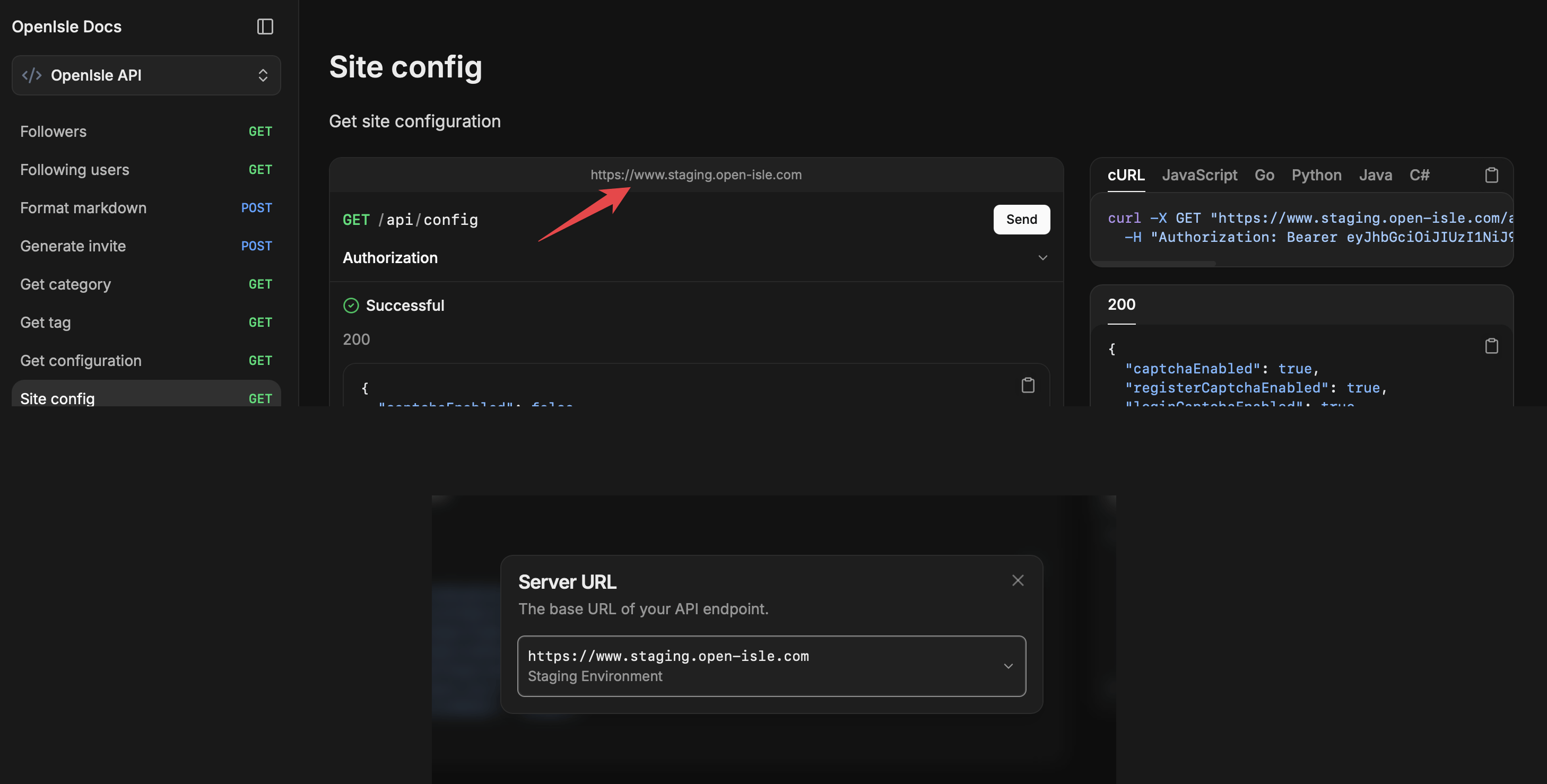
- 预发环境/正式环境切换,可以通过如下位置切换API环境
|
||||
- 预发环境/正式环境切换,以通过如下位置切换API环境
|
||||
|
||||
|
||||
|
||||
|
||||
@@ -1,35 +0,0 @@
|
||||
package com.openisle.controller;
|
||||
|
||||
import com.openisle.dto.AdminGrantPointRequest;
|
||||
import com.openisle.service.PointService;
|
||||
import io.swagger.v3.oas.annotations.Operation;
|
||||
import io.swagger.v3.oas.annotations.responses.ApiResponse;
|
||||
import io.swagger.v3.oas.annotations.security.SecurityRequirement;
|
||||
import java.util.Map;
|
||||
import lombok.RequiredArgsConstructor;
|
||||
import org.springframework.security.core.Authentication;
|
||||
import org.springframework.web.bind.annotation.PostMapping;
|
||||
import org.springframework.web.bind.annotation.RequestBody;
|
||||
import org.springframework.web.bind.annotation.RequestMapping;
|
||||
import org.springframework.web.bind.annotation.RestController;
|
||||
|
||||
@RestController
|
||||
@RequestMapping("/api/admin/points")
|
||||
@RequiredArgsConstructor
|
||||
public class AdminPointController {
|
||||
|
||||
private final PointService pointService;
|
||||
|
||||
@PostMapping("/grant")
|
||||
@SecurityRequirement(name = "JWT")
|
||||
@Operation(summary = "Grant points", description = "Grant points to a user as administrator")
|
||||
@ApiResponse(responseCode = "200", description = "Points granted")
|
||||
public Map<String, Object> grant(
|
||||
@RequestBody AdminGrantPointRequest request,
|
||||
Authentication auth
|
||||
) {
|
||||
String username = request.getUsername();
|
||||
int balance = pointService.grantPointByAdmin(auth.getName(), username, request.getAmount());
|
||||
return Map.of("username", username.trim(), "point", balance);
|
||||
}
|
||||
}
|
||||
@@ -1,12 +0,0 @@
|
||||
package com.openisle.dto;
|
||||
|
||||
import lombok.Getter;
|
||||
import lombok.Setter;
|
||||
|
||||
@Getter
|
||||
@Setter
|
||||
public class AdminGrantPointRequest {
|
||||
|
||||
private String username;
|
||||
private int amount;
|
||||
}
|
||||
@@ -13,5 +13,4 @@ public enum PointHistoryType {
|
||||
REDEEM,
|
||||
LOTTERY_JOIN,
|
||||
LOTTERY_REWARD,
|
||||
ADMIN_GRANT,
|
||||
}
|
||||
|
||||
@@ -43,22 +43,6 @@ public class PointService {
|
||||
return addPoint(user, 500, PointHistoryType.FEATURE, post, null, null);
|
||||
}
|
||||
|
||||
public int grantPointByAdmin(String adminName, String targetUsername, int amount) {
|
||||
if (amount <= 0) {
|
||||
throw new FieldException("amount", "积分必须为正数");
|
||||
}
|
||||
if (targetUsername == null || targetUsername.isBlank()) {
|
||||
throw new FieldException("username", "用户名不能为空");
|
||||
}
|
||||
String normalizedUsername = targetUsername.trim();
|
||||
User admin = userRepository.findByUsername(adminName).orElseThrow();
|
||||
User target = userRepository
|
||||
.findByUsername(normalizedUsername)
|
||||
.orElseThrow(() -> new FieldException("username", "用户不存在"));
|
||||
addPoint(target, amount, PointHistoryType.ADMIN_GRANT, null, null, admin);
|
||||
return target.getPoint();
|
||||
}
|
||||
|
||||
public void processLotteryJoin(User participant, LotteryPost post) {
|
||||
int cost = post.getPointCost();
|
||||
if (cost > 0) {
|
||||
|
||||
@@ -4,7 +4,7 @@ set -euo pipefail
|
||||
# 可用法:
|
||||
# ./deploy.sh
|
||||
# ./deploy.sh feature/docker
|
||||
deploy_branch="${1:-feature/docker}"
|
||||
deploy_branch="${1:-main}"
|
||||
|
||||
repo_dir="/opt/openisle/OpenIsle"
|
||||
compose_file="${repo_dir}/docker/docker-compose.yaml"
|
||||
@@ -40,12 +40,12 @@ echo "👉 Build images ..."
|
||||
docker compose -f "$compose_file" --env-file "$env_file" \
|
||||
build --pull \
|
||||
--build-arg NUXT_ENV=production \
|
||||
frontend_service opensearch
|
||||
frontend_service
|
||||
|
||||
echo "👉 Recreate & start all target services (no dev profile)..."
|
||||
docker compose -f "$compose_file" --env-file "$env_file" \
|
||||
up -d --force-recreate --remove-orphans \
|
||||
mysql redis rabbitmq opensearch dashboards websocket-service springboot frontend_service
|
||||
up -d --force-recreate --remove-orphans --no-deps \
|
||||
mysql redis rabbitmq websocket-service springboot frontend_service
|
||||
|
||||
echo "👉 Current status:"
|
||||
docker compose -f "$compose_file" --env-file "$env_file" ps
|
||||
|
||||
@@ -8,7 +8,6 @@ deploy_branch="${1:-main}"
|
||||
|
||||
repo_dir="/opt/openisle/OpenIsle-staging"
|
||||
compose_file="${repo_dir}/docker/docker-compose.yaml"
|
||||
# 使用仓库根目录的 .env(CI 预先写好),也可以改成绝对路径
|
||||
env_file="${repo_dir}/.env"
|
||||
project="openisle_staging"
|
||||
|
||||
@@ -41,12 +40,12 @@ echo "👉 Build images (staging)..."
|
||||
docker compose -f "$compose_file" --env-file "$env_file" \
|
||||
build --pull \
|
||||
--build-arg NUXT_ENV=staging \
|
||||
frontend_service opensearch
|
||||
frontend_service
|
||||
|
||||
echo "👉 Recreate & start all target services (no dev profile)..."
|
||||
docker compose -f "$compose_file" --env-file "$env_file" \
|
||||
up -d --force-recreate --remove-orphans \
|
||||
mysql redis rabbitmq opensearch dashboards websocket-service springboot frontend_service
|
||||
up -d --force-recreate --remove-orphans --no-deps \
|
||||
mysql redis rabbitmq websocket-service springboot frontend_service
|
||||
|
||||
echo "👉 Current status:"
|
||||
docker compose -f "$compose_file" --env-file "$env_file" ps
|
||||
|
||||
@@ -45,8 +45,8 @@ services:
|
||||
memlock: { soft: -1, hard: -1 }
|
||||
nofile: { soft: 65536, hard: 65536 }
|
||||
volumes:
|
||||
- ${OPENSEARCH_DATA_DIR:-./data}:/usr/share/opensearch/data
|
||||
- ${OPENSEARCH_SNAPSHOT_DIR:-./snapshots}:/snapshots
|
||||
- opensearch-data:/usr/share/opensearch/data
|
||||
- opensearch-snapshots:/snapshots
|
||||
ports:
|
||||
- "${OPENSEARCH_PORT:-9200}:9200"
|
||||
- "${OPENSEARCH_METRICS_PORT:-9600}:9600"
|
||||
@@ -293,3 +293,7 @@ volumes:
|
||||
name: "${COMPOSE_PROJECT_NAME}_frontend-service-node-modules"
|
||||
frontend-static:
|
||||
name: "${COMPOSE_PROJECT_NAME}_frontend-static"
|
||||
opensearch-data:
|
||||
name: "${COMPOSE_PROJECT_NAME}_opensearch-data"
|
||||
opensearch-snapshots:
|
||||
name: "${COMPOSE_PROJECT_NAME}_opensearch-snapshots"
|
||||
|
||||
@@ -71,16 +71,6 @@ export default {
|
||||
label: '隐私政策',
|
||||
file: 'https://openisle-1307107697.cos.ap-guangzhou.myqcloud.com/assert/about/privacy.md',
|
||||
},
|
||||
{
|
||||
key: 'points',
|
||||
label: '积分说明',
|
||||
content: `# 积分说明
|
||||
|
||||
- 积分可用于兑换商品、参与抽奖等社区玩法。
|
||||
- 管理员可以通过后台新增的积分模块为用户发放奖励积分。
|
||||
- 每次发放都会记录在积分历史中,方便你查看积分来源。
|
||||
`,
|
||||
},
|
||||
{
|
||||
key: 'api',
|
||||
label: 'API与调试',
|
||||
@@ -98,21 +88,11 @@ export default {
|
||||
return `${token.value.slice(0, 20)}...${token.value.slice(-10)}`
|
||||
})
|
||||
|
||||
const loadContent = async (tab) => {
|
||||
if (!tab || tab.key === 'api') return
|
||||
if (tab.content) {
|
||||
isFetching.value = false
|
||||
content.value = tab.content
|
||||
return
|
||||
}
|
||||
if (!tab.file) {
|
||||
isFetching.value = false
|
||||
content.value = ''
|
||||
return
|
||||
}
|
||||
const loadContent = async (file) => {
|
||||
if (!file) return
|
||||
try {
|
||||
isFetching.value = true
|
||||
const res = await fetch(tab.file)
|
||||
const res = await fetch(file)
|
||||
if (res.ok) {
|
||||
content.value = await res.text()
|
||||
} else {
|
||||
@@ -130,15 +110,15 @@ export default {
|
||||
if (initTab && tabs.find((t) => t.key === initTab)) {
|
||||
selectedTab.value = initTab
|
||||
const tab = tabs.find((t) => t.key === initTab)
|
||||
if (tab) loadContent(tab)
|
||||
if (tab && tab.file) loadContent(tab.file)
|
||||
} else {
|
||||
loadContent(tabs[0])
|
||||
loadContent(tabs[0].file)
|
||||
}
|
||||
})
|
||||
|
||||
watch(selectedTab, (name) => {
|
||||
const tab = tabs.find((t) => t.key === name)
|
||||
if (tab) loadContent(tab)
|
||||
if (tab && tab.file) loadContent(tab.file)
|
||||
router.replace({ query: { ...route.query, tab: name } })
|
||||
})
|
||||
|
||||
@@ -147,8 +127,6 @@ export default {
|
||||
(name) => {
|
||||
if (name && name !== selectedTab.value && tabs.find((t) => t.key === name)) {
|
||||
selectedTab.value = name
|
||||
const tab = tabs.find((t) => t.key === name)
|
||||
if (tab) loadContent(tab)
|
||||
}
|
||||
},
|
||||
)
|
||||
|
||||
@@ -184,16 +184,6 @@
|
||||
}}</NuxtLink>
|
||||
参与,获得 {{ item.amount }} 积分
|
||||
</template>
|
||||
<template v-else-if="item.type === 'ADMIN_GRANT' && item.fromUserId">
|
||||
管理员
|
||||
<NuxtLink :to="`/users/${item.fromUserId}`" class="timeline-link">{{
|
||||
item.fromUserName
|
||||
}}</NuxtLink>
|
||||
赠送了 {{ item.amount }} 积分
|
||||
</template>
|
||||
<template v-else-if="item.type === 'ADMIN_GRANT'">
|
||||
管理员赠送了 {{ item.amount }} 积分
|
||||
</template>
|
||||
<template v-else-if="item.type === 'SYSTEM_ONLINE'"> 积分历史系统上线 </template>
|
||||
<paper-money-two /> 你目前的积分是 {{ item.balance }}
|
||||
</div>
|
||||
@@ -239,7 +229,6 @@ const pointRules = [
|
||||
'评论被点赞:每次 10 积分',
|
||||
'邀请好友加入可获得 500 积分/次,注意需要使用邀请链接注册',
|
||||
'文章被收录至精选:每次 500 积分',
|
||||
'管理员赠送:特殊活动可由管理员手动赠送积分',
|
||||
]
|
||||
|
||||
const goods = ref([])
|
||||
@@ -261,7 +250,6 @@ const iconMap = {
|
||||
LOTTERY_REWARD: 'fireworks',
|
||||
POST_LIKE_CANCELLED: 'clear-icon',
|
||||
COMMENT_LIKE_CANCELLED: 'clear-icon',
|
||||
ADMIN_GRANT: 'paper-money-two',
|
||||
}
|
||||
|
||||
const loadTrend = async () => {
|
||||
|
||||
@@ -65,35 +65,6 @@
|
||||
<div class="setting-title">注册模式</div>
|
||||
<Dropdown v-model="registerMode" :fetch-options="fetchRegisterModes" />
|
||||
</div>
|
||||
<div class="form-row grant-row">
|
||||
<div class="setting-title">发放积分</div>
|
||||
<div class="grant-form">
|
||||
<BaseInput
|
||||
v-model="grantUsername"
|
||||
placeholder="请输入用户名"
|
||||
class="grant-input"
|
||||
@input="grantError = ''"
|
||||
/>
|
||||
<BaseInput
|
||||
v-model="grantAmount"
|
||||
type="number"
|
||||
placeholder="积分数量"
|
||||
class="grant-input amount"
|
||||
@input="grantError = ''"
|
||||
/>
|
||||
<button
|
||||
type="button"
|
||||
class="grant-button"
|
||||
:class="{ disabled: isGrantingPoints }"
|
||||
:disabled="isGrantingPoints"
|
||||
@click="grantPoint"
|
||||
>
|
||||
{{ isGrantingPoints ? '发放中...' : '发放' }}
|
||||
</button>
|
||||
</div>
|
||||
<div v-if="grantError" class="grant-error-message">{{ grantError }}</div>
|
||||
<div class="setting-description">积分会立即发放给目标用户,并记录在积分历史中</div>
|
||||
</div>
|
||||
</div>
|
||||
<div class="buttons">
|
||||
<div v-if="isSaving" class="save-button disabled">保存中...</div>
|
||||
@@ -131,10 +102,6 @@ const registerMode = ref('DIRECT')
|
||||
const isLoadingPage = ref(false)
|
||||
const isSaving = ref(false)
|
||||
const frosted = ref(true)
|
||||
const grantUsername = ref('')
|
||||
const grantAmount = ref('')
|
||||
const grantError = ref('')
|
||||
const isGrantingPoints = ref(false)
|
||||
|
||||
onMounted(async () => {
|
||||
isLoadingPage.value = true
|
||||
@@ -217,55 +184,6 @@ const loadAdminConfig = async () => {
|
||||
// ignore
|
||||
}
|
||||
}
|
||||
|
||||
const grantPoint = async () => {
|
||||
if (isGrantingPoints.value) return
|
||||
const username = grantUsername.value.trim()
|
||||
if (!username) {
|
||||
grantError.value = '用户名不能为空'
|
||||
toast.error(grantError.value)
|
||||
return
|
||||
}
|
||||
const amount = Number(grantAmount.value)
|
||||
if (!Number.isInteger(amount) || amount <= 0) {
|
||||
grantError.value = '积分数量必须为正整数'
|
||||
toast.error(grantError.value)
|
||||
return
|
||||
}
|
||||
isGrantingPoints.value = true
|
||||
try {
|
||||
const token = getToken()
|
||||
const res = await fetch(`${API_BASE_URL}/api/admin/points/grant`, {
|
||||
method: 'POST',
|
||||
headers: {
|
||||
'Content-Type': 'application/json',
|
||||
Authorization: `Bearer ${token}`,
|
||||
},
|
||||
body: JSON.stringify({ username, amount }),
|
||||
})
|
||||
let data = null
|
||||
try {
|
||||
data = await res.json()
|
||||
} catch (e) {
|
||||
// ignore body parse errors
|
||||
}
|
||||
if (res.ok) {
|
||||
toast.success(`已为 ${username} 发放 ${amount} 积分`)
|
||||
grantUsername.value = ''
|
||||
grantAmount.value = ''
|
||||
grantError.value = ''
|
||||
} else {
|
||||
const message = data?.error || '发放失败'
|
||||
grantError.value = message
|
||||
toast.error(message)
|
||||
}
|
||||
} catch (e) {
|
||||
grantError.value = '发放失败,请稍后再试'
|
||||
toast.error(grantError.value)
|
||||
} finally {
|
||||
isGrantingPoints.value = false
|
||||
}
|
||||
}
|
||||
const save = async () => {
|
||||
isSaving.value = true
|
||||
|
||||
@@ -405,51 +323,6 @@ const save = async () => {
|
||||
max-width: 200px;
|
||||
}
|
||||
|
||||
.grant-row {
|
||||
max-width: 100%;
|
||||
}
|
||||
|
||||
.grant-form {
|
||||
display: flex;
|
||||
flex-wrap: wrap;
|
||||
gap: 10px;
|
||||
align-items: center;
|
||||
}
|
||||
|
||||
.grant-input {
|
||||
flex: 1 1 180px;
|
||||
}
|
||||
|
||||
.grant-input.amount {
|
||||
max-width: 140px;
|
||||
}
|
||||
|
||||
.grant-button {
|
||||
background-color: var(--primary-color);
|
||||
color: #fff;
|
||||
border: none;
|
||||
border-radius: 8px;
|
||||
padding: 8px 16px;
|
||||
cursor: pointer;
|
||||
transition: background-color 0.2s ease-in-out;
|
||||
}
|
||||
|
||||
.grant-button.disabled,
|
||||
.grant-button:disabled {
|
||||
cursor: not-allowed;
|
||||
background-color: var(--primary-color-disabled);
|
||||
}
|
||||
|
||||
.grant-button:not(.disabled):hover {
|
||||
background-color: var(--primary-color-hover);
|
||||
}
|
||||
|
||||
.grant-error-message {
|
||||
color: red;
|
||||
font-size: 14px;
|
||||
margin-top: 8px;
|
||||
}
|
||||
|
||||
.switch-row {
|
||||
flex-direction: row;
|
||||
align-items: center;
|
||||
|
||||
174
nginx/openisle
Normal file
174
nginx/openisle
Normal file
@@ -0,0 +1,174 @@
|
||||
server {
|
||||
listen 443 ssl;
|
||||
server_name open-isle.com www.open-isle.com;
|
||||
|
||||
ssl_certificate /etc/letsencrypt/live/open-isle.com/fullchain.pem;
|
||||
ssl_certificate_key /etc/letsencrypt/live/open-isle.com/privkey.pem;
|
||||
include /etc/letsencrypt/options-ssl-nginx.conf;
|
||||
ssl_dhparam /etc/letsencrypt/ssl-dhparams.pem;
|
||||
|
||||
location / {
|
||||
proxy_pass http://127.0.0.1:3000;
|
||||
proxy_http_version 1.1;
|
||||
proxy_set_header Host $host;
|
||||
proxy_set_header X-Real-IP $remote_addr;
|
||||
proxy_set_header Upgrade $http_upgrade;
|
||||
proxy_set_header Connection "upgrade";
|
||||
add_header Cache-Control "no-store" always;
|
||||
add_header X-Upstream $upstream_addr always;
|
||||
}
|
||||
|
||||
location ^~ /api/ws {
|
||||
proxy_pass http://127.0.0.1:8080;
|
||||
proxy_http_version 1.1;
|
||||
|
||||
# 升级所需
|
||||
proxy_set_header Upgrade $http_upgrade;
|
||||
proxy_set_header Connection $connection_upgrade;
|
||||
|
||||
# 统一透传这些头(你在 /api/ 有,/api/ws 也要有)
|
||||
proxy_set_header Host $host;
|
||||
proxy_set_header X-Real-IP $remote_addr;
|
||||
proxy_set_header X-Forwarded-For $proxy_add_x_forwarded_for;
|
||||
proxy_set_header X-Forwarded-Proto $scheme;
|
||||
proxy_set_header X-Forwarded-Host $host;
|
||||
|
||||
proxy_read_timeout 300s;
|
||||
proxy_send_timeout 300s;
|
||||
proxy_buffering off;
|
||||
proxy_cache off;
|
||||
}
|
||||
|
||||
# 2) SockJS(包含 /info、/iframe.html、/.../websocket 等)
|
||||
location ^~ /api/sockjs {
|
||||
proxy_pass http://127.0.0.1:8080;
|
||||
proxy_http_version 1.1;
|
||||
|
||||
proxy_set_header Upgrade $http_upgrade;
|
||||
proxy_set_header Connection $connection_upgrade;
|
||||
|
||||
proxy_set_header Host $host;
|
||||
proxy_set_header X-Real-IP $remote_addr;
|
||||
proxy_set_header X-Forwarded-For $proxy_add_x_forwarded_for;
|
||||
proxy_set_header X-Forwarded-Proto $scheme;
|
||||
proxy_set_header X-Forwarded-Host $host;
|
||||
|
||||
proxy_read_timeout 300s;
|
||||
proxy_send_timeout 300s;
|
||||
proxy_buffering off;
|
||||
proxy_cache off;
|
||||
|
||||
# 如要同源 iframe 回退,下面两行二选一(或者交给 Spring Security 的 sameOrigin)
|
||||
# proxy_hide_header X-Frame-Options;
|
||||
# add_header X-Frame-Options "SAMEORIGIN" always;
|
||||
}
|
||||
|
||||
location /api/ {
|
||||
proxy_pass http://127.0.0.1:8080/api/;
|
||||
proxy_http_version 1.1;
|
||||
proxy_set_header Host $host;
|
||||
proxy_set_header X-Real-IP $remote_addr;
|
||||
add_header Cache-Control "no-store, no-cache, must-revalidate, max-age=0" always;
|
||||
proxy_no_cache 1;
|
||||
proxy_cache_bypass 1;
|
||||
}
|
||||
|
||||
# 通过 https://open-isle.com/rabbitmq/ 访问管理界面
|
||||
location ^~ /rabbitmq/ {
|
||||
# 关键点:proxy_pass 以 "/" 结尾,保留后缀子路径映射
|
||||
proxy_pass http://127.0.0.1:15672/;
|
||||
proxy_http_version 1.1;
|
||||
|
||||
proxy_set_header Host $host;
|
||||
proxy_set_header X-Real-IP $remote_addr;
|
||||
proxy_set_header X-Forwarded-For $proxy_add_x_forwarded_for;
|
||||
proxy_set_header X-Forwarded-Proto $scheme;
|
||||
|
||||
proxy_read_timeout 300s;
|
||||
proxy_send_timeout 300s;
|
||||
|
||||
# 把上游返回的绝对重定向 /... 改写为 /rabbitmq/...
|
||||
proxy_redirect ~^(/.*)$ /rabbitmq$1;
|
||||
|
||||
# 为了做 HTML/CSS/JS 内绝对路径替换,需要关闭压缩
|
||||
proxy_set_header Accept-Encoding "";
|
||||
|
||||
# 将页面中以 "/" 开头的 src/href 替换为 "/rabbitmq/..."
|
||||
sub_filter_types text/html text/css application/javascript;
|
||||
sub_filter 'href="/' 'href="/rabbitmq/';
|
||||
sub_filter 'src="/' 'src="/rabbitmq/';
|
||||
sub_filter_once off;
|
||||
|
||||
# 建议对管理台再加一道保护(可选)
|
||||
# auth_basic "RabbitMQ Console";
|
||||
# auth_basic_user_file /etc/nginx/.htpasswd;
|
||||
}
|
||||
|
||||
# 通过 https://open-isle.com/docker/ 访问 Portainer(上游是自签名 HTTPS)
|
||||
location ^~ /docker/ {
|
||||
proxy_pass https://127.0.0.1:19000/; # 末尾 / 保留子路径
|
||||
proxy_http_version 1.1;
|
||||
|
||||
# 上游是自签证书,关闭校验(仅内网/自签场景)
|
||||
proxy_ssl_verify off;
|
||||
|
||||
# 透传头
|
||||
proxy_set_header Host $host;
|
||||
proxy_set_header X-Real-IP $remote_addr;
|
||||
proxy_set_header X-Forwarded-For $proxy_add_x_forwarded_for;
|
||||
proxy_set_header X-Forwarded-Proto $scheme;
|
||||
proxy_set_header X-Forwarded-Host $host;
|
||||
|
||||
# WebSocket/事件流(Portainer 某些功能会用到)
|
||||
proxy_set_header Upgrade $http_upgrade;
|
||||
proxy_set_header Connection $connection_upgrade;
|
||||
|
||||
proxy_read_timeout 300s;
|
||||
proxy_send_timeout 300s;
|
||||
proxy_buffering off;
|
||||
proxy_cache off;
|
||||
|
||||
# 把上游返回的绝对重定向 /... 改写为 /docker/...
|
||||
proxy_redirect ~^(/.*)$ /docker$1;
|
||||
|
||||
# 为了替换 HTML/CSS/JS 中的绝对路径,需要关闭压缩
|
||||
proxy_set_header Accept-Encoding "";
|
||||
|
||||
# 将页面中以 "/" 开头的 src/href 替换为 "/docker/..."
|
||||
sub_filter_types text/html text/css application/javascript;
|
||||
sub_filter 'href="/' 'href="/docker/';
|
||||
sub_filter 'src="/' 'src="/docker/';
|
||||
sub_filter_once off;
|
||||
|
||||
# 可选:再加一道基本认证
|
||||
# auth_basic "Portainer";
|
||||
# auth_basic_user_file /etc/nginx/.htpasswd;
|
||||
}
|
||||
|
||||
|
||||
# ---------- WEBSOCKET GATEWAY TO :8082 ----------
|
||||
location ^~ /websocket/ {
|
||||
proxy_pass http://127.0.0.1:8082/;
|
||||
proxy_http_version 1.1;
|
||||
|
||||
proxy_set_header Upgrade $http_upgrade;
|
||||
proxy_set_header Connection $connection_upgrade;
|
||||
|
||||
proxy_set_header Host $host;
|
||||
proxy_set_header X-Real-IP $remote_addr;
|
||||
proxy_set_header X-Forwarded-For $proxy_add_x_forwarded_for;
|
||||
proxy_set_header X-Forwarded-Proto $scheme;
|
||||
proxy_set_header X-Forwarded-Host $host;
|
||||
|
||||
proxy_read_timeout 300s;
|
||||
proxy_send_timeout 300s;
|
||||
proxy_buffering off;
|
||||
proxy_cache off;
|
||||
add_header Cache-Control "no-store" always;
|
||||
}
|
||||
}
|
||||
server {
|
||||
listen 80;
|
||||
server_name open-isle.com www.open-isle.com;
|
||||
return 301 https://$host$request_uri;
|
||||
}
|
||||
133
nginx/openisle-staging
Normal file
133
nginx/openisle-staging
Normal file
@@ -0,0 +1,133 @@
|
||||
# 放在 http { } 里一次定义
|
||||
map $http_upgrade $connection_upgrade {
|
||||
default upgrade;
|
||||
'' close;
|
||||
}
|
||||
|
||||
server {
|
||||
listen 443 ssl;
|
||||
server_name staging.open-isle.com www.staging.open-isle.com;
|
||||
|
||||
|
||||
ssl_certificate /etc/letsencrypt/live/staging.open-isle.com/fullchain.pem;
|
||||
ssl_certificate_key /etc/letsencrypt/live/staging.open-isle.com/privkey.pem;
|
||||
# ssl_certificate /etc/letsencrypt/live/open-isle.com/fullchain.pem;
|
||||
# ssl_certificate_key /etc/letsencrypt/live/open-isle.com/privkey.pem;
|
||||
include /etc/letsencrypt/options-ssl-nginx.conf;
|
||||
ssl_dhparam /etc/letsencrypt/ssl-dhparams.pem;
|
||||
|
||||
# ---------- SSR ----------
|
||||
location / {
|
||||
proxy_pass http://127.0.0.1:3001;
|
||||
proxy_http_version 1.1;
|
||||
|
||||
# 正确的升级头(仅在有 Upgrade 时)
|
||||
proxy_set_header Upgrade $http_upgrade;
|
||||
proxy_set_header Connection $connection_upgrade;
|
||||
|
||||
# 透传真实主机/协议/源 IP
|
||||
proxy_set_header Host $host;
|
||||
proxy_set_header X-Real-IP $remote_addr;
|
||||
proxy_set_header X-Forwarded-For $proxy_add_x_forwarded_for;
|
||||
proxy_set_header X-Forwarded-Proto $scheme;
|
||||
proxy_set_header X-Forwarded-Host $host;
|
||||
|
||||
# 合理超时,避免 SSR 首屏慢查询导致 502/504
|
||||
proxy_read_timeout 120s;
|
||||
proxy_send_timeout 120s;
|
||||
|
||||
add_header Cache-Control "no-store" always;
|
||||
add_header X-Upstream $upstream_addr always;
|
||||
}
|
||||
|
||||
# 1) 原生 WebSocket
|
||||
location ^~ /api/ws {
|
||||
proxy_pass http://127.0.0.1:8081; # 不要尾随 /,保留原样 URI
|
||||
proxy_http_version 1.1;
|
||||
|
||||
# 升级所需
|
||||
proxy_set_header Upgrade $http_upgrade;
|
||||
proxy_set_header Connection $connection_upgrade;
|
||||
|
||||
# 统一透传这些头(你在 /api/ 有,/api/ws 也要有)
|
||||
proxy_set_header Host $host;
|
||||
proxy_set_header X-Real-IP $remote_addr;
|
||||
proxy_set_header X-Forwarded-For $proxy_add_x_forwarded_for;
|
||||
proxy_set_header X-Forwarded-Proto $scheme;
|
||||
proxy_set_header X-Forwarded-Host $host;
|
||||
|
||||
proxy_read_timeout 300s;
|
||||
proxy_send_timeout 300s;
|
||||
proxy_buffering off;
|
||||
proxy_cache off;
|
||||
}
|
||||
|
||||
# 2) SockJS(包含 /info、/iframe.html、/.../websocket 等)
|
||||
location ^~ /api/sockjs {
|
||||
proxy_pass http://127.0.0.1:8081;
|
||||
proxy_http_version 1.1;
|
||||
|
||||
proxy_set_header Upgrade $http_upgrade;
|
||||
proxy_set_header Connection $connection_upgrade;
|
||||
|
||||
proxy_set_header Host $host;
|
||||
proxy_set_header X-Real-IP $remote_addr;
|
||||
proxy_set_header X-Forwarded-For $proxy_add_x_forwarded_for;
|
||||
proxy_set_header X-Forwarded-Proto $scheme;
|
||||
proxy_set_header X-Forwarded-Host $host;
|
||||
|
||||
proxy_read_timeout 300s;
|
||||
proxy_send_timeout 300s;
|
||||
proxy_buffering off;
|
||||
proxy_cache off;
|
||||
|
||||
# 如要同源 iframe 回退,下面两行二选一(或者交给 Spring Security 的 sameOrigin)
|
||||
# proxy_hide_header X-Frame-Options;
|
||||
# add_header X-Frame-Options "SAMEORIGIN" always;
|
||||
}
|
||||
|
||||
# ---------- API ----------
|
||||
location /api/ {
|
||||
proxy_pass http://127.0.0.1:8081/api/;
|
||||
proxy_http_version 1.1;
|
||||
|
||||
proxy_set_header Upgrade $http_upgrade;
|
||||
proxy_set_header Connection $connection_upgrade;
|
||||
|
||||
|
||||
proxy_set_header Host $host;
|
||||
proxy_set_header X-Real-IP $remote_addr;
|
||||
proxy_set_header X-Forwarded-For $proxy_add_x_forwarded_for;
|
||||
proxy_set_header X-Forwarded-Proto $scheme;
|
||||
proxy_set_header X-Forwarded-Host $host;
|
||||
|
||||
proxy_read_timeout 120s;
|
||||
proxy_send_timeout 120s;
|
||||
|
||||
add_header Cache-Control "no-store, no-cache, must-revalidate, max-age=0" always;
|
||||
proxy_no_cache 1;
|
||||
proxy_cache_bypass 1;
|
||||
}
|
||||
|
||||
# ---------- WEBSOCKET GATEWAY TO :8083 ----------
|
||||
location ^~ /websocket/ {
|
||||
proxy_pass http://127.0.0.1:8083/;
|
||||
proxy_http_version 1.1;
|
||||
|
||||
proxy_set_header Upgrade $http_upgrade;
|
||||
proxy_set_header Connection $connection_upgrade;
|
||||
|
||||
proxy_set_header Host $host;
|
||||
proxy_set_header X-Real-IP $remote_addr;
|
||||
proxy_set_header X-Forwarded-For $proxy_add_x_forwarded_for;
|
||||
proxy_set_header X-Forwarded-Proto $scheme;
|
||||
proxy_set_header X-Forwarded-Host $host;
|
||||
|
||||
proxy_read_timeout 300s;
|
||||
proxy_send_timeout 300s;
|
||||
proxy_buffering off;
|
||||
proxy_cache off;
|
||||
add_header Cache-Control "no-store" always;
|
||||
}
|
||||
|
||||
}
|
||||
Reference in New Issue
Block a user