

Next-generation Cloud Native Gateway
English | 中文
Higress is a next-generation cloud-native gateway based on Alibaba's internal gateway practices.
Powered by Istio and Envoy, Higress realizes the integration of the triple gateway architecture of traffic gateway, microservice gateway and security gateway, thereby greatly reducing the costs of deployment, operation and maintenance.
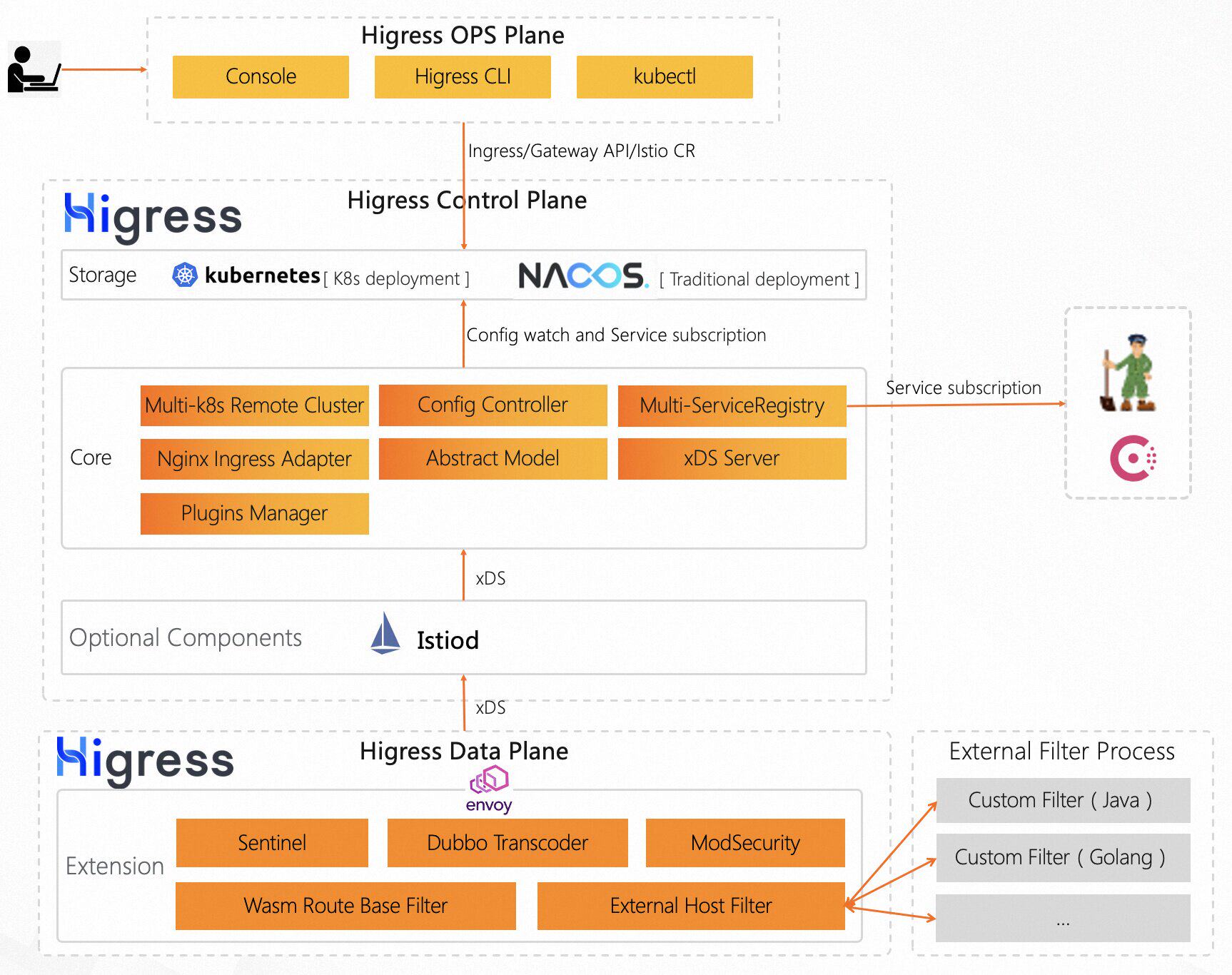
Summary
Use Cases
-
Kubernetes ingress controller:
Higress can function as a feature-rich ingress controller, which is compatible with many annotations of K8s' nginx ingress controller.
Gateway API support is coming soon and will support smooth migration from Ingress API to Gateway API.
-
Microservice gateway:
Higress can function as a microservice gateway, which can discovery microservices from various service registries, such as Nacos, ZooKeeper, Consul, etc.
It deeply integrates of Dubbo, Nacos, Sentinel and other microservice technology stacks.
-
Security gateway:
Higress can be used as a security gateway, supporting WAF and various authentication strategies, such as key-auth, hmac-auth, jwt-auth, basic-auth, oidc, etc.
Higress Features
(TODO)
Quick Start
Local Environment
step 1. install kubectl & kind
On MacOS
curl -Lo ./kubectl https://storage.googleapis.com/kubernetes-release/release/$(curl -s https://storage.googleapis.com/kubernetes-release/release/stable.txt)/bin/darwin/amd64/kubectl
# for Intel Macs
[ $(uname -m) = x86_64 ]&& curl -Lo ./kind https://kind.sigs.k8s.io/dl/v0.17.0/kind-darwin-amd64
# for M1 / ARM Macs
[ $(uname -m) = arm64 ] && curl -Lo ./kind https://kind.sigs.k8s.io/dl/v0.17.0/kind-darwin-arm64
chmod +x ./kind ./kubectl
mv ./kind ./kubectl /some-dir-in-your-PATH/
On Windows in PowerShell:
curl.exe -Lo kubectl.exe https://storage.googleapis.com/kubernetes-release/release/$(curl.exe -s https://storage.googleapis.com/kubernetes-release/release/stable.txt)/bin/windows/amd64/kubectl.exe
curl.exe -Lo kind-windows-amd64.exe https://kind.sigs.k8s.io/dl/v0.17.0/kind-windows-amd64
Move-Item .\kind-windows-amd64.exe c:\some-dir-in-your-PATH\kind.exe
Move-Item .\kubectl.exe c:\some-dir-in-your-PATH\kubectl.exe
On Linux:
curl -Lo ./kubectl https://storage.googleapis.com/kubernetes-release/release/$(curl -s https://storage.googleapis.com/kubernetes-release/release/stable.txt)/bin/linux/amd64/kubectl
curl -Lo ./kind https://kind.sigs.k8s.io/dl/v0.17.0/kind-linux-amd64
chmod +x ./kind ./kubectl
sudo mv ./kind ./kubectl /usr/local/bin/kind
step 2. create kind cluster
create a cluster config file: cluster.conf
# cluster.conf
kind: Cluster
apiVersion: kind.x-k8s.io/v1alpha4
nodes:
- role: control-plane
  kubeadmConfigPatches:
  - |
    kind: InitConfiguration
    nodeRegistration:
      kubeletExtraArgs:
        node-labels: "ingress-ready=true"
  extraPortMappings:
  - containerPort: 80
    hostPort: 80
    protocol: TCP
  - containerPort: 443
    hostPort: 443
    protocol: TCP
Mac & Linux:
kind create cluster --name higress --config=cluster.conf
kubectl cluster-info --context higress
Windows:
kind.exe create cluster --name higress --config=cluster.conf
kubectl.exe cluster-info --context higress
step 3. install istio & higress
helm install istio -n istio-system oci://higress-registry.cn-hangzhou.cr.aliyuncs.com/charts/istio-local
helm install higress -n higress-system oci://higress-registry.cn-hangzhou.cr.aliyuncs.com/charts/higress-local
step 4. create the ingress and test it!
kubectl apply -f https://kind.sigs.k8s.io/examples/ingress/usage.yaml
Now verify that the ingress works
# should output "foo"
curl localhost/foo
# should output "bar"
curl localhost/bar
Production Environment
step 1. install istio
select higress istio:
kubectl create ns istio-system
helm install istio -n istio-system oci://higress-registry.cn-hangzhou.cr.aliyuncs.com/charts/istio
or select official istio (lose some abilities, such as using annotation to limit request rate):
https://istio.io/latest/docs/setup/install
step 2. install higress
kubectl create ns higress-system
helm install higress -n higress-system oci://higress-registry.cn-hangzhou.cr.aliyuncs.com/charts/higress
step 3. create the ingress and test it!
for example there is a service test in default namespace.
apiVersion: networking.k8s.io/v1
kind: Ingress
metadata:
  name: simple-example
spec:
  rules:
  - host: foo.bar.com
    http:
      paths:
      - path: /foo
        pathType: Prefix
        backend:
          service:
            name: test
            port:
              number: 80
curl "$(k get svc -n higress-system higress-gateway -o jsonpath='{.status.loadBalancer.ingress[0].ip}')"/foo -H 'host: foo.bar.com'