mirror of
https://github.com/alibaba/higress.git
synced 2026-03-17 08:50:46 +08:00
Compare commits
18 Commits
v2.1.1-rc.
...
wasm-go-ai
| Author | SHA1 | Date | |
|---|---|---|---|

|
a57173ce28 | ||

|
3a8d8f5b94 | ||

|
1c37c361e1 | ||

|
b8133a95b2 | ||

|
36d5d391b8 | ||
|
|
1da9a07866 | ||

|
8620838f8b | ||

|
e7d2005382 | ||
|
|
4f47d3fc12 | ||

|
6773482300 | ||
|
|
b6d61f9568 | ||

|
1834d4acef | ||
|
|
7f9ae38e51 | ||
|
|
b13bce6a36 | ||

|
275cac9dbb | ||
|
|
8cce7f5d50 | ||
|
|
4f0834d817 | ||
|
|
7cf0dae824 |
42
README.md
42
README.md
@@ -22,13 +22,21 @@
|
||||
English | <a href="README_ZH.md">中文<a/> | <a href="README_JP.md">日本語<a/>
|
||||
</p>
|
||||
|
||||
## What is Higress?
|
||||
|
||||
Higress is a cloud-native API gateway based on Istio and Envoy, which can be extended with Wasm plugins written in Go/Rust/JS. It provides dozens of ready-to-use general-purpose plugins and an out-of-the-box console (try the [demo here](http://demo.higress.io/)).
|
||||
|
||||
Higress was born within Alibaba to solve the issues of Tengine reload affecting long-connection services and insufficient load balancing capabilities for gRPC/Dubbo.
|
||||
### Core Use Cases
|
||||
|
||||
Alibaba Cloud has built its cloud-native API gateway product based on Higress, providing 99.99% gateway high availability guarantee service capabilities for a large number of enterprise customers.
|
||||
Higress's AI gateway capabilities support all [mainstream model providers](https://github.com/alibaba/higress/tree/main/plugins/wasm-go/extensions/ai-proxy/provider) both domestic and international. It also supports hosting MCP (Model Context Protocol) Servers through its plugin mechanism, enabling AI Agents to easily call various tools and services. With the [openapi-to-mcp tool](https://github.com/higress-group/openapi-to-mcpserver), you can quickly convert OpenAPI specifications into remote MCP servers for hosting. Higress provides unified management for both LLM API and MCP API.
|
||||
|
||||
Higress's AI gateway capabilities support all [mainstream model providers](https://github.com/alibaba/higress/tree/main/plugins/wasm-go/extensions/ai-proxy/provider) both domestic and international, as well as self-built DeepSeek models based on vllm/ollama. Within Alibaba Cloud, it supports AI businesses such as Tongyi Qianwen APP, Bailian large model API, and machine learning PAI platform. It also serves leading AIGC enterprises (such as Zero One Infinite) and AI products (such as FastGPT).
|
||||
**🌟 Try it now at [https://mcp.higress.ai/](https://mcp.higress.ai/)** to experience Higress-hosted Remote MCP Servers firsthand:
|
||||
|
||||

|
||||
|
||||
### Enterprise Adoption
|
||||
|
||||
Higress was born within Alibaba to solve the issues of Tengine reload affecting long-connection services and insufficient load balancing capabilities for gRPC/Dubbo. Within Alibaba Cloud, Higress's AI gateway capabilities support core AI applications such as Tongyi Bailian model studio, machine learning PAI platform, and other critical AI services. Alibaba Cloud has built its cloud-native API gateway product based on Higress, providing 99.99% gateway high availability guarantee service capabilities for a large number of enterprise customers.
|
||||
|
||||
## Summary
|
||||
|
||||
@@ -64,28 +72,28 @@ For other installation methods such as Helm deployment under K8s, please refer t
|
||||
|
||||
## Use Cases
|
||||
|
||||
- **AI Gateway**:
|
||||
|
||||
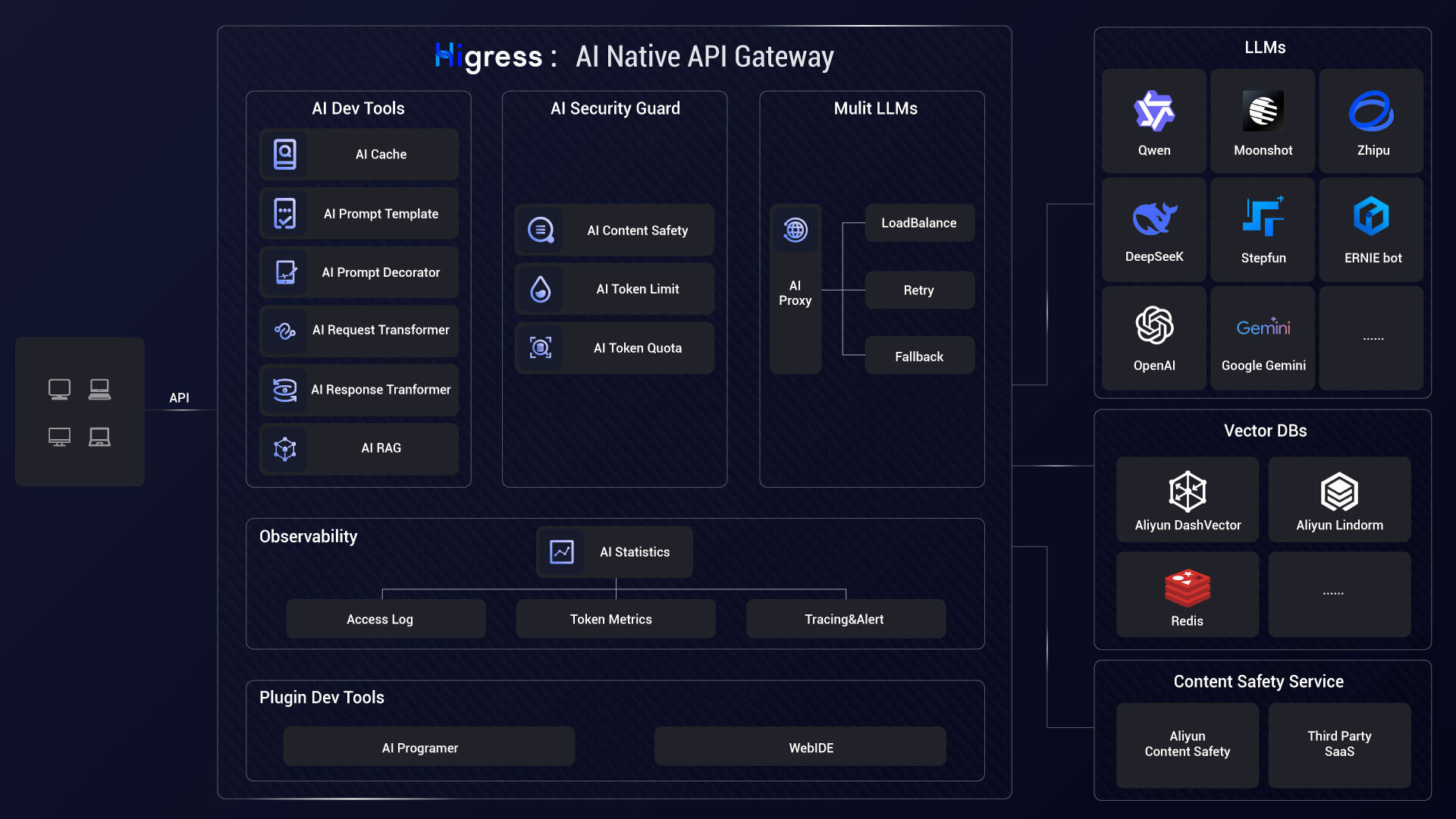
Higress can connect to all LLM model providers both domestic and international using a unified protocol, while also providing rich AI observability, multi-model load balancing/fallback, AI token rate limiting, AI caching, and other capabilities:
|
||||
|
||||
|
||||
|
||||
- **MCP Server Hosting**:
|
||||
|
||||
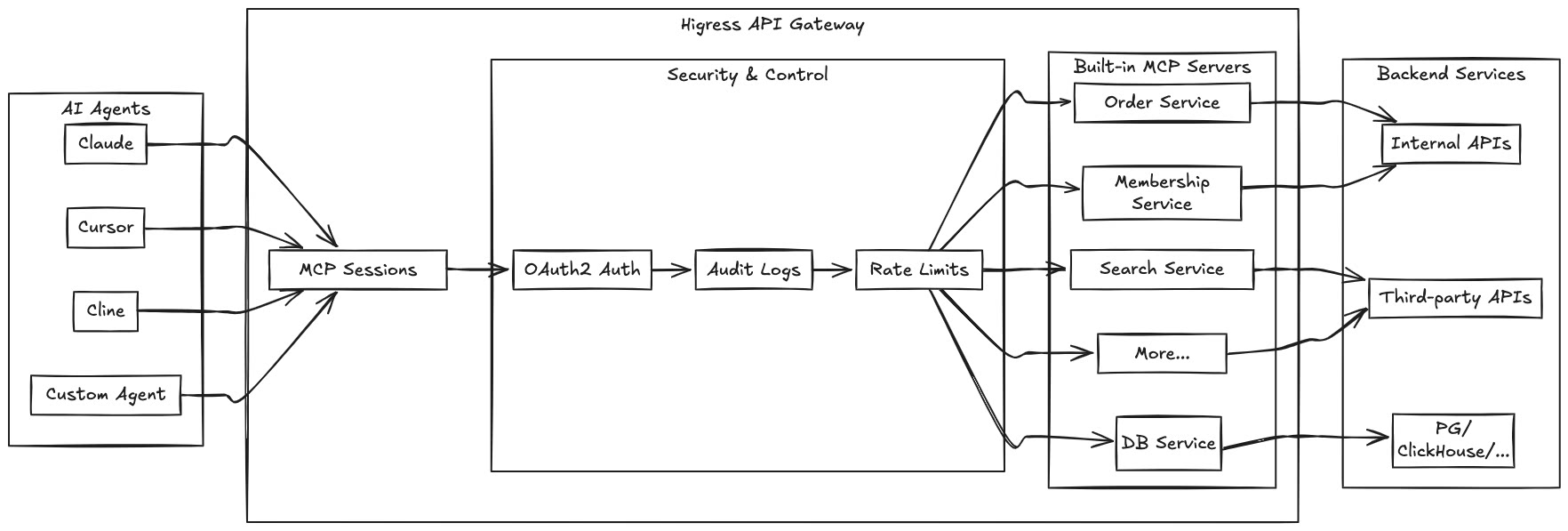
Higress, as an Envoy-based API gateway, supports hosting MCP Servers through its plugin mechanism. MCP (Model Context Protocol) is essentially an AI-friendly API that enables AI Agents to more easily call various tools and services. Higress provides unified capabilities for authentication, authorization, rate limiting, and observability for tool calls, simplifying the development and deployment of AI applications.
|
||||
Higress hosts MCP Servers through its plugin mechanism, enabling AI Agents to easily call various tools and services. With the [openapi-to-mcp tool](https://github.com/higress-group/openapi-to-mcpserver), you can quickly convert OpenAPI specifications into remote MCP servers.
|
||||
|
||||
|
||||
|
||||
By hosting MCP Servers with Higress, you can achieve:
|
||||
- Unified authentication and authorization mechanisms, ensuring the security of AI tool calls
|
||||
- Fine-grained rate limiting to prevent abuse and resource exhaustion
|
||||
- Comprehensive audit logs recording all tool call behaviors
|
||||
- Rich observability for monitoring the performance and health of tool calls
|
||||
- Simplified deployment and management through Higress's plugin mechanism for quickly adding new MCP Servers
|
||||
- Dynamic updates without disruption: Thanks to Envoy's friendly handling of long connections and Wasm plugin's dynamic update mechanism, MCP Server logic can be updated on-the-fly without any traffic disruption or connection drops
|
||||
Key benefits of hosting MCP Servers with Higress:
|
||||
- Unified authentication and authorization mechanisms
|
||||
- Fine-grained rate limiting to prevent abuse
|
||||
- Comprehensive audit logs for all tool calls
|
||||
- Rich observability for monitoring performance
|
||||
- Simplified deployment through Higress's plugin mechanism
|
||||
- Dynamic updates without disruption or connection drops
|
||||
|
||||
[Learn more...](https://higress.cn/en/ai/mcp-quick-start/?spm=36971b57.7beea2de.0.0.d85f20a94jsWGm)
|
||||
|
||||
- **AI Gateway**:
|
||||
|
||||
Higress connects to all LLM model providers using a unified protocol, with AI observability, multi-model load balancing, token rate limiting, and caching capabilities:
|
||||
|
||||

|
||||
|
||||
- **Kubernetes ingress controller**:
|
||||
|
||||
Higress can function as a feature-rich ingress controller, which is compatible with many annotations of K8s' nginx ingress controller.
|
||||
|
||||
30
README_JP.md
30
README_JP.md
@@ -22,15 +22,21 @@
|
||||
</p>
|
||||
|
||||
|
||||
## Higressとは?
|
||||
|
||||
Higressは、IstioとEnvoyをベースにしたクラウドネイティブAPIゲートウェイで、Go/Rust/JSなどを使用してWasmプラグインを作成できます。数十の既製の汎用プラグインと、すぐに使用できるコンソールを提供しています(デモは[こちら](http://demo.higress.io/))。
|
||||
|
||||
Higressは、Tengineのリロードが長時間接続のビジネスに影響を与える問題や、gRPC/Dubboの負荷分散能力の不足を解決するために、Alibaba内部で誕生しました。
|
||||
### 主な使用シナリオ
|
||||
|
||||
Alibaba Cloudは、Higressを基盤にクラウドネイティブAPIゲートウェイ製品を構築し、多くの企業顧客に99.99%のゲートウェイ高可用性保証サービスを提供しています。
|
||||
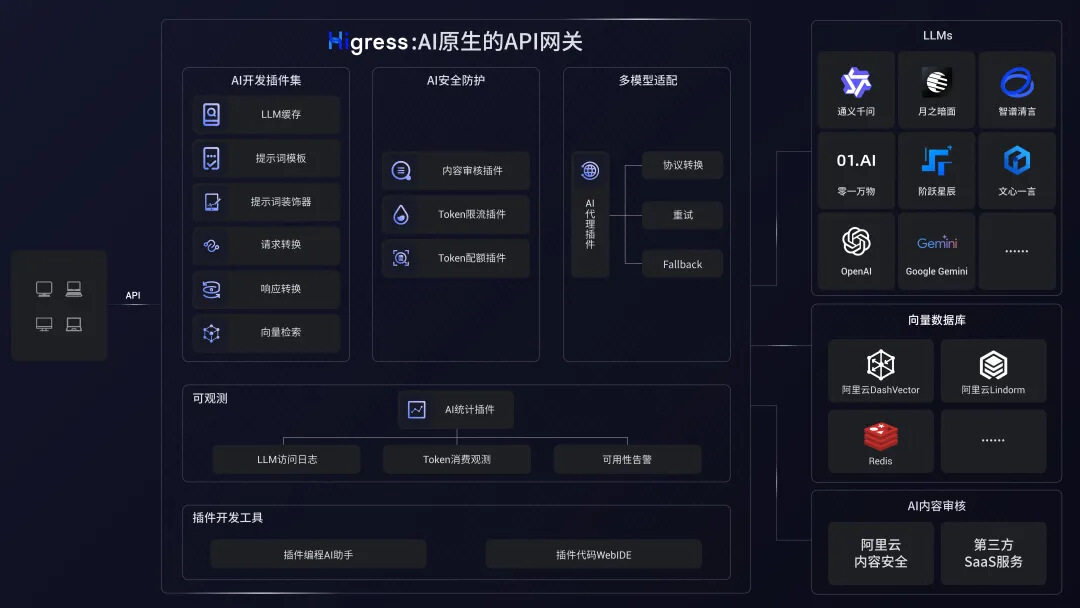
HigressのAIゲートウェイ機能は、国内外のすべての[主要モデルプロバイダー](https://github.com/alibaba/higress/tree/main/plugins/wasm-go/extensions/ai-proxy/provider)をサポートし、vllm/ollamaなどに基づく自己構築DeepSeekモデルにも対応しています。また、プラグインメカニズムを通じてMCP(Model Context Protocol)サーバーをホストすることもでき、AI Agentが様々なツールやサービスを簡単に呼び出せるようにします。[openapi-to-mcpツール](https://github.com/higress-group/openapi-to-mcpserver)を使用すると、OpenAPI仕様を迅速にリモートMCPサーバーに変換してホスティングできます。HigressはLLM APIとMCP APIの統一管理を提供します。
|
||||
|
||||
Higressは、AIゲートウェイ機能を基盤に、Tongyi Qianwen APP、Bailian大規模モデルAPI、機械学習PAIプラットフォームなどのAIビジネスをサポートしています。また、国内の主要なAIGC企業(例:ZeroOne)やAI製品(例:FastGPT)にもサービスを提供しています。
|
||||
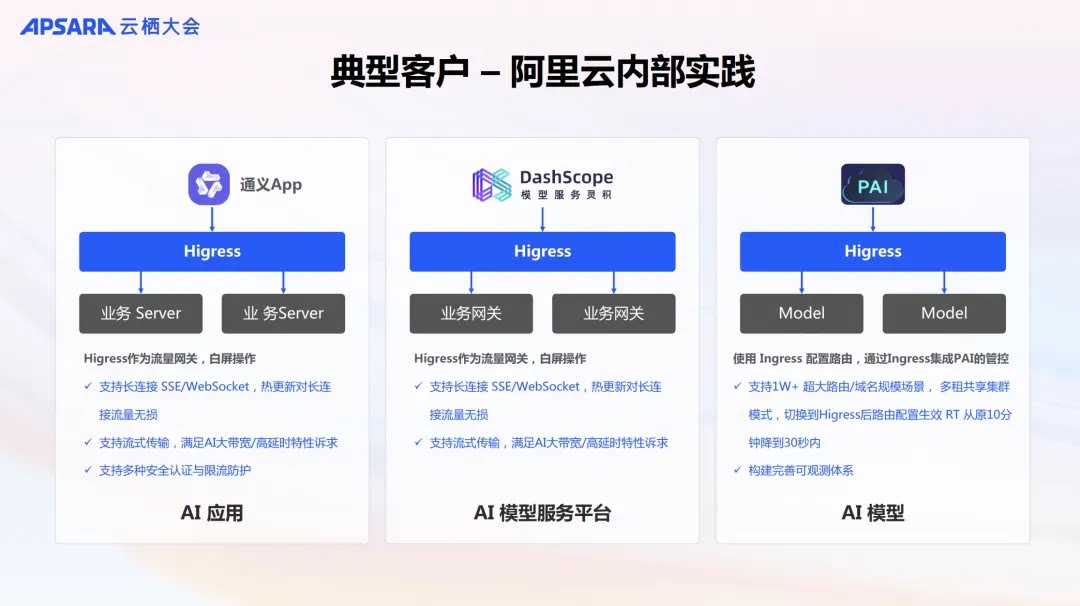
**🌟 今すぐ[https://mcp.higress.ai/](https://mcp.higress.ai/)で体験**してください。HigressがホストするリモートMCPサーバーを直接体験できます:
|
||||
|
||||
|
||||

|
||||
|
||||
### 企業での採用
|
||||
|
||||
Higressは、Tengineのリロードが長時間接続のビジネスに影響を与える問題や、gRPC/Dubboの負荷分散能力の不足を解決するために、Alibaba内部で誕生しました。Alibaba Cloud内では、HigressのAIゲートウェイ機能がTongyi Qianwen APP、Tongyi Bailian Model Studio、機械学習PAIプラットフォームなどの中核的なAIアプリケーションをサポートしています。また、国内の主要なAIGC企業(例:ZeroOne)やAI製品(例:FastGPT)にもサービスを提供しています。Alibaba Cloudは、Higressを基盤にクラウドネイティブAPIゲートウェイ製品を構築し、多くの企業顧客に99.99%のゲートウェイ高可用性保証サービスを提供しています。
|
||||
|
||||
|
||||
## 目次
|
||||
@@ -73,6 +79,20 @@ K8sでのHelmデプロイなどの他のインストール方法については
|
||||
|
||||
|
||||
|
||||
- **MCP Server ホスティング**:
|
||||
|
||||
Higressは、EnvoyベースのAPIゲートウェイとして、プラグインメカニズムを通じてMCP Serverをホストすることができます。MCP(Model Context Protocol)は本質的にAIにより親和性の高いAPIであり、AI Agentが様々なツールやサービスを簡単に呼び出せるようにします。Higressはツール呼び出しの認証、認可、レート制限、可観測性などの統一機能を提供し、AIアプリケーションの開発とデプロイを簡素化します。
|
||||
|
||||
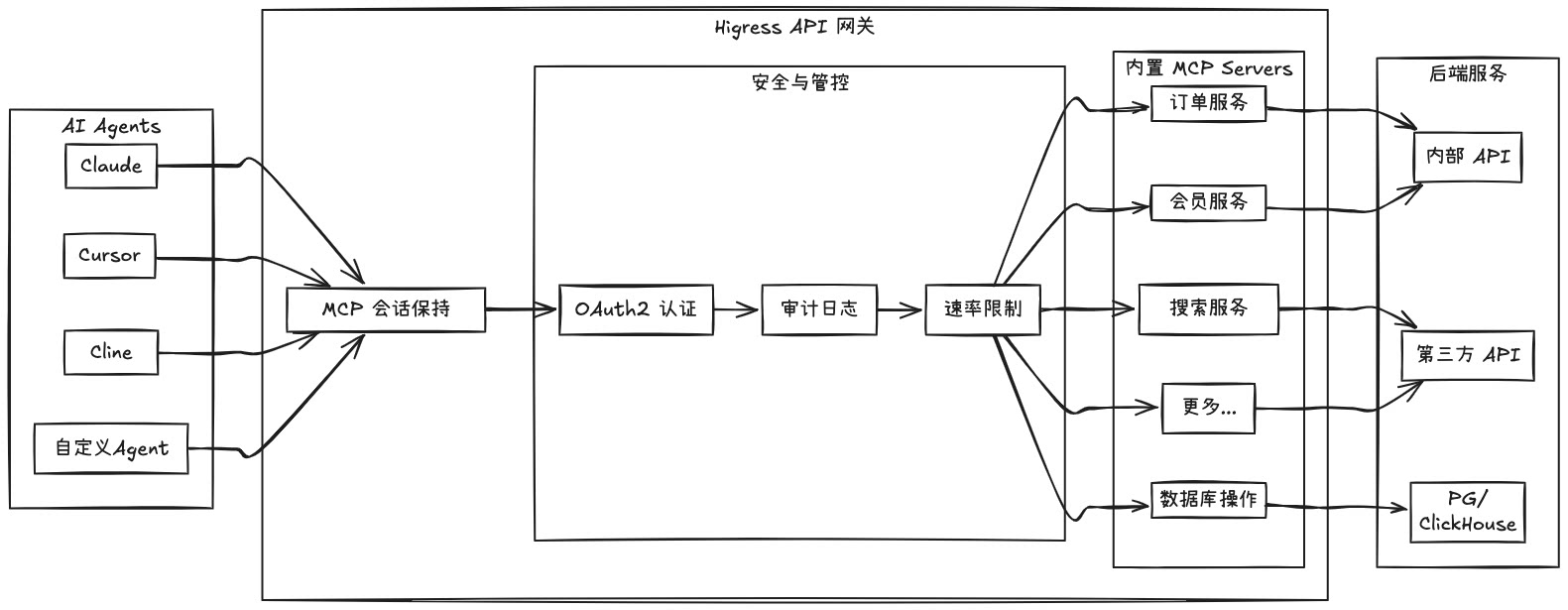
|
||||
|
||||
Higressを使用してMCP Serverをホストすることで、以下のことが実現できます:
|
||||
- 統一された認証と認可メカニズム、AIツール呼び出しのセキュリティを確保
|
||||
- きめ細かいレート制限、乱用やリソース枯渇を防止
|
||||
- 包括的な監査ログ、すべてのツール呼び出し行動を記録
|
||||
- 豊富な可観測性、ツール呼び出しのパフォーマンスと健全性を監視
|
||||
- 簡素化されたデプロイと管理、Higressのプラグインメカニズムを通じて新しいMCP Serverを迅速に追加
|
||||
- 動的更新による無停止:Envoyの長時間接続に対する友好的なサポートとWasmプラグインの動的更新メカニズムにより、MCP Serverのロジックをリアルタイムで更新でき、トラフィックに完全に影響を与えず、接続が切断されることはありません
|
||||
|
||||
- **Kubernetes Ingressゲートウェイ**:
|
||||
|
||||
HigressはK8sクラスターのIngressエントリーポイントゲートウェイとして機能し、多くのK8s Nginx Ingressの注釈に対応しています。K8s Nginx IngressからHigressへのスムーズな移行が可能です。
|
||||
@@ -203,4 +223,4 @@ WeChat公式アカウント:
|
||||
<a href="#readme-top" style="text-decoration: none; color: #007bff; font-weight: bold;">
|
||||
↑ トップに戻る ↑
|
||||
</a>
|
||||
</p>
|
||||
</p>
|
||||
|
||||
14
README_ZH.md
14
README_ZH.md
@@ -28,15 +28,21 @@
|
||||
</p>
|
||||
|
||||
|
||||
## Higress 是什么?
|
||||
|
||||
Higress 是一款云原生 API 网关,内核基于 Istio 和 Envoy,可以用 Go/Rust/JS 等编写 Wasm 插件,提供了数十个现成的通用插件,以及开箱即用的控制台(demo 点[这里](http://demo.higress.io/))
|
||||
|
||||
Higress 在阿里内部为解决 Tengine reload 对长连接业务有损,以及 gRPC/Dubbo 负载均衡能力不足而诞生。
|
||||
### 核心使用场景
|
||||
|
||||
阿里云基于 Higress 构建了云原生 API 网关产品,为大量企业客户提供 99.99% 的网关高可用保障服务能力。
|
||||
Higress 的 AI 网关能力支持国内外所有[主流模型供应商](https://github.com/alibaba/higress/tree/main/plugins/wasm-go/extensions/ai-proxy/provider)和基于 vllm/ollama 等自建的 DeepSeek 模型。同时,Higress 支持通过插件方式托管 MCP (Model Context Protocol) 服务器,使 AI Agent 能够更容易地调用各种工具和服务。借助 [openapi-to-mcp 工具](https://github.com/higress-group/openapi-to-mcpserver),您可以快速将 OpenAPI 规范转换为远程 MCP 服务器进行托管。Higress 提供了对 LLM API 和 MCP API 的统一管理。
|
||||
|
||||
Higress 的 AI 网关能力支持国内外所有[主流模型供应商](https://github.com/alibaba/higress/tree/main/plugins/wasm-go/extensions/ai-proxy/provider)和基于 vllm/ollama 等自建的 DeepSeek 模型;在阿里云内部支撑了通义千问 APP、百炼大模型 API、机器学习 PAI 平台等 AI 业务。同时服务国内头部的 AIGC 企业(如零一万物),以及 AI 产品(如 FastGPT)
|
||||
**🌟 立即体验 [https://mcp.higress.ai/](https://mcp.higress.ai/)** 基于 Higress 托管的远程 MCP 服务器:
|
||||
|
||||

|
||||

|
||||
|
||||
### 生产环境采用
|
||||
|
||||
Higress 在阿里内部为解决 Tengine reload 对长连接业务有损,以及 gRPC/Dubbo 负载均衡能力不足而诞生。在阿里云内部,Higress 的 AI 网关能力支撑了通义千问 APP、通义百炼模型工作室、机器学习 PAI 平台等核心 AI 应用。同时服务国内头部的 AIGC 企业(如零一万物),以及 AI 产品(如 FastGPT)。阿里云基于 Higress 构建了云原生 API 网关产品,为大量企业客户提供 99.99% 的网关高可用保障服务能力。
|
||||
|
||||
|
||||
## Summary
|
||||
|
||||
@@ -1,5 +1,5 @@
|
||||
apiVersion: v2
|
||||
appVersion: 2.1.1-rc.1
|
||||
appVersion: 2.1.1
|
||||
description: Helm chart for deploying higress gateways
|
||||
icon: https://higress.io/img/higress_logo_small.png
|
||||
home: http://higress.io/
|
||||
@@ -15,4 +15,4 @@ dependencies:
|
||||
repository: "file://../redis"
|
||||
version: 0.0.1
|
||||
type: application
|
||||
version: 2.1.1-rc.1
|
||||
version: 2.1.1
|
||||
|
||||
@@ -1,9 +1,9 @@
|
||||
dependencies:
|
||||
- name: higress-core
|
||||
repository: file://../core
|
||||
version: 2.1.1-rc.1
|
||||
version: 2.1.1
|
||||
- name: higress-console
|
||||
repository: https://higress.io/helm-charts/
|
||||
version: 2.1.0
|
||||
digest: sha256:a54678c246a6f0873cc4e9411902314f34d3aed439774d054c899574fdcba4cc
|
||||
generated: "2025-04-14T21:04:25.733949+08:00"
|
||||
version: 2.1.1
|
||||
digest: sha256:a40f56252d0aa995fbf62952a6d23304dd84845caf5766bc64f7270cb00f01e9
|
||||
generated: "2025-04-18T16:45:23.961507+08:00"
|
||||
|
||||
@@ -1,5 +1,5 @@
|
||||
apiVersion: v2
|
||||
appVersion: 2.1.1-rc.1
|
||||
appVersion: 2.1.1
|
||||
description: Helm chart for deploying Higress gateways
|
||||
icon: https://higress.io/img/higress_logo_small.png
|
||||
home: http://higress.io/
|
||||
@@ -12,9 +12,9 @@ sources:
|
||||
dependencies:
|
||||
- name: higress-core
|
||||
repository: "file://../core"
|
||||
version: 2.1.1-rc.1
|
||||
version: 2.1.1
|
||||
- name: higress-console
|
||||
repository: "https://higress.io/helm-charts/"
|
||||
version: 2.1.0
|
||||
version: 2.1.1
|
||||
type: application
|
||||
version: 2.1.1-rc.1
|
||||
version: 2.1.1
|
||||
|
||||
@@ -152,6 +152,7 @@ type IngressConfig struct {
|
||||
|
||||
httpsConfigMgr *cert.ConfigMgr
|
||||
|
||||
commonOptions common.Options
|
||||
// templateProcessor processes template variables in config
|
||||
templateProcessor *TemplateProcessor
|
||||
|
||||
@@ -197,6 +198,7 @@ func NewIngressConfig(localKubeClient kube.Client, xdsUpdater istiomodel.XDSUpda
|
||||
namespace: namespace,
|
||||
wasmPlugins: make(map[string]*extensions.WasmPlugin),
|
||||
http2rpcs: make(map[string]*higressv1.Http2Rpc),
|
||||
commonOptions: options,
|
||||
}
|
||||
|
||||
// Initialize secret config manager
|
||||
@@ -904,7 +906,7 @@ func (m *IngressConfig) convertIstioWasmPlugin(obj *higressext.WasmPlugin) (*ext
|
||||
result := &extensions.WasmPlugin{
|
||||
Selector: &istiotype.WorkloadSelector{
|
||||
MatchLabels: map[string]string{
|
||||
"higress": m.namespace + "-higress-gateway",
|
||||
m.commonOptions.GatewaySelectorKey: m.commonOptions.GatewaySelectorValue,
|
||||
},
|
||||
},
|
||||
Url: obj.Url,
|
||||
|
||||
@@ -49,6 +49,9 @@ func (c *config) Destroy() {
|
||||
api.LogDebug("Closing Redis client")
|
||||
c.redisClient.Close()
|
||||
}
|
||||
for _, server := range c.servers {
|
||||
server.Close()
|
||||
}
|
||||
}
|
||||
|
||||
type parser struct {
|
||||
@@ -127,6 +130,9 @@ func (p *parser) Parse(any *anypb.Any, callbacks api.ConfigCallbackHandler) (int
|
||||
}
|
||||
}
|
||||
}
|
||||
if errorText, ok := rateLimit["error_text"].(string); ok {
|
||||
rateLimitConfig.ErrorText = errorText
|
||||
}
|
||||
conf.rateLimitConfig = rateLimitConfig
|
||||
}
|
||||
|
||||
|
||||
@@ -1,6 +1,7 @@
|
||||
package main
|
||||
|
||||
import (
|
||||
"encoding/json"
|
||||
"fmt"
|
||||
"net/http"
|
||||
"net/http/httptest"
|
||||
@@ -11,6 +12,7 @@ import (
|
||||
"github.com/alibaba/higress/plugins/golang-filter/mcp-server/handler"
|
||||
"github.com/alibaba/higress/plugins/golang-filter/mcp-server/internal"
|
||||
"github.com/envoyproxy/envoy/contrib/golang/common/go/api"
|
||||
"github.com/mark3labs/mcp-go/mcp"
|
||||
)
|
||||
|
||||
const (
|
||||
@@ -35,6 +37,7 @@ type filter struct {
|
||||
|
||||
userLevelConfig bool
|
||||
mcpConfigHandler *handler.MCPConfigHandler
|
||||
ratelimit bool
|
||||
mcpRatelimitHandler *handler.MCPRatelimitHandler
|
||||
}
|
||||
|
||||
@@ -110,6 +113,11 @@ func (f *filter) DecodeHeaders(header api.RequestHeaderMap, endStream bool) api.
|
||||
}
|
||||
}
|
||||
|
||||
f.req = &http.Request{
|
||||
Method: url.method,
|
||||
URL: url.parsedURL,
|
||||
}
|
||||
|
||||
if strings.HasSuffix(f.path, ConfigPathSuffix) && f.config.enableUserLevelServer {
|
||||
if !url.internalIP {
|
||||
api.LogWarnf("Access denied: non-internal IP address %s", url.parsedURL.String())
|
||||
@@ -118,13 +126,9 @@ func (f *filter) DecodeHeaders(header api.RequestHeaderMap, endStream bool) api.
|
||||
}
|
||||
if strings.HasSuffix(f.path, ConfigPathSuffix) && url.method == http.MethodGet {
|
||||
api.LogDebugf("Handling config request: %s", f.path)
|
||||
f.mcpConfigHandler.HandleConfigRequest(f.path, url.method, []byte{})
|
||||
f.mcpConfigHandler.HandleConfigRequest(f.req, []byte{})
|
||||
return api.LocalReply
|
||||
}
|
||||
f.req = &http.Request{
|
||||
Method: url.method,
|
||||
URL: url.parsedURL,
|
||||
}
|
||||
f.userLevelConfig = true
|
||||
if endStream {
|
||||
return api.Continue
|
||||
@@ -137,30 +141,23 @@ func (f *filter) DecodeHeaders(header api.RequestHeaderMap, endStream bool) api.
|
||||
f.proxyURL = url.parsedURL
|
||||
if f.config.enableUserLevelServer {
|
||||
parts := strings.Split(url.parsedURL.Path, "/")
|
||||
if len(parts) < 3 {
|
||||
api.LogDebugf("Access denied: missing uid in path %s", url.parsedURL.Path)
|
||||
f.callbacks.DecoderFilterCallbacks().SendLocalReply(http.StatusForbidden, "Access denied: missing uid", nil, 0, "")
|
||||
return api.LocalReply
|
||||
}
|
||||
serverName := parts[1]
|
||||
uid := parts[2]
|
||||
// Get encoded config
|
||||
encodedConfig, err := f.mcpConfigHandler.GetEncodedConfig(serverName, uid)
|
||||
if err != nil {
|
||||
api.LogWarnf("Access denied: no valid config found for uid %s", uid)
|
||||
f.callbacks.DecoderFilterCallbacks().SendLocalReply(http.StatusForbidden, "", nil, 0, "")
|
||||
return api.LocalReply
|
||||
} else if encodedConfig != "" {
|
||||
header.Set("x-higress-mcpserver-config", encodedConfig)
|
||||
api.LogDebugf("Set x-higress-mcpserver-config Header for %s:%s", serverName, uid)
|
||||
} else {
|
||||
api.LogDebugf("Empty config found for %s:%s", serverName, uid)
|
||||
if !f.mcpRatelimitHandler.HandleRatelimit(url.parsedURL.Path, url.method, []byte{}) {
|
||||
return api.LocalReply
|
||||
if len(parts) >= 3 {
|
||||
serverName := parts[1]
|
||||
uid := parts[2]
|
||||
// Get encoded config
|
||||
encodedConfig, _ := f.mcpConfigHandler.GetEncodedConfig(serverName, uid)
|
||||
if encodedConfig != "" {
|
||||
header.Set("x-higress-mcpserver-config", encodedConfig)
|
||||
api.LogDebugf("Set x-higress-mcpserver-config Header for %s:%s", serverName, uid)
|
||||
}
|
||||
}
|
||||
f.ratelimit = true
|
||||
}
|
||||
if endStream {
|
||||
return api.Continue
|
||||
} else {
|
||||
return api.StopAndBuffer
|
||||
}
|
||||
return api.Continue
|
||||
}
|
||||
|
||||
if url.method != http.MethodGet {
|
||||
@@ -183,26 +180,50 @@ func (f *filter) DecodeData(buffer api.BufferInstance, endStream bool) api.Statu
|
||||
if f.skip {
|
||||
return api.Continue
|
||||
}
|
||||
if !endStream {
|
||||
return api.StopAndBuffer
|
||||
}
|
||||
if f.message {
|
||||
if endStream {
|
||||
for _, server := range f.config.servers {
|
||||
if f.path == server.GetMessageEndpoint() {
|
||||
// Create a response recorder to capture the response
|
||||
recorder := httptest.NewRecorder()
|
||||
// Call the handleMessage method of SSEServer with complete body
|
||||
server.HandleMessage(recorder, f.req, buffer.Bytes())
|
||||
f.message = false
|
||||
f.callbacks.DecoderFilterCallbacks().SendLocalReply(recorder.Code, recorder.Body.String(), recorder.Header(), 0, "")
|
||||
return api.LocalReply
|
||||
}
|
||||
for _, server := range f.config.servers {
|
||||
if f.path == server.GetMessageEndpoint() {
|
||||
// Create a response recorder to capture the response
|
||||
recorder := httptest.NewRecorder()
|
||||
// Call the handleMessage method of SSEServer with complete body
|
||||
httpStatus := server.HandleMessage(recorder, f.req, buffer.Bytes())
|
||||
f.message = false
|
||||
f.callbacks.DecoderFilterCallbacks().SendLocalReply(httpStatus, recorder.Body.String(), recorder.Header(), 0, "")
|
||||
return api.LocalReply
|
||||
}
|
||||
}
|
||||
return api.StopAndBuffer
|
||||
} else if f.userLevelConfig {
|
||||
// Handle config POST request
|
||||
api.LogDebugf("Handling config request: %s", f.path)
|
||||
f.mcpConfigHandler.HandleConfigRequest(f.path, f.req.Method, buffer.Bytes())
|
||||
f.mcpConfigHandler.HandleConfigRequest(f.req, buffer.Bytes())
|
||||
return api.LocalReply
|
||||
} else if f.ratelimit {
|
||||
if checkJSONRPCMethod(buffer.Bytes(), "tools/list") {
|
||||
api.LogDebugf("Not a tools call request, skipping ratelimit")
|
||||
return api.Continue
|
||||
}
|
||||
parts := strings.Split(f.req.URL.Path, "/")
|
||||
if len(parts) < 3 {
|
||||
api.LogWarnf("Access denied: no valid uid found")
|
||||
f.callbacks.DecoderFilterCallbacks().SendLocalReply(http.StatusForbidden, "", nil, 0, "")
|
||||
return api.LocalReply
|
||||
}
|
||||
serverName := parts[1]
|
||||
uid := parts[2]
|
||||
encodedConfig, err := f.mcpConfigHandler.GetEncodedConfig(serverName, uid)
|
||||
if err != nil {
|
||||
api.LogWarnf("Access denied: no valid config found for uid %s", uid)
|
||||
f.callbacks.DecoderFilterCallbacks().SendLocalReply(http.StatusForbidden, "", nil, 0, "")
|
||||
return api.LocalReply
|
||||
} else if encodedConfig == "" && checkJSONRPCMethod(buffer.Bytes(), "tools/call") {
|
||||
api.LogDebugf("Empty config found for %s:%s", serverName, uid)
|
||||
if !f.mcpRatelimitHandler.HandleRatelimit(f.req, buffer.Bytes()) {
|
||||
return api.LocalReply
|
||||
}
|
||||
}
|
||||
}
|
||||
return api.Continue
|
||||
}
|
||||
@@ -287,3 +308,14 @@ func (f *filter) OnDestroy(reason api.DestroyReason) {
|
||||
}
|
||||
}
|
||||
}
|
||||
|
||||
// check if the request is a tools/call request
|
||||
func checkJSONRPCMethod(body []byte, method string) bool {
|
||||
var request mcp.CallToolRequest
|
||||
if err := json.Unmarshal(body, &request); err != nil {
|
||||
api.LogWarnf("Failed to unmarshal request body: %v, not a JSON RPC request", err)
|
||||
return true
|
||||
}
|
||||
|
||||
return request.Method == method
|
||||
}
|
||||
|
||||
@@ -26,14 +26,14 @@ func NewMCPConfigHandler(redisClient *internal.RedisClient, callbacks api.Filter
|
||||
}
|
||||
|
||||
// HandleConfigRequest processes configuration requests
|
||||
func (h *MCPConfigHandler) HandleConfigRequest(path string, method string, body []byte) bool {
|
||||
func (h *MCPConfigHandler) HandleConfigRequest(req *http.Request, body []byte) bool {
|
||||
// Check if it's a configuration request
|
||||
if !strings.HasSuffix(path, "/config") {
|
||||
if !strings.HasSuffix(req.URL.Path, "/config") {
|
||||
return false
|
||||
}
|
||||
|
||||
// Extract serverName and uid from path
|
||||
pathParts := strings.Split(strings.TrimSuffix(path, "/config"), "/")
|
||||
pathParts := strings.Split(strings.TrimSuffix(req.URL.Path, "/config"), "/")
|
||||
if len(pathParts) < 2 {
|
||||
h.sendErrorResponse(http.StatusBadRequest, "INVALID_PATH", "Invalid path format")
|
||||
return true
|
||||
@@ -41,7 +41,7 @@ func (h *MCPConfigHandler) HandleConfigRequest(path string, method string, body
|
||||
uid := pathParts[len(pathParts)-1]
|
||||
serverName := pathParts[len(pathParts)-2]
|
||||
|
||||
switch method {
|
||||
switch req.Method {
|
||||
case http.MethodGet:
|
||||
return h.handleGetConfig(serverName, uid)
|
||||
case http.MethodPost:
|
||||
@@ -70,10 +70,13 @@ func (h *MCPConfigHandler) handleGetConfig(serverName string, uid string) bool {
|
||||
}
|
||||
|
||||
responseBytes, _ := json.Marshal(response)
|
||||
headers := map[string][]string{
|
||||
"Content-Type": {"application/json"},
|
||||
}
|
||||
h.callbacks.DecoderFilterCallbacks().SendLocalReply(
|
||||
http.StatusOK,
|
||||
string(responseBytes),
|
||||
nil, 0, "",
|
||||
headers, 0, "",
|
||||
)
|
||||
return true
|
||||
}
|
||||
@@ -103,10 +106,13 @@ func (h *MCPConfigHandler) handleStoreConfig(serverName string, uid string, body
|
||||
}
|
||||
|
||||
responseBytes, _ := json.Marshal(response)
|
||||
headers := map[string][]string{
|
||||
"Content-Type": {"application/json"},
|
||||
}
|
||||
h.callbacks.DecoderFilterCallbacks().SendLocalReply(
|
||||
http.StatusOK,
|
||||
string(responseBytes),
|
||||
nil, 0, "",
|
||||
headers, 0, "",
|
||||
)
|
||||
return true
|
||||
}
|
||||
@@ -124,10 +130,13 @@ func (h *MCPConfigHandler) sendErrorResponse(status int, code string, message st
|
||||
},
|
||||
}
|
||||
responseBytes, _ := json.Marshal(response)
|
||||
headers := map[string][]string{
|
||||
"Content-Type": {"application/json"},
|
||||
}
|
||||
h.callbacks.DecoderFilterCallbacks().SendLocalReply(
|
||||
status,
|
||||
string(responseBytes),
|
||||
nil, 0, "",
|
||||
headers, 0, "",
|
||||
)
|
||||
}
|
||||
|
||||
|
||||
@@ -1,6 +1,7 @@
|
||||
package handler
|
||||
|
||||
import (
|
||||
"encoding/json"
|
||||
"fmt"
|
||||
"net/http"
|
||||
"strconv"
|
||||
@@ -9,6 +10,7 @@ import (
|
||||
|
||||
"github.com/alibaba/higress/plugins/golang-filter/mcp-server/internal"
|
||||
"github.com/envoyproxy/envoy/contrib/golang/common/go/api"
|
||||
"github.com/mark3labs/mcp-go/mcp"
|
||||
)
|
||||
|
||||
type MCPRatelimitHandler struct {
|
||||
@@ -17,6 +19,7 @@ type MCPRatelimitHandler struct {
|
||||
limit int // Maximum requests allowed per window
|
||||
window int // Time window in seconds
|
||||
whitelist []string // Whitelist of UIDs that bypass rate limiting
|
||||
errorText string // Error text to be displayed
|
||||
}
|
||||
|
||||
// MCPRatelimitConfig is the configuration for the rate limit handler
|
||||
@@ -24,6 +27,7 @@ type MCPRatelimitConfig struct {
|
||||
Limit int `json:"limit"`
|
||||
Window int `json:"window"`
|
||||
Whitelist []string `json:"white_list"` // List of UIDs that bypass rate limiting
|
||||
ErrorText string `json:"error_text"` // Error text to be displayed
|
||||
}
|
||||
|
||||
// NewMCPRatelimitHandler creates a new rate limit handler
|
||||
@@ -33,6 +37,7 @@ func NewMCPRatelimitHandler(redisClient *internal.RedisClient, callbacks api.Fil
|
||||
Limit: 100,
|
||||
Window: int(24 * time.Hour / time.Second), // 24 hours in seconds
|
||||
Whitelist: []string{},
|
||||
ErrorText: "API rate limit exceeded",
|
||||
}
|
||||
}
|
||||
return &MCPRatelimitHandler{
|
||||
@@ -41,6 +46,7 @@ func NewMCPRatelimitHandler(redisClient *internal.RedisClient, callbacks api.Fil
|
||||
limit: conf.Limit,
|
||||
window: conf.Window,
|
||||
whitelist: conf.Whitelist,
|
||||
errorText: conf.ErrorText,
|
||||
}
|
||||
}
|
||||
|
||||
@@ -62,8 +68,9 @@ type LimitContext struct {
|
||||
Reset int // Time until reset in seconds
|
||||
}
|
||||
|
||||
func (h *MCPRatelimitHandler) HandleRatelimit(path string, method string, body []byte) bool {
|
||||
parts := strings.Split(path, "/")
|
||||
// TODO: needs to be refactored, rate limit should be registered as a request hook in MCP server
|
||||
func (h *MCPRatelimitHandler) HandleRatelimit(req *http.Request, body []byte) bool {
|
||||
parts := strings.Split(req.URL.Path, "/")
|
||||
if len(parts) < 3 {
|
||||
h.callbacks.DecoderFilterCallbacks().SendLocalReply(http.StatusForbidden, "", nil, 0, "")
|
||||
return false
|
||||
@@ -106,13 +113,58 @@ func (h *MCPRatelimitHandler) HandleRatelimit(path string, method string, body [
|
||||
}
|
||||
|
||||
if context.Remaining < 0 {
|
||||
h.callbacks.DecoderFilterCallbacks().SendLocalReply(http.StatusTooManyRequests, "", nil, 0, "")
|
||||
// Create error response content
|
||||
errorContent := []mcp.TextContent{
|
||||
{
|
||||
Type: "text",
|
||||
Text: h.errorText,
|
||||
},
|
||||
}
|
||||
// Create response result
|
||||
result := map[string]interface{}{
|
||||
"content": errorContent,
|
||||
"isError": true,
|
||||
}
|
||||
// Create JSON-RPC response
|
||||
id := getJSONPRCID(body)
|
||||
response := mcp.JSONRPCResponse{
|
||||
JSONRPC: mcp.JSONRPC_VERSION,
|
||||
ID: id,
|
||||
Result: result,
|
||||
}
|
||||
// Convert response to JSON
|
||||
jsonResponse, err := json.Marshal(response)
|
||||
if err != nil {
|
||||
api.LogErrorf("Failed to marshal JSON response: %v", err)
|
||||
h.callbacks.DecoderFilterCallbacks().SendLocalReply(http.StatusInternalServerError, "", nil, 0, "")
|
||||
return false
|
||||
}
|
||||
// Send JSON-RPC response
|
||||
sessionID := req.URL.Query().Get("sessionId")
|
||||
if sessionID != "" {
|
||||
h.callbacks.DecoderFilterCallbacks().SendLocalReply(http.StatusAccepted, string(jsonResponse), nil, 0, "")
|
||||
} else {
|
||||
h.callbacks.DecoderFilterCallbacks().SendLocalReply(http.StatusOK, string(jsonResponse), nil, 0, "")
|
||||
}
|
||||
return false
|
||||
}
|
||||
|
||||
return true
|
||||
}
|
||||
|
||||
func getJSONPRCID(body []byte) mcp.RequestId {
|
||||
baseMessage := struct {
|
||||
JSONRPC string `json:"jsonrpc"`
|
||||
Method string `json:"method"`
|
||||
ID interface{} `json:"id,omitempty"`
|
||||
}{}
|
||||
if err := json.Unmarshal(body, &baseMessage); err != nil {
|
||||
api.LogWarnf("Failed to unmarshal request body: %v, not a JSON RPC request", err)
|
||||
return ""
|
||||
}
|
||||
return baseMessage.ID
|
||||
}
|
||||
|
||||
// parseRedisValue converts the value from Redis to an int
|
||||
func parseRedisValue(value interface{}) int {
|
||||
switch v := value.(type) {
|
||||
|
||||
@@ -78,6 +78,7 @@ type MCPServer struct {
|
||||
clientMu sync.Mutex // Separate mutex for client context
|
||||
currentClient NotificationContext
|
||||
initialized atomic.Bool // Use atomic for the initialized flag
|
||||
destory chan struct{}
|
||||
}
|
||||
|
||||
// serverKey is the context key for storing the server instance
|
||||
@@ -226,6 +227,7 @@ func NewMCPServer(
|
||||
prompts: nil,
|
||||
logging: false,
|
||||
},
|
||||
destory: make(chan struct{}),
|
||||
}
|
||||
|
||||
for _, opt := range opts {
|
||||
@@ -826,6 +828,14 @@ func (s *MCPServer) handleNotification(
|
||||
return nil
|
||||
}
|
||||
|
||||
func (s *MCPServer) Close() {
|
||||
close(s.destory)
|
||||
}
|
||||
|
||||
func (s *MCPServer) GetDestoryChannel() chan struct{} {
|
||||
return s.destory
|
||||
}
|
||||
|
||||
func createResponse(id interface{}, result interface{}) mcp.JSONRPCMessage {
|
||||
return mcp.JSONRPCResponse{
|
||||
JSONRPC: mcp.JSONRPC_VERSION,
|
||||
|
||||
@@ -179,10 +179,10 @@ func (s *SSEServer) HandleSSE(cb api.FilterCallbackHandler, stopChan chan struct
|
||||
|
||||
// handleMessage processes incoming JSON-RPC messages from clients and sends responses
|
||||
// back through both the SSE connection and HTTP response.
|
||||
func (s *SSEServer) HandleMessage(w http.ResponseWriter, r *http.Request, body json.RawMessage) {
|
||||
func (s *SSEServer) HandleMessage(w http.ResponseWriter, r *http.Request, body json.RawMessage) int {
|
||||
if r.Method != http.MethodPost {
|
||||
s.writeJSONRPCError(w, nil, mcp.INVALID_REQUEST, fmt.Sprintf("Method %s not allowed", r.Method))
|
||||
return
|
||||
return http.StatusBadRequest
|
||||
}
|
||||
|
||||
sessionID := r.URL.Query().Get("sessionId")
|
||||
@@ -207,7 +207,7 @@ func (s *SSEServer) HandleMessage(w http.ResponseWriter, r *http.Request, body j
|
||||
|
||||
// Process message through MCPServer
|
||||
response := s.server.HandleMessage(ctx, body)
|
||||
|
||||
var status int
|
||||
// Only send response if there is one (not for notifications)
|
||||
if response != nil {
|
||||
eventData, _ := json.Marshal(response)
|
||||
@@ -219,15 +219,22 @@ func (s *SSEServer) HandleMessage(w http.ResponseWriter, r *http.Request, body j
|
||||
if publishErr != nil {
|
||||
api.LogErrorf("Failed to publish message to Redis: %v", publishErr)
|
||||
}
|
||||
w.WriteHeader(http.StatusAccepted)
|
||||
status = http.StatusAccepted
|
||||
} else {
|
||||
// support streamable http
|
||||
w.WriteHeader(http.StatusOK)
|
||||
status = http.StatusOK
|
||||
}
|
||||
// Send HTTP response
|
||||
w.Header().Set("Content-Type", "application/json")
|
||||
w.WriteHeader(http.StatusAccepted)
|
||||
json.NewEncoder(w).Encode(response)
|
||||
} else {
|
||||
// For notifications, just send 202 Accepted with no body
|
||||
w.WriteHeader(http.StatusAccepted)
|
||||
status = http.StatusAccepted
|
||||
}
|
||||
return status
|
||||
}
|
||||
|
||||
// writeJSONRPCError writes a JSON-RPC error response with the given error details.
|
||||
@@ -242,3 +249,7 @@ func (s *SSEServer) writeJSONRPCError(
|
||||
w.WriteHeader(http.StatusBadRequest)
|
||||
json.NewEncoder(w).Encode(response)
|
||||
}
|
||||
|
||||
func (s *SSEServer) Close() {
|
||||
s.server.Close()
|
||||
}
|
||||
|
||||
@@ -1,47 +1,148 @@
|
||||
package gorm
|
||||
|
||||
import (
|
||||
"context"
|
||||
"fmt"
|
||||
"sync/atomic"
|
||||
"time"
|
||||
|
||||
"github.com/envoyproxy/envoy/contrib/golang/common/go/api"
|
||||
"gorm.io/driver/clickhouse"
|
||||
"gorm.io/driver/mysql"
|
||||
"gorm.io/driver/postgres"
|
||||
"gorm.io/driver/sqlite"
|
||||
"gorm.io/gorm"
|
||||
"gorm.io/gorm/logger"
|
||||
)
|
||||
|
||||
// DBClient is a struct to handle PostgreSQL connections and operations
|
||||
// DBClient is a struct to handle database connections and operations
|
||||
type DBClient struct {
|
||||
db *gorm.DB
|
||||
db *gorm.DB
|
||||
dsn string
|
||||
dbType string
|
||||
reconnect chan struct{}
|
||||
stop chan struct{}
|
||||
panicCount int32 // Add panic counter
|
||||
}
|
||||
|
||||
// NewDBClient creates a new DBClient instance and establishes a connection to the PostgreSQL database
|
||||
func NewDBClient(dsn string, dbType string) (*DBClient, error) {
|
||||
var db *gorm.DB
|
||||
var err error
|
||||
if dbType == "postgres" {
|
||||
db, err = gorm.Open(postgres.Open(dsn), &gorm.Config{})
|
||||
} else if dbType == "clickhouse" {
|
||||
db, err = gorm.Open(clickhouse.Open(dsn), &gorm.Config{})
|
||||
} else if dbType == "mysql" {
|
||||
db, err = gorm.Open(mysql.Open(dsn), &gorm.Config{})
|
||||
} else if dbType == "sqlite" {
|
||||
db, err = gorm.Open(sqlite.Open(dsn), &gorm.Config{})
|
||||
} else {
|
||||
return nil, fmt.Errorf("unsupported database type %s", dbType)
|
||||
}
|
||||
// Connect to the database
|
||||
if err != nil {
|
||||
return nil, fmt.Errorf("failed to connect to database: %w", err)
|
||||
// NewDBClient creates a new DBClient instance and establishes a connection to the database
|
||||
func NewDBClient(dsn string, dbType string, stop chan struct{}) *DBClient {
|
||||
client := &DBClient{
|
||||
dsn: dsn,
|
||||
dbType: dbType,
|
||||
reconnect: make(chan struct{}, 1),
|
||||
stop: stop,
|
||||
}
|
||||
|
||||
return &DBClient{db: db}, nil
|
||||
// Start reconnection goroutine
|
||||
go client.reconnectLoop()
|
||||
|
||||
// Try initial connection
|
||||
if err := client.connect(); err != nil {
|
||||
api.LogErrorf("Initial database connection failed: %v", err)
|
||||
}
|
||||
|
||||
return client
|
||||
}
|
||||
|
||||
func (c *DBClient) connect() error {
|
||||
var db *gorm.DB
|
||||
var err error
|
||||
gormConfig := gorm.Config{
|
||||
Logger: logger.Default.LogMode(logger.Silent),
|
||||
}
|
||||
|
||||
switch c.dbType {
|
||||
case "postgres":
|
||||
db, err = gorm.Open(postgres.Open(c.dsn), &gormConfig)
|
||||
case "clickhouse":
|
||||
db, err = gorm.Open(clickhouse.Open(c.dsn), &gormConfig)
|
||||
case "mysql":
|
||||
db, err = gorm.Open(mysql.Open(c.dsn), &gormConfig)
|
||||
case "sqlite":
|
||||
db, err = gorm.Open(sqlite.Open(c.dsn), &gormConfig)
|
||||
default:
|
||||
return fmt.Errorf("unsupported database type %s", c.dbType)
|
||||
}
|
||||
|
||||
if err != nil {
|
||||
return fmt.Errorf("failed to connect to database: %w", err)
|
||||
}
|
||||
|
||||
c.db = db
|
||||
return nil
|
||||
}
|
||||
|
||||
func (c *DBClient) reconnectLoop() {
|
||||
defer func() {
|
||||
if r := recover(); r != nil {
|
||||
api.LogErrorf("Recovered from panic in reconnectLoop: %v", r)
|
||||
|
||||
// Increment panic counter
|
||||
atomic.AddInt32(&c.panicCount, 1)
|
||||
|
||||
// If panic count exceeds threshold, stop trying to reconnect
|
||||
if atomic.LoadInt32(&c.panicCount) > 3 {
|
||||
api.LogErrorf("Too many panics in reconnectLoop, stopping reconnection attempts")
|
||||
return
|
||||
}
|
||||
|
||||
// Wait for a while before restarting
|
||||
time.Sleep(5 * time.Second)
|
||||
|
||||
// Restart the reconnect loop
|
||||
go c.reconnectLoop()
|
||||
}
|
||||
}()
|
||||
|
||||
ticker := time.NewTicker(30 * time.Second) // Try to reconnect every 30 seconds
|
||||
defer ticker.Stop()
|
||||
|
||||
for {
|
||||
select {
|
||||
case <-c.stop:
|
||||
api.LogInfof("Database %s connection closed", c.dbType)
|
||||
return
|
||||
case <-ticker.C:
|
||||
if c.db == nil || c.Ping() != nil {
|
||||
if err := c.connect(); err != nil {
|
||||
api.LogErrorf("Database reconnection failed: %v", err)
|
||||
} else {
|
||||
api.LogInfof("Database reconnected successfully")
|
||||
// Reset panic count on successful connection
|
||||
atomic.StoreInt32(&c.panicCount, 0)
|
||||
}
|
||||
}
|
||||
case <-c.reconnect:
|
||||
if err := c.connect(); err != nil {
|
||||
api.LogErrorf("Database reconnection failed: %v", err)
|
||||
} else {
|
||||
api.LogInfof("Database reconnected successfully")
|
||||
// Reset panic count on successful connection
|
||||
atomic.StoreInt32(&c.panicCount, 0)
|
||||
}
|
||||
}
|
||||
}
|
||||
}
|
||||
|
||||
// ExecuteSQL executes a raw SQL query and returns the result as a slice of maps
|
||||
func (c *DBClient) ExecuteSQL(query string, args ...interface{}) ([]map[string]interface{}, error) {
|
||||
if c.db == nil {
|
||||
// Trigger reconnection
|
||||
select {
|
||||
case c.reconnect <- struct{}{}:
|
||||
default:
|
||||
}
|
||||
return nil, fmt.Errorf("database is not connected, attempting to reconnect")
|
||||
}
|
||||
|
||||
rows, err := c.db.Raw(query, args...).Rows()
|
||||
if err != nil {
|
||||
// If execution fails, connection might be lost, trigger reconnection
|
||||
select {
|
||||
case c.reconnect <- struct{}{}:
|
||||
default:
|
||||
}
|
||||
return nil, fmt.Errorf("failed to execute SQL query: %w", err)
|
||||
}
|
||||
defer rows.Close()
|
||||
@@ -88,3 +189,21 @@ func (c *DBClient) ExecuteSQL(query string, args ...interface{}) ([]map[string]i
|
||||
|
||||
return results, nil
|
||||
}
|
||||
|
||||
func (c *DBClient) Ping() error {
|
||||
if c.db == nil {
|
||||
return fmt.Errorf("database connection is nil")
|
||||
}
|
||||
|
||||
// Use context to set timeout
|
||||
ctx, cancel := context.WithTimeout(context.Background(), time.Second)
|
||||
defer cancel()
|
||||
|
||||
// Try to ping the database
|
||||
sqlDB, err := c.db.DB()
|
||||
if err != nil {
|
||||
return fmt.Errorf("failed to get underlying *sql.DB: %v", err)
|
||||
}
|
||||
|
||||
return sqlDB.PingContext(ctx)
|
||||
}
|
||||
|
||||
@@ -16,8 +16,9 @@ func init() {
|
||||
}
|
||||
|
||||
type DBConfig struct {
|
||||
dbType string
|
||||
dsn string
|
||||
dbType string
|
||||
dsn string
|
||||
description string
|
||||
}
|
||||
|
||||
func (c *DBConfig) ParseConfig(config map[string]any) error {
|
||||
@@ -33,6 +34,10 @@ func (c *DBConfig) ParseConfig(config map[string]any) error {
|
||||
}
|
||||
c.dbType = dbType
|
||||
api.LogDebugf("DBConfig ParseConfig: %+v", config)
|
||||
c.description, ok = config["description"].(string)
|
||||
if !ok {
|
||||
c.description = ""
|
||||
}
|
||||
return nil
|
||||
}
|
||||
|
||||
@@ -43,14 +48,10 @@ func (c *DBConfig) NewServer(serverName string) (*internal.MCPServer, error) {
|
||||
internal.WithInstructions(fmt.Sprintf("This is a %s database server", c.dbType)),
|
||||
)
|
||||
|
||||
dbClient, err := NewDBClient(c.dsn, c.dbType)
|
||||
if err != nil {
|
||||
return nil, fmt.Errorf("failed to initialize DBClient: %w", err)
|
||||
}
|
||||
|
||||
dbClient := NewDBClient(c.dsn, c.dbType, mcpServer.GetDestoryChannel())
|
||||
// Add query tool
|
||||
mcpServer.AddTool(
|
||||
mcp.NewToolWithRawSchema("query", fmt.Sprintf("Run a read-only SQL query in database %s", c.dbType), GetQueryToolSchema()),
|
||||
mcp.NewToolWithRawSchema("query", fmt.Sprintf("Run a read-only SQL query in database %s. Database description: %s", c.dbType, c.description), GetQueryToolSchema()),
|
||||
HandleQueryTool(dbClient),
|
||||
)
|
||||
|
||||
|
||||
@@ -55,6 +55,7 @@ constexpr std::string_view Host(":authority");
|
||||
constexpr std::string_view Path(":path");
|
||||
constexpr std::string_view EnvoyOriginalPath("x-envoy-original-path");
|
||||
constexpr std::string_view Accept("accept");
|
||||
constexpr std::string_view ContentDisposition("content-disposition");
|
||||
constexpr std::string_view ContentMD5("content-md5");
|
||||
constexpr std::string_view ContentType("content-type");
|
||||
constexpr std::string_view ContentLength("content-length");
|
||||
@@ -68,6 +69,7 @@ constexpr std::string_view StrictTransportSecurity("strict-transport-security");
|
||||
namespace ContentTypeValues {
|
||||
constexpr std::string_view Grpc{"application/grpc"};
|
||||
constexpr std::string_view Json{"application/json"};
|
||||
constexpr std::string_view MultipartFormData{"multipart/form-data"};
|
||||
} // namespace ContentTypeValues
|
||||
|
||||
class PercentEncoding {
|
||||
|
||||
@@ -16,6 +16,7 @@
|
||||
|
||||
#include <array>
|
||||
#include <limits>
|
||||
#include <regex>
|
||||
|
||||
#include "absl/strings/str_cat.h"
|
||||
#include "absl/strings/str_split.h"
|
||||
@@ -123,6 +124,7 @@ bool PluginRootContext::configure(size_t configuration_size) {
|
||||
}
|
||||
|
||||
FilterHeadersStatus PluginRootContext::onHeader(
|
||||
PluginContext& ctx,
|
||||
const ModelRouterConfigRule& rule) {
|
||||
if (!Wasm::Common::Http::hasRequestBody()) {
|
||||
return FilterHeadersStatus::Continue;
|
||||
@@ -150,19 +152,49 @@ FilterHeadersStatus PluginRootContext::onHeader(
|
||||
if (!enable) {
|
||||
return FilterHeadersStatus::Continue;
|
||||
}
|
||||
auto content_type_value =
|
||||
auto content_type_ptr =
|
||||
getRequestHeader(Wasm::Common::Http::Header::ContentType);
|
||||
if (!absl::StrContains(content_type_value->view(),
|
||||
auto content_type_value = content_type_ptr->view();
|
||||
LOG_DEBUG(absl::StrCat("Content-Type: ", content_type_value));
|
||||
if (absl::StrContains(content_type_value,
|
||||
Wasm::Common::Http::ContentTypeValues::Json)) {
|
||||
return FilterHeadersStatus::Continue;
|
||||
ctx.mode_ = MODE_JSON;
|
||||
LOG_DEBUG("Enable JSON mode.");
|
||||
removeRequestHeader(Wasm::Common::Http::Header::ContentLength);
|
||||
setFilterState(SetDecoderBufferLimitKey, DefaultMaxBodyBytes);
|
||||
LOG_INFO(absl::StrCat("SetRequestBodyBufferLimit: ", DefaultMaxBodyBytes));
|
||||
return FilterHeadersStatus::StopIteration;
|
||||
}
|
||||
removeRequestHeader(Wasm::Common::Http::Header::ContentLength);
|
||||
setFilterState(SetDecoderBufferLimitKey, DefaultMaxBodyBytes);
|
||||
LOG_INFO(absl::StrCat("SetRequestBodyBufferLimit: ", DefaultMaxBodyBytes));
|
||||
return FilterHeadersStatus::StopIteration;
|
||||
if (absl::StrContains(content_type_value,
|
||||
Wasm::Common::Http::ContentTypeValues::MultipartFormData)) {
|
||||
// Get the boundary from the content type
|
||||
auto boundary_start = content_type_value.find("boundary=");
|
||||
if (boundary_start == std::string::npos) {
|
||||
LOG_WARN(absl::StrCat("No boundary found in a multipart/form-data content-type: ", content_type_value));
|
||||
return FilterHeadersStatus::Continue;
|
||||
}
|
||||
boundary_start += 9;
|
||||
auto boundary_end = content_type_value.find(';', boundary_start);
|
||||
if (boundary_end == std::string::npos) {
|
||||
boundary_end = content_type_value.size();
|
||||
}
|
||||
auto boundary_length = boundary_end - boundary_start;
|
||||
if (boundary_length < 1 || boundary_length > 70) {
|
||||
// See https://www.w3.org/Protocols/rfc1341/7_2_Multipart.html
|
||||
LOG_WARN(absl::StrCat("Invalid boundary value in a multipart/form-data content-type: ", content_type_value));
|
||||
return FilterHeadersStatus::Continue;
|
||||
}
|
||||
auto boundary_value = content_type_value.substr(boundary_start, boundary_end - boundary_start);
|
||||
ctx.mode_ = MODE_MULTIPART;
|
||||
ctx.boundary_ = boundary_value;
|
||||
LOG_DEBUG(absl::StrCat("Enable multipart/form-data mode. Boundary=", boundary_value));
|
||||
removeRequestHeader(Wasm::Common::Http::Header::ContentLength);
|
||||
return FilterHeadersStatus::StopIteration;
|
||||
}
|
||||
return FilterHeadersStatus::Continue;
|
||||
}
|
||||
|
||||
FilterDataStatus PluginRootContext::onBody(const ModelRouterConfigRule& rule,
|
||||
FilterDataStatus PluginRootContext::onJsonBody(const ModelRouterConfigRule& rule,
|
||||
std::string_view body) {
|
||||
const auto& model_key = rule.model_key_;
|
||||
const auto& add_provider_header = rule.add_provider_header_;
|
||||
@@ -198,10 +230,85 @@ FilterDataStatus PluginRootContext::onBody(const ModelRouterConfigRule& rule,
|
||||
return FilterDataStatus::Continue;
|
||||
}
|
||||
|
||||
FilterDataStatus PluginRootContext::onMultipartBody(
|
||||
PluginContext& ctx,
|
||||
const ModelRouterConfigRule& rule,
|
||||
WasmDataPtr& body,
|
||||
bool end_stream) {
|
||||
const auto& add_provider_header = rule.add_provider_header_;
|
||||
const auto& model_to_header = rule.model_to_header_;
|
||||
|
||||
const auto boundary = ctx.boundary_;
|
||||
const auto body_view = body->view();
|
||||
const auto model_param_header = absl::StrCat("Content-Disposition: form-data; name=\"", rule.model_key_, "\"");
|
||||
|
||||
for (size_t pos = 0; (pos = body_view.find(boundary, pos)) != std::string_view::npos;) {
|
||||
LOG_DEBUG(absl::StrCat("Found boundary at ", pos));
|
||||
pos += boundary.length();
|
||||
size_t end_pos = body_view.find(boundary, pos);
|
||||
if (end_pos == std::string_view::npos) {
|
||||
end_pos = body_view.length();
|
||||
}
|
||||
std::string_view part = body_view.substr(pos, end_pos - pos);
|
||||
LOG_DEBUG(absl::StrCat("Part: ", part));
|
||||
auto part_pos = pos;
|
||||
pos = end_pos;
|
||||
|
||||
// Check if this part contains the model parameter
|
||||
if (!absl::StrContains(part, model_param_header)) {
|
||||
LOG_DEBUG("Part does not contain model parameter");
|
||||
continue;
|
||||
}
|
||||
size_t value_start = part.find(CRLF_CRLF);
|
||||
if (value_start == std::string_view::npos) {
|
||||
LOG_DEBUG("No value start found in part");
|
||||
break;
|
||||
}
|
||||
value_start += 4; // Skip the "\r\n\r\n"
|
||||
// model parameter should be only one line
|
||||
size_t value_end = part.find(CRLF, value_start);
|
||||
if (value_end == std::string_view::npos) {
|
||||
LOG_DEBUG("No value end found in part");
|
||||
break;
|
||||
}
|
||||
auto model_value = part.substr(value_start, value_end - value_start);
|
||||
LOG_DEBUG(absl::StrCat("Model value: ", model_value));
|
||||
if (!model_to_header.empty()) {
|
||||
replaceRequestHeader(model_to_header, model_value);
|
||||
}
|
||||
if (!add_provider_header.empty()) {
|
||||
auto pos = model_value.find('/');
|
||||
if (pos != std::string::npos) {
|
||||
const auto& provider = model_value.substr(0, pos);
|
||||
const auto& model = model_value.substr(pos + 1);
|
||||
replaceRequestHeader(add_provider_header, provider);
|
||||
size_t new_size = 0;
|
||||
auto new_buffer_data = absl::StrCat(body_view.substr(0, part_pos + value_start), model, body_view.substr(part_pos + value_end));
|
||||
auto result = setBuffer(WasmBufferType::HttpRequestBody, 0, std::numeric_limits<size_t>::max(), new_buffer_data, &new_size);
|
||||
LOG_DEBUG(absl::StrCat("model route to provider:", provider,
|
||||
", model:", model));
|
||||
LOG_DEBUG(absl::StrCat("result=", result, " new_size=", new_size));
|
||||
} else {
|
||||
LOG_DEBUG(absl::StrCat("model route to provider not work, model:",
|
||||
model_value));
|
||||
}
|
||||
}
|
||||
// We are done now. We can stop processing the body.
|
||||
LOG_DEBUG(absl::StrCat("Done processing multipart body after caching ", body_view.length() , " bytes."));
|
||||
ctx.mode_ = MODE_BYPASS;
|
||||
return FilterDataStatus::Continue;
|
||||
}
|
||||
if (end_stream) {
|
||||
LOG_DEBUG("No model parameter found in the body");
|
||||
return FilterDataStatus::Continue;
|
||||
}
|
||||
return FilterDataStatus::StopIterationAndBuffer;
|
||||
}
|
||||
|
||||
FilterHeadersStatus PluginContext::onRequestHeaders(uint32_t, bool) {
|
||||
auto* rootCtx = rootContext();
|
||||
return rootCtx->onHeaders([rootCtx, this](const auto& config) {
|
||||
auto ret = rootCtx->onHeader(config);
|
||||
auto ret = rootCtx->onHeader(*this, config);
|
||||
if (ret == FilterHeadersStatus::StopIteration) {
|
||||
this->config_ = &config;
|
||||
}
|
||||
@@ -214,14 +321,28 @@ FilterDataStatus PluginContext::onRequestBody(size_t body_size,
|
||||
if (config_ == nullptr) {
|
||||
return FilterDataStatus::Continue;
|
||||
}
|
||||
body_total_size_ += body_size;
|
||||
if (!end_stream) {
|
||||
return FilterDataStatus::StopIterationAndBuffer;
|
||||
}
|
||||
auto body =
|
||||
getBufferBytes(WasmBufferType::HttpRequestBody, 0, body_total_size_);
|
||||
auto* rootCtx = rootContext();
|
||||
return rootCtx->onBody(*config_, body->view());
|
||||
body_total_size_ += body_size;
|
||||
switch (mode_) {
|
||||
case MODE_JSON:
|
||||
{
|
||||
if (!end_stream) {
|
||||
return FilterDataStatus::StopIterationAndBuffer;
|
||||
}
|
||||
auto body =
|
||||
getBufferBytes(WasmBufferType::HttpRequestBody, 0, body_total_size_);
|
||||
return rootCtx->onJsonBody(*config_, body->view());
|
||||
}
|
||||
case MODE_MULTIPART:
|
||||
{
|
||||
auto body =
|
||||
getBufferBytes(WasmBufferType::HttpRequestBody, 0, body_total_size_);
|
||||
return rootCtx->onMultipartBody(*this, *config_, body, end_stream);
|
||||
}
|
||||
case MODE_BYPASS:
|
||||
default:
|
||||
return FilterDataStatus::Continue;
|
||||
}
|
||||
}
|
||||
|
||||
#ifdef NULL_PLUGIN
|
||||
|
||||
@@ -36,6 +36,13 @@ namespace model_router {
|
||||
|
||||
#endif
|
||||
|
||||
#define MODE_BYPASS 0
|
||||
#define MODE_JSON 1
|
||||
#define MODE_MULTIPART 2
|
||||
|
||||
#define CRLF ("\r\n")
|
||||
#define CRLF_CRLF ("\r\n\r\n")
|
||||
|
||||
struct ModelRouterConfigRule {
|
||||
std::string model_key_ = "model";
|
||||
std::string add_provider_header_;
|
||||
@@ -45,6 +52,8 @@ struct ModelRouterConfigRule {
|
||||
"/audio/speech", "/fine_tuning/jobs", "/moderations"};
|
||||
};
|
||||
|
||||
class PluginContext;
|
||||
|
||||
// PluginRootContext is the root context for all streams processed by the
|
||||
// thread. It has the same lifetime as the worker thread and acts as target for
|
||||
// interactions that outlives individual stream, e.g. timer, async calls.
|
||||
@@ -55,8 +64,9 @@ class PluginRootContext : public RootContext,
|
||||
: RootContext(id, root_id) {}
|
||||
~PluginRootContext() {}
|
||||
bool onConfigure(size_t) override;
|
||||
FilterHeadersStatus onHeader(const ModelRouterConfigRule&);
|
||||
FilterDataStatus onBody(const ModelRouterConfigRule&, std::string_view);
|
||||
FilterHeadersStatus onHeader(PluginContext& ctx, const ModelRouterConfigRule&);
|
||||
FilterDataStatus onJsonBody(const ModelRouterConfigRule&, std::string_view);
|
||||
FilterDataStatus onMultipartBody(PluginContext& ctx, const ModelRouterConfigRule& rule, WasmDataPtr& body, bool end_stream);
|
||||
bool configure(size_t);
|
||||
|
||||
private:
|
||||
@@ -69,6 +79,8 @@ class PluginContext : public Context {
|
||||
explicit PluginContext(uint32_t id, RootContext* root) : Context(id, root) {}
|
||||
FilterHeadersStatus onRequestHeaders(uint32_t, bool) override;
|
||||
FilterDataStatus onRequestBody(size_t, bool) override;
|
||||
int mode_;
|
||||
std::string boundary_;
|
||||
|
||||
private:
|
||||
inline PluginRootContext* rootContext() {
|
||||
|
||||
@@ -15,6 +15,7 @@
|
||||
#include "extensions/model_router/plugin.h"
|
||||
|
||||
#include <cstddef>
|
||||
#include <regex>
|
||||
|
||||
#include "gmock/gmock.h"
|
||||
#include "gtest/gtest.h"
|
||||
@@ -86,7 +87,7 @@ class ModelRouterTest : public ::testing::Test {
|
||||
.WillByDefault([&](WasmHeaderMapType, std::string_view header,
|
||||
std::string_view* result) {
|
||||
if (header == "content-type") {
|
||||
*result = "application/json";
|
||||
*result = content_type_;
|
||||
} else if (header == "content-length") {
|
||||
*result = "1024";
|
||||
} else if (header == ":path") {
|
||||
@@ -125,6 +126,7 @@ class ModelRouterTest : public ::testing::Test {
|
||||
std::unique_ptr<PluginContext> context_;
|
||||
std::string route_name_;
|
||||
std::string path_;
|
||||
std::string content_type_ = "application/json";
|
||||
BufferBase body_;
|
||||
BufferBase config_;
|
||||
};
|
||||
@@ -133,7 +135,7 @@ TEST_F(ModelRouterTest, RewriteModelAndHeader) {
|
||||
std::string configuration = R"(
|
||||
{
|
||||
"addProviderHeader": "x-higress-llm-provider"
|
||||
})";
|
||||
})";
|
||||
|
||||
config_.set(configuration);
|
||||
EXPECT_TRUE(root_context_->configure(configuration.size()));
|
||||
@@ -155,14 +157,14 @@ TEST_F(ModelRouterTest, RewriteModelAndHeader) {
|
||||
body_.set(request_json);
|
||||
EXPECT_EQ(context_->onRequestHeaders(0, false),
|
||||
FilterHeadersStatus::StopIteration);
|
||||
EXPECT_EQ(context_->onRequestBody(28, true), FilterDataStatus::Continue);
|
||||
EXPECT_EQ(context_->onRequestBody(request_json.length(), true), FilterDataStatus::Continue);
|
||||
}
|
||||
|
||||
TEST_F(ModelRouterTest, ModelToHeader) {
|
||||
std::string configuration = R"(
|
||||
{
|
||||
"modelToHeader": "x-higress-llm-model"
|
||||
})";
|
||||
})";
|
||||
|
||||
config_.set(configuration);
|
||||
EXPECT_TRUE(root_context_->configure(configuration.size()));
|
||||
@@ -181,14 +183,14 @@ TEST_F(ModelRouterTest, ModelToHeader) {
|
||||
body_.set(request_json);
|
||||
EXPECT_EQ(context_->onRequestHeaders(0, false),
|
||||
FilterHeadersStatus::StopIteration);
|
||||
EXPECT_EQ(context_->onRequestBody(28, true), FilterDataStatus::Continue);
|
||||
EXPECT_EQ(context_->onRequestBody(request_json.length(), true), FilterDataStatus::Continue);
|
||||
}
|
||||
|
||||
TEST_F(ModelRouterTest, IgnorePath) {
|
||||
std::string configuration = R"(
|
||||
{
|
||||
"addProviderHeader": "x-higress-llm-provider"
|
||||
})";
|
||||
})";
|
||||
|
||||
config_.set(configuration);
|
||||
EXPECT_TRUE(root_context_->configure(configuration.size()));
|
||||
@@ -208,7 +210,7 @@ TEST_F(ModelRouterTest, IgnorePath) {
|
||||
body_.set(request_json);
|
||||
EXPECT_EQ(context_->onRequestHeaders(0, false),
|
||||
FilterHeadersStatus::Continue);
|
||||
EXPECT_EQ(context_->onRequestBody(28, true), FilterDataStatus::Continue);
|
||||
EXPECT_EQ(context_->onRequestBody(request_json.length(), true), FilterDataStatus::Continue);
|
||||
}
|
||||
|
||||
TEST_F(ModelRouterTest, RouteLevelRewriteModelAndHeader) {
|
||||
@@ -242,7 +244,178 @@ TEST_F(ModelRouterTest, RouteLevelRewriteModelAndHeader) {
|
||||
route_name_ = "route-a";
|
||||
EXPECT_EQ(context_->onRequestHeaders(0, false),
|
||||
FilterHeadersStatus::StopIteration);
|
||||
EXPECT_EQ(context_->onRequestBody(28, true), FilterDataStatus::Continue);
|
||||
EXPECT_EQ(context_->onRequestBody(request_json.length(), true), FilterDataStatus::Continue);
|
||||
}
|
||||
|
||||
|
||||
TEST_F(ModelRouterTest, RewriteModelAndHeaderMultipartFormData) {
|
||||
std::string configuration = R"({
|
||||
"addProviderHeader": "x-higress-llm-provider"
|
||||
})";
|
||||
|
||||
config_.set(configuration);
|
||||
EXPECT_TRUE(root_context_->configure(configuration.size()));
|
||||
|
||||
path_ = "/v1/chat/completions";
|
||||
content_type_ = "multipart/form-data; boundary=--------------------------100751621174704322650451";
|
||||
std::string request_data = std::regex_replace(R"(
|
||||
----------------------------100751621174704322650451
|
||||
Content-Disposition: form-data; name="purpose"
|
||||
|
||||
batch
|
||||
----------------------------100751621174704322650451
|
||||
Content-Disposition: form-data; name="model"
|
||||
|
||||
qwen/qwen-turbo
|
||||
----------------------------100751621174704322650451
|
||||
Content-Disposition: form-data; name="file"; filename="test-data.json"
|
||||
Content-Type: application/json
|
||||
|
||||
[
|
||||
]
|
||||
----------------------------100751621174704322650451--
|
||||
)", std::regex("\n"), "\r\n"); // Multipart data requires CRLF line endings
|
||||
EXPECT_CALL(*mock_context_,
|
||||
setBuffer(testing::_, testing::_, testing::_, testing::_))
|
||||
.WillOnce([&](WasmBufferType, size_t start, size_t length, std::string_view body) {
|
||||
std::cerr << "===============" << "\n";
|
||||
std::cerr << body << "\n";
|
||||
std::cerr << "===============" << "\n";
|
||||
EXPECT_EQ(start, 0);
|
||||
EXPECT_EQ(length, std::numeric_limits<size_t>::max());
|
||||
auto expected_body= std::regex_replace(R"(
|
||||
----------------------------100751621174704322650451
|
||||
Content-Disposition: form-data; name="purpose"
|
||||
|
||||
batch
|
||||
----------------------------100751621174704322650451
|
||||
Content-Disposition: form-data; name="model"
|
||||
|
||||
qwen-turbo
|
||||
)", std::regex("\n"), "\r\n"); // Multipart data requires CRLF line endings
|
||||
EXPECT_EQ(body, expected_body);
|
||||
return WasmResult::Ok;
|
||||
});
|
||||
|
||||
EXPECT_CALL(*mock_context_,
|
||||
replaceHeaderMapValue(testing::_,
|
||||
std::string_view("x-higress-llm-provider"),
|
||||
std::string_view("qwen")));
|
||||
|
||||
body_.set(request_data);
|
||||
EXPECT_EQ(context_->onRequestHeaders(0, false),
|
||||
FilterHeadersStatus::StopIteration);
|
||||
|
||||
auto last_body_size = 0;
|
||||
|
||||
auto body = request_data.substr(0, request_data.find("batch") + 5 + 2 /* batch + CRLF */);
|
||||
body_.set(body);
|
||||
EXPECT_EQ(context_->onRequestBody(body.size() - last_body_size, false), FilterDataStatus::StopIterationAndBuffer);
|
||||
last_body_size = body.size();
|
||||
|
||||
body = request_data.substr(0, request_data.find("\"model\"") + 5 + 2 + 2 /* "model" + CRLF + CRLF */);
|
||||
body_.set(body);
|
||||
EXPECT_EQ(context_->onRequestBody(body.size() - last_body_size, false), FilterDataStatus::StopIterationAndBuffer);
|
||||
last_body_size = body.size();
|
||||
|
||||
body = request_data.substr(0, request_data.find("qwen") + 4 /* "qwen" */);
|
||||
body_.set(body);
|
||||
EXPECT_EQ(context_->onRequestBody(body.size() - last_body_size, false), FilterDataStatus::StopIterationAndBuffer);
|
||||
last_body_size = body.size();
|
||||
|
||||
body = request_data.substr(0, request_data.find("qwen-turbo") + 10 /* "qwen-turbo" */);
|
||||
body_.set(body);
|
||||
EXPECT_EQ(context_->onRequestBody(body.size() - last_body_size, false), FilterDataStatus::StopIterationAndBuffer);
|
||||
last_body_size = body.size();
|
||||
|
||||
body = request_data.substr(0, request_data.find("qwen-turbo") + 10 + 2 /* "qwen-turbo" + CRLF */);
|
||||
body_.set(body);
|
||||
EXPECT_EQ(context_->onRequestBody(body.size() - last_body_size, false), FilterDataStatus::Continue);
|
||||
last_body_size = body.size();
|
||||
|
||||
body = request_data.substr(0, request_data.find("qwen-turbo") + 10 + 2 + 50 /* "qwen-turbo" + CRLF + boundary */);
|
||||
body_.set(body);
|
||||
EXPECT_EQ(context_->onRequestBody(body.size() - last_body_size, false), FilterDataStatus::Continue);
|
||||
last_body_size = body.size();
|
||||
|
||||
body_.set(request_data);
|
||||
EXPECT_EQ(context_->onRequestBody(body.size() - last_body_size, true), FilterDataStatus::Continue);
|
||||
}
|
||||
|
||||
TEST_F(ModelRouterTest, ModelToHeaderMultipartFormData) {
|
||||
std::string configuration = R"(
|
||||
{
|
||||
"modelToHeader": "x-higress-llm-model"
|
||||
})";
|
||||
|
||||
config_.set(configuration);
|
||||
EXPECT_TRUE(root_context_->configure(configuration.size()));
|
||||
|
||||
path_ = "/v1/chat/completions";
|
||||
content_type_ = "multipart/form-data; boundary=--------------------------100751621174704322650451";
|
||||
std::string request_data = std::regex_replace(R"(
|
||||
----------------------------100751621174704322650451
|
||||
Content-Disposition: form-data; name="purpose"
|
||||
|
||||
batch
|
||||
----------------------------100751621174704322650451
|
||||
Content-Disposition: form-data; name="model"
|
||||
|
||||
qwen-max
|
||||
----------------------------100751621174704322650451
|
||||
Content-Disposition: form-data; name="file"; filename="test-data.json"
|
||||
Content-Type: application/json
|
||||
|
||||
[
|
||||
]
|
||||
----------------------------100751621174704322650451--
|
||||
)", std::regex("\n"), "\r\n"); // Multipart data requires CRLF line endings
|
||||
EXPECT_CALL(*mock_context_,
|
||||
setBuffer(testing::_, testing::_, testing::_, testing::_))
|
||||
.Times(0);
|
||||
|
||||
EXPECT_CALL(
|
||||
*mock_context_,
|
||||
replaceHeaderMapValue(testing::_, std::string_view("x-higress-llm-model"),
|
||||
std::string_view("qwen-max")));
|
||||
|
||||
EXPECT_EQ(context_->onRequestHeaders(0, false),
|
||||
FilterHeadersStatus::StopIteration);
|
||||
|
||||
auto last_body_size = 0;
|
||||
|
||||
auto body = request_data.substr(0, request_data.find("batch") + 5 + 2 /* batch + CRLF */);
|
||||
body_.set(body);
|
||||
EXPECT_EQ(context_->onRequestBody(body.size() - last_body_size, false), FilterDataStatus::StopIterationAndBuffer);
|
||||
last_body_size = body.size();
|
||||
|
||||
body = request_data.substr(0, request_data.find("\"model\"") + 5 + 2 + 2 /* "model" + CRLF + CRLF */);
|
||||
body_.set(body);
|
||||
EXPECT_EQ(context_->onRequestBody(body.size() - last_body_size, false), FilterDataStatus::StopIterationAndBuffer);
|
||||
last_body_size = body.size();
|
||||
|
||||
body = request_data.substr(0, request_data.find("qwen") + 4 /* "qwen" */);
|
||||
body_.set(body);
|
||||
EXPECT_EQ(context_->onRequestBody(body.size() - last_body_size, false), FilterDataStatus::StopIterationAndBuffer);
|
||||
last_body_size = body.size();
|
||||
|
||||
body = request_data.substr(0, request_data.find("qwen-max") + 8 /* "qwen-max" */);
|
||||
body_.set(body);
|
||||
EXPECT_EQ(context_->onRequestBody(body.size() - last_body_size, false), FilterDataStatus::StopIterationAndBuffer);
|
||||
last_body_size = body.size();
|
||||
|
||||
body = request_data.substr(0, request_data.find("qwen-max") + 8 + 2 /* "qwen-max" + CRLF */);
|
||||
body_.set(body);
|
||||
EXPECT_EQ(context_->onRequestBody(body.size() - last_body_size, false), FilterDataStatus::Continue);
|
||||
last_body_size = body.size();
|
||||
|
||||
body = request_data.substr(0, request_data.find("qwen-max") + 8 + 2 + 50 /* "qwen-max" + CRLF */);
|
||||
body_.set(body);
|
||||
EXPECT_EQ(context_->onRequestBody(body.size() - last_body_size, false), FilterDataStatus::Continue);
|
||||
last_body_size = body.size();
|
||||
|
||||
body_.set(request_data);
|
||||
EXPECT_EQ(context_->onRequestBody(body.size() - last_body_size, true), FilterDataStatus::Continue);
|
||||
}
|
||||
|
||||
} // namespace model_router
|
||||
|
||||
@@ -17,7 +17,14 @@ COPY . .
|
||||
WORKDIR /workspace/extensions/$PLUGIN_NAME
|
||||
|
||||
RUN go mod tidy
|
||||
RUN tinygo build -o /main.wasm -scheduler=none -gc=custom -tags="custommalloc nottinygc_finalizer $EXTRA_TAGS" -target=wasi ./
|
||||
RUN \
|
||||
if echo "$PLUGIN_NAME" | grep -Eq '^waf$'; then \
|
||||
# Please use higress-registry.cn-hangzhou.cr.aliyuncs.com/plugins/wasm-go-builder:go1.19-tinygo0.28.1-oras1.0.0 as BUILDER
|
||||
go run mage.go build && \
|
||||
mv ./local/main.wasm /main.wasm ; \
|
||||
else \
|
||||
tinygo build -o /main.wasm -scheduler=none -gc=custom -tags="custommalloc nottinygc_finalizer $EXTRA_TAGS" -target=wasi ./ ; \
|
||||
fi
|
||||
|
||||
FROM scratch as output
|
||||
|
||||
|
||||
817
plugins/wasm-go/extensions/ai-proxy/provider/bedrock.go
Normal file
817
plugins/wasm-go/extensions/ai-proxy/provider/bedrock.go
Normal file
@@ -0,0 +1,817 @@
|
||||
package provider
|
||||
|
||||
import (
|
||||
"bytes"
|
||||
"crypto/hmac"
|
||||
"crypto/sha256"
|
||||
"encoding/binary"
|
||||
"encoding/hex"
|
||||
"encoding/json"
|
||||
"errors"
|
||||
"fmt"
|
||||
"hash"
|
||||
"hash/crc32"
|
||||
"io"
|
||||
"net/http"
|
||||
"strings"
|
||||
"time"
|
||||
|
||||
"github.com/alibaba/higress/plugins/wasm-go/extensions/ai-proxy/util"
|
||||
"github.com/alibaba/higress/plugins/wasm-go/pkg/log"
|
||||
"github.com/alibaba/higress/plugins/wasm-go/pkg/wrapper"
|
||||
"github.com/higress-group/proxy-wasm-go-sdk/proxywasm"
|
||||
"github.com/higress-group/proxy-wasm-go-sdk/proxywasm/types"
|
||||
)
|
||||
|
||||
const (
|
||||
httpPostMethod = "POST"
|
||||
awsService = "bedrock"
|
||||
// bedrock-runtime.{awsRegion}.amazonaws.com
|
||||
bedrockDefaultDomain = "bedrock-runtime.%s.amazonaws.com"
|
||||
// converse路径 /model/{modelId}/converse
|
||||
bedrockChatCompletionPath = "/model/%s/converse"
|
||||
// converseStream路径 /model/{modelId}/converse-stream
|
||||
bedrockStreamChatCompletionPath = "/model/%s/converse-stream"
|
||||
bedrockSignedHeaders = "host;x-amz-date"
|
||||
)
|
||||
|
||||
type bedrockProviderInitializer struct {
|
||||
}
|
||||
|
||||
func (b *bedrockProviderInitializer) ValidateConfig(config *ProviderConfig) error {
|
||||
if len(config.awsAccessKey) == 0 || len(config.awsSecretKey) == 0 {
|
||||
return errors.New("missing bedrock access authentication parameters")
|
||||
}
|
||||
if len(config.awsRegion) == 0 {
|
||||
return errors.New("missing bedrock region parameters")
|
||||
}
|
||||
return nil
|
||||
}
|
||||
|
||||
func (b *bedrockProviderInitializer) DefaultCapabilities() map[string]string {
|
||||
return map[string]string{
|
||||
string(ApiNameChatCompletion): bedrockChatCompletionPath,
|
||||
}
|
||||
}
|
||||
|
||||
func (b *bedrockProviderInitializer) CreateProvider(config ProviderConfig) (Provider, error) {
|
||||
config.setDefaultCapabilities(b.DefaultCapabilities())
|
||||
return &bedrockProvider{
|
||||
config: config,
|
||||
contextCache: createContextCache(&config),
|
||||
}, nil
|
||||
}
|
||||
|
||||
type bedrockProvider struct {
|
||||
config ProviderConfig
|
||||
contextCache *contextCache
|
||||
}
|
||||
|
||||
func (b *bedrockProvider) OnStreamingResponseBody(ctx wrapper.HttpContext, name ApiName, chunk []byte, isLastChunk bool) ([]byte, error) {
|
||||
events := extractAmazonEventStreamEvents(ctx, chunk)
|
||||
if len(events) == 0 {
|
||||
return chunk, fmt.Errorf("No events are extracted ")
|
||||
}
|
||||
var responseBuilder strings.Builder
|
||||
for _, event := range events {
|
||||
outputEvent, err := b.convertEventFromBedrockToOpenAI(ctx, event)
|
||||
if err != nil {
|
||||
log.Errorf("[onStreamingResponseBody] failed to process streaming event: %v\n%s", err, chunk)
|
||||
return chunk, err
|
||||
}
|
||||
responseBuilder.WriteString(string(outputEvent))
|
||||
}
|
||||
return []byte(responseBuilder.String()), nil
|
||||
}
|
||||
|
||||
func (b *bedrockProvider) convertEventFromBedrockToOpenAI(ctx wrapper.HttpContext, bedrockEvent ConverseStreamEvent) ([]byte, error) {
|
||||
choices := make([]chatCompletionChoice, 0)
|
||||
chatChoice := chatCompletionChoice{
|
||||
Delta: &chatMessage{},
|
||||
}
|
||||
if bedrockEvent.Role != nil {
|
||||
chatChoice.Delta.Role = *bedrockEvent.Role
|
||||
}
|
||||
if bedrockEvent.Delta != nil {
|
||||
chatChoice.Delta = &chatMessage{Content: bedrockEvent.Delta.Text}
|
||||
}
|
||||
if bedrockEvent.StopReason != nil {
|
||||
chatChoice.FinishReason = stopReasonBedrock2OpenAI(*bedrockEvent.StopReason)
|
||||
}
|
||||
choices = append(choices, chatChoice)
|
||||
requestId := ctx.GetStringContext("X-Amzn-Requestid", "")
|
||||
openAIFormattedChunk := &chatCompletionResponse{
|
||||
Id: requestId,
|
||||
Created: time.Now().UnixMilli() / 1000,
|
||||
Model: ctx.GetStringContext(ctxKeyFinalRequestModel, ""),
|
||||
SystemFingerprint: "",
|
||||
Object: objectChatCompletion,
|
||||
Choices: choices,
|
||||
}
|
||||
if bedrockEvent.Usage != nil {
|
||||
openAIFormattedChunk.Choices = choices[:0]
|
||||
openAIFormattedChunk.Usage = usage{
|
||||
CompletionTokens: bedrockEvent.Usage.OutputTokens,
|
||||
PromptTokens: bedrockEvent.Usage.InputTokens,
|
||||
TotalTokens: bedrockEvent.Usage.TotalTokens,
|
||||
}
|
||||
}
|
||||
|
||||
openAIFormattedChunkBytes, _ := json.Marshal(openAIFormattedChunk)
|
||||
var openAIChunk strings.Builder
|
||||
openAIChunk.WriteString(ssePrefix)
|
||||
openAIChunk.WriteString(string(openAIFormattedChunkBytes))
|
||||
openAIChunk.WriteString("\n\n")
|
||||
return []byte(openAIChunk.String()), nil
|
||||
}
|
||||
|
||||
type ConverseStreamEvent struct {
|
||||
ContentBlockIndex int `json:"contentBlockIndex,omitempty"`
|
||||
Delta *converseStreamEventContentBlockDelta `json:"delta,omitempty"`
|
||||
Role *string `json:"role,omitempty"`
|
||||
StopReason *string `json:"stopReason,omitempty"`
|
||||
Usage *tokenUsage `json:"usage,omitempty"`
|
||||
Start *contentBlockStart `json:"start,omitempty"`
|
||||
}
|
||||
|
||||
type converseStreamEventContentBlockDelta struct {
|
||||
Text *string `json:"text,omitempty"`
|
||||
ToolUse *toolUseBlockDelta `json:"toolUse,omitempty"`
|
||||
}
|
||||
|
||||
type toolUseBlockStart struct {
|
||||
Name string `json:"name"`
|
||||
ToolUseID string `json:"toolUseId"`
|
||||
}
|
||||
|
||||
type contentBlockStart struct {
|
||||
ToolUse *toolUseBlockStart `json:"toolUse,omitempty"`
|
||||
}
|
||||
|
||||
type toolUseBlockDelta struct {
|
||||
Input string `json:"input"`
|
||||
}
|
||||
|
||||
func extractAmazonEventStreamEvents(ctx wrapper.HttpContext, chunk []byte) []ConverseStreamEvent {
|
||||
body := chunk
|
||||
if bufferedStreamingBody, has := ctx.GetContext(ctxKeyStreamingBody).([]byte); has {
|
||||
body = append(bufferedStreamingBody, chunk...)
|
||||
}
|
||||
|
||||
r := bytes.NewReader(body)
|
||||
var events []ConverseStreamEvent
|
||||
var lastRead int64 = -1
|
||||
messageBuffer := make([]byte, 1024)
|
||||
defer func() {
|
||||
log.Infof("extractAmazonEventStreamEvents: lastRead=%d, r.Size=%d", lastRead, r.Size())
|
||||
ctx.SetContext(ctxKeyStreamingBody, nil)
|
||||
}()
|
||||
|
||||
for {
|
||||
msg, err := decodeMessage(r, messageBuffer)
|
||||
if err != nil {
|
||||
if err == io.EOF {
|
||||
break
|
||||
}
|
||||
log.Errorf("failed to decode message: %v", err)
|
||||
break
|
||||
}
|
||||
var event ConverseStreamEvent
|
||||
if err = json.Unmarshal(msg.Payload, &event); err == nil {
|
||||
events = append(events, event)
|
||||
}
|
||||
lastRead = r.Size() - int64(r.Len())
|
||||
}
|
||||
return events
|
||||
}
|
||||
|
||||
type bedrockStreamMessage struct {
|
||||
Headers headers
|
||||
Payload []byte
|
||||
}
|
||||
|
||||
type EventFrame struct {
|
||||
TotalLength uint32
|
||||
HeadersLength uint32
|
||||
PreludeCRC uint32
|
||||
Headers map[string]interface{}
|
||||
Payload []byte
|
||||
PayloadCRC uint32
|
||||
}
|
||||
|
||||
type headers []header
|
||||
|
||||
type header struct {
|
||||
Name string
|
||||
Value Value
|
||||
}
|
||||
|
||||
func (hs *headers) Set(name string, value Value) {
|
||||
var i int
|
||||
for ; i < len(*hs); i++ {
|
||||
if (*hs)[i].Name == name {
|
||||
(*hs)[i].Value = value
|
||||
return
|
||||
}
|
||||
}
|
||||
|
||||
*hs = append(*hs, header{
|
||||
Name: name, Value: value,
|
||||
})
|
||||
}
|
||||
|
||||
func decodeMessage(reader io.Reader, payloadBuf []byte) (m bedrockStreamMessage, err error) {
|
||||
crc := crc32.New(crc32.MakeTable(crc32.IEEE))
|
||||
hashReader := io.TeeReader(reader, crc)
|
||||
|
||||
prelude, err := decodePrelude(hashReader, crc)
|
||||
if err != nil {
|
||||
return bedrockStreamMessage{}, err
|
||||
}
|
||||
|
||||
if prelude.HeadersLen > 0 {
|
||||
lr := io.LimitReader(hashReader, int64(prelude.HeadersLen))
|
||||
m.Headers, err = decodeHeaders(lr)
|
||||
if err != nil {
|
||||
return bedrockStreamMessage{}, err
|
||||
}
|
||||
}
|
||||
|
||||
if payloadLen := prelude.PayloadLen(); payloadLen > 0 {
|
||||
buf, err := decodePayload(payloadBuf, io.LimitReader(hashReader, int64(payloadLen)))
|
||||
if err != nil {
|
||||
return bedrockStreamMessage{}, err
|
||||
}
|
||||
m.Payload = buf
|
||||
}
|
||||
|
||||
msgCRC := crc.Sum32()
|
||||
if err := validateCRC(reader, msgCRC); err != nil {
|
||||
return bedrockStreamMessage{}, err
|
||||
}
|
||||
|
||||
return m, nil
|
||||
}
|
||||
|
||||
func decodeHeaders(r io.Reader) (headers, error) {
|
||||
hs := headers{}
|
||||
|
||||
for {
|
||||
name, err := decodeHeaderName(r)
|
||||
if err != nil {
|
||||
if err == io.EOF {
|
||||
// EOF while getting header name means no more headers
|
||||
break
|
||||
}
|
||||
return nil, err
|
||||
}
|
||||
|
||||
value, err := decodeHeaderValue(r)
|
||||
if err != nil {
|
||||
return nil, err
|
||||
}
|
||||
|
||||
hs.Set(name, value)
|
||||
}
|
||||
|
||||
return hs, nil
|
||||
}
|
||||
|
||||
func decodeHeaderValue(r io.Reader) (Value, error) {
|
||||
var raw rawValue
|
||||
|
||||
typ, err := decodeUint8(r)
|
||||
if err != nil {
|
||||
return nil, err
|
||||
}
|
||||
raw.Type = valueType(typ)
|
||||
|
||||
var v Value
|
||||
|
||||
switch raw.Type {
|
||||
case stringValueType:
|
||||
var tv StringValue
|
||||
err = tv.decode(r)
|
||||
v = tv
|
||||
default:
|
||||
log.Errorf("unknown value type %d", raw.Type)
|
||||
}
|
||||
|
||||
// Error could be EOF, let caller deal with it
|
||||
return v, err
|
||||
}
|
||||
|
||||
type Value interface {
|
||||
Get() interface{}
|
||||
}
|
||||
|
||||
type StringValue string
|
||||
|
||||
func (v StringValue) Get() interface{} {
|
||||
return string(v)
|
||||
}
|
||||
|
||||
func (v *StringValue) decode(r io.Reader) error {
|
||||
s, err := decodeStringValue(r)
|
||||
if err != nil {
|
||||
return err
|
||||
}
|
||||
|
||||
*v = StringValue(s)
|
||||
return nil
|
||||
}
|
||||
|
||||
func decodeBytesValue(r io.Reader) ([]byte, error) {
|
||||
var raw rawValue
|
||||
var err error
|
||||
raw.Len, err = decodeUint16(r)
|
||||
if err != nil {
|
||||
return nil, err
|
||||
}
|
||||
|
||||
buf := make([]byte, raw.Len)
|
||||
_, err = io.ReadFull(r, buf)
|
||||
if err != nil {
|
||||
return nil, err
|
||||
}
|
||||
|
||||
return buf, nil
|
||||
}
|
||||
|
||||
func decodeUint16(r io.Reader) (uint16, error) {
|
||||
var b [2]byte
|
||||
bs := b[:]
|
||||
_, err := io.ReadFull(r, bs)
|
||||
if err != nil {
|
||||
return 0, err
|
||||
}
|
||||
return binary.BigEndian.Uint16(bs), nil
|
||||
}
|
||||
|
||||
func decodeStringValue(r io.Reader) (string, error) {
|
||||
v, err := decodeBytesValue(r)
|
||||
return string(v), err
|
||||
}
|
||||
|
||||
type rawValue struct {
|
||||
Type valueType
|
||||
Len uint16 // Only set for variable length slices
|
||||
Value []byte // byte representation of value, BigEndian encoding.
|
||||
}
|
||||
|
||||
type valueType uint8
|
||||
|
||||
const (
|
||||
trueValueType valueType = iota
|
||||
falseValueType
|
||||
int8ValueType // Byte
|
||||
int16ValueType // Short
|
||||
int32ValueType // Integer
|
||||
int64ValueType // Long
|
||||
bytesValueType
|
||||
stringValueType
|
||||
timestampValueType
|
||||
uuidValueType
|
||||
)
|
||||
|
||||
func decodeHeaderName(r io.Reader) (string, error) {
|
||||
var n headerName
|
||||
|
||||
var err error
|
||||
n.Len, err = decodeUint8(r)
|
||||
if err != nil {
|
||||
return "", err
|
||||
}
|
||||
|
||||
name := n.Name[:n.Len]
|
||||
if _, err := io.ReadFull(r, name); err != nil {
|
||||
return "", err
|
||||
}
|
||||
|
||||
return string(name), nil
|
||||
}
|
||||
|
||||
func decodeUint8(r io.Reader) (uint8, error) {
|
||||
type byteReader interface {
|
||||
ReadByte() (byte, error)
|
||||
}
|
||||
|
||||
if br, ok := r.(byteReader); ok {
|
||||
v, err := br.ReadByte()
|
||||
return v, err
|
||||
}
|
||||
|
||||
var b [1]byte
|
||||
_, err := io.ReadFull(r, b[:])
|
||||
return b[0], err
|
||||
}
|
||||
|
||||
const maxHeaderNameLen = 255
|
||||
|
||||
type headerName struct {
|
||||
Len uint8
|
||||
Name [maxHeaderNameLen]byte
|
||||
}
|
||||
|
||||
func decodePayload(buf []byte, r io.Reader) ([]byte, error) {
|
||||
w := bytes.NewBuffer(buf[0:0])
|
||||
|
||||
_, err := io.Copy(w, r)
|
||||
return w.Bytes(), err
|
||||
}
|
||||
|
||||
type messagePrelude struct {
|
||||
Length uint32
|
||||
HeadersLen uint32
|
||||
PreludeCRC uint32
|
||||
}
|
||||
|
||||
func (p messagePrelude) ValidateLens() error {
|
||||
if p.Length == 0 {
|
||||
return fmt.Errorf("message prelude want: 16, have: %v", int(p.Length))
|
||||
}
|
||||
return nil
|
||||
}
|
||||
|
||||
func (p messagePrelude) PayloadLen() uint32 {
|
||||
return p.Length - p.HeadersLen - 16
|
||||
}
|
||||
|
||||
func decodePrelude(r io.Reader, crc hash.Hash32) (messagePrelude, error) {
|
||||
var p messagePrelude
|
||||
|
||||
var err error
|
||||
p.Length, err = decodeUint32(r)
|
||||
if err != nil {
|
||||
return messagePrelude{}, err
|
||||
}
|
||||
|
||||
p.HeadersLen, err = decodeUint32(r)
|
||||
if err != nil {
|
||||
return messagePrelude{}, err
|
||||
}
|
||||
|
||||
if err := p.ValidateLens(); err != nil {
|
||||
return messagePrelude{}, err
|
||||
}
|
||||
|
||||
preludeCRC := crc.Sum32()
|
||||
if err := validateCRC(r, preludeCRC); err != nil {
|
||||
return messagePrelude{}, err
|
||||
}
|
||||
|
||||
p.PreludeCRC = preludeCRC
|
||||
|
||||
return p, nil
|
||||
}
|
||||
|
||||
func decodeUint32(r io.Reader) (uint32, error) {
|
||||
var b [4]byte
|
||||
bs := b[:]
|
||||
_, err := io.ReadFull(r, bs)
|
||||
if err != nil {
|
||||
return 0, err
|
||||
}
|
||||
return binary.BigEndian.Uint32(bs), nil
|
||||
}
|
||||
|
||||
func validateCRC(r io.Reader, expect uint32) error {
|
||||
msgCRC, err := decodeUint32(r)
|
||||
if err != nil {
|
||||
return err
|
||||
}
|
||||
|
||||
if msgCRC != expect {
|
||||
return fmt.Errorf("message checksum mismatch")
|
||||
}
|
||||
|
||||
return nil
|
||||
}
|
||||
|
||||
func (b *bedrockProvider) TransformResponseHeaders(ctx wrapper.HttpContext, apiName ApiName, headers http.Header) {
|
||||
ctx.SetContext("X-Amzn-Requestid", headers.Get("X-Amzn-Requestid"))
|
||||
if headers.Get("Content-Type") == "application/vnd.amazon.eventstream" {
|
||||
headers.Set("Content-Type", "text/event-stream; charset=utf-8")
|
||||
}
|
||||
headers.Del("Content-Length")
|
||||
}
|
||||
|
||||
func (b *bedrockProvider) GetProviderType() string {
|
||||
return providerTypeBedrock
|
||||
}
|
||||
|
||||
func (b *bedrockProvider) OnRequestHeaders(ctx wrapper.HttpContext, apiName ApiName) error {
|
||||
b.config.handleRequestHeaders(b, ctx, apiName)
|
||||
return nil
|
||||
}
|
||||
|
||||
func (b *bedrockProvider) TransformRequestHeaders(ctx wrapper.HttpContext, apiName ApiName, headers http.Header) {
|
||||
util.OverwriteRequestHostHeader(headers, fmt.Sprintf(bedrockDefaultDomain, b.config.awsRegion))
|
||||
}
|
||||
|
||||
func (b *bedrockProvider) OnRequestBody(ctx wrapper.HttpContext, apiName ApiName, body []byte) (types.Action, error) {
|
||||
if !b.config.isSupportedAPI(apiName) {
|
||||
return types.ActionContinue, errUnsupportedApiName
|
||||
}
|
||||
return b.config.handleRequestBody(b, b.contextCache, ctx, apiName, body)
|
||||
}
|
||||
|
||||
func (b *bedrockProvider) insertHttpContextMessage(body []byte, content string, onlyOneSystemBeforeFile bool) ([]byte, error) {
|
||||
request := &bedrockTextGenRequest{}
|
||||
if err := json.Unmarshal(body, request); err != nil {
|
||||
return nil, fmt.Errorf("unable to unmarshal request: %v", err)
|
||||
}
|
||||
|
||||
if len(request.System) > 0 {
|
||||
request.System = append(request.System, systemContentBlock{Text: content})
|
||||
} else {
|
||||
request.System = []systemContentBlock{{Text: content}}
|
||||
}
|
||||
|
||||
requestBytes, err := json.Marshal(request)
|
||||
b.setAuthHeaders(requestBytes, nil)
|
||||
return requestBytes, err
|
||||
}
|
||||
|
||||
func (b *bedrockProvider) TransformRequestBodyHeaders(ctx wrapper.HttpContext, apiName ApiName, body []byte, headers http.Header) ([]byte, error) {
|
||||
switch apiName {
|
||||
case ApiNameChatCompletion:
|
||||
return b.onChatCompletionRequestBody(ctx, body, headers)
|
||||
default:
|
||||
return b.config.defaultTransformRequestBody(ctx, apiName, body)
|
||||
}
|
||||
}
|
||||
|
||||
func (b *bedrockProvider) TransformResponseBody(ctx wrapper.HttpContext, apiName ApiName, body []byte) ([]byte, error) {
|
||||
if apiName == ApiNameChatCompletion {
|
||||
return b.onChatCompletionResponseBody(ctx, body)
|
||||
}
|
||||
return nil, errUnsupportedApiName
|
||||
}
|
||||
|
||||
func (b *bedrockProvider) onChatCompletionResponseBody(ctx wrapper.HttpContext, body []byte) ([]byte, error) {
|
||||
bedrockResponse := &bedrockConverseResponse{}
|
||||
if err := json.Unmarshal(body, bedrockResponse); err != nil {
|
||||
log.Errorf("unable to unmarshal bedrock response: %v", err)
|
||||
return nil, fmt.Errorf("unable to unmarshal bedrock response: %v", err)
|
||||
}
|
||||
response := b.buildChatCompletionResponse(ctx, bedrockResponse)
|
||||
return json.Marshal(response)
|
||||
}
|
||||
|
||||
func (b *bedrockProvider) onChatCompletionRequestBody(ctx wrapper.HttpContext, body []byte, headers http.Header) ([]byte, error) {
|
||||
request := &chatCompletionRequest{}
|
||||
err := b.config.parseRequestAndMapModel(ctx, request, body)
|
||||
if err != nil {
|
||||
return nil, err
|
||||
}
|
||||
|
||||
streaming := request.Stream
|
||||
headers.Set("Accept", "*/*")
|
||||
if streaming {
|
||||
util.OverwriteRequestPathHeader(headers, fmt.Sprintf(bedrockStreamChatCompletionPath, request.Model))
|
||||
} else {
|
||||
util.OverwriteRequestPathHeader(headers, fmt.Sprintf(bedrockChatCompletionPath, request.Model))
|
||||
}
|
||||
return b.buildBedrockTextGenerationRequest(request, headers)
|
||||
}
|
||||
|
||||
func (b *bedrockProvider) buildBedrockTextGenerationRequest(origRequest *chatCompletionRequest, headers http.Header) ([]byte, error) {
|
||||
messages := make([]bedrockMessage, 0, len(origRequest.Messages))
|
||||
for i := range origRequest.Messages {
|
||||
messages = append(messages, chatMessage2BedrockMessage(origRequest.Messages[i]))
|
||||
}
|
||||
request := &bedrockTextGenRequest{
|
||||
Messages: messages,
|
||||
InferenceConfig: bedrockInferenceConfig{
|
||||
MaxTokens: origRequest.MaxTokens,
|
||||
Temperature: origRequest.Temperature,
|
||||
TopP: origRequest.TopP,
|
||||
},
|
||||
AdditionalModelRequestFields: map[string]interface{}{},
|
||||
PerformanceConfig: PerformanceConfiguration{
|
||||
Latency: "standard",
|
||||
},
|
||||
}
|
||||
requestBytes, err := json.Marshal(request)
|
||||
b.setAuthHeaders(requestBytes, headers)
|
||||
return requestBytes, err
|
||||
}
|
||||
|
||||
func (b *bedrockProvider) buildChatCompletionResponse(ctx wrapper.HttpContext, bedrockResponse *bedrockConverseResponse) *chatCompletionResponse {
|
||||
var outputContent string
|
||||
if len(bedrockResponse.Output.Message.Content) > 0 {
|
||||
outputContent = bedrockResponse.Output.Message.Content[0].Text
|
||||
}
|
||||
choices := []chatCompletionChoice{
|
||||
{
|
||||
Index: 0,
|
||||
Message: &chatMessage{
|
||||
Role: bedrockResponse.Output.Message.Role,
|
||||
Content: outputContent,
|
||||
},
|
||||
FinishReason: stopReasonBedrock2OpenAI(bedrockResponse.StopReason),
|
||||
},
|
||||
}
|
||||
requestId := ctx.GetStringContext("X-Amzn-Requestid", "")
|
||||
return &chatCompletionResponse{
|
||||
Id: requestId,
|
||||
Created: time.Now().UnixMilli() / 1000,
|
||||
Model: ctx.GetStringContext(ctxKeyFinalRequestModel, ""),
|
||||
SystemFingerprint: "",
|
||||
Object: objectChatCompletion,
|
||||
Choices: choices,
|
||||
Usage: usage{
|
||||
PromptTokens: bedrockResponse.Usage.InputTokens,
|
||||
CompletionTokens: bedrockResponse.Usage.OutputTokens,
|
||||
TotalTokens: bedrockResponse.Usage.TotalTokens,
|
||||
},
|
||||
}
|
||||
}
|
||||
|
||||
func stopReasonBedrock2OpenAI(reason string) string {
|
||||
switch reason {
|
||||
case "end_turn":
|
||||
return finishReasonStop
|
||||
case "stop_sequence":
|
||||
return finishReasonStop
|
||||
case "max_tokens":
|
||||
return finishReasonLength
|
||||
default:
|
||||
return reason
|
||||
}
|
||||
}
|
||||
|
||||
type bedrockTextGenRequest struct {
|
||||
Messages []bedrockMessage `json:"messages"`
|
||||
System []systemContentBlock `json:"system,omitempty"`
|
||||
InferenceConfig bedrockInferenceConfig `json:"inferenceConfig,omitempty"`
|
||||
AdditionalModelRequestFields map[string]interface{} `json:"additionalModelRequestFields,omitempty"`
|
||||
PerformanceConfig PerformanceConfiguration `json:"performanceConfig,omitempty"`
|
||||
}
|
||||
|
||||
type PerformanceConfiguration struct {
|
||||
Latency string `json:"latency,omitempty"`
|
||||
}
|
||||
|
||||
type bedrockMessage struct {
|
||||
Role string `json:"role"`
|
||||
Content []bedrockMessageContent `json:"content"`
|
||||
}
|
||||
|
||||
type bedrockMessageContent struct {
|
||||
Text string `json:"text,omitempty"`
|
||||
Image *imageBlock `json:"image,omitempty"`
|
||||
}
|
||||
|
||||
type systemContentBlock struct {
|
||||
Text string `json:"text,omitempty"`
|
||||
}
|
||||
|
||||
type imageBlock struct {
|
||||
Format string `json:"format,omitempty"`
|
||||
Source imageSource `json:"source,omitempty"`
|
||||
}
|
||||
|
||||
type imageSource struct {
|
||||
Bytes string `json:"bytes,omitempty"`
|
||||
}
|
||||
|
||||
type bedrockInferenceConfig struct {
|
||||
StopSequences []string `json:"stopSequences,omitempty"`
|
||||
MaxTokens int `json:"maxTokens,omitempty"`
|
||||
Temperature float64 `json:"temperature,omitempty"`
|
||||
TopP float64 `json:"topP,omitempty"`
|
||||
}
|
||||
|
||||
type bedrockConverseResponse struct {
|
||||
Metrics converseMetrics `json:"metrics"`
|
||||
Output converseOutputMemberMessage `json:"output"`
|
||||
StopReason string `json:"stopReason"`
|
||||
Usage tokenUsage `json:"usage"`
|
||||
}
|
||||
|
||||
type converseMetrics struct {
|
||||
LatencyMs int `json:"latencyMs"`
|
||||
}
|
||||
|
||||
type converseOutputMemberMessage struct {
|
||||
Message message `json:"message"`
|
||||
}
|
||||
|
||||
type message struct {
|
||||
Content []contentBlockMemberText `json:"content"`
|
||||
|
||||
Role string `json:"role"`
|
||||
}
|
||||
|
||||
type contentBlockMemberText struct {
|
||||
Text string `json:"text"`
|
||||
}
|
||||
|
||||
type tokenUsage struct {
|
||||
InputTokens int `json:"inputTokens,omitempty"`
|
||||
|
||||
OutputTokens int `json:"outputTokens,omitempty"`
|
||||
|
||||
TotalTokens int `json:"totalTokens"`
|
||||
}
|
||||
|
||||
func chatMessage2BedrockMessage(chatMessage chatMessage) bedrockMessage {
|
||||
if chatMessage.IsStringContent() {
|
||||
return bedrockMessage{
|
||||
Role: chatMessage.Role,
|
||||
Content: []bedrockMessageContent{{Text: chatMessage.StringContent()}},
|
||||
}
|
||||
} else {
|
||||
var contents []bedrockMessageContent
|
||||
openaiContent := chatMessage.ParseContent()
|
||||
for _, part := range openaiContent {
|
||||
var content bedrockMessageContent
|
||||
if part.Type == contentTypeText {
|
||||
content.Text = part.Text
|
||||
} else {
|
||||
log.Warnf("imageUrl is not supported: %s", part.Type)
|
||||
continue
|
||||
}
|
||||
contents = append(contents, content)
|
||||
}
|
||||
return bedrockMessage{
|
||||
Role: chatMessage.Role,
|
||||
Content: contents,
|
||||
}
|
||||
}
|
||||
}
|
||||
|
||||
func (b *bedrockProvider) setAuthHeaders(body []byte, headers http.Header) {
|
||||
t := time.Now().UTC()
|
||||
amzDate := t.Format("20060102T150405Z")
|
||||
dateStamp := t.Format("20060102")
|
||||
path, _ := proxywasm.GetHttpRequestHeader(":path")
|
||||
if headers != nil {
|
||||
path = headers.Get(":path")
|
||||
}
|
||||
signature := b.generateSignature(path, amzDate, dateStamp, body)
|
||||
if headers != nil {
|
||||
headers.Set("X-Amz-Date", amzDate)
|
||||
headers.Set("Authorization", fmt.Sprintf("AWS4-HMAC-SHA256 Credential=%s/%s/%s/%s/aws4_request, SignedHeaders=%s, Signature=%s", b.config.awsAccessKey, dateStamp, b.config.awsRegion, awsService, bedrockSignedHeaders, signature))
|
||||
} else {
|
||||
_ = proxywasm.ReplaceHttpRequestHeader("X-Amz-Date", amzDate)
|
||||
_ = proxywasm.ReplaceHttpRequestHeader("Authorization", fmt.Sprintf("AWS4-HMAC-SHA256 Credential=%s/%s/%s/%s/aws4_request, SignedHeaders=%s, Signature=%s", b.config.awsAccessKey, dateStamp, b.config.awsRegion, awsService, bedrockSignedHeaders, signature))
|
||||
}
|
||||
}
|
||||
|
||||
func (b *bedrockProvider) generateSignature(path, amzDate, dateStamp string, body []byte) string {
|
||||
hashedPayload := sha256Hex(body)
|
||||
path = urlEncoding(path)
|
||||
|
||||
endpoint := fmt.Sprintf(bedrockDefaultDomain, b.config.awsRegion)
|
||||
canonicalHeaders := fmt.Sprintf("host:%s\nx-amz-date:%s\n", endpoint, amzDate)
|
||||
canonicalRequest := fmt.Sprintf("%s\n%s\n\n%s\n%s\n%s",
|
||||
httpPostMethod, path, canonicalHeaders, bedrockSignedHeaders, hashedPayload)
|
||||
|
||||
credentialScope := fmt.Sprintf("%s/%s/%s/aws4_request", dateStamp, b.config.awsRegion, awsService)
|
||||
hashedCanonReq := sha256Hex([]byte(canonicalRequest))
|
||||
stringToSign := fmt.Sprintf("AWS4-HMAC-SHA256\n%s\n%s\n%s",
|
||||
amzDate, credentialScope, hashedCanonReq)
|
||||
|
||||
signingKey := getSignatureKey(b.config.awsSecretKey, dateStamp, b.config.awsRegion, awsService)
|
||||
signature := hmacHex(signingKey, stringToSign)
|
||||
return signature
|
||||
}
|
||||
|
||||
func urlEncoding(rawStr string) string {
|
||||
encodedStr := strings.ReplaceAll(rawStr, ":", "%3A")
|
||||
encodedStr = strings.ReplaceAll(encodedStr, "+", "%2B")
|
||||
encodedStr = strings.ReplaceAll(encodedStr, "=", "%3D")
|
||||
encodedStr = strings.ReplaceAll(encodedStr, "&", "%26")
|
||||
encodedStr = strings.ReplaceAll(encodedStr, "$", "%24")
|
||||
encodedStr = strings.ReplaceAll(encodedStr, "@", "%40")
|
||||
return encodedStr
|
||||
}
|
||||
|
||||
func getSignatureKey(key, dateStamp, region, service string) []byte {
|
||||
kDate := hmacSha256([]byte("AWS4"+key), dateStamp)
|
||||
kRegion := hmacSha256(kDate, region)
|
||||
kService := hmacSha256(kRegion, service)
|
||||
kSigning := hmacSha256(kService, "aws4_request")
|
||||
return kSigning
|
||||
}
|
||||
|
||||
func hmacSha256(key []byte, data string) []byte {
|
||||
h := hmac.New(sha256.New, key)
|
||||
h.Write([]byte(data))
|
||||
return h.Sum(nil)
|
||||
}
|
||||
|
||||
func sha256Hex(data []byte) string {
|
||||
h := sha256.New()
|
||||
h.Write(data)
|
||||
return hex.EncodeToString(h.Sum(nil))
|
||||
}
|
||||
|
||||
func hmacHex(key []byte, data string) string {
|
||||
h := hmac.New(sha256.New, key)
|
||||
h.Write([]byte(data))
|
||||
return hex.EncodeToString(h.Sum(nil))
|
||||
}
|
||||
@@ -68,6 +68,7 @@ const (
|
||||
providerTypeCoze = "coze"
|
||||
providerTypeTogetherAI = "together-ai"
|
||||
providerTypeDify = "dify"
|
||||
providerTypeBedrock = "bedrock"
|
||||
|
||||
protocolOpenAI = "openai"
|
||||
protocolOriginal = "original"
|
||||
@@ -138,6 +139,7 @@ var (
|
||||
providerTypeCoze: &cozeProviderInitializer{},
|
||||
providerTypeTogetherAI: &togetherAIProviderInitializer{},
|
||||
providerTypeDify: &difyProviderInitializer{},
|
||||
providerTypeBedrock: &bedrockProviderInitializer{},
|
||||
}
|
||||
)
|
||||
|
||||
@@ -242,6 +244,15 @@ type ProviderConfig struct {
|
||||
// @Title zh-CN hunyuan api id for authorization
|
||||
// @Description zh-CN 仅适用于Hun Yuan AI服务鉴权
|
||||
hunyuanAuthId string `required:"false" yaml:"hunyuanAuthId" json:"hunyuanAuthId"`
|
||||
// @Title zh-CN Amazon Bedrock AccessKey for authorization
|
||||
// @Description zh-CN 仅适用于Amazon Bedrock服务鉴权,API key/id 参考:https://docs.aws.amazon.com/zh_cn/IAM/latest/UserGuide/reference_sigv.html
|
||||
awsAccessKey string `required:"false" yaml:"awsAccessKey" json:"awsAccessKey"`
|
||||
// @Title zh-CN Amazon Bedrock SecretKey for authorization
|
||||
// @Description zh-CN 仅适用于Amazon Bedrock服务鉴权
|
||||
awsSecretKey string `required:"false" yaml:"awsSecretKey" json:"awsSecretKey"`
|
||||
// @Title zh-CN Amazon Bedrock Region
|
||||
// @Description zh-CN 仅适用于Amazon Bedrock服务访问
|
||||
awsRegion string `required:"false" yaml:"awsRegion" json:"awsRegion"`
|
||||
// @Title zh-CN minimax API type
|
||||
// @Description zh-CN 仅适用于 minimax 服务。minimax API 类型,v2 和 pro 中选填一项,默认值为 v2
|
||||
minimaxApiType string `required:"false" yaml:"minimaxApiType" json:"minimaxApiType"`
|
||||
@@ -346,6 +357,9 @@ func (c *ProviderConfig) FromJson(json gjson.Result) {
|
||||
c.claudeVersion = json.Get("claudeVersion").String()
|
||||
c.hunyuanAuthId = json.Get("hunyuanAuthId").String()
|
||||
c.hunyuanAuthKey = json.Get("hunyuanAuthKey").String()
|
||||
c.awsAccessKey = json.Get("awsAccessKey").String()
|
||||
c.awsSecretKey = json.Get("awsSecretKey").String()
|
||||
c.awsRegion = json.Get("awsRegion").String()
|
||||
c.minimaxApiType = json.Get("minimaxApiType").String()
|
||||
c.minimaxGroupId = json.Get("minimaxGroupId").String()
|
||||
c.cloudflareAccountId = json.Get("cloudflareAccountId").String()
|
||||
|
||||
@@ -75,18 +75,22 @@ description: higress 支持通过集成搜索引擎(Google/Bing/Arxiv/Elastics
|
||||
|
||||
## Elasticsearch 特定配置
|
||||
|
||||
| 名称 | 数据类型 | 填写要求 | 默认值 | 描述 |
|
||||
|------|----------|----------|--------|-----------------------|
|
||||
| index | string | 必填 | - | 要搜索的Elasticsearch索引名称 |
|
||||
| contentField | string | 必填 | - | 要查询的内容字段名称 |
|
||||
| semanticTextField | string | 必填 | - | 要查询的 embedding 字段名称 |
|
||||
| linkField | string | 必填 | - | 结果链接字段名称 |
|
||||
| titleField | string | 必填 | - | 结果标题字段名称 |
|
||||
| username | string | 选填 | - | Elasticsearch 用户名 |
|
||||
| password | string | 选填 | - | Elasticsearch 密码 |
|
||||
| 名称 | 数据类型 | 填写要求 | 默认值 | 描述 |
|
||||
|------|----------|------|--------|------------------------------------|
|
||||
| index | string | 必填 | - | 要搜索的 Elasticsearch 索引名称 |
|
||||
| contentField | string | 必填 | - | 要查询的内容字段名称 |
|
||||
| semanticTextField | string | 必填 | - | 要查询的 embedding 字段名称 |
|
||||
| linkField | string | 选填 | - | 结果链接字段名称,当配置 `needReference` 时需要填写 |
|
||||
| titleField | string | 选填 | - | 结果标题字段名称,当配置 `needReference` 时需要填写 |
|
||||
| username | string | 选填 | - | Elasticsearch 用户名 |
|
||||
| password | string | 选填 | - | Elasticsearch 密码 |
|
||||
|
||||
混合搜索中使用的 [Reciprocal Rank Fusion (RRF)](https://www.elastic.co/guide/en/elasticsearch/reference/8.17/rrf.html) 查询要求 Elasticsearch 的版本在 8.8 及以上。
|
||||
|
||||
目前文档向量化依赖于 Elasticsearch 的 Embedding 模型,该功能需要 Elasticsearch 企业版 License,或可使用 30 天的 Trial License。安装 Elasticsearch 内置 Embedding 模型的步骤可参考[该文档](https://www.elastic.co/docs/explore-analyze/machine-learning/nlp/ml-nlp-elser#alternative-download-deploy);若需安装第三方 Embedding 模型,可参考[该文档](https://www.elastic.co/docs/explore-analyze/machine-learning/nlp/ml-nlp-text-emb-vector-search-example)。
|
||||
|
||||
有关 ai-search 插件集成 Elasticsearch 的完整教程,请参考:[使用 LangChain + Higress + Elasticsearch 构建 RAG 应用](https://cr7258.github.io/blogs/original/2025/15-rag-higress-es-langchain)。
|
||||
|
||||
## Quark 特定配置
|
||||
|
||||
| 名称 | 数据类型 | 填写要求 | 默认值 | 描述 |
|
||||
@@ -204,13 +208,9 @@ searchFrom:
|
||||
searchFrom:
|
||||
- type: elasticsearch
|
||||
serviceName: "es-svc.static"
|
||||
# 固定地址服务的端口默认是80
|
||||
servicePort: 80
|
||||
index: "knowledge_base"
|
||||
contentField: "content"
|
||||
semanticTextField: "semantic_text"
|
||||
linkField: "url"
|
||||
titleField: "title"
|
||||
# username: "elastic"
|
||||
# password: "password"
|
||||
```
|
||||
|
||||
@@ -80,13 +80,17 @@ It is strongly recommended to enable this feature when using Arxiv or Elasticsea
|
||||
| index | string | Required | - | Elasticsearch index name to search |
|
||||
| contentField | string | Required | - | Content field name to query |
|
||||
| semanticTextField | string | Required | - | Embedding field name to query |
|
||||
| linkField | string | Required | - | Result link field name |
|
||||
| titleField | string | Required | - | Result title field name |
|
||||
| linkField | string | Optional | - | Result link field name, needed when `needReference` is configured |
|
||||
| titleField | string | Optional | - | Result title field name, needed when `needReference` is configured |
|
||||
| username | string | Optional | - | Elasticsearch username |
|
||||
| password | string | Optional | - | Elasticsearch password |
|
||||
|
||||
The [Reciprocal Rank Fusion (RRF)](https://www.elastic.co/guide/en/elasticsearch/reference/8.17/rrf.html) query used in hybrid search requires Elasticsearch version 8.8 or higher.
|
||||
|
||||
Currently, document vectorization relies on Elasticsearch's embedding model, which requires an Elasticsearch Enterprise license or a 30-day Trial license. To install the built-in embedding model in Elasticsearch, please refer to [this documentation](https://www.elastic.co/docs/explore-analyze/machine-learning/nlp/ml-nlp-elser#alternative-download-deploy). If you want to install a third-party embedding model, please refer to [this guide](https://www.elastic.co/docs/explore-analyze/machine-learning/nlp/ml-nlp-text-emb-vector-search-example).
|
||||
|
||||
For a complete tutorial on integrating the ai-search plugin with Elasticsearch, please refer to: [Building a RAG Application with LangChain + Higress + Elasticsearch](https://cr7258.github.io/blogs/original/2025/15-rag-higress-es-langchain).
|
||||
|
||||
## Quark Specific Configuration
|
||||
|
||||
| Name | Data Type | Requirement | Default Value | Description |
|
||||
@@ -203,13 +207,9 @@ Note that excessive concurrency may lead to rate limiting, adjust according to a
|
||||
searchFrom:
|
||||
- type: elasticsearch
|
||||
serviceName: "es-svc.static"
|
||||
# static ip service use 80 as default port
|
||||
servicePort: 80
|
||||
index: "knowledge_base"
|
||||
contentField: "content"
|
||||
semanticTextField: "semantic_text"
|
||||
linkField: "url"
|
||||
titleField: "title"
|
||||
# username: "elastic"
|
||||
# password: "password"
|
||||
```
|
||||
|
||||
@@ -27,7 +27,7 @@ type ElasticsearchSearch struct {
|
||||
password string
|
||||
}
|
||||
|
||||
func NewElasticsearchSearch(config *gjson.Result) (*ElasticsearchSearch, error) {
|
||||
func NewElasticsearchSearch(config *gjson.Result, needReference bool) (*ElasticsearchSearch, error) {
|
||||
engine := &ElasticsearchSearch{}
|
||||
serviceName := config.Get("serviceName").String()
|
||||
if serviceName == "" {
|
||||
@@ -35,7 +35,13 @@ func NewElasticsearchSearch(config *gjson.Result) (*ElasticsearchSearch, error)
|
||||
}
|
||||
servicePort := config.Get("servicePort").Int()
|
||||
if servicePort == 0 {
|
||||
return nil, errors.New("servicePort not found")
|
||||
if strings.HasSuffix(serviceName, ".static") {
|
||||
servicePort = 80
|
||||
} else if strings.HasSuffix(serviceName, ".dns") {
|
||||
servicePort = 443
|
||||
} else {
|
||||
return nil, errors.New("servicePort not found")
|
||||
}
|
||||
}
|
||||
engine.client = wrapper.NewClusterClient(wrapper.FQDNCluster{
|
||||
FQDN: serviceName,
|
||||
@@ -54,14 +60,18 @@ func NewElasticsearchSearch(config *gjson.Result) (*ElasticsearchSearch, error)
|
||||
if engine.semanticTextField == "" {
|
||||
return nil, errors.New("semanticTextField not found")
|
||||
}
|
||||
engine.linkField = config.Get("linkField").String()
|
||||
if engine.linkField == "" {
|
||||
return nil, errors.New("linkField not found")
|
||||
}
|
||||
engine.titleField = config.Get("titleField").String()
|
||||
if engine.titleField == "" {
|
||||
return nil, errors.New("titleField not found")
|
||||
|
||||
if needReference {
|
||||
engine.linkField = config.Get("linkField").String()
|
||||
if engine.linkField == "" {
|
||||
return nil, errors.New("linkField not found")
|
||||
}
|
||||
engine.titleField = config.Get("titleField").String()
|
||||
if engine.titleField == "" {
|
||||
return nil, errors.New("titleField not found")
|
||||
}
|
||||
}
|
||||
|
||||
engine.timeoutMillisecond = uint32(config.Get("timeoutMillisecond").Uint())
|
||||
if engine.timeoutMillisecond == 0 {
|
||||
engine.timeoutMillisecond = 5000
|
||||
@@ -93,6 +103,9 @@ func (e ElasticsearchSearch) generateAuthorizationHeader() string {
|
||||
func (e ElasticsearchSearch) generateQueryBody(ctx engine.SearchContext) string {
|
||||
queryText := strings.Join(ctx.Querys, " ")
|
||||
return fmt.Sprintf(`{
|
||||
"_source":{
|
||||
"excludes": "%s"
|
||||
},
|
||||
"retriever": {
|
||||
"rrf": {
|
||||
"retrievers": [
|
||||
@@ -118,7 +131,7 @@ func (e ElasticsearchSearch) generateQueryBody(ctx engine.SearchContext) string
|
||||
]
|
||||
}
|
||||
}
|
||||
}`, e.contentField, queryText, e.semanticTextField, queryText)
|
||||
}`, e.semanticTextField, e.contentField, queryText, e.semanticTextField, queryText)
|
||||
}
|
||||
|
||||
func (e ElasticsearchSearch) CallArgs(ctx engine.SearchContext) engine.CallArgs {
|
||||
@@ -145,9 +158,7 @@ func (e ElasticsearchSearch) ParseResult(ctx engine.SearchContext, response []by
|
||||
Link: source.Get(e.linkField).String(),
|
||||
Content: source.Get(e.contentField).String(),
|
||||
}
|
||||
if result.Valid() {
|
||||
results = append(results, result)
|
||||
}
|
||||
results = append(results, result)
|
||||
}
|
||||
return results
|
||||
}
|
||||
|
||||
@@ -185,7 +185,7 @@ func parseConfig(json gjson.Result, config *Config, log wrapper.Log) error {
|
||||
arxivExists = true
|
||||
onlyQuark = false
|
||||
case "elasticsearch":
|
||||
searchEngine, err := elasticsearch.NewElasticsearchSearch(&e)
|
||||
searchEngine, err := elasticsearch.NewElasticsearchSearch(&e, config.needReference)
|
||||
if err != nil {
|
||||
return fmt.Errorf("elasticsearch search engine init failed:%s", err)
|
||||
}
|
||||
|
||||
@@ -17,4 +17,5 @@ require (
|
||||
github.com/tidwall/match v1.1.1 // indirect
|
||||
github.com/tidwall/pretty v1.2.0 // indirect
|
||||
github.com/tidwall/resp v0.1.1 // indirect
|
||||
github.com/tidwall/sjson v1.2.5 // indirect
|
||||
)
|
||||
|
||||
@@ -9,6 +9,7 @@ github.com/magefile/mage v1.14.0 h1:6QDX3g6z1YvJ4olPhT1wksUcSa/V0a1B+pJb73fBjyo=
|
||||
github.com/magefile/mage v1.14.0/go.mod h1:z5UZb/iS3GoOSn0JgWuiw7dxlurVYTu+/jHXqQg881A=
|
||||
github.com/pmezard/go-difflib v1.0.0 h1:4DBwDE0NGyQoBHbLQYPwSUPoCMWR5BEzIk/f1lZbAQM=
|
||||
github.com/stretchr/testify v1.8.4 h1:CcVxjf3Q8PM0mHUKJCdn+eZZtm5yQwehR5yeSVQQcUk=
|
||||
github.com/tidwall/gjson v1.14.2/go.mod h1:/wbyibRr2FHMks5tjHJ5F8dMZh3AcwJEMf5vlfC0lxk=
|
||||
github.com/tidwall/gjson v1.17.3 h1:bwWLZU7icoKRG+C+0PNwIKC6FCJO/Q3p2pZvuP0jN94=
|
||||
github.com/tidwall/gjson v1.17.3/go.mod h1:/wbyibRr2FHMks5tjHJ5F8dMZh3AcwJEMf5vlfC0lxk=
|
||||
github.com/tidwall/match v1.1.1 h1:+Ho715JplO36QYgwN9PGYNhgZvoUSc9X2c80KVTi+GA=
|
||||
@@ -17,4 +18,6 @@ github.com/tidwall/pretty v1.2.0 h1:RWIZEg2iJ8/g6fDDYzMpobmaoGh5OLl4AXtGUGPcqCs=
|
||||
github.com/tidwall/pretty v1.2.0/go.mod h1:ITEVvHYasfjBbM0u2Pg8T2nJnzm8xPwvNhhsoaGGjNU=
|
||||
github.com/tidwall/resp v0.1.1 h1:Ly20wkhqKTmDUPlyM1S7pWo5kk0tDu8OoC/vFArXmwE=
|
||||
github.com/tidwall/resp v0.1.1/go.mod h1:3/FrruOBAxPTPtundW0VXgmsQ4ZBA0Aw714lVYgwFa0=
|
||||
github.com/tidwall/sjson v1.2.5 h1:kLy8mja+1c9jlljvWTlSazM7cKDRfJuR/bOJhcY5NcY=
|
||||
github.com/tidwall/sjson v1.2.5/go.mod h1:Fvgq9kS/6ociJEDnK0Fk1cpYF4FIW6ZF7LAe+6jwd28=
|
||||
gopkg.in/yaml.v3 v3.0.1 h1:fxVm/GzAzEWqLHuvctI91KS9hhNmmWOoWu0XTYJS7CA=
|
||||
|
||||
@@ -46,7 +46,7 @@ const (
|
||||
ResponseStreamingBody = "response_streaming_body"
|
||||
ResponseBody = "response_body"
|
||||
|
||||
// Inner metric & log attributes name
|
||||
// Inner metric & log attributes
|
||||
Model = "model"
|
||||
InputToken = "input_token"
|
||||
OutputToken = "output_token"
|
||||
@@ -55,6 +55,16 @@ const (
|
||||
LLMDurationCount = "llm_duration_count"
|
||||
LLMStreamDurationCount = "llm_stream_duration_count"
|
||||
ResponseType = "response_type"
|
||||
ChatID = "chat_id"
|
||||
ChatRound = "chat_round"
|
||||
|
||||
// Inner span attributes
|
||||
ArmsSpanKind = "gen_ai.span.kind"
|
||||
ArmsModelName = "gen_ai.model_name"
|
||||
ArmsRequestModel = "gen_ai.request.model"
|
||||
ArmsInputToken = "gen_ai.usage.input_tokens"
|
||||
ArmsOutputToken = "gen_ai.usage.output_tokens"
|
||||
ArmsTotalToken = "gen_ai.usage.total_tokens"
|
||||
|
||||
// Extract Rule
|
||||
RuleFirst = "first"
|
||||
@@ -171,7 +181,8 @@ func onHttpRequestHeaders(ctx wrapper.HttpContext, config AIStatisticsConfig, lo
|
||||
setAttributeBySource(ctx, config, FixedValue, nil, log)
|
||||
// Set user defined log & span attributes which type is request_header
|
||||
setAttributeBySource(ctx, config, RequestHeader, nil, log)
|
||||
// Set request start time.
|
||||
// Set span attributes for ARMS.
|
||||
setSpanAttribute(ArmsSpanKind, "LLM", log)
|
||||
|
||||
return types.ActionContinue
|
||||
}
|
||||
@@ -179,6 +190,22 @@ func onHttpRequestHeaders(ctx wrapper.HttpContext, config AIStatisticsConfig, lo
|
||||
func onHttpRequestBody(ctx wrapper.HttpContext, config AIStatisticsConfig, body []byte, log wrapper.Log) types.Action {
|
||||
// Set user defined log & span attributes.
|
||||
setAttributeBySource(ctx, config, RequestBody, body, log)
|
||||
// Set span attributes for ARMS.
|
||||
requestModel := gjson.GetBytes(body, "model").String()
|
||||
if requestModel == "" {
|
||||
requestModel = "UNKNOWN"
|
||||
}
|
||||
setSpanAttribute(ArmsRequestModel, requestModel, log)
|
||||
// Set the number of conversation rounds
|
||||
if gjson.GetBytes(body, "messages").Exists() {
|
||||
userPromptCount := 0
|
||||
for _, msg := range gjson.GetBytes(body, "messages").Array() {
|
||||
if msg.Get("role").String() == "user" {
|
||||
userPromptCount += 1
|
||||
}
|
||||
}
|
||||
ctx.SetUserAttribute(ChatRound, userPromptCount)
|
||||
}
|
||||
|
||||
// Write log
|
||||
ctx.WriteUserAttributeToLogWithKey(wrapper.AILogKey)
|
||||
@@ -211,6 +238,10 @@ func onHttpStreamingBody(ctx wrapper.HttpContext, config AIStatisticsConfig, dat
|
||||
}
|
||||
|
||||
ctx.SetUserAttribute(ResponseType, "stream")
|
||||
chatID := gjson.GetBytes(data, "id").String()
|
||||
if chatID != "" {
|
||||
ctx.SetUserAttribute(ChatID, chatID)
|
||||
}
|
||||
|
||||
// Get requestStartTime from http context
|
||||
requestStartTime, ok := ctx.GetContext(StatisticsRequestStartTime).(int64)
|
||||
@@ -231,6 +262,11 @@ func onHttpStreamingBody(ctx wrapper.HttpContext, config AIStatisticsConfig, dat
|
||||
ctx.SetUserAttribute(Model, model)
|
||||
ctx.SetUserAttribute(InputToken, inputToken)
|
||||
ctx.SetUserAttribute(OutputToken, outputToken)
|
||||
// Set span attributes for ARMS.
|
||||
setSpanAttribute(ArmsModelName, model, log)
|
||||
setSpanAttribute(ArmsInputToken, inputToken, log)
|
||||
setSpanAttribute(ArmsOutputToken, outputToken, log)
|
||||
setSpanAttribute(ArmsTotalToken, inputToken+outputToken, log)
|
||||
}
|
||||
// If the end of the stream is reached, record metrics/logs/spans.
|
||||
if endOfStream {
|
||||
@@ -263,12 +299,21 @@ func onHttpResponseBody(ctx wrapper.HttpContext, config AIStatisticsConfig, body
|
||||
ctx.SetUserAttribute(LLMServiceDuration, responseEndTime-requestStartTime)
|
||||
|
||||
ctx.SetUserAttribute(ResponseType, "normal")
|
||||
chatID := gjson.GetBytes(body, "id").String()
|
||||
if chatID != "" {
|
||||
ctx.SetUserAttribute(ChatID, chatID)
|
||||
}
|
||||
|
||||
// Set information about this request
|
||||
if model, inputToken, outputToken, ok := getUsage(body); ok {
|
||||
ctx.SetUserAttribute(Model, model)
|
||||
ctx.SetUserAttribute(InputToken, inputToken)
|
||||
ctx.SetUserAttribute(OutputToken, outputToken)
|
||||
// Set span attributes for ARMS.
|
||||
setSpanAttribute(ArmsModelName, model, log)
|
||||
setSpanAttribute(ArmsInputToken, inputToken, log)
|
||||
setSpanAttribute(ArmsOutputToken, outputToken, log)
|
||||
setSpanAttribute(ArmsTotalToken, inputToken+outputToken, log)
|
||||
}
|
||||
|
||||
// Set user defined log & span attributes.
|
||||
@@ -283,8 +328,14 @@ func onHttpResponseBody(ctx wrapper.HttpContext, config AIStatisticsConfig, body
|
||||
return types.ActionContinue
|
||||
}
|
||||
|
||||
func unifySSEChunk(data []byte) []byte {
|
||||
data = bytes.ReplaceAll(data, []byte("\r\n"), []byte("\n"))
|
||||
data = bytes.ReplaceAll(data, []byte("\r"), []byte("\n"))
|
||||
return data
|
||||
}
|
||||
|
||||
func getUsage(data []byte) (model string, inputTokenUsage int64, outputTokenUsage int64, ok bool) {
|
||||
chunks := bytes.Split(bytes.TrimSpace(data), []byte("\n\n"))
|
||||
chunks := bytes.Split(bytes.TrimSpace(unifySSEChunk(data)), []byte("\n\n"))
|
||||
for _, chunk := range chunks {
|
||||
// the feature strings are used to identify the usage data, like:
|
||||
// {"model":"gpt2","usage":{"prompt_tokens":1,"completion_tokens":1}}
|
||||
@@ -353,7 +404,7 @@ func setAttributeBySource(ctx wrapper.HttpContext, config AIStatisticsConfig, so
|
||||
}
|
||||
|
||||
func extractStreamingBodyByJsonPath(data []byte, jsonPath string, rule string, log wrapper.Log) interface{} {
|
||||
chunks := bytes.Split(bytes.TrimSpace(data), []byte("\n\n"))
|
||||
chunks := bytes.Split(bytes.TrimSpace(unifySSEChunk(data)), []byte("\n\n"))
|
||||
var value interface{}
|
||||
if rule == RuleFirst {
|
||||
for _, chunk := range chunks {
|
||||
|
||||
@@ -26,8 +26,9 @@ func claimsToHeader(claims map[string]any, cth []cfg.ClaimsToHeader) {
|
||||
if v, ok := claims[cth[i].Claim]; ok {
|
||||
if *cth[i].Override {
|
||||
proxywasm.ReplaceHttpRequestHeader(cth[i].Header, fmt.Sprint(v))
|
||||
} else {
|
||||
proxywasm.AddHttpRequestHeader(cth[i].Header, fmt.Sprint(v))
|
||||
}
|
||||
proxywasm.AddHttpRequestHeader(cth[i].Header, fmt.Sprint(v))
|
||||
}
|
||||
}
|
||||
}
|
||||
|
||||
@@ -1,5 +1,9 @@
|
||||
# MCP Server Implementation Guide
|
||||
|
||||
> **🌟 Try it now!** Experience Higress-hosted Remote MCP Servers at [https://mcp.higress.ai/](https://mcp.higress.ai/). This platform allows you to see firsthand how Higress can host and manage Remote MCP Servers.
|
||||
>
|
||||
> 
|
||||
|
||||
## Background
|
||||
|
||||
Higress, as an Envoy-based API gateway, supports hosting MCP Servers through its plugin mechanism. MCP (Model Context Protocol) is essentially an AI-friendly API that enables AI Agents to more easily call various tools and services. Higress provides unified capabilities for authentication, authorization, rate limiting, and observability for tool calls, simplifying the development and deployment of AI applications.
|
||||
|
||||
@@ -6,9 +6,11 @@ replace quark-search => ../quark-search
|
||||
|
||||
replace amap-tools => ../amap-tools
|
||||
|
||||
replace github.com/alibaba/higress/plugins/wasm-go => ../..
|
||||
|
||||
require (
|
||||
amap-tools v0.0.0-00010101000000-000000000000
|
||||
github.com/alibaba/higress/plugins/wasm-go v1.4.4-0.20250413143111-22e90c61ae13
|
||||
github.com/alibaba/higress/plugins/wasm-go v1.4.4-0.20250417132640-fb2e8d5157ad
|
||||
quark-search v0.0.0-00010101000000-000000000000
|
||||
)
|
||||
|
||||
|
||||
@@ -6,8 +6,6 @@ github.com/Masterminds/semver/v3 v3.3.0 h1:B8LGeaivUe71a5qox1ICM/JLl0NqZSW5CHyL+
|
||||
github.com/Masterminds/semver/v3 v3.3.0/go.mod h1:4V+yj/TJE1HU9XfppCwVMZq3I84lprf4nC11bSS5beM=
|
||||
github.com/Masterminds/sprig/v3 v3.3.0 h1:mQh0Yrg1XPo6vjYXgtf5OtijNAKJRNcTdOOGZe3tPhs=
|
||||
github.com/Masterminds/sprig/v3 v3.3.0/go.mod h1:Zy1iXRYNqNLUolqCpL4uhk6SHUMAOSCzdgBfDb35Lz0=
|
||||
github.com/alibaba/higress/plugins/wasm-go v1.4.4-0.20250413143111-22e90c61ae13 h1:o1XeVR4EPPcdUrogcCcgJbh1cgK80x1ecYRPFypWkfw=
|
||||
github.com/alibaba/higress/plugins/wasm-go v1.4.4-0.20250413143111-22e90c61ae13/go.mod h1:VsSgC7oa1dhUArj6COnzo2AWSMCuNQAFo5HjZdo5Rks=
|
||||
github.com/bahlo/generic-list-go v0.2.0 h1:5sz/EEAK+ls5wF+NeqDpk5+iNdMDXrh3z3nPnH1Wvgk=
|
||||
github.com/bahlo/generic-list-go v0.2.0/go.mod h1:2KvAjgMlE5NNynlg/5iLrrCCZ2+5xWbdbCW3pNTGyYg=
|
||||
github.com/buger/jsonparser v1.1.1 h1:2PnMjfWD7wBILjqQbt530v576A/cAbQvEW9gGIpYMUs=
|
||||
|
||||
@@ -0,0 +1,12 @@
|
||||
# Agricultural Product Price Inquiry
|
||||
|
||||
The APP Code required for API authentication can be applied for on the Alibaba Cloud API Marketplace: https://market.aliyun.com/apimarket/detail/cmapi00044839
|
||||
|
||||
# Agricultural Product Price Inquiry Server Configuration Document
|
||||
|
||||
This document aims to provide users with an overview of the basic functions of the Agricultural Product Price Inquiry MCP (Market Cloud Platform) server and a detailed introduction to the tools used. Through this document, users can learn how to use these tools to obtain agricultural product price information for specific regions and categories.
|
||||
|
||||
## Function Overview
|
||||
|
||||
The `agricultural-product-price-query` service is specifically designed to fetch the latest market price information for agricultural products from the Alibaba Cloud API Marketplace. It allows users to query relevant price statistical data based on specified geographic regions, product categories, and dates. This service is very useful for agricultural practitioners, research institutions, or any stakeholders who need to understand the latest market price trends.
|
||||
|
||||
@@ -0,0 +1,23 @@
|
||||
# 农产品价格查询
|
||||
|
||||
API认证需要的APP Code请在阿里云API市场申请: https://market.aliyun.com/apimarket/detail/cmapi00064763
|
||||
|
||||
## 什么是云市场API MCP服务
|
||||
|
||||
阿里云云市场是生态伙伴的交易服务平台,我们致力于为合作伙伴提供覆盖上云、商业化和售卖的全链路服务,帮助客户高效获取、部署和管理优质生态产品。云市场的API服务涵盖以下几个类目:应用开发、身份验证与金融、车辆交通与物流、企业服务、短信与运营商、AI应用与OCR、生活服务。
|
||||
云市场API依托Higress提供MCP服务,您只需在云市场完成订阅并获取AppCode,通过Higress MCP Server进行配置,即可无缝集成云市场API服务。
|
||||
|
||||
## 如何在使用云市场API MCP服务
|
||||
|
||||
1. 进入API详情页,订阅该API。您可以优先使用免费试用。
|
||||
2. 前往云市场用户控制台,使用阿里云账号登陆后查看已订阅API服务的AppCode,并配置到Higress MCP Server的配置中。注意:在阿里云市场订阅API服务后,您将获得AppCode。对于您订阅的所有API服务,此AppCode是相同的,您只需使用这一个AppCode即可访问所有已订阅的API服务。
|
||||
3. 云市场用户控制台会实时展示已订阅的预付费API服务的可用额度,如您免费试用额度已用完,您可以选择重新订阅。
|
||||
|
||||
# 农产品价格查询服务器配置文档
|
||||
|
||||
本文件旨在为用户提供关于农产品价格查询MCP(Market Cloud Platform)服务器的基本功能概述以及所使用工具的具体介绍。通过这份文档,用户可以了解到如何利用这些工具来获取特定地区及类目的农产品价格信息。
|
||||
|
||||
## 功能简介
|
||||
|
||||
`agricultural-product-price-query` 服务专门设计用于从阿里云API市场获取最新的农产品市场价格信息。它允许用户根据指定的地理区域、产品类别和日期查询相关的价格统计数据。此服务对于农业从业者、研究机构或任何需要了解最新市场价格趋势的利益相关者都非常有用。
|
||||
|
||||
@@ -0,0 +1,130 @@
|
||||
{
|
||||
"info": {
|
||||
"description": "惠农行情数据接口可提供全国31个省级行政区、2818个县级行政区的蔬菜、水果、畜禽、水产等3000多个品类,2万多个常见农产品的价格数据服务、历史数据最早可追溯至2013年。惠农行情大数据是基于惠农网的线上电商交易平台,线下行情官系统和农业专家团队所发布的农产品信息,经标准化清洗、分类和数据库建设而形成的农业全产业链专业数据库;是农产品生产经营管理监测、分析、预警的有力工具。",
|
||||
"title": "农产品价格行情数据接口",
|
||||
"version": "1.0.0"
|
||||
},
|
||||
"openapi": "3.0.1",
|
||||
"paths": {
|
||||
"/aliyun/market/category/detail": {
|
||||
"get": {
|
||||
"operationId": "类目数据价格行情",
|
||||
"summary": "阿里云api市场-1日数据统计信息(类目)",
|
||||
"parameters": [
|
||||
{
|
||||
"description": "中国地理行政区(县级市),支持地区下载路径https://files.cnhnb.com/area_list.xlsx",
|
||||
"example": "岳麓区",
|
||||
"in": "query",
|
||||
"name": "areaName",
|
||||
"required": true,
|
||||
"schema": {
|
||||
"type": "string"
|
||||
}
|
||||
},
|
||||
{
|
||||
"description": "农产品三级类目名称,具体名单参照https://files.cnhnb.com/category_list.xlsx",
|
||||
"example": "大米",
|
||||
"in": "query",
|
||||
"name": "categoryName",
|
||||
"required": true,
|
||||
"schema": {
|
||||
"type": "string"
|
||||
}
|
||||
},
|
||||
{
|
||||
"description": "要查询的日期。 例子: 2020-12-25",
|
||||
"example": "2020-12-22",
|
||||
"in": "query",
|
||||
"name": "date",
|
||||
"required": false,
|
||||
"schema": {
|
||||
"type": "string"
|
||||
}
|
||||
}
|
||||
],
|
||||
"responses": {
|
||||
"200": {
|
||||
"content": {
|
||||
"application/json": {
|
||||
"schema": {
|
||||
"type": "object",
|
||||
"properties": {
|
||||
"code": {
|
||||
"type": "integer",
|
||||
"description": "响应状态码",
|
||||
"example": 0
|
||||
},
|
||||
"msg": {
|
||||
"type": "string",
|
||||
"description": "响应消息",
|
||||
"example": "success"
|
||||
},
|
||||
"traceId": {
|
||||
"type": "string",
|
||||
"description": "跟踪ID",
|
||||
"example": "77e70b08b4ca064d"
|
||||
},
|
||||
"data": {
|
||||
"type": "array",
|
||||
"items": {
|
||||
"type": "object",
|
||||
"properties": {
|
||||
"cateName": {
|
||||
"type": "string",
|
||||
"description": "类别名称",
|
||||
"example": "大米"
|
||||
},
|
||||
"breedName": {
|
||||
"type": "string",
|
||||
"description": "品种名称",
|
||||
"example": "有机米"
|
||||
},
|
||||
"unit": {
|
||||
"type": "string",
|
||||
"description": "单位",
|
||||
"example": "斤"
|
||||
},
|
||||
"nowAvgPrice": {
|
||||
"type": "number",
|
||||
"description": "当前平均价格",
|
||||
"example": 2.8
|
||||
},
|
||||
"provinceName": {
|
||||
"type": "string",
|
||||
"description": "省份名称",
|
||||
"example": "湖南省"
|
||||
},
|
||||
"cityName": {
|
||||
"type": "string",
|
||||
"description": "城市名称",
|
||||
"example": "长沙市"
|
||||
},
|
||||
"areaName": {
|
||||
"type": "string",
|
||||
"description": "区域名称",
|
||||
"example": "岳麓区"
|
||||
},
|
||||
"marketDate": {
|
||||
"type": "string",
|
||||
"description": "市场日期",
|
||||
"example": "2020-12-24T00:00:00Z"
|
||||
}
|
||||
}
|
||||
}
|
||||
}
|
||||
}
|
||||
}
|
||||
}
|
||||
},
|
||||
"description": "成功响应"
|
||||
}
|
||||
}
|
||||
}
|
||||
}
|
||||
},
|
||||
"servers": [
|
||||
{
|
||||
"url": "https://agroprice.market.alicloudapi.com"
|
||||
}
|
||||
]
|
||||
}
|
||||
@@ -0,0 +1,151 @@
|
||||
server:
|
||||
name: agricultural-product-price-query
|
||||
config:
|
||||
appCode: ""
|
||||
tools:
|
||||
- name: avg-price
|
||||
description: 地区均价
|
||||
args:
|
||||
- name: city
|
||||
description: 地级市名称
|
||||
type: string
|
||||
position: body
|
||||
- name: code
|
||||
description: 农产品代码,通过【支持产品查询】接口获取的code
|
||||
type: string
|
||||
required: true
|
||||
position: body
|
||||
- name: province
|
||||
description: 省份名称,暂不支持港澳台地区,省份名字不带“省”字,譬如:浙江省,输入浙江
|
||||
type: string
|
||||
required: true
|
||||
position: body
|
||||
requestTemplate:
|
||||
url: https://lhncpcx.market.alicloudapi.com/agricultural/products/region/average-price
|
||||
method: POST
|
||||
headers:
|
||||
- key: Content-Type
|
||||
value: application/x-www-form-urlencoded
|
||||
- key: Authorization
|
||||
value: APPCODE {{.config.appCode}}
|
||||
- key: X-Ca-Nonce
|
||||
value: '{{uuidv4}}'
|
||||
responseTemplate:
|
||||
prependBody: |+
|
||||
# API Response Information
|
||||
|
||||
Below is the response from an API call. To help you understand the data, I've provided:
|
||||
|
||||
1. A detailed description of all fields in the response structure
|
||||
2. The complete API response
|
||||
|
||||
## Response Structure
|
||||
|
||||
> Content-Type: application/json
|
||||
|
||||
- **code**: (Type: integer)
|
||||
- **data**: (Type: object)
|
||||
- **data.avg**: 参考均价 (Type: string)
|
||||
- **data.sample**: 样本数量 (Type: string)
|
||||
- **data.unit**: 计价单位 (Type: string)
|
||||
- **msg**: (Type: string)
|
||||
- **taskNo**: (Type: string)
|
||||
|
||||
## Original Response
|
||||
|
||||
- name: product-query
|
||||
description: 支持产品查询
|
||||
args:
|
||||
- name: name
|
||||
description: 农产品名称,支持模糊查询
|
||||
type: string
|
||||
position: body
|
||||
- name: type
|
||||
description: 农产品种类,1表示畜产,2表示水产,3代表粮油,4代表果品,5代表蔬菜
|
||||
type: string
|
||||
required: true
|
||||
position: body
|
||||
requestTemplate:
|
||||
url: https://lhncpcx.market.alicloudapi.com/agricultural/products/query
|
||||
method: POST
|
||||
headers:
|
||||
- key: Content-Type
|
||||
value: application/x-www-form-urlencoded
|
||||
- key: Authorization
|
||||
value: APPCODE {{.config.appCode}}
|
||||
- key: X-Ca-Nonce
|
||||
value: '{{uuidv4}}'
|
||||
responseTemplate:
|
||||
prependBody: |+
|
||||
# API Response Information
|
||||
|
||||
Below is the response from an API call. To help you understand the data, I've provided:
|
||||
|
||||
1. A detailed description of all fields in the response structure
|
||||
2. The complete API response
|
||||
|
||||
## Response Structure
|
||||
|
||||
> Content-Type: application/json
|
||||
|
||||
- **code**: 接口返回码【注意:不等于HTTP响应状态码】 (Type: integer)
|
||||
- **data**: (Type: array)
|
||||
- **data[].code**: 农产品代码 (Type: string)
|
||||
- **data[].genus**: 产品种类 (Type: string)
|
||||
- **data[].genusCode**: 产品种类代码 (Type: string)
|
||||
- **data[].name**: 名称 (Type: string)
|
||||
- **msg**: 接口返回码对应的描述信息 (Type: string)
|
||||
- **taskNo**: 任务订单号【可反馈服务商复核对应订单】 (Type: string)
|
||||
|
||||
## Original Response
|
||||
|
||||
- name: newest-price
|
||||
description: 最新参考价
|
||||
args:
|
||||
- name: city
|
||||
description: 地级市名称
|
||||
type: string
|
||||
position: body
|
||||
- name: code
|
||||
description: 农产品代码,通过【支持产品查询】接口获取的code
|
||||
type: string
|
||||
required: true
|
||||
position: body
|
||||
- name: province
|
||||
description: 省份名称,暂不支持港澳台地区,省份名字不带“省”字,譬如:浙江省,输入浙江
|
||||
type: string
|
||||
required: true
|
||||
position: body
|
||||
requestTemplate:
|
||||
url: https://lhncpcx.market.alicloudapi.com/agricultural/products/lastest/reference-price
|
||||
method: POST
|
||||
headers:
|
||||
- key: Content-Type
|
||||
value: application/x-www-form-urlencoded
|
||||
- key: Authorization
|
||||
value: APPCODE {{.config.appCode}}
|
||||
- key: X-Ca-Nonce
|
||||
value: '{{uuidv4}}'
|
||||
responseTemplate:
|
||||
prependBody: |+
|
||||
# API Response Information
|
||||
|
||||
Below is the response from an API call. To help you understand the data, I've provided:
|
||||
|
||||
1. A detailed description of all fields in the response structure
|
||||
2. The complete API response
|
||||
|
||||
## Response Structure
|
||||
|
||||
> Content-Type: application/json
|
||||
|
||||
- **code**: 接口返回码【注意:不等于HTTP响应状态码】 (Type: integer)
|
||||
- **data**: (Type: array)
|
||||
- **data[].address**: 价格获取地址(单位) (Type: string)
|
||||
- **data[].date**: 更新时间 (Type: string)
|
||||
- **data[].money**: 价格 (Type: string)
|
||||
- **data[].unit**: 单位 (Type: string)
|
||||
- **msg**: 接口返回码对应的描述信息 (Type: string)
|
||||
- **taskNo**: 任务订单号【可反馈服务商复核对应订单】 (Type: string)
|
||||
|
||||
## Original Response
|
||||
37
plugins/wasm-go/mcp-servers/mcp-book-query/README.md
Normal file
37
plugins/wasm-go/mcp-servers/mcp-book-query/README.md
Normal file
@@ -0,0 +1,37 @@
|
||||
# Book Query
|
||||
|
||||
The APP Code required for API authentication can be applied for at the Alibaba Cloud API Marketplace: https://market.aliyun.com/apimarket/detail/cmapi00066353
|
||||
|
||||
## Overview
|
||||
|
||||
The `book-query` service is primarily used to query detailed information about books using their ISBN numbers. This service accepts a request containing an ISBN number and sends a request to an external API to retrieve all available data related to that ISBN, including but not limited to the author, publication date, and publisher. This feature is very useful for library management systems, online bookstores, and other applications that need to quickly look up book details based on ISBN.
|
||||
|
||||
## Tool Introduction
|
||||
|
||||
### ISBN Number Query
|
||||
- **Purpose**: This tool allows users to input an ISBN number and obtain comprehensive information about the corresponding book.
|
||||
- **Use Cases**:
|
||||
- When developers or system integrators need to provide users with a book search function based on ISBN.
|
||||
- For those who want to quickly learn all relevant information about a book (such as author, edition, price, etc.) through its ISBN.
|
||||
- As a basic data query method when building platforms that involve managing or selling a large number of books.
|
||||
|
||||
#### Parameter Description
|
||||
- `isbn`: The ISBN number provided by the user, which is a string. This is the only required piece of information in the query process, used to locate a specific book record.
|
||||
|
||||
#### Request Example
|
||||
- **URL**: https://lhisbnshcx.market.alicloudapi.com/isbn/query
|
||||
- **Method**: POST
|
||||
- **Headers**:
|
||||
- Content-Type: application/x-www-form-urlencoded
|
||||
- Authorization: Use the APP CODE for authentication
|
||||
- X-Ca-Nonce: A generated random UUID value to ensure the uniqueness of each request
|
||||
|
||||
#### Response Structure
|
||||
The response will be returned in JSON format and will include the following main fields:
|
||||
- `code`: The status code returned by the interface, different from the HTTP status code.
|
||||
- `data`: An object containing specific book information.
|
||||
- `details[]`: An array of specific book details, where each element represents a record and includes various attributes such as author, title, and publisher.
|
||||
- `msg`: A description message corresponding to the returned status code.
|
||||
- `taskNo`: The task order number, which can be used for subsequent service provider verification.
|
||||
|
||||
This is a brief overview of the MCP server and its components mentioned in the YAML configuration file. Through these tools and services, effective querying and management of book information can be achieved.
|
||||
48
plugins/wasm-go/mcp-servers/mcp-book-query/README_ZH.md
Normal file
48
plugins/wasm-go/mcp-servers/mcp-book-query/README_ZH.md
Normal file
@@ -0,0 +1,48 @@
|
||||
# 图书查询
|
||||
|
||||
API认证需要的APP Code请在阿里云API市场申请: https://market.aliyun.com/apimarket/detail/cmapi00066353
|
||||
|
||||
## 什么是云市场API MCP服务
|
||||
|
||||
阿里云云市场是生态伙伴的交易服务平台,我们致力于为合作伙伴提供覆盖上云、商业化和售卖的全链路服务,帮助客户高效获取、部署和管理优质生态产品。云市场的API服务涵盖以下几个类目:应用开发、身份验证与金融、车辆交通与物流、企业服务、短信与运营商、AI应用与OCR、生活服务。
|
||||
云市场API依托Higress提供MCP服务,您只需在云市场完成订阅并获取AppCode,通过Higress MCP Server进行配置,即可无缝集成云市场API服务。
|
||||
|
||||
## 如何在使用云市场API MCP服务
|
||||
|
||||
1. 进入API详情页,订阅该API。您可以优先使用免费试用。
|
||||
2. 前往云市场用户控制台,使用阿里云账号登陆后查看已订阅API服务的AppCode,并配置到Higress MCP Server的配置中。注意:在阿里云市场订阅API服务后,您将获得AppCode。对于您订阅的所有API服务,此AppCode是相同的,您只需使用这一个AppCode即可访问所有已订阅的API服务。
|
||||
3. 云市场用户控制台会实时展示已订阅的预付费API服务的可用额度,如您免费试用额度已用完,您可以选择重新订阅。
|
||||
|
||||
## 功能简介
|
||||
|
||||
主要用于通过ISBN书号来查询图书的详细信息。该服务接收一个包含ISBN书号的请求,并向外部API发送请求以获取与该ISBN相关的所有可用数据,包括但不限于作者、出版日期、出版社等信息。此功能对于图书馆管理系统、在线书店以及其他需要根据ISBN快速查找书籍详情的应用非常有用。
|
||||
|
||||
## 工具简介
|
||||
|
||||
### ISBN书号查询
|
||||
- **用途**:此工具允许用户输入ISBN书号并获取关于该书号所对应书籍的全面信息。
|
||||
- **使用场景**:
|
||||
- 当开发者或系统集成者需要为用户提供基于ISBN的书籍检索功能时。
|
||||
- 对于那些希望通过ISBN快速了解一本书籍的所有相关信息(如作者、版本、价格等)的情况。
|
||||
- 在构建涉及大量书籍管理或者销售的平台时作为基础的数据查询手段之一。
|
||||
|
||||
#### 参数说明
|
||||
- `isbn`: 用户必须提供的ISBN书号,类型为字符串。这是查询过程中唯一必需的信息点,用于定位特定的图书记录。
|
||||
|
||||
#### 请求示例
|
||||
- **URL**: https://lhisbnshcx.market.alicloudapi.com/isbn/query
|
||||
- **方法**: POST
|
||||
- **头部信息**:
|
||||
- Content-Type: application/x-www-form-urlencoded
|
||||
- Authorization: 使用APP CODE进行身份验证
|
||||
- X-Ca-Nonce: 生成的随机UUID值,确保每次请求的独特性
|
||||
|
||||
#### 响应结构
|
||||
响应将以JSON格式返回,并包含以下主要字段:
|
||||
- `code`: 接口返回的状态码,不同于HTTP状态码。
|
||||
- `data`: 包含具体图书信息的对象。
|
||||
- `details[]`: 图书的具体细节数组,每个元素代表一条记录,其中包括了诸如作者、标题、出版社等多种属性。
|
||||
- `msg`: 返回的状态码对应的描述信息。
|
||||
- `taskNo`: 任务订单号,可用于后续的服务商复核。
|
||||
|
||||
以上是针对YAML配置文件中提到的MCP服务器及其组件的一个简要概述。通过这些工具和服务,可以有效地实现对图书信息的查询和管理。
|
||||
191
plugins/wasm-go/mcp-servers/mcp-book-query/api.json
Normal file
191
plugins/wasm-go/mcp-servers/mcp-book-query/api.json
Normal file
@@ -0,0 +1,191 @@
|
||||
{
|
||||
"info": {
|
||||
"description": "【感受科技的温度】ISBN标准书号查询-ISBN书号查询-ISBN图书查询-ISBN图书详情信息查询-图书编号查询 —— 输入ISBN书号查询图书详情信息,返回包含书名、作者、出版社、价格、出版日期、印次、装帧方式、语种、摘要等详细图书信息。【怜花数科】",
|
||||
"title": "ISBN标准书号查询-ISBN书号查询-ISBN图书查询-ISBN图书详情信息查询-图书编号查询",
|
||||
"version": "1.0.0"
|
||||
},
|
||||
"openapi": "3.0.1",
|
||||
"paths": {
|
||||
"/isbn/query": {
|
||||
"post": {
|
||||
"operationId": "ISBN书号查询",
|
||||
"summary": "ISBN书号查询",
|
||||
"requestBody": {
|
||||
"content": {
|
||||
"application/x-www-form-urlencoded": {
|
||||
"schema": {
|
||||
"type": "object",
|
||||
"properties": {
|
||||
"isbn": {
|
||||
"description": "ISBN书号",
|
||||
"type": "string"
|
||||
}
|
||||
},
|
||||
"required": [
|
||||
"isbn"
|
||||
]
|
||||
}
|
||||
}
|
||||
},
|
||||
"required": true
|
||||
},
|
||||
"responses": {
|
||||
"200": {
|
||||
"content": {
|
||||
"application/json": {
|
||||
"schema": {
|
||||
"type": "object",
|
||||
"properties": {
|
||||
"code": {
|
||||
"type": "integer",
|
||||
"description": "接口返回码【注意:不等于HTTP响应状态码】"
|
||||
},
|
||||
"msg": {
|
||||
"type": "string",
|
||||
"description": "接口返回码对应的描述信息"
|
||||
},
|
||||
"taskNo": {
|
||||
"type": "string",
|
||||
"description": "任务订单号【可反馈服务商复核对应订单】"
|
||||
},
|
||||
"data": {
|
||||
"type": "object",
|
||||
"properties": {
|
||||
"details": {
|
||||
"type": "array",
|
||||
"items": {
|
||||
"type": "object",
|
||||
"properties": {
|
||||
"title": {
|
||||
"type": "string",
|
||||
"description": "书名"
|
||||
},
|
||||
"author": {
|
||||
"type": "string",
|
||||
"description": "作者、编者、译者信息"
|
||||
},
|
||||
"publisher": {
|
||||
"type": "string",
|
||||
"description": "出版社"
|
||||
},
|
||||
"pubDate": {
|
||||
"type": "string",
|
||||
"description": "出版日期"
|
||||
},
|
||||
"pubPlace": {
|
||||
"type": "string",
|
||||
"description": "出版地"
|
||||
},
|
||||
"isbn": {
|
||||
"type": "string",
|
||||
"description": "13位isbn号"
|
||||
},
|
||||
"isbn10": {
|
||||
"type": "string",
|
||||
"description": "10位isbn号"
|
||||
},
|
||||
"price": {
|
||||
"type": "string",
|
||||
"description": "定价"
|
||||
},
|
||||
"genus": {
|
||||
"type": "string",
|
||||
"description": "中图分类号"
|
||||
},
|
||||
"levelNum": {
|
||||
"type": "string",
|
||||
"description": "读者评分"
|
||||
},
|
||||
"heatNum": {
|
||||
"type": "string",
|
||||
"description": "图书热度"
|
||||
},
|
||||
"format": {
|
||||
"type": "string",
|
||||
"description": "纸张开数"
|
||||
},
|
||||
"binding": {
|
||||
"type": "string",
|
||||
"description": "装帧信息"
|
||||
},
|
||||
"page": {
|
||||
"type": "string",
|
||||
"description": "页数"
|
||||
},
|
||||
"wordNum": {
|
||||
"type": "string",
|
||||
"description": "字数"
|
||||
},
|
||||
"edition": {
|
||||
"type": "string",
|
||||
"description": "版次"
|
||||
},
|
||||
"yinci": {
|
||||
"type": "string",
|
||||
"description": "印次"
|
||||
},
|
||||
"paper": {
|
||||
"type": "string",
|
||||
"description": "书籍纸张类型"
|
||||
},
|
||||
"language": {
|
||||
"type": "string",
|
||||
"description": "语言"
|
||||
},
|
||||
"keyword": {
|
||||
"type": "string",
|
||||
"description": "图书关键词"
|
||||
},
|
||||
"img": {
|
||||
"type": "string",
|
||||
"description": "封面链接【提示:图片链接24小时有效,超过失效不可访问】"
|
||||
},
|
||||
"bookCatalog": {
|
||||
"type": "string",
|
||||
"description": "目录"
|
||||
},
|
||||
"gist": {
|
||||
"type": "string",
|
||||
"description": "图书内容简介"
|
||||
},
|
||||
"cipTxt": {
|
||||
"type": "string",
|
||||
"description": "cip信息"
|
||||
},
|
||||
"annotation": {
|
||||
"type": "string",
|
||||
"description": "附注"
|
||||
},
|
||||
"subject": {
|
||||
"type": "string",
|
||||
"description": "主题"
|
||||
},
|
||||
"series": {
|
||||
"type": "string",
|
||||
"description": "丛书信息,非丛书为空"
|
||||
},
|
||||
"batch": {
|
||||
"type": "string",
|
||||
"description": "丛编信息"
|
||||
}
|
||||
}
|
||||
}
|
||||
}
|
||||
}
|
||||
}
|
||||
}
|
||||
}
|
||||
}
|
||||
},
|
||||
"description": "成功"
|
||||
}
|
||||
}
|
||||
}
|
||||
}
|
||||
},
|
||||
"servers": [
|
||||
{
|
||||
"url": "https://lhisbnshcx.market.alicloudapi.com"
|
||||
}
|
||||
]
|
||||
}
|
||||
72
plugins/wasm-go/mcp-servers/mcp-book-query/mcp-server.yaml
Normal file
72
plugins/wasm-go/mcp-servers/mcp-book-query/mcp-server.yaml
Normal file
@@ -0,0 +1,72 @@
|
||||
server:
|
||||
name: book-query
|
||||
config:
|
||||
appCode: ""
|
||||
tools:
|
||||
- name: isbn-query
|
||||
description: ISBN书号查询
|
||||
args:
|
||||
- name: isbn
|
||||
description: ISBN书号
|
||||
type: string
|
||||
required: true
|
||||
position: body
|
||||
requestTemplate:
|
||||
url: https://lhisbnshcx.market.alicloudapi.com/isbn/query
|
||||
method: POST
|
||||
headers:
|
||||
- key: Content-Type
|
||||
value: application/x-www-form-urlencoded
|
||||
- key: Authorization
|
||||
value: APPCODE {{.config.appCode}}
|
||||
- key: X-Ca-Nonce
|
||||
value: '{{uuidv4}}'
|
||||
responseTemplate:
|
||||
prependBody: |+
|
||||
# API Response Information
|
||||
|
||||
Below is the response from an API call. To help you understand the data, I've provided:
|
||||
|
||||
1. A detailed description of all fields in the response structure
|
||||
2. The complete API response
|
||||
|
||||
## Response Structure
|
||||
|
||||
> Content-Type: application/json
|
||||
|
||||
- **code**: 接口返回码【注意:不等于HTTP响应状态码】 (Type: integer)
|
||||
- **data**: (Type: object)
|
||||
- **data.details**: (Type: array)
|
||||
- **data.details[].annotation**: 附注 (Type: string)
|
||||
- **data.details[].author**: 作者、编者、译者信息 (Type: string)
|
||||
- **data.details[].batch**: 丛编信息 (Type: string)
|
||||
- **data.details[].binding**: 装帧信息 (Type: string)
|
||||
- **data.details[].bookCatalog**: 目录 (Type: string)
|
||||
- **data.details[].cipTxt**: cip信息 (Type: string)
|
||||
- **data.details[].edition**: 版次 (Type: string)
|
||||
- **data.details[].format**: 纸张开数 (Type: string)
|
||||
- **data.details[].genus**: 中图分类号 (Type: string)
|
||||
- **data.details[].gist**: 图书内容简介 (Type: string)
|
||||
- **data.details[].heatNum**: 图书热度 (Type: string)
|
||||
- **data.details[].img**: 封面链接【提示:图片链接24小时有效,超过失效不可访问】 (Type: string)
|
||||
- **data.details[].isbn**: 13位isbn号 (Type: string)
|
||||
- **data.details[].isbn10**: 10位isbn号 (Type: string)
|
||||
- **data.details[].keyword**: 图书关键词 (Type: string)
|
||||
- **data.details[].language**: 语言 (Type: string)
|
||||
- **data.details[].levelNum**: 读者评分 (Type: string)
|
||||
- **data.details[].page**: 页数 (Type: string)
|
||||
- **data.details[].paper**: 书籍纸张类型 (Type: string)
|
||||
- **data.details[].price**: 定价 (Type: string)
|
||||
- **data.details[].pubDate**: 出版日期 (Type: string)
|
||||
- **data.details[].pubPlace**: 出版地 (Type: string)
|
||||
- **data.details[].publisher**: 出版社 (Type: string)
|
||||
- **data.details[].series**: 丛书信息,非丛书为空 (Type: string)
|
||||
- **data.details[].subject**: 主题 (Type: string)
|
||||
- **data.details[].title**: 书名 (Type: string)
|
||||
- **data.details[].wordNum**: 字数 (Type: string)
|
||||
- **data.details[].yinci**: 印次 (Type: string)
|
||||
- **msg**: 接口返回码对应的描述信息 (Type: string)
|
||||
- **taskNo**: 任务订单号【可反馈服务商复核对应订单】 (Type: string)
|
||||
|
||||
## Original Response
|
||||
|
||||
34
plugins/wasm-go/mcp-servers/mcp-bravesearch/README.md
Normal file
34
plugins/wasm-go/mcp-servers/mcp-bravesearch/README.md
Normal file
@@ -0,0 +1,34 @@
|
||||
# Brave Search MCP Server
|
||||
|
||||
An MCP server implementation that integrates the Brave Search API, providing web and local search capabilities.
|
||||
|
||||
## Features
|
||||
|
||||
- **Web Search**: Supports general queries, news, articles, with pagination and time control
|
||||
- **Local Search**: Find businesses, restaurants, and services with detailed information
|
||||
|
||||
Source code: [https://github.com/modelcontextprotocol/servers/tree/main/src/brave-search](https://github.com/modelcontextprotocol/servers/tree/main/src/brave-search)
|
||||
|
||||
# Usage Guide
|
||||
|
||||
## Get API-KEY
|
||||
|
||||
1. Register for a Brave Search API account [Visit official website](https://brave.com/search/api/)
|
||||
2. Choose a plan (free plan includes 2000 queries per month)
|
||||
3. Generate API key through developer console [Go to console](https://api.search.brave.com/app/keys)
|
||||
|
||||
## Generate SSE URL
|
||||
|
||||
On the MCP Server interface, log in and enter the API-KEY to generate the URL.
|
||||
|
||||
## Configure MCP Client
|
||||
|
||||
On the user's MCP Client interface, add the generated SSE URL to the MCP Server list.
|
||||
|
||||
```json
|
||||
"mcpServers": {
|
||||
"bravesearch": {
|
||||
"url": "http://mcp.higress.ai/mcp-bravesearch/{generate_key}",
|
||||
}
|
||||
}
|
||||
```
|
||||
38
plugins/wasm-go/mcp-servers/mcp-bravesearch/README_ZH.md
Normal file
38
plugins/wasm-go/mcp-servers/mcp-bravesearch/README_ZH.md
Normal file
@@ -0,0 +1,38 @@
|
||||
# Brave Search MCP Server
|
||||
|
||||
一个集成Brave搜索API的MCP服务器实现,提供网页和本地搜索功能。
|
||||
|
||||
## 功能
|
||||
|
||||
- **网页搜索**:支持通用查询、新闻、文章,具备分页和时效性控制
|
||||
- **本地搜索**:查找带有详细信息的企业、餐厅和服务
|
||||
|
||||
源码地址:[https://github.com/modelcontextprotocol/servers/tree/main/src/brave-search](https://github.com/modelcontextprotocol/servers/tree/main/src/brave-search)
|
||||
|
||||
# 使用教程
|
||||
|
||||
## 获取 API-KEY
|
||||
|
||||
1. 注册Brave搜索API账号 [访问官网](https://brave.com/search/api/)
|
||||
2. 选择套餐(免费套餐每月包含2000次查询)
|
||||
3. 通过开发者控制台生成 API 密钥 [前往控制台](https://api.search.brave.com/app/keys)
|
||||
|
||||
## 生成 SSE URL
|
||||
|
||||
在 MCP Server 界面,登录后输入 API-KEY,生成URL。
|
||||
|
||||
|
||||
|
||||
## 配置 MCP Client
|
||||
|
||||
在用户的 MCP Client 界面,将生成的 SSE URL添加到MCP Server列表中。
|
||||
|
||||
```json
|
||||
"mcpServers": {
|
||||
"bravesearch": {
|
||||
"url": "http://mcp.higress.ai/mcp-bravesearch/{generate_key}",
|
||||
}
|
||||
}
|
||||
```
|
||||
|
||||
|
||||
121
plugins/wasm-go/mcp-servers/mcp-bravesearch/mcp-server.yaml
Normal file
121
plugins/wasm-go/mcp-servers/mcp-bravesearch/mcp-server.yaml
Normal file
@@ -0,0 +1,121 @@
|
||||
server:
|
||||
name: brave-search-server
|
||||
config:
|
||||
apiKey: ""
|
||||
tools:
|
||||
- name: brave_web_search
|
||||
description: "使用Brave Search API进行网页搜索,适用于一般查询、新闻、文章和在线内容。支持分页、内容过滤和新鲜度控制。"
|
||||
args:
|
||||
- name: q
|
||||
description: "搜索查询(最多400字符,50个词)"
|
||||
type: string
|
||||
required: true
|
||||
- name: count
|
||||
description: "结果数量(1-20,默认10)"
|
||||
type: integer
|
||||
required: false
|
||||
default: 10
|
||||
- name: offset
|
||||
description: "分页偏移量(最大9,默认0)"
|
||||
type: integer
|
||||
required: false
|
||||
default: 0
|
||||
- name: search_lang
|
||||
description: "搜索语言"
|
||||
type: string
|
||||
required: false
|
||||
enum: ["en", "zh-hans"]
|
||||
requestTemplate:
|
||||
url: "https://api.search.brave.com/res/v1/web/search"
|
||||
method: GET
|
||||
argsToUrlParam: true
|
||||
headers:
|
||||
- key: Accept
|
||||
value: "application/json"
|
||||
- key: X-Subscription-Token
|
||||
value: "{{.config.apiKey}}"
|
||||
responseTemplate:
|
||||
body: |
|
||||
{{- range $index, $item := .web.results }}
|
||||
## 结果 {{add $index 1}}
|
||||
- **标题**: {{ $item.title }}
|
||||
- **描述**: {{ $item.description }}
|
||||
- **URL**: {{ $item.url }}
|
||||
{{- end }}
|
||||
{{- if .locations.results }}
|
||||
{{- range $index, $item := .locations.results }}
|
||||
## 结果 {{add $index 1}}
|
||||
- **locationID**: {{ $item.id }}
|
||||
{{- end }}
|
||||
{{- end }}
|
||||
|
||||
- name: brave_local_search_pois
|
||||
description: "使用Brave Local Search API搜索本地POI(兴趣点)信息,包括名称、地址、电话、评分等信息。"
|
||||
args:
|
||||
- name: ids
|
||||
description: "Location ID列表,通过brave_web_search获取"
|
||||
type: array
|
||||
required: true
|
||||
- name: search_lang
|
||||
description: "搜索语言"
|
||||
type: string
|
||||
required: false
|
||||
default: "en"
|
||||
- name: search_lang
|
||||
description: "响应语言"
|
||||
type: string
|
||||
required: false
|
||||
default: "en-US"
|
||||
requestTemplate:
|
||||
url: "https://api.search.brave.com/res/v1/local/pois"
|
||||
method: GET
|
||||
argsToUrlParam: true
|
||||
headers:
|
||||
- key: Accept
|
||||
value: "application/json"
|
||||
- key: X-Subscription-Token
|
||||
value: "{{.config.apiKey}}"
|
||||
responseTemplate:
|
||||
body: |
|
||||
{{- range $index, $item := .results }}
|
||||
## POI {{add $index 1}}
|
||||
- **名称**: {{ $item.name }}
|
||||
- **地址**: {{ $item.address.streetAddress }}, {{ $item.address.addressLocality }}, {{ $item.address.addressRegion }} {{ $item.address.postalCode }}
|
||||
- **电话**: {{ $item.phone }}
|
||||
- **评分**: {{ $item.rating.ratingValue }} ({{ $item.rating.ratingCount }} 条评价)
|
||||
- **价格范围**: {{ $item.priceRange }}
|
||||
- **营业时间**: {{ join $item.openingHours ", " }}
|
||||
{{- end }}
|
||||
|
||||
- name: brave_local_search_descriptions
|
||||
description: "使用Brave Local Search API获取本地POI的描述信息。"
|
||||
args:
|
||||
- name: ids
|
||||
description: "Location ID列表,通过brave_web_search获取"
|
||||
type: array
|
||||
required: true
|
||||
- name: search_lang
|
||||
description: "搜索语言"
|
||||
type: string
|
||||
required: false
|
||||
default: "en"
|
||||
- name: search_lang
|
||||
description: "响应语言"
|
||||
type: string
|
||||
required: false
|
||||
default: "en-US"
|
||||
requestTemplate:
|
||||
url: "https://api.search.brave.com/res/v1/local/descriptions"
|
||||
method: GET
|
||||
argsToUrlParam: true
|
||||
headers:
|
||||
- key: Accept
|
||||
value: "application/json"
|
||||
- key: X-Subscription-Token
|
||||
value: "{{.config.apiKey}}"
|
||||
responseTemplate:
|
||||
body: |
|
||||
{{- range $id, $desc := .descriptions }}
|
||||
## 描述 {{ $id }}
|
||||
{{ $desc }}
|
||||
{{- end }}
|
||||
@@ -0,0 +1,45 @@
|
||||
# Enterprise Credit Rating
|
||||
|
||||
The APP Code required for API authentication can be applied for on the Alibaba Cloud API Marketplace: https://market.aliyun.com/apimarket/detail/cmapi00067564
|
||||
|
||||
# MCP Server Configuration Overview
|
||||
|
||||
## Function Overview
|
||||
This MCP server is primarily used to handle query requests related to enterprise credit ratings. By interacting with specific APIs available on the Alibaba Cloud Marketplace, this service can return detailed credit rating information of a company based on provided information such as the company name, registration number, or social credit code. This allows users to conveniently obtain the latest credit status of target companies, including but not limited to bond credit ratings, entity ratings, and rating outlooks.
|
||||
|
||||
## Tool Overview
|
||||
|
||||
### Enterprise Credit Rating
|
||||
- **Purpose**: Provides an interface for querying the credit rating information of specified enterprises.
|
||||
- **Use Cases**: Suitable for scenarios where a comprehensive understanding of an enterprise's credit status is needed, such as when financial institutions decide whether to provide loans to a company; or when suppliers investigate the creditworthiness of potential clients before choosing partners.
|
||||
|
||||
#### Parameter Description
|
||||
- **keyword** (Required): The search keyword, which can be the company name, registration number, or social credit code.
|
||||
- **pageNum**: The page number in the request pagination, defaulting to 1.
|
||||
- **pageSize**: The number of result items per page, with a default value of 10.
|
||||
|
||||
#### Request Template
|
||||
- **URL**: `https://slyhonour.market.alicloudapi.com/credit/rating`
|
||||
- **Method**: GET
|
||||
- **Headers**:
|
||||
- Authorization: Use the application code as the authentication method
|
||||
- X-Ca-Nonce: A unique identifier generated automatically
|
||||
|
||||
#### Response Structure
|
||||
- **code**: Status code
|
||||
- **data**:
|
||||
- **items[]**:
|
||||
- alias: Rating company alias
|
||||
- bondCreditLevel: Bond credit level
|
||||
- gid: Global ID
|
||||
- logo: Rating company logo
|
||||
- ratingCompanyName: Rating company name
|
||||
- ratingDate: Rating date
|
||||
- ratingOutlook: Rating outlook
|
||||
- subjectLevel: Subject level
|
||||
- orderNo: Order number
|
||||
- total: Total number of records
|
||||
- **msg**: Message content returned
|
||||
- **success**: Boolean flag indicating whether the operation was successful
|
||||
|
||||
This tool provides detailed enterprise credit assessment data, helping users to quickly and accurately evaluate a company's financial health and its ability to repay debts.
|
||||
@@ -0,0 +1,56 @@
|
||||
# 企业信用评级
|
||||
|
||||
API认证需要的APP Code请在阿里云API市场申请: https://market.aliyun.com/apimarket/detail/cmapi00067564
|
||||
|
||||
## 什么是云市场API MCP服务
|
||||
|
||||
阿里云云市场是生态伙伴的交易服务平台,我们致力于为合作伙伴提供覆盖上云、商业化和售卖的全链路服务,帮助客户高效获取、部署和管理优质生态产品。云市场的API服务涵盖以下几个类目:应用开发、身份验证与金融、车辆交通与物流、企业服务、短信与运营商、AI应用与OCR、生活服务。
|
||||
云市场API依托Higress提供MCP服务,您只需在云市场完成订阅并获取AppCode,通过Higress MCP Server进行配置,即可无缝集成云市场API服务。
|
||||
|
||||
## 如何在使用云市场API MCP服务
|
||||
|
||||
1. 进入API详情页,订阅该API。您可以优先使用免费试用。
|
||||
2. 前往云市场用户控制台,使用阿里云账号登陆后查看已订阅API服务的AppCode,并配置到Higress MCP Server的配置中。注意:在阿里云市场订阅API服务后,您将获得AppCode。对于您订阅的所有API服务,此AppCode是相同的,您只需使用这一个AppCode即可访问所有已订阅的API服务。
|
||||
3. 云市场用户控制台会实时展示已订阅的预付费API服务的可用额度,如您免费试用额度已用完,您可以选择重新订阅。
|
||||
|
||||
# MCP服务器配置功能简介
|
||||
|
||||
## 功能简介
|
||||
主要用于处理企业信用评级相关的查询请求。通过与阿里云市场上的特定API进行交互,该服务能够根据提供的公司名称、注册号或社会统一信用代码等信息返回对应企业的信用评级详情。这使得用户可以方便地获取到目标公司的最新信用状况,包括但不限于债券信用等级、主体等级以及评级展望等内容。
|
||||
|
||||
## 工具简介
|
||||
|
||||
### 企业信用评级
|
||||
- **用途**:提供一个接口用于查询指定企业的信用评级信息。
|
||||
- **使用场景**:适用于需要对企业信用状况进行全面了解的情况,比如金融机构在决定是否向某企业提供贷款时;供应商在选择合作伙伴前对潜在客户的资信进行调查等。
|
||||
|
||||
#### 参数说明
|
||||
- **keyword** (必填): 搜索关键字,可以是公司名称、注册号或者社会统一信用代码。
|
||||
- **pageNum**: 请求分页中的页码数,默认从1开始计数。
|
||||
- **pageSize**: 每页显示的结果条目数,默认值为10。
|
||||
|
||||
#### 请求模板
|
||||
- **URL**: `https://slyhonour.market.alicloudapi.com/credit/rating`
|
||||
- **方法**: GET
|
||||
- **头部信息**:
|
||||
- Authorization: 使用应用程序编码作为认证方式
|
||||
- X-Ca-Nonce: 自动生成的唯一标识符
|
||||
|
||||
#### 响应结构
|
||||
- **code**: 状态码
|
||||
- **data**:
|
||||
- **items[]**:
|
||||
- alias: 评级公司别名
|
||||
- bondCreditLevel: 债券信用等级
|
||||
- gid: 全球ID
|
||||
- logo: 评级公司Logo
|
||||
- ratingCompanyName: 评级公司名称
|
||||
- ratingDate: 评级日期
|
||||
- ratingOutlook: 评级展望
|
||||
- subjectLevel: 主体等级
|
||||
- orderNo: 订单号
|
||||
- total: 总记录数
|
||||
- **msg**: 返回的消息内容
|
||||
- **success**: 操作是否成功的布尔标志
|
||||
|
||||
此工具提供了详尽的企业信用评估数据,有助于用户快速准确地判断一家企业的财务健康状况及其偿还债务的能力。
|
||||
143
plugins/wasm-go/mcp-servers/mcp-business-credit-rating/api.json
Normal file
143
plugins/wasm-go/mcp-servers/mcp-business-credit-rating/api.json
Normal file
@@ -0,0 +1,143 @@
|
||||
{
|
||||
"info": {
|
||||
"description": "【企业信用评级-企业信用查询】★通过公司名称、注册号或社会统一信用代码任一项,查询企业信用评级信息。★毫秒级响应,支持高并发,24h不间断运维,专业技术支持在线服务。★新老客户享专属活动价,详情可咨询客服。——全品类接口专家",
|
||||
"title": "企业信用评级-企业信用查询【数链云】",
|
||||
"version": "1.0.0"
|
||||
},
|
||||
"openapi": "3.0.1",
|
||||
"paths": {
|
||||
"/credit/rating": {
|
||||
"get": {
|
||||
"operationId": "企业信用评级",
|
||||
"summary": "企业信用评级",
|
||||
"parameters": [
|
||||
{
|
||||
"description": "搜索关键字(公司名称、注册号或社会统一信用代码)",
|
||||
"in": "query",
|
||||
"name": "keyword",
|
||||
"required": true,
|
||||
"schema": {
|
||||
"type": "string"
|
||||
}
|
||||
},
|
||||
{
|
||||
"description": "分页数量 1开始",
|
||||
"in": "query",
|
||||
"name": "pageNum",
|
||||
"required": false,
|
||||
"schema": {
|
||||
"type": "string"
|
||||
}
|
||||
},
|
||||
{
|
||||
"description": "每页数量 默认 10",
|
||||
"in": "query",
|
||||
"name": "pageSize",
|
||||
"required": false,
|
||||
"schema": {
|
||||
"type": "string"
|
||||
}
|
||||
}
|
||||
],
|
||||
"responses": {
|
||||
"200": {
|
||||
"content": {
|
||||
"application/json": {
|
||||
"schema": {
|
||||
"properties": {
|
||||
"msg": {
|
||||
"description": "响应消息",
|
||||
"example": "成功",
|
||||
"type": "string"
|
||||
},
|
||||
"success": {
|
||||
"description": "是否成功",
|
||||
"example": "true",
|
||||
"type": "boolean"
|
||||
},
|
||||
"code": {
|
||||
"description": "状态码",
|
||||
"example": "200",
|
||||
"type": "integer"
|
||||
},
|
||||
"data": {
|
||||
"properties": {
|
||||
"orderNo": {
|
||||
"description": "订单号",
|
||||
"example": "276085547371344356",
|
||||
"type": "string"
|
||||
},
|
||||
"total": {
|
||||
"description": "总数",
|
||||
"example": "22",
|
||||
"type": "integer"
|
||||
},
|
||||
"items": {
|
||||
"items": {
|
||||
"properties": {
|
||||
"ratingOutlook": {
|
||||
"description": "评级展望",
|
||||
"example": "负面",
|
||||
"type": "string"
|
||||
},
|
||||
"ratingDate": {
|
||||
"description": "评级日期",
|
||||
"example": "2024-04-16",
|
||||
"format": "date",
|
||||
"type": "string"
|
||||
},
|
||||
"gid": {
|
||||
"description": "全球ID",
|
||||
"nullable": true,
|
||||
"type": "string"
|
||||
},
|
||||
"ratingCompanyName": {
|
||||
"description": "评级公司名称",
|
||||
"example": "惠誉国际信用评级有限公司",
|
||||
"type": "string"
|
||||
},
|
||||
"logo": {
|
||||
"description": "评级公司Logo",
|
||||
"nullable": true,
|
||||
"type": "string"
|
||||
},
|
||||
"alias": {
|
||||
"description": "评级公司别名",
|
||||
"example": "惠誉国际",
|
||||
"type": "string"
|
||||
},
|
||||
"bondCreditLevel": {
|
||||
"description": "债券信用等级",
|
||||
"nullable": true,
|
||||
"type": "string"
|
||||
},
|
||||
"subjectLevel": {
|
||||
"description": "主体等级",
|
||||
"example": "A+",
|
||||
"type": "string"
|
||||
}
|
||||
},
|
||||
"type": "object"
|
||||
},
|
||||
"type": "array"
|
||||
}
|
||||
},
|
||||
"type": "object"
|
||||
}
|
||||
},
|
||||
"type": "object"
|
||||
}
|
||||
}
|
||||
},
|
||||
"description": "成功响应"
|
||||
}
|
||||
}
|
||||
}
|
||||
}
|
||||
},
|
||||
"servers": [
|
||||
{
|
||||
"url": "https://slyhonour.market.alicloudapi.com"
|
||||
}
|
||||
]
|
||||
}
|
||||
@@ -0,0 +1,60 @@
|
||||
server:
|
||||
name: business-credit-rating
|
||||
config:
|
||||
appCode: ""
|
||||
tools:
|
||||
- name: bussiness-credit-rating
|
||||
description: 企业信用评级
|
||||
args:
|
||||
- name: keyword
|
||||
description: 搜索关键字(公司名称、注册号或社会统一信用代码)
|
||||
type: string
|
||||
required: true
|
||||
position: query
|
||||
- name: pageNum
|
||||
description: 分页数量 1开始
|
||||
type: string
|
||||
position: query
|
||||
- name: pageSize
|
||||
description: 每页数量 默认 10
|
||||
type: string
|
||||
position: query
|
||||
requestTemplate:
|
||||
url: https://slyhonour.market.alicloudapi.com/credit/rating
|
||||
method: GET
|
||||
headers:
|
||||
- key: Authorization
|
||||
value: APPCODE {{.config.appCode}}
|
||||
- key: X-Ca-Nonce
|
||||
value: '{{uuidv4}}'
|
||||
responseTemplate:
|
||||
prependBody: |+
|
||||
# API Response Information
|
||||
|
||||
Below is the response from an API call. To help you understand the data, I've provided:
|
||||
|
||||
1. A detailed description of all fields in the response structure
|
||||
2. The complete API response
|
||||
|
||||
## Response Structure
|
||||
|
||||
> Content-Type: application/json
|
||||
|
||||
- **code**: 状态码 (Type: integer)
|
||||
- **data**: (Type: object)
|
||||
- **data.items**: (Type: array)
|
||||
- **data.items[].alias**: 评级公司别名 (Type: string)
|
||||
- **data.items[].bondCreditLevel**: 债券信用等级 (Type: string)
|
||||
- **data.items[].gid**: 全球ID (Type: string)
|
||||
- **data.items[].logo**: 评级公司Logo (Type: string)
|
||||
- **data.items[].ratingCompanyName**: 评级公司名称 (Type: string)
|
||||
- **data.items[].ratingDate**: 评级日期 (Type: string)
|
||||
- **data.items[].ratingOutlook**: 评级展望 (Type: string)
|
||||
- **data.items[].subjectLevel**: 主体等级 (Type: string)
|
||||
- **data.orderNo**: 订单号 (Type: string)
|
||||
- **data.total**: 总数 (Type: integer)
|
||||
- **msg**: 响应消息 (Type: string)
|
||||
- **success**: 是否成功 (Type: boolean)
|
||||
|
||||
## Original Response
|
||||
|
||||
@@ -0,0 +1,78 @@
|
||||
# Business Information Inquiry
|
||||
|
||||
The APP Code required for API authentication can be applied for on the Alibaba Cloud API Marketplace: https://market.aliyun.com/apimarket/detail/cmapi029030
|
||||
|
||||
# MCP Server Function Overview Document
|
||||
|
||||
## Function Overview
|
||||
The MCP server is primarily used to provide query services for enterprise-related information. Through a series of API interfaces, users can obtain detailed information including but not limited to patent information, copyright information, branch information, and business registration data of enterprises. These tools are designed to help businesses better understand their own or other companies' operational status, legal risks, and market performance.
|
||||
|
||||
## Tool Introduction
|
||||
|
||||
### 1. Enterprise Patent Information
|
||||
- **Purpose**: This tool is used to query all publicly available patent information of a specified company, covering various types such as inventions, utility models, and design patents.
|
||||
- **Use Case**: When evaluating a company's innovation capability or intellectual property layout, this tool can provide relevant data to support decision-making.
|
||||
|
||||
### 2. Other Copyright Information of Enterprises
|
||||
- **Purpose**: In addition to patents, it also provides a service for querying other types of copyright information of enterprises.
|
||||
- **Use Case**: Suitable for users interested in copyright protection in specific fields, such as copyright agencies or research institutions.
|
||||
|
||||
### 3. Enterprise Branch Information
|
||||
- **Purpose**: Lists all subsidiary or branch details under a given company name.
|
||||
- **Use Case**: Very useful for corporate analysts who want to fully understand the structure of a group.
|
||||
|
||||
### 4. Enterprise Name Search Suggestion Query
|
||||
- **Purpose**: Returns a list of related company names based on the input keywords, suitable for associative searches.
|
||||
- **Use Case**: Quickly find target companies during preliminary market research.
|
||||
|
||||
### 5. Enterprise Trademark Information
|
||||
- **Purpose**: Displays the trademarks held by an enterprise and their status.
|
||||
- **Use Case**: Brand management teams can use this service to monitor competitors' brand activities.
|
||||
|
||||
### 6. Enterprise External Investment Information
|
||||
- **Purpose**: Provides specific details about an enterprise's external investment projects.
|
||||
- **Use Case**: Investors and financial advisors can use this to understand the capital operations of a company.
|
||||
|
||||
### 7. Fuzzy Search for Enterprise Business Registration Data
|
||||
- **Purpose**: Finds basic information of enterprises based on incomplete matching conditions (e.g., abbreviations).
|
||||
- **Use Case**: Useful for quickly locating a target company when only partial information is known.
|
||||
|
||||
### 8. Precise Search for Enterprise Business Registration Data
|
||||
- **Purpose**: Conducts precise queries based on the full company name or social credit code.
|
||||
- **Use Case**: Suitable for situations where accurate and error-free business registration information is needed.
|
||||
|
||||
### 9. Enterprise Annual Report Information
|
||||
- **Purpose**: Views various financial indicators and other important information included in the annual report of an enterprise.
|
||||
- **Use Case**: Provides a basis for investors to analyze the financial health of a company.
|
||||
|
||||
### 10. Enterprise Recruitment Information
|
||||
- **Purpose**: Collects and displays job vacancies and related requirements posted by enterprises.
|
||||
- **Use Case**: Job seekers looking for opportunities; HR departments understanding industry talent demand trends.
|
||||
|
||||
### 11. Enterprise Legal Litigation Information
|
||||
- **Purpose**: Obtains details of legal disputes involving the enterprise.
|
||||
- **Use Case**: Legal advisors assessing the risk level of potential partners.
|
||||
|
||||
### 12. Enterprise Court Announcement Information
|
||||
- **Purpose**: Reviews the content of court announcements related to the enterprise.
|
||||
- **Use Case**: Tracking judicial dynamics of specific enterprises.
|
||||
|
||||
### 13. Enterprise Abnormal Operation Information
|
||||
- **Purpose**: Reveals records of issues that have occurred during the operation of the enterprise.
|
||||
- **Use Case**: Regulatory bodies overseeing corporate compliance; consumer protection organizations safeguarding public interests.
|
||||
|
||||
### 14. Enterprise Financing Information
|
||||
- **Purpose**: Tracks the specifics of each financing event of the enterprise.
|
||||
- **Use Case**: Startups monitoring the fundraising activities of competitors in the same industry.
|
||||
|
||||
### 15. Enterprise Executed Party Information
|
||||
- **Purpose**: Discloses the list of enterprises as executed parties and related case information.
|
||||
- **Use Case**: Financial institutions assessing the creditworthiness of loan applicants.
|
||||
|
||||
### 16. Enterprise Software Copyright Information
|
||||
- **Purpose**: Lists the software works owned by the enterprise and their copyright status.
|
||||
- **Use Case**: IT professionals understanding the technical strength of peers.
|
||||
|
||||
### 17. Big Data Enterprise Profile Tag Information
|
||||
- **Purpose**: A collection of enterprise characteristic tags generated through big data analysis.
|
||||
- **Use Case**: Marketing personnel customizing personalized promotion strategies; academic researchers conducting studies on enterprise behavior patterns.
|
||||
@@ -0,0 +1,89 @@
|
||||
# 工商信息查询
|
||||
|
||||
API认证需要的APP Code请在阿里云API市场申请: https://market.aliyun.com/apimarket/detail/cmapi029030
|
||||
|
||||
## 什么是云市场API MCP服务
|
||||
|
||||
阿里云云市场是生态伙伴的交易服务平台,我们致力于为合作伙伴提供覆盖上云、商业化和售卖的全链路服务,帮助客户高效获取、部署和管理优质生态产品。云市场的API服务涵盖以下几个类目:应用开发、身份验证与金融、车辆交通与物流、企业服务、短信与运营商、AI应用与OCR、生活服务。
|
||||
云市场API依托Higress提供MCP服务,您只需在云市场完成订阅并获取AppCode,通过Higress MCP Server进行配置,即可无缝集成云市场API服务。
|
||||
|
||||
## 如何在使用云市场API MCP服务
|
||||
|
||||
1. 进入API详情页,订阅该API。您可以优先使用免费试用。
|
||||
2. 前往云市场用户控制台,使用阿里云账号登陆后查看已订阅API服务的AppCode,并配置到Higress MCP Server的配置中。注意:在阿里云市场订阅API服务后,您将获得AppCode。对于您订阅的所有API服务,此AppCode是相同的,您只需使用这一个AppCode即可访问所有已订阅的API服务。
|
||||
3. 云市场用户控制台会实时展示已订阅的预付费API服务的可用额度,如您免费试用额度已用完,您可以选择重新订阅。
|
||||
|
||||
# MCP服务器功能简介文档
|
||||
|
||||
## 功能简介
|
||||
主要用于提供企业相关信息的查询服务。通过一系列API接口,用户可以获取到包括但不限于企业的专利信息、著作权信息、分支机构信息、工商数据等详细资料。这些工具旨在帮助企业更好地了解其自身或其他企业的经营状况、法律风险及市场表现等方面的信息。
|
||||
|
||||
## 工具简介
|
||||
|
||||
### 1. 企业专利信息
|
||||
- **用途**:此工具用于查询指定企业的所有公开专利信息,涵盖发明、实用新型、外观设计等多种类型。
|
||||
- **使用场景**:当需要评估一家企业的创新能力或知识产权布局时,可以通过该工具获取相关数据支持决策制定。
|
||||
|
||||
### 2. 企业其它著作权信息
|
||||
- **用途**:除了专利之外,还提供了关于企业其他类型的著作权信息查询服务。
|
||||
- **使用场景**:适用于对特定领域内版权保护情况感兴趣的用户,如版权代理机构或者研究机构。
|
||||
|
||||
### 3. 企业分支机构信息
|
||||
- **用途**:能够列出给定公司名下的所有子公司或分公司详情。
|
||||
- **使用场景**:对于希望全面了解某集团架构的企业分析师来说非常有用。
|
||||
|
||||
### 4. 企业名称搜索建议查询
|
||||
- **用途**:根据输入的关键字返回相关的公司名称列表,适合做联想式搜索。
|
||||
- **使用场景**:在进行初步市场调研时快速找到目标企业。
|
||||
|
||||
### 5. 企业商标信息
|
||||
- **用途**:显示企业所持有的商标及其状态等信息。
|
||||
- **使用场景**:品牌管理团队可利用这项服务来监控竞争对手的品牌活动。
|
||||
|
||||
### 6. 企业对外投资信息
|
||||
- **用途**:提供有关企业对外投资项目的具体细节。
|
||||
- **使用场景**:投资者和财务顾问可通过此途径了解企业的资本运作情况。
|
||||
|
||||
### 7. 企业工商数据模糊查询
|
||||
- **用途**:基于不完全匹配条件(如简称)查找符合条件的企业基本信息。
|
||||
- **使用场景**:当只知道部分企业信息时,可用于快速定位目标企业。
|
||||
|
||||
### 8. 企业工商数据精准查询
|
||||
- **用途**:针对已知完整企业名称或社会信用代码进行精确查询。
|
||||
- **使用场景**:适用于需要获取准确无误的企业注册信息的情况。
|
||||
|
||||
### 9. 企业年报信息
|
||||
- **用途**:查看企业年度报告中包含的各项财务指标及其他重要信息。
|
||||
- **使用场景**:为投资者分析企业财务健康状况提供依据。
|
||||
|
||||
### 10. 企业招聘信息
|
||||
- **用途**:收集并展示企业发布的职位空缺及相关要求。
|
||||
- **使用场景**:求职者寻找工作机会;人力资源部门了解行业人才需求趋势。
|
||||
|
||||
### 11. 企业法律诉讼信息
|
||||
- **用途**:获取涉及企业的法律纠纷案件详情。
|
||||
- **使用场景**:法律顾问评估潜在合作伙伴的风险等级。
|
||||
|
||||
### 12. 企业法院公告信息
|
||||
- **用途**:查阅与企业相关的法院公告内容。
|
||||
- **使用场景**:跟踪特定企业的司法动态。
|
||||
|
||||
### 13. 企业经营异常信息
|
||||
- **用途**:揭示企业在经营过程中出现的问题记录。
|
||||
- **使用场景**:监管机构监督企业合规性;消费者保护组织维护公众利益。
|
||||
|
||||
### 14. 企业融资信息
|
||||
- **用途**:追踪企业历次融资事件的具体情况。
|
||||
- **使用场景**:创业公司关注同行业内竞争者的资金募集情况。
|
||||
|
||||
### 15. 企业被执行人信息
|
||||
- **用途**:揭露作为被执行人的企业名单及相关案件信息。
|
||||
- **使用场景**:金融机构评估贷款申请者的信用水平。
|
||||
|
||||
### 16. 企业软件著作权信息
|
||||
- **用途**:列出企业拥有的软件作品及其版权状态。
|
||||
- **使用场景**:IT行业从业者了解同行技术实力。
|
||||
|
||||
### 17. 大数据企业画像标签信息
|
||||
- **用途**:基于大数据分析生成的企业特征标签集合。
|
||||
- **使用场景**:市场营销人员定制个性化推广策略;学术研究人员开展企业行为模式研究。
|
||||
1446
plugins/wasm-go/mcp-servers/mcp-business-info-query/api.json
Normal file
1446
plugins/wasm-go/mcp-servers/mcp-business-info-query/api.json
Normal file
File diff suppressed because it is too large
Load Diff
@@ -0,0 +1,775 @@
|
||||
server:
|
||||
name: business-info-query
|
||||
config:
|
||||
appCode: ""
|
||||
tools:
|
||||
- name: business-patent-query
|
||||
description: 查询企业公布的专利信息,包括发明专利,实用新型,实用外观,发明授权等类型
|
||||
args:
|
||||
- name: CompanyName
|
||||
description: CompanyName
|
||||
type: string
|
||||
required: true
|
||||
position: path
|
||||
- name: isRaiseErrorCode
|
||||
description: "当请求传入不存在企业名称时是否抛出404错误。0为否,1为是,默认为否。可以避免传入不存在企业时扣减次数。\t"
|
||||
type: integer
|
||||
position: query
|
||||
requestTemplate:
|
||||
url: https://api.81api.com/getCompanyPatentsInfo/{CompanyName}/
|
||||
method: GET
|
||||
headers:
|
||||
- key: Authorization
|
||||
value: APPCODE {{.config.appCode}}
|
||||
- key: X-Ca-Nonce
|
||||
value: '{{uuidv4}}'
|
||||
responseTemplate:
|
||||
prependBody: |+
|
||||
# API Response Information
|
||||
|
||||
Below is the response from an API call. To help you understand the data, I've provided:
|
||||
|
||||
1. A detailed description of all fields in the response structure
|
||||
2. The complete API response
|
||||
|
||||
## Response Structure
|
||||
|
||||
> Content-Type: application/json
|
||||
|
||||
- **data**: (Type: object)
|
||||
- **data.list**: (Type: array)
|
||||
- **data.list[].createDate**: 创建日期 (Type: string)
|
||||
- **data.list[].createNum**: 专利编号 (Type: string)
|
||||
- **data.list[].patentName**: 专利名称 (Type: string)
|
||||
- **data.list[].type**: 专利类型 (Type: string)
|
||||
- **data.total**: 总数 (Type: integer)
|
||||
- **status**: 请求状态 (Type: boolean)
|
||||
|
||||
## Original Response
|
||||
|
||||
- name: business-other-copyright-query
|
||||
description: 企业其它著作权信息
|
||||
args:
|
||||
- name: CompanyName
|
||||
description: CompanyName
|
||||
type: string
|
||||
required: true
|
||||
position: path
|
||||
- name: isRaiseErrorCode
|
||||
description: "当请求传入不存在企业名称时是否抛出404错误。0为否,1为是,默认为否。可以避免传入不存在企业时扣减次数。\t"
|
||||
type: integer
|
||||
position: query
|
||||
requestTemplate:
|
||||
url: https://api.81api.com/getCompanyOtherCopyrightsInfo/{CompanyName}/
|
||||
method: GET
|
||||
headers:
|
||||
- key: Authorization
|
||||
value: APPCODE {{.config.appCode}}
|
||||
- key: X-Ca-Nonce
|
||||
value: '{{uuidv4}}'
|
||||
responseTemplate:
|
||||
prependBody: |+
|
||||
# API Response Information
|
||||
|
||||
Below is the response from an API call. To help you understand the data, I've provided:
|
||||
|
||||
1. A detailed description of all fields in the response structure
|
||||
2. The complete API response
|
||||
|
||||
## Response Structure
|
||||
|
||||
> Content-Type: application/json
|
||||
|
||||
- **data**: (Type: object)
|
||||
- **data.list**: (Type: array)
|
||||
- **data.list[].className**: 类别名称 (Type: string)
|
||||
- **data.list[].createDate**: 创建日期 (Type: string)
|
||||
- **data.list[].name**: 名称 (Type: string)
|
||||
- **data.list[].publishDate**: 发布日期 (Type: string)
|
||||
- **data.list[].regNo**: 注册号 (Type: string)
|
||||
- **data.total**: 总数量 (Type: integer)
|
||||
- **status**: 状态标志,表示请求是否成功 (Type: boolean)
|
||||
|
||||
## Original Response
|
||||
|
||||
- name: business-branch-query
|
||||
description: 企业所有分支机构信息
|
||||
args:
|
||||
- name: CompanyName
|
||||
description: CompanyName
|
||||
type: string
|
||||
required: true
|
||||
position: path
|
||||
- name: PageNum
|
||||
description: 查询页数,默认为第一页
|
||||
type: integer
|
||||
position: query
|
||||
- name: isRaiseErrorCode
|
||||
description: "当请求传入不存在企业名称时是否抛出404错误。0为否,1为是,默认为否。可以避免传入不存在企业时扣减次数。\t"
|
||||
type: integer
|
||||
position: query
|
||||
requestTemplate:
|
||||
url: https://api.81api.com/getCompanyBranchInfo/{CompanyName}/
|
||||
method: GET
|
||||
headers:
|
||||
- key: Authorization
|
||||
value: APPCODE {{.config.appCode}}
|
||||
- key: X-Ca-Nonce
|
||||
value: '{{uuidv4}}'
|
||||
responseTemplate:
|
||||
prependBody: |+
|
||||
# API Response Information
|
||||
|
||||
Below is the response from an API call. To help you understand the data, I've provided:
|
||||
|
||||
1. A detailed description of all fields in the response structure
|
||||
2. The complete API response
|
||||
|
||||
## Response Structure
|
||||
|
||||
> Content-Type: application/json
|
||||
|
||||
- **data**: (Type: object)
|
||||
- **data.list**: (Type: array)
|
||||
- **data.list[].name**: 分公司名称 (Type: string)
|
||||
- **data.total**: 总数 (Type: integer)
|
||||
- **status**: 状态标志,表示请求是否成功 (Type: boolean)
|
||||
|
||||
## Original Response
|
||||
|
||||
- name: business-name-query
|
||||
description: 企业工商名称搜索建议查询,只返回推荐匹配的企业名称,适合联想查询,输入框搜索建议
|
||||
args:
|
||||
- name: Keyword
|
||||
description: 查询关键字,至少3个字
|
||||
type: string
|
||||
required: true
|
||||
position: path
|
||||
- name: isRaiseErrorCode
|
||||
description: 当请求查询关键字无返回结果时是否抛出404错误。0为否,1为是,默认为否。可以避免传入无效关键字时扣减次数。
|
||||
type: integer
|
||||
position: query
|
||||
requestTemplate:
|
||||
url: https://api.81api.com/fuzzySuggestCompanyName/{Keyword}/
|
||||
method: GET
|
||||
headers:
|
||||
- key: Authorization
|
||||
value: APPCODE {{.config.appCode}}
|
||||
- key: X-Ca-Nonce
|
||||
value: '{{uuidv4}}'
|
||||
responseTemplate:
|
||||
prependBody: |+
|
||||
# API Response Information
|
||||
|
||||
Below is the response from an API call. To help you understand the data, I've provided:
|
||||
|
||||
1. A detailed description of all fields in the response structure
|
||||
2. The complete API response
|
||||
|
||||
## Response Structure
|
||||
|
||||
> Content-Type: application/json
|
||||
|
||||
- **data**: (Type: object)
|
||||
- **data.list**: (Type: array)
|
||||
- **data.list[].companyname**: 公司名称 (Type: string)
|
||||
- **status**: 响应状态,true表示成功 (Type: boolean)
|
||||
|
||||
## Original Response
|
||||
|
||||
- name: business-trademark-query
|
||||
description: 企业商标信息
|
||||
args:
|
||||
- name: CompanyName
|
||||
description: CompanyName
|
||||
type: string
|
||||
required: true
|
||||
position: path
|
||||
- name: isRaiseErrorCode
|
||||
description: "当请求传入不存在企业名称时是否抛出404错误。0为否,1为是,默认为否。可以避免传入不存在企业时扣减次数。\t"
|
||||
type: integer
|
||||
position: query
|
||||
requestTemplate:
|
||||
url: https://api.81api.com/getCompanyTrademarksInfo/{CompanyName}/
|
||||
method: GET
|
||||
headers:
|
||||
- key: Authorization
|
||||
value: APPCODE {{.config.appCode}}
|
||||
- key: X-Ca-Nonce
|
||||
value: '{{uuidv4}}'
|
||||
responseTemplate:
|
||||
prependBody: |+
|
||||
# API Response Information
|
||||
|
||||
Below is the response from an API call. To help you understand the data, I've provided:
|
||||
|
||||
1. A detailed description of all fields in the response structure
|
||||
2. The complete API response
|
||||
|
||||
## Response Structure
|
||||
|
||||
> Content-Type: application/json
|
||||
|
||||
- **data**: (Type: object)
|
||||
- **data.list**: (Type: array)
|
||||
- **data.list[].name**: 名称 (Type: string)
|
||||
- **data.list[].status**: 当前状态 (Type: string)
|
||||
- **data.list[].type**: 类型 (Type: string)
|
||||
- **data.total**: 总数 (Type: integer)
|
||||
- **status**: 状态标志 (Type: boolean)
|
||||
|
||||
## Original Response
|
||||
|
||||
- name: busiiness-invest-query
|
||||
description: 企业对外投资信息
|
||||
args:
|
||||
- name: CompanyName
|
||||
description: CompanyName
|
||||
type: string
|
||||
required: true
|
||||
position: path
|
||||
- name: isRaiseErrorCode
|
||||
description: "当请求传入不存在企业名称时是否抛出404错误。0为否,1为是,默认为否。可以避免传入不存在企业时扣减次数。\t"
|
||||
type: integer
|
||||
position: query
|
||||
requestTemplate:
|
||||
url: https://api.81api.com/getCompanyInvestEventsInfo/{CompanyName}/
|
||||
method: GET
|
||||
headers:
|
||||
- key: Authorization
|
||||
value: APPCODE {{.config.appCode}}
|
||||
- key: X-Ca-Nonce
|
||||
value: '{{uuidv4}}'
|
||||
responseTemplate:
|
||||
prependBody: |+
|
||||
# API Response Information
|
||||
|
||||
Below is the response from an API call. To help you understand the data, I've provided:
|
||||
|
||||
1. A detailed description of all fields in the response structure
|
||||
2. The complete API response
|
||||
|
||||
## Response Structure
|
||||
|
||||
> Content-Type: application/json
|
||||
|
||||
- **data**: (Type: object)
|
||||
- **data.list**: (Type: array)
|
||||
- **data.list[].investCapital**: 投资金额 (Type: string)
|
||||
- **data.list[].investCompanyName**: 投资公司名称 (Type: string)
|
||||
- **data.list[].investDate**: 投资日期 (Type: string)
|
||||
- **data.total**: 列表总数 (Type: integer)
|
||||
- **status**: 操作状态,true表示成功 (Type: boolean)
|
||||
|
||||
## Original Response
|
||||
|
||||
- name: business-basic-query
|
||||
description: 企业工商基本数据模糊查询
|
||||
args:
|
||||
- name: CompanyName
|
||||
description: 支持企业名称、简称、注册号、信任号等模糊匹配
|
||||
type: string
|
||||
required: true
|
||||
position: path
|
||||
- name: PageNum
|
||||
description: 查询页数,默认为第一页
|
||||
type: integer
|
||||
position: query
|
||||
requestTemplate:
|
||||
url: https://api.81api.com/fuzzyQueryCompanyInfo/{CompanyName}/
|
||||
method: GET
|
||||
headers:
|
||||
- key: Authorization
|
||||
value: APPCODE {{.config.appCode}}
|
||||
- key: X-Ca-Nonce
|
||||
value: '{{uuidv4}}'
|
||||
responseTemplate:
|
||||
prependBody: |+
|
||||
# API Response Information
|
||||
|
||||
Below is the response from an API call. To help you understand the data, I've provided:
|
||||
|
||||
1. A detailed description of all fields in the response structure
|
||||
2. The complete API response
|
||||
|
||||
## Response Structure
|
||||
|
||||
> Content-Type: application/json
|
||||
|
||||
- **data**: (Type: object)
|
||||
- **data.list**: (Type: array)
|
||||
- **data.list[].legal_person_name**: 法人代表姓名 (Type: string)
|
||||
- **data.list[].name**: 公司名称 (Type: string)
|
||||
- **data.list[].reg_capital**: 注册资本 (Type: string)
|
||||
- **data.list[].reg_date**: 注册日期 (Type: string)
|
||||
- **data.num**: 当前数量 (Type: integer)
|
||||
- **data.total**: 总数 (Type: integer)
|
||||
- **message**: 消息 (Type: string)
|
||||
- **status**: 状态码 (Type: string)
|
||||
|
||||
## Original Response
|
||||
|
||||
- name: exact-business-query
|
||||
description: 精准查询企业工商基本数据,包括工商注册信息,股东信息,变更记录,分支机构,董事会信息
|
||||
args:
|
||||
- name: CompanyNameOrCreditNo
|
||||
description: 支持企业全称和企业社会信任代码
|
||||
type: string
|
||||
required: true
|
||||
position: path
|
||||
- name: isRaiseErrorCode
|
||||
description: 当请求传入不存在企业名称时是否抛出404错误。0为否,1为是,默认为否。可以避免传入不存在企业时扣减次数。
|
||||
type: integer
|
||||
position: query
|
||||
requestTemplate:
|
||||
url: https://api.81api.com/getCompanyBaseInfo/{CompanyNameOrCreditNo}/
|
||||
method: GET
|
||||
headers:
|
||||
- key: Authorization
|
||||
value: APPCODE {{.config.appCode}}
|
||||
- key: X-Ca-Nonce
|
||||
value: '{{uuidv4}}'
|
||||
responseTemplate:
|
||||
prependBody: |+
|
||||
# API Response Information
|
||||
|
||||
Below is the response from an API call. To help you understand the data, I've provided:
|
||||
|
||||
1. A detailed description of all fields in the response structure
|
||||
2. The complete API response
|
||||
|
||||
## Response Structure
|
||||
|
||||
> Content-Type: application/json
|
||||
|
||||
- **data**: (Type: object)
|
||||
- **data.changeRecordData**: (Type: object)
|
||||
- **data.changeRecordData.hasMore**: 是否有更多变更记录 (Type: boolean)
|
||||
- **data.changeRecordData.list**: (Type: array)
|
||||
- **data.changeRecordData.list[].after**: 变更后内容 (Type: string)
|
||||
- **data.changeRecordData.list[].before**: 变更前内容 (Type: string)
|
||||
- **data.changeRecordData.list[].date**: 变更日期 (Type: string)
|
||||
- **data.changeRecordData.list[].item**: 变更项目 (Type: string)
|
||||
- **data.employeeData**: (Type: object)
|
||||
- **data.employeeData.list**: (Type: array)
|
||||
- **data.employeeData.list[].name**: 员工姓名 (Type: string)
|
||||
- **data.employeeData.list[].title**: 职位 (Type: string)
|
||||
- **data.employeeData.total**: 员工总数 (Type: integer)
|
||||
- **data.legalPersonName**: 法定代表人姓名 (Type: string)
|
||||
- **data.name**: 公司名称 (Type: string)
|
||||
- **data.partnerData**: (Type: object)
|
||||
- **data.partnerData.list**: (Type: array)
|
||||
- **data.partnerData.list[].partnerName**: 股东姓名 (Type: string)
|
||||
- **data.partnerData.list[].partnerType**: 股东类型 (Type: string)
|
||||
- **data.partnerData.list[].totalRealCapital**: 实缴资本 (Type: string)
|
||||
- **data.partnerData.list[].totalShouldCapital**: 认缴资本 (Type: string)
|
||||
- **data.partnerData.total**: 股东总数 (Type: integer)
|
||||
- **data.registerCapital**: 注册资本 (Type: string)
|
||||
- **data.registerData**: (Type: object)
|
||||
- **data.registerData.address**: 公司地址 (Type: string)
|
||||
- **data.registerData.belongOrg**: 登记机关 (Type: string)
|
||||
- **data.registerData.businessScope**: 经营范围 (Type: string)
|
||||
- **data.registerData.businessTerm**: 营业期限 (Type: string)
|
||||
- **data.registerData.creditNo**: 统一社会信用代码 (Type: string)
|
||||
- **data.registerData.orgNo**: 组织机构代码 (Type: string)
|
||||
- **data.registerData.regType**: 企业类型 (Type: string)
|
||||
- **data.registerData.registerNo**: 工商注册号 (Type: string)
|
||||
- **data.registerData.status**: 经营状态 (Type: string)
|
||||
- **data.startDate**: 公司成立日期 (Type: string)
|
||||
- **status**: 响应状态 (Type: boolean)
|
||||
|
||||
## Original Response
|
||||
|
||||
- name: business-year-report-query
|
||||
description: 企业年报信息
|
||||
args:
|
||||
- name: CompanyName
|
||||
description: CompanyName
|
||||
type: string
|
||||
required: true
|
||||
position: path
|
||||
- name: isRaiseErrorCode
|
||||
description: "当请求传入不存在企业名称时是否抛出404错误。0为否,1为是,默认为否。可以避免传入不存在企业时扣减次数。\t"
|
||||
type: integer
|
||||
position: query
|
||||
requestTemplate:
|
||||
url: https://api.81api.com/getCompanyYearReportInfo/{CompanyName}/
|
||||
method: GET
|
||||
headers:
|
||||
- key: Authorization
|
||||
value: APPCODE {{.config.appCode}}
|
||||
- key: X-Ca-Nonce
|
||||
value: '{{uuidv4}}'
|
||||
responseTemplate:
|
||||
prependBody: |+
|
||||
# API Response Information
|
||||
|
||||
Below is the response from an API call. To help you understand the data, I've provided:
|
||||
|
||||
1. A detailed description of all fields in the response structure
|
||||
2. The complete API response
|
||||
|
||||
## Response Structure
|
||||
|
||||
> Content-Type: application/json
|
||||
|
||||
- **data**: (Type: array)
|
||||
- **data[].rptDate**: 报告日期 (Type: string)
|
||||
- **data[].rptDetail**: (Type: object)
|
||||
- **data[].rptDetail.creditNo**: 统一社会信用代码 (Type: string)
|
||||
- **data[].rptDetail.isEquity**: 是否有股权 (Type: string)
|
||||
- **data[].rptDetail.isInvest**: 是否有投资 (Type: string)
|
||||
- **data[].rptDetail.name**: 公司名称 (Type: string)
|
||||
- **data[].rptDetail.staffNum**: 员工人数 (Type: string)
|
||||
- **data[].rptDetail.status**: 公司状态 (Type: string)
|
||||
- **data[].rptYear**: 报告年度 (Type: string)
|
||||
- **status**: 响应状态 (Type: boolean)
|
||||
|
||||
## Original Response
|
||||
|
||||
- name: business-jobs-query
|
||||
description: 企业招聘信息
|
||||
args:
|
||||
- name: CompanyName
|
||||
description: CompanyName
|
||||
type: string
|
||||
required: true
|
||||
position: path
|
||||
- name: isRaiseErrorCode
|
||||
description: "当请求传入不存在企业名称时是否抛出404错误。0为否,1为是,默认为否。可以避免传入不存在企业时扣减次数。\t"
|
||||
type: integer
|
||||
position: query
|
||||
requestTemplate:
|
||||
url: https://api.81api.com/getCompanyJobsInfo/{CompanyName}/
|
||||
method: GET
|
||||
headers:
|
||||
- key: Authorization
|
||||
value: APPCODE {{.config.appCode}}
|
||||
- key: X-Ca-Nonce
|
||||
value: '{{uuidv4}}'
|
||||
responseTemplate:
|
||||
prependBody: |+
|
||||
# API Response Information
|
||||
|
||||
Below is the response from an API call. To help you understand the data, I've provided:
|
||||
|
||||
1. A detailed description of all fields in the response structure
|
||||
2. The complete API response
|
||||
|
||||
## Response Structure
|
||||
|
||||
> Content-Type: application/json
|
||||
|
||||
- **data**: (Type: object)
|
||||
- **data.list**: (Type: array)
|
||||
- **data.list[].date**: 发布日期 (Type: string)
|
||||
- **data.list[].education**: 学历要求 (Type: string)
|
||||
- **data.list[].position**: 职位名称 (Type: string)
|
||||
- **data.list[].salary**: 薪资范围 (Type: string)
|
||||
- **data.list[].years**: 工作年限 (Type: string)
|
||||
- **data.total**: 总数 (Type: integer)
|
||||
- **status**: 响应状态 (Type: boolean)
|
||||
|
||||
## Original Response
|
||||
|
||||
- name: business-lawsuit-query
|
||||
description: 企业法律诉讼信息,主要是裁判文书
|
||||
args:
|
||||
- name: CompanyName
|
||||
description: 传入企业全称
|
||||
type: string
|
||||
required: true
|
||||
position: path
|
||||
- name: isRaiseErrorCode
|
||||
description: "当请求传入不存在企业名称时是否抛出404错误。0为否,1为是,默认为否。可以避免传入不存在企业时扣减次数。\t"
|
||||
type: integer
|
||||
position: query
|
||||
requestTemplate:
|
||||
url: https://api.81api.com/getCompanyLawsuitInfo/{CompanyName}/
|
||||
method: GET
|
||||
headers:
|
||||
- key: Authorization
|
||||
value: APPCODE {{.config.appCode}}
|
||||
- key: X-Ca-Nonce
|
||||
value: '{{uuidv4}}'
|
||||
responseTemplate:
|
||||
prependBody: |+
|
||||
# API Response Information
|
||||
|
||||
Below is the response from an API call. To help you understand the data, I've provided:
|
||||
|
||||
1. A detailed description of all fields in the response structure
|
||||
2. The complete API response
|
||||
|
||||
## Response Structure
|
||||
|
||||
> Content-Type: application/json
|
||||
|
||||
- **data**: (Type: array)
|
||||
- **data[].caseContent**: 案件内容 (Type: string)
|
||||
- **data[].caseName**: 案件名称 (Type: string)
|
||||
- **data[].caseNo**: 案号 (Type: string)
|
||||
- **data[].caseReason**: 案由 (Type: string)
|
||||
- **data[].pulishDate**: 发布日期 (Type: string)
|
||||
- **status**: 请求状态 (Type: boolean)
|
||||
|
||||
## Original Response
|
||||
|
||||
- name: business-court-query
|
||||
description: 企业法院公告信息
|
||||
args:
|
||||
- name: CompanyName
|
||||
description: CompanyName
|
||||
type: string
|
||||
required: true
|
||||
position: path
|
||||
- name: isRaiseErrorCode
|
||||
description: "当请求传入不存在企业名称时是否抛出404错误。0为否,1为是,默认为否。可以避免传入不存在企业时扣减次数。\t"
|
||||
type: integer
|
||||
position: query
|
||||
requestTemplate:
|
||||
url: https://api.81api.com/getCompanyCourtInfo/{CompanyName}/
|
||||
method: GET
|
||||
headers:
|
||||
- key: Authorization
|
||||
value: APPCODE {{.config.appCode}}
|
||||
- key: X-Ca-Nonce
|
||||
value: '{{uuidv4}}'
|
||||
responseTemplate:
|
||||
prependBody: |+
|
||||
# API Response Information
|
||||
|
||||
Below is the response from an API call. To help you understand the data, I've provided:
|
||||
|
||||
1. A detailed description of all fields in the response structure
|
||||
2. The complete API response
|
||||
|
||||
## Response Structure
|
||||
|
||||
> Content-Type: application/json
|
||||
|
||||
- **data**: (Type: array)
|
||||
- **data[].courtName**: 法庭名称 (Type: string)
|
||||
- **data[].courtNo**: 案件编号 (Type: string)
|
||||
- **data[].pulishDate**: 发布日期和时间 (Type: string)
|
||||
- **status**: 请求状态 (Type: boolean)
|
||||
|
||||
## Original Response
|
||||
|
||||
- name: business-abnormal-query
|
||||
description: 企业经营异常信息
|
||||
args:
|
||||
- name: CompanyName
|
||||
description: CompanyName
|
||||
type: string
|
||||
required: true
|
||||
position: path
|
||||
- name: isRaiseErrorCode
|
||||
description: "当请求传入不存在企业名称时是否抛出404错误。0为否,1为是,默认为否。可以避免传入不存在企业时扣减次数。\t"
|
||||
type: integer
|
||||
position: query
|
||||
requestTemplate:
|
||||
url: https://api.81api.com/getCompanyAbnormalInfo/{CompanyName}/
|
||||
method: GET
|
||||
headers:
|
||||
- key: Authorization
|
||||
value: APPCODE {{.config.appCode}}
|
||||
- key: X-Ca-Nonce
|
||||
value: '{{uuidv4}}'
|
||||
responseTemplate:
|
||||
prependBody: |+
|
||||
# API Response Information
|
||||
|
||||
Below is the response from an API call. To help you understand the data, I've provided:
|
||||
|
||||
1. A detailed description of all fields in the response structure
|
||||
2. The complete API response
|
||||
|
||||
## Response Structure
|
||||
|
||||
> Content-Type: application/json
|
||||
|
||||
- **data**: (Type: object)
|
||||
- **data.list**: (Type: array)
|
||||
- **data.list[].iDate**: (Type: string)
|
||||
- **data.list[].iReason**: (Type: string)
|
||||
- **data.list[].oDate**: (Type: string)
|
||||
- **data.list[].oReason**: (Type: string)
|
||||
- **data.list[].orgName**: (Type: string)
|
||||
- **data.total**: (Type: integer)
|
||||
- **status**: (Type: boolean)
|
||||
|
||||
## Original Response
|
||||
|
||||
- name: business-financing-query
|
||||
description: 企业融资信息
|
||||
args:
|
||||
- name: CompanyName
|
||||
description: CompanyName
|
||||
type: string
|
||||
required: true
|
||||
position: path
|
||||
- name: isRaiseErrorCode
|
||||
description: "当请求传入不存在企业名称时是否抛出404错误。0为否,1为是,默认为否。可以避免传入不存在企业时扣减次数。\t"
|
||||
type: integer
|
||||
position: query
|
||||
requestTemplate:
|
||||
url: https://api.81api.com/getCompanyFinancingInfo/{CompanyName}/
|
||||
method: GET
|
||||
headers:
|
||||
- key: Authorization
|
||||
value: APPCODE {{.config.appCode}}
|
||||
- key: X-Ca-Nonce
|
||||
value: '{{uuidv4}}'
|
||||
responseTemplate:
|
||||
prependBody: |+
|
||||
# API Response Information
|
||||
|
||||
Below is the response from an API call. To help you understand the data, I've provided:
|
||||
|
||||
1. A detailed description of all fields in the response structure
|
||||
2. The complete API response
|
||||
|
||||
## Response Structure
|
||||
|
||||
> Content-Type: application/json
|
||||
|
||||
- **data**: (Type: array)
|
||||
- **data[].amount**: 投资金额 (Type: string)
|
||||
- **data[].date**: 投资日期 (Type: string)
|
||||
- **data[].investors**: 投资者列表 (Type: string)
|
||||
- **data[].round**: 融资轮次 (Type: string)
|
||||
- **status**: 状态标识,true表示成功 (Type: boolean)
|
||||
|
||||
## Original Response
|
||||
|
||||
- name: business-debtor-query
|
||||
description: 企业被执行人信息
|
||||
args:
|
||||
- name: CompanyName
|
||||
description: 传入企业全称
|
||||
type: string
|
||||
required: true
|
||||
position: path
|
||||
- name: isRaiseErrorCode
|
||||
description: "当请求传入不存在企业名称时是否抛出404错误。0为否,1为是,默认为否。可以避免传入不存在企业时扣减次数。\t"
|
||||
type: integer
|
||||
position: query
|
||||
requestTemplate:
|
||||
url: https://api.81api.com/getCompanyJudgmentDebtorInfo/{CompanyName}/
|
||||
method: GET
|
||||
headers:
|
||||
- key: Authorization
|
||||
value: APPCODE {{.config.appCode}}
|
||||
- key: X-Ca-Nonce
|
||||
value: '{{uuidv4}}'
|
||||
responseTemplate:
|
||||
prependBody: |+
|
||||
# API Response Information
|
||||
|
||||
Below is the response from an API call. To help you understand the data, I've provided:
|
||||
|
||||
1. A detailed description of all fields in the response structure
|
||||
2. The complete API response
|
||||
|
||||
## Response Structure
|
||||
|
||||
> Content-Type: application/json
|
||||
|
||||
- **data**: (Type: object)
|
||||
- **data.list**: (Type: array)
|
||||
- **data.list[].caseMoney**: 案件金额 (Type: string)
|
||||
- **data.list[].caseNo**: 案件编号 (Type: string)
|
||||
- **data.list[].caseOrg**: 案件所属法院 (Type: string)
|
||||
- **data.list[].parties**: 当事人 (Type: string)
|
||||
- **data.list[].pulishDate**: 发布日期 (Type: string)
|
||||
- **data.total**: 数据总数 (Type: integer)
|
||||
- **status**: 状态标识,true表示成功 (Type: boolean)
|
||||
|
||||
## Original Response
|
||||
|
||||
- name: business-software-copyrights-query
|
||||
description: 企业软件著作权信息
|
||||
args:
|
||||
- name: CompanyName
|
||||
description: CompanyName
|
||||
type: string
|
||||
required: true
|
||||
position: path
|
||||
- name: isRaiseErrorCode
|
||||
description: "当请求传入不存在企业名称时是否抛出404错误。0为否,1为是,默认为否。可以避免传入不存在企业时扣减次数。\t"
|
||||
type: integer
|
||||
position: query
|
||||
requestTemplate:
|
||||
url: https://api.81api.com/getCompanySoftwareCopyrightsInfo/{CompanyName}/
|
||||
method: GET
|
||||
headers:
|
||||
- key: Authorization
|
||||
value: APPCODE {{.config.appCode}}
|
||||
- key: X-Ca-Nonce
|
||||
value: '{{uuidv4}}'
|
||||
responseTemplate:
|
||||
prependBody: |+
|
||||
# API Response Information
|
||||
|
||||
Below is the response from an API call. To help you understand the data, I've provided:
|
||||
|
||||
1. A detailed description of all fields in the response structure
|
||||
2. The complete API response
|
||||
|
||||
## Response Structure
|
||||
|
||||
> Content-Type: application/json
|
||||
|
||||
- **data**: (Type: object)
|
||||
- **data.list**: (Type: array)
|
||||
- **data.list[].name**: 软件名称 (Type: string)
|
||||
- **data.list[].publishDate**: 发布日期 (Type: string)
|
||||
- **data.list[].regNo**: 注册号 (Type: string)
|
||||
- **data.list[].shortName**: 简称 (Type: string)
|
||||
- **data.list[].typeNo**: 类型编号 (Type: string)
|
||||
- **data.list[].versionNo**: 版本号 (Type: string)
|
||||
- **data.total**: 总数量 (Type: integer)
|
||||
- **status**: 请求状态,true表示成功 (Type: boolean)
|
||||
|
||||
## Original Response
|
||||
|
||||
- name: business-profile-tags-query
|
||||
description: 基于大数据对企业的画像标签信息
|
||||
args:
|
||||
- name: CompanyName
|
||||
description: CompanyName
|
||||
type: string
|
||||
required: true
|
||||
position: path
|
||||
- name: isRaiseErrorCode
|
||||
description: 当请求传入不存在企业名称时是否抛出404错误。0为否,1为是,默认为否。可以避免传入不存在企业时扣减次数。
|
||||
type: integer
|
||||
position: query
|
||||
requestTemplate:
|
||||
url: https://api.81api.com/getCompanyProfileTags/{CompanyName}/
|
||||
method: GET
|
||||
headers:
|
||||
- key: Authorization
|
||||
value: APPCODE {{.config.appCode}}
|
||||
- key: X-Ca-Nonce
|
||||
value: '{{uuidv4}}'
|
||||
responseTemplate:
|
||||
prependBody: |+
|
||||
# API Response Information
|
||||
|
||||
Below is the response from an API call. To help you understand the data, I've provided:
|
||||
|
||||
1. A detailed description of all fields in the response structure
|
||||
2. The complete API response
|
||||
|
||||
## Response Structure
|
||||
|
||||
> Content-Type: application/json
|
||||
|
||||
- **data**: 数据列表 (Type: array)
|
||||
- **data[]**: Items of type string
|
||||
- **status**: 响应状态,true表示成功 (Type: boolean)
|
||||
|
||||
## Original Response
|
||||
|
||||
@@ -0,0 +1,30 @@
|
||||
# Enterprise Patent Query
|
||||
|
||||
The APP Code required for API authentication can be applied for at the Alibaba Cloud API Marketplace: https://market.aliyun.com/apimarket/detail/cmapi00049059
|
||||
|
||||
# MCP Server Configuration Document
|
||||
|
||||
This server is primarily used for querying enterprise patent information, supporting the retrieval of patent lists and detailed information.
|
||||
|
||||
## Function Overview
|
||||
The `business-patent-query` server focuses on providing services related to patent information for enterprises or individual users. Through this service, users can easily search for all relevant patents within a specific technical field, which helps in avoiding infringement of others' intellectual property rights and guiding their own R&D activities. It includes two core functions: patent information list retrieval and patent detail viewing.
|
||||
|
||||
## Tool Introduction
|
||||
|
||||
### 1. Patent Information List
|
||||
- **Purpose**: This tool allows users to find related patent lists based on keywords (such as company name, social credit code, etc.).
|
||||
- **Use Cases**: It is used when a comprehensive understanding of the patent layout of a particular industry or company is needed; it can also be used for market research, competitor analysis, and other areas.
|
||||
- **Parameter Description**:
|
||||
- `dtype`: The format of the returned data, default is JSON.
|
||||
- `keyword`: A required parameter, used to specify the search keyword.
|
||||
- `pageIndex`: Specifies the page number of the returned results, default is the first page.
|
||||
- `pageSize`: Sets the number of results displayed per page, default is 10 records, with a maximum of 10 records.
|
||||
|
||||
### 2. Patent Information Details
|
||||
- **Purpose**: Based on a known patent ID, this tool can obtain the specific details of a single patent.
|
||||
- **Use Cases**: It is suitable for in-depth study of a specific patent content or when detailed information about a certain technical solution is needed.
|
||||
- **Parameter Description**:
|
||||
- `dtype`: Defines the format of the response data, default is JSON.
|
||||
- `id`: A required field, representing the unique identifier of the patent to be queried, typically obtained from the "Patent Information List" interface.
|
||||
|
||||
Each tool provides detailed request and response templates to ensure that developers can correctly call the API and handle the returned data. Additionally, the response structure for each tool includes basic information about the requested patent as well as some additional metadata, such as order number, status code, etc., to facilitate tracking the request status and parsing the data.
|
||||
@@ -0,0 +1,41 @@
|
||||
# 企业专利查询
|
||||
|
||||
API认证需要的APP Code请在阿里云API市场申请: https://market.aliyun.com/apimarket/detail/cmapi00049059
|
||||
|
||||
## 什么是云市场API MCP服务
|
||||
|
||||
阿里云云市场是生态伙伴的交易服务平台,我们致力于为合作伙伴提供覆盖上云、商业化和售卖的全链路服务,帮助客户高效获取、部署和管理优质生态产品。云市场的API服务涵盖以下几个类目:应用开发、身份验证与金融、车辆交通与物流、企业服务、短信与运营商、AI应用与OCR、生活服务。
|
||||
云市场API依托Higress提供MCP服务,您只需在云市场完成订阅并获取AppCode,通过Higress MCP Server进行配置,即可无缝集成云市场API服务。
|
||||
|
||||
## 如何在使用云市场API MCP服务
|
||||
|
||||
1. 进入API详情页,订阅该API。您可以优先使用免费试用。
|
||||
2. 前往云市场用户控制台,使用阿里云账号登陆后查看已订阅API服务的AppCode,并配置到Higress MCP Server的配置中。注意:在阿里云市场订阅API服务后,您将获得AppCode。对于您订阅的所有API服务,此AppCode是相同的,您只需使用这一个AppCode即可访问所有已订阅的API服务。
|
||||
3. 云市场用户控制台会实时展示已订阅的预付费API服务的可用额度,如您免费试用额度已用完,您可以选择重新订阅。
|
||||
|
||||
# MCP服务器配置文档
|
||||
|
||||
该服务器主要用于查询企业的专利信息,支持获取专利列表及详细信息。
|
||||
|
||||
## 功能简介
|
||||
`business-patent-query`服务器专注于为企业或个人用户提供专利相关信息的服务。通过此服务,用户可以轻松地搜索到特定技术领域内的所有相关专利,这有助于避免侵犯他人的知识产权,并为自身的研发活动指明方向。它包括两大核心功能:专利信息列表检索与专利详情查看。
|
||||
|
||||
## 工具简介
|
||||
|
||||
### 1. 专利信息列表
|
||||
- **用途**:此工具允许用户根据关键字(如公司名称、社会统一信用代码等)来查找相关的专利列表。
|
||||
- **应用场景**:当需要对某一行业或公司的专利布局进行全面了解时使用;也可用于市场调研、竞争对手分析等领域。
|
||||
- **参数说明**:
|
||||
- `dtype`: 返回的数据格式,默认为JSON。
|
||||
- `keyword`: 必填项,用来指定搜索的关键字。
|
||||
- `pageIndex`: 指定返回结果的页码,默认第一页。
|
||||
- `pageSize`: 设置每页显示的结果数量,默认为10条记录,最大不超过10条。
|
||||
|
||||
### 2. 专利信息详情
|
||||
- **用途**:基于已知的专利ID,此工具能够获取单个专利的具体细节信息。
|
||||
- **应用场景**:适用于深入研究某一项具体的专利内容,或是需要详细了解某项技术解决方案的情况。
|
||||
- **参数说明**:
|
||||
- `dtype`: 同样定义了响应数据的格式,默认采用JSON形式。
|
||||
- `id`: 必需字段,代表想要查询的专利唯一标识符,通常是从“专利信息列表”接口获得的ID值。
|
||||
|
||||
每个工具都提供了详细的请求模板和响应模板说明,以确保开发者能够正确调用API并处理返回的数据。此外,对于每个工具而言,其响应结构均包含关于所请求专利的基本信息以及额外的一些元数据,比如订单号、状态码等,便于跟踪请求状态和解析数据。
|
||||
380
plugins/wasm-go/mcp-servers/mcp-business-patent-query/api.json
Normal file
380
plugins/wasm-go/mcp-servers/mcp-business-patent-query/api.json
Normal file
@@ -0,0 +1,380 @@
|
||||
{
|
||||
"info": {
|
||||
"description": "查询企业或某技术的专利,帮助用户掌握相同技术领域的发展状况,为规避他人知识产权和调整研发方向提供参考",
|
||||
"title": "企业专利信息-专利信息查询",
|
||||
"version": "1.0.0"
|
||||
},
|
||||
"openapi": "3.0.1",
|
||||
"paths": {
|
||||
"/utn/ip/PatentDetail": {
|
||||
"get": {
|
||||
"operationId": "专利信息详情",
|
||||
"summary": "查询企业或某技术的专利,帮助用户掌握相同技术领域的发展状况,为规避他人知识产权和调整研发方向提供参考",
|
||||
"parameters": [
|
||||
{
|
||||
"description": "专利信息列表接口返回的Id",
|
||||
"in": "query",
|
||||
"name": "id",
|
||||
"required": true,
|
||||
"schema": {
|
||||
"type": "integer"
|
||||
}
|
||||
},
|
||||
{
|
||||
"description": "返回数据格式:json或xml,默认json",
|
||||
"in": "query",
|
||||
"name": "dtype",
|
||||
"required": false,
|
||||
"schema": {
|
||||
"type": "string"
|
||||
}
|
||||
}
|
||||
],
|
||||
"responses": {
|
||||
"200": {
|
||||
"content": {
|
||||
"application/json": {
|
||||
"schema": {
|
||||
"properties": {
|
||||
"orderNo": {
|
||||
"description": "订单编号",
|
||||
"example": "1359050786293813200",
|
||||
"type": "integer"
|
||||
},
|
||||
"data": {
|
||||
"properties": {
|
||||
"LegalStatusDate": {
|
||||
"description": "法律状态日期",
|
||||
"example": "2019-11-15 00:00:00",
|
||||
"format": "date-time",
|
||||
"type": "string"
|
||||
},
|
||||
"Agent": {
|
||||
"description": "代理人",
|
||||
"example": "肖平安",
|
||||
"type": "string"
|
||||
},
|
||||
"PublicationDate": {
|
||||
"description": "公布日期",
|
||||
"example": "2018-11-13 00:00:00",
|
||||
"format": "date-time",
|
||||
"type": "string"
|
||||
},
|
||||
"Agency": {
|
||||
"description": "代理机构",
|
||||
"example": "北京科亿知识产权代理事务所(普通合伙)",
|
||||
"type": "string"
|
||||
},
|
||||
"OtherReferences": {
|
||||
"description": "其他引用",
|
||||
"nullable": true,
|
||||
"type": "string"
|
||||
},
|
||||
"IPCList": {
|
||||
"description": "国际专利分类号列表",
|
||||
"example": "H04L9/32",
|
||||
"type": "string"
|
||||
},
|
||||
"LegalStatusDesc": {
|
||||
"description": "法律状态描述",
|
||||
"example": "授权",
|
||||
"type": "string"
|
||||
},
|
||||
"Abstract": {
|
||||
"description": "摘要",
|
||||
"example": "本发明公开了一种基于非对称密码算法的保护隐私征信方法...",
|
||||
"type": "string"
|
||||
},
|
||||
"Title": {
|
||||
"description": "标题",
|
||||
"example": "一种基于非对称密码算法的保护隐私征信方法",
|
||||
"type": "string"
|
||||
},
|
||||
"KindCodeDesc": {
|
||||
"description": "类型代码描述",
|
||||
"example": "发明",
|
||||
"type": "string"
|
||||
},
|
||||
"PrimaryExaminer": {
|
||||
"description": "主审查员",
|
||||
"nullable": true,
|
||||
"type": "string"
|
||||
},
|
||||
"AssiantExaminer": {
|
||||
"description": "辅助审查员",
|
||||
"nullable": true,
|
||||
"type": "string"
|
||||
},
|
||||
"ApplicationDate": {
|
||||
"description": "申请日期",
|
||||
"example": "2015-05-13 00:00:00",
|
||||
"format": "date-time",
|
||||
"type": "string"
|
||||
},
|
||||
"PatentImage": {
|
||||
"description": "专利图片链接",
|
||||
"example": "https://filecdn.shuidi.cn/img/upload/images_patent/cc/b4/eb/ccb4ebc86ad8b0093fcc0c30999be8fc.png/0x0.jpg",
|
||||
"type": "string"
|
||||
},
|
||||
"AssigneestringList": {
|
||||
"description": "专利权人列表",
|
||||
"example": "上海凭安企业信用征信有限公司,上海凭安征信服务有限公司",
|
||||
"type": "string"
|
||||
},
|
||||
"PatentLegalHistory": {
|
||||
"items": {
|
||||
"properties": {
|
||||
"LegalStatusDate": {
|
||||
"description": "法律状态日期",
|
||||
"example": "2019-11-15 00:00:00",
|
||||
"format": "date-time",
|
||||
"type": "string"
|
||||
},
|
||||
"Desc": {
|
||||
"description": "描述",
|
||||
"example": "专利权人的姓名或者名称、地址的变更IPC(主分类):H04L 9/32变更前 专利权人:上海凭安企业信用征信有限公司 地址:201700 上海市长宁区广顺路33号8幢193室变更后 专利权人:上海凭安征信服务有限公司 地址:200335 上海市长宁区广顺路33号8幢193室",
|
||||
"type": "string"
|
||||
},
|
||||
"LegalStatus": {
|
||||
"description": "法律状态",
|
||||
"example": "专利权人的姓名或者名称、地址的变更",
|
||||
"type": "string"
|
||||
}
|
||||
},
|
||||
"type": "object"
|
||||
},
|
||||
"type": "array"
|
||||
},
|
||||
"InventorStringList": {
|
||||
"description": "发明人列表",
|
||||
"example": "韩洪慧,杨茂江",
|
||||
"type": "string"
|
||||
},
|
||||
"IPCDesc": {
|
||||
"description": "国际专利分类号描述",
|
||||
"example": "包括用于检验系统用户的身份或凭据的装置〔5〕",
|
||||
"type": "string"
|
||||
},
|
||||
"DocumentTypes": {
|
||||
"description": "文档类型",
|
||||
"nullable": true,
|
||||
"type": "string"
|
||||
},
|
||||
"ApplicationNumber": {
|
||||
"description": "申请号",
|
||||
"example": "CN201510241189.8",
|
||||
"type": "string"
|
||||
},
|
||||
"PublicationNumber": {
|
||||
"description": "公布号",
|
||||
"example": "CN104821883B",
|
||||
"type": "string"
|
||||
},
|
||||
"Cites": {
|
||||
"description": "引用",
|
||||
"nullable": true,
|
||||
"type": "string"
|
||||
}
|
||||
},
|
||||
"type": "object"
|
||||
},
|
||||
"statusMessage": {
|
||||
"description": "状态消息",
|
||||
"example": "请求成功",
|
||||
"type": "string"
|
||||
},
|
||||
"statusCode": {
|
||||
"description": "状态码",
|
||||
"example": "1",
|
||||
"type": "integer"
|
||||
}
|
||||
},
|
||||
"type": "object"
|
||||
}
|
||||
}
|
||||
},
|
||||
"description": "请求成功"
|
||||
}
|
||||
}
|
||||
}
|
||||
},
|
||||
"/utn/ip/PatentPageByKey/V2": {
|
||||
"get": {
|
||||
"operationId": "专利信息列表",
|
||||
"summary": "查询企业或某技术的专利,帮助用户掌握相同技术领域的发展状况,为规避他人知识产权和调整研发方向提供参考",
|
||||
"parameters": [
|
||||
{
|
||||
"description": "搜索关键字(公司名称、社会统一信用代码、注册号)",
|
||||
"in": "query",
|
||||
"name": "keyword",
|
||||
"required": true,
|
||||
"schema": {
|
||||
"type": "string"
|
||||
}
|
||||
},
|
||||
{
|
||||
"description": "页码,默认第1页",
|
||||
"in": "query",
|
||||
"name": "pageIndex",
|
||||
"required": false,
|
||||
"schema": {
|
||||
"type": "integer"
|
||||
}
|
||||
},
|
||||
{
|
||||
"description": "每页条数,默认为10,最大不超过10条",
|
||||
"in": "query",
|
||||
"name": "pageSize",
|
||||
"required": false,
|
||||
"schema": {
|
||||
"type": "integer"
|
||||
}
|
||||
},
|
||||
{
|
||||
"description": "返回数据格式:json或xml,默认json",
|
||||
"in": "query",
|
||||
"name": "dtype",
|
||||
"required": false,
|
||||
"schema": {
|
||||
"type": "string"
|
||||
}
|
||||
}
|
||||
],
|
||||
"responses": {
|
||||
"200": {
|
||||
"content": {
|
||||
"application/json": {
|
||||
"schema": {
|
||||
"properties": {
|
||||
"orderNo": {
|
||||
"description": "订单号",
|
||||
"example": "1359050786163789800",
|
||||
"type": "integer"
|
||||
},
|
||||
"data": {
|
||||
"properties": {
|
||||
"Paging": {
|
||||
"properties": {
|
||||
"PageSize": {
|
||||
"description": "每页显示条数",
|
||||
"example": "10",
|
||||
"type": "integer"
|
||||
},
|
||||
"TotalRecords": {
|
||||
"description": "总记录数",
|
||||
"example": "8842",
|
||||
"type": "integer"
|
||||
},
|
||||
"PageIndex": {
|
||||
"description": "当前页码",
|
||||
"example": "3",
|
||||
"type": "integer"
|
||||
}
|
||||
},
|
||||
"type": "object"
|
||||
},
|
||||
"Items": {
|
||||
"items": {
|
||||
"properties": {
|
||||
"PublicationDate": {
|
||||
"description": "公开日期",
|
||||
"example": "2018-04-27 00:00:00",
|
||||
"format": "date-time",
|
||||
"type": "string"
|
||||
},
|
||||
"Agency": {
|
||||
"description": "代理机构",
|
||||
"example": "北京三高永信知识产权代理有限责任公司",
|
||||
"type": "string"
|
||||
},
|
||||
"IPCList": {
|
||||
"description": "IPC分类号",
|
||||
"example": "H04M7/00",
|
||||
"type": "string"
|
||||
},
|
||||
"LegalStatusDesc": {
|
||||
"description": "法律状态描述",
|
||||
"example": "授权",
|
||||
"type": "string"
|
||||
},
|
||||
"Title": {
|
||||
"description": "标题",
|
||||
"example": "语音通道建立方法、装置及系统",
|
||||
"type": "string"
|
||||
},
|
||||
"KindCodeDesc": {
|
||||
"description": "类别代码描述",
|
||||
"example": "发明",
|
||||
"type": "string"
|
||||
},
|
||||
"ApplicationDate": {
|
||||
"description": "申请日期",
|
||||
"example": "2015-06-26 00:00:00",
|
||||
"format": "date-time",
|
||||
"type": "string"
|
||||
},
|
||||
"AssigneeStringList": {
|
||||
"description": "申请人",
|
||||
"example": "小米科技有限责任公司",
|
||||
"type": "string"
|
||||
},
|
||||
"InventorStringList": {
|
||||
"description": "发明人",
|
||||
"example": "侯俊杰,辛显龙,金峰",
|
||||
"type": "string"
|
||||
},
|
||||
"IPCDesc": {
|
||||
"description": "IPC分类描述",
|
||||
"example": "交换中心之间的互连装置",
|
||||
"type": "string"
|
||||
},
|
||||
"ApplicationNumber": {
|
||||
"description": "申请号",
|
||||
"example": "CN201510363777.9",
|
||||
"type": "string"
|
||||
},
|
||||
"Id": {
|
||||
"description": "ID",
|
||||
"example": "45233394",
|
||||
"type": "integer"
|
||||
},
|
||||
"PublicationNumber": {
|
||||
"description": "公开号",
|
||||
"example": "CN105100523B",
|
||||
"type": "string"
|
||||
}
|
||||
},
|
||||
"type": "object"
|
||||
},
|
||||
"type": "array"
|
||||
}
|
||||
},
|
||||
"type": "object"
|
||||
},
|
||||
"statusMessage": {
|
||||
"description": "状态消息",
|
||||
"example": "请求成功",
|
||||
"type": "string"
|
||||
},
|
||||
"statusCode": {
|
||||
"description": "状态码",
|
||||
"example": "1",
|
||||
"type": "integer"
|
||||
}
|
||||
},
|
||||
"type": "object"
|
||||
}
|
||||
}
|
||||
},
|
||||
"description": "请求成功"
|
||||
}
|
||||
}
|
||||
}
|
||||
}
|
||||
},
|
||||
"servers": [
|
||||
{
|
||||
"url": "http://icpatent.market.alicloudapi.com"
|
||||
}
|
||||
]
|
||||
}
|
||||
@@ -0,0 +1,136 @@
|
||||
server:
|
||||
name: business-patent-query
|
||||
config:
|
||||
appCode: ""
|
||||
tools:
|
||||
- name: business-patent-query
|
||||
description: 查询企业或某技术的专利,帮助用户掌握相同技术领域的发展状况,为规避他人知识产权和调整研发方向提供参考
|
||||
args:
|
||||
- name: dtype
|
||||
description: 返回数据格式:json或xml,默认json
|
||||
type: string
|
||||
position: query
|
||||
- name: keyword
|
||||
description: 搜索关键字(公司名称、社会统一信用代码、注册号)
|
||||
type: string
|
||||
required: true
|
||||
position: query
|
||||
- name: pageIndex
|
||||
description: 页码,默认第1页
|
||||
type: integer
|
||||
position: query
|
||||
- name: pageSize
|
||||
description: 每页条数,默认为10,最大不超过10条
|
||||
type: integer
|
||||
position: query
|
||||
requestTemplate:
|
||||
url: http://icpatent.market.alicloudapi.com/utn/ip/PatentPageByKey/V2
|
||||
method: GET
|
||||
headers:
|
||||
- key: Authorization
|
||||
value: APPCODE {{.config.appCode}}
|
||||
- key: X-Ca-Nonce
|
||||
value: '{{uuidv4}}'
|
||||
responseTemplate:
|
||||
prependBody: |+
|
||||
# API Response Information
|
||||
|
||||
Below is the response from an API call. To help you understand the data, I've provided:
|
||||
|
||||
1. A detailed description of all fields in the response structure
|
||||
2. The complete API response
|
||||
|
||||
## Response Structure
|
||||
|
||||
> Content-Type: application/json
|
||||
|
||||
- **data**: (Type: object)
|
||||
- **data.Items**: (Type: array)
|
||||
- **data.Items[].Agency**: 代理机构 (Type: string)
|
||||
- **data.Items[].ApplicationDate**: 申请日期 (Type: string)
|
||||
- **data.Items[].ApplicationNumber**: 申请号 (Type: string)
|
||||
- **data.Items[].AssigneeStringList**: 申请人 (Type: string)
|
||||
- **data.Items[].IPCDesc**: IPC分类描述 (Type: string)
|
||||
- **data.Items[].IPCList**: IPC分类号 (Type: string)
|
||||
- **data.Items[].Id**: ID (Type: integer)
|
||||
- **data.Items[].InventorStringList**: 发明人 (Type: string)
|
||||
- **data.Items[].KindCodeDesc**: 类别代码描述 (Type: string)
|
||||
- **data.Items[].LegalStatusDesc**: 法律状态描述 (Type: string)
|
||||
- **data.Items[].PublicationDate**: 公开日期 (Type: string)
|
||||
- **data.Items[].PublicationNumber**: 公开号 (Type: string)
|
||||
- **data.Items[].Title**: 标题 (Type: string)
|
||||
- **data.Paging**: (Type: object)
|
||||
- **data.Paging.PageIndex**: 当前页码 (Type: integer)
|
||||
- **data.Paging.PageSize**: 每页显示条数 (Type: integer)
|
||||
- **data.Paging.TotalRecords**: 总记录数 (Type: integer)
|
||||
- **orderNo**: 订单号 (Type: integer)
|
||||
- **statusCode**: 状态码 (Type: integer)
|
||||
- **statusMessage**: 状态消息 (Type: string)
|
||||
|
||||
## Original Response
|
||||
|
||||
- name: patent-detail
|
||||
description: 查询企业或某技术的专利,帮助用户掌握相同技术领域的发展状况,为规避他人知识产权和调整研发方向提供参考
|
||||
args:
|
||||
- name: dtype
|
||||
description: 返回数据格式:json或xml,默认json
|
||||
type: string
|
||||
position: query
|
||||
- name: id
|
||||
description: 专利信息列表接口返回的Id
|
||||
type: integer
|
||||
required: true
|
||||
position: query
|
||||
requestTemplate:
|
||||
url: http://icpatent.market.alicloudapi.com/utn/ip/PatentDetail
|
||||
method: GET
|
||||
headers:
|
||||
- key: Authorization
|
||||
value: APPCODE {{.config.appCode}}
|
||||
- key: X-Ca-Nonce
|
||||
value: '{{uuidv4}}'
|
||||
responseTemplate:
|
||||
prependBody: |+
|
||||
# API Response Information
|
||||
|
||||
Below is the response from an API call. To help you understand the data, I've provided:
|
||||
|
||||
1. A detailed description of all fields in the response structure
|
||||
2. The complete API response
|
||||
|
||||
## Response Structure
|
||||
|
||||
> Content-Type: application/json
|
||||
|
||||
- **data**: (Type: object)
|
||||
- **data.Abstract**: 摘要 (Type: string)
|
||||
- **data.Agency**: 代理机构 (Type: string)
|
||||
- **data.Agent**: 代理人 (Type: string)
|
||||
- **data.ApplicationDate**: 申请日期 (Type: string)
|
||||
- **data.ApplicationNumber**: 申请号 (Type: string)
|
||||
- **data.AssiantExaminer**: 辅助审查员 (Type: string)
|
||||
- **data.AssigneestringList**: 专利权人列表 (Type: string)
|
||||
- **data.Cites**: 引用 (Type: string)
|
||||
- **data.DocumentTypes**: 文档类型 (Type: string)
|
||||
- **data.IPCDesc**: 国际专利分类号描述 (Type: string)
|
||||
- **data.IPCList**: 国际专利分类号列表 (Type: string)
|
||||
- **data.InventorStringList**: 发明人列表 (Type: string)
|
||||
- **data.KindCodeDesc**: 类型代码描述 (Type: string)
|
||||
- **data.LegalStatusDate**: 法律状态日期 (Type: string)
|
||||
- **data.LegalStatusDesc**: 法律状态描述 (Type: string)
|
||||
- **data.OtherReferences**: 其他引用 (Type: string)
|
||||
- **data.PatentImage**: 专利图片链接 (Type: string)
|
||||
- **data.PatentLegalHistory**: (Type: array)
|
||||
- **data.PatentLegalHistory[].Desc**: 描述 (Type: string)
|
||||
- **data.PatentLegalHistory[].LegalStatus**: 法律状态 (Type: string)
|
||||
- **data.PatentLegalHistory[].LegalStatusDate**: 法律状态日期 (Type: string)
|
||||
- **data.PrimaryExaminer**: 主审查员 (Type: string)
|
||||
- **data.PublicationDate**: 公布日期 (Type: string)
|
||||
- **data.PublicationNumber**: 公布号 (Type: string)
|
||||
- **data.Title**: 标题 (Type: string)
|
||||
- **orderNo**: 订单编号 (Type: integer)
|
||||
- **statusCode**: 状态码 (Type: integer)
|
||||
- **statusMessage**: 状态消息 (Type: string)
|
||||
|
||||
## Original Response
|
||||
|
||||
@@ -0,0 +1,43 @@
|
||||
# Chinese Almanac/Holiday Helper
|
||||
|
||||
The APP Code required for API authentication can be applied for at the Alibaba Cloud API Marketplace: https://market.aliyun.com/apimarket/detail/cmapi00066017
|
||||
|
||||
# MCP Server Configuration Document
|
||||
|
||||
## Function Overview
|
||||
The `calendar-holiday-helper` server is a service platform focused on providing holiday-related information and almanac fortune queries. It supports various API calls to obtain data including but not limited to holiday lists, detailed holiday information for specific dates, and almanac information based on traditional Chinese culture. These services are very useful for individuals and organizations that need to schedule activities based on specific dates or want to know the auspiciousness of a particular day.
|
||||
|
||||
## Tool Introduction
|
||||
|
||||
### 1. Holiday List
|
||||
- **Description**: This tool is used to list all holidays within a specified year.
|
||||
- **Use Case**: Suitable for businesses planning annual holidays, the travel industry formulating promotional plans, etc.
|
||||
- **Parameter Description**:
|
||||
- `year` (string): The year to query, defaulting to the current year. For non-current years, it also returns the current year's holiday data; next year's data can only be queried in December of the current year.
|
||||
|
||||
### 2. Holiday Details
|
||||
- **Description**: This tool provides detailed holiday information for a specific date (defaulting to the current day).
|
||||
- **Use Case**: Suitable for individuals or teams who want to know if a particular day is a holiday and its specific name.
|
||||
- **Parameter Description**:
|
||||
- `date` (string): The date to query, defaulting to the current day.
|
||||
- `needDesc` (string): Whether to return a brief description of public holidays, international days, and traditional Chinese festivals, with a value of 1 indicating to return, defaulting to not returning.
|
||||
|
||||
### 3. Almanac Fortune (New Version) - Auspicious Times
|
||||
- **Description**: Provides a daily auspicious time query service based on the traditional Chinese calendar.
|
||||
- **Use Case**: Particularly useful for those who believe in choosing auspicious times for important decisions.
|
||||
- **Parameter Description**:
|
||||
- `date` (string, required): The date to query, in the format yyyyMMdd.
|
||||
|
||||
### 4. Almanac Fortune (New Version) - Auspicious Deities and Inauspicious Spirits
|
||||
- **Description**: Displays information about auspicious deities and inauspicious spirits affecting fortune on a specific date.
|
||||
- **Use Case**: Helps users avoid unfavorable factors and seize favorable opportunities.
|
||||
- **Parameter Description**:
|
||||
- `date` (string, required): The date to query, in the format yyyyMMdd.
|
||||
|
||||
### 5. Almanac Fortune (New Version) - Almanac
|
||||
- **Description**: A comprehensive calendar service integrating the lunar calendar, Gregorian calendar, and other relevant astronomical information.
|
||||
- **Use Case**: Widely used for arranging various customary activities in daily life.
|
||||
- **Parameter Description**:
|
||||
- `date` (string, required): The date to query, in the format yyyyMMdd.
|
||||
|
||||
The above is an overview of the main tools and services provided by the `calendar-holiday-helper` server. By making reasonable use of these tools, users can more effectively manage their time and adjust their activity schedules as needed.
|
||||
@@ -0,0 +1,54 @@
|
||||
# 中国黄历/假期助手
|
||||
|
||||
API认证需要的APP Code请在阿里云API市场申请: https://market.aliyun.com/apimarket/detail/cmapi00066017
|
||||
|
||||
## 什么是云市场API MCP服务
|
||||
|
||||
阿里云云市场是生态伙伴的交易服务平台,我们致力于为合作伙伴提供覆盖上云、商业化和售卖的全链路服务,帮助客户高效获取、部署和管理优质生态产品。云市场的API服务涵盖以下几个类目:应用开发、身份验证与金融、车辆交通与物流、企业服务、短信与运营商、AI应用与OCR、生活服务。
|
||||
云市场API依托Higress提供MCP服务,您只需在云市场完成订阅并获取AppCode,通过Higress MCP Server进行配置,即可无缝集成云市场API服务。
|
||||
|
||||
## 如何在使用云市场API MCP服务
|
||||
|
||||
1. 进入API详情页,订阅该API。您可以优先使用免费试用。
|
||||
2. 前往云市场用户控制台,使用阿里云账号登陆后查看已订阅API服务的AppCode,并配置到Higress MCP Server的配置中。注意:在阿里云市场订阅API服务后,您将获得AppCode。对于您订阅的所有API服务,此AppCode是相同的,您只需使用这一个AppCode即可访问所有已订阅的API服务。
|
||||
3. 云市场用户控制台会实时展示已订阅的预付费API服务的可用额度,如您免费试用额度已用完,您可以选择重新订阅。
|
||||
|
||||
# MCP服务器配置文档
|
||||
|
||||
## 功能简介
|
||||
`calendar-holiday-helper`服务器是一个专注于提供节假日相关信息以及黄历运势查询的服务平台。它支持多种API调用来获取包括但不限于节假日列表、具体日期的节假日详情、以及基于中国传统文化的黄历信息等数据。这些服务对于需要根据特定日期安排活动或希望了解某日吉凶情况的个人和组织非常有用。
|
||||
|
||||
## 工具简介
|
||||
|
||||
### 1. 节假日列表
|
||||
- **描述**:此工具用于列出指定年份内的所有节假日。
|
||||
- **应用场景**:适用于企业规划年度假期、旅游行业制定促销计划等场合。
|
||||
- **参数说明**:
|
||||
- `year` (string):需要查询的年份,默认查当年。非当年日期也返回当年节假日数据;来年的数据需等到当年12月份才能查询。
|
||||
|
||||
### 2. 节假日详情
|
||||
- **描述**:该工具提供了一个具体的日期(默认为当天)下的节假日详细信息。
|
||||
- **应用场景**:适合于个人或团队想要了解某一天是否为节假日及其具体名称时使用。
|
||||
- **参数说明**:
|
||||
- `date` (string):查询的日期,默认为当天。
|
||||
- `needDesc` (string):是否需要返回当日公众日、国际日和我国传统节日的简介,值为1表示返回,默认不返回。
|
||||
|
||||
### 3. 黄历运势_新版_吉时
|
||||
- **描述**:提供了基于中国传统历法的每日吉时查询服务。
|
||||
- **应用场景**:对那些相信选择吉时进行重要决策的人群特别有用。
|
||||
- **参数说明**:
|
||||
- `date` (string, 必填):查询的日期,格式为yyyyMMdd。
|
||||
|
||||
### 4. 黄历运势_新版_吉神凶煞
|
||||
- **描述**:展示了特定日期内影响运势的吉神与凶煞信息。
|
||||
- **应用场景**:帮助用户避开不利因素并抓住有利时机。
|
||||
- **参数说明**:
|
||||
- `date` (string, 必填):查询的日期,格式为yyyyMMdd。
|
||||
|
||||
### 5. 黄历运势_新版_黄历
|
||||
- **描述**:综合了农历、公历以及其他相关天文学信息的日历服务。
|
||||
- **应用场景**:广泛应用于日常生活中的各种习俗活动安排。
|
||||
- **参数说明**:
|
||||
- `date` (string, 必填):查询的日期,格式为yyyyMMdd。
|
||||
|
||||
以上就是`calendar-holiday-helper`服务器提供的主要工具和服务概述。通过合理利用这些工具,用户能够更有效地管理时间,并根据需要调整自己的活动安排。
|
||||
909
plugins/wasm-go/mcp-servers/mcp-calendar-holiday-helper/api.json
Normal file
909
plugins/wasm-go/mcp-servers/mcp-calendar-holiday-helper/api.json
Normal file
@@ -0,0 +1,909 @@
|
||||
{
|
||||
"info": {
|
||||
"description": "【节假日查询 黄历查询 吉日查询 】接口可查询传统日历、节假日、运势、宜忌等信息,广泛用于日程安排,出行指南,风水评估等。 —— 我们只做精品!",
|
||||
"title": "【聚美智数】黄历查询-日历查询-节假日查询-运势查询-吉凶查询-万年历-阴阳历-国际法定节假日查询",
|
||||
"version": "1.0.0"
|
||||
},
|
||||
"openapi": "3.0.1",
|
||||
"paths": {
|
||||
"/holiday/list": {
|
||||
"post": {
|
||||
"operationId": "节假日列表",
|
||||
"summary": "节假日列表",
|
||||
"requestBody": {
|
||||
"content": {
|
||||
"application/x-www-form-urlencoded": {
|
||||
"schema": {
|
||||
"type": "object",
|
||||
"properties": {
|
||||
"year": {
|
||||
"description": "需要查询的年份【注意: 默认查当年,非当年日期也返回当年节假日数据,来年数据需等到当年12月份才能查】",
|
||||
"type": "string"
|
||||
}
|
||||
}
|
||||
}
|
||||
}
|
||||
},
|
||||
"required": true
|
||||
},
|
||||
"responses": {
|
||||
"200": {
|
||||
"content": {
|
||||
"application/json": {
|
||||
"schema": {
|
||||
"type": "object",
|
||||
"properties": {
|
||||
"code": {
|
||||
"type": "integer",
|
||||
"description": "返回码"
|
||||
},
|
||||
"msg": {
|
||||
"type": "string",
|
||||
"description": "返回信息"
|
||||
},
|
||||
"taskNo": {
|
||||
"type": "string",
|
||||
"description": "请求号"
|
||||
},
|
||||
"data": {
|
||||
"type": "object",
|
||||
"properties": {
|
||||
"count": {
|
||||
"type": "integer",
|
||||
"description": "一年的节假日数量"
|
||||
},
|
||||
"items": {
|
||||
"type": "array",
|
||||
"items": {
|
||||
"type": "object",
|
||||
"properties": {
|
||||
"begin": {
|
||||
"type": "string"
|
||||
},
|
||||
"end": {
|
||||
"type": "string"
|
||||
},
|
||||
"holiday": {
|
||||
"type": "string"
|
||||
},
|
||||
"holiday_remark": {
|
||||
"type": "string"
|
||||
},
|
||||
"inverse_days": {
|
||||
"type": "array",
|
||||
"items": {
|
||||
"type": "string"
|
||||
}
|
||||
}
|
||||
}
|
||||
}
|
||||
}
|
||||
}
|
||||
}
|
||||
}
|
||||
}
|
||||
}
|
||||
},
|
||||
"description": "成功响应"
|
||||
}
|
||||
}
|
||||
}
|
||||
},
|
||||
"/luck-tendency/almanac": {
|
||||
"post": {
|
||||
"operationId": "黄历运势_新版_黄历",
|
||||
"summary": "黄历运势_新版_黄历",
|
||||
"requestBody": {
|
||||
"content": {
|
||||
"application/x-www-form-urlencoded": {
|
||||
"schema": {
|
||||
"type": "object",
|
||||
"properties": {
|
||||
"date": {
|
||||
"description": "查询的日期 格式为yyyyMMdd",
|
||||
"type": "string"
|
||||
}
|
||||
},
|
||||
"required": [
|
||||
"date"
|
||||
]
|
||||
}
|
||||
}
|
||||
},
|
||||
"required": true
|
||||
},
|
||||
"responses": {
|
||||
"200": {
|
||||
"content": {
|
||||
"application/json": {
|
||||
"schema": {
|
||||
"type": "object",
|
||||
"properties": {
|
||||
"msg": {
|
||||
"type": "string",
|
||||
"example": "成功"
|
||||
},
|
||||
"code": {
|
||||
"type": "integer",
|
||||
"example": 200
|
||||
},
|
||||
"taskNo": {
|
||||
"type": "string",
|
||||
"example": 74848319667949360000
|
||||
},
|
||||
"data": {
|
||||
"type": "object",
|
||||
"properties": {
|
||||
"gongli": {
|
||||
"type": "string",
|
||||
"description": "公历"
|
||||
},
|
||||
"nongli": {
|
||||
"type": "string",
|
||||
"description": "农历"
|
||||
},
|
||||
"jieri": {
|
||||
"type": "string",
|
||||
"description": "节日"
|
||||
},
|
||||
"zhiri": {
|
||||
"type": "string",
|
||||
"description": "值日"
|
||||
},
|
||||
"zhishen": {
|
||||
"type": "string",
|
||||
"description": "值神"
|
||||
},
|
||||
"yi": {
|
||||
"type": "string",
|
||||
"description": "宜"
|
||||
},
|
||||
"ji": {
|
||||
"type": "string",
|
||||
"description": "忌"
|
||||
},
|
||||
"qixiang": {
|
||||
"type": "string",
|
||||
"description": "气象"
|
||||
},
|
||||
"jieqi24": {
|
||||
"type": "string",
|
||||
"description": "当前月包含的24节气"
|
||||
},
|
||||
"shengxiao": {
|
||||
"type": "string",
|
||||
"description": "生肖"
|
||||
},
|
||||
"xingzuo": {
|
||||
"type": "string",
|
||||
"description": "星座"
|
||||
},
|
||||
"rulueli": {
|
||||
"type": "string",
|
||||
"description": "儒略历"
|
||||
},
|
||||
"jsyq": {
|
||||
"type": "string",
|
||||
"description": "吉神宜趋"
|
||||
},
|
||||
"xsyj": {
|
||||
"type": "string",
|
||||
"description": "凶神宜忌"
|
||||
},
|
||||
"pzbj": {
|
||||
"type": "string",
|
||||
"description": "彭祖百忌"
|
||||
},
|
||||
"tszf": {
|
||||
"type": "string",
|
||||
"description": "胎神占方"
|
||||
},
|
||||
"chongsha": {
|
||||
"type": "string",
|
||||
"description": "冲煞"
|
||||
},
|
||||
"nayin": {
|
||||
"type": "string",
|
||||
"description": "纳音"
|
||||
},
|
||||
"dizhi": {
|
||||
"type": "string",
|
||||
"description": "地支"
|
||||
},
|
||||
"ganzhi": {
|
||||
"type": "string",
|
||||
"description": "干支"
|
||||
}
|
||||
}
|
||||
}
|
||||
}
|
||||
}
|
||||
}
|
||||
},
|
||||
"description": "成功响应"
|
||||
}
|
||||
}
|
||||
}
|
||||
},
|
||||
"/luck-tendency/auspicious-demon": {
|
||||
"post": {
|
||||
"operationId": "黄历运势_新版_吉神凶煞",
|
||||
"summary": "黄历运势_新版_吉神凶煞",
|
||||
"requestBody": {
|
||||
"content": {
|
||||
"application/x-www-form-urlencoded": {
|
||||
"schema": {
|
||||
"type": "object",
|
||||
"properties": {
|
||||
"date": {
|
||||
"description": "查询的日期 格式为yyyyMMdd",
|
||||
"type": "string"
|
||||
}
|
||||
},
|
||||
"required": [
|
||||
"date"
|
||||
]
|
||||
}
|
||||
}
|
||||
},
|
||||
"required": true
|
||||
},
|
||||
"responses": {
|
||||
"200": {
|
||||
"content": {
|
||||
"application/json": {
|
||||
"schema": {
|
||||
"type": "object",
|
||||
"properties": {
|
||||
"msg": {
|
||||
"type": "string",
|
||||
"example": "成功"
|
||||
},
|
||||
"code": {
|
||||
"type": "integer",
|
||||
"example": 200
|
||||
},
|
||||
"taskNo": {
|
||||
"type": "string",
|
||||
"example": "74848319667949359984"
|
||||
},
|
||||
"data": {
|
||||
"type": "object",
|
||||
"properties": {
|
||||
"niansansha": {
|
||||
"type": "string"
|
||||
},
|
||||
"nianqisha": {
|
||||
"type": "string"
|
||||
},
|
||||
"niankongwang": {
|
||||
"type": "string"
|
||||
},
|
||||
"yuezhi": {
|
||||
"type": "string"
|
||||
},
|
||||
"yueling": {
|
||||
"type": "string"
|
||||
},
|
||||
"yuexiang": {
|
||||
"type": "string"
|
||||
},
|
||||
"yuesansha": {
|
||||
"type": "string"
|
||||
},
|
||||
"yueqisha": {
|
||||
"type": "string"
|
||||
},
|
||||
"yuekongwang": {
|
||||
"type": "string"
|
||||
},
|
||||
"risansha": {
|
||||
"type": "string"
|
||||
},
|
||||
"riqisha": {
|
||||
"type": "string"
|
||||
},
|
||||
"rikongwang": {
|
||||
"type": "string"
|
||||
},
|
||||
"tjjs": {
|
||||
"type": "string"
|
||||
},
|
||||
"taisuiwei": {
|
||||
"type": "string"
|
||||
},
|
||||
"fantaisui": {
|
||||
"type": "string"
|
||||
},
|
||||
"esbx": {
|
||||
"type": "string"
|
||||
},
|
||||
"jiuxing": {
|
||||
"type": "string"
|
||||
},
|
||||
"rilu": {
|
||||
"type": "string"
|
||||
},
|
||||
"zhongdong": {
|
||||
"type": "string"
|
||||
},
|
||||
"suipowei": {
|
||||
"type": "string"
|
||||
},
|
||||
"niantaisui": {
|
||||
"type": "string"
|
||||
},
|
||||
"caishen": {
|
||||
"type": "string"
|
||||
},
|
||||
"xishen": {
|
||||
"type": "string"
|
||||
},
|
||||
"yangguishen": {
|
||||
"type": "string"
|
||||
},
|
||||
"yinguishen": {
|
||||
"type": "string"
|
||||
},
|
||||
"fushen": {
|
||||
"type": "string"
|
||||
},
|
||||
"yjgx": {
|
||||
"type": "string"
|
||||
},
|
||||
"wuhou": {
|
||||
"type": "string"
|
||||
},
|
||||
"zhishn12": {
|
||||
"type": "string"
|
||||
},
|
||||
"zhiri12": {
|
||||
"type": "string"
|
||||
},
|
||||
"liuyao": {
|
||||
"type": "string"
|
||||
}
|
||||
}
|
||||
}
|
||||
}
|
||||
}
|
||||
}
|
||||
},
|
||||
"description": "成功响应"
|
||||
}
|
||||
}
|
||||
}
|
||||
},
|
||||
"/luck-tendency/auspicious-time": {
|
||||
"post": {
|
||||
"operationId": "黄历运势_新版_吉时",
|
||||
"summary": "黄历运势_新版_吉时",
|
||||
"requestBody": {
|
||||
"content": {
|
||||
"application/x-www-form-urlencoded": {
|
||||
"schema": {
|
||||
"type": "object",
|
||||
"properties": {
|
||||
"date": {
|
||||
"description": "查询的日期 格式为yyyyMMdd",
|
||||
"type": "string"
|
||||
}
|
||||
},
|
||||
"required": [
|
||||
"date"
|
||||
]
|
||||
}
|
||||
}
|
||||
},
|
||||
"required": true
|
||||
},
|
||||
"responses": {
|
||||
"200": {
|
||||
"content": {
|
||||
"application/json": {
|
||||
"schema": {
|
||||
"type": "object",
|
||||
"properties": {
|
||||
"msg": {
|
||||
"type": "string",
|
||||
"example": "成功"
|
||||
},
|
||||
"code": {
|
||||
"type": "integer",
|
||||
"example": 200
|
||||
},
|
||||
"taskNo": {
|
||||
"type": "string",
|
||||
"example": 74848319667949360000
|
||||
},
|
||||
"data": {
|
||||
"type": "object",
|
||||
"properties": {
|
||||
"zi": {
|
||||
"type": "object",
|
||||
"properties": {
|
||||
"shijian": {
|
||||
"type": "string",
|
||||
"example": "23:00:00-0:59:59"
|
||||
},
|
||||
"jixiong": {
|
||||
"type": "string",
|
||||
"example": "司命(吉)"
|
||||
},
|
||||
"jishen": {
|
||||
"type": "string",
|
||||
"example": "司命天乙贵人"
|
||||
},
|
||||
"xiongshen": {
|
||||
"type": "string",
|
||||
"example": "日刑"
|
||||
},
|
||||
"shichong": {
|
||||
"type": "string",
|
||||
"example": "冲马"
|
||||
},
|
||||
"shizhu": {
|
||||
"type": "string",
|
||||
"example": "甲子"
|
||||
}
|
||||
}
|
||||
},
|
||||
"hai": {
|
||||
"type": "object",
|
||||
"properties": {
|
||||
"jixiong": {
|
||||
"type": "string",
|
||||
"example": "玄武(凶)"
|
||||
},
|
||||
"jishen": {
|
||||
"type": "string",
|
||||
"example": "无"
|
||||
},
|
||||
"shijian": {
|
||||
"type": "string",
|
||||
"example": "21:00:00-22:59:59"
|
||||
},
|
||||
"xiongshen": {
|
||||
"type": "string",
|
||||
"example": "玄武"
|
||||
},
|
||||
"shichong": {
|
||||
"type": "string",
|
||||
"example": "冲蛇"
|
||||
},
|
||||
"shizhu": {
|
||||
"type": "string",
|
||||
"example": "乙亥"
|
||||
}
|
||||
}
|
||||
},
|
||||
"wei": {
|
||||
"type": "object",
|
||||
"properties": {
|
||||
"jixiong": {
|
||||
"type": "string",
|
||||
"example": "天德(吉)"
|
||||
},
|
||||
"jishen": {
|
||||
"type": "string",
|
||||
"example": "天德福星贵人"
|
||||
},
|
||||
"shijian": {
|
||||
"type": "string",
|
||||
"example": "13:00:00-14:59:59"
|
||||
},
|
||||
"xiongshen": {
|
||||
"type": "string",
|
||||
"example": "无"
|
||||
},
|
||||
"shichong": {
|
||||
"type": "string",
|
||||
"example": "冲牛"
|
||||
},
|
||||
"shizhu": {
|
||||
"type": "string",
|
||||
"example": "辛未"
|
||||
}
|
||||
}
|
||||
},
|
||||
"cheng": {
|
||||
"type": "object",
|
||||
"properties": {
|
||||
"jixiong": {
|
||||
"type": "string",
|
||||
"example": "天刑(凶)"
|
||||
},
|
||||
"jishen": {
|
||||
"type": "string",
|
||||
"example": "无"
|
||||
},
|
||||
"shijian": {
|
||||
"type": "string",
|
||||
"example": "7:00:00-8:59:59"
|
||||
},
|
||||
"xiongshen": {
|
||||
"type": "string",
|
||||
"example": "天刑日害"
|
||||
},
|
||||
"shichong": {
|
||||
"type": "string",
|
||||
"example": "冲狗"
|
||||
},
|
||||
"shizhu": {
|
||||
"type": "string",
|
||||
"example": "戊辰"
|
||||
}
|
||||
}
|
||||
},
|
||||
"you": {
|
||||
"type": "object",
|
||||
"properties": {
|
||||
"jixiong": {
|
||||
"type": "string",
|
||||
"example": "玉堂(吉)"
|
||||
},
|
||||
"jishen": {
|
||||
"type": "string",
|
||||
"example": "玉堂文昌贵人"
|
||||
},
|
||||
"shijian": {
|
||||
"type": "string",
|
||||
"example": "17:00:00-18:59:59"
|
||||
},
|
||||
"xiongshen": {
|
||||
"type": "string",
|
||||
"example": "日破"
|
||||
},
|
||||
"shichong": {
|
||||
"type": "string",
|
||||
"example": "冲兔"
|
||||
},
|
||||
"shizhu": {
|
||||
"type": "string",
|
||||
"example": "癸酉"
|
||||
}
|
||||
}
|
||||
},
|
||||
"wu": {
|
||||
"type": "object",
|
||||
"properties": {
|
||||
"jixiong": {
|
||||
"type": "string",
|
||||
"example": "金匮(吉)"
|
||||
},
|
||||
"jishen": {
|
||||
"type": "string",
|
||||
"example": "金匮日禄"
|
||||
},
|
||||
"shijian": {
|
||||
"type": "string",
|
||||
"example": "11:00:00-12:59:59"
|
||||
},
|
||||
"xiongshen": {
|
||||
"type": "string",
|
||||
"example": "无"
|
||||
},
|
||||
"shichong": {
|
||||
"type": "string",
|
||||
"example": "冲鼠"
|
||||
},
|
||||
"shizhu": {
|
||||
"type": "string",
|
||||
"example": "庚午"
|
||||
}
|
||||
}
|
||||
},
|
||||
"si": {
|
||||
"type": "object",
|
||||
"properties": {
|
||||
"jixiong": {
|
||||
"type": "string",
|
||||
"example": "朱雀(凶)"
|
||||
},
|
||||
"jishen": {
|
||||
"type": "string",
|
||||
"example": "日马"
|
||||
},
|
||||
"shijian": {
|
||||
"type": "string",
|
||||
"example": "9:00:00-10:59:59"
|
||||
},
|
||||
"xiongshen": {
|
||||
"type": "string",
|
||||
"example": "朱雀"
|
||||
},
|
||||
"shichong": {
|
||||
"type": "string",
|
||||
"example": "冲猪"
|
||||
},
|
||||
"shizhu": {
|
||||
"type": "string",
|
||||
"example": "己巳"
|
||||
}
|
||||
}
|
||||
},
|
||||
"xu": {
|
||||
"type": "object",
|
||||
"properties": {
|
||||
"jixiong": {
|
||||
"type": "string",
|
||||
"example": "天牢(凶)"
|
||||
},
|
||||
"jishen": {
|
||||
"type": "string",
|
||||
"example": "日合"
|
||||
},
|
||||
"shijian": {
|
||||
"type": "string",
|
||||
"example": "19:00:00-20:59:59"
|
||||
},
|
||||
"xiongshen": {
|
||||
"type": "string",
|
||||
"example": "天牢"
|
||||
},
|
||||
"shichong": {
|
||||
"type": "string",
|
||||
"example": "冲龙"
|
||||
},
|
||||
"shizhu": {
|
||||
"type": "string",
|
||||
"example": "甲戌"
|
||||
}
|
||||
}
|
||||
},
|
||||
"chou": {
|
||||
"type": "object",
|
||||
"properties": {
|
||||
"jixiong": {
|
||||
"type": "string",
|
||||
"example": "勾陈(凶)"
|
||||
},
|
||||
"jishen": {
|
||||
"type": "string",
|
||||
"example": "无"
|
||||
},
|
||||
"shijian": {
|
||||
"type": "string",
|
||||
"example": "1:00:00-2:59:59"
|
||||
},
|
||||
"xiongshen": {
|
||||
"type": "string",
|
||||
"example": "勾陈"
|
||||
},
|
||||
"shichong": {
|
||||
"type": "string",
|
||||
"example": "冲羊"
|
||||
},
|
||||
"shizhu": {
|
||||
"type": "string",
|
||||
"example": "乙丑"
|
||||
}
|
||||
}
|
||||
},
|
||||
"yin": {
|
||||
"type": "object",
|
||||
"properties": {
|
||||
"jixiong": {
|
||||
"type": "string",
|
||||
"example": "青龙(吉)"
|
||||
},
|
||||
"jishen": {
|
||||
"type": "string",
|
||||
"example": "青龙喜神天官贵人"
|
||||
},
|
||||
"shijian": {
|
||||
"type": "string",
|
||||
"example": "3:00:00-4:59:59"
|
||||
},
|
||||
"xiongshen": {
|
||||
"type": "string",
|
||||
"example": "无"
|
||||
},
|
||||
"shichong": {
|
||||
"type": "string",
|
||||
"example": "冲猴"
|
||||
},
|
||||
"shizhu": {
|
||||
"type": "string",
|
||||
"example": "丙寅"
|
||||
}
|
||||
}
|
||||
},
|
||||
"shen": {
|
||||
"type": "object",
|
||||
"properties": {
|
||||
"jixiong": {
|
||||
"type": "string",
|
||||
"example": "白虎(凶)"
|
||||
},
|
||||
"jishen": {
|
||||
"type": "string",
|
||||
"example": "天乙贵人"
|
||||
},
|
||||
"shijian": {
|
||||
"type": "string",
|
||||
"example": "15:00:00-16:59:59"
|
||||
},
|
||||
"xiongshen": {
|
||||
"type": "string",
|
||||
"example": "白虎"
|
||||
},
|
||||
"shichong": {
|
||||
"type": "string",
|
||||
"example": "冲虎"
|
||||
},
|
||||
"shizhu": {
|
||||
"type": "string",
|
||||
"example": "壬申"
|
||||
}
|
||||
}
|
||||
},
|
||||
"mao": {
|
||||
"type": "object",
|
||||
"properties": {
|
||||
"jixiong": {
|
||||
"type": "string",
|
||||
"example": "明堂(吉)"
|
||||
},
|
||||
"jishen": {
|
||||
"type": "string",
|
||||
"example": "明堂"
|
||||
},
|
||||
"shijian": {
|
||||
"type": "string",
|
||||
"example": "5:00:00-6:59:59"
|
||||
},
|
||||
"xiongshen": {
|
||||
"type": "string",
|
||||
"example": "无"
|
||||
},
|
||||
"shichong": {
|
||||
"type": "string",
|
||||
"example": "冲鸡"
|
||||
},
|
||||
"shizhu": {
|
||||
"type": "string",
|
||||
"example": "丁卯"
|
||||
}
|
||||
}
|
||||
}
|
||||
}
|
||||
}
|
||||
}
|
||||
}
|
||||
}
|
||||
},
|
||||
"description": "成功响应"
|
||||
}
|
||||
}
|
||||
}
|
||||
},
|
||||
"/holiday/detail": {
|
||||
"post": {
|
||||
"operationId": "节假日详情",
|
||||
"summary": "节假日详情",
|
||||
"requestBody": {
|
||||
"content": {
|
||||
"application/x-www-form-urlencoded": {
|
||||
"schema": {
|
||||
"type": "object",
|
||||
"properties": {
|
||||
"date": {
|
||||
"description": "查询的日期,默认当天",
|
||||
"type": "string"
|
||||
},
|
||||
"needDesc": {
|
||||
"description": "是否需要返回当日公众日、国际日和我国传统节日的简介,1-返回,默认不返回",
|
||||
"type": "string"
|
||||
}
|
||||
}
|
||||
}
|
||||
}
|
||||
},
|
||||
"required": true
|
||||
},
|
||||
"responses": {
|
||||
"200": {
|
||||
"content": {
|
||||
"application/json": {
|
||||
"schema": {
|
||||
"type": "object",
|
||||
"properties": {
|
||||
"code": {
|
||||
"type": "integer",
|
||||
"description": "返回码"
|
||||
},
|
||||
"msg": {
|
||||
"type": "string",
|
||||
"description": "返回消息"
|
||||
},
|
||||
"taskNo": {
|
||||
"type": "string",
|
||||
"description": "请求号"
|
||||
},
|
||||
"data": {
|
||||
"type": "object",
|
||||
"properties": {
|
||||
"day": {
|
||||
"type": "string",
|
||||
"description": "查询的日期"
|
||||
},
|
||||
"holiday": {
|
||||
"type": "string",
|
||||
"description": "节日名称"
|
||||
},
|
||||
"type": {
|
||||
"type": "string",
|
||||
"description": "日期类型"
|
||||
},
|
||||
"begin": {
|
||||
"type": "string",
|
||||
"description": "节日或周末开始时间"
|
||||
},
|
||||
"end": {
|
||||
"type": "string",
|
||||
"description": "节日或周末结束时间"
|
||||
},
|
||||
"holiday_remark": {
|
||||
"type": "string",
|
||||
"description": "节日备注"
|
||||
},
|
||||
"weekDay": {
|
||||
"type": "integer",
|
||||
"description": "星期几的数字"
|
||||
},
|
||||
"cn": {
|
||||
"type": "string",
|
||||
"description": "星期几的中文名"
|
||||
},
|
||||
"en": {
|
||||
"type": "string",
|
||||
"description": "星期几的英文名"
|
||||
},
|
||||
"h": {
|
||||
"type": "array",
|
||||
"items": {
|
||||
"type": "object",
|
||||
"properties": {
|
||||
"name": {
|
||||
"type": "string",
|
||||
"description": "节日名称"
|
||||
},
|
||||
"genus": {
|
||||
"type": "string",
|
||||
"description": "节日种类"
|
||||
},
|
||||
"day": {
|
||||
"type": "string",
|
||||
"description": "节日公历日期"
|
||||
},
|
||||
"lunaDay": {
|
||||
"type": "string"
|
||||
},
|
||||
"info": {
|
||||
"type": "string"
|
||||
},
|
||||
"origin": {
|
||||
"type": "string"
|
||||
}
|
||||
}
|
||||
}
|
||||
}
|
||||
}
|
||||
}
|
||||
}
|
||||
}
|
||||
}
|
||||
},
|
||||
"description": "成功响应"
|
||||
}
|
||||
}
|
||||
}
|
||||
}
|
||||
},
|
||||
"servers": [
|
||||
{
|
||||
"url": "https://jmhlysjjr.market.alicloudapi.com"
|
||||
}
|
||||
]
|
||||
}
|
||||
@@ -0,0 +1,374 @@
|
||||
server:
|
||||
name: calendar-holiday-helper
|
||||
config:
|
||||
appCode: ""
|
||||
tools:
|
||||
- name: chinese-holiday-list
|
||||
description: 查询指定年份的中国节假日信息,调休信息等
|
||||
args:
|
||||
- name: year
|
||||
description: 需要查询的年份,可以传空字符串表示今年,在不确定年份的情况下,请传空字符串
|
||||
type: string
|
||||
required: true
|
||||
requestTemplate:
|
||||
url: https://jmhlysjjr.market.alicloudapi.com/holiday/list
|
||||
method: POST
|
||||
headers:
|
||||
- key: Content-Type
|
||||
value: application/x-www-form-urlencoded
|
||||
- key: Authorization
|
||||
value: APPCODE {{.config.appCode}}
|
||||
- key: X-Ca-Nonce
|
||||
value: '{{uuidv4}}'
|
||||
body: |
|
||||
year={{ if empty .args.year }}{{ now | date "2006" }}{{ else }}{{ .args.year }}{{ end }}
|
||||
responseTemplate:
|
||||
prependBody: |+
|
||||
# API Response Information
|
||||
|
||||
Below is the response from an API call. To help you understand the data, I've provided:
|
||||
|
||||
1. A detailed description of all fields in the response structure
|
||||
2. The complete API response
|
||||
|
||||
## Response Structure
|
||||
|
||||
> Content-Type: application/json
|
||||
|
||||
- **code**: 返回码 (Type: integer)
|
||||
- **data**: (Type: object)
|
||||
- **data.count**: 一年的节假日数量 (Type: integer)
|
||||
- **data.items**: (Type: array)
|
||||
- **data.items[].begin**: 节假日的开始时间 (Type: string)
|
||||
- **data.items[].end**: 节假日的结束时间 (Type: string)
|
||||
- **data.items[].holiday**: 节假日名称 (Type: string)
|
||||
- **data.items[].holiday_remark**: 节假日描述 (Type: string)
|
||||
- **data.items[].inverse_days**: 具体调修日期列表 (Type: array)
|
||||
- **data.items[].inverse_days[]**: Items of type string
|
||||
- **msg**: 返回信息 (Type: string)
|
||||
- **taskNo**: 请求号 (Type: string)
|
||||
|
||||
## Original Response
|
||||
|
||||
- name: chinese-holiday-detail
|
||||
description: 中国节假日详情查询
|
||||
args:
|
||||
- name: date
|
||||
description: 查询的日期,格式为yyyyMMdd,可以传空字符串,则默认当天,在不确定日期的情况下,请传空字符串
|
||||
type: string
|
||||
required: true
|
||||
- name: needDesc
|
||||
description: 是否需要返回当日公众日、国际日和我国传统节日的简介,1-返回,默认不返回
|
||||
type: string
|
||||
position: body
|
||||
requestTemplate:
|
||||
url: https://jmhlysjjr.market.alicloudapi.com/holiday/detail
|
||||
method: POST
|
||||
headers:
|
||||
- key: Content-Type
|
||||
value: application/x-www-form-urlencoded
|
||||
- key: Authorization
|
||||
value: APPCODE {{.config.appCode}}
|
||||
- key: X-Ca-Nonce
|
||||
value: '{{uuidv4}}'
|
||||
body: |
|
||||
date={{ if empty .args.date }}{{ dateInZone "20060102" now "Asia/Shanghai" }}{{ else }}{{ .args.date }}{{ end }}
|
||||
responseTemplate:
|
||||
prependBody: |+
|
||||
# API Response Information
|
||||
|
||||
Below is the response from an API call. To help you understand the data, I've provided:
|
||||
|
||||
1. A detailed description of all fields in the response structure
|
||||
2. The complete API response
|
||||
|
||||
## Response Structure
|
||||
|
||||
> Content-Type: application/json
|
||||
|
||||
- **code**: 返回码 (Type: integer)
|
||||
- **data**: (Type: object)
|
||||
- **data.begin**: 节日或周末开始时间 (Type: string)
|
||||
- **data.cn**: 星期几的中文名 (Type: string)
|
||||
- **data.day**: 查询的日期 (Type: string)
|
||||
- **data.en**: 星期几的英文名 (Type: string)
|
||||
- **data.end**: 节日或周末结束时间 (Type: string)
|
||||
- **data.h**: (Type: array)
|
||||
- **data.h[].day**: 节日公历日期 (Type: string)
|
||||
- **data.h[].genus**: 节日种类 (Type: string)
|
||||
- **data.h[].info**: (Type: string)
|
||||
- **data.h[].lunaDay**: (Type: string)
|
||||
- **data.h[].name**: 节日名称 (Type: string)
|
||||
- **data.h[].origin**: (Type: string)
|
||||
- **data.holiday**: 节日名称 (Type: string)
|
||||
- **data.holiday_remark**: 节日备注 (Type: string)
|
||||
- **data.type**: 日期类型 (Type: string)
|
||||
- **data.weekDay**: 星期几的数字 (Type: integer)
|
||||
- **msg**: 返回消息 (Type: string)
|
||||
- **taskNo**: 请求号 (Type: string)
|
||||
|
||||
## Original Response
|
||||
|
||||
- name: chinese-almanac-auspicious-time
|
||||
description: 查询中国黄历指定日期的吉时
|
||||
args:
|
||||
- name: date
|
||||
description: 查询的日期,格式为yyyyMMdd,可以传空字符串,则默认当天,在不确定日期的情况下,请传空字符串
|
||||
type: string
|
||||
required: true
|
||||
- name: timeZone
|
||||
description: 基于IANA时区数据库规范的时区字符串(例如:Asia/Shanghai),仅当date传空字符串时有效,用于在服务器获取指定时区下的当天日期,可以尝试通过IP定位用户的位置,从而获取时区
|
||||
type: string
|
||||
default: Asia/Shanghai
|
||||
requestTemplate:
|
||||
url: https://jmhlysjjr.market.alicloudapi.com/luck-tendency/auspicious-time
|
||||
method: POST
|
||||
headers:
|
||||
- key: Content-Type
|
||||
value: application/x-www-form-urlencoded
|
||||
- key: Authorization
|
||||
value: APPCODE {{.config.appCode}}
|
||||
- key: X-Ca-Nonce
|
||||
value: '{{uuidv4}}'
|
||||
body: |
|
||||
date={{ if empty .args.date }}{{ dateInZone "20060102" now .args.timeZone }}{{ else }}{{ .args.date }}{{ end }}
|
||||
responseTemplate:
|
||||
prependBody: |+
|
||||
# API Response Information
|
||||
|
||||
Below is the response from an API call. To help you understand the data, I've provided:
|
||||
|
||||
1. A detailed description of all fields in the response structure
|
||||
2. The complete API response
|
||||
|
||||
## Response Structure
|
||||
|
||||
> Content-Type: application/json
|
||||
|
||||
- **code**: (Type: integer)
|
||||
- **data**: (Type: object)
|
||||
- **data.ut**: 来源数据更新时间 (Type: string)
|
||||
- **data.zi**: 子时 (11pm - 1am)
|
||||
- **data.zi.jishen**: 吉神(其他时辰含义相同,不赘述) (Type: string)
|
||||
- **data.zi.jixiong**: 吉凶 (其他时辰含义相同,不赘述)(Type: string)
|
||||
- **data.zi.shichong**: 相冲的生肖(其他时辰含义相同,不赘述) (Type: string)
|
||||
- **data.zi.shijian**: 时间(其他时辰含义相同,不赘述)(Type: string)
|
||||
- **data.zi.shizhu**: 时柱(其他时辰含义相同,不赘述) (Type: string)
|
||||
- **data.zi.xiongshen**: 凶神 (Type: string)
|
||||
- **data.chou**: 丑时 (1am - 3am)
|
||||
- **data.chou.jishen**: (Type: string)
|
||||
- **data.chou.jixiong**: (Type: string)
|
||||
- **data.chou.shichong**: (Type: string)
|
||||
- **data.chou.shijian**: (Type: string)
|
||||
- **data.chou.shizhu**: (Type: string)
|
||||
- **data.chou.xiongshen**: (Type: string)
|
||||
- **data.yin**: 寅时 (3am - 5am)
|
||||
- **data.yin.jishen**: (Type: string)
|
||||
- **data.yin.jixiong**: (Type: string)
|
||||
- **data.yin.shichong**: (Type: string)
|
||||
- **data.yin.shijian**: (Type: string)
|
||||
- **data.yin.shizhu**: (Type: string)
|
||||
- **data.yin.xiongshen**: (Type: string)
|
||||
- **data.mao**: 卯时 (5am - 7am)
|
||||
- **data.mao.jishen**: (Type: string)
|
||||
- **data.mao.jixiong**: (Type: string)
|
||||
- **data.mao.shichong**: (Type: string)
|
||||
- **data.mao.shijian**: (Type: string)
|
||||
- **data.mao.shizhu**: (Type: string)
|
||||
- **data.mao.xiongshen**: (Type: string)
|
||||
- **data.cheng**: 辰时 (7am - 9am)
|
||||
- **data.cheng.jishen**: 吉神 (Type: string)
|
||||
- **data.cheng.jixiong**: 吉凶 (Type: string)
|
||||
- **data.cheng.shichong**: 时冲 (Type: string)
|
||||
- **data.cheng.shijian**: 时间 (Type: string)
|
||||
- **data.cheng.shizhu**: 时柱 (Type: string)
|
||||
- **data.cheng.xiongshen**: 凶神 (Type: string)
|
||||
- **data.si**: 巳时 (9am - 11am)
|
||||
- **data.si.jishen**: (Type: string)
|
||||
- **data.si.jixiong**: (Type: string)
|
||||
- **data.si.shichong**: (Type: string)
|
||||
- **data.si.shijian**: (Type: string)
|
||||
- **data.si.shizhu**: (Type: string)
|
||||
- **data.si.xiongshen**: (Type: string)
|
||||
- **data.wu**: 午时 (11am - 1pm)
|
||||
- **data.wu.jishen**: (Type: string)
|
||||
- **data.wu.jixiong**: (Type: string)
|
||||
- **data.wu.shichong**: (Type: string)
|
||||
- **data.wu.shijian**: (Type: string)
|
||||
- **data.wu.shizhu**: (Type: string)
|
||||
- **data.wu.xiongshen**: (Type: string)
|
||||
- **data.wei**: 未时 (1pm - 3pm)
|
||||
- **data.wei.jishen**: (Type: string)
|
||||
- **data.wei.jixiong**: (Type: string)
|
||||
- **data.wei.shichong**: (Type: string)
|
||||
- **data.wei.shijian**: (Type: string)
|
||||
- **data.wei.shizhu**: (Type: string)
|
||||
- **data.wei.xiongshen**: (Type: string)
|
||||
- **data.shen**: 申时 (3pm - 5pm)
|
||||
- **data.shen.jishen**: (Type: string)
|
||||
- **data.shen.jixiong**: (Type: string)
|
||||
- **data.shen.shichong**: (Type: string)
|
||||
- **data.shen.shijian**: (Type: string)
|
||||
- **data.shen.shizhu**: (Type: string)
|
||||
- **data.shen.xiongshen**: (Type: string)
|
||||
- **data.you**: 酉时 (5pm - 7pm)
|
||||
- **data.you.jishen**: (Type: string)
|
||||
- **data.you.jixiong**: (Type: string)
|
||||
- **data.you.shichong**: (Type: string)
|
||||
- **data.you.shijian**: (Type: string)
|
||||
- **data.you.shizhu**: (Type: string)
|
||||
- **data.you.xiongshen**: (Type: string)
|
||||
- **data.xu**: 戌时 (7pm - 9pm)
|
||||
- **data.xu.jishen**: (Type: string)
|
||||
- **data.xu.jixiong**: (Type: string)
|
||||
- **data.xu.shichong**: (Type: string)
|
||||
- **data.xu.shijian**: (Type: string)
|
||||
- **data.xu.shizhu**: (Type: string)
|
||||
- **data.xu.xiongshen**: (Type: string)
|
||||
- **data.hai**: 亥时 (9pm - 11pm)
|
||||
- **data.hai.jishen**: (Type: string)
|
||||
- **data.hai.jixiong**: (Type: string)
|
||||
- **data.hai.shichong**: (Type: string)
|
||||
- **data.hai.shijian**: (Type: string)
|
||||
- **data.hai.shizhu**: (Type: string)
|
||||
- **data.hai.xiongshen**: (Type: string)
|
||||
|
||||
## Original Response
|
||||
|
||||
- name: chinese-almanac-time-deities-and-spirits
|
||||
description: 查询中国黄历指定日期的吉神凶煞
|
||||
args:
|
||||
- name: date
|
||||
description: 查询的日期,格式为yyyyMMdd,可以传空字符串,则默认当天,在不确定日期的情况下,请传空字符串
|
||||
type: string
|
||||
required: true
|
||||
- name: timeZone
|
||||
description: 基于IANA时区数据库规范的时区字符串(例如:Asia/Shanghai),仅当date传空字符串时有效,用于在服务器获取指定时区下的当天日期,可以尝试通过IP定位用户的位置,从而获取时区
|
||||
type: string
|
||||
default: Asia/Shanghai
|
||||
requestTemplate:
|
||||
url: https://jmhlysjjr.market.alicloudapi.com/luck-tendency/auspicious-demon
|
||||
method: POST
|
||||
headers:
|
||||
- key: Content-Type
|
||||
value: application/x-www-form-urlencoded
|
||||
- key: Authorization
|
||||
value: APPCODE {{.config.appCode}}
|
||||
- key: X-Ca-Nonce
|
||||
value: '{{uuidv4}}'
|
||||
body: |
|
||||
date={{ if empty .args.date }}{{ dateInZone "20060102" now .args.timeZone }}{{ else }}{{ .args.date }}{{ end }}
|
||||
responseTemplate:
|
||||
prependBody: |+
|
||||
# API Response Information
|
||||
|
||||
Below is the response from an API call. To help you understand the data, I've provided:
|
||||
|
||||
1. A detailed description of all fields in the response structure
|
||||
2. The complete API response
|
||||
|
||||
## Response Structure
|
||||
|
||||
> Content-Type: application/json
|
||||
|
||||
- **code**: (Type: integer)
|
||||
- **data**: (Type: object)
|
||||
- **data.caishen**: 财神 (Type: string)
|
||||
- **data.esbx**: 二十八宿 (Type: string)
|
||||
- **data.fantaisui**: 犯太岁 (Type: string)
|
||||
- **data.fushen**: 福神 (Type: string)
|
||||
- **data.jiuxing**: 九星 (Type: string)
|
||||
- **data.liuyao**: 六曜 (Type: string)
|
||||
- **data.niankongwang**: 年空亡 (Type: string)
|
||||
- **data.nianqisha**: 年空亡 (Type: string)
|
||||
- **data.niansansha**: 年三煞 (Type: string)
|
||||
- **data.niantaisui**: 年太岁 (Type: string)
|
||||
- **data.rikongwang**: 日空亡 (Type: string)
|
||||
- **data.rilu**: 日禄 (Type: string)
|
||||
- **data.riqisha**: 日七煞 (Type: string)
|
||||
- **data.risansha**: 日三煞 (Type: string)
|
||||
- **data.suipowei**: 岁破位 (Type: string)
|
||||
- **data.taisuiwei**: 太岁位 (Type: string)
|
||||
- **data.tjjs**: 推荐吉时 (Type: string)
|
||||
- **data.wuhou**: 物候 (Type: string)
|
||||
- **data.xishen**: 喜神 (Type: string)
|
||||
- **data.yangguishen**: 阳贵神 (Type: string)
|
||||
- **data.yinguishen**: 阴贵神 (Type: string)
|
||||
- **data.yjgx**: 易经卦象 (Type: string)
|
||||
- **data.yuekongwang**: 月空亡 (Type: string)
|
||||
- **data.yueling**: 月令 (Type: string)
|
||||
- **data.yueqisha**: 月七煞 (Type: string)
|
||||
- **data.yuesansha**: 月三煞 (Type: string)
|
||||
- **data.yuexiang**: 月相 (Type: string)
|
||||
- **data.yuezhi**: 月支 (Type: string)
|
||||
- **data.zhiri12**: 十二值日 (Type: string)
|
||||
- **data.zhishn12**: 十二值神 (Type: string)
|
||||
- **data.zhongdong**: 仲冬 (Type: string)
|
||||
- **msg**: (Type: string)
|
||||
- **taskNo**: (Type: string)
|
||||
|
||||
## Original Response
|
||||
|
||||
- name: chinese-almanac-time-detail
|
||||
description: 查询中国黄历指定日期的详情信息
|
||||
args:
|
||||
- name: date
|
||||
description: 查询的日期,格式为yyyyMMdd,可以传空字符串,则默认当天,在不确定日期的情况下,请传空字符串
|
||||
type: string
|
||||
required: true
|
||||
- name: timeZone
|
||||
description: 基于IANA时区数据库规范的时区字符串(例如:Asia/Shanghai),仅当date传空字符串时有效,用于在服务器获取指定时区下的当天日期,可以尝试通过IP定位用户的位置,从而获取时区
|
||||
type: string
|
||||
default: Asia/Shanghai
|
||||
requestTemplate:
|
||||
url: https://jmhlysjjr.market.alicloudapi.com/luck-tendency/almanac
|
||||
method: POST
|
||||
headers:
|
||||
- key: Content-Type
|
||||
value: application/x-www-form-urlencoded
|
||||
- key: Authorization
|
||||
value: APPCODE {{.config.appCode}}
|
||||
- key: X-Ca-Nonce
|
||||
value: '{{uuidv4}}'
|
||||
body: |
|
||||
date={{ if empty .args.date }}{{ dateInZone "20060102" now .args.timeZone }}{{ else }}{{ .args.date }}{{ end }}
|
||||
responseTemplate:
|
||||
prependBody: |+
|
||||
# API Response Information
|
||||
|
||||
Below is the response from an API call. To help you understand the data, I've provided:
|
||||
|
||||
1. A detailed description of all fields in the response structure
|
||||
2. The complete API response
|
||||
|
||||
## Response Structure
|
||||
|
||||
> Content-Type: application/json
|
||||
|
||||
- **code**: (Type: integer)
|
||||
- **data**: (Type: object)
|
||||
- **data.chongsha**: 冲煞 (Type: string)
|
||||
- **data.dizhi**: 地支 (Type: string)
|
||||
- **data.ganzhi**: 干支 (Type: string)
|
||||
- **data.gongli**: 公历 (Type: string)
|
||||
- **data.ji**: 忌 (Type: string)
|
||||
- **data.jieqi24**: 当前月包含的24节气 (Type: string)
|
||||
- **data.jieri**: 节日 (Type: string)
|
||||
- **data.jsyq**: 吉神宜趋 (Type: string)
|
||||
- **data.nayin**: 纳音 (Type: string)
|
||||
- **data.nongli**: 农历 (Type: string)
|
||||
- **data.pzbj**: 彭祖百忌 (Type: string)
|
||||
- **data.qixiang**: 气象 (Type: string)
|
||||
- **data.rulueli**: 儒略历 (Type: string)
|
||||
- **data.shengxiao**: 生肖 (Type: string)
|
||||
- **data.tszf**: 胎神占方 (Type: string)
|
||||
- **data.xingzuo**: 星座 (Type: string)
|
||||
- **data.xsyj**: 凶神宜忌 (Type: string)
|
||||
- **data.yi**: 宜 (Type: string)
|
||||
- **data.zhiri**: 值日 (Type: string)
|
||||
- **data.zhishen**: 值神 (Type: string)
|
||||
- **msg**: (Type: string)
|
||||
- **taskNo**: (Type: string)
|
||||
|
||||
## Original Response
|
||||
|
||||
27
plugins/wasm-go/mcp-servers/mcp-chatppt/README.md
Normal file
27
plugins/wasm-go/mcp-servers/mcp-chatppt/README.md
Normal file
@@ -0,0 +1,27 @@
|
||||
# ChatPPT MCP Server
|
||||
|
||||
Biyou Technology's MCP Server currently covers 18 intelligent document processing interfaces, including but not limited to PPT creation, PPT beautification, PPT generation, resume creation, resume analysis, and person-job matching. Users can build their own document creation tools through the server, enabling more possibilities for intelligent document creation.
|
||||
|
||||
Source code: [https://github.com/YOOTeam/chatppt-mcp](https://github.com/YOOTeam/chatppt-mcp)
|
||||
|
||||
## Usage Guide
|
||||
|
||||
### Get API-KEY
|
||||
|
||||
Refer to the official documentation to get API-KEY [Create Application and Get Token](https://wiki.yoo-ai.com/mcp/McpServe/serve1.3.html)
|
||||
|
||||
### Generate SSE URL
|
||||
|
||||
On the MCP Server interface, log in and enter the API-KEY to generate the URL.
|
||||
|
||||
### Configure MCP Client
|
||||
|
||||
On the user's MCP Client interface, add the generated SSE URL to the MCP Server list.
|
||||
|
||||
```json
|
||||
"mcpServers": {
|
||||
"chatppt": {
|
||||
"url": "http://mcp.higress.ai/mcp-chatppt/{generate_key}",
|
||||
}
|
||||
}
|
||||
```
|
||||
28
plugins/wasm-go/mcp-servers/mcp-chatppt/README_ZH.md
Normal file
28
plugins/wasm-go/mcp-servers/mcp-chatppt/README_ZH.md
Normal file
@@ -0,0 +1,28 @@
|
||||
# ChatPPT MCP Server
|
||||
|
||||
必优科技 MCP Server 目前已经覆盖了 18 个智能文档的接口能力,包括但不限于 PPT 创作,PPT 美化,PPT 生成,简历创作,简历分析,人岗匹配等场景下的文档处理能力,用户可通过 server 搭建自己的文档创作工具,让智能文档创作有更多可能。
|
||||
|
||||
源码地址: [https://github.com/YOOTeam/chatppt-mcp](https://github.com/YOOTeam/chatppt-mcp)
|
||||
|
||||
## 使用教程
|
||||
|
||||
### 获取 API-KEY
|
||||
|
||||
参考官方文档获取 API-KEY [创建应用获取 Token](https://wiki.yoo-ai.com/mcp/McpServe/serve1.3.html)
|
||||
|
||||
### 生成 SSE URL
|
||||
|
||||
在 MCP Server 界面,登录后输入 API-KEY,生成URL。
|
||||
|
||||
### 配置 MCP Client
|
||||
|
||||
在用户的 MCP Client 界面,将生成的 SSE URL添加到 MCP Server列表中。
|
||||
|
||||
```json
|
||||
"mcpServers": {
|
||||
"chatppt": {
|
||||
"url": "http://mcp.higress.ai/mcp-chatppt/{generate_key}",
|
||||
}
|
||||
}
|
||||
```
|
||||
|
||||
121
plugins/wasm-go/mcp-servers/mcp-chatppt/mcp-server.yaml
Normal file
121
plugins/wasm-go/mcp-servers/mcp-chatppt/mcp-server.yaml
Normal file
@@ -0,0 +1,121 @@
|
||||
server:
|
||||
name: chatppt-server
|
||||
config:
|
||||
apiKey: ""
|
||||
|
||||
tools:
|
||||
- name: check
|
||||
description: "查询用户当前配置token"
|
||||
args: []
|
||||
requestTemplate:
|
||||
url: "https://saas.api.yoo-ai.com"
|
||||
method: GET
|
||||
headers:
|
||||
- key: Authorization
|
||||
value: "Bearer {{.config.apiKey}}"
|
||||
responseTemplate:
|
||||
body: |
|
||||
{
|
||||
"apiKey": "{{.body}}"
|
||||
}
|
||||
|
||||
- name: query_ppt
|
||||
description: "根据PPT任务ID查询异步生成结果"
|
||||
args:
|
||||
- name: ppt_id
|
||||
description: "PPT-ID"
|
||||
type: string
|
||||
required: true
|
||||
requestTemplate:
|
||||
url: "https://saas.api.yoo-ai.com/apps/ppt-result"
|
||||
method: GET
|
||||
argsToUrlParam: true
|
||||
headers:
|
||||
- key: Authorization
|
||||
value: "Bearer {{.config.apiKey}}"
|
||||
responseTemplate:
|
||||
body: |
|
||||
{
|
||||
"status": "{{.body.status}}",
|
||||
"process_url": "{{.body.process_url}}"
|
||||
}
|
||||
|
||||
- name: build_ppt
|
||||
description: "根据描述的文本或markdown生成PPT"
|
||||
args:
|
||||
- name: text
|
||||
description: "输入描述的文本或markdown"
|
||||
type: string
|
||||
required: true
|
||||
requestTemplate:
|
||||
url: "https://saas.api.yoo-ai.com/apps/ppt-create"
|
||||
method: POST
|
||||
argsToFormBody: true
|
||||
headers:
|
||||
- key: Authorization
|
||||
value: "Bearer {{.config.apiKey}}"
|
||||
responseTemplate:
|
||||
body: |
|
||||
{
|
||||
"ppt_id": "{{.body}}"
|
||||
}
|
||||
|
||||
- name: replace_template_ppt
|
||||
description: "根据PPT-ID执行替换模板"
|
||||
args:
|
||||
- name: ppt_id
|
||||
description: "PPT-ID"
|
||||
type: string
|
||||
required: true
|
||||
requestTemplate:
|
||||
url: "https://saas.api.yoo-ai.com/apps/ppt-create-task"
|
||||
method: POST
|
||||
argsToFormBody: true
|
||||
headers:
|
||||
- key: Authorization
|
||||
value: "Bearer {{.config.apiKey}}"
|
||||
responseTemplate:
|
||||
body: |
|
||||
{
|
||||
"new_ppt_id": "{{.body}}"
|
||||
}
|
||||
|
||||
- name: download_ppt
|
||||
description: "生成PPT下载地址"
|
||||
args:
|
||||
- name: ppt_id
|
||||
description: "PPT-ID"
|
||||
type: string
|
||||
required: true
|
||||
requestTemplate:
|
||||
url: "https://saas.api.yoo-ai.com/apps/ppt-download"
|
||||
method: GET
|
||||
argsToUrlParam: true
|
||||
headers:
|
||||
- key: Authorization
|
||||
value: "Bearer {{.config.apiKey}}"
|
||||
responseTemplate:
|
||||
body: |
|
||||
{
|
||||
"download_url": "{{.body}}"
|
||||
}
|
||||
|
||||
- name: editor_ppt
|
||||
description: "生成PPT编辑器界面URL"
|
||||
args:
|
||||
- name: ppt_id
|
||||
description: "PPT-ID"
|
||||
type: string
|
||||
required: true
|
||||
requestTemplate:
|
||||
url: "https://saas.api.yoo-ai.com/apps/ppt-editor"
|
||||
method: POST
|
||||
argsToFormBody: true
|
||||
headers:
|
||||
- key: Authorization
|
||||
value: "Bearer {{.config.apiKey}}"
|
||||
responseTemplate:
|
||||
body: |
|
||||
{
|
||||
"editor_url": "{{.body}}"
|
||||
}
|
||||
38
plugins/wasm-go/mcp-servers/mcp-deadbeat-query/README.md
Normal file
38
plugins/wasm-go/mcp-servers/mcp-deadbeat-query/README.md
Normal file
@@ -0,0 +1,38 @@
|
||||
# Deadbeat Inquiry
|
||||
|
||||
The APP Code required for API authentication can be applied for on the Alibaba Cloud API Marketplace: https://market.aliyun.com/apimarket/detail/cmapi00047480
|
||||
|
||||
# MCP Server Configuration Document
|
||||
|
||||
## Overview
|
||||
This MCP server, named `deadbeat-query`, primarily serves as an external interface that allows users to query whether a person is a dishonest debtor by submitting basic personal information such as name, ID number, and mobile phone number. This service is particularly useful for financial institutions, credit departments, and other entities that need to perform risk control, helping these organizations quickly understand the credit status of potential customers and make more informed decisions.
|
||||
|
||||
## Tool Introduction
|
||||
### Dishonest Debtor Information Inquiry
|
||||
- **Purpose**: This tool is specifically designed to check if there are any records of a person being a dishonest debtor based on the provided personal information.
|
||||
- **Use Cases**: It is applicable in various fields such as bank loan approvals, lease business reviews, and employment background checks, where it can effectively assess the creditworthiness of relevant individuals.
|
||||
|
||||
#### Input Parameters
|
||||
- `idcard_number`: Required, represents the identification number of the individual being queried.
|
||||
- `mobile_number`: Required, indicates the mobile phone number used by the individual being queried.
|
||||
- `name`: Required, specifies the name of the person to be queried.
|
||||
|
||||
#### Request Example
|
||||
- **URL**: `https://jumjokk.market.alicloudapi.com/personal/disenforcement`
|
||||
- **Method**: POST
|
||||
- **Headers**:
|
||||
- `Content-Type: application/x-www-form-urlencoded`
|
||||
- `Authorization: APPCODE <appCode value>` (Replace `<appCode value>` with the actual application code)
|
||||
- `X-Ca-Nonce: <randomly generated unique identifier>`
|
||||
|
||||
#### Response Structure
|
||||
The response will include the following fields:
|
||||
- `code`: An integer indicating the status code of the API call result.
|
||||
- `data`: An object type, which contains specific details of the dishonesty records when data is returned.
|
||||
- `caseCount`: An integer showing the number of related cases found.
|
||||
- `caseList`: An array listing all the details of the related cases.
|
||||
- Each element includes information such as age (`age`), area name (`areaname`), business entity (`buesinessentity`), etc.
|
||||
- `msg`: A string providing a message or error prompt regarding this query operation.
|
||||
- `taskNo`: A string, a unique task number that can be used to track the processing of this request.
|
||||
|
||||
Please note that to ensure privacy, security, and legal compliance, please make sure you have obtained the appropriate authorization and comply with local laws and regulations before using this service.
|
||||
49
plugins/wasm-go/mcp-servers/mcp-deadbeat-query/README_ZH.md
Normal file
49
plugins/wasm-go/mcp-servers/mcp-deadbeat-query/README_ZH.md
Normal file
@@ -0,0 +1,49 @@
|
||||
# 老赖查询
|
||||
|
||||
API认证需要的APP Code请在阿里云API市场申请: https://market.aliyun.com/apimarket/detail/cmapi00047480
|
||||
|
||||
## 什么是云市场API MCP服务
|
||||
|
||||
阿里云云市场是生态伙伴的交易服务平台,我们致力于为合作伙伴提供覆盖上云、商业化和售卖的全链路服务,帮助客户高效获取、部署和管理优质生态产品。云市场的API服务涵盖以下几个类目:应用开发、身份验证与金融、车辆交通与物流、企业服务、短信与运营商、AI应用与OCR、生活服务。
|
||||
云市场API依托Higress提供MCP服务,您只需在云市场完成订阅并获取AppCode,通过Higress MCP Server进行配置,即可无缝集成云市场API服务。
|
||||
|
||||
## 如何在使用云市场API MCP服务
|
||||
|
||||
1. 进入API详情页,订阅该API。您可以优先使用免费试用。
|
||||
2. 前往云市场用户控制台,使用阿里云账号登陆后查看已订阅API服务的AppCode,并配置到Higress MCP Server的配置中。注意:在阿里云市场订阅API服务后,您将获得AppCode。对于您订阅的所有API服务,此AppCode是相同的,您只需使用这一个AppCode即可访问所有已订阅的API服务。
|
||||
3. 云市场用户控制台会实时展示已订阅的预付费API服务的可用额度,如您免费试用额度已用完,您可以选择重新订阅。
|
||||
|
||||
# MCP服务器配置文档
|
||||
|
||||
## 功能简介
|
||||
本MCP服务器被命名为`deadbeat-query`,其主要功能是提供一个对外接口服务,允许用户通过提交个人基本信息如姓名、身份证号及手机号来查询该个人是否为失信被执行人。此服务对于金融机构、信贷部门等需要进行风险控制的场合非常有用,可以帮助这些机构快速了解潜在客户的信用状况,从而做出更加合理的决策。
|
||||
|
||||
## 工具简介
|
||||
### 失信被执行人信息查询
|
||||
- **用途**:此工具专用于根据提供的个人信息查询特定人员是否存在失信被执行记录。
|
||||
- **使用场景**:适用于银行贷款审批、租赁业务审核、就业背景调查等多个领域,在这些场景下能够有效评估相关人士的信用水平。
|
||||
|
||||
#### 输入参数说明
|
||||
- `idcard_number`: 必须提供,代表查询对象的身份证明号码。
|
||||
- `mobile_number`: 必须提供,表示查询对象所使用的移动电话号码。
|
||||
- `name`: 必须提供,指明要查询的人名。
|
||||
|
||||
#### 请求示例
|
||||
- **URL**: `https://jumjokk.market.alicloudapi.com/personal/disenforcement`
|
||||
- **方法**: POST
|
||||
- **请求头**:
|
||||
- `Content-Type: application/x-www-form-urlencoded`
|
||||
- `Authorization: APPCODE <appCode值>` (其中`<appCode值>`需替换为实际的应用程序代码)
|
||||
- `X-Ca-Nonce: <随机生成的唯一标识符>`
|
||||
|
||||
#### 响应结构
|
||||
响应将包含以下字段:
|
||||
- `code`: 整型数值,指示API调用结果的状态码。
|
||||
- `data`: 对象类型,当有数据返回时包含具体的失信记录详情。
|
||||
- `caseCount`: 整数,显示找到的相关案件数量。
|
||||
- `caseList`: 数组形式,列出所有相关的案件细节。
|
||||
- 每个元素中包含的信息包括但不限于年龄(`age`)、地区名称(`areaname`)、商业实体(`buesinessentity`)等。
|
||||
- `msg`: 字符串类型,给出关于此次查询操作的消息或错误提示。
|
||||
- `taskNo`: 字符串类型,唯一的任务编号,可用于跟踪本次请求处理过程。
|
||||
|
||||
请注意,为了保证隐私安全及合法合规性,在使用本服务前,请确保已获得适当授权并遵守当地法律法规要求。
|
||||
150
plugins/wasm-go/mcp-servers/mcp-deadbeat-query/api.json
Normal file
150
plugins/wasm-go/mcp-servers/mcp-deadbeat-query/api.json
Normal file
@@ -0,0 +1,150 @@
|
||||
{
|
||||
"info": {
|
||||
"description": "【法院失信被执行人个人失信被执行全国失信被执行信息查询】查询个人失信被执行详细信息,包括主体名称,法院名称、案件状态,执行标的、案号、法定代表人、执行文号、发布日期、执行情况等。直连官方,实时查询。—— 我们只做精品!",
|
||||
"title": "【聚美智数】法院失信被执行人查询-个人失信被执行--全国失信被执行人-老赖黑名单-失信被执行人-失信被执行查询",
|
||||
"version": "1.0.0"
|
||||
},
|
||||
"openapi": "3.0.1",
|
||||
"paths": {
|
||||
"/personal/disenforcement": {
|
||||
"post": {
|
||||
"operationId": "失信被执行人信息查询",
|
||||
"summary": "根据姓名、身份证号和手机号返回个人失信被执行情况",
|
||||
"requestBody": {
|
||||
"content": {
|
||||
"application/x-www-form-urlencoded": {
|
||||
"schema": {
|
||||
"type": "object",
|
||||
"properties": {
|
||||
"idcard_number": {
|
||||
"description": "身份证号",
|
||||
"type": "string"
|
||||
},
|
||||
"name": {
|
||||
"description": "姓名",
|
||||
"type": "string"
|
||||
},
|
||||
"mobile_number": {
|
||||
"description": "手机号",
|
||||
"type": "string"
|
||||
}
|
||||
},
|
||||
"required": [
|
||||
"name",
|
||||
"idcard_number",
|
||||
"mobile_number"
|
||||
]
|
||||
}
|
||||
}
|
||||
},
|
||||
"required": true
|
||||
},
|
||||
"responses": {
|
||||
"200": {
|
||||
"content": {
|
||||
"application/json": {
|
||||
"schema": {
|
||||
"type": "object",
|
||||
"properties": {
|
||||
"msg": {
|
||||
"type": "string",
|
||||
"example": "成功"
|
||||
},
|
||||
"code": {
|
||||
"type": "integer",
|
||||
"example": 200
|
||||
},
|
||||
"taskNo": {
|
||||
"type": "string",
|
||||
"example": "074388502348792558"
|
||||
},
|
||||
"data": {
|
||||
"type": "object",
|
||||
"properties": {
|
||||
"caseCount": {
|
||||
"type": "integer",
|
||||
"example": 2
|
||||
},
|
||||
"caseList": {
|
||||
"type": "array",
|
||||
"items": {
|
||||
"type": "object",
|
||||
"properties": {
|
||||
"datatype": {
|
||||
"type": "string",
|
||||
"example": "失信被执行人"
|
||||
},
|
||||
"iname": {
|
||||
"type": "string",
|
||||
"example": "赵五"
|
||||
},
|
||||
"sexname": {
|
||||
"type": "string",
|
||||
"example": "女性"
|
||||
},
|
||||
"age": {
|
||||
"type": "string",
|
||||
"example": 35
|
||||
},
|
||||
"casecode": {
|
||||
"type": "string",
|
||||
"example": "(2018)粤0106执2984号"
|
||||
},
|
||||
"gistcid": {
|
||||
"type": "string",
|
||||
"example": "(2016)粤0106民初9317号"
|
||||
},
|
||||
"areaname": {
|
||||
"type": "string",
|
||||
"example": "广东省"
|
||||
},
|
||||
"courtname": {
|
||||
"type": "string",
|
||||
"example": "广东省广州市天河区人民法院"
|
||||
},
|
||||
"regdate": {
|
||||
"type": "string",
|
||||
"format": "date",
|
||||
"example": "2018-02-01T00:00:00Z"
|
||||
},
|
||||
"publishdate": {
|
||||
"type": "string",
|
||||
"format": "date",
|
||||
"example": "2018-05-22T00:00:00Z"
|
||||
},
|
||||
"buesinessentity": {
|
||||
"type": "string"
|
||||
},
|
||||
"partytypename": {
|
||||
"type": "string"
|
||||
},
|
||||
"sign": {
|
||||
"type": "string"
|
||||
},
|
||||
"signalDesc": {
|
||||
"type": "string"
|
||||
},
|
||||
"signalRating": {
|
||||
"type": "string"
|
||||
}
|
||||
}
|
||||
}
|
||||
}
|
||||
}
|
||||
}
|
||||
}
|
||||
}
|
||||
}
|
||||
},
|
||||
"description": "成功响应"
|
||||
}
|
||||
}
|
||||
}
|
||||
}
|
||||
},
|
||||
"servers": [
|
||||
{
|
||||
"url": "https://jumjokk.market.alicloudapi.com"
|
||||
}
|
||||
]
|
||||
}
|
||||
@@ -0,0 +1,70 @@
|
||||
server:
|
||||
name: deadbeat-query
|
||||
config:
|
||||
appCode: ""
|
||||
tools:
|
||||
- name: deadbeat-query
|
||||
description: 根据姓名、身份证号和手机号返回个人失信被执行情况
|
||||
args:
|
||||
- name: idcard_number
|
||||
description: 身份证号
|
||||
type: string
|
||||
required: true
|
||||
position: body
|
||||
- name: mobile_number
|
||||
description: 手机号
|
||||
type: string
|
||||
required: true
|
||||
position: body
|
||||
- name: name
|
||||
description: 姓名
|
||||
type: string
|
||||
required: true
|
||||
position: body
|
||||
requestTemplate:
|
||||
url: https://jumjokk.market.alicloudapi.com/personal/disenforcement
|
||||
method: POST
|
||||
headers:
|
||||
- key: Content-Type
|
||||
value: application/x-www-form-urlencoded
|
||||
- key: Authorization
|
||||
value: APPCODE {{.config.appCode}}
|
||||
- key: X-Ca-Nonce
|
||||
value: '{{uuidv4}}'
|
||||
responseTemplate:
|
||||
prependBody: |+
|
||||
# API Response Information
|
||||
|
||||
Below is the response from an API call. To help you understand the data, I've provided:
|
||||
|
||||
1. A detailed description of all fields in the response structure
|
||||
2. The complete API response
|
||||
|
||||
## Response Structure
|
||||
|
||||
> Content-Type: application/json
|
||||
|
||||
- **code**: (Type: integer)
|
||||
- **data**: (Type: object)
|
||||
- **data.caseCount**: (Type: integer)
|
||||
- **data.caseList**: (Type: array)
|
||||
- **data.caseList[].age**: 年龄 (Type: string)
|
||||
- **data.caseList[].areaname**: 地域名称 (Type: string)
|
||||
- **data.caseList[].buesinessentity**: 企业法人姓名 (Type: string)
|
||||
- **data.caseList[].casecode**: 案号 (Type: string)
|
||||
- **data.caseList[].courtname**: 执行法院 (Type: string)
|
||||
- **data.caseList[].datatype**: 数据类型 (Type: string)
|
||||
- **data.caseList[].gistcid**: 执行依据文号 (Type: string)
|
||||
- **data.caseList[].iname**: 失信被执行人姓名 (Type: string)
|
||||
- **data.caseList[].partytypename**: 标识自然人或企业法人,取值范围:空:未表明是自然人或企业,0:自然人,1:企业 (Type: string)
|
||||
- **data.caseList[].publishdate**: 发布时间 YYYY-MM-DD (Type: string)
|
||||
- **data.caseList[].regdate**: 立案时间 YYYY-MM-DD (Type: string)
|
||||
- **data.caseList[].sexname**: 性别 (Type: string)
|
||||
- **data.caseList[].sign**: 下架标识,0为已下架,1/空/其他均为未下架 (Type: string)
|
||||
- **data.caseList[].signalDesc**: 信号描述,对应信号等级内容详情 (Type: string)
|
||||
- **data.caseList[].signalRating**: 信号等级,返回1、2、3、4、5、6、7;1为风险最高,7为风险最低 (Type: string)
|
||||
- **msg**: (Type: string)
|
||||
- **taskNo**: (Type: string)
|
||||
|
||||
## Original Response
|
||||
|
||||
@@ -0,0 +1,28 @@
|
||||
# Document Conversion
|
||||
|
||||
The APP Code required for API authentication can be applied for on the Alibaba Cloud API Marketplace: https://market.aliyun.com/apimarket/detail/cmapi00067671
|
||||
|
||||
# MCP Server Configuration Documentation
|
||||
|
||||
## Overview
|
||||
This MCP server is primarily used to provide file format conversion services, supporting the conversion of PDF files into Word, PPT, or Excel formats, as well as converting common office document formats such as Word, Excel, PPT, and txt into PDF. Additionally, it provides a feature to query the results of file conversions, allowing users to track the status of their requests. With these tools, users can easily convert between different document types and add watermarks as needed to protect the content of documents.
|
||||
|
||||
## Tool Introduction
|
||||
|
||||
### PDF to Document
|
||||
This tool allows users to convert PDF files into various Microsoft Office document formats, including but not limited to Word (.docx, .doc), PowerPoint (.pptx, .ppt), and Excel (.xlsx, .xls) files. It is ideal for situations where information needs to be extracted from a fixed-layout PDF and edited.
|
||||
- **callBackUrl**: The callback URL for receiving notifications upon completion of the conversion.
|
||||
- **fileUrl**: The URL link to the PDF file to be converted; there are certain limitations on file size and number of pages.
|
||||
- **type**: Specifies the target output file format.
|
||||
|
||||
### Document to PDF
|
||||
With this feature, users can create PDF versions from Word, Excel, PPT, and even plain text files. This is very useful for scenarios where cross-platform compatibility or enhanced security is desired. In addition to basic conversion capabilities, it also supports adding custom text or image watermarks to the generated PDF.
|
||||
- **callBackUrl**: The notification address for receiving updates on the conversion status.
|
||||
- **fileUrl**: The source file link that needs to be converted to PDF; different types of files have different maximum size limits.
|
||||
- **watermarkColor**, **watermarkFontName**, **watermarkFontSize**, **watermarkImage**, **watermarkLocation**, **watermarkRotation**, **watermarkText**, **watermarkTransparency**: These parameters collectively define how the watermark effect will be displayed in the final PDF document.
|
||||
|
||||
### Document Conversion Result Query
|
||||
After a conversion task is submitted, it may take some time to complete. This API allows users to check the status of a specific conversion request, thereby understanding whether the conversion was successful and obtaining any download links for the generated files.
|
||||
- **convertTaskId**: The task identifier returned from a previously initiated conversion request, used to track the processing progress.
|
||||
|
||||
All of the above tools are invoked via POST requests and require setting the appropriate content type header (Content-Type: application/x-www-form-urlencoded) and authorization information (Authorization: APPCODE [appCode]) to access the relevant service endpoints on the Alibaba Cloud Marketplace. Each response includes information about the success or failure of the operation, and if applicable, provides a direct link to the converted file.
|
||||
@@ -0,0 +1,39 @@
|
||||
# 文档转换
|
||||
|
||||
API认证需要的APP Code请在阿里云API市场申请: https://market.aliyun.com/apimarket/detail/cmapi00067671
|
||||
|
||||
## 什么是云市场API MCP服务
|
||||
|
||||
阿里云云市场是生态伙伴的交易服务平台,我们致力于为合作伙伴提供覆盖上云、商业化和售卖的全链路服务,帮助客户高效获取、部署和管理优质生态产品。云市场的API服务涵盖以下几个类目:应用开发、身份验证与金融、车辆交通与物流、企业服务、短信与运营商、AI应用与OCR、生活服务。
|
||||
云市场API依托Higress提供MCP服务,您只需在云市场完成订阅并获取AppCode,通过Higress MCP Server进行配置,即可无缝集成云市场API服务。
|
||||
|
||||
## 如何在使用云市场API MCP服务
|
||||
|
||||
1. 进入API详情页,订阅该API。您可以优先使用免费试用。
|
||||
2. 前往云市场用户控制台,使用阿里云账号登陆后查看已订阅API服务的AppCode,并配置到Higress MCP Server的配置中。注意:在阿里云市场订阅API服务后,您将获得AppCode。对于您订阅的所有API服务,此AppCode是相同的,您只需使用这一个AppCode即可访问所有已订阅的API服务。
|
||||
3. 云市场用户控制台会实时展示已订阅的预付费API服务的可用额度,如您免费试用额度已用完,您可以选择重新订阅。
|
||||
|
||||
# MCP服务器配置文档
|
||||
|
||||
## 功能简介
|
||||
该MCP服务器主要用于提供文件格式转换服务,支持将PDF文件转换为Word、PPT或Excel格式,以及将Word、Excel、PPT和txt等常见办公文档格式转换成PDF。此外,还提供了查询文件转换结果的功能,以便用户能够跟踪其请求的状态。通过这些工具,用户可以轻松地在不同文档类型之间进行转换,并且可以根据需要添加水印以保护文档内容。
|
||||
|
||||
## 工具简介
|
||||
|
||||
### PDF转文档
|
||||
此工具允许用户将PDF文件转换成多种Microsoft Office文档格式,包括但不限于Word (.docx, .doc), PowerPoint (.pptx, .ppt) 和 Excel (.xlsx, .xls) 文件。它非常适合那些需要从固定布局的PDF中提取信息并编辑的情况。
|
||||
- **callBackUrl**: 用于接收转换完成后通知的回调地址。
|
||||
- **fileUrl**: 指向待转换PDF文件的URL链接;对文件大小及页数有一定限制。
|
||||
- **type**: 指定目标输出文件格式。
|
||||
|
||||
### 文档转PDF
|
||||
利用此功能,用户可以从Word、Excel、PPT甚至纯文本文件创建PDF版本。这对于希望确保跨平台兼容性或增加安全性的场景非常有用。除了基本的转换能力外,还支持添加自定义文字或图片水印到生成的PDF中。
|
||||
- **callBackUrl**: 接收转换状态更新的通知地址。
|
||||
- **fileUrl**: 需要被转换成PDF的源文件链接;不同类型文件有不同的最大尺寸限制。
|
||||
- **watermarkColor**, **watermarkFontName**, **watermarkFontSize**, **watermarkImage**, **watermarkLocation**, **watermarkRotation**, **watermarkText**, **watermarkTransparency**: 这些参数共同定义了如何在最终PDF文档中显示水印效果。
|
||||
|
||||
### 文档转换结果查询
|
||||
当一个转换任务提交后,可能需要一段时间才能完成。此API允许用户检查特定转换请求的状态,从而了解转换是否成功以及获取任何已生成文件的下载链接。
|
||||
- **convertTaskId**: 之前发起的转换请求所返回的任务标识符,用于追踪处理进度。
|
||||
|
||||
以上工具均通过POST请求调用,并要求设置适当的内容类型头部(Content-Type: application/x-www-form-urlencoded)及授权信息(Authorization: APPCODE [appCode])来访问阿里云市场上的相关服务端点。每个响应都包含有关操作成功与否的信息,以及如果适用的话,还会提供转换后文件的直接链接。
|
||||
242
plugins/wasm-go/mcp-servers/mcp-document-conversion/api.json
Normal file
242
plugins/wasm-go/mcp-servers/mcp-document-conversion/api.json
Normal file
@@ -0,0 +1,242 @@
|
||||
{
|
||||
"info": {
|
||||
"description": "【Word文档转PDF PDF转Word等文档】接口可实现PDF与Word\\PPT\\Excel\\TXT等文档的互相转换,支持设置水印等功能。 —— 我们只做精品!",
|
||||
"title": "【聚美智数】PDF转Word\\PPT\\Excel\\TXT-Word文档转PDF-文档转换-文档格式转换-文件格式转换",
|
||||
"version": "1.0.0"
|
||||
},
|
||||
"openapi": "3.0.1",
|
||||
"paths": {
|
||||
"/file-convert/word2pdf": {
|
||||
"post": {
|
||||
"operationId": "文档转PDF",
|
||||
"summary": "文件转PDF",
|
||||
"requestBody": {
|
||||
"content": {
|
||||
"application/x-www-form-urlencoded": {
|
||||
"schema": {
|
||||
"type": "object",
|
||||
"properties": {
|
||||
"watermarkImage": {
|
||||
"description": "水印图片,base64或图片url,若需要在转换后的pdf加上图片水印,传入该参数即可",
|
||||
"type": "string"
|
||||
},
|
||||
"watermarkFontName": {
|
||||
"description": "文字水印字体,直接传字体的中文名称。支持:宋体、黑体、微软雅黑。默认: 黑体",
|
||||
"type": "string"
|
||||
},
|
||||
"callBackUrl": {
|
||||
"description": "接入商接收文件转换结果的接口地址,聚美智数通过该地址,将信息推送给接入商,详见:推送说明",
|
||||
"type": "string"
|
||||
},
|
||||
"watermarkTransparency": {
|
||||
"description": "透明度,默认:0.4",
|
||||
"type": "number"
|
||||
},
|
||||
"fileUrl": {
|
||||
"description": "可外网下载的文件URL地址,支持Word、Excel、PPT和txt,Word和Excel最大支持10M,PPT最大支持80M, txt最大支持2M",
|
||||
"type": "string"
|
||||
},
|
||||
"watermarkFontSize": {
|
||||
"description": "文字水印大小,默认:20",
|
||||
"type": "integer"
|
||||
},
|
||||
"watermarkRotation": {
|
||||
"description": "内容旋转角度,默认:0",
|
||||
"type": "integer"
|
||||
},
|
||||
"watermarkText": {
|
||||
"description": "水印文字,若需要在转换后的pdf加上文字水印,传入该参数即可",
|
||||
"type": "string"
|
||||
},
|
||||
"watermarkColor": {
|
||||
"description": "文字水印颜色,16进制值,默认:#666666",
|
||||
"type": "string"
|
||||
},
|
||||
"watermarkLocation": {
|
||||
"description": "位置,默认:LAY。LAY - 3 * 3 平铺,TOP_LEFT - 顶部居左,TOP_CENTER - 顶部居中,TOP_RIGHT - 顶部局右,CENTER_LEFT - 中部居左,CENTER - 居中,CENTER_RIGHT - 中部局右,BOTTOM_LEFT - 底部居左,BOTTOM_CENTER - 底部居中,BOTTOM_RIGHT - 底部局右",
|
||||
"type": "string"
|
||||
}
|
||||
},
|
||||
"required": [
|
||||
"fileUrl"
|
||||
]
|
||||
}
|
||||
}
|
||||
},
|
||||
"required": true
|
||||
},
|
||||
"responses": {
|
||||
"200": {
|
||||
"content": {
|
||||
"application/json": {
|
||||
"schema": {
|
||||
"type": "object",
|
||||
"properties": {
|
||||
"code": {
|
||||
"type": "integer",
|
||||
"description": "返回码"
|
||||
},
|
||||
"msg": {
|
||||
"type": "string",
|
||||
"description": "返回信息"
|
||||
},
|
||||
"taskNo": {
|
||||
"type": "string",
|
||||
"description": "本次请求号"
|
||||
},
|
||||
"data": {
|
||||
"type": "object",
|
||||
"properties": {
|
||||
"convertTaskId": {
|
||||
"type": "string",
|
||||
"description": "转换任务Id"
|
||||
}
|
||||
}
|
||||
}
|
||||
}
|
||||
}
|
||||
}
|
||||
},
|
||||
"description": "成功响应"
|
||||
}
|
||||
}
|
||||
}
|
||||
},
|
||||
"/file-convert/pdf2word": {
|
||||
"post": {
|
||||
"operationId": "PDF转文档",
|
||||
"summary": "将PDF转换为Word、PPT、Excel",
|
||||
"requestBody": {
|
||||
"content": {
|
||||
"application/x-www-form-urlencoded": {
|
||||
"schema": {
|
||||
"type": "object",
|
||||
"properties": {
|
||||
"callBackUrl": {
|
||||
"description": "接入商接收文件转换结果的接口地址,聚美智数通过该地址,将信息推送给接入商,详见:推送说明",
|
||||
"type": "string"
|
||||
},
|
||||
"fileUrl": {
|
||||
"description": "可外网下载的文件URL地址,支持Word、PPT、Excel,PDF文件最大支持30M,页数限制在80页之内",
|
||||
"type": "string"
|
||||
},
|
||||
"type": {
|
||||
"description": "转换为目标文档扩展名,可选值:docx, doc, pptx, ppt, xlsx, xls",
|
||||
"type": "string"
|
||||
}
|
||||
},
|
||||
"required": [
|
||||
"fileUrl",
|
||||
"type"
|
||||
]
|
||||
}
|
||||
}
|
||||
},
|
||||
"required": true
|
||||
},
|
||||
"responses": {
|
||||
"200": {
|
||||
"content": {
|
||||
"application/json": {
|
||||
"schema": {
|
||||
"type": "object",
|
||||
"properties": {
|
||||
"code": {
|
||||
"type": "integer",
|
||||
"description": "状态码"
|
||||
},
|
||||
"msg": {
|
||||
"type": "string",
|
||||
"description": "消息"
|
||||
},
|
||||
"taskNo": {
|
||||
"type": "string",
|
||||
"description": "任务编号"
|
||||
},
|
||||
"data": {
|
||||
"type": "object",
|
||||
"properties": {
|
||||
"convertTaskId": {
|
||||
"type": "string",
|
||||
"description": "转换任务Id"
|
||||
}
|
||||
}
|
||||
}
|
||||
}
|
||||
}
|
||||
}
|
||||
},
|
||||
"description": "成功响应"
|
||||
}
|
||||
}
|
||||
}
|
||||
},
|
||||
"/file-convert/result": {
|
||||
"post": {
|
||||
"operationId": "文档转换结果查询",
|
||||
"summary": "文件转换结果查询",
|
||||
"requestBody": {
|
||||
"content": {
|
||||
"application/x-www-form-urlencoded": {
|
||||
"schema": {
|
||||
"type": "object",
|
||||
"properties": {
|
||||
"convertTaskId": {
|
||||
"description": "转换任务ID",
|
||||
"type": "string"
|
||||
}
|
||||
},
|
||||
"required": [
|
||||
"convertTaskId"
|
||||
]
|
||||
}
|
||||
}
|
||||
},
|
||||
"required": true
|
||||
},
|
||||
"responses": {
|
||||
"200": {
|
||||
"content": {
|
||||
"application/json": {
|
||||
"schema": {
|
||||
"type": "object",
|
||||
"properties": {
|
||||
"code": {
|
||||
"type": "integer",
|
||||
"example": 200
|
||||
},
|
||||
"msg": {
|
||||
"type": "string",
|
||||
"example": "成功"
|
||||
},
|
||||
"taskNo": {
|
||||
"type": "string",
|
||||
"example": 41020892700032660000
|
||||
},
|
||||
"data": {
|
||||
"type": "object",
|
||||
"properties": {
|
||||
"urls": {
|
||||
"type": "array",
|
||||
"items": {
|
||||
"type": "string"
|
||||
}
|
||||
}
|
||||
}
|
||||
}
|
||||
}
|
||||
}
|
||||
}
|
||||
},
|
||||
"description": "成功响应"
|
||||
}
|
||||
}
|
||||
}
|
||||
}
|
||||
},
|
||||
"servers": [
|
||||
{
|
||||
"url": "https://jmwjzhwjzh.market.alicloudapi.com"
|
||||
}
|
||||
]
|
||||
}
|
||||
@@ -0,0 +1,168 @@
|
||||
server:
|
||||
name: document-conversion
|
||||
config:
|
||||
appCode: ""
|
||||
tools:
|
||||
- name: pdf-to-doc
|
||||
description: 将PDF转换为Word、PPT、Excel
|
||||
args:
|
||||
- name: callBackUrl
|
||||
description: 接入商接收文件转换结果的接口地址,聚美智数通过该地址,将信息推送给接入商,详见:推送说明
|
||||
type: string
|
||||
position: body
|
||||
- name: fileUrl
|
||||
description: 可外网下载的文件URL地址,支持Word、PPT、Excel,PDF文件最大支持30M,页数限制在80页之内
|
||||
type: string
|
||||
required: true
|
||||
position: body
|
||||
- name: type
|
||||
description: 转换为目标文档扩展名,可选值:docx, doc, pptx, ppt, xlsx, xls
|
||||
type: string
|
||||
required: true
|
||||
position: body
|
||||
requestTemplate:
|
||||
url: https://jmwjzhwjzh.market.alicloudapi.com/file-convert/pdf2word
|
||||
method: POST
|
||||
headers:
|
||||
- key: Content-Type
|
||||
value: application/x-www-form-urlencoded
|
||||
- key: Authorization
|
||||
value: APPCODE {{.config.appCode}}
|
||||
- key: X-Ca-Nonce
|
||||
value: '{{uuidv4}}'
|
||||
responseTemplate:
|
||||
prependBody: |+
|
||||
# API Response Information
|
||||
|
||||
Below is the response from an API call. To help you understand the data, I've provided:
|
||||
|
||||
1. A detailed description of all fields in the response structure
|
||||
2. The complete API response
|
||||
|
||||
## Response Structure
|
||||
|
||||
> Content-Type: application/json
|
||||
|
||||
- **code**: 状态码 (Type: integer)
|
||||
- **data**: (Type: object)
|
||||
- **data.convertTaskId**: 转换任务Id (Type: string)
|
||||
- **msg**: 消息 (Type: string)
|
||||
- **taskNo**: 任务编号 (Type: string)
|
||||
|
||||
## Original Response
|
||||
|
||||
- name: doc-to-pdf
|
||||
description: 文件转PDF
|
||||
args:
|
||||
- name: callBackUrl
|
||||
description: 接入商接收文件转换结果的接口地址,聚美智数通过该地址,将信息推送给接入商,详见:推送说明
|
||||
type: string
|
||||
position: body
|
||||
- name: fileUrl
|
||||
description: 可外网下载的文件URL地址,支持Word、Excel、PPT和txt,Word和Excel最大支持10M,PPT最大支持80M, txt最大支持2M
|
||||
type: string
|
||||
required: true
|
||||
position: body
|
||||
- name: watermarkColor
|
||||
description: 文字水印颜色,16进制值,默认:#666666
|
||||
type: string
|
||||
position: body
|
||||
- name: watermarkFontName
|
||||
description: 文字水印字体,直接传字体的中文名称。支持:宋体、黑体、微软雅黑。默认: 黑体
|
||||
type: string
|
||||
position: body
|
||||
- name: watermarkFontSize
|
||||
description: 文字水印大小,默认:20
|
||||
type: integer
|
||||
position: body
|
||||
- name: watermarkImage
|
||||
description: 水印图片,base64或图片url,若需要在转换后的pdf加上图片水印,传入该参数即可
|
||||
type: string
|
||||
position: body
|
||||
- name: watermarkLocation
|
||||
description: 位置,默认:LAY。LAY - 3 * 3 平铺,TOP_LEFT - 顶部居左,TOP_CENTER - 顶部居中,TOP_RIGHT - 顶部局右,CENTER_LEFT - 中部居左,CENTER - 居中,CENTER_RIGHT - 中部局右,BOTTOM_LEFT - 底部居左,BOTTOM_CENTER - 底部居中,BOTTOM_RIGHT - 底部局右
|
||||
type: string
|
||||
position: body
|
||||
- name: watermarkRotation
|
||||
description: 内容旋转角度,默认:0
|
||||
type: integer
|
||||
position: body
|
||||
- name: watermarkText
|
||||
description: 水印文字,若需要在转换后的pdf加上文字水印,传入该参数即可
|
||||
type: string
|
||||
position: body
|
||||
- name: watermarkTransparency
|
||||
description: 透明度,默认:0.4
|
||||
type: number
|
||||
position: body
|
||||
requestTemplate:
|
||||
url: https://jmwjzhwjzh.market.alicloudapi.com/file-convert/word2pdf
|
||||
method: POST
|
||||
headers:
|
||||
- key: Content-Type
|
||||
value: application/x-www-form-urlencoded
|
||||
- key: Authorization
|
||||
value: APPCODE {{.config.appCode}}
|
||||
- key: X-Ca-Nonce
|
||||
value: '{{uuidv4}}'
|
||||
responseTemplate:
|
||||
prependBody: |+
|
||||
# API Response Information
|
||||
|
||||
Below is the response from an API call. To help you understand the data, I've provided:
|
||||
|
||||
1. A detailed description of all fields in the response structure
|
||||
2. The complete API response
|
||||
|
||||
## Response Structure
|
||||
|
||||
> Content-Type: application/json
|
||||
|
||||
- **code**: 返回码 (Type: integer)
|
||||
- **data**: (Type: object)
|
||||
- **data.convertTaskId**: 转换任务Id (Type: string)
|
||||
- **msg**: 返回信息 (Type: string)
|
||||
- **taskNo**: 本次请求号 (Type: string)
|
||||
|
||||
## Original Response
|
||||
|
||||
- name: doc-convert-result-query
|
||||
description: 文件转换结果查询
|
||||
args:
|
||||
- name: convertTaskId
|
||||
description: 转换任务ID
|
||||
type: string
|
||||
required: true
|
||||
position: body
|
||||
requestTemplate:
|
||||
url: https://jmwjzhwjzh.market.alicloudapi.com/file-convert/result
|
||||
method: POST
|
||||
headers:
|
||||
- key: Content-Type
|
||||
value: application/x-www-form-urlencoded
|
||||
- key: Authorization
|
||||
value: APPCODE {{.config.appCode}}
|
||||
- key: X-Ca-Nonce
|
||||
value: '{{uuidv4}}'
|
||||
responseTemplate:
|
||||
prependBody: |+
|
||||
# API Response Information
|
||||
|
||||
Below is the response from an API call. To help you understand the data, I've provided:
|
||||
|
||||
1. A detailed description of all fields in the response structure
|
||||
2. The complete API response
|
||||
|
||||
## Response Structure
|
||||
|
||||
> Content-Type: application/json
|
||||
|
||||
- **code**: (Type: integer)
|
||||
- **data**: (Type: object)
|
||||
- **data.urls**: (Type: array)
|
||||
- **data.urls[]**: Items of type string
|
||||
- **msg**: (Type: string)
|
||||
- **taskNo**: (Type: string)
|
||||
|
||||
## Original Response
|
||||
|
||||
@@ -0,0 +1,35 @@
|
||||
# Exchange Rate Inquiry
|
||||
|
||||
The APP Code required for API authentication can be applied for at the Alibaba Cloud API Marketplace: https://market.aliyun.com/apimarket/detail/cmapi011221
|
||||
|
||||
# MCP Server Function Overview Document
|
||||
|
||||
## Function Overview
|
||||
This MCP server, named `exchange-rate-query`, primarily provides foreign exchange rate inquiry and conversion services. By integrating with the exchange rate API available on the Alibaba Cloud Marketplace, it offers users information including but not limited to the foreign exchange rates of the top ten banks, the exchange rate between a single currency and other currencies, all supported currency names, and specific currency conversions. This service is particularly suitable for application scenarios requiring real-time access to the latest exchange rate data, such as financial analysis software, international trade platforms, or personal finance assistants.
|
||||
|
||||
## Tool Introduction
|
||||
|
||||
### Foreign Exchange Rates of the Top Ten Banks
|
||||
- **Purpose**: This tool allows users to query the foreign exchange rates provided by the top ten major banks in China.
|
||||
- **Use Case**: It is useful for situations where one needs to understand the differences in foreign exchange prices among different banks, such as comparing fees and exchange rates before making an international transfer to choose the best option.
|
||||
- **Parameter Description**:
|
||||
- `bank`: Specifies the bank code to be queried, defaulting to Bank of China (BOC).
|
||||
|
||||
### Single Currency Inquiry Interface
|
||||
- **Purpose**: Used to obtain the current exchange rates of a specific currency relative to other multiple currencies and their last update time.
|
||||
- **Use Case**: It is very useful when you need to check the value of a base currency against other currencies worldwide.
|
||||
- **Parameter Description**:
|
||||
- `currency`: A required parameter that specifies the code of the base currency to be queried.
|
||||
|
||||
### All Currencies Inquiry Interface
|
||||
- **Purpose**: Lists all supported currencies and their corresponding full names.
|
||||
- **Use Case**: As one of the initialization steps when building applications involving multi-currency transactions to obtain a complete list of currencies.
|
||||
- **Parameter Description**: No additional input parameters are needed.
|
||||
|
||||
### Exchange Rate Conversion Interface
|
||||
- **Purpose**: Converts the value of one unit of currency into another based on a given amount.
|
||||
- **Use Case**: It is ideal for applications that need to quickly calculate the value conversion between different currencies in cross-border transactions.
|
||||
- **Parameter Description**:
|
||||
- `amount`: A required field indicating the amount to be converted.
|
||||
- `from`: A required field specifying the source currency code; if left blank, it defaults to Chinese Yuan (CNY) or US Dollar (USD).
|
||||
- `to`: A required field specifying the target currency code; similarly, if not specified, it defaults to CNY or USD as the output currency.
|
||||
@@ -0,0 +1,46 @@
|
||||
# 汇率查询
|
||||
|
||||
API认证需要的APP Code请在阿里云API市场申请: https://market.aliyun.com/apimarket/detail/cmapi011221
|
||||
|
||||
## 什么是云市场API MCP服务
|
||||
|
||||
阿里云云市场是生态伙伴的交易服务平台,我们致力于为合作伙伴提供覆盖上云、商业化和售卖的全链路服务,帮助客户高效获取、部署和管理优质生态产品。云市场的API服务涵盖以下几个类目:应用开发、身份验证与金融、车辆交通与物流、企业服务、短信与运营商、AI应用与OCR、生活服务。
|
||||
云市场API依托Higress提供MCP服务,您只需在云市场完成订阅并获取AppCode,通过Higress MCP Server进行配置,即可无缝集成云市场API服务。
|
||||
|
||||
## 如何在使用云市场API MCP服务
|
||||
|
||||
1. 进入API详情页,订阅该API。您可以优先使用免费试用。
|
||||
2. 前往云市场用户控制台,使用阿里云账号登陆后查看已订阅API服务的AppCode,并配置到Higress MCP Server的配置中。注意:在阿里云市场订阅API服务后,您将获得AppCode。对于您订阅的所有API服务,此AppCode是相同的,您只需使用这一个AppCode即可访问所有已订阅的API服务。
|
||||
3. 云市场用户控制台会实时展示已订阅的预付费API服务的可用额度,如您免费试用额度已用完,您可以选择重新订阅。
|
||||
|
||||
# MCP服务器功能简介文档
|
||||
|
||||
## 功能简介
|
||||
本MCP服务器名为`exchange-rate-query`,主要提供外汇牌价查询及汇率转换服务。通过与阿里云市场中的汇率API对接,能够为用户提供包括但不限于十大银行外汇牌价、单个货币与其他货币间的汇率、所有支持的货币名称以及具体的汇率转换等信息。此服务对于需要实时获取最新汇率数据的应用场景尤为适用,如金融分析软件、国际贸易平台或个人理财助手。
|
||||
|
||||
## 工具简介
|
||||
|
||||
### 十大银行的外汇牌价
|
||||
- **用途**:该工具允许用户查询中国十大主要银行提供的外汇牌价。
|
||||
- **使用场景**:适用于需要了解不同银行之间外汇价格差异的情况,比如进行国际汇款前比较各银行手续费和汇率以选择最优方案。
|
||||
- **参数说明**:
|
||||
- `bank`:指定查询的银行编码,默认为中国银行(BOC)。
|
||||
|
||||
### 单个货币查询接口
|
||||
- **用途**:用于获取特定货币相对于其他多种货币的当前汇率及其最后更新时间。
|
||||
- **使用场景**:当需要针对某一种基础货币查看其对世界范围内其他货币的价值时非常有用。
|
||||
- **参数说明**:
|
||||
- `currency`:必需参数,指明要查询的基础货币代码。
|
||||
|
||||
### 所有货币查询接口
|
||||
- **用途**:列出系统支持的所有货币及其对应的全称。
|
||||
- **使用场景**:在构建涉及多币种交易的应用程序时,作为初始化步骤之一来获取完整的货币列表。
|
||||
- **参数说明**:无额外输入参数。
|
||||
|
||||
### 汇率转换接口
|
||||
- **用途**:根据给定的数量将一个单位的货币价值转换成另一个单位。
|
||||
- **使用场景**:非常适合那些需要快速计算跨国交易中不同货币间价值转换的应用场合。
|
||||
- **参数说明**:
|
||||
- `amount`:必填项,表示要转换的金额数。
|
||||
- `from`:必填项,源货币代码;如果为空,则默认采用人民币(CNY)或者美元(USD)。
|
||||
- `to`:必填项,目标货币代码;同样地,若未指定则默认取CNY或USD作为输出货币。
|
||||
359
plugins/wasm-go/mcp-servers/mcp-exchange-rate-query/api.json
Normal file
359
plugins/wasm-go/mcp-servers/mcp-exchange-rate-query/api.json
Normal file
@@ -0,0 +1,359 @@
|
||||
{
|
||||
"info": {
|
||||
"description": "人民币、美元、欧元、英镑、日元、韩元、加元等100多种货币的实时汇率查询,提供汇率转换、单个货币对应的热门货币汇率行情等API。",
|
||||
"title": "【极速数据】汇率查询_汇率转换_汇率查询转换_汇率换算_汇率接口API",
|
||||
"version": "1.0.0"
|
||||
},
|
||||
"openapi": "3.0.1",
|
||||
"paths": {
|
||||
"/exchange/bank": {
|
||||
"get": {
|
||||
"operationId": "十大银行的外汇牌价",
|
||||
"summary": "十大银行的外汇牌价",
|
||||
"parameters": [
|
||||
{
|
||||
"description": "银行编码。工商银行:ICBC ,中国银行:BOC ,农业银行:ABCHINA ,交通银行:BANKCOMM ,建设银行:CCB ,招商银行:CMBCHINA ,光大银行:CEBBANK ,浦发银行:SPDB ,兴业银行:CIB ,中信银行:ECITIC,默认BOC",
|
||||
"example": "BOC",
|
||||
"in": "query",
|
||||
"name": "bank",
|
||||
"required": false,
|
||||
"schema": {
|
||||
"type": "string"
|
||||
}
|
||||
}
|
||||
],
|
||||
"responses": {
|
||||
"200": {
|
||||
"content": {
|
||||
"application/json": {
|
||||
"schema": {
|
||||
"type": "object",
|
||||
"properties": {
|
||||
"status": {
|
||||
"type": "integer",
|
||||
"description": "返回状态码"
|
||||
},
|
||||
"msg": {
|
||||
"type": "string",
|
||||
"description": "状态信息"
|
||||
},
|
||||
"result": {
|
||||
"type": "object",
|
||||
"properties": {
|
||||
"bank": {
|
||||
"type": "string",
|
||||
"description": "银行代号"
|
||||
},
|
||||
"list": {
|
||||
"type": "array",
|
||||
"items": {
|
||||
"type": "object",
|
||||
"properties": {
|
||||
"code": {
|
||||
"type": "string",
|
||||
"description": "货币代码"
|
||||
},
|
||||
"name": {
|
||||
"type": "string",
|
||||
"description": "货币名称"
|
||||
},
|
||||
"midprice": {
|
||||
"type": "string",
|
||||
"description": "中间价"
|
||||
},
|
||||
"cashbuyprice": {
|
||||
"type": "string",
|
||||
"description": "钞买价"
|
||||
},
|
||||
"forexbuyprice": {
|
||||
"type": "string",
|
||||
"description": "汇买价"
|
||||
},
|
||||
"cashsellprice": {
|
||||
"type": "string",
|
||||
"description": "钞卖价"
|
||||
},
|
||||
"forexsellprice": {
|
||||
"type": "string",
|
||||
"description": "汇卖价"
|
||||
},
|
||||
"updatetime": {
|
||||
"type": "string",
|
||||
"description": "更新时间"
|
||||
}
|
||||
}
|
||||
}
|
||||
}
|
||||
}
|
||||
}
|
||||
}
|
||||
}
|
||||
}
|
||||
},
|
||||
"description": "成功响应"
|
||||
}
|
||||
}
|
||||
}
|
||||
},
|
||||
"/exchange/convert": {
|
||||
"get": {
|
||||
"operationId": "汇率转换接口",
|
||||
"summary": "汇率转换",
|
||||
"parameters": [
|
||||
{
|
||||
"description": "要换算的单位(所有货币接口中获取,若为空取CNY或USD)",
|
||||
"example": "CNY",
|
||||
"in": "query",
|
||||
"name": "from",
|
||||
"required": true,
|
||||
"schema": {
|
||||
"type": "string"
|
||||
}
|
||||
},
|
||||
{
|
||||
"description": "数量",
|
||||
"example": "10",
|
||||
"in": "query",
|
||||
"name": "amount",
|
||||
"required": true,
|
||||
"schema": {
|
||||
"type": "string"
|
||||
}
|
||||
},
|
||||
{
|
||||
"description": "换算后的单位(所有货币接口中获取,若为空取CNY或USD)",
|
||||
"example": "USD",
|
||||
"in": "query",
|
||||
"name": "to",
|
||||
"required": true,
|
||||
"schema": {
|
||||
"type": "string"
|
||||
}
|
||||
}
|
||||
],
|
||||
"responses": {
|
||||
"200": {
|
||||
"content": {
|
||||
"application/json": {
|
||||
"schema": {
|
||||
"type": "object",
|
||||
"properties": {
|
||||
"status": {
|
||||
"type": "string",
|
||||
"description": "状态码",
|
||||
"example": "0"
|
||||
},
|
||||
"msg": {
|
||||
"type": "string",
|
||||
"description": "返回信息",
|
||||
"example": "ok"
|
||||
},
|
||||
"result": {
|
||||
"type": "object",
|
||||
"properties": {
|
||||
"from": {
|
||||
"type": "string",
|
||||
"description": "源货币代码",
|
||||
"example": "CNY"
|
||||
},
|
||||
"to": {
|
||||
"type": "string",
|
||||
"description": "目标货币代码",
|
||||
"example": "USD"
|
||||
},
|
||||
"fromname": {
|
||||
"type": "string",
|
||||
"description": "源货币名称",
|
||||
"example": "人民币"
|
||||
},
|
||||
"toname": {
|
||||
"type": "string",
|
||||
"description": "目标货币名称",
|
||||
"example": "美元"
|
||||
},
|
||||
"updatetime": {
|
||||
"type": "string",
|
||||
"description": "更新时间",
|
||||
"example": "2015-10-26 16:56:22"
|
||||
},
|
||||
"rate": {
|
||||
"type": "string",
|
||||
"description": "汇率",
|
||||
"example": "0.1574"
|
||||
},
|
||||
"camount": {
|
||||
"type": "string",
|
||||
"description": "计算后的金额",
|
||||
"example": "1.574"
|
||||
}
|
||||
}
|
||||
}
|
||||
}
|
||||
}
|
||||
}
|
||||
},
|
||||
"description": "成功响应"
|
||||
}
|
||||
}
|
||||
}
|
||||
},
|
||||
"/exchange/currency": {
|
||||
"get": {
|
||||
"operationId": "所有货币查询接口",
|
||||
"summary": "查询货币名称。",
|
||||
"responses": {
|
||||
"200": {
|
||||
"content": {
|
||||
"application/json": {
|
||||
"schema": {
|
||||
"type": "object",
|
||||
"properties": {
|
||||
"status": {
|
||||
"type": "string",
|
||||
"example": "0"
|
||||
},
|
||||
"msg": {
|
||||
"type": "string",
|
||||
"example": "ok"
|
||||
},
|
||||
"result": {
|
||||
"type": "array",
|
||||
"items": {
|
||||
"type": "object",
|
||||
"properties": {
|
||||
"currency": {
|
||||
"type": "string",
|
||||
"example": "USD"
|
||||
},
|
||||
"name": {
|
||||
"type": "string",
|
||||
"example": "美元"
|
||||
}
|
||||
}
|
||||
}
|
||||
}
|
||||
}
|
||||
}
|
||||
}
|
||||
},
|
||||
"description": "成功响应"
|
||||
}
|
||||
}
|
||||
}
|
||||
},
|
||||
"/exchange/single": {
|
||||
"get": {
|
||||
"operationId": "单个货币查询接口",
|
||||
"summary": "查询单个货币与其他货币间的汇率及更新时间。",
|
||||
"parameters": [
|
||||
{
|
||||
"description": "货币(所有货币查询接口中获取)",
|
||||
"example": "CNY",
|
||||
"in": "query",
|
||||
"name": "currency",
|
||||
"required": true,
|
||||
"schema": {
|
||||
"type": "string"
|
||||
}
|
||||
}
|
||||
],
|
||||
"responses": {
|
||||
"200": {
|
||||
"content": {
|
||||
"application/json": {
|
||||
"schema": {
|
||||
"type": "object",
|
||||
"properties": {
|
||||
"status": {
|
||||
"type": "string",
|
||||
"example": "0"
|
||||
},
|
||||
"msg": {
|
||||
"type": "string",
|
||||
"example": "ok"
|
||||
},
|
||||
"result": {
|
||||
"type": "object",
|
||||
"properties": {
|
||||
"currency": {
|
||||
"type": "string",
|
||||
"example": "CNY"
|
||||
},
|
||||
"name": {
|
||||
"type": "string",
|
||||
"example": "人民币"
|
||||
},
|
||||
"list": {
|
||||
"type": "object",
|
||||
"properties": {
|
||||
"HKD": {
|
||||
"type": "object",
|
||||
"properties": {
|
||||
"name": {
|
||||
"type": "string",
|
||||
"example": "港币"
|
||||
},
|
||||
"rate": {
|
||||
"type": "string",
|
||||
"example": "1.2198"
|
||||
},
|
||||
"updatetime": {
|
||||
"type": "string",
|
||||
"example": "2015-10-26 16:56:22"
|
||||
}
|
||||
}
|
||||
},
|
||||
"USD": {
|
||||
"type": "object",
|
||||
"properties": {
|
||||
"name": {
|
||||
"type": "string",
|
||||
"example": "美元"
|
||||
},
|
||||
"rate": {
|
||||
"type": "string",
|
||||
"example": "0.1574"
|
||||
},
|
||||
"updatetime": {
|
||||
"type": "string",
|
||||
"example": "2015-10-26 16:56:22"
|
||||
}
|
||||
}
|
||||
},
|
||||
"EUR": {
|
||||
"type": "object",
|
||||
"properties": {
|
||||
"name": {
|
||||
"type": "string",
|
||||
"example": "欧元"
|
||||
},
|
||||
"rate": {
|
||||
"type": "string",
|
||||
"example": "0.1426"
|
||||
},
|
||||
"updatetime": {
|
||||
"type": "string",
|
||||
"example": "2015-10-26 16:56:22"
|
||||
}
|
||||
}
|
||||
}
|
||||
}
|
||||
}
|
||||
}
|
||||
}
|
||||
}
|
||||
}
|
||||
}
|
||||
},
|
||||
"description": "成功响应"
|
||||
}
|
||||
}
|
||||
}
|
||||
}
|
||||
},
|
||||
"servers": [
|
||||
{
|
||||
"url": "https://jisuhuilv.market.alicloudapi.com"
|
||||
}
|
||||
]
|
||||
}
|
||||
@@ -0,0 +1,183 @@
|
||||
server:
|
||||
name: exchange-rate-query
|
||||
config:
|
||||
appCode: ""
|
||||
tools:
|
||||
- name: topbank-exchange-rate
|
||||
description: 十大银行的外汇牌价
|
||||
args:
|
||||
- name: bank
|
||||
description: 银行编码。工商银行:ICBC ,中国银行:BOC ,农业银行:ABCHINA ,交通银行:BANKCOMM ,建设银行:CCB ,招商银行:CMBCHINA ,光大银行:CEBBANK ,浦发银行:SPDB ,兴业银行:CIB ,中信银行:ECITIC,默认BOC
|
||||
type: string
|
||||
position: query
|
||||
requestTemplate:
|
||||
url: https://jisuhuilv.market.alicloudapi.com/exchange/bank
|
||||
method: GET
|
||||
headers:
|
||||
- key: Authorization
|
||||
value: APPCODE {{.config.appCode}}
|
||||
- key: X-Ca-Nonce
|
||||
value: '{{uuidv4}}'
|
||||
responseTemplate:
|
||||
prependBody: |+
|
||||
# API Response Information
|
||||
|
||||
Below is the response from an API call. To help you understand the data, I've provided:
|
||||
|
||||
1. A detailed description of all fields in the response structure
|
||||
2. The complete API response
|
||||
|
||||
## Response Structure
|
||||
|
||||
> Content-Type: application/json
|
||||
|
||||
- **msg**: 状态信息 (Type: string)
|
||||
- **result**: (Type: object)
|
||||
- **result.bank**: 银行代号 (Type: string)
|
||||
- **result.list**: (Type: array)
|
||||
- **result.list[].cashbuyprice**: 钞买价 (Type: string)
|
||||
- **result.list[].cashsellprice**: 钞卖价 (Type: string)
|
||||
- **result.list[].code**: 货币代码 (Type: string)
|
||||
- **result.list[].forexbuyprice**: 汇买价 (Type: string)
|
||||
- **result.list[].forexsellprice**: 汇卖价 (Type: string)
|
||||
- **result.list[].midprice**: 中间价 (Type: string)
|
||||
- **result.list[].name**: 货币名称 (Type: string)
|
||||
- **result.list[].updatetime**: 更新时间 (Type: string)
|
||||
- **status**: 返回状态码 (Type: integer)
|
||||
|
||||
## Original Response
|
||||
|
||||
- name: single-exchange-rate
|
||||
description: 查询单个货币与其他货币间的汇率及更新时间。
|
||||
args:
|
||||
- name: currency
|
||||
description: 货币(所有货币查询接口中获取)
|
||||
type: string
|
||||
required: true
|
||||
position: query
|
||||
requestTemplate:
|
||||
url: https://jisuhuilv.market.alicloudapi.com/exchange/single
|
||||
method: GET
|
||||
headers:
|
||||
- key: Authorization
|
||||
value: APPCODE {{.config.appCode}}
|
||||
- key: X-Ca-Nonce
|
||||
value: '{{uuidv4}}'
|
||||
responseTemplate:
|
||||
prependBody: |+
|
||||
# API Response Information
|
||||
|
||||
Below is the response from an API call. To help you understand the data, I've provided:
|
||||
|
||||
1. A detailed description of all fields in the response structure
|
||||
2. The complete API response
|
||||
|
||||
## Response Structure
|
||||
|
||||
> Content-Type: application/json
|
||||
|
||||
- **msg**: (Type: string)
|
||||
- **result**: (Type: object)
|
||||
- **result.currency**: (Type: string)
|
||||
- **result.list**: (Type: object)
|
||||
- **result.list.EUR**: (Type: object)
|
||||
- **result.list.EUR.name**: (Type: string)
|
||||
- **result.list.EUR.rate**: (Type: string)
|
||||
- **result.list.EUR.updatetime**: (Type: string)
|
||||
- **result.list.HKD**: (Type: object)
|
||||
- **result.list.HKD.name**: (Type: string)
|
||||
- **result.list.HKD.rate**: (Type: string)
|
||||
- **result.list.HKD.updatetime**: (Type: string)
|
||||
- **result.list.USD**: (Type: object)
|
||||
- **result.list.USD.name**: (Type: string)
|
||||
- **result.list.USD.rate**: (Type: string)
|
||||
- **result.list.USD.updatetime**: (Type: string)
|
||||
- **result.name**: (Type: string)
|
||||
- **status**: (Type: string)
|
||||
|
||||
## Original Response
|
||||
|
||||
- name: all-currency
|
||||
description: 查询货币名称。
|
||||
args: []
|
||||
requestTemplate:
|
||||
url: https://jisuhuilv.market.alicloudapi.com/exchange/currency
|
||||
method: GET
|
||||
headers:
|
||||
- key: Authorization
|
||||
value: APPCODE {{.config.appCode}}
|
||||
- key: X-Ca-Nonce
|
||||
value: '{{uuidv4}}'
|
||||
responseTemplate:
|
||||
prependBody: |+
|
||||
# API Response Information
|
||||
|
||||
Below is the response from an API call. To help you understand the data, I've provided:
|
||||
|
||||
1. A detailed description of all fields in the response structure
|
||||
2. The complete API response
|
||||
|
||||
## Response Structure
|
||||
|
||||
> Content-Type: application/json
|
||||
|
||||
- **msg**: (Type: string)
|
||||
- **result**: (Type: array)
|
||||
- **result[].currency**: (Type: string)
|
||||
- **result[].name**: (Type: string)
|
||||
- **status**: (Type: string)
|
||||
|
||||
## Original Response
|
||||
|
||||
- name: exchange-rate-convert
|
||||
description: 汇率转换
|
||||
args:
|
||||
- name: amount
|
||||
description: 数量
|
||||
type: string
|
||||
required: true
|
||||
position: query
|
||||
- name: from
|
||||
description: 要换算的单位(所有货币接口中获取,若为空取CNY或USD)
|
||||
type: string
|
||||
required: true
|
||||
position: query
|
||||
- name: to
|
||||
description: 换算后的单位(所有货币接口中获取,若为空取CNY或USD)
|
||||
type: string
|
||||
required: true
|
||||
position: query
|
||||
requestTemplate:
|
||||
url: https://jisuhuilv.market.alicloudapi.com/exchange/convert
|
||||
method: GET
|
||||
headers:
|
||||
- key: Authorization
|
||||
value: APPCODE {{.config.appCode}}
|
||||
- key: X-Ca-Nonce
|
||||
value: '{{uuidv4}}'
|
||||
responseTemplate:
|
||||
prependBody: |+
|
||||
# API Response Information
|
||||
|
||||
Below is the response from an API call. To help you understand the data, I've provided:
|
||||
|
||||
1. A detailed description of all fields in the response structure
|
||||
2. The complete API response
|
||||
|
||||
## Response Structure
|
||||
|
||||
> Content-Type: application/json
|
||||
|
||||
- **msg**: 返回信息 (Type: string)
|
||||
- **result**: (Type: object)
|
||||
- **result.camount**: 计算后的金额 (Type: string)
|
||||
- **result.from**: 源货币代码 (Type: string)
|
||||
- **result.fromname**: 源货币名称 (Type: string)
|
||||
- **result.rate**: 汇率 (Type: string)
|
||||
- **result.to**: 目标货币代码 (Type: string)
|
||||
- **result.toname**: 目标货币名称 (Type: string)
|
||||
- **result.updatetime**: 更新时间 (Type: string)
|
||||
- **status**: 状态码 (Type: string)
|
||||
|
||||
## Original Response
|
||||
|
||||
33
plugins/wasm-go/mcp-servers/mcp-firecrawl/README.md
Normal file
33
plugins/wasm-go/mcp-servers/mcp-firecrawl/README.md
Normal file
@@ -0,0 +1,33 @@
|
||||
# Firecrawl MCP Server
|
||||
|
||||
An implementation of the Model Context Protocol (MCP) server that integrates [Firecrawl](https://github.com/mendableai/firecrawl), providing web scraping capabilities.
|
||||
|
||||
## Features
|
||||
|
||||
- Supports scraping, crawling, searching, extracting, deep research, and batch scraping
|
||||
- Supports JavaScript-rendered web page scraping
|
||||
- URL discovery and crawling
|
||||
- Web search and content extraction
|
||||
- Scraping result transformation
|
||||
|
||||
## Usage Guide
|
||||
|
||||
### Get API-KEY
|
||||
1. Register for a Firecrawl account [Visit official website](https://www.firecrawl.dev/app)
|
||||
2. Generate API Key through developer console [Go to console](https://www.firecrawl.dev/app/api-keys)
|
||||
|
||||
### Generate SSE URL
|
||||
|
||||
On the MCP Server interface, log in and enter the API-KEY to generate the URL.
|
||||
|
||||
### Configure MCP Client
|
||||
|
||||
On the user's MCP Client interface, add the generated SSE URL to the MCP Server list.
|
||||
|
||||
```json
|
||||
"mcpServers": {
|
||||
"firecrawl": {
|
||||
"url": "http://mcp.higress.ai/mcp-firecrawl/{generate_key}",
|
||||
}
|
||||
}
|
||||
```
|
||||
34
plugins/wasm-go/mcp-servers/mcp-firecrawl/README_ZH.md
Normal file
34
plugins/wasm-go/mcp-servers/mcp-firecrawl/README_ZH.md
Normal file
@@ -0,0 +1,34 @@
|
||||
# Firecrawl MCP Server
|
||||
|
||||
一个集成了[Firecrawl](https://github.com/mendableai/firecrawl)的模型上下文协议(MCP)服务器实现,提供网页抓取功能。
|
||||
|
||||
## 功能
|
||||
|
||||
- 支持抓取、爬取、搜索、提取、深度研究和批量抓取
|
||||
- 支持JavaScript渲染的网页抓取
|
||||
- URL发现和爬取
|
||||
- 网页搜索与内容提取
|
||||
- 抓取结果转换
|
||||
|
||||
## 使用教程
|
||||
|
||||
### 获取 API-KEY
|
||||
1. 注册Firecrawl 账号 [访问官网](https://www.firecrawl.dev/app)
|
||||
2. 通过开发者控制台生成 API Key [前往控制台](https://www.firecrawl.dev/app/api-keys)
|
||||
|
||||
### 生成 SSE URL
|
||||
|
||||
在 MCP Server 界面,登录后输入 API-KEY,生成URL。
|
||||
|
||||
### 配置 MCP Client
|
||||
|
||||
在用户的 MCP Client 界面,将生成的 SSE URL添加到 MCP Server列表中。
|
||||
|
||||
```json
|
||||
"mcpServers": {
|
||||
"firecrawl": {
|
||||
"url": "http://mcp.higress.ai/mcp-firecrawl/{generate_key}",
|
||||
}
|
||||
}
|
||||
```
|
||||
|
||||
940
plugins/wasm-go/mcp-servers/mcp-firecrawl/mcp-server.yaml
Normal file
940
plugins/wasm-go/mcp-servers/mcp-firecrawl/mcp-server.yaml
Normal file
@@ -0,0 +1,940 @@
|
||||
server:
|
||||
config:
|
||||
apiKey: ""
|
||||
name: "rest-crawl-server"
|
||||
tools:
|
||||
- args:
|
||||
- description: "要抓取的URL"
|
||||
name: "url"
|
||||
required: true
|
||||
type: "string"
|
||||
- default:
|
||||
- "markdown"
|
||||
description: "输出中包含的格式"
|
||||
items:
|
||||
enum:
|
||||
- "markdown"
|
||||
- "html"
|
||||
- "rawHtml"
|
||||
- "links"
|
||||
- "screenshot"
|
||||
- "screenshot@fullPage"
|
||||
- "json"
|
||||
type: "string"
|
||||
name: "formats"
|
||||
type: "array"
|
||||
- default: true
|
||||
description: "是否只返回主要内容"
|
||||
name: "onlyMainContent"
|
||||
type: "boolean"
|
||||
- description: "输出中包含的标签"
|
||||
items:
|
||||
type: "string"
|
||||
name: "includeTags"
|
||||
type: "array"
|
||||
- description: "输出中排除的标签"
|
||||
items:
|
||||
type: "string"
|
||||
name: "excludeTags"
|
||||
type: "array"
|
||||
- description: "请求头信息"
|
||||
name: "headers"
|
||||
type: "object"
|
||||
- default: 0
|
||||
description: "抓取前的等待时间(毫秒)"
|
||||
name: "waitFor"
|
||||
type: "integer"
|
||||
- default: false
|
||||
description: "是否模拟移动设备"
|
||||
name: "mobile"
|
||||
type: "boolean"
|
||||
- default: false
|
||||
description: "是否跳过TLS验证"
|
||||
name: "skipTlsVerification"
|
||||
type: "boolean"
|
||||
- default: 30000
|
||||
description: "请求超时时间(毫秒)"
|
||||
name: "timeout"
|
||||
type: "integer"
|
||||
- description: "JSON提取选项"
|
||||
name: "jsonOptions"
|
||||
properties:
|
||||
prompt:
|
||||
description: "提取提示"
|
||||
type: "string"
|
||||
schema:
|
||||
description: "提取使用的schema"
|
||||
type: "object"
|
||||
systemPrompt:
|
||||
description: "系统提示"
|
||||
type: "string"
|
||||
type: "object"
|
||||
- description: "抓取前执行的操作"
|
||||
items:
|
||||
oneOf:
|
||||
- properties:
|
||||
milliseconds:
|
||||
minimum: 1
|
||||
type: "integer"
|
||||
selector:
|
||||
type: "string"
|
||||
type:
|
||||
enum:
|
||||
- "wait"
|
||||
type: "string"
|
||||
type: "object"
|
||||
- properties:
|
||||
fullPage:
|
||||
default: false
|
||||
type: "boolean"
|
||||
type:
|
||||
enum:
|
||||
- "screenshot"
|
||||
type: "string"
|
||||
type: "object"
|
||||
- properties:
|
||||
all:
|
||||
default: false
|
||||
type: "boolean"
|
||||
selector:
|
||||
type: "string"
|
||||
type:
|
||||
enum:
|
||||
- "click"
|
||||
type: "string"
|
||||
type: "object"
|
||||
- properties:
|
||||
text:
|
||||
type: "string"
|
||||
type:
|
||||
enum:
|
||||
- "write"
|
||||
type: "string"
|
||||
type: "object"
|
||||
- properties:
|
||||
key:
|
||||
type: "string"
|
||||
type:
|
||||
enum:
|
||||
- "press"
|
||||
type: "string"
|
||||
type: "object"
|
||||
- properties:
|
||||
direction:
|
||||
default: "down"
|
||||
enum:
|
||||
- "up"
|
||||
- "down"
|
||||
type: "string"
|
||||
selector:
|
||||
type: "string"
|
||||
type:
|
||||
enum:
|
||||
- "scroll"
|
||||
type: "string"
|
||||
type: "object"
|
||||
- properties:
|
||||
type:
|
||||
enum:
|
||||
- "scrape"
|
||||
type: "string"
|
||||
type: "object"
|
||||
- properties:
|
||||
script:
|
||||
type: "string"
|
||||
type:
|
||||
enum:
|
||||
- "executeJavascript"
|
||||
type: "string"
|
||||
type: "object"
|
||||
name: "actions"
|
||||
type: "array"
|
||||
- description: "位置设置"
|
||||
name: "location"
|
||||
properties:
|
||||
country:
|
||||
default: "US"
|
||||
pattern: "^[A-Z]{2}$"
|
||||
type: "string"
|
||||
languages:
|
||||
items:
|
||||
type: "string"
|
||||
type: "array"
|
||||
type: "object"
|
||||
- description: "是否移除base64图片"
|
||||
name: "removeBase64Images"
|
||||
type: "boolean"
|
||||
- default: true
|
||||
description: "是否启用广告拦截"
|
||||
name: "blockAds"
|
||||
type: "boolean"
|
||||
- description: "使用的代理类型"
|
||||
enum:
|
||||
- "basic"
|
||||
- "stealth"
|
||||
name: "proxy"
|
||||
type: "string"
|
||||
description: "抓取单个URL并可选地使用LLM提取信息"
|
||||
name: "scrape"
|
||||
requestTemplate:
|
||||
argsToJsonBody: true
|
||||
headers:
|
||||
- key: "Authorization"
|
||||
value: "Bearer {{.config.apiKey}}"
|
||||
method: "POST"
|
||||
url: "https://api.firecrawl.dev/v1/scrape"
|
||||
responseTemplate:
|
||||
body: |
|
||||
{{- if .success }}
|
||||
成功: {{ .success }}
|
||||
数据:
|
||||
Markdown: {{ .data.markdown }}
|
||||
HTML: {{ .data.html }}
|
||||
Raw HTML: {{ .data.rawHtml }}
|
||||
链接: {{ .data.links }}
|
||||
截图: {{ .data.screenshot }}
|
||||
元数据:
|
||||
标题: {{ .data.metadata.title }}
|
||||
描述: {{ .data.metadata.description }}
|
||||
语言: {{ .data.metadata.language }}
|
||||
源URL: {{ .data.metadata.sourceURL }}
|
||||
状态码: {{ .data.metadata.statusCode }}
|
||||
错误: {{ .data.metadata.error }}
|
||||
{{- else }}
|
||||
错误: {{ .error }}
|
||||
{{- end }}
|
||||
- args:
|
||||
- description: "要抓取的URL列表"
|
||||
items:
|
||||
format: "uri"
|
||||
type: "string"
|
||||
name: "urls"
|
||||
required: true
|
||||
type: "array"
|
||||
- description: "Webhook配置"
|
||||
name: "webhook"
|
||||
properties:
|
||||
events:
|
||||
description: "触发Webhook的事件类型"
|
||||
items:
|
||||
enum:
|
||||
- "completed"
|
||||
- "page"
|
||||
- "failed"
|
||||
- "started"
|
||||
type: "string"
|
||||
type: "array"
|
||||
headers:
|
||||
description: "Webhook请求头"
|
||||
type: "object"
|
||||
metadata:
|
||||
description: "自定义元数据"
|
||||
type: "object"
|
||||
url:
|
||||
description: "Webhook URL"
|
||||
type: "string"
|
||||
type: "object"
|
||||
- default: false
|
||||
description: "是否忽略无效URL"
|
||||
name: "ignoreInvalidURLs"
|
||||
type: "boolean"
|
||||
- default:
|
||||
- "markdown"
|
||||
description: "输出中包含的格式"
|
||||
items:
|
||||
enum:
|
||||
- "markdown"
|
||||
- "html"
|
||||
- "rawHtml"
|
||||
- "links"
|
||||
- "screenshot"
|
||||
- "screenshot@fullPage"
|
||||
- "json"
|
||||
type: "string"
|
||||
name: "formats"
|
||||
type: "array"
|
||||
- default: true
|
||||
description: "是否只返回主要内容"
|
||||
name: "onlyMainContent"
|
||||
type: "boolean"
|
||||
- description: "输出中包含的标签"
|
||||
items:
|
||||
type: "string"
|
||||
name: "includeTags"
|
||||
type: "array"
|
||||
- description: "输出中排除的标签"
|
||||
items:
|
||||
type: "string"
|
||||
name: "excludeTags"
|
||||
type: "array"
|
||||
- description: "请求头信息"
|
||||
name: "headers"
|
||||
type: "object"
|
||||
- default: 0
|
||||
description: "抓取前的等待时间(毫秒)"
|
||||
name: "waitFor"
|
||||
type: "integer"
|
||||
- default: false
|
||||
description: "是否模拟移动设备"
|
||||
name: "mobile"
|
||||
type: "boolean"
|
||||
- default: false
|
||||
description: "是否跳过TLS验证"
|
||||
name: "skipTlsVerification"
|
||||
type: "boolean"
|
||||
- default: 30000
|
||||
description: "请求超时时间(毫秒)"
|
||||
name: "timeout"
|
||||
type: "integer"
|
||||
- description: "JSON提取选项"
|
||||
name: "jsonOptions"
|
||||
properties:
|
||||
prompt:
|
||||
description: "提取提示"
|
||||
type: "string"
|
||||
schema:
|
||||
description: "提取使用的schema"
|
||||
type: "object"
|
||||
systemPrompt:
|
||||
description: "系统提示"
|
||||
type: "string"
|
||||
type: "object"
|
||||
- description: "抓取前执行的操作"
|
||||
items:
|
||||
oneOf:
|
||||
- properties:
|
||||
milliseconds:
|
||||
minimum: 1
|
||||
type: "integer"
|
||||
selector:
|
||||
type: "string"
|
||||
type:
|
||||
enum:
|
||||
- "wait"
|
||||
type: "string"
|
||||
type: "object"
|
||||
- properties:
|
||||
fullPage:
|
||||
default: false
|
||||
type: "boolean"
|
||||
type:
|
||||
enum:
|
||||
- "screenshot"
|
||||
type: "string"
|
||||
type: "object"
|
||||
- properties:
|
||||
all:
|
||||
default: false
|
||||
type: "boolean"
|
||||
selector:
|
||||
type: "string"
|
||||
type:
|
||||
enum:
|
||||
- "click"
|
||||
type: "string"
|
||||
type: "object"
|
||||
- properties:
|
||||
text:
|
||||
type: "string"
|
||||
type:
|
||||
enum:
|
||||
- "write"
|
||||
type: "string"
|
||||
type: "object"
|
||||
- properties:
|
||||
key:
|
||||
type: "string"
|
||||
type:
|
||||
enum:
|
||||
- "press"
|
||||
type: "string"
|
||||
type: "object"
|
||||
- properties:
|
||||
direction:
|
||||
default: "down"
|
||||
enum:
|
||||
- "up"
|
||||
- "down"
|
||||
type: "string"
|
||||
selector:
|
||||
type: "string"
|
||||
type:
|
||||
enum:
|
||||
- "scroll"
|
||||
type: "string"
|
||||
type: "object"
|
||||
- properties:
|
||||
type:
|
||||
enum:
|
||||
- "scrape"
|
||||
type: "string"
|
||||
type: "object"
|
||||
- properties:
|
||||
script:
|
||||
type: "string"
|
||||
type:
|
||||
enum:
|
||||
- "executeJavascript"
|
||||
type: "string"
|
||||
type: "object"
|
||||
name: "actions"
|
||||
type: "array"
|
||||
- description: "位置设置"
|
||||
name: "location"
|
||||
properties:
|
||||
country:
|
||||
default: "US"
|
||||
pattern: "^[A-Z]{2}$"
|
||||
type: "string"
|
||||
languages:
|
||||
items:
|
||||
type: "string"
|
||||
type: "array"
|
||||
type: "object"
|
||||
- description: "是否移除base64图片"
|
||||
name: "removeBase64Images"
|
||||
type: "boolean"
|
||||
- default: true
|
||||
description: "是否启用广告拦截"
|
||||
name: "blockAds"
|
||||
type: "boolean"
|
||||
- description: "使用的代理类型"
|
||||
enum:
|
||||
- "basic"
|
||||
- "stealth"
|
||||
name: "proxy"
|
||||
type: "string"
|
||||
description: "批量抓取多个URL并可选地使用LLM提取信息"
|
||||
name: "batch_scrape"
|
||||
requestTemplate:
|
||||
argsToJsonBody: true
|
||||
headers:
|
||||
- key: "Authorization"
|
||||
value: "Bearer {{.config.apiKey}}"
|
||||
method: "POST"
|
||||
url: "https://api.firecrawl.dev/v1/batch/scrape"
|
||||
responseTemplate:
|
||||
body: |
|
||||
{{- if .success }}
|
||||
成功: {{ .success }}
|
||||
任务ID: {{ .id }}
|
||||
URL: {{ .url }}
|
||||
无效URL: {{ .invalidURLs }}
|
||||
{{- else }}
|
||||
错误: {{ .error }}
|
||||
{{- end }}
|
||||
- args:
|
||||
- description: "基础URL"
|
||||
format: "uri"
|
||||
name: "url"
|
||||
required: true
|
||||
type: "string"
|
||||
- description: "搜索查询"
|
||||
name: "search"
|
||||
type: "string"
|
||||
- default: true
|
||||
description: "是否忽略网站地图"
|
||||
name: "ignoreSitemap"
|
||||
type: "boolean"
|
||||
- default: false
|
||||
description: "是否只返回网站地图中的链接"
|
||||
name: "sitemapOnly"
|
||||
type: "boolean"
|
||||
- default: false
|
||||
description: "是否包含子域名"
|
||||
name: "includeSubdomains"
|
||||
type: "boolean"
|
||||
- default: 5000
|
||||
description: "最大返回链接数"
|
||||
maximum: 5000
|
||||
name: "limit"
|
||||
type: "integer"
|
||||
- description: "超时时间(毫秒)"
|
||||
name: "timeout"
|
||||
type: "integer"
|
||||
description: "根据选项映射多个URL"
|
||||
name: "map"
|
||||
requestTemplate:
|
||||
argsToJsonBody: true
|
||||
headers:
|
||||
- key: "Authorization"
|
||||
value: "Bearer {{.config.apiKey}}"
|
||||
method: "POST"
|
||||
url: "https://api.firecrawl.dev/v1/map"
|
||||
responseTemplate:
|
||||
body: |
|
||||
{{- if .success }}
|
||||
成功: {{ .success }}
|
||||
链接: {{ .links }}
|
||||
{{- else }}
|
||||
错误: {{ .error }}
|
||||
{{- end }}
|
||||
- args:
|
||||
- description: "要提取数据的URL"
|
||||
items:
|
||||
format: "uri"
|
||||
type: "string"
|
||||
name: "urls"
|
||||
required: true
|
||||
type: "array"
|
||||
- description: "指导提取过程的提示"
|
||||
name: "prompt"
|
||||
type: "string"
|
||||
- description: "定义提取数据结构的schema"
|
||||
name: "schema"
|
||||
properties:
|
||||
property1:
|
||||
description: "属性1的描述"
|
||||
required: true
|
||||
type: "string"
|
||||
property2:
|
||||
description: "属性2的描述"
|
||||
required: true
|
||||
type: "integer"
|
||||
type: "object"
|
||||
- default: false
|
||||
description: "是否启用网络搜索"
|
||||
name: "enableWebSearch"
|
||||
type: "boolean"
|
||||
- default: false
|
||||
description: "是否忽略网站地图"
|
||||
name: "ignoreSitemap"
|
||||
type: "boolean"
|
||||
- default: true
|
||||
description: "是否包含子域名"
|
||||
name: "includeSubdomains"
|
||||
type: "boolean"
|
||||
- default: false
|
||||
description: "是否显示数据来源"
|
||||
name: "showSources"
|
||||
type: "boolean"
|
||||
- description: "抓取选项"
|
||||
name: "scrapeOptions"
|
||||
properties:
|
||||
actions:
|
||||
description: "抓取前执行的操作"
|
||||
items:
|
||||
oneOf:
|
||||
- properties:
|
||||
milliseconds:
|
||||
minimum: 1
|
||||
type: "integer"
|
||||
selector:
|
||||
type: "string"
|
||||
type:
|
||||
enum:
|
||||
- "wait"
|
||||
type: "string"
|
||||
type: "object"
|
||||
- properties:
|
||||
fullPage:
|
||||
default: false
|
||||
type: "boolean"
|
||||
type:
|
||||
enum:
|
||||
- "screenshot"
|
||||
type: "string"
|
||||
type: "object"
|
||||
- properties:
|
||||
all:
|
||||
default: false
|
||||
type: "boolean"
|
||||
selector:
|
||||
type: "string"
|
||||
type:
|
||||
enum:
|
||||
- "click"
|
||||
type: "string"
|
||||
type: "object"
|
||||
- properties:
|
||||
text:
|
||||
type: "string"
|
||||
type:
|
||||
enum:
|
||||
- "write"
|
||||
type: "string"
|
||||
type: "object"
|
||||
- properties:
|
||||
key:
|
||||
type: "string"
|
||||
type:
|
||||
enum:
|
||||
- "press"
|
||||
type: "string"
|
||||
type: "object"
|
||||
- properties:
|
||||
direction:
|
||||
default: "down"
|
||||
enum:
|
||||
- "up"
|
||||
- "down"
|
||||
type: "string"
|
||||
selector:
|
||||
type: "string"
|
||||
type:
|
||||
enum:
|
||||
- "scroll"
|
||||
type: "string"
|
||||
type: "object"
|
||||
- properties:
|
||||
type:
|
||||
enum:
|
||||
- "scrape"
|
||||
type: "string"
|
||||
type: "object"
|
||||
- properties:
|
||||
script:
|
||||
type: "string"
|
||||
type:
|
||||
enum:
|
||||
- "executeJavascript"
|
||||
type: "string"
|
||||
type: "object"
|
||||
type: "array"
|
||||
blockAds:
|
||||
default: true
|
||||
description: "是否启用广告拦截"
|
||||
type: "boolean"
|
||||
excludeTags:
|
||||
description: "输出中排除的标签"
|
||||
items:
|
||||
type: "string"
|
||||
type: "array"
|
||||
formats:
|
||||
default:
|
||||
- "markdown"
|
||||
description: "输出中包含的格式"
|
||||
items:
|
||||
enum:
|
||||
- "markdown"
|
||||
- "html"
|
||||
- "rawHtml"
|
||||
- "links"
|
||||
- "screenshot"
|
||||
- "screenshot@fullPage"
|
||||
- "json"
|
||||
type: "string"
|
||||
type: "array"
|
||||
headers:
|
||||
description: "请求头信息"
|
||||
type: "object"
|
||||
includeTags:
|
||||
description: "输出中包含的标签"
|
||||
items:
|
||||
type: "string"
|
||||
type: "array"
|
||||
jsonOptions:
|
||||
description: "JSON提取选项"
|
||||
properties:
|
||||
prompt:
|
||||
description: "提取提示"
|
||||
type: "string"
|
||||
schema:
|
||||
description: "提取使用的schema"
|
||||
type: "object"
|
||||
systemPrompt:
|
||||
description: "系统提示"
|
||||
type: "string"
|
||||
type: "object"
|
||||
location:
|
||||
description: "位置设置"
|
||||
properties:
|
||||
country:
|
||||
default: "US"
|
||||
pattern: "^[A-Z]{2}$"
|
||||
type: "string"
|
||||
languages:
|
||||
items:
|
||||
type: "string"
|
||||
type: "array"
|
||||
type: "object"
|
||||
mobile:
|
||||
default: false
|
||||
description: "是否模拟移动设备"
|
||||
type: "boolean"
|
||||
onlyMainContent:
|
||||
default: true
|
||||
description: "是否只返回主要内容"
|
||||
type: "boolean"
|
||||
proxy:
|
||||
description: "使用的代理类型"
|
||||
enum:
|
||||
- "basic"
|
||||
- "stealth"
|
||||
type: "string"
|
||||
removeBase64Images:
|
||||
description: "是否移除base64图片"
|
||||
type: "boolean"
|
||||
skipTlsVerification:
|
||||
default: false
|
||||
description: "是否跳过TLS验证"
|
||||
type: "boolean"
|
||||
timeout:
|
||||
default: 30000
|
||||
description: "请求超时时间(毫秒)"
|
||||
type: "integer"
|
||||
waitFor:
|
||||
default: 0
|
||||
description: "抓取前的等待时间(毫秒)"
|
||||
type: "integer"
|
||||
type: "object"
|
||||
description: "使用LLM从页面中提取结构化数据"
|
||||
name: "extract"
|
||||
requestTemplate:
|
||||
argsToJsonBody: true
|
||||
headers:
|
||||
- key: "Authorization"
|
||||
value: "Bearer {{.config.apiKey}}"
|
||||
method: "POST"
|
||||
url: "https://api.firecrawl.dev/v1/extract"
|
||||
responseTemplate:
|
||||
body: |
|
||||
{{- if .success }}
|
||||
成功: {{ .success }}
|
||||
任务ID: {{ .id }}
|
||||
{{- else }}
|
||||
错误: {{ .error }}
|
||||
{{- end }}
|
||||
- args:
|
||||
- description: "搜索查询"
|
||||
name: "query"
|
||||
required: true
|
||||
type: "string"
|
||||
- default: 5
|
||||
description: "最大返回结果数"
|
||||
maximum: 10
|
||||
minimum: 1
|
||||
name: "limit"
|
||||
type: "integer"
|
||||
- description: "基于时间的搜索参数"
|
||||
name: "tbs"
|
||||
type: "string"
|
||||
- default: "en"
|
||||
description: "搜索结果的语言代码"
|
||||
name: "lang"
|
||||
type: "string"
|
||||
- default: "us"
|
||||
description: "搜索结果的国家代码"
|
||||
name: "country"
|
||||
type: "string"
|
||||
- description: "搜索结果的location参数"
|
||||
name: "location"
|
||||
type: "string"
|
||||
- default: 60000
|
||||
description: "超时时间(毫秒)"
|
||||
name: "timeout"
|
||||
type: "integer"
|
||||
- default: {}
|
||||
description: "抓取搜索结果的选项"
|
||||
name: "scrapeOptions"
|
||||
properties:
|
||||
formats:
|
||||
default: []
|
||||
description: "输出中包含的格式"
|
||||
items:
|
||||
enum:
|
||||
- "markdown"
|
||||
- "html"
|
||||
- "rawHtml"
|
||||
- "links"
|
||||
- "screenshot"
|
||||
- "screenshot@fullPage"
|
||||
- "extract"
|
||||
type: "string"
|
||||
type: "array"
|
||||
type: "object"
|
||||
description: "搜索并可选地抓取搜索结果"
|
||||
name: "search"
|
||||
requestTemplate:
|
||||
argsToJsonBody: true
|
||||
headers:
|
||||
- key: "Authorization"
|
||||
value: "Bearer {{.config.apiKey}}"
|
||||
method: "POST"
|
||||
url: "https://api.firecrawl.dev/v1/search"
|
||||
responseTemplate:
|
||||
body: |
|
||||
{{- if .success }}
|
||||
成功: {{ .success }}
|
||||
数据:
|
||||
{{- range .data }}
|
||||
- 标题: {{ .title }}
|
||||
描述: {{ .description }}
|
||||
URL: {{ .url }}
|
||||
Markdown: {{ .markdown }}
|
||||
HTML: {{ .html }}
|
||||
Raw HTML: {{ .rawHtml }}
|
||||
链接: {{ .links }}
|
||||
截图: {{ .screenshot }}
|
||||
元数据:
|
||||
标题: {{ .metadata.title }}
|
||||
描述: {{ .metadata.description }}
|
||||
源URL: {{ .metadata.sourceURL }}
|
||||
状态码: {{ .metadata.statusCode }}
|
||||
错误: {{ .metadata.error }}
|
||||
{{- end }}
|
||||
警告: {{ .warning }}
|
||||
{{- else }}
|
||||
错误: {{ .error }}
|
||||
{{- end }}
|
||||
- args:
|
||||
- description: "批量抓取任务的ID"
|
||||
name: "id"
|
||||
required: true
|
||||
type: "string"
|
||||
description: "获取批量抓取任务的状态"
|
||||
name: "get_batch_scrape_status"
|
||||
requestTemplate:
|
||||
headers:
|
||||
- key: "Authorization"
|
||||
value: "Bearer {{.config.apiKey}}"
|
||||
method: "GET"
|
||||
url: "https://api.firecrawl.dev/v1/batch/scrape/{{.args.id}}"
|
||||
responseTemplate:
|
||||
body: |
|
||||
{{- if .status }}
|
||||
状态: {{ .status }}
|
||||
总数: {{ .total }}
|
||||
已完成: {{ .completed }}
|
||||
使用信用: {{ .creditsUsed }}
|
||||
过期时间: {{ .expiresAt }}
|
||||
数据:
|
||||
{{- range .data }}
|
||||
- Markdown: {{ .markdown }}
|
||||
HTML: {{ .html }}
|
||||
Raw HTML: {{ .rawHtml }}
|
||||
链接: {{ .links }}
|
||||
截图: {{ .screenshot }}
|
||||
元数据:
|
||||
标题: {{ .metadata.title }}
|
||||
描述: {{ .metadata.description }}
|
||||
语言: {{ .metadata.language }}
|
||||
源URL: {{ .metadata.sourceURL }}
|
||||
状态码: {{ .metadata.statusCode }}
|
||||
错误: {{ .metadata.error }}
|
||||
{{- end }}
|
||||
{{- else }}
|
||||
错误: {{ .error }}
|
||||
{{- end }}
|
||||
- args:
|
||||
- description: "批量抓取任务的ID"
|
||||
name: "id"
|
||||
required: true
|
||||
type: "string"
|
||||
description: "获取批量抓取任务的错误信息"
|
||||
name: "get_batch_scrape_errors"
|
||||
requestTemplate:
|
||||
headers:
|
||||
- key: "Authorization"
|
||||
value: "Bearer {{.config.apiKey}}"
|
||||
method: "GET"
|
||||
url: "https://api.firecrawl.dev/v1/batch/scrape/{{.args.id}}/errors"
|
||||
responseTemplate:
|
||||
body: |
|
||||
{{- if .errors }}
|
||||
错误:
|
||||
{{- range .errors }}
|
||||
- ID: {{ .id }}
|
||||
时间戳: {{ .timestamp }}
|
||||
URL: {{ .url }}
|
||||
错误信息: {{ .error }}
|
||||
{{- end }}
|
||||
被robots.txt阻止的URL:
|
||||
{{- range .robotsBlocked }}
|
||||
- {{ . }}
|
||||
{{- end }}
|
||||
{{- else }}
|
||||
错误: {{ .error }}
|
||||
{{- end }}
|
||||
- args:
|
||||
- description: "爬取任务的ID"
|
||||
name: "id"
|
||||
required: true
|
||||
type: "string"
|
||||
description: "获取爬取任务的状态"
|
||||
name: "get_crawl_status"
|
||||
requestTemplate:
|
||||
headers:
|
||||
- key: "Authorization"
|
||||
value: "Bearer {{.config.apiKey}}"
|
||||
method: "GET"
|
||||
url: "https://api.firecrawl.dev/v1/crawl/{{.args.id}}"
|
||||
responseTemplate:
|
||||
body: |
|
||||
{{- if .status }}
|
||||
状态: {{ .status }}
|
||||
总数: {{ .total }}
|
||||
已完成: {{ .completed }}
|
||||
使用信用: {{ .creditsUsed }}
|
||||
过期时间: {{ .expiresAt }}
|
||||
数据:
|
||||
{{- range .data }}
|
||||
- Markdown: {{ .markdown }}
|
||||
HTML: {{ .html }}
|
||||
Raw HTML: {{ .rawHtml }}
|
||||
链接: {{ .links }}
|
||||
截图: {{ .screenshot }}
|
||||
元数据:
|
||||
标题: {{ .metadata.title }}
|
||||
描述: {{ .metadata.description }}
|
||||
语言: {{ .metadata.language }}
|
||||
源URL: {{ .metadata.sourceURL }}
|
||||
状态码: {{ .metadata.statusCode }}
|
||||
错误: {{ .metadata.error }}
|
||||
{{- end }}
|
||||
{{- else }}
|
||||
错误: {{ .error }}
|
||||
{{- end }}
|
||||
- args:
|
||||
- description: "爬取任务的ID"
|
||||
name: "id"
|
||||
required: true
|
||||
type: "string"
|
||||
description: "获取爬取任务的错误信息"
|
||||
name: "get_crawl_errors"
|
||||
requestTemplate:
|
||||
headers:
|
||||
- key: "Authorization"
|
||||
value: "Bearer {{.config.apiKey}}"
|
||||
method: "GET"
|
||||
url: "https://api.firecrawl.dev/v1/crawl/{{.args.id}}/errors"
|
||||
responseTemplate:
|
||||
body: |
|
||||
{{- if .errors }}
|
||||
错误:
|
||||
{{- range .errors }}
|
||||
- ID: {{ .id }}
|
||||
时间戳: {{ .timestamp }}
|
||||
URL: {{ .url }}
|
||||
错误信息: {{ .error }}
|
||||
{{- end }}
|
||||
被robots.txt阻止的URL:
|
||||
{{- range .robotsBlocked }}
|
||||
- {{ . }}
|
||||
{{- end }}
|
||||
{{- else }}
|
||||
错误: {{ .error }}
|
||||
{{- end }}
|
||||
- args:
|
||||
- description: "提取任务的ID"
|
||||
name: "id"
|
||||
required: true
|
||||
type: "string"
|
||||
description: "获取提取任务的状态"
|
||||
name: "get_extract_job_status"
|
||||
requestTemplate:
|
||||
headers:
|
||||
- key: "Authorization"
|
||||
value: "Bearer {{.config.apiKey}}"
|
||||
method: "GET"
|
||||
url: "https://api.firecrawl.dev/v1/extract/{{.args.id}}"
|
||||
responseTemplate:
|
||||
body: |
|
||||
{{- if .success }}
|
||||
成功: {{ .success }}
|
||||
数据: {{ .data }}
|
||||
状态: {{ .status }}
|
||||
过期时间: {{ .expiresAt }}
|
||||
{{- else }}
|
||||
错误: {{ .error }}
|
||||
{{- end }}
|
||||
55
plugins/wasm-go/mcp-servers/mcp-fund-data-query/README.md
Normal file
55
plugins/wasm-go/mcp-servers/mcp-fund-data-query/README.md
Normal file
@@ -0,0 +1,55 @@
|
||||
# Fund Data Query
|
||||
|
||||
The APP Code required for API authentication can be applied for on the Alibaba Cloud API Marketplace: https://market.aliyun.com/apimarket/detail/cmapi026966
|
||||
|
||||
# MCP Server Function Overview Document
|
||||
|
||||
## Function Overview
|
||||
This MCP server, named `fund-data-query`, is primarily used to provide fund-related data query services. It achieves the acquisition of various types of fund information through a series of tools, including but not limited to lists of funds on sale, fund valuation data, and fund announcements. These tools all use the HTTP GET method to send requests to specified URLs and require specific application codes (appCode) for authorization verification. The data format returned by each tool is JSON.
|
||||
|
||||
## Tool Overview
|
||||
|
||||
### List of Funds on Sale
|
||||
- **Purpose**: Used to obtain basic information about all purchasable funds currently available in the market.
|
||||
- **Usage Scenario**: When users or systems need to display the latest fund products for selection, this interface can be called to fetch the most recent data.
|
||||
- **Parameter Description**:
|
||||
- `limit`: Number of items displayed per page.
|
||||
- `page`: The current page number being viewed.
|
||||
|
||||
### Fund Valuation Data
|
||||
- **Purpose**: Provides the latest valuation details for a single fund.
|
||||
- **Usage Scenario**: Suitable for individual investors to track the performance of a specific fund they hold.
|
||||
- **Parameter Description**:
|
||||
- `fundcode`: The specific fund code to be queried.
|
||||
|
||||
### Fund Announcement Data
|
||||
- **Purpose**: Lists all official notifications or important matters issued by a specific fund.
|
||||
- **Usage Scenario**: Helps investors stay informed about significant changes in their invested funds.
|
||||
- **Parameter Description**:
|
||||
- `fundcode`: Target fund code.
|
||||
- `limit`: Maximum number of results to return.
|
||||
- `page`: Pagination index.
|
||||
|
||||
### Fund Dividend and Distribution
|
||||
- **Purpose**: Displays the dividend records of a particular fund over a certain period.
|
||||
- **Usage Scenario**: Very useful for investors who are concerned with the distribution strategy of returns.
|
||||
- **Parameter Description**:
|
||||
- `fundcode`: The fund code of the object to be queried.
|
||||
|
||||
### Fund Historical Managers
|
||||
- **Purpose**: Provides information about all fund managers who have managed a given fund in the past.
|
||||
- **Usage Scenario**: Consider the impact of different managers during different time periods when evaluating the long-term performance of a fund.
|
||||
- **Parameter Description**:
|
||||
- `fundcode`: Identifier of the specific fund.
|
||||
|
||||
... [Some tool introductions are omitted here for brevity]
|
||||
|
||||
### New Fund Issuance List
|
||||
- **Purpose**: Lists newly issued fund products.
|
||||
- **Usage Scenario**: Provides references for users looking for new investment opportunities.
|
||||
- **Parameter Description**:
|
||||
- `limit`: The maximum number of records to return in a single request.
|
||||
- `page`: The page number of the data requested.
|
||||
- `saleStatus`: Whether to show only funds that are currently on sale or also include those not yet open for subscription. The default value is true.
|
||||
|
||||
The above is a brief description of the main tools provided by the MCP server, along with their basic functions and usage scenarios. Each tool is designed with corresponding API endpoints, and developers can call the appropriate interfaces based on actual needs to obtain the required information.
|
||||
66
plugins/wasm-go/mcp-servers/mcp-fund-data-query/README_ZH.md
Normal file
66
plugins/wasm-go/mcp-servers/mcp-fund-data-query/README_ZH.md
Normal file
@@ -0,0 +1,66 @@
|
||||
# 基金数据查询
|
||||
|
||||
API认证需要的APP Code请在阿里云API市场申请: https://market.aliyun.com/apimarket/detail/cmapi026966
|
||||
|
||||
## 什么是云市场API MCP服务
|
||||
|
||||
阿里云云市场是生态伙伴的交易服务平台,我们致力于为合作伙伴提供覆盖上云、商业化和售卖的全链路服务,帮助客户高效获取、部署和管理优质生态产品。云市场的API服务涵盖以下几个类目:应用开发、身份验证与金融、车辆交通与物流、企业服务、短信与运营商、AI应用与OCR、生活服务。
|
||||
云市场API依托Higress提供MCP服务,您只需在云市场完成订阅并获取AppCode,通过Higress MCP Server进行配置,即可无缝集成云市场API服务。
|
||||
|
||||
## 如何在使用云市场API MCP服务
|
||||
|
||||
1. 进入API详情页,订阅该API。您可以优先使用免费试用。
|
||||
2. 前往云市场用户控制台,使用阿里云账号登陆后查看已订阅API服务的AppCode,并配置到Higress MCP Server的配置中。注意:在阿里云市场订阅API服务后,您将获得AppCode。对于您订阅的所有API服务,此AppCode是相同的,您只需使用这一个AppCode即可访问所有已订阅的API服务。
|
||||
3. 云市场用户控制台会实时展示已订阅的预付费API服务的可用额度,如您免费试用额度已用完,您可以选择重新订阅。
|
||||
|
||||
# MCP服务器功能简介文档
|
||||
|
||||
## 功能简介
|
||||
该MCP服务器名为`fund-data-query`,主要用于提供基金相关数据的查询服务。它通过一系列工具来实现对不同种类基金信息的获取,包括但不限于在售基金列表、基金估值数据、基金公告等。这些工具均采用HTTP GET方法向指定URL发送请求,并且需要使用特定的应用代码(appCode)进行授权验证。每个工具返回的数据格式均为JSON。
|
||||
|
||||
## 工具简介
|
||||
|
||||
### 在售基金列表
|
||||
- **用途**:用于获取当前市场上所有可购买基金的基本信息。
|
||||
- **使用场景**:当用户或系统需要展示最新的基金产品供选择时,可以调用此接口获取最新数据。
|
||||
- **参数说明**:
|
||||
- `limit`: 每页显示条目数量。
|
||||
- `page`: 当前查看页码。
|
||||
|
||||
### 基金估值数据
|
||||
- **用途**:提供单个基金的最新估值详情。
|
||||
- **使用场景**:适合于个人投资者跟踪其持有的某只基金的表现情况。
|
||||
- **参数说明**:
|
||||
- `fundcode`: 需要查询的具体基金代码。
|
||||
|
||||
### 基金公告数据
|
||||
- **用途**:列出特定基金发布的所有官方通知或重要事项。
|
||||
- **使用场景**:帮助投资者及时了解所投资基金的重要变动信息。
|
||||
- **参数说明**:
|
||||
- `fundcode`: 目标基金代码。
|
||||
- `limit`: 返回结果的最大数量限制。
|
||||
- `page`: 分页索引。
|
||||
|
||||
### 基金分红送配
|
||||
- **用途**:展示某个基金过去一段时间内的分红记录。
|
||||
- **使用场景**:对于关注收益分配策略的投资者非常有用。
|
||||
- **参数说明**:
|
||||
- `fundcode`: 查询对象基金代码。
|
||||
|
||||
### 基金历任经理
|
||||
- **用途**:提供给定基金历史上管理过它的所有基金经理的信息。
|
||||
- **使用场景**:评估基金长期表现时考虑不同时间段内经理的影响。
|
||||
- **参数说明**:
|
||||
- `fundcode`: 特定基金的标识符。
|
||||
|
||||
... [此处省略了部分工具介绍以保持简洁]
|
||||
|
||||
### 新发基金列表
|
||||
- **用途**:列出最近发行的新基金产品。
|
||||
- **使用场景**:为寻找新投资机会的用户提供参考。
|
||||
- **参数说明**:
|
||||
- `limit`: 单次请求最多返回多少条记录。
|
||||
- `page`: 请求第几页的数据。
|
||||
- `saleStatus`: 只显示正在销售还是也包含未开放申购状态下的基金,默认值为true。
|
||||
|
||||
以上是对MCP服务器提供的主要工具及其基本功能和应用场景的简要描述。每种工具都设计有相应的API端点,开发者可以根据实际需求调用相应接口来获取所需信息。
|
||||
552
plugins/wasm-go/mcp-servers/mcp-fund-data-query/api.json
Normal file
552
plugins/wasm-go/mcp-servers/mcp-fund-data-query/api.json
Normal file
@@ -0,0 +1,552 @@
|
||||
{
|
||||
"info": {
|
||||
"description": "查询基金净值、基金排名、基金历史净值、基金分红、基金费率、基金经理、基金收益排名等基础信息",
|
||||
"title": "基金数据查询接口_基金信息API_基金净值走势查询",
|
||||
"version": "1.0.0"
|
||||
},
|
||||
"openapi": "3.0.1",
|
||||
"paths": {
|
||||
"/fundHistory": {
|
||||
"get": {
|
||||
"operationId": "基金历史净值",
|
||||
"summary": "基金历史净值",
|
||||
"parameters": [
|
||||
{
|
||||
"description": "基金代码",
|
||||
"example": "000263",
|
||||
"in": "query",
|
||||
"name": "fundcode",
|
||||
"required": true,
|
||||
"schema": {
|
||||
"type": "string"
|
||||
}
|
||||
},
|
||||
{
|
||||
"description": "取值说明:取值1:近一个月;取值2:近3个月;取值3:近6个月;取值4:近一年;取值5:近三年;取值6:近五年;取值7:今年以来;取值8:成立以来;",
|
||||
"in": "query",
|
||||
"name": "period",
|
||||
"required": false,
|
||||
"schema": {
|
||||
"type": "string"
|
||||
}
|
||||
}
|
||||
],
|
||||
"responses": {
|
||||
"200": {
|
||||
"content": {
|
||||
"application/json": {
|
||||
"schema": {
|
||||
"type": "array",
|
||||
"items": {
|
||||
"type": "object",
|
||||
"properties": {
|
||||
"date": {
|
||||
"type": "string",
|
||||
"example": "2022-09-21",
|
||||
"description": "数据日期"
|
||||
},
|
||||
"totalValue": {
|
||||
"type": "number",
|
||||
"example": 4.047,
|
||||
"description": "累计净值"
|
||||
},
|
||||
"fundCode": {
|
||||
"type": "string",
|
||||
"example": "000263",
|
||||
"description": "基金代码"
|
||||
},
|
||||
"netValue": {
|
||||
"type": "number",
|
||||
"example": 3.77,
|
||||
"description": "单位净值"
|
||||
},
|
||||
"dayOfGrowth": {
|
||||
"type": "number",
|
||||
"example": -0.95,
|
||||
"description": "日涨幅"
|
||||
}
|
||||
}
|
||||
}
|
||||
}
|
||||
}
|
||||
},
|
||||
"description": "成功响应"
|
||||
}
|
||||
}
|
||||
}
|
||||
},
|
||||
"/queryFundYield": {
|
||||
"get": {
|
||||
"operationId": "基金走势数据",
|
||||
"summary": "查询近三个月的历史数据",
|
||||
"parameters": [
|
||||
{
|
||||
"description": "基金代码",
|
||||
"example": "001227",
|
||||
"in": "query",
|
||||
"name": "fundcode",
|
||||
"required": true,
|
||||
"schema": {
|
||||
"type": "string"
|
||||
}
|
||||
}
|
||||
],
|
||||
"responses": {
|
||||
"200": {
|
||||
"content": {
|
||||
"application/json": {
|
||||
"schema": {
|
||||
"type": "object"
|
||||
}
|
||||
}
|
||||
},
|
||||
"description": "成功响应"
|
||||
}
|
||||
}
|
||||
}
|
||||
},
|
||||
"/getFundManager": {
|
||||
"get": {
|
||||
"operationId": "基金经理数据",
|
||||
"summary": "基金基础数据查询",
|
||||
"parameters": [
|
||||
{
|
||||
"description": "基金代码",
|
||||
"example": "001227",
|
||||
"in": "query",
|
||||
"name": "fundcode",
|
||||
"required": true,
|
||||
"schema": {
|
||||
"type": "string"
|
||||
}
|
||||
}
|
||||
],
|
||||
"responses": {
|
||||
"200": {
|
||||
"content": {
|
||||
"application/json": {
|
||||
"schema": {
|
||||
"type": "object"
|
||||
}
|
||||
}
|
||||
},
|
||||
"description": "成功响应"
|
||||
}
|
||||
}
|
||||
}
|
||||
},
|
||||
"/getFundManagerHistory": {
|
||||
"get": {
|
||||
"operationId": "基金历任经理",
|
||||
"summary": "基金历任经理数据查询",
|
||||
"parameters": [
|
||||
{
|
||||
"description": "基金代码",
|
||||
"example": "001227",
|
||||
"in": "query",
|
||||
"name": "fundcode",
|
||||
"required": true,
|
||||
"schema": {
|
||||
"type": "string"
|
||||
}
|
||||
}
|
||||
],
|
||||
"responses": {
|
||||
"200": {
|
||||
"content": {
|
||||
"application/json": {
|
||||
"schema": {
|
||||
"type": "object"
|
||||
}
|
||||
}
|
||||
},
|
||||
"description": "成功响应"
|
||||
}
|
||||
}
|
||||
}
|
||||
},
|
||||
"/fundRate": {
|
||||
"get": {
|
||||
"operationId": "基金费率数据",
|
||||
"summary": "基金费率数据",
|
||||
"parameters": [
|
||||
{
|
||||
"description": "基金代码",
|
||||
"example": "001707",
|
||||
"in": "query",
|
||||
"name": "fundcode",
|
||||
"required": true,
|
||||
"schema": {
|
||||
"type": "string"
|
||||
}
|
||||
}
|
||||
],
|
||||
"responses": {
|
||||
"200": {
|
||||
"content": {
|
||||
"application/json": {
|
||||
"schema": {
|
||||
"type": "object"
|
||||
}
|
||||
}
|
||||
},
|
||||
"description": "成功响应"
|
||||
}
|
||||
}
|
||||
}
|
||||
},
|
||||
"/getFundDetail": {
|
||||
"get": {
|
||||
"operationId": "基金基础数据",
|
||||
"summary": "基金基础数据查询",
|
||||
"parameters": [
|
||||
{
|
||||
"description": "基金代码",
|
||||
"example": "001227",
|
||||
"in": "query",
|
||||
"name": "fundcode",
|
||||
"required": true,
|
||||
"schema": {
|
||||
"type": "string"
|
||||
}
|
||||
}
|
||||
],
|
||||
"responses": {
|
||||
"200": {
|
||||
"content": {
|
||||
"application/json": {
|
||||
"schema": {
|
||||
"type": "object"
|
||||
}
|
||||
}
|
||||
},
|
||||
"description": "成功响应"
|
||||
}
|
||||
}
|
||||
}
|
||||
},
|
||||
"/fundGuzhi": {
|
||||
"get": {
|
||||
"operationId": "基金估值数据",
|
||||
"summary": "基金估值数据",
|
||||
"parameters": [
|
||||
{
|
||||
"description": "基金代码",
|
||||
"example": "001707",
|
||||
"in": "query",
|
||||
"name": "fundcode",
|
||||
"required": true,
|
||||
"schema": {
|
||||
"type": "string"
|
||||
}
|
||||
}
|
||||
],
|
||||
"responses": {
|
||||
"200": {
|
||||
"content": {
|
||||
"application/json": {
|
||||
"schema": {
|
||||
"type": "object"
|
||||
}
|
||||
}
|
||||
},
|
||||
"description": "成功响应"
|
||||
}
|
||||
}
|
||||
}
|
||||
},
|
||||
"/fundNotice": {
|
||||
"get": {
|
||||
"operationId": "基金公告数据",
|
||||
"summary": "基金公告数据",
|
||||
"parameters": [
|
||||
{
|
||||
"description": "分页页码",
|
||||
"example": "1",
|
||||
"in": "query",
|
||||
"name": "page",
|
||||
"required": false,
|
||||
"schema": {
|
||||
"type": "string"
|
||||
}
|
||||
},
|
||||
{
|
||||
"description": "分页条数",
|
||||
"example": "10",
|
||||
"in": "query",
|
||||
"name": "limit",
|
||||
"required": false,
|
||||
"schema": {
|
||||
"type": "string"
|
||||
}
|
||||
},
|
||||
{
|
||||
"description": "基金代码",
|
||||
"example": "150186",
|
||||
"in": "query",
|
||||
"name": "fundcode",
|
||||
"required": true,
|
||||
"schema": {
|
||||
"type": "string"
|
||||
}
|
||||
}
|
||||
],
|
||||
"responses": {
|
||||
"200": {
|
||||
"content": {
|
||||
"application/json": {
|
||||
"schema": {
|
||||
"type": "object"
|
||||
}
|
||||
}
|
||||
},
|
||||
"description": "成功响应"
|
||||
}
|
||||
}
|
||||
}
|
||||
},
|
||||
"/fundAsset": {
|
||||
"get": {
|
||||
"operationId": "基金规模变化",
|
||||
"summary": "基金规模变化",
|
||||
"parameters": [
|
||||
{
|
||||
"description": "分页页码",
|
||||
"example": "1",
|
||||
"in": "query",
|
||||
"name": "page",
|
||||
"required": false,
|
||||
"schema": {
|
||||
"type": "string"
|
||||
}
|
||||
},
|
||||
{
|
||||
"description": "分页条数",
|
||||
"example": "10",
|
||||
"in": "query",
|
||||
"name": "limit",
|
||||
"required": false,
|
||||
"schema": {
|
||||
"type": "string"
|
||||
}
|
||||
},
|
||||
{
|
||||
"description": "基金代码",
|
||||
"example": "150186",
|
||||
"in": "query",
|
||||
"name": "fundcode",
|
||||
"required": true,
|
||||
"schema": {
|
||||
"type": "string"
|
||||
}
|
||||
}
|
||||
],
|
||||
"responses": {
|
||||
"200": {
|
||||
"content": {
|
||||
"application/json": {
|
||||
"schema": {
|
||||
"type": "object"
|
||||
}
|
||||
}
|
||||
},
|
||||
"description": "成功响应"
|
||||
}
|
||||
}
|
||||
}
|
||||
},
|
||||
"/fundRank": {
|
||||
"get": {
|
||||
"operationId": "基金收益排名",
|
||||
"summary": "基金收益排名",
|
||||
"parameters": [
|
||||
{
|
||||
"description": "基金代码",
|
||||
"example": "000263",
|
||||
"in": "query",
|
||||
"name": "fundcode",
|
||||
"required": true,
|
||||
"schema": {
|
||||
"type": "string"
|
||||
}
|
||||
}
|
||||
],
|
||||
"responses": {
|
||||
"200": {
|
||||
"content": {
|
||||
"application/json": {
|
||||
"schema": {
|
||||
"type": "object"
|
||||
}
|
||||
}
|
||||
},
|
||||
"description": "成功响应"
|
||||
}
|
||||
}
|
||||
}
|
||||
},
|
||||
"/fundNew": {
|
||||
"get": {
|
||||
"operationId": "新发基金列表",
|
||||
"summary": "新发基金列表",
|
||||
"parameters": [
|
||||
{
|
||||
"description": "分页页码",
|
||||
"example": "1",
|
||||
"in": "query",
|
||||
"name": "page",
|
||||
"required": false,
|
||||
"schema": {
|
||||
"type": "string"
|
||||
}
|
||||
},
|
||||
{
|
||||
"description": "分页条数",
|
||||
"example": "10",
|
||||
"in": "query",
|
||||
"name": "limit",
|
||||
"required": false,
|
||||
"schema": {
|
||||
"type": "string"
|
||||
}
|
||||
},
|
||||
{
|
||||
"description": "销售状态,true为可售,false为不可售",
|
||||
"in": "query",
|
||||
"name": "saleStatus",
|
||||
"required": false,
|
||||
"schema": {
|
||||
"type": "string"
|
||||
}
|
||||
}
|
||||
],
|
||||
"responses": {
|
||||
"200": {
|
||||
"content": {
|
||||
"application/json": {
|
||||
"schema": {
|
||||
"type": "object"
|
||||
}
|
||||
}
|
||||
},
|
||||
"description": "成功响应"
|
||||
}
|
||||
}
|
||||
}
|
||||
},
|
||||
"/fundHold": {
|
||||
"get": {
|
||||
"operationId": "基金持仓数据",
|
||||
"summary": "基金持仓数据",
|
||||
"parameters": [
|
||||
{
|
||||
"description": "基金代码",
|
||||
"example": "000263",
|
||||
"in": "query",
|
||||
"name": "fundcode",
|
||||
"required": true,
|
||||
"schema": {
|
||||
"type": "string"
|
||||
}
|
||||
},
|
||||
{
|
||||
"description": "公告日期,格式为2020-06-30,2020-03-31,不传则默认最新",
|
||||
"in": "query",
|
||||
"name": "reportDate",
|
||||
"required": false,
|
||||
"schema": {
|
||||
"type": "string"
|
||||
}
|
||||
}
|
||||
],
|
||||
"responses": {
|
||||
"200": {
|
||||
"content": {
|
||||
"application/json": {
|
||||
"schema": {
|
||||
"type": "object"
|
||||
}
|
||||
}
|
||||
},
|
||||
"description": "成功响应"
|
||||
}
|
||||
}
|
||||
}
|
||||
},
|
||||
"/fundBonus": {
|
||||
"get": {
|
||||
"operationId": "基金分红送配",
|
||||
"summary": "基金分红送配",
|
||||
"parameters": [
|
||||
{
|
||||
"description": "基金代码",
|
||||
"example": "000263",
|
||||
"in": "query",
|
||||
"name": "fundcode",
|
||||
"required": true,
|
||||
"schema": {
|
||||
"type": "string"
|
||||
}
|
||||
}
|
||||
],
|
||||
"responses": {
|
||||
"200": {
|
||||
"content": {
|
||||
"application/json": {
|
||||
"schema": {
|
||||
"type": "object"
|
||||
}
|
||||
}
|
||||
},
|
||||
"description": "成功响应"
|
||||
}
|
||||
}
|
||||
}
|
||||
},
|
||||
"/fundList": {
|
||||
"get": {
|
||||
"operationId": "在售基金列表",
|
||||
"summary": "在售基金列表",
|
||||
"parameters": [
|
||||
{
|
||||
"description": "分页页码",
|
||||
"example": "1",
|
||||
"in": "query",
|
||||
"name": "page",
|
||||
"required": false,
|
||||
"schema": {
|
||||
"type": "string"
|
||||
}
|
||||
},
|
||||
{
|
||||
"description": "分页条数",
|
||||
"example": "10",
|
||||
"in": "query",
|
||||
"name": "limit",
|
||||
"required": false,
|
||||
"schema": {
|
||||
"type": "string"
|
||||
}
|
||||
}
|
||||
],
|
||||
"responses": {
|
||||
"200": {
|
||||
"content": {
|
||||
"application/json": {
|
||||
"schema": {
|
||||
"type": "object"
|
||||
}
|
||||
}
|
||||
},
|
||||
"description": "成功响应"
|
||||
}
|
||||
}
|
||||
}
|
||||
}
|
||||
},
|
||||
"servers": [
|
||||
{
|
||||
"url": "https://fund.market.alicloudapi.com"
|
||||
}
|
||||
]
|
||||
}
|
||||
487
plugins/wasm-go/mcp-servers/mcp-fund-data-query/mcp-server.yaml
Normal file
487
plugins/wasm-go/mcp-servers/mcp-fund-data-query/mcp-server.yaml
Normal file
@@ -0,0 +1,487 @@
|
||||
server:
|
||||
name: fund-data-query
|
||||
config:
|
||||
appCode: ""
|
||||
tools:
|
||||
- name: fund-list
|
||||
description: 在售基金列表
|
||||
args:
|
||||
- name: limit
|
||||
description: 分页条数
|
||||
type: string
|
||||
position: query
|
||||
- name: page
|
||||
description: 分页页码
|
||||
type: string
|
||||
position: query
|
||||
requestTemplate:
|
||||
url: https://fund.market.alicloudapi.com/fundList
|
||||
method: GET
|
||||
headers:
|
||||
- key: Authorization
|
||||
value: APPCODE {{.config.appCode}}
|
||||
- key: X-Ca-Nonce
|
||||
value: '{{uuidv4}}'
|
||||
responseTemplate:
|
||||
prependBody: |+
|
||||
# API Response Information
|
||||
|
||||
Below is the response from an API call. To help you understand the data, I've provided:
|
||||
|
||||
1. A detailed description of all fields in the response structure
|
||||
2. The complete API response
|
||||
|
||||
## Response Structure
|
||||
|
||||
> Content-Type: application/json
|
||||
|
||||
|
||||
## Original Response
|
||||
|
||||
- name: fund-guzhi
|
||||
description: 基金估值数据
|
||||
args:
|
||||
- name: fundcode
|
||||
description: 基金代码
|
||||
type: string
|
||||
required: true
|
||||
position: query
|
||||
requestTemplate:
|
||||
url: https://fund.market.alicloudapi.com/fundGuzhi
|
||||
method: GET
|
||||
headers:
|
||||
- key: Authorization
|
||||
value: APPCODE {{.config.appCode}}
|
||||
- key: X-Ca-Nonce
|
||||
value: '{{uuidv4}}'
|
||||
responseTemplate:
|
||||
prependBody: |+
|
||||
# API Response Information
|
||||
|
||||
Below is the response from an API call. To help you understand the data, I've provided:
|
||||
|
||||
1. A detailed description of all fields in the response structure
|
||||
2. The complete API response
|
||||
|
||||
## Response Structure
|
||||
|
||||
> Content-Type: application/json
|
||||
|
||||
|
||||
## Original Response
|
||||
|
||||
- name: fund-notice
|
||||
description: 基金公告数据
|
||||
args:
|
||||
- name: fundcode
|
||||
description: 基金代码
|
||||
type: string
|
||||
required: true
|
||||
position: query
|
||||
- name: limit
|
||||
description: 分页条数
|
||||
type: string
|
||||
position: query
|
||||
- name: page
|
||||
description: 分页页码
|
||||
type: string
|
||||
position: query
|
||||
requestTemplate:
|
||||
url: https://fund.market.alicloudapi.com/fundNotice
|
||||
method: GET
|
||||
headers:
|
||||
- key: Authorization
|
||||
value: APPCODE {{.config.appCode}}
|
||||
- key: X-Ca-Nonce
|
||||
value: '{{uuidv4}}'
|
||||
responseTemplate:
|
||||
prependBody: |+
|
||||
# API Response Information
|
||||
|
||||
Below is the response from an API call. To help you understand the data, I've provided:
|
||||
|
||||
1. A detailed description of all fields in the response structure
|
||||
2. The complete API response
|
||||
|
||||
## Response Structure
|
||||
|
||||
> Content-Type: application/json
|
||||
|
||||
|
||||
## Original Response
|
||||
|
||||
- name: fund-bonus
|
||||
description: 基金分红送配
|
||||
args:
|
||||
- name: fundcode
|
||||
description: 基金代码
|
||||
type: string
|
||||
required: true
|
||||
position: query
|
||||
requestTemplate:
|
||||
url: https://fund.market.alicloudapi.com/fundBonus
|
||||
method: GET
|
||||
headers:
|
||||
- key: Authorization
|
||||
value: APPCODE {{.config.appCode}}
|
||||
- key: X-Ca-Nonce
|
||||
value: '{{uuidv4}}'
|
||||
responseTemplate:
|
||||
prependBody: |+
|
||||
# API Response Information
|
||||
|
||||
Below is the response from an API call. To help you understand the data, I've provided:
|
||||
|
||||
1. A detailed description of all fields in the response structure
|
||||
2. The complete API response
|
||||
|
||||
## Response Structure
|
||||
|
||||
> Content-Type: application/json
|
||||
|
||||
|
||||
## Original Response
|
||||
|
||||
- name: fund-manager-history
|
||||
description: 基金历任经理数据查询
|
||||
args:
|
||||
- name: fundcode
|
||||
description: 基金代码
|
||||
type: string
|
||||
required: true
|
||||
position: query
|
||||
requestTemplate:
|
||||
url: https://fund.market.alicloudapi.com/getFundManagerHistory
|
||||
method: GET
|
||||
headers:
|
||||
- key: Authorization
|
||||
value: APPCODE {{.config.appCode}}
|
||||
- key: X-Ca-Nonce
|
||||
value: '{{uuidv4}}'
|
||||
responseTemplate:
|
||||
prependBody: |+
|
||||
# API Response Information
|
||||
|
||||
Below is the response from an API call. To help you understand the data, I've provided:
|
||||
|
||||
1. A detailed description of all fields in the response structure
|
||||
2. The complete API response
|
||||
|
||||
## Response Structure
|
||||
|
||||
> Content-Type: application/json
|
||||
|
||||
|
||||
## Original Response
|
||||
|
||||
- name: fund-history
|
||||
description: 基金历史净值
|
||||
args:
|
||||
- name: fundcode
|
||||
description: 基金代码
|
||||
type: string
|
||||
required: true
|
||||
position: query
|
||||
- name: period
|
||||
description: 取值说明:取值1:近一个月;取值2:近3个月;取值3:近6个月;取值4:近一年;取值5:近三年;取值6:近五年;取值7:今年以来;取值8:成立以来;
|
||||
type: string
|
||||
position: query
|
||||
requestTemplate:
|
||||
url: https://fund.market.alicloudapi.com/fundHistory
|
||||
method: GET
|
||||
headers:
|
||||
- key: Authorization
|
||||
value: APPCODE {{.config.appCode}}
|
||||
- key: X-Ca-Nonce
|
||||
value: '{{uuidv4}}'
|
||||
responseTemplate:
|
||||
prependBody: |+
|
||||
# API Response Information
|
||||
|
||||
Below is the response from an API call. To help you understand the data, I've provided:
|
||||
|
||||
1. A detailed description of all fields in the response structure
|
||||
2. The complete API response
|
||||
|
||||
## Response Structure
|
||||
|
||||
> Content-Type: application/json
|
||||
|
||||
|
||||
## Original Response
|
||||
|
||||
- name: fund-detail
|
||||
description: 基金基础数据查询
|
||||
args:
|
||||
- name: fundcode
|
||||
description: 基金代码
|
||||
type: string
|
||||
required: true
|
||||
position: query
|
||||
requestTemplate:
|
||||
url: https://fund.market.alicloudapi.com/getFundDetail
|
||||
method: GET
|
||||
headers:
|
||||
- key: Authorization
|
||||
value: APPCODE {{.config.appCode}}
|
||||
- key: X-Ca-Nonce
|
||||
value: '{{uuidv4}}'
|
||||
responseTemplate:
|
||||
prependBody: |+
|
||||
# API Response Information
|
||||
|
||||
Below is the response from an API call. To help you understand the data, I've provided:
|
||||
|
||||
1. A detailed description of all fields in the response structure
|
||||
2. The complete API response
|
||||
|
||||
## Response Structure
|
||||
|
||||
> Content-Type: application/json
|
||||
|
||||
|
||||
## Original Response
|
||||
|
||||
- name: fund-hold
|
||||
description: 基金持仓数据
|
||||
args:
|
||||
- name: fundcode
|
||||
description: 基金代码
|
||||
type: string
|
||||
required: true
|
||||
position: query
|
||||
- name: reportDate
|
||||
description: 公告日期,格式为2020-06-30,2020-03-31,不传则默认最新
|
||||
type: string
|
||||
position: query
|
||||
requestTemplate:
|
||||
url: https://fund.market.alicloudapi.com/fundHold
|
||||
method: GET
|
||||
headers:
|
||||
- key: Authorization
|
||||
value: APPCODE {{.config.appCode}}
|
||||
- key: X-Ca-Nonce
|
||||
value: '{{uuidv4}}'
|
||||
responseTemplate:
|
||||
prependBody: |+
|
||||
# API Response Information
|
||||
|
||||
Below is the response from an API call. To help you understand the data, I've provided:
|
||||
|
||||
1. A detailed description of all fields in the response structure
|
||||
2. The complete API response
|
||||
|
||||
## Response Structure
|
||||
|
||||
> Content-Type: application/json
|
||||
|
||||
|
||||
## Original Response
|
||||
|
||||
- name: fund-rank
|
||||
description: 基金收益排名
|
||||
args:
|
||||
- name: fundcode
|
||||
description: 基金代码
|
||||
type: string
|
||||
required: true
|
||||
position: query
|
||||
requestTemplate:
|
||||
url: https://fund.market.alicloudapi.com/fundRank
|
||||
method: GET
|
||||
headers:
|
||||
- key: Authorization
|
||||
value: APPCODE {{.config.appCode}}
|
||||
- key: X-Ca-Nonce
|
||||
value: '{{uuidv4}}'
|
||||
responseTemplate:
|
||||
prependBody: |+
|
||||
# API Response Information
|
||||
|
||||
Below is the response from an API call. To help you understand the data, I've provided:
|
||||
|
||||
1. A detailed description of all fields in the response structure
|
||||
2. The complete API response
|
||||
|
||||
## Response Structure
|
||||
|
||||
> Content-Type: application/json
|
||||
|
||||
|
||||
## Original Response
|
||||
|
||||
- name: fund-manager
|
||||
description: 基金基础数据查询
|
||||
args:
|
||||
- name: fundcode
|
||||
description: 基金代码
|
||||
type: string
|
||||
required: true
|
||||
position: query
|
||||
requestTemplate:
|
||||
url: https://fund.market.alicloudapi.com/getFundManager
|
||||
method: GET
|
||||
headers:
|
||||
- key: Authorization
|
||||
value: APPCODE {{.config.appCode}}
|
||||
- key: X-Ca-Nonce
|
||||
value: '{{uuidv4}}'
|
||||
responseTemplate:
|
||||
prependBody: |+
|
||||
# API Response Information
|
||||
|
||||
Below is the response from an API call. To help you understand the data, I've provided:
|
||||
|
||||
1. A detailed description of all fields in the response structure
|
||||
2. The complete API response
|
||||
|
||||
## Response Structure
|
||||
|
||||
> Content-Type: application/json
|
||||
|
||||
|
||||
## Original Response
|
||||
|
||||
- name: fund-asset
|
||||
description: 基金规模变化
|
||||
args:
|
||||
- name: fundcode
|
||||
description: 基金代码
|
||||
type: string
|
||||
required: true
|
||||
position: query
|
||||
- name: limit
|
||||
description: 分页条数
|
||||
type: string
|
||||
position: query
|
||||
- name: page
|
||||
description: 分页页码
|
||||
type: string
|
||||
position: query
|
||||
requestTemplate:
|
||||
url: https://fund.market.alicloudapi.com/fundAsset
|
||||
method: GET
|
||||
headers:
|
||||
- key: Authorization
|
||||
value: APPCODE {{.config.appCode}}
|
||||
- key: X-Ca-Nonce
|
||||
value: '{{uuidv4}}'
|
||||
responseTemplate:
|
||||
prependBody: |+
|
||||
# API Response Information
|
||||
|
||||
Below is the response from an API call. To help you understand the data, I've provided:
|
||||
|
||||
1. A detailed description of all fields in the response structure
|
||||
2. The complete API response
|
||||
|
||||
## Response Structure
|
||||
|
||||
> Content-Type: application/json
|
||||
|
||||
|
||||
## Original Response
|
||||
|
||||
- name: fund-rate
|
||||
description: 基金费率数据
|
||||
args:
|
||||
- name: fundcode
|
||||
description: 基金代码
|
||||
type: string
|
||||
required: true
|
||||
position: query
|
||||
requestTemplate:
|
||||
url: https://fund.market.alicloudapi.com/fundRate
|
||||
method: GET
|
||||
headers:
|
||||
- key: Authorization
|
||||
value: APPCODE {{.config.appCode}}
|
||||
- key: X-Ca-Nonce
|
||||
value: '{{uuidv4}}'
|
||||
responseTemplate:
|
||||
prependBody: |+
|
||||
# API Response Information
|
||||
|
||||
Below is the response from an API call. To help you understand the data, I've provided:
|
||||
|
||||
1. A detailed description of all fields in the response structure
|
||||
2. The complete API response
|
||||
|
||||
## Response Structure
|
||||
|
||||
> Content-Type: application/json
|
||||
|
||||
|
||||
## Original Response
|
||||
|
||||
- name: fund-yield
|
||||
description: 查询近三个月的历史数据
|
||||
args:
|
||||
- name: fundcode
|
||||
description: 基金代码
|
||||
type: string
|
||||
required: true
|
||||
position: query
|
||||
requestTemplate:
|
||||
url: https://fund.market.alicloudapi.com/queryFundYield
|
||||
method: GET
|
||||
headers:
|
||||
- key: Authorization
|
||||
value: APPCODE {{.config.appCode}}
|
||||
- key: X-Ca-Nonce
|
||||
value: '{{uuidv4}}'
|
||||
responseTemplate:
|
||||
prependBody: |+
|
||||
# API Response Information
|
||||
|
||||
Below is the response from an API call. To help you understand the data, I've provided:
|
||||
|
||||
1. A detailed description of all fields in the response structure
|
||||
2. The complete API response
|
||||
|
||||
## Response Structure
|
||||
|
||||
> Content-Type: application/json
|
||||
|
||||
|
||||
## Original Response
|
||||
|
||||
- name: fund-new
|
||||
description: 新发基金列表
|
||||
args:
|
||||
- name: limit
|
||||
description: 分页条数
|
||||
type: string
|
||||
position: query
|
||||
- name: page
|
||||
description: 分页页码
|
||||
type: string
|
||||
position: query
|
||||
- name: saleStatus
|
||||
description: 销售状态,true为可售,false为不可售
|
||||
type: string
|
||||
position: query
|
||||
requestTemplate:
|
||||
url: https://fund.market.alicloudapi.com/fundNew
|
||||
method: GET
|
||||
headers:
|
||||
- key: Authorization
|
||||
value: APPCODE {{.config.appCode}}
|
||||
- key: X-Ca-Nonce
|
||||
value: '{{uuidv4}}'
|
||||
responseTemplate:
|
||||
prependBody: |+
|
||||
# API Response Information
|
||||
|
||||
Below is the response from an API call. To help you understand the data, I've provided:
|
||||
|
||||
1. A detailed description of all fields in the response structure
|
||||
2. The complete API response
|
||||
|
||||
## Response Structure
|
||||
|
||||
> Content-Type: application/json
|
||||
|
||||
|
||||
## Original Response
|
||||
|
||||
39
plugins/wasm-go/mcp-servers/mcp-github/README.md
Normal file
39
plugins/wasm-go/mcp-servers/mcp-github/README.md
Normal file
@@ -0,0 +1,39 @@
|
||||
# GitHub MCP Server
|
||||
|
||||
An MCP server implementation of the GitHub API, supporting file operations, repository management, search, and more.
|
||||
|
||||
Source code: [https://github.com/modelcontextprotocol/servers/tree/main/src/github](https://github.com/modelcontextprotocol/servers/tree/main/src/github)
|
||||
|
||||
## Features
|
||||
|
||||
- **Automatic branch creation**: Automatically creates branches if they don't exist when creating/updating files or pushing changes
|
||||
- **Comprehensive error handling**: Provides clear error messages for common issues
|
||||
- **Git history preservation**: Operations preserve complete Git history, no force pushing
|
||||
- **Batch operations**: Supports both single file and batch file operations
|
||||
- **Advanced search**: Supports code, issues/PRs, and user search
|
||||
|
||||
## Usage Guide
|
||||
|
||||
### Get AccessToken
|
||||
[Create GitHub personal access token](https://docs.github.com/en/authentication/keeping-your-account-and-data-secure/managing-your-personal-access-tokens):
|
||||
1. Visit [Personal access tokens](https://github.com/settings/tokens) (in GitHub Settings > Developer settings)
|
||||
2. Select repositories the token can access (public, all, or selected)
|
||||
3. Create token with `repo` permissions ("Full control of private repositories")
|
||||
- Or, if only using public repositories, select only `public_repo` permissions
|
||||
4. Copy the generated token
|
||||
|
||||
### Generate SSE URL
|
||||
|
||||
On the MCP Server interface, log in and enter the AccessToken to generate the URL.
|
||||
|
||||
### Configure MCP Client
|
||||
|
||||
On the user's MCP Client interface, add the generated SSE URL to the MCP Server list.
|
||||
|
||||
```json
|
||||
"mcpServers": {
|
||||
"github": {
|
||||
"url": "http://mcp.higress.ai/mcp-github/{generate_key}",
|
||||
}
|
||||
}
|
||||
```
|
||||
40
plugins/wasm-go/mcp-servers/mcp-github/README_ZH.md
Normal file
40
plugins/wasm-go/mcp-servers/mcp-github/README_ZH.md
Normal file
@@ -0,0 +1,40 @@
|
||||
# GitHub MCP Server
|
||||
|
||||
GitHub API 的 MCP 服务器实现,支持文件操作、仓库管理、搜索等功能。
|
||||
|
||||
源码地址:[https://github.com/modelcontextprotocol/servers/tree/main/src/github](https://github.com/modelcontextprotocol/servers/tree/main/src/github)
|
||||
|
||||
## 功能
|
||||
|
||||
- **自动分支创建**: 在创建/更新文件或推送更改时,如果分支不存在会自动创建
|
||||
- **全面的错误处理**: 提供常见问题的清晰错误信息
|
||||
- **Git 历史保留**: 操作会保留完整的 Git 历史记录,不会强制推送
|
||||
- **批量操作**: 支持单文件和批量文件操作
|
||||
- **高级搜索**: 支持代码、issues/PRs 和用户的搜索
|
||||
|
||||
## 使用教程
|
||||
|
||||
### 获取 AccessToken
|
||||
[创建 GitHub 个人访问令牌](https://docs.github.com/zh/authentication/keeping-your-account-and-data-secure/managing-your-personal-access-tokens):
|
||||
1. 访问 [个人访问令牌](https://github.com/settings/tokens)(在 GitHub 设置 > 开发者设置中)
|
||||
2. 选择该令牌可以访问的仓库(公开、所有或选择)
|
||||
3. 创建具有 `repo` 权限的令牌("对私有仓库的完全控制")
|
||||
- 或者,如果仅使用公开仓库,选择仅 `public_repo` 权限
|
||||
4. 复制生成的令牌
|
||||
|
||||
### 生成 SSE URL
|
||||
|
||||
在 MCP Server 界面,登录后输入 AccessToken,生成URL。
|
||||
|
||||
### 配置 MCP Client
|
||||
|
||||
在用户的 MCP Client 界面,将生成的 SSE URL添加到 MCP Server列表中。
|
||||
|
||||
```json
|
||||
"mcpServers": {
|
||||
"github": {
|
||||
"url": "http://mcp.higress.ai/mcp-github/{generate_key}",
|
||||
}
|
||||
}
|
||||
```
|
||||
|
||||
998
plugins/wasm-go/mcp-servers/mcp-github/mcp-server.yaml
Normal file
998
plugins/wasm-go/mcp-servers/mcp-github/mcp-server.yaml
Normal file
@@ -0,0 +1,998 @@
|
||||
server:
|
||||
name: github-mcp-server
|
||||
config:
|
||||
accessToken: ""
|
||||
|
||||
tools:
|
||||
- name: create_or_update_file
|
||||
description: 在GitHub仓库创建或更新单个文件
|
||||
args:
|
||||
- name: owner
|
||||
type: string
|
||||
required: true
|
||||
description: "Repository owner (username or organization)"
|
||||
- name: repo
|
||||
type: string
|
||||
required: true
|
||||
description: "Repository name"
|
||||
- name: path
|
||||
type: string
|
||||
required: true
|
||||
description: "Path where to create/update the file"
|
||||
- name: content
|
||||
type: string
|
||||
required: true
|
||||
description: "Content of the file"
|
||||
- name: message
|
||||
type: string
|
||||
required: true
|
||||
description: "Commit message"
|
||||
- name: branch
|
||||
type: string
|
||||
required: true
|
||||
description: "Branch to create/update the file in"
|
||||
- name: sha
|
||||
type: string
|
||||
required: false
|
||||
description: "SHA of the file being replaced (required when updating existing files)"
|
||||
requestTemplate:
|
||||
url: "https://api.github.com/repos/{{.args.owner}}/{{.args.repo}}/contents/{{.args.path}}"
|
||||
method: PUT
|
||||
body: |
|
||||
{
|
||||
"message": "{{.args.message}}",
|
||||
"content": "{{.args.content | b64enc}}",
|
||||
"branch": "{{.args.branch}}",
|
||||
"sha": "{{.args.sha}}"
|
||||
}
|
||||
headers:
|
||||
- key: Authorization
|
||||
value: "Bearer {{.config.accessToken}}"
|
||||
- key: Accept
|
||||
value: "application/vnd.github+json"
|
||||
- key: X-GitHub-Api-Version
|
||||
value: "2022-11-28"
|
||||
|
||||
- name: search_repositories
|
||||
description: 搜索GitHub仓库
|
||||
args:
|
||||
- name: query
|
||||
type: string
|
||||
required: true
|
||||
description: "Search query (see GitHub search syntax)"
|
||||
- name: page
|
||||
type: number
|
||||
required: false
|
||||
description: "Page number for pagination (default: 1)"
|
||||
- name: perPage
|
||||
type: number
|
||||
required: false
|
||||
description: "Number of results per page (default: 30, max: 100)"
|
||||
requestTemplate:
|
||||
url: "https://api.github.com/search/repositories?q={{.args.query}}&page={{.args.page}}&per_page={{.args.perPage}}"
|
||||
method: GET
|
||||
headers:
|
||||
- key: Authorization
|
||||
value: "Bearer {{.config.accessToken}}"
|
||||
- key: Accept
|
||||
value: "application/vnd.github+json"
|
||||
- key: X-GitHub-Api-Version
|
||||
value: "2022-11-28"
|
||||
|
||||
- name: create_repository
|
||||
description: 在您的账户中创建新的GitHub仓库
|
||||
args:
|
||||
- name: name
|
||||
type: string
|
||||
required: true
|
||||
description: "Repository name"
|
||||
- name: description
|
||||
type: string
|
||||
required: false
|
||||
description: "Repository description"
|
||||
- name: private
|
||||
type: boolean
|
||||
required: false
|
||||
description: "Whether the repository should be private"
|
||||
- name: autoInit
|
||||
type: boolean
|
||||
required: false
|
||||
description: "Initialize with README.md"
|
||||
requestTemplate:
|
||||
url: "https://api.github.com/user/repos"
|
||||
method: POST
|
||||
body: |
|
||||
{
|
||||
"name": "{{.args.name}}",
|
||||
"description": "{{.args.description}}",
|
||||
"private": {{.args.private}},
|
||||
"auto_init": {{.args.autoInit}}
|
||||
}
|
||||
headers:
|
||||
- key: Authorization
|
||||
value: "Bearer {{.config.accessToken}}"
|
||||
- key: Accept
|
||||
value: "application/vnd.github+json"
|
||||
- key: X-GitHub-Api-Version
|
||||
value: "2022-11-28"
|
||||
|
||||
- name: get_file_contents
|
||||
description: 从GitHub仓库获取文件或目录内容
|
||||
args:
|
||||
- name: owner
|
||||
type: string
|
||||
required: true
|
||||
description: "Repository owner (username or organization)"
|
||||
- name: repo
|
||||
type: string
|
||||
required: true
|
||||
description: "Repository name"
|
||||
- name: path
|
||||
type: string
|
||||
required: true
|
||||
description: "Path to the file or directory"
|
||||
- name: branch
|
||||
type: string
|
||||
required: false
|
||||
description: "Branch to get contents from"
|
||||
requestTemplate:
|
||||
url: "https://api.github.com/repos/{{.args.owner}}/{{.args.repo}}/contents/{{.args.path}}?ref={{.args.branch}}"
|
||||
method: GET
|
||||
headers:
|
||||
- key: Authorization
|
||||
value: "Bearer {{.config.accessToken}}"
|
||||
- key: Accept
|
||||
value: "application/vnd.github+json"
|
||||
- key: X-GitHub-Api-Version
|
||||
value: "2022-11-28"
|
||||
|
||||
- name: push_files
|
||||
description: 在单个提交中推送多个文件到GitHub仓库
|
||||
args:
|
||||
- name: owner
|
||||
type: string
|
||||
required: true
|
||||
description: "Repository owner (username or organization)"
|
||||
- name: repo
|
||||
type: string
|
||||
required: true
|
||||
description: "Repository name"
|
||||
- name: branch
|
||||
type: string
|
||||
required: true
|
||||
description: "Branch to push to (e.g., 'main' or 'master')"
|
||||
- name: files
|
||||
type: array
|
||||
items:
|
||||
type: object
|
||||
properties:
|
||||
path:
|
||||
type: string
|
||||
content:
|
||||
type: string
|
||||
required: true
|
||||
description: "Array of files to push"
|
||||
- name: message
|
||||
type: string
|
||||
required: true
|
||||
description: "Commit message"
|
||||
requestTemplate:
|
||||
url: "https://api.github.com/repos/{{.args.owner}}/{{.args.repo}}/git/commits"
|
||||
method: POST
|
||||
body: |
|
||||
{
|
||||
"message": "{{.args.message}}",
|
||||
"tree": "{{.args.files | toJson}}",
|
||||
"parents": ["{{.args.branch}}"]
|
||||
}
|
||||
headers:
|
||||
- key: Authorization
|
||||
value: "Bearer {{.config.accessToken}}"
|
||||
- key: Accept
|
||||
value: "application/vnd.github+json"
|
||||
- key: X-GitHub-Api-Version
|
||||
value: "2022-11-28"
|
||||
|
||||
- name: create_issue
|
||||
description: 在GitHub仓库创建新Issue
|
||||
args:
|
||||
- name: owner
|
||||
type: string
|
||||
required: true
|
||||
description: "Repository owner (username or organization)"
|
||||
- name: repo
|
||||
type: string
|
||||
required: true
|
||||
description: "Repository name"
|
||||
- name: title
|
||||
type: string
|
||||
required: true
|
||||
description: "Issue title"
|
||||
- name: body
|
||||
type: string
|
||||
required: false
|
||||
description: "Issue description"
|
||||
- name: assignees
|
||||
type: array
|
||||
items:
|
||||
type: string
|
||||
required: false
|
||||
description: "Usernames to assign"
|
||||
- name: labels
|
||||
type: array
|
||||
items:
|
||||
type: string
|
||||
required: false
|
||||
description: "Labels to add"
|
||||
- name: milestone
|
||||
type: number
|
||||
required: false
|
||||
description: "Milestone number"
|
||||
requestTemplate:
|
||||
url: "https://api.github.com/repos/{{.args.owner}}/{{.args.repo}}/issues"
|
||||
method: POST
|
||||
body: |
|
||||
{
|
||||
"title": "{{.args.title}}",
|
||||
"body": "{{.args.body}}",
|
||||
"assignees": {{.args.assignees | toJson}},
|
||||
"labels": {{.args.labels | toJson}},
|
||||
"milestone": {{.args.milestone}}
|
||||
}
|
||||
headers:
|
||||
- key: Authorization
|
||||
value: "Bearer {{.config.accessToken}}"
|
||||
- key: Accept
|
||||
value: "application/vnd.github+json"
|
||||
- key: X-GitHub-Api-Version
|
||||
value: "2022-11-28"
|
||||
|
||||
- name: create_pull_request
|
||||
description: 在GitHub仓库创建新的Pull Request
|
||||
args:
|
||||
- name: owner
|
||||
type: string
|
||||
required: true
|
||||
description: "Repository owner (username or organization)"
|
||||
- name: repo
|
||||
type: string
|
||||
required: true
|
||||
description: "Repository name"
|
||||
- name: title
|
||||
type: string
|
||||
required: true
|
||||
description: "Pull request title"
|
||||
- name: body
|
||||
type: string
|
||||
required: false
|
||||
description: "Pull request body/description"
|
||||
- name: head
|
||||
type: string
|
||||
required: true
|
||||
description: "The name of the branch where your changes are implemented"
|
||||
- name: base
|
||||
type: string
|
||||
required: true
|
||||
description: "The name of the branch you want the changes pulled into"
|
||||
- name: draft
|
||||
type: boolean
|
||||
required: false
|
||||
description: "Whether to create the pull request as a draft"
|
||||
- name: maintainer_can_modify
|
||||
type: boolean
|
||||
required: false
|
||||
description: "Whether maintainers can modify the pull request"
|
||||
requestTemplate:
|
||||
url: "https://api.github.com/repos/{{.args.owner}}/{{.args.repo}}/pulls"
|
||||
method: POST
|
||||
body: |
|
||||
{
|
||||
"title": "{{.args.title}}",
|
||||
"body": "{{.args.body}}",
|
||||
"head": "{{.args.head}}",
|
||||
"base": "{{.args.base}}",
|
||||
"draft": {{.args.draft}},
|
||||
"maintainer_can_modify": {{.args.maintainer_can_modify}}
|
||||
}
|
||||
headers:
|
||||
- key: Authorization
|
||||
value: "Bearer {{.config.accessToken}}"
|
||||
- key: Accept
|
||||
value: "application/vnd.github+json"
|
||||
- key: X-GitHub-Api-Version
|
||||
value: "2022-11-28"
|
||||
|
||||
- name: fork_repository
|
||||
description: 将GitHub仓库fork到您的账户或指定组织
|
||||
args:
|
||||
- name: owner
|
||||
type: string
|
||||
required: true
|
||||
description: "Repository owner (username or organization)"
|
||||
- name: repo
|
||||
type: string
|
||||
required: true
|
||||
description: "Repository name"
|
||||
- name: organization
|
||||
type: string
|
||||
required: false
|
||||
description: "Optional: organization to fork to (defaults to your personal account)"
|
||||
requestTemplate:
|
||||
url: "https://api.github.com/repos/{{.args.owner}}/{{.args.repo}}/forks"
|
||||
method: POST
|
||||
body: |
|
||||
{
|
||||
"organization": "{{.args.organization}}"
|
||||
}
|
||||
headers:
|
||||
- key: Authorization
|
||||
value: "Bearer {{.config.accessToken}}"
|
||||
- key: Accept
|
||||
value: "application/vnd.github+json"
|
||||
- key: X-GitHub-Api-Version
|
||||
value: "2022-11-28"
|
||||
|
||||
- name: create_branch
|
||||
description: 在GitHub仓库创建新分支
|
||||
args:
|
||||
- name: owner
|
||||
type: string
|
||||
required: true
|
||||
description: "Repository owner (username or organization)"
|
||||
- name: repo
|
||||
type: string
|
||||
required: true
|
||||
description: "Repository name"
|
||||
- name: branch
|
||||
type: string
|
||||
required: true
|
||||
description: "Name for the new branch"
|
||||
- name: from_branch
|
||||
type: string
|
||||
required: false
|
||||
description: "Optional: source branch to create from (defaults to the repository's default branch)"
|
||||
requestTemplate:
|
||||
url: "https://api.github.com/repos/{{.args.owner}}/{{.args.repo}}/git/refs"
|
||||
method: POST
|
||||
body: |
|
||||
{
|
||||
"ref": "refs/heads/{{.args.branch}}",
|
||||
"sha": "{{.args.from_branch}}"
|
||||
}
|
||||
headers:
|
||||
- key: Authorization
|
||||
value: "Bearer {{.config.accessToken}}"
|
||||
- key: Accept
|
||||
value: "application/vnd.github+json"
|
||||
- key: X-GitHub-Api-Version
|
||||
value: "2022-11-28"
|
||||
|
||||
- name: list_commits
|
||||
description: 获取GitHub仓库分支的提交列表
|
||||
args:
|
||||
- name: owner
|
||||
type: string
|
||||
required: true
|
||||
description: "Repository owner (username or organization)"
|
||||
- name: repo
|
||||
type: string
|
||||
required: true
|
||||
description: "Repository name"
|
||||
- name: page
|
||||
type: number
|
||||
required: false
|
||||
description: "Page number for pagination"
|
||||
- name: perPage
|
||||
type: number
|
||||
required: false
|
||||
description: "Number of results per page"
|
||||
- name: sha
|
||||
type: string
|
||||
required: false
|
||||
description: "Branch name"
|
||||
requestTemplate:
|
||||
url: "https://api.github.com/repos/{{.args.owner}}/{{.args.repo}}/commits?page={{.args.page}}&per_page={{.args.perPage}}&sha={{.args.sha}}"
|
||||
method: GET
|
||||
headers:
|
||||
- key: Authorization
|
||||
value: "Bearer {{.config.accessToken}}"
|
||||
- key: Accept
|
||||
value: "application/vnd.github+json"
|
||||
- key: X-GitHub-Api-Version
|
||||
value: "2022-11-28"
|
||||
|
||||
- name: list_issues
|
||||
description: 列出并过滤GitHub仓库的Issues
|
||||
args:
|
||||
- name: owner
|
||||
type: string
|
||||
required: true
|
||||
description: "Repository owner (username or organization)"
|
||||
- name: repo
|
||||
type: string
|
||||
required: true
|
||||
description: "Repository name"
|
||||
- name: state
|
||||
type: string
|
||||
required: false
|
||||
description: "Filter by state ('open', 'closed', 'all')"
|
||||
- name: labels
|
||||
type: array
|
||||
items:
|
||||
type: string
|
||||
required: false
|
||||
description: "Filter by labels"
|
||||
- name: sort
|
||||
type: string
|
||||
required: false
|
||||
description: "Sort by ('created', 'updated', 'comments')"
|
||||
- name: direction
|
||||
type: string
|
||||
required: false
|
||||
description: "Sort direction ('asc', 'desc')"
|
||||
- name: since
|
||||
type: string
|
||||
required: false
|
||||
description: "Filter by date (ISO 8601 timestamp)"
|
||||
- name: page
|
||||
type: number
|
||||
required: false
|
||||
description: "Page number"
|
||||
- name: per_page
|
||||
type: number
|
||||
required: false
|
||||
description: "Results per page"
|
||||
requestTemplate:
|
||||
url: "https://api.github.com/repos/{{.args.owner}}/{{.args.repo}}/issues?state={{.args.state}}&labels={{.args.labels | join ','}}&sort={{.args.sort}}&direction={{.args.direction}}&since={{.args.since}}&page={{.args.page}}&per_page={{.args.per_page}}"
|
||||
method: GET
|
||||
headers:
|
||||
- key: Authorization
|
||||
value: "Bearer {{.config.accessToken}}"
|
||||
- key: Accept
|
||||
value: "application/vnd.github+json"
|
||||
- key: X-GitHub-Api-Version
|
||||
value: "2022-11-28"
|
||||
|
||||
- name: update_issue
|
||||
description: 更新GitHub仓库中的现有Issue
|
||||
args:
|
||||
- name: owner
|
||||
type: string
|
||||
required: true
|
||||
description: "Repository owner (username or organization)"
|
||||
- name: repo
|
||||
type: string
|
||||
required: true
|
||||
description: "Repository name"
|
||||
- name: issue_number
|
||||
type: number
|
||||
required: true
|
||||
description: "Issue number to update"
|
||||
- name: title
|
||||
type: string
|
||||
required: false
|
||||
description: "New title"
|
||||
- name: body
|
||||
type: string
|
||||
required: false
|
||||
description: "New description"
|
||||
- name: state
|
||||
type: string
|
||||
required: false
|
||||
description: "New state ('open' or 'closed')"
|
||||
- name: labels
|
||||
type: array
|
||||
items:
|
||||
type: string
|
||||
required: false
|
||||
description: "New labels"
|
||||
- name: assignees
|
||||
type: array
|
||||
items:
|
||||
type: string
|
||||
required: false
|
||||
description: "New assignees"
|
||||
- name: milestone
|
||||
type: number
|
||||
required: false
|
||||
description: "New milestone number"
|
||||
requestTemplate:
|
||||
url: "https://api.github.com/repos/{{.args.owner}}/{{.args.repo}}/issues/{{.args.issue_number}}"
|
||||
method: PATCH
|
||||
body: |
|
||||
{
|
||||
"title": "{{.args.title}}",
|
||||
"body": "{{.args.body}}",
|
||||
"state": "{{.args.state}}",
|
||||
"labels": {{.args.labels | toJson}},
|
||||
"assignees": {{.args.assignees | toJson}},
|
||||
"milestone": {{.args.milestone}}
|
||||
}
|
||||
headers:
|
||||
- key: Authorization
|
||||
value: "Bearer {{.config.accessToken}}"
|
||||
- key: Accept
|
||||
value: "application/vnd.github+json"
|
||||
- key: X-GitHub-Api-Version
|
||||
value: "2022-11-28"
|
||||
|
||||
- name: add_issue_comment
|
||||
description: 在GitHub Issue中添加评论
|
||||
args:
|
||||
- name: owner
|
||||
type: string
|
||||
required: true
|
||||
description: "Repository owner (username or organization)"
|
||||
- name: repo
|
||||
type: string
|
||||
required: true
|
||||
description: "Repository name"
|
||||
- name: issue_number
|
||||
type: number
|
||||
required: true
|
||||
description: "Issue number to comment on"
|
||||
- name: body
|
||||
type: string
|
||||
required: true
|
||||
description: "Comment text"
|
||||
requestTemplate:
|
||||
url: "https://api.github.com/repos/{{.args.owner}}/{{.args.repo}}/issues/{{.args.issue_number}}/comments"
|
||||
method: POST
|
||||
body: |
|
||||
{
|
||||
"body": "{{.args.body}}"
|
||||
}
|
||||
headers:
|
||||
- key: Authorization
|
||||
value: "Bearer {{.config.accessToken}}"
|
||||
- key: Accept
|
||||
value: "application/vnd.github+json"
|
||||
- key: X-GitHub-Api-Version
|
||||
value: "2022-11-28"
|
||||
|
||||
- name: search_code
|
||||
description: 在GitHub仓库中搜索代码
|
||||
args:
|
||||
- name: q
|
||||
type: string
|
||||
required: true
|
||||
description: "Search query using GitHub code search syntax"
|
||||
- name: sort
|
||||
type: string
|
||||
required: false
|
||||
description: "Sort field ('indexed' only)"
|
||||
- name: order
|
||||
type: string
|
||||
required: false
|
||||
description: "Sort order ('asc' or 'desc')"
|
||||
- name: per_page
|
||||
type: number
|
||||
required: false
|
||||
description: "Results per page (max 100)"
|
||||
- name: page
|
||||
type: number
|
||||
required: false
|
||||
description: "Page number"
|
||||
requestTemplate:
|
||||
url: "https://api.github.com/search/code?q={{.args.q}}&sort={{.args.sort}}&order={{.args.order}}&per_page={{.args.per_page}}&page={{.args.page}}"
|
||||
method: GET
|
||||
headers:
|
||||
- key: Authorization
|
||||
value: "Bearer {{.config.accessToken}}"
|
||||
- key: Accept
|
||||
value: "application/vnd.github+json"
|
||||
- key: X-GitHub-Api-Version
|
||||
value: "2022-11-28"
|
||||
|
||||
- name: search_issues
|
||||
description: 在GitHub仓库中搜索Issues和Pull Requests
|
||||
args:
|
||||
- name: q
|
||||
type: string
|
||||
required: true
|
||||
description: "Search query using GitHub issues search syntax"
|
||||
- name: sort
|
||||
type: string
|
||||
required: false
|
||||
description: "Sort field (comments, reactions, created, etc.)"
|
||||
- name: order
|
||||
type: string
|
||||
required: false
|
||||
description: "Sort order ('asc' or 'desc')"
|
||||
- name: per_page
|
||||
type: number
|
||||
required: false
|
||||
description: "Results per page (max 100)"
|
||||
- name: page
|
||||
type: number
|
||||
required: false
|
||||
description: "Page number"
|
||||
requestTemplate:
|
||||
url: "https://api.github.com/search/issues?q={{.args.q}}&sort={{.args.sort}}&order={{.args.order}}&per_page={{.args.per_page}}&page={{.args.page}}"
|
||||
method: GET
|
||||
headers:
|
||||
- key: Authorization
|
||||
value: "Bearer {{.config.accessToken}}"
|
||||
- key: Accept
|
||||
value: "application/vnd.github+json"
|
||||
- key: X-GitHub-Api-Version
|
||||
value: "2022-11-28"
|
||||
|
||||
- name: search_users
|
||||
description: 在GitHub中搜索用户
|
||||
args:
|
||||
- name: q
|
||||
type: string
|
||||
required: true
|
||||
description: "Search query using GitHub users search syntax"
|
||||
- name: sort
|
||||
type: string
|
||||
required: false
|
||||
description: "Sort field (followers, repositories, joined)"
|
||||
- name: order
|
||||
type: string
|
||||
required: false
|
||||
description: "Sort order ('asc' or 'desc')"
|
||||
- name: per_page
|
||||
type: number
|
||||
required: false
|
||||
description: "Results per page (max 100)"
|
||||
- name: page
|
||||
type: number
|
||||
required: false
|
||||
description: "Page number"
|
||||
requestTemplate:
|
||||
url: "https://api.github.com/search/users?q={{.args.q}}&sort={{.args.sort}}&order={{.args.order}}&per_page={{.args.per_page}}&page={{.args.page}}"
|
||||
method: GET
|
||||
headers:
|
||||
- key: Authorization
|
||||
value: "Bearer {{.config.accessToken}}"
|
||||
- key: Accept
|
||||
value: "application/vnd.github+json"
|
||||
- key: X-GitHub-Api-Version
|
||||
value: "2022-11-28"
|
||||
|
||||
- name: get_issue
|
||||
description: 获取GitHub仓库中特定Issue的详细信息
|
||||
args:
|
||||
- name: owner
|
||||
type: string
|
||||
required: true
|
||||
description: "Repository owner (username or organization)"
|
||||
- name: repo
|
||||
type: string
|
||||
required: true
|
||||
description: "Repository name"
|
||||
- name: issue_number
|
||||
type: number
|
||||
required: true
|
||||
description: "Issue number to retrieve"
|
||||
requestTemplate:
|
||||
url: "https://api.github.com/repos/{{.args.owner}}/{{.args.repo}}/issues/{{.args.issue_number}}"
|
||||
method: GET
|
||||
headers:
|
||||
- key: Authorization
|
||||
value: "Bearer {{.config.accessToken}}"
|
||||
- key: Accept
|
||||
value: "application/vnd.github+json"
|
||||
- key: X-GitHub-Api-Version
|
||||
value: "2022-11-28"
|
||||
|
||||
- name: get_pull_request
|
||||
description: 获取GitHub仓库中特定Pull Request的详细信息
|
||||
args:
|
||||
- name: owner
|
||||
type: string
|
||||
required: true
|
||||
description: "Repository owner (username or organization)"
|
||||
- name: repo
|
||||
type: string
|
||||
required: true
|
||||
description: "Repository name"
|
||||
- name: pull_number
|
||||
type: number
|
||||
required: true
|
||||
description: "Pull request number"
|
||||
requestTemplate:
|
||||
url: "https://api.github.com/repos/{{.args.owner}}/{{.args.repo}}/pulls/{{.args.pull_number}}"
|
||||
method: GET
|
||||
headers:
|
||||
- key: Authorization
|
||||
value: "Bearer {{.config.accessToken}}"
|
||||
- key: Accept
|
||||
value: "application/vnd.github+json"
|
||||
- key: X-GitHub-Api-Version
|
||||
value: "2022-11-28"
|
||||
|
||||
- name: list_pull_requests
|
||||
description: 列出并过滤GitHub仓库的Pull Requests
|
||||
args:
|
||||
- name: owner
|
||||
type: string
|
||||
required: true
|
||||
description: "Repository owner (username or organization)"
|
||||
- name: repo
|
||||
type: string
|
||||
required: true
|
||||
description: "Repository name"
|
||||
- name: state
|
||||
type: string
|
||||
required: false
|
||||
description: "State of the pull requests to return"
|
||||
- name: head
|
||||
type: string
|
||||
required: false
|
||||
description: "Filter by head user or head organization and branch name"
|
||||
- name: base
|
||||
type: string
|
||||
required: false
|
||||
description: "Filter by base branch name"
|
||||
- name: sort
|
||||
type: string
|
||||
required: false
|
||||
description: "What to sort results by"
|
||||
- name: direction
|
||||
type: string
|
||||
required: false
|
||||
description: "The direction of the sort"
|
||||
- name: per_page
|
||||
type: number
|
||||
required: false
|
||||
description: "Results per page (max 100)"
|
||||
- name: page
|
||||
type: number
|
||||
required: false
|
||||
description: "Page number of the results"
|
||||
requestTemplate:
|
||||
url: "https://api.github.com/repos/{{.args.owner}}/{{.args.repo}}/pulls?state={{.args.state}}&head={{.args.head}}&base={{.args.base}}&sort={{.args.sort}}&direction={{.args.direction}}&per_page={{.args.per_page}}&page={{.args.page}}"
|
||||
method: GET
|
||||
headers:
|
||||
- key: Authorization
|
||||
value: "Bearer {{.config.accessToken}}"
|
||||
- key: Accept
|
||||
value: "application/vnd.github+json"
|
||||
- key: X-GitHub-Api-Version
|
||||
value: "2022-11-28"
|
||||
|
||||
- name: create_pull_request_review
|
||||
description: 在GitHub Pull Request上创建review
|
||||
args:
|
||||
- name: owner
|
||||
type: string
|
||||
required: true
|
||||
description: "Repository owner (username or organization)"
|
||||
- name: repo
|
||||
type: string
|
||||
required: true
|
||||
description: "Repository name"
|
||||
- name: pull_number
|
||||
type: number
|
||||
required: true
|
||||
description: "Pull request number"
|
||||
- name: commit_id
|
||||
type: string
|
||||
required: false
|
||||
description: "The SHA of the commit that needs a review"
|
||||
- name: body
|
||||
type: string
|
||||
required: true
|
||||
description: "The body text of the review"
|
||||
- name: event
|
||||
type: string
|
||||
required: true
|
||||
description: "The review action to perform"
|
||||
- name: comments
|
||||
type: array
|
||||
items:
|
||||
type: object
|
||||
properties:
|
||||
path:
|
||||
type: string
|
||||
description: "The relative path to the file being commented on"
|
||||
position:
|
||||
type: number
|
||||
description: "The position in the diff where you want to add a review comment"
|
||||
body:
|
||||
type: string
|
||||
description: "Text of the review comment"
|
||||
required: false
|
||||
description: "Comments to post as part of the review (specify either position or line, not both)"
|
||||
requestTemplate:
|
||||
url: "https://api.github.com/repos/{{.args.owner}}/{{.args.repo}}/pulls/{{.args.pull_number}}/reviews"
|
||||
method: POST
|
||||
body: |
|
||||
{
|
||||
"body": "{{.args.body}}",
|
||||
"event": "{{.args.event}}",
|
||||
"commit_id": "{{.args.commit_id}}",
|
||||
"comments": {{.args.comments | toJson}}
|
||||
}
|
||||
headers:
|
||||
- key: Authorization
|
||||
value: "Bearer {{.config.accessToken}}"
|
||||
- key: Accept
|
||||
value: "application/vnd.github+json"
|
||||
- key: X-GitHub-Api-Version
|
||||
value: "2022-11-28"
|
||||
|
||||
- name: merge_pull_request
|
||||
description: 合并GitHub Pull Request
|
||||
args:
|
||||
- name: owner
|
||||
type: string
|
||||
required: true
|
||||
description: "Repository owner (username or organization)"
|
||||
- name: repo
|
||||
type: string
|
||||
required: true
|
||||
description: "Repository name"
|
||||
- name: pull_number
|
||||
type: number
|
||||
required: true
|
||||
description: "Pull request number"
|
||||
- name: commit_title
|
||||
type: string
|
||||
required: false
|
||||
description: "Title for the automatic commit message"
|
||||
- name: commit_message
|
||||
type: string
|
||||
required: false
|
||||
description: "Extra detail to append to automatic commit message"
|
||||
- name: merge_method
|
||||
type: string
|
||||
required: false
|
||||
description: "Merge method to use"
|
||||
requestTemplate:
|
||||
url: "https://api.github.com/repos/{{.args.owner}}/{{.args.repo}}/pulls/{{.args.pull_number}}/merge"
|
||||
method: PUT
|
||||
body: |
|
||||
{
|
||||
"commit_title": "{{.args.commit_title}}",
|
||||
"commit_message": "{{.args.commit_message}}",
|
||||
"merge_method": "{{.args.merge_method}}"
|
||||
}
|
||||
headers:
|
||||
- key: Authorization
|
||||
value: "Bearer {{.config.accessToken}}"
|
||||
- key: Accept
|
||||
value: "application/vnd.github+json"
|
||||
- key: X-GitHub-Api-Version
|
||||
value: "2022-11-28"
|
||||
|
||||
- name: get_pull_request_files
|
||||
description: 获取GitHub Pull Request中更改的文件列表
|
||||
args:
|
||||
- name: owner
|
||||
type: string
|
||||
required: true
|
||||
description: "Repository owner (username or organization)"
|
||||
- name: repo
|
||||
type: string
|
||||
required: true
|
||||
description: "Repository name"
|
||||
- name: pull_number
|
||||
type: number
|
||||
required: true
|
||||
description: "Pull request number"
|
||||
requestTemplate:
|
||||
url: "https://api.github.com/repos/{{.args.owner}}/{{.args.repo}}/pulls/{{.args.pull_number}}/files"
|
||||
method: GET
|
||||
headers:
|
||||
- key: Authorization
|
||||
value: "Bearer {{.config.accessToken}}"
|
||||
- key: Accept
|
||||
value: "application/vnd.github+json"
|
||||
- key: X-GitHub-Api-Version
|
||||
value: "2022-11-28"
|
||||
|
||||
- name: get_pull_request_status
|
||||
description: 获取GitHub Pull Request的状态检查结果
|
||||
args:
|
||||
- name: owner
|
||||
type: string
|
||||
required: true
|
||||
description: "Repository owner (username or organization)"
|
||||
- name: repo
|
||||
type: string
|
||||
required: true
|
||||
description: "Repository name"
|
||||
- name: pull_number
|
||||
type: number
|
||||
required: true
|
||||
description: "Pull request number"
|
||||
requestTemplate:
|
||||
url: "https://api.github.com/repos/{{.args.owner}}/{{.args.repo}}/pulls/{{.args.pull_number}}/status"
|
||||
method: GET
|
||||
headers:
|
||||
- key: Authorization
|
||||
value: "Bearer {{.config.accessToken}}"
|
||||
- key: Accept
|
||||
value: "application/vnd.github+json"
|
||||
- key: X-GitHub-Api-Version
|
||||
value: "2022-11-28"
|
||||
|
||||
- name: update_pull_request_branch
|
||||
description: 使用base分支的最新更改更新Pull Request分支
|
||||
args:
|
||||
- name: owner
|
||||
type: string
|
||||
required: true
|
||||
description: "Repository owner (username or organization)"
|
||||
- name: repo
|
||||
type: string
|
||||
required: true
|
||||
description: "Repository name"
|
||||
- name: pull_number
|
||||
type: number
|
||||
required: true
|
||||
description: "Pull request number"
|
||||
- name: expected_head_sha
|
||||
type: string
|
||||
required: false
|
||||
description: "The expected SHA of the pull request's HEAD ref"
|
||||
requestTemplate:
|
||||
url: "https://api.github.com/repos/{{.args.owner}}/{{.args.repo}}/pulls/{{.args.pull_number}}/update-branch"
|
||||
method: PUT
|
||||
body: |
|
||||
{
|
||||
"expected_head_sha": "{{.args.expected_head_sha}}"
|
||||
}
|
||||
headers:
|
||||
- key: Authorization
|
||||
value: "Bearer {{.config.accessToken}}"
|
||||
- key: Accept
|
||||
value: "application/vnd.github+json"
|
||||
- key: X-GitHub-Api-Version
|
||||
value: "2022-11-28"
|
||||
|
||||
- name: get_pull_request_comments
|
||||
description: 获取GitHub Pull Request的review评论
|
||||
args:
|
||||
- name: owner
|
||||
type: string
|
||||
required: true
|
||||
description: "Repository owner (username or organization)"
|
||||
- name: repo
|
||||
type: string
|
||||
required: true
|
||||
description: "Repository name"
|
||||
- name: pull_number
|
||||
type: number
|
||||
required: true
|
||||
description: "Pull request number"
|
||||
requestTemplate:
|
||||
url: "https://api.github.com/repos/{{.args.owner}}/{{.args.repo}}/pulls/{{.args.pull_number}}/comments"
|
||||
method: GET
|
||||
headers:
|
||||
- key: Authorization
|
||||
value: "Bearer {{.config.accessToken}}"
|
||||
- key: Accept
|
||||
value: "application/vnd.github+json"
|
||||
- key: X-GitHub-Api-Version
|
||||
value: "2022-11-28"
|
||||
|
||||
- name: get_pull_request_reviews
|
||||
description: 获取GitHub Pull Request的reviews
|
||||
args:
|
||||
- name: owner
|
||||
type: string
|
||||
required: true
|
||||
description: "Repository owner (username or organization)"
|
||||
- name: repo
|
||||
type: string
|
||||
required: true
|
||||
description: "Repository name"
|
||||
- name: pull_number
|
||||
type: number
|
||||
required: true
|
||||
description: "Pull request number"
|
||||
requestTemplate:
|
||||
url: "https://api.github.com/repos/{{.args.owner}}/{{.args.repo}}/pulls/{{.args.pull_number}}/reviews"
|
||||
method: GET
|
||||
headers:
|
||||
- key: Authorization
|
||||
value: "Bearer {{.config.accessToken}}"
|
||||
- key: Accept
|
||||
value: "application/vnd.github+json"
|
||||
- key: X-GitHub-Api-Version
|
||||
value: "2022-11-28"
|
||||
@@ -0,0 +1,47 @@
|
||||
# Global Financial News Briefs
|
||||
|
||||
The APP Code required for API authentication can be applied for on the Alibaba Cloud API Marketplace: https://market.aliyun.com/apimarket/detail/cmapi027789
|
||||
|
||||
# MCP Server Configuration Documentation
|
||||
|
||||
## Overview
|
||||
This MCP server provides a series of financial-related APIs, aimed at offering users global financial information. This information includes, but is not limited to, financial holiday calendars, real-time news briefs, economic data release calendars, and important financial events. Through these tools, users can promptly obtain the latest financial information, helping them make more accurate decisions in their investments.
|
||||
|
||||
## Tool Introduction
|
||||
|
||||
### Global Financial Holiday Calendar
|
||||
- **Purpose**: This tool provides financial holiday schedules for countries/regions worldwide, which is very useful for investors who need to know if a specific date is a working day or a holiday.
|
||||
- **Use Case**: When planning cross-border transactions, this feature can be used to avoid delays caused by non-working days.
|
||||
- **Parameters**:
|
||||
- `date` (required): The specific date to query.
|
||||
- `year` (required): The year.
|
||||
|
||||
### Global Real-Time Financial News Briefs
|
||||
- **Purpose**: Provides the latest global financial news updates, allowing users to quickly learn about major financial events happening around the world.
|
||||
- **Use Case**: Suitable for professionals who wish to continuously track financial market dynamics.
|
||||
- **Parameters**:
|
||||
- `lastOutId`: The output ID from the last request, used for paginated loading of more content.
|
||||
- `size`: The number of messages per page.
|
||||
|
||||
### Global Real-Time Financial News and Economic Data
|
||||
- **Purpose**: In addition to providing the latest financial news, it also includes important economic indicator data such as GDP growth rate, unemployment rate, and other key statistics.
|
||||
- **Use Case**: Suitable for researchers who need to conduct comprehensive analysis of economic conditions and market trends.
|
||||
- **Parameters**:
|
||||
- `lastOutId`: Same as above.
|
||||
- `size`: Same as above.
|
||||
|
||||
### Global Economic Data Calendar
|
||||
- **Purpose**: Lists upcoming economic reports and their expected values, helping investors predict market trends.
|
||||
- **Use Case**: Particularly valuable for those who want to prepare in advance and adjust their investment portfolios.
|
||||
- **Parameters**:
|
||||
- `date` (required): The date of interest.
|
||||
- `year` (required): The corresponding year.
|
||||
|
||||
### Global Financial Events Calendar
|
||||
- **Purpose**: Records the schedule of important meetings, speeches, and other activities that impact the global economy.
|
||||
- **Use Case**: Very important for entrepreneurs or analysts who are concerned with changes in international financial policies.
|
||||
- **Parameters**:
|
||||
- `date` (required): The day to view significant events.
|
||||
- `year` (required): The specified year.
|
||||
|
||||
Each tool supports invocation via the HTTP GET method and requires the inclusion of authentication information (`Authorization: APPCODE`) and a randomly generated nonce value in the request header to ensure security. The returned data format is JSON, making it easy to parse and process.
|
||||
@@ -0,0 +1,58 @@
|
||||
# 全球财经快讯
|
||||
|
||||
API认证需要的APP Code请在阿里云API市场申请: https://market.aliyun.com/apimarket/detail/cmapi027789
|
||||
|
||||
## 什么是云市场API MCP服务
|
||||
|
||||
阿里云云市场是生态伙伴的交易服务平台,我们致力于为合作伙伴提供覆盖上云、商业化和售卖的全链路服务,帮助客户高效获取、部署和管理优质生态产品。云市场的API服务涵盖以下几个类目:应用开发、身份验证与金融、车辆交通与物流、企业服务、短信与运营商、AI应用与OCR、生活服务。
|
||||
云市场API依托Higress提供MCP服务,您只需在云市场完成订阅并获取AppCode,通过Higress MCP Server进行配置,即可无缝集成云市场API服务。
|
||||
|
||||
## 如何在使用云市场API MCP服务
|
||||
|
||||
1. 进入API详情页,订阅该API。您可以优先使用免费试用。
|
||||
2. 前往云市场用户控制台,使用阿里云账号登陆后查看已订阅API服务的AppCode,并配置到Higress MCP Server的配置中。注意:在阿里云市场订阅API服务后,您将获得AppCode。对于您订阅的所有API服务,此AppCode是相同的,您只需使用这一个AppCode即可访问所有已订阅的API服务。
|
||||
3. 云市场用户控制台会实时展示已订阅的预付费API服务的可用额度,如您免费试用额度已用完,您可以选择重新订阅。
|
||||
|
||||
# MCP服务器配置文档
|
||||
|
||||
## 功能简介
|
||||
本MCP服务器主要提供一系列财经相关的API接口,旨在为用户提供全球范围内的财经信息。这些信息包括但不限于财经假期日历、实时快讯、经济数据发布日历以及重要的财经事件等。通过这些工具,用户能够及时获取到最新的财经资讯,帮助他们在投资决策中做出更准确的判断。
|
||||
|
||||
## 工具简介
|
||||
|
||||
### 全球财经假期日历
|
||||
- **用途**:此工具提供了全球各国/地区的财经假期安排,对于需要了解特定日期是否为工作日或节假日的投资人来说非常有用。
|
||||
- **使用场景**:当计划进行跨国交易时,可以利用该功能来避免因非工作日而造成的延误。
|
||||
- **参数**:
|
||||
- `date` (必填):查询的具体日期。
|
||||
- `year` (必填):年份。
|
||||
|
||||
### 全球财经实时快讯
|
||||
- **用途**:提供最新的全球财经新闻更新,使用户能够快速了解到世界各地发生的重大财经事件。
|
||||
- **使用场景**:适用于希望持续跟踪金融市场动态的专业人士。
|
||||
- **参数**:
|
||||
- `lastOutId`:上一次请求的输出ID,用于分页加载更多内容。
|
||||
- `size`:每页显示的消息数量。
|
||||
|
||||
### 全球财经实时快讯与经济数据
|
||||
- **用途**:除了提供最新的财经快讯外,还包含了重要的经济指标数据,如GDP增长率、失业率等关键统计数字。
|
||||
- **使用场景**:适合于需要综合分析经济状况和市场趋势的研究人员。
|
||||
- **参数**:
|
||||
- `lastOutId`:同上。
|
||||
- `size`:同上。
|
||||
|
||||
### 全球财经经济数据日历
|
||||
- **用途**:列出即将发布的经济报告及其预期值,帮助投资者预测市场走向。
|
||||
- **使用场景**:对于那些想要提前准备并调整自己投资组合的人来说特别有价值。
|
||||
- **参数**:
|
||||
- `date` (必填):感兴趣的日期。
|
||||
- `year` (必填):对应的年份。
|
||||
|
||||
### 全球财经财经大事日历
|
||||
- **用途**:记录了对全球经济有影响的重要会议、演讲等活动的时间表。
|
||||
- **使用场景**:对于关注国际金融政策变化的企业家或者分析师而言非常重要。
|
||||
- **参数**:
|
||||
- `date` (必填):查看某一天发生的大事。
|
||||
- `year` (必填):指定的年份。
|
||||
|
||||
每个工具都支持通过HTTP GET方法调用,并且需要在请求头中包含认证信息 (`Authorization: APPCODE`) 和一个随机生成的nonce值以确保安全性。返回的数据格式均为JSON,易于解析和处理。
|
||||
526
plugins/wasm-go/mcp-servers/mcp-global-financial-news/api.json
Normal file
526
plugins/wasm-go/mcp-servers/mcp-global-financial-news/api.json
Normal file
@@ -0,0 +1,526 @@
|
||||
{
|
||||
"info": {
|
||||
"description": "全球财经实时快讯API、全球财经经济数据日历API、全球财经财经大事日历API、全球财经假期日历API",
|
||||
"title": "财经快讯数据接口(全球财经快讯、日历数据)",
|
||||
"version": "1.0.0"
|
||||
},
|
||||
"openapi": "3.0.1",
|
||||
"paths": {
|
||||
"/event/{year}/{date}": {
|
||||
"get": {
|
||||
"operationId": "全球财经财经大事日历",
|
||||
"summary": "全球财经财经大事日历\n包括:时间、国家/地区、城市、重要性、事件",
|
||||
"parameters": [
|
||||
{
|
||||
"description": "年",
|
||||
"example": "2018",
|
||||
"in": "path",
|
||||
"name": "year",
|
||||
"required": true,
|
||||
"schema": {
|
||||
"type": "string"
|
||||
}
|
||||
},
|
||||
{
|
||||
"description": "日期",
|
||||
"example": "0419",
|
||||
"in": "path",
|
||||
"name": "date",
|
||||
"required": true,
|
||||
"schema": {
|
||||
"type": "string"
|
||||
}
|
||||
}
|
||||
],
|
||||
"responses": {
|
||||
"200": {
|
||||
"content": {
|
||||
"application/json": {
|
||||
"schema": {
|
||||
"type": "array",
|
||||
"items": {
|
||||
"type": "object",
|
||||
"properties": {
|
||||
"importThingsId": {
|
||||
"type": "integer",
|
||||
"description": "导入事件ID"
|
||||
},
|
||||
"importDate": {
|
||||
"type": "string",
|
||||
"format": "date-time",
|
||||
"description": "导入日期"
|
||||
},
|
||||
"importTime": {
|
||||
"type": "string",
|
||||
"description": "导入时间"
|
||||
},
|
||||
"country": {
|
||||
"type": "string",
|
||||
"description": "国家"
|
||||
},
|
||||
"city": {
|
||||
"type": "string",
|
||||
"description": "城市"
|
||||
},
|
||||
"title": {
|
||||
"type": "string",
|
||||
"description": "事件标题"
|
||||
},
|
||||
"importance": {
|
||||
"type": "integer",
|
||||
"description": "重要性等级"
|
||||
},
|
||||
"createDt": {
|
||||
"type": "string",
|
||||
"format": "date-time",
|
||||
"description": "创建日期"
|
||||
},
|
||||
"outId": {
|
||||
"type": "string",
|
||||
"description": "外部ID"
|
||||
}
|
||||
}
|
||||
}
|
||||
}
|
||||
}
|
||||
},
|
||||
"description": "成功响应"
|
||||
}
|
||||
}
|
||||
}
|
||||
},
|
||||
"/economics/{year}/{date}": {
|
||||
"get": {
|
||||
"operationId": "全球财经经济数据日历",
|
||||
"summary": "全球财经经济数据日历\n包括:时间、国/区、指标名称、重要性、前值、预测值、公布值、影响",
|
||||
"parameters": [
|
||||
{
|
||||
"description": "年",
|
||||
"example": "2018",
|
||||
"in": "path",
|
||||
"name": "year",
|
||||
"required": true,
|
||||
"schema": {
|
||||
"type": "string"
|
||||
}
|
||||
},
|
||||
{
|
||||
"description": "日期",
|
||||
"example": "0419",
|
||||
"in": "path",
|
||||
"name": "date",
|
||||
"required": true,
|
||||
"schema": {
|
||||
"type": "string"
|
||||
}
|
||||
}
|
||||
],
|
||||
"responses": {
|
||||
"200": {
|
||||
"content": {
|
||||
"application/json": {
|
||||
"schema": {
|
||||
"type": "array",
|
||||
"items": {
|
||||
"type": "object",
|
||||
"properties": {
|
||||
"economicCalId": {
|
||||
"type": "integer",
|
||||
"description": "经济日历ID"
|
||||
},
|
||||
"economicDate": {
|
||||
"type": "string",
|
||||
"format": "date-time",
|
||||
"description": "经济日期"
|
||||
},
|
||||
"previous": {
|
||||
"type": "string",
|
||||
"description": "前值"
|
||||
},
|
||||
"unit": {
|
||||
"type": "string",
|
||||
"description": "单位"
|
||||
},
|
||||
"importance": {
|
||||
"type": "integer",
|
||||
"description": "重要性等级"
|
||||
},
|
||||
"publishDt": {
|
||||
"type": "string",
|
||||
"format": "date-time",
|
||||
"description": "发布时间"
|
||||
},
|
||||
"country": {
|
||||
"type": "string",
|
||||
"description": "国家"
|
||||
},
|
||||
"predicttime": {
|
||||
"type": "string",
|
||||
"description": "预测时间"
|
||||
},
|
||||
"forecast": {
|
||||
"type": "string",
|
||||
"description": "预期值"
|
||||
},
|
||||
"reality": {
|
||||
"type": "string",
|
||||
"description": "实际值"
|
||||
},
|
||||
"title": {
|
||||
"type": "string",
|
||||
"description": "标题"
|
||||
},
|
||||
"effect": {
|
||||
"type": "string",
|
||||
"description": "影响"
|
||||
},
|
||||
"createDt": {
|
||||
"type": "string",
|
||||
"format": "date-time",
|
||||
"description": "创建时间"
|
||||
},
|
||||
"outId": {
|
||||
"type": "string",
|
||||
"description": "外部ID"
|
||||
},
|
||||
"kuaixunOutId": {
|
||||
"type": "string",
|
||||
"description": "快讯外部ID"
|
||||
}
|
||||
}
|
||||
}
|
||||
}
|
||||
}
|
||||
},
|
||||
"description": "成功响应"
|
||||
}
|
||||
}
|
||||
}
|
||||
},
|
||||
"/kuaixun/newest": {
|
||||
"get": {
|
||||
"operationId": "全球财经实时快讯",
|
||||
"summary": "全球财经实时快讯接口",
|
||||
"parameters": [
|
||||
{
|
||||
"description": "size",
|
||||
"in": "query",
|
||||
"name": "size",
|
||||
"required": false,
|
||||
"schema": {
|
||||
"type": "integer"
|
||||
}
|
||||
},
|
||||
{
|
||||
"description": "lastOutId",
|
||||
"in": "query",
|
||||
"name": "lastOutId",
|
||||
"required": false,
|
||||
"schema": {
|
||||
"type": "string"
|
||||
}
|
||||
}
|
||||
],
|
||||
"responses": {
|
||||
"200": {
|
||||
"content": {
|
||||
"application/json": {
|
||||
"schema": {
|
||||
"type": "array",
|
||||
"items": {
|
||||
"type": "object",
|
||||
"properties": {
|
||||
"kuaixunId": {
|
||||
"type": "integer",
|
||||
"description": "快讯ID"
|
||||
},
|
||||
"type": {
|
||||
"type": "integer",
|
||||
"description": "快讯类型"
|
||||
},
|
||||
"outId": {
|
||||
"type": "string",
|
||||
"description": "外部ID"
|
||||
},
|
||||
"createDt": {
|
||||
"type": "string",
|
||||
"format": "date-time",
|
||||
"description": "创建时间"
|
||||
},
|
||||
"publishDate": {
|
||||
"type": "string",
|
||||
"format": "date-time",
|
||||
"description": "发布时间"
|
||||
},
|
||||
"data": {
|
||||
"type": "string",
|
||||
"description": "快讯数据"
|
||||
},
|
||||
"quickMessage": {
|
||||
"type": "object",
|
||||
"properties": {
|
||||
"quickMessageId": {
|
||||
"type": "integer",
|
||||
"description": "快讯消息ID"
|
||||
},
|
||||
"datetime": {
|
||||
"type": "string",
|
||||
"format": "date-time",
|
||||
"description": "消息时间"
|
||||
},
|
||||
"content": {
|
||||
"type": "string",
|
||||
"description": "消息内容"
|
||||
},
|
||||
"fontColor": {
|
||||
"type": "integer",
|
||||
"description": "字体颜色"
|
||||
},
|
||||
"linkUrl": {
|
||||
"type": "string",
|
||||
"description": "链接URL"
|
||||
},
|
||||
"imgUrl": {
|
||||
"type": "string",
|
||||
"description": "图片URL"
|
||||
},
|
||||
"createDt": {
|
||||
"type": "string",
|
||||
"format": "date-time",
|
||||
"description": "创建时间"
|
||||
},
|
||||
"outId": {
|
||||
"type": "string",
|
||||
"description": "外部ID"
|
||||
}
|
||||
}
|
||||
},
|
||||
"economicCal": {
|
||||
"type": "object",
|
||||
"nullable": true,
|
||||
"description": "经济日历信息"
|
||||
},
|
||||
"showDate": {
|
||||
"type": "string",
|
||||
"nullable": true,
|
||||
"description": "显示日期"
|
||||
}
|
||||
}
|
||||
}
|
||||
}
|
||||
}
|
||||
},
|
||||
"description": "成功响应"
|
||||
}
|
||||
}
|
||||
}
|
||||
},
|
||||
"/holiday/{year}/{date}": {
|
||||
"get": {
|
||||
"operationId": "全球财经假期日历",
|
||||
"summary": "全球财经假期日历\n包括:时间、国/区、市场、节日、详细安排",
|
||||
"parameters": [
|
||||
{
|
||||
"description": "年",
|
||||
"example": "2018",
|
||||
"in": "path",
|
||||
"name": "year",
|
||||
"required": true,
|
||||
"schema": {
|
||||
"type": "string"
|
||||
}
|
||||
},
|
||||
{
|
||||
"description": "日期",
|
||||
"example": "0501",
|
||||
"in": "path",
|
||||
"name": "date",
|
||||
"required": true,
|
||||
"schema": {
|
||||
"type": "string"
|
||||
}
|
||||
}
|
||||
],
|
||||
"responses": {
|
||||
"200": {
|
||||
"content": {
|
||||
"application/json": {
|
||||
"schema": {
|
||||
"type": "array",
|
||||
"items": {
|
||||
"type": "object",
|
||||
"properties": {
|
||||
"holidayNoticesId": {
|
||||
"type": "integer",
|
||||
"description": "假期通知ID"
|
||||
},
|
||||
"holidayDate": {
|
||||
"type": "string",
|
||||
"format": "date-time",
|
||||
"description": "假期日期"
|
||||
},
|
||||
"holidayTime": {
|
||||
"type": "string",
|
||||
"nullable": true,
|
||||
"description": "假期时间"
|
||||
},
|
||||
"holidayName": {
|
||||
"type": "string",
|
||||
"description": "假期名称"
|
||||
},
|
||||
"country": {
|
||||
"type": "string",
|
||||
"description": "国家"
|
||||
},
|
||||
"title": {
|
||||
"type": "string",
|
||||
"description": "通知标题"
|
||||
},
|
||||
"site": {
|
||||
"type": "string",
|
||||
"description": "交易所"
|
||||
},
|
||||
"createDt": {
|
||||
"type": "string",
|
||||
"format": "date-time",
|
||||
"description": "创建时间"
|
||||
},
|
||||
"outId": {
|
||||
"type": "string",
|
||||
"description": "外部ID"
|
||||
}
|
||||
}
|
||||
}
|
||||
}
|
||||
}
|
||||
},
|
||||
"description": "成功响应"
|
||||
}
|
||||
}
|
||||
}
|
||||
},
|
||||
"/kuaixun2/newest": {
|
||||
"get": {
|
||||
"operationId": "全球财经实时快讯与经济数据",
|
||||
"summary": "全球财经实时快讯+经济数据接口",
|
||||
"parameters": [
|
||||
{
|
||||
"description": "size",
|
||||
"in": "query",
|
||||
"name": "size",
|
||||
"required": false,
|
||||
"schema": {
|
||||
"type": "integer"
|
||||
}
|
||||
},
|
||||
{
|
||||
"description": "lastOutId",
|
||||
"in": "query",
|
||||
"name": "lastOutId",
|
||||
"required": false,
|
||||
"schema": {
|
||||
"type": "string"
|
||||
}
|
||||
}
|
||||
],
|
||||
"responses": {
|
||||
"200": {
|
||||
"content": {
|
||||
"application/json": {
|
||||
"schema": {
|
||||
"type": "array",
|
||||
"items": {
|
||||
"type": "object",
|
||||
"properties": {
|
||||
"kuaixunId": {
|
||||
"type": "integer",
|
||||
"description": "快讯ID"
|
||||
},
|
||||
"type": {
|
||||
"type": "integer",
|
||||
"description": "类型"
|
||||
},
|
||||
"outId": {
|
||||
"type": "string",
|
||||
"description": "外部ID"
|
||||
},
|
||||
"createDt": {
|
||||
"type": "string",
|
||||
"format": "date-time",
|
||||
"description": "创建时间"
|
||||
},
|
||||
"publishDate": {
|
||||
"type": "string",
|
||||
"format": "date-time",
|
||||
"description": "发布时间"
|
||||
},
|
||||
"data": {
|
||||
"type": "string",
|
||||
"description": "数据"
|
||||
},
|
||||
"quickMessage": {
|
||||
"type": "object",
|
||||
"properties": {
|
||||
"quickMessageId": {
|
||||
"type": "integer",
|
||||
"description": "快讯消息ID"
|
||||
},
|
||||
"datetime": {
|
||||
"type": "string",
|
||||
"format": "date-time",
|
||||
"description": "时间"
|
||||
},
|
||||
"content": {
|
||||
"type": "string",
|
||||
"description": "内容"
|
||||
},
|
||||
"fontColor": {
|
||||
"type": "integer",
|
||||
"description": "字体颜色"
|
||||
},
|
||||
"linkUrl": {
|
||||
"type": "string",
|
||||
"description": "链接URL"
|
||||
},
|
||||
"imgUrl": {
|
||||
"type": "string",
|
||||
"description": "图片URL"
|
||||
},
|
||||
"createDt": {
|
||||
"type": "string",
|
||||
"format": "date-time",
|
||||
"description": "创建时间"
|
||||
},
|
||||
"outId": {
|
||||
"type": "string",
|
||||
"description": "外部ID"
|
||||
}
|
||||
}
|
||||
},
|
||||
"economicCal": {
|
||||
"type": "object",
|
||||
"nullable": true,
|
||||
"description": "经济日历"
|
||||
},
|
||||
"showDate": {
|
||||
"type": "string",
|
||||
"nullable": true,
|
||||
"description": "显示日期"
|
||||
}
|
||||
}
|
||||
}
|
||||
}
|
||||
}
|
||||
},
|
||||
"description": "成功响应"
|
||||
}
|
||||
}
|
||||
}
|
||||
}
|
||||
},
|
||||
"servers": [
|
||||
{
|
||||
"url": "http://caijin.market.alicloudapi.com"
|
||||
}
|
||||
]
|
||||
}
|
||||
@@ -0,0 +1,112 @@
|
||||
server:
|
||||
name: global-financial-news
|
||||
config:
|
||||
appCode: ""
|
||||
tools:
|
||||
- name: global-financial-news
|
||||
description: |-
|
||||
全球财经假期日历
|
||||
包括:时间、国/区、市场、节日、详细安排
|
||||
args:
|
||||
- name: date
|
||||
description: 日期
|
||||
type: string
|
||||
required: true
|
||||
position: path
|
||||
- name: year
|
||||
description: 年
|
||||
type: string
|
||||
required: true
|
||||
position: path
|
||||
requestTemplate:
|
||||
url: http://caijin.market.alicloudapi.com/holiday/{year}/{date}
|
||||
method: GET
|
||||
headers:
|
||||
- key: Authorization
|
||||
value: APPCODE {{.config.appCode}}
|
||||
- key: X-Ca-Nonce
|
||||
value: '{{uuidv4}}'
|
||||
- name: global-financial-news-kuaixun
|
||||
description: 全球财经实时快讯接口
|
||||
args:
|
||||
- name: lastOutId
|
||||
description: lastOutId
|
||||
type: string
|
||||
position: query
|
||||
- name: size
|
||||
description: size
|
||||
type: integer
|
||||
position: query
|
||||
requestTemplate:
|
||||
url: http://caijin.market.alicloudapi.com/kuaixun/newest
|
||||
method: GET
|
||||
headers:
|
||||
- key: Authorization
|
||||
value: APPCODE {{.config.appCode}}
|
||||
- key: X-Ca-Nonce
|
||||
value: '{{uuidv4}}'
|
||||
- name: global-financial-news-kuaixun2
|
||||
description: 全球财经实时快讯+经济数据接口
|
||||
args:
|
||||
- name: lastOutId
|
||||
description: lastOutId
|
||||
type: string
|
||||
position: query
|
||||
- name: size
|
||||
description: size
|
||||
type: integer
|
||||
position: query
|
||||
requestTemplate:
|
||||
url: http://caijin.market.alicloudapi.com/kuaixun2/newest
|
||||
method: GET
|
||||
headers:
|
||||
- key: Authorization
|
||||
value: APPCODE {{.config.appCode}}
|
||||
- key: X-Ca-Nonce
|
||||
value: '{{uuidv4}}'
|
||||
- name: global-financial-news-economics
|
||||
description: |-
|
||||
全球财经经济数据日历
|
||||
包括:时间、国/区、指标名称、重要性、前值、预测值、公布值、影响
|
||||
args:
|
||||
- name: date
|
||||
description: 日期
|
||||
type: string
|
||||
required: true
|
||||
position: path
|
||||
- name: year
|
||||
description: 年
|
||||
type: string
|
||||
required: true
|
||||
position: path
|
||||
requestTemplate:
|
||||
url: http://caijin.market.alicloudapi.com/economics/{year}/{date}
|
||||
method: GET
|
||||
headers:
|
||||
- key: Authorization
|
||||
value: APPCODE {{.config.appCode}}
|
||||
- key: X-Ca-Nonce
|
||||
value: '{{uuidv4}}'
|
||||
- name: global-financial-news-event
|
||||
description: |-
|
||||
全球财经财经大事日历
|
||||
包括:时间、国家/地区、城市、重要性、事件
|
||||
args:
|
||||
- name: date
|
||||
description: 日期
|
||||
type: string
|
||||
required: true
|
||||
position: path
|
||||
- name: year
|
||||
description: 年
|
||||
type: string
|
||||
required: true
|
||||
position: path
|
||||
requestTemplate:
|
||||
url: http://caijin.market.alicloudapi.com/event/{year}/{date}
|
||||
method: GET
|
||||
headers:
|
||||
- key: Authorization
|
||||
value: APPCODE {{.config.appCode}}
|
||||
- key: X-Ca-Nonce
|
||||
value: '{{uuidv4}}'
|
||||
@@ -0,0 +1,17 @@
|
||||
# Heavenly Stems and Earthly Branches Query
|
||||
|
||||
API authentication required APP Code, please apply at Alibaba Cloud API marketplace: https://market.aliyun.com/apimarket/detail/cmapi011212
|
||||
|
||||
## Function Overview
|
||||
|
||||
This MCP server, named `heavenly-stems-and-earthly-branches-query`, primarily serves to provide an interface service for querying heavenly stems and earthly branches. It allows users to obtain detailed information about the heavenly stems and earthly branches based on inputs such as date, time, and location.
|
||||
|
||||
## Tool Introduction
|
||||
|
||||
### Interface Description
|
||||
|
||||
#### Purpose
|
||||
This is a powerful tool that can calculate the information of heavenly stems and earthly branches based on parameters such as year, month, day, hour, minute, whether to use the lunar calendar, and solar time.
|
||||
|
||||
#### Use Cases
|
||||
- **Education and Research**: Can be used in teaching or academic research to deepen the understanding of ancient Chinese philosophical thought.
|
||||
@@ -0,0 +1,29 @@
|
||||
# 天干地支查询
|
||||
|
||||
API认证需要的APP Code请在阿里云API市场申请: https://market.aliyun.com/apimarket/detail/cmapi011212
|
||||
|
||||
## 什么是云市场API MCP服务
|
||||
|
||||
阿里云云市场是生态伙伴的交易服务平台,我们致力于为合作伙伴提供覆盖上云、商业化和售卖的全链路服务,帮助客户高效获取、部署和管理优质生态产品。云市场的API服务涵盖以下几个类目:应用开发、身份验证与金融、车辆交通与物流、企业服务、短信与运营商、AI应用与OCR、生活服务。
|
||||
云市场API依托Higress提供MCP服务,您只需在云市场完成订阅并获取AppCode,通过Higress MCP Server进行配置,即可无缝集成云市场API服务。
|
||||
|
||||
## 如何在使用云市场API MCP服务
|
||||
|
||||
1. 进入API详情页,订阅该API。您可以优先使用免费试用。
|
||||
2. 前往云市场用户控制台,使用阿里云账号登陆后查看已订阅API服务的AppCode,并配置到Higress MCP Server的配置中。注意:在阿里云市场订阅API服务后,您将获得AppCode。对于您订阅的所有API服务,此AppCode是相同的,您只需使用这一个AppCode即可访问所有已订阅的API服务。
|
||||
3. 云市场用户控制台会实时展示已订阅的预付费API服务的可用额度,如您免费试用额度已用完,您可以选择重新订阅。
|
||||
|
||||
## 功能简介
|
||||
|
||||
该MCP服务器被命名为`heavenly-stems-and-earthly-branches-query`,其主要功能是提供一个天干地支查询接口服务,允许用户根据输入的日期、时间和地点等信息获取天干地支的相关详细信息。
|
||||
|
||||
## 工具简介
|
||||
|
||||
### 接口说明
|
||||
|
||||
#### 用途
|
||||
这是一个强大的工具,它能够年月日时分以及是否采用阴历和太阳时间等参数,计算出天干地支信息
|
||||
|
||||
#### 使用场景
|
||||
- **教育与研究**:可用于教学或者学术研究中,以加深对中国古代哲学思想的理解。
|
||||
|
||||
@@ -0,0 +1,457 @@
|
||||
{
|
||||
"info": {
|
||||
"description": "根据出生的年月日、时辰、分钟,确定你的生辰八字、坤/乾造、纳音、旬空、行大运时间、流年等信息。",
|
||||
"title": "八字排盘",
|
||||
"version": "1.0.0"
|
||||
},
|
||||
"openapi": "3.0.1",
|
||||
"paths": {
|
||||
"/bazi/paipan": {
|
||||
"get": {
|
||||
"operationId": "八字排盘接口",
|
||||
"summary": "根据出生的年月日、时辰、分钟,确定你的生辰八字、坤/乾造、纳音、旬空、行大运时间、流年等信息。",
|
||||
"parameters": [
|
||||
{
|
||||
"description": "是否使用太阳时 默认0不使用",
|
||||
"example": "0",
|
||||
"in": "query",
|
||||
"name": "istaiyang",
|
||||
"required": true,
|
||||
"schema": {
|
||||
"type": "string"
|
||||
}
|
||||
},
|
||||
{
|
||||
"description": "是否是阴历 默认0阳历",
|
||||
"example": "请输入是否",
|
||||
"in": "query",
|
||||
"name": "islunar",
|
||||
"required": true,
|
||||
"schema": {
|
||||
"type": "string"
|
||||
}
|
||||
},
|
||||
{
|
||||
"description": "性别 1男 0女",
|
||||
"example": "1",
|
||||
"in": "query",
|
||||
"name": "sex",
|
||||
"required": true,
|
||||
"schema": {
|
||||
"type": "string"
|
||||
}
|
||||
},
|
||||
{
|
||||
"description": "分",
|
||||
"example": "5",
|
||||
"in": "query",
|
||||
"name": "minute",
|
||||
"required": true,
|
||||
"schema": {
|
||||
"type": "string"
|
||||
}
|
||||
},
|
||||
{
|
||||
"description": "时",
|
||||
"example": "2",
|
||||
"in": "query",
|
||||
"name": "hour",
|
||||
"required": true,
|
||||
"schema": {
|
||||
"type": "string"
|
||||
}
|
||||
},
|
||||
{
|
||||
"description": "日",
|
||||
"example": "18",
|
||||
"in": "query",
|
||||
"name": "day",
|
||||
"required": true,
|
||||
"schema": {
|
||||
"type": "string"
|
||||
}
|
||||
},
|
||||
{
|
||||
"description": "月",
|
||||
"example": "10",
|
||||
"in": "query",
|
||||
"name": "month",
|
||||
"required": true,
|
||||
"schema": {
|
||||
"type": "string"
|
||||
}
|
||||
},
|
||||
{
|
||||
"description": "年",
|
||||
"example": "2009",
|
||||
"in": "query",
|
||||
"name": "year",
|
||||
"required": true,
|
||||
"schema": {
|
||||
"type": "string"
|
||||
}
|
||||
},
|
||||
{
|
||||
"description": "城市",
|
||||
"example": "请输入城市",
|
||||
"in": "query",
|
||||
"name": "city",
|
||||
"required": true,
|
||||
"schema": {
|
||||
"type": "string"
|
||||
}
|
||||
},
|
||||
{
|
||||
"description": "姓名",
|
||||
"example": "请输入姓名",
|
||||
"in": "query",
|
||||
"name": "name",
|
||||
"required": true,
|
||||
"schema": {
|
||||
"type": "string"
|
||||
}
|
||||
}
|
||||
],
|
||||
"responses": {
|
||||
"200": {
|
||||
"content": {
|
||||
"application/json": {
|
||||
"schema": {
|
||||
"type": "object",
|
||||
"properties": {
|
||||
"status": {
|
||||
"type": "string",
|
||||
"example": "0"
|
||||
},
|
||||
"msg": {
|
||||
"type": "string",
|
||||
"example": "ok"
|
||||
},
|
||||
"result": {
|
||||
"type": "object",
|
||||
"properties": {
|
||||
"year": {
|
||||
"type": "string",
|
||||
"example": "2009"
|
||||
},
|
||||
"month": {
|
||||
"type": "string",
|
||||
"example": "10"
|
||||
},
|
||||
"day": {
|
||||
"type": "string",
|
||||
"example": "18"
|
||||
},
|
||||
"hour": {
|
||||
"type": "string",
|
||||
"example": "02"
|
||||
},
|
||||
"minute": {
|
||||
"type": "string",
|
||||
"example": "05"
|
||||
},
|
||||
"name": {
|
||||
"type": "string"
|
||||
},
|
||||
"city": {
|
||||
"type": "string"
|
||||
},
|
||||
"istaiyang": {
|
||||
"type": "string",
|
||||
"example": "0"
|
||||
},
|
||||
"lunaryear": {
|
||||
"type": "string",
|
||||
"example": "2009"
|
||||
},
|
||||
"lunarmonth": {
|
||||
"type": "string",
|
||||
"example": "九月"
|
||||
},
|
||||
"lunarday": {
|
||||
"type": "string",
|
||||
"example": "初一"
|
||||
},
|
||||
"lunarhour": {
|
||||
"type": "string",
|
||||
"example": "丑时"
|
||||
},
|
||||
"animal": {
|
||||
"type": "string",
|
||||
"example": "牛"
|
||||
},
|
||||
"yearganzhi": {
|
||||
"type": "string",
|
||||
"example": "己丑"
|
||||
},
|
||||
"jieqiprev": {
|
||||
"type": "object",
|
||||
"properties": {
|
||||
"jieqiname": {
|
||||
"type": "string",
|
||||
"example": "寒露"
|
||||
},
|
||||
"date": {
|
||||
"type": "string",
|
||||
"example": "2009-10-08 11:40:03"
|
||||
}
|
||||
}
|
||||
},
|
||||
"jieqinext": {
|
||||
"type": "object",
|
||||
"properties": {
|
||||
"jieqiname": {
|
||||
"type": "string",
|
||||
"example": "立冬"
|
||||
},
|
||||
"date": {
|
||||
"type": "string",
|
||||
"example": "2009-11-07 14:56:15"
|
||||
}
|
||||
}
|
||||
},
|
||||
"bazi": {
|
||||
"type": "array",
|
||||
"items": {
|
||||
"type": "string"
|
||||
},
|
||||
"example": [
|
||||
"己丑",
|
||||
"甲戌",
|
||||
"丙申",
|
||||
"己丑"
|
||||
]
|
||||
},
|
||||
"taiyuan": {
|
||||
"type": "string",
|
||||
"example": "乙丑"
|
||||
},
|
||||
"minggong": {
|
||||
"type": "string",
|
||||
"example": "庚午"
|
||||
},
|
||||
"xunkong": {
|
||||
"type": "array",
|
||||
"items": {
|
||||
"type": "string"
|
||||
},
|
||||
"example": [
|
||||
"午未",
|
||||
"申酉",
|
||||
"辰巳",
|
||||
"午未"
|
||||
]
|
||||
},
|
||||
"qiyun": {
|
||||
"type": "object",
|
||||
"properties": {
|
||||
"year": {
|
||||
"type": "string",
|
||||
"example": "3"
|
||||
},
|
||||
"month": {
|
||||
"type": "string",
|
||||
"example": "2"
|
||||
},
|
||||
"day": {
|
||||
"type": "string",
|
||||
"example": "12"
|
||||
},
|
||||
"hour": {
|
||||
"type": "string",
|
||||
"example": "2"
|
||||
}
|
||||
}
|
||||
},
|
||||
"jiaoyun": {
|
||||
"type": "object",
|
||||
"properties": {
|
||||
"year": {
|
||||
"type": "string",
|
||||
"example": "2012"
|
||||
},
|
||||
"month": {
|
||||
"type": "string",
|
||||
"example": "12"
|
||||
},
|
||||
"day": {
|
||||
"type": "string",
|
||||
"example": "30"
|
||||
},
|
||||
"hour": {
|
||||
"type": "string",
|
||||
"example": "04"
|
||||
}
|
||||
}
|
||||
},
|
||||
"qiankunzao": {
|
||||
"type": "array",
|
||||
"items": {
|
||||
"type": "array",
|
||||
"items": {
|
||||
"oneOf": [
|
||||
{
|
||||
"type": "string"
|
||||
},
|
||||
{
|
||||
"type": "array",
|
||||
"items": {
|
||||
"type": "string"
|
||||
}
|
||||
}
|
||||
]
|
||||
}
|
||||
},
|
||||
"example": [
|
||||
[
|
||||
"伤官",
|
||||
"偏印",
|
||||
"日元",
|
||||
"伤官"
|
||||
],
|
||||
[
|
||||
"己丑",
|
||||
"甲戌",
|
||||
"丙申",
|
||||
"己丑",
|
||||
"(辰巳空)"
|
||||
],
|
||||
[
|
||||
[
|
||||
"癸正官",
|
||||
"辛正财",
|
||||
"戊食神",
|
||||
"癸正官"
|
||||
]
|
||||
]
|
||||
]
|
||||
},
|
||||
"nayin": {
|
||||
"type": "array",
|
||||
"items": {
|
||||
"type": "string"
|
||||
},
|
||||
"example": [
|
||||
"霹雳火",
|
||||
"山头火",
|
||||
"山下火",
|
||||
"霹雳火"
|
||||
]
|
||||
},
|
||||
"shensha": {
|
||||
"type": "array",
|
||||
"items": {
|
||||
"type": "array",
|
||||
"items": {
|
||||
"type": "string"
|
||||
}
|
||||
},
|
||||
"example": [
|
||||
[
|
||||
"太极贵人",
|
||||
"华盖",
|
||||
"国印贵人",
|
||||
"十恶大败"
|
||||
],
|
||||
[
|
||||
"太极贵人",
|
||||
"寡宿",
|
||||
"吊客"
|
||||
]
|
||||
]
|
||||
},
|
||||
"dayun": {
|
||||
"type": "object",
|
||||
"properties": {
|
||||
"nayin": {
|
||||
"type": "array",
|
||||
"items": {
|
||||
"type": "string"
|
||||
},
|
||||
"example": [
|
||||
"山头火",
|
||||
"剑锋金"
|
||||
]
|
||||
},
|
||||
"shishen": {
|
||||
"type": "array",
|
||||
"items": {
|
||||
"type": "string"
|
||||
},
|
||||
"example": [
|
||||
"偏印",
|
||||
"正官"
|
||||
]
|
||||
},
|
||||
"ganzhi": {
|
||||
"type": "array",
|
||||
"items": {
|
||||
"type": "string"
|
||||
},
|
||||
"example": [
|
||||
"甲戌",
|
||||
"癸酉",
|
||||
"壬申"
|
||||
]
|
||||
},
|
||||
"sui": {
|
||||
"type": "array",
|
||||
"items": {
|
||||
"type": "string"
|
||||
},
|
||||
"example": [
|
||||
"1-2岁",
|
||||
"3岁",
|
||||
"13岁",
|
||||
"23岁",
|
||||
"33岁"
|
||||
]
|
||||
},
|
||||
"year": {
|
||||
"type": "array",
|
||||
"items": {
|
||||
"type": "string"
|
||||
},
|
||||
"example": [
|
||||
"2009",
|
||||
"2012",
|
||||
"2022",
|
||||
"2032"
|
||||
]
|
||||
}
|
||||
}
|
||||
},
|
||||
"liunian": {
|
||||
"type": "array",
|
||||
"items": {
|
||||
"type": "array",
|
||||
"items": {
|
||||
"type": "string"
|
||||
}
|
||||
},
|
||||
"example": [
|
||||
[
|
||||
"己丑",
|
||||
"壬辰",
|
||||
"壬寅"
|
||||
]
|
||||
]
|
||||
}
|
||||
}
|
||||
}
|
||||
}
|
||||
}
|
||||
}
|
||||
},
|
||||
"description": "成功响应"
|
||||
}
|
||||
}
|
||||
}
|
||||
}
|
||||
},
|
||||
"servers": [
|
||||
{
|
||||
"url": "https://jisubazi.market.alicloudapi.com"
|
||||
}
|
||||
]
|
||||
}
|
||||
@@ -0,0 +1,106 @@
|
||||
server:
|
||||
name: heavenly-stems-and-earthly-branches-query
|
||||
config:
|
||||
appCode: ""
|
||||
tools:
|
||||
- name: heavenly-stems-and-earthly-branches-query
|
||||
description: 根据年/月/日/时/分钟等,确定天干地支等信息。
|
||||
args:
|
||||
- name: city
|
||||
description: 城市
|
||||
type: string
|
||||
required: true
|
||||
position: query
|
||||
- name: day
|
||||
description: 日
|
||||
type: string
|
||||
required: true
|
||||
position: query
|
||||
- name: hour
|
||||
description: 时
|
||||
type: string
|
||||
required: true
|
||||
position: query
|
||||
- name: islunar
|
||||
description: 是否是阴历 默认0阳历
|
||||
type: string
|
||||
required: true
|
||||
position: query
|
||||
- name: istaiyang
|
||||
description: 是否使用太阳时 默认0不使用
|
||||
type: string
|
||||
required: true
|
||||
position: query
|
||||
- name: minute
|
||||
description: 分
|
||||
type: string
|
||||
required: true
|
||||
position: query
|
||||
- name: month
|
||||
description: 月
|
||||
type: string
|
||||
required: true
|
||||
position: query
|
||||
- name: name
|
||||
description: 姓名
|
||||
type: string
|
||||
required: true
|
||||
position: query
|
||||
- name: sex
|
||||
description: 性别 1男 0女
|
||||
type: string
|
||||
required: true
|
||||
position: query
|
||||
- name: year
|
||||
description: 年
|
||||
type: string
|
||||
required: true
|
||||
position: query
|
||||
requestTemplate:
|
||||
url: https://jisubazi.market.alicloudapi.com/bazi/paipan
|
||||
method: GET
|
||||
headers:
|
||||
- key: Authorization
|
||||
value: APPCODE {{.config.appCode}}
|
||||
- key: X-Ca-Nonce
|
||||
value: '{{uuidv4}}'
|
||||
responseTemplate:
|
||||
prependBody: |+
|
||||
# API Response Information
|
||||
|
||||
Below is the response from an API call. To help you understand the data, I've provided:
|
||||
|
||||
1. A detailed description of all fields in the response structure
|
||||
2. The complete API response
|
||||
|
||||
## Response Structure
|
||||
|
||||
> Content-Type: application/json
|
||||
|
||||
- **msg**: (Type: string)
|
||||
- **result**: (Type: object)
|
||||
- **result.animal**: 生肖 (Type: string)
|
||||
- **result.bazi**: 天干地支 (Type: array)
|
||||
- **result.bazi[]**: Items of type string
|
||||
- **result.jieqinext**: 跟当前时间临近的下个节气 (Type: object)
|
||||
- **result.jieqinext.date**: 日期 (Type: string)
|
||||
- **result.jieqinext.jieqiname**: 节气名称 (Type: string)
|
||||
- **result.jieqiprev**: 跟当前时间临近的上个节气 (Type: object)
|
||||
- **result.jieqiprev.date**: 日期 (Type: string)
|
||||
- **result.jieqiprev.jieqiname**: 节气名称 (Type: string)
|
||||
- **result.lunarday**: 农历日 (Type: string)
|
||||
- **result.lunarhour**: 农历时 (Type: string)
|
||||
- **result.lunarmonth**: 农历月 (Type: string)
|
||||
- **result.lunaryear**: 农历年 (Type: string)
|
||||
- **result.minggong**: 命宫 (Type: string)
|
||||
- **result.nayin**: 纳音 (Type: array)
|
||||
- **result.nayin[]**: Items of type string
|
||||
- **result.shensha**: 四柱对应的神煞 (Type: array)
|
||||
- **result.shensha[]**: Items of type array
|
||||
- **result.taiyuan**: 胎元 (Type: string)
|
||||
- **result.xunkong**: 四柱对应的旬空 (Type: array)
|
||||
- **result.xunkong[]**: Items of type string
|
||||
- **status**: (Type: string)
|
||||
|
||||
## Original Response
|
||||
|
||||
37
plugins/wasm-go/mcp-servers/mcp-hot-news/README.md
Normal file
37
plugins/wasm-go/mcp-servers/mcp-hot-news/README.md
Normal file
@@ -0,0 +1,37 @@
|
||||
# Hot News
|
||||
|
||||
The APP Code required for API authentication can be applied for on the Alibaba Cloud API Marketplace: https://market.aliyun.com/apimarket/detail/cmapi011178
|
||||
|
||||
# MCP Server Configuration Documentation
|
||||
|
||||
This document aims to provide users with detailed information about the MCP server `hot-news`, including its main functionalities and the specific uses and application scenarios of the integrated tools.
|
||||
|
||||
## Function Overview
|
||||
|
||||
The MCP server `hot-news` is primarily used for managing and providing news-related API services. It supports various operations such as searching for news based on keywords, fetching the latest message lists by channel, and querying available news channels. Through these features, users can easily access the latest news information and filter out content of interest according to their needs. Additionally, the server supports custom application code settings (appCode), enhancing security and flexibility.
|
||||
|
||||
## Tool Introduction
|
||||
|
||||
### Search News Interface
|
||||
- **Purpose**: Allows users to retrieve relevant news entries based on specific keywords.
|
||||
- **Use Case**: Very useful when users need to quickly find information related to a particular topic or event.
|
||||
- **Request Parameters**:
|
||||
- `keyword`: Required, specifies the keyword to search for.
|
||||
- **Response Structure**: Returns a list of all news entries associated with the keyword, each record containing details such as title, timestamp, and source link.
|
||||
|
||||
### Get News Interface
|
||||
- **Purpose**: Pulls a specified number of new articles from a specific channel.
|
||||
- **Use Case**: Suitable for browsing the latest updates in a specific field (e.g., technology, sports).
|
||||
- **Request Parameters**:
|
||||
- `channel`: Required, used to select the target news channel.
|
||||
- `num`: Optional, default value is 10, maximum can be set to 40, specifies the number of results to return.
|
||||
- `start`: Optional, defaults to 0, indicates the starting index of the records.
|
||||
- **Response Format**: The returned dataset includes an overview of the specified number of articles in the selected channel, with each item accompanied by detailed metadata.
|
||||
|
||||
### Get News Channels Interface
|
||||
- **Purpose**: Lists all available news channels.
|
||||
- **Use Case**: Helps developers understand which news categories are currently supported by the system, making it easier to correctly fill in the `channel` field when calling other APIs.
|
||||
- **Request Parameters**: None
|
||||
- **Response Content**: A simple array of strings, where each element represents a unique news channel name.
|
||||
|
||||
The above provides a basic introduction to the `hot-news` server and its built-in tools. We hope this will help you better understand and utilize this service!
|
||||
48
plugins/wasm-go/mcp-servers/mcp-hot-news/README_ZH.md
Normal file
48
plugins/wasm-go/mcp-servers/mcp-hot-news/README_ZH.md
Normal file
@@ -0,0 +1,48 @@
|
||||
# 热门新闻
|
||||
|
||||
API认证需要的APP Code请在阿里云API市场申请: https://market.aliyun.com/apimarket/detail/cmapi011178
|
||||
|
||||
## 什么是云市场API MCP服务
|
||||
|
||||
阿里云云市场是生态伙伴的交易服务平台,我们致力于为合作伙伴提供覆盖上云、商业化和售卖的全链路服务,帮助客户高效获取、部署和管理优质生态产品。云市场的API服务涵盖以下几个类目:应用开发、身份验证与金融、车辆交通与物流、企业服务、短信与运营商、AI应用与OCR、生活服务。
|
||||
云市场API依托Higress提供MCP服务,您只需在云市场完成订阅并获取AppCode,通过Higress MCP Server进行配置,即可无缝集成云市场API服务。
|
||||
|
||||
## 如何在使用云市场API MCP服务
|
||||
|
||||
1. 进入API详情页,订阅该API。您可以优先使用免费试用。
|
||||
2. 前往云市场用户控制台,使用阿里云账号登陆后查看已订阅API服务的AppCode,并配置到Higress MCP Server的配置中。注意:在阿里云市场订阅API服务后,您将获得AppCode。对于您订阅的所有API服务,此AppCode是相同的,您只需使用这一个AppCode即可访问所有已订阅的API服务。
|
||||
3. 云市场用户控制台会实时展示已订阅的预付费API服务的可用额度,如您免费试用额度已用完,您可以选择重新订阅。
|
||||
|
||||
# MCP服务器配置文档
|
||||
|
||||
本文件旨在为用户提供关于MCP服务器`hot-news`的详细说明,包括其主要功能以及所集成工具的具体用途和应用场景。
|
||||
|
||||
## 功能简介
|
||||
|
||||
MCP服务器`hot-news`主要用于管理和提供新闻相关的API服务。它支持多种操作,如根据关键词搜索新闻、按频道获取最新消息列表以及查询可用的新闻频道等。通过这些功能,用户能够轻松地访问到最新的新闻资讯,并按照自己的需求筛选出感兴趣的内容。此外,该服务器还支持自定义的应用程序代码设置(appCode),增强了安全性和灵活性。
|
||||
|
||||
## 工具简介
|
||||
|
||||
### 搜索新闻接口
|
||||
- **用途**:允许用户基于特定关键词来检索相关新闻条目。
|
||||
- **使用场景**:当用户需要围绕某一主题或事件快速找到相关信息时非常有用。
|
||||
- **请求参数**:
|
||||
- `keyword`: 必需,用于指定要搜索的关键词。
|
||||
- **响应结构**:返回包含与关键词相关联的所有新闻条目的列表,每条记录都包含了标题、时间戳、来源链接等信息。
|
||||
|
||||
### 获取新闻接口
|
||||
- **用途**:从特定频道中拉取指定数量的新文章。
|
||||
- **使用场景**:适用于想要浏览某个特定领域(如科技、体育)内最新动态的情况。
|
||||
- **请求参数**:
|
||||
- `channel`: 必填项,用来选择目标新闻频道。
|
||||
- `num`: 可选项,默认值为10,最大可设为40,指定了返回结果的数量。
|
||||
- `start`: 可选,默认从第0篇开始计数,用以指示从哪一条记录起始。
|
||||
- **响应格式**:返回的数据集包含了所选频道下相应数量的文章概览,每个项目均附有详细的元数据描述。
|
||||
|
||||
### 获取新闻频道接口
|
||||
- **用途**:列出所有可用的新闻频道。
|
||||
- **使用场景**:帮助开发者了解系统当前支持哪些新闻分类,以便于后续调用其他API时正确填写`channel`字段。
|
||||
- **请求参数**:无
|
||||
- **响应内容**:一个简单的字符串数组,其中每个元素代表一个独立的新闻频道名称。
|
||||
|
||||
以上是对`hot-news`服务器及其内置工具的基本介绍。希望这能为你更好地理解和利用这项服务提供帮助!
|
||||
254
plugins/wasm-go/mcp-servers/mcp-hot-news/api.json
Normal file
254
plugins/wasm-go/mcp-servers/mcp-hot-news/api.json
Normal file
@@ -0,0 +1,254 @@
|
||||
{
|
||||
"info": {
|
||||
"description": "包含头条、新闻、财经、体育、娱乐、军事、教育、科技、NBA、股票、星座、女性、育儿等频道,20分钟一更新,图片均为源链接,此接口仅用于内部数据分析和机器学习,不得用于终端展示。有关版权问题,请与发布方联系获取授权。",
|
||||
"title": "【极速数据】新闻API_头条新闻_热门头条新闻查询",
|
||||
"version": "1.0.0"
|
||||
},
|
||||
"openapi": "3.0.1",
|
||||
"paths": {
|
||||
"/news/channel": {
|
||||
"get": {
|
||||
"operationId": "获取新闻频道接口",
|
||||
"summary": "通过查询获取新闻频道等信息。",
|
||||
"responses": {
|
||||
"200": {
|
||||
"content": {
|
||||
"application/json": {
|
||||
"schema": {
|
||||
"type": "object",
|
||||
"properties": {
|
||||
"status": {
|
||||
"type": "string",
|
||||
"description": "状态码,0表示成功"
|
||||
},
|
||||
"msg": {
|
||||
"type": "string",
|
||||
"description": "消息描述"
|
||||
},
|
||||
"result": {
|
||||
"type": "array",
|
||||
"items": {
|
||||
"type": "string"
|
||||
},
|
||||
"description": "分类列表"
|
||||
}
|
||||
}
|
||||
}
|
||||
}
|
||||
},
|
||||
"description": "成功响应"
|
||||
}
|
||||
}
|
||||
}
|
||||
},
|
||||
"/news/get": {
|
||||
"get": {
|
||||
"operationId": "获取新闻接口",
|
||||
"summary": "通过新闻接口,获取频道、数量、标题、时间等信息",
|
||||
"parameters": [
|
||||
{
|
||||
"description": "频道",
|
||||
"example": "头条",
|
||||
"in": "query",
|
||||
"name": "channel",
|
||||
"required": true,
|
||||
"schema": {
|
||||
"type": "string"
|
||||
}
|
||||
},
|
||||
{
|
||||
"description": "数量 默认10,最大40",
|
||||
"example": "10",
|
||||
"in": "query",
|
||||
"name": "num",
|
||||
"required": false,
|
||||
"schema": {
|
||||
"type": "integer"
|
||||
}
|
||||
},
|
||||
{
|
||||
"description": "起始位置,默认0",
|
||||
"example": "0",
|
||||
"in": "query",
|
||||
"name": "start",
|
||||
"required": false,
|
||||
"schema": {
|
||||
"type": "integer"
|
||||
}
|
||||
}
|
||||
],
|
||||
"responses": {
|
||||
"200": {
|
||||
"content": {
|
||||
"application/json": {
|
||||
"schema": {
|
||||
"type": "object",
|
||||
"properties": {
|
||||
"status": {
|
||||
"type": "string",
|
||||
"description": "状态码"
|
||||
},
|
||||
"msg": {
|
||||
"type": "string",
|
||||
"description": "消息"
|
||||
},
|
||||
"result": {
|
||||
"type": "object",
|
||||
"properties": {
|
||||
"channel": {
|
||||
"type": "string",
|
||||
"description": "频道名称"
|
||||
},
|
||||
"num": {
|
||||
"type": "string",
|
||||
"description": "列表项数量"
|
||||
},
|
||||
"list": {
|
||||
"type": "array",
|
||||
"items": {
|
||||
"type": "object",
|
||||
"properties": {
|
||||
"title": {
|
||||
"type": "string",
|
||||
"description": "新闻标题"
|
||||
},
|
||||
"time": {
|
||||
"type": "string",
|
||||
"description": "发布时间"
|
||||
},
|
||||
"src": {
|
||||
"type": "string",
|
||||
"description": "新闻来源"
|
||||
},
|
||||
"category": {
|
||||
"type": "string",
|
||||
"description": "分类"
|
||||
},
|
||||
"pic": {
|
||||
"type": "string",
|
||||
"description": "图片链接"
|
||||
},
|
||||
"content": {
|
||||
"type": "string",
|
||||
"description": "新闻内容"
|
||||
},
|
||||
"url": {
|
||||
"type": "string",
|
||||
"description": "移动端新闻链接"
|
||||
},
|
||||
"weburl": {
|
||||
"type": "string",
|
||||
"description": "PC端新闻链接"
|
||||
}
|
||||
}
|
||||
}
|
||||
}
|
||||
}
|
||||
}
|
||||
}
|
||||
}
|
||||
}
|
||||
},
|
||||
"description": "成功响应"
|
||||
}
|
||||
}
|
||||
}
|
||||
},
|
||||
"/news/search": {
|
||||
"get": {
|
||||
"operationId": "搜索新闻接口",
|
||||
"summary": "查询新闻接口,获取关键词、数量、标题、时间等信息。",
|
||||
"parameters": [
|
||||
{
|
||||
"description": "关键词",
|
||||
"example": "姚明",
|
||||
"in": "query",
|
||||
"name": "keyword",
|
||||
"required": true,
|
||||
"schema": {
|
||||
"type": "string"
|
||||
}
|
||||
}
|
||||
],
|
||||
"responses": {
|
||||
"200": {
|
||||
"content": {
|
||||
"application/json": {
|
||||
"schema": {
|
||||
"type": "object",
|
||||
"properties": {
|
||||
"status": {
|
||||
"type": "string",
|
||||
"example": "0"
|
||||
},
|
||||
"msg": {
|
||||
"type": "string",
|
||||
"example": "ok"
|
||||
},
|
||||
"result": {
|
||||
"type": "object",
|
||||
"properties": {
|
||||
"keyword": {
|
||||
"type": "string",
|
||||
"example": "姚明"
|
||||
},
|
||||
"num": {
|
||||
"type": "string",
|
||||
"example": "9"
|
||||
},
|
||||
"list": {
|
||||
"type": "array",
|
||||
"items": {
|
||||
"type": "object",
|
||||
"properties": {
|
||||
"title": {
|
||||
"type": "string",
|
||||
"example": "姚明:篮球改革比足球基础好 像电视剧一样播比赛"
|
||||
},
|
||||
"time": {
|
||||
"type": "string",
|
||||
"example": "2016-03-16T09:59:06Z"
|
||||
},
|
||||
"src": {
|
||||
"type": "string",
|
||||
"example": "网易"
|
||||
},
|
||||
"category": {
|
||||
"type": "string"
|
||||
},
|
||||
"pic": {
|
||||
"type": "string",
|
||||
"example": "http://api.jisuapi.com/news/upload/20160316/104634_55612.jpg"
|
||||
},
|
||||
"url": {
|
||||
"type": "string",
|
||||
"example": "http://m.news.so.com/transcode?ofmt=html&src=srp&q=%E5%A7%9A%E6%98%8E&pn=1&pos=1&m=20bf33d00f8db460ecacb72229acbd11f3d238e1&u=http%3A%2F%2Fsports.163.com%2F16%2F0316%2F09%2FBI96O41V00052UUC.html"
|
||||
},
|
||||
"weburl": {
|
||||
"type": "string",
|
||||
"example": "http://sports.163.com/16/0316/09/BI96O41V00052UUC.html"
|
||||
},
|
||||
"content": {
|
||||
"type": "string"
|
||||
}
|
||||
}
|
||||
}
|
||||
}
|
||||
}
|
||||
}
|
||||
}
|
||||
}
|
||||
}
|
||||
},
|
||||
"description": "成功响应"
|
||||
}
|
||||
}
|
||||
}
|
||||
}
|
||||
},
|
||||
"servers": [
|
||||
{
|
||||
"url": "https://jisunews.market.alicloudapi.com"
|
||||
}
|
||||
]
|
||||
}
|
||||
136
plugins/wasm-go/mcp-servers/mcp-hot-news/mcp-server.yaml
Normal file
136
plugins/wasm-go/mcp-servers/mcp-hot-news/mcp-server.yaml
Normal file
@@ -0,0 +1,136 @@
|
||||
server:
|
||||
name: hot-news
|
||||
config:
|
||||
appCode: ""
|
||||
tools:
|
||||
- name: search-news
|
||||
description: 查询新闻接口,获取关键词、数量、标题、时间等信息。
|
||||
args:
|
||||
- name: keyword
|
||||
description: 关键词
|
||||
type: string
|
||||
required: true
|
||||
position: query
|
||||
requestTemplate:
|
||||
url: https://jisunews.market.alicloudapi.com/news/search
|
||||
method: GET
|
||||
headers:
|
||||
- key: Authorization
|
||||
value: APPCODE {{.config.appCode}}
|
||||
- key: X-Ca-Nonce
|
||||
value: '{{uuidv4}}'
|
||||
responseTemplate:
|
||||
prependBody: |+
|
||||
# API Response Information
|
||||
|
||||
Below is the response from an API call. To help you understand the data, I've provided:
|
||||
|
||||
1. A detailed description of all fields in the response structure
|
||||
2. The complete API response
|
||||
|
||||
## Response Structure
|
||||
|
||||
> Content-Type: application/json
|
||||
|
||||
- **msg**: (Type: string)
|
||||
- **result**: (Type: object)
|
||||
- **result.keyword**: (Type: string)
|
||||
- **result.list**: (Type: array)
|
||||
- **result.list[].category**: (Type: string)
|
||||
- **result.list[].content**: (Type: string)
|
||||
- **result.list[].pic**: (Type: string)
|
||||
- **result.list[].src**: (Type: string)
|
||||
- **result.list[].time**: (Type: string)
|
||||
- **result.list[].title**: (Type: string)
|
||||
- **result.list[].url**: (Type: string)
|
||||
- **result.list[].weburl**: (Type: string)
|
||||
- **result.num**: (Type: string)
|
||||
- **status**: (Type: string)
|
||||
|
||||
## Original Response
|
||||
|
||||
- name: get-news
|
||||
description: 通过新闻接口,获取频道、数量、标题、时间等信息
|
||||
args:
|
||||
- name: channel
|
||||
description: 频道
|
||||
type: string
|
||||
required: true
|
||||
position: query
|
||||
- name: num
|
||||
description: 数量 默认10,最大40
|
||||
type: integer
|
||||
position: query
|
||||
- name: start
|
||||
description: 起始位置,默认0
|
||||
type: integer
|
||||
position: query
|
||||
requestTemplate:
|
||||
url: https://jisunews.market.alicloudapi.com/news/get
|
||||
method: GET
|
||||
headers:
|
||||
- key: Authorization
|
||||
value: APPCODE {{.config.appCode}}
|
||||
- key: X-Ca-Nonce
|
||||
value: '{{uuidv4}}'
|
||||
responseTemplate:
|
||||
prependBody: |+
|
||||
# API Response Information
|
||||
|
||||
Below is the response from an API call. To help you understand the data, I've provided:
|
||||
|
||||
1. A detailed description of all fields in the response structure
|
||||
2. The complete API response
|
||||
|
||||
## Response Structure
|
||||
|
||||
> Content-Type: application/json
|
||||
|
||||
- **msg**: 消息 (Type: string)
|
||||
- **result**: (Type: object)
|
||||
- **result.channel**: 频道名称 (Type: string)
|
||||
- **result.list**: (Type: array)
|
||||
- **result.list[].category**: 分类 (Type: string)
|
||||
- **result.list[].content**: 新闻内容 (Type: string)
|
||||
- **result.list[].pic**: 图片链接 (Type: string)
|
||||
- **result.list[].src**: 新闻来源 (Type: string)
|
||||
- **result.list[].time**: 发布时间 (Type: string)
|
||||
- **result.list[].title**: 新闻标题 (Type: string)
|
||||
- **result.list[].url**: 移动端新闻链接 (Type: string)
|
||||
- **result.list[].weburl**: PC端新闻链接 (Type: string)
|
||||
- **result.num**: 列表项数量 (Type: string)
|
||||
- **status**: 状态码 (Type: string)
|
||||
|
||||
## Original Response
|
||||
|
||||
- name: get-channel
|
||||
description: 通过查询获取新闻频道等信息。
|
||||
args: []
|
||||
requestTemplate:
|
||||
url: https://jisunews.market.alicloudapi.com/news/channel
|
||||
method: GET
|
||||
headers:
|
||||
- key: Authorization
|
||||
value: APPCODE {{.config.appCode}}
|
||||
- key: X-Ca-Nonce
|
||||
value: '{{uuidv4}}'
|
||||
responseTemplate:
|
||||
prependBody: |+
|
||||
# API Response Information
|
||||
|
||||
Below is the response from an API call. To help you understand the data, I've provided:
|
||||
|
||||
1. A detailed description of all fields in the response structure
|
||||
2. The complete API response
|
||||
|
||||
## Response Structure
|
||||
|
||||
> Content-Type: application/json
|
||||
|
||||
- **msg**: 消息描述 (Type: string)
|
||||
- **result**: 分类列表 (Type: array)
|
||||
- **result[]**: Items of type string
|
||||
- **status**: 状态码,0表示成功 (Type: string)
|
||||
|
||||
## Original Response
|
||||
|
||||
@@ -0,0 +1,59 @@
|
||||
# Invoice Verification
|
||||
|
||||
The APP Code required for API authentication can be applied for on the Alibaba Cloud API Marketplace: https://market.aliyun.com/apimarket/detail/cmapi00050226
|
||||
|
||||
# MCP Server Function Overview Document
|
||||
|
||||
## Function Overview
|
||||
This MCP server is primarily responsible for handling various verification and download tasks related to invoices. Through a series of tools, it can achieve functions such as blockchain invoice verification, invoice downloading, and invoice checking. This server is suitable for enterprises and organizations that need to verify, download, or further process invoice information. The configuration file defines multiple tools, each with specific functions and application scenarios.
|
||||
|
||||
## Tool Introduction
|
||||
|
||||
### 1. Blockchain Invoice Verification
|
||||
**Purpose:**
|
||||
Used to verify the authenticity of invoices issued based on blockchain technology.
|
||||
|
||||
**Use Case:**
|
||||
When an enterprise receives an electronic invoice based on blockchain technology, this tool can be used to confirm the validity and accuracy of the invoice. It supports verification based on region, invoice code, number, etc.
|
||||
|
||||
### 2. Invoice Download v2
|
||||
**Purpose:**
|
||||
Provides a service to obtain and download specified invoice format files (such as PDF, OFD) from the cloud.
|
||||
|
||||
**Use Case:**
|
||||
After completing the invoice verification, users can use this tool to quickly download the corresponding electronic invoice copy for archiving or subsequent processing. Input parameters include the invoice number, total amount including tax, and the invoicing date.
|
||||
|
||||
### 3. Invoice Checking V2
|
||||
**Purpose:**
|
||||
Performs detailed information queries and authenticity checks for different types of invoices (such as VAT special/general invoices, etc.).
|
||||
|
||||
**Use Case:**
|
||||
Suitable for finance departments to review various types of invoices submitted by employees before reimbursement, ensuring all data is accurate. Detailed invoice content, such as the name of the buyer, seller, and amount, can be queried.
|
||||
|
||||
### 4. Invoice Validation
|
||||
**Purpose:**
|
||||
Simply determines whether an invoice is legal and valid based on the provided basic invoice information (such as invoice code, number, etc.).
|
||||
|
||||
**Use Case:**
|
||||
Suitable for preliminary screening of a large number of invoices for authenticity, especially for applications that only require basic validation without in-depth detail analysis.
|
||||
|
||||
### 5. Fiscal Receipt Validation
|
||||
**Purpose:**
|
||||
Specifically used to verify the authenticity and integrity of various receipts issued by the finance department.
|
||||
|
||||
**Use Case:**
|
||||
Government agencies or related institutions can use this tool to ensure that the fiscal receipts used in transactions involving public funds are genuine and official documents.
|
||||
|
||||
### 6. Vehicle Toll Invoice Verification_Jiangsu
|
||||
**Purpose:**
|
||||
Provides online verification services specifically for vehicle toll invoices within Jiangsu Province.
|
||||
|
||||
**Use Case:**
|
||||
Logistics companies or businesses that frequently need to transport goods across cities can use this tool to verify the accuracy of the toll invoices they receive when settling transportation fees.
|
||||
|
||||
### 7. General Electronic Invoice Verification
|
||||
**Purpose:**
|
||||
A more broadly applicable solution for electronic invoice verification, not limited to specific types or regions of invoices.
|
||||
|
||||
**Use Case:**
|
||||
Any enterprise that needs to conduct comprehensive and detailed checks on electronic invoices can adopt this service, especially those with a wide business scope and diverse customer base.
|
||||
@@ -0,0 +1,70 @@
|
||||
# 发票查验
|
||||
|
||||
API认证需要的APP Code请在阿里云API市场申请: https://market.aliyun.com/apimarket/detail/cmapi00050226
|
||||
|
||||
## 什么是云市场API MCP服务
|
||||
|
||||
阿里云云市场是生态伙伴的交易服务平台,我们致力于为合作伙伴提供覆盖上云、商业化和售卖的全链路服务,帮助客户高效获取、部署和管理优质生态产品。云市场的API服务涵盖以下几个类目:应用开发、身份验证与金融、车辆交通与物流、企业服务、短信与运营商、AI应用与OCR、生活服务。
|
||||
云市场API依托Higress提供MCP服务,您只需在云市场完成订阅并获取AppCode,通过Higress MCP Server进行配置,即可无缝集成云市场API服务。
|
||||
|
||||
## 如何在使用云市场API MCP服务
|
||||
|
||||
1. 进入API详情页,订阅该API。您可以优先使用免费试用。
|
||||
2. 前往云市场用户控制台,使用阿里云账号登陆后查看已订阅API服务的AppCode,并配置到Higress MCP Server的配置中。注意:在阿里云市场订阅API服务后,您将获得AppCode。对于您订阅的所有API服务,此AppCode是相同的,您只需使用这一个AppCode即可访问所有已订阅的API服务。
|
||||
3. 云市场用户控制台会实时展示已订阅的预付费API服务的可用额度,如您免费试用额度已用完,您可以选择重新订阅。
|
||||
|
||||
# MCP服务器功能简介文档
|
||||
|
||||
## 功能简介
|
||||
主要负责处理与发票相关的多种验证和下载任务。通过一系列的工具,它能够实现区块链发票验证、发票下载、发票查验等多种功能。该服务器适用于需要对发票信息进行验证、下载或进一步处理的企业和组织。其配置文件中定义了多个工具,每个工具都有特定的功能和应用场景。
|
||||
|
||||
## 工具简介
|
||||
|
||||
### 1. 区块链发票验证
|
||||
**用途:**
|
||||
用于验证基于区块链技术开具的发票的真实性。
|
||||
|
||||
**使用场景:**
|
||||
当企业收到以区块链技术为基础的电子发票时,可以通过此工具来确认发票的有效性及准确性。支持根据地区、发票代码、号码等信息进行校验。
|
||||
|
||||
### 2. 发票下载v2
|
||||
**用途:**
|
||||
提供从云端获取并下载指定发票版式文件(如PDF, OFD格式)的服务。
|
||||
|
||||
**使用场景:**
|
||||
用户可以在完成发票验证后,利用此工具快速下载相应的电子发票副本,方便存档或后续处理。输入参数包括发票号码、价税合计金额以及开票日期。
|
||||
|
||||
### 3. 发票查验V2
|
||||
**用途:**
|
||||
针对不同类型(增值税专用/普通发票等)的发票进行详细信息查询和真实性检查。
|
||||
|
||||
**使用场景:**
|
||||
适用于财务部门在报销前对员工提交的各种类型发票进行审核,确保所有数据准确无误。可以查询到详细的发票内容,比如购买方名称、销售方名称、金额等信息。
|
||||
|
||||
### 4. 发票验证
|
||||
**用途:**
|
||||
简单地依据提供的基本发票信息(如发票代码、号码等)判断发票是否合法有效。
|
||||
|
||||
**使用场景:**
|
||||
适合于初步筛查大量发票真伪的情况,特别是对于那些只需要基础验证而不需要深入细节分析的应用场合。
|
||||
|
||||
### 5. 财政票据验证
|
||||
**用途:**
|
||||
专门用来检验财政部门发行的各种票据的真实性和完整性。
|
||||
|
||||
**使用场景:**
|
||||
政府部门或相关机构在处理涉及公共资金支付的事务时,可通过此工具来确保所使用的财政票据均为真实有效的官方文件。
|
||||
|
||||
### 6. 车辆通行费发票查验_江苏
|
||||
**用途:**
|
||||
专为江苏省内发生的车辆通行费用发票提供在线验证服务。
|
||||
|
||||
**使用场景:**
|
||||
物流公司或经常需要跨城市运输货物的企业,在结算交通费用时可利用此工具核对收到的通行费发票是否正确无误。
|
||||
|
||||
### 7. 通用电子发票查验
|
||||
**用途:**
|
||||
一个更加广泛适用的电子发票验证解决方案,不仅限于特定类型或地区的发票。
|
||||
|
||||
**使用场景:**
|
||||
任何需要对电子发票进行全面细致检查的企业都可以采用这项服务,尤其是那些业务范围较广、面对多样化客户群体的企业。
|
||||
Some files were not shown because too many files have changed in this diff Show More
Reference in New Issue
Block a user