mirror of
https://github.com/nagisa77/OpenIsle.git
synced 2026-02-25 23:50:51 +08:00
Compare commits
20 Commits
codex/add-
...
codex/fix-
| Author | SHA1 | Date | |
|---|---|---|---|

|
3fc6929075 | ||

|
91ffacc335 | ||
|
|
4969a759aa | ||
|
|
81e3a80d35 | ||
|
|
d717ce03c1 | ||
|
|
66035447a8 | ||
|
|
fa1148bc4e | ||
|
|
f60f184c84 | ||
|
|
06ffb180fe | ||
|
|
1b892828f1 | ||
|
|
1aa88ab0fe | ||

|
86126699d3 | ||
|
|
a6a07b9bda | ||

|
d8b3c68150 | ||
|
|
318b481c4b | ||
|
|
7338b891db | ||
|
|
eb18dc8e94 | ||
|
|
aec5321f89 | ||
|
|
2e658f37a4 | ||
|
|
7ccb2a44e3 |
116
CONTRIBUTING.md
Normal file
116
CONTRIBUTING.md
Normal file
@@ -0,0 +1,116 @@
|
||||
#### **⚠️注意:仅想修改前端的朋友可不用部署后端服务**
|
||||
|
||||
## 如何部署
|
||||
|
||||
> Step1 先克隆仓库
|
||||
|
||||
```shell
|
||||
git clone https://github.com/nagisa77/OpenIsle.git
|
||||
cd OpenIsle
|
||||
```
|
||||
|
||||
> Step2 后端部署
|
||||
|
||||
```shell
|
||||
cd backend
|
||||
```
|
||||
|
||||
以IDEA编辑器为例,IDEA打开backend文件夹。
|
||||
|
||||
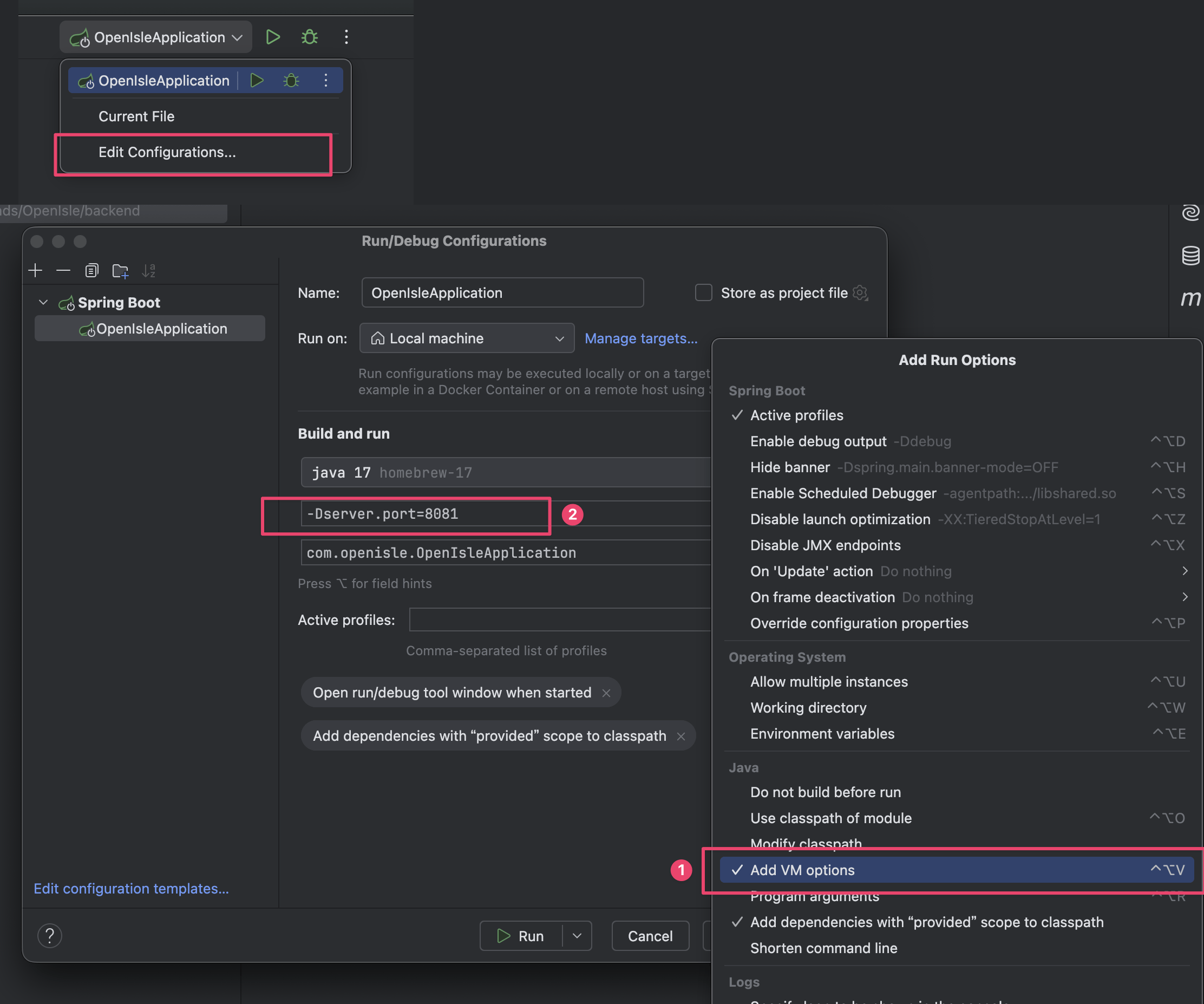
- 设置VM Option,最好运行在其他端口,非8080,这里设置8081
|
||||
|
||||
```shell
|
||||
-Dserver.port=8081
|
||||
```
|
||||
|
||||
|
||||
|
||||
- 设置jdk版本为java 17
|
||||
|
||||

|
||||
|
||||
- 本机配置MySQL服务(网上很多教程,忽略)
|
||||
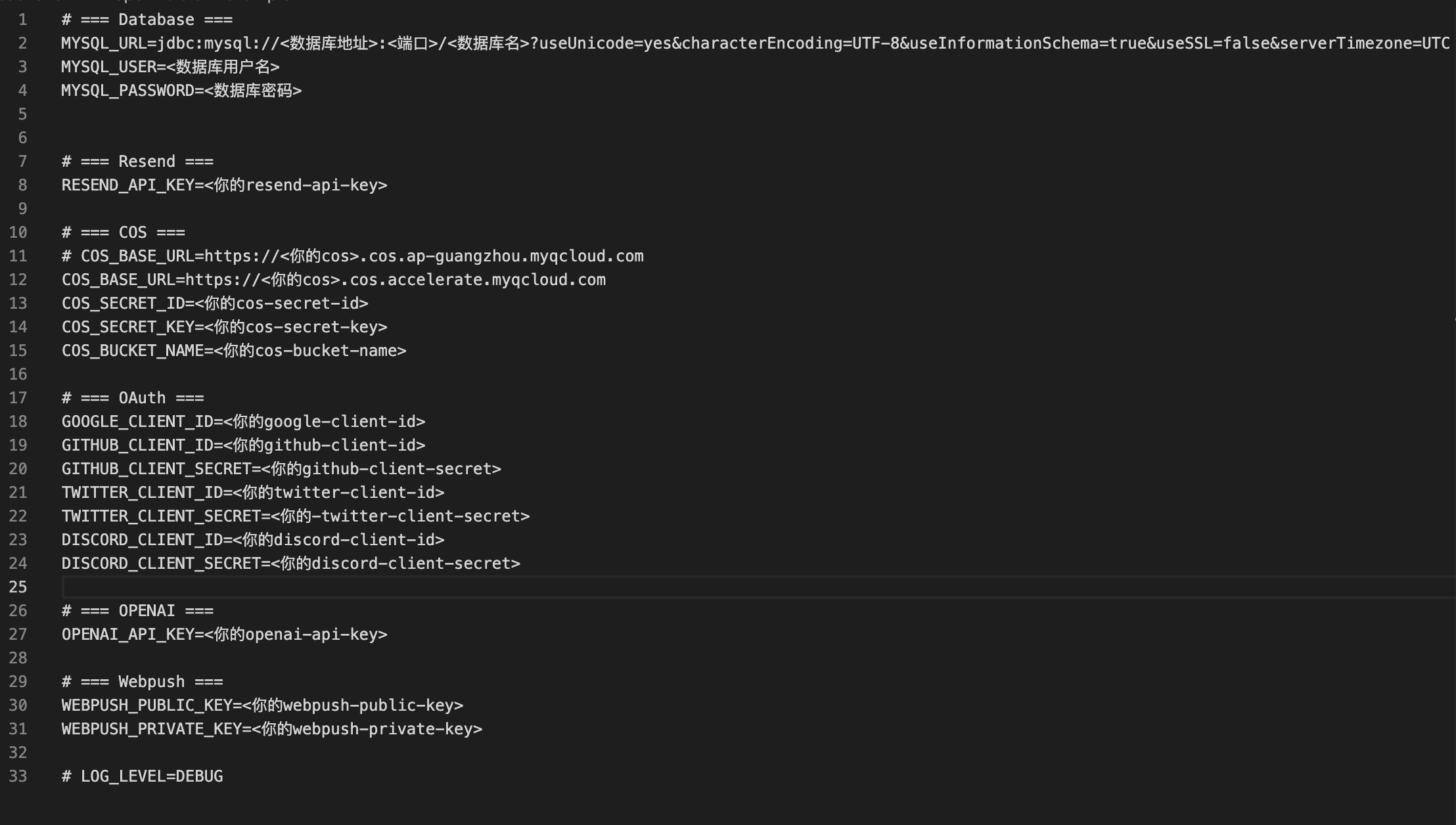
- 设置环境变量.env 文件 或.properties 文件(二选一)
|
||||
|
||||
1. 环境变量文件生成
|
||||
|
||||
```shell
|
||||
cp open-isle.env.example open-isle.env
|
||||
```
|
||||
|
||||
修改环境变量,留下需要的,比如你要开发Google登录业务,就需要谷歌相关的变量,数据库是一定要的
|
||||
|
||||
|
||||
|
||||
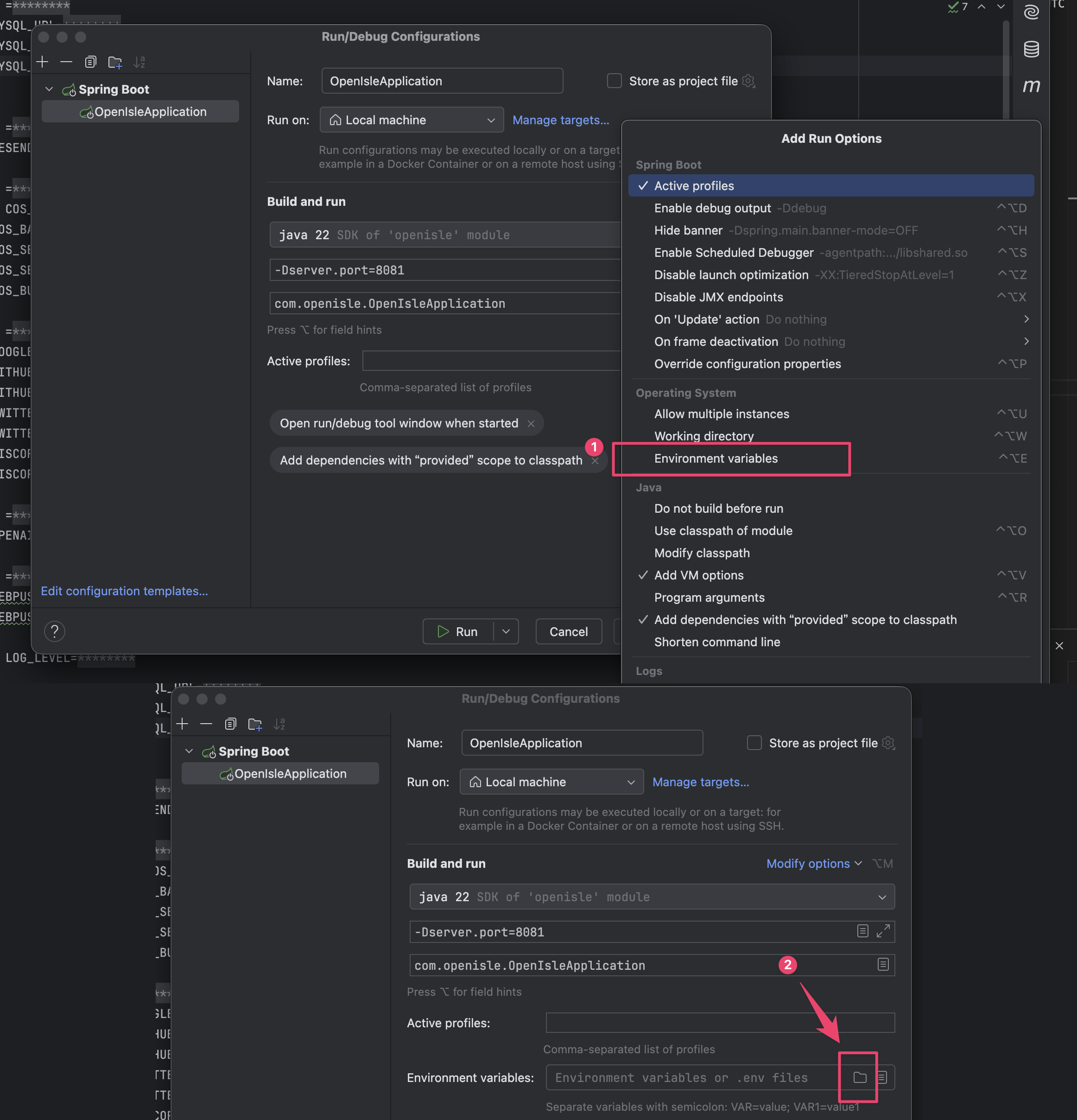
应用环境文件, 选择刚刚的`open-isle.env`
|
||||
|
||||
|
||||
|
||||
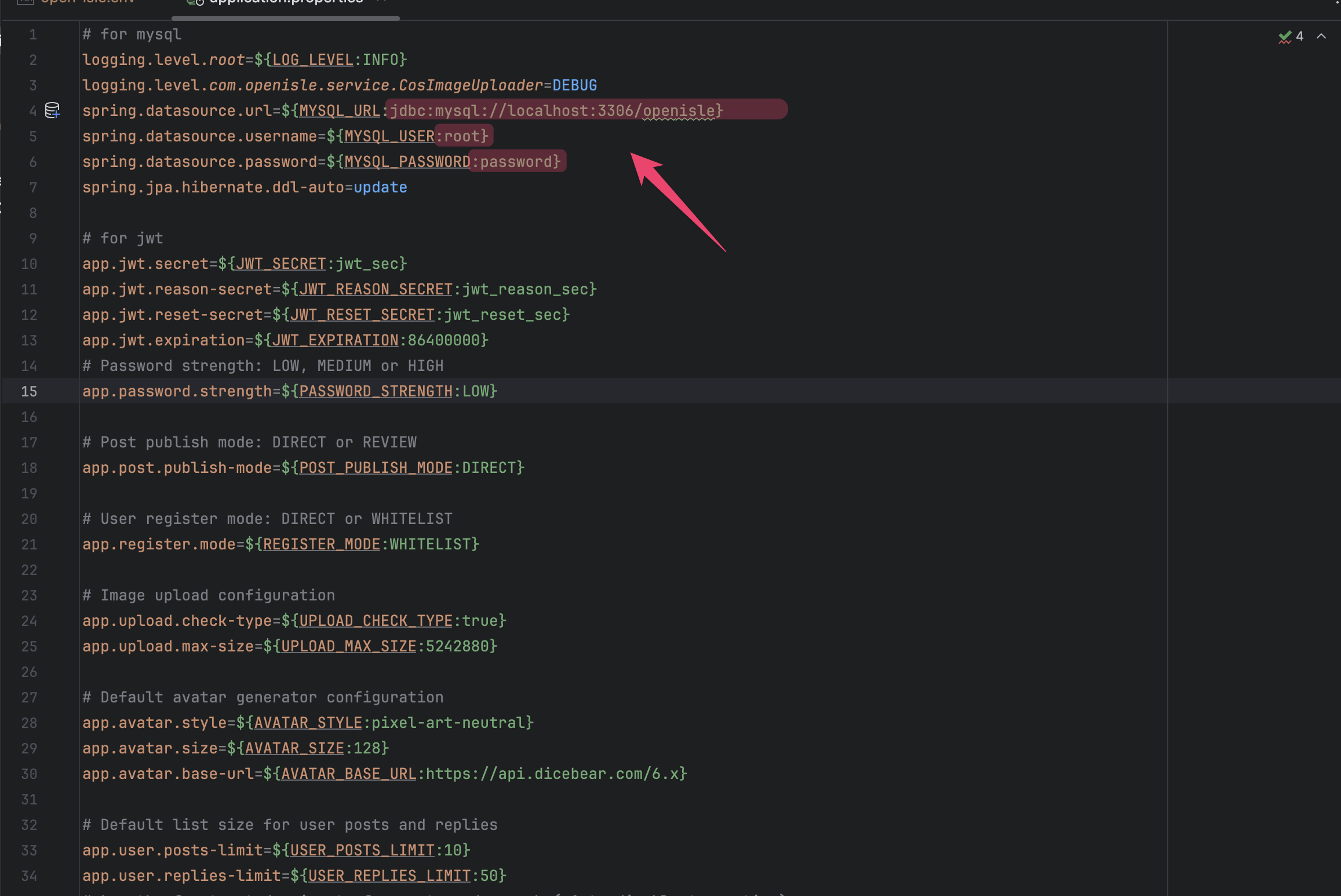
2. 直接修改 .properities 文件
|
||||
|
||||
位置src/main/application.properties, 数据库需要修改标红处,其他按需修改
|
||||
|
||||
|
||||
|
||||
处理完环境问题直接跑起来就能通了
|
||||
|
||||
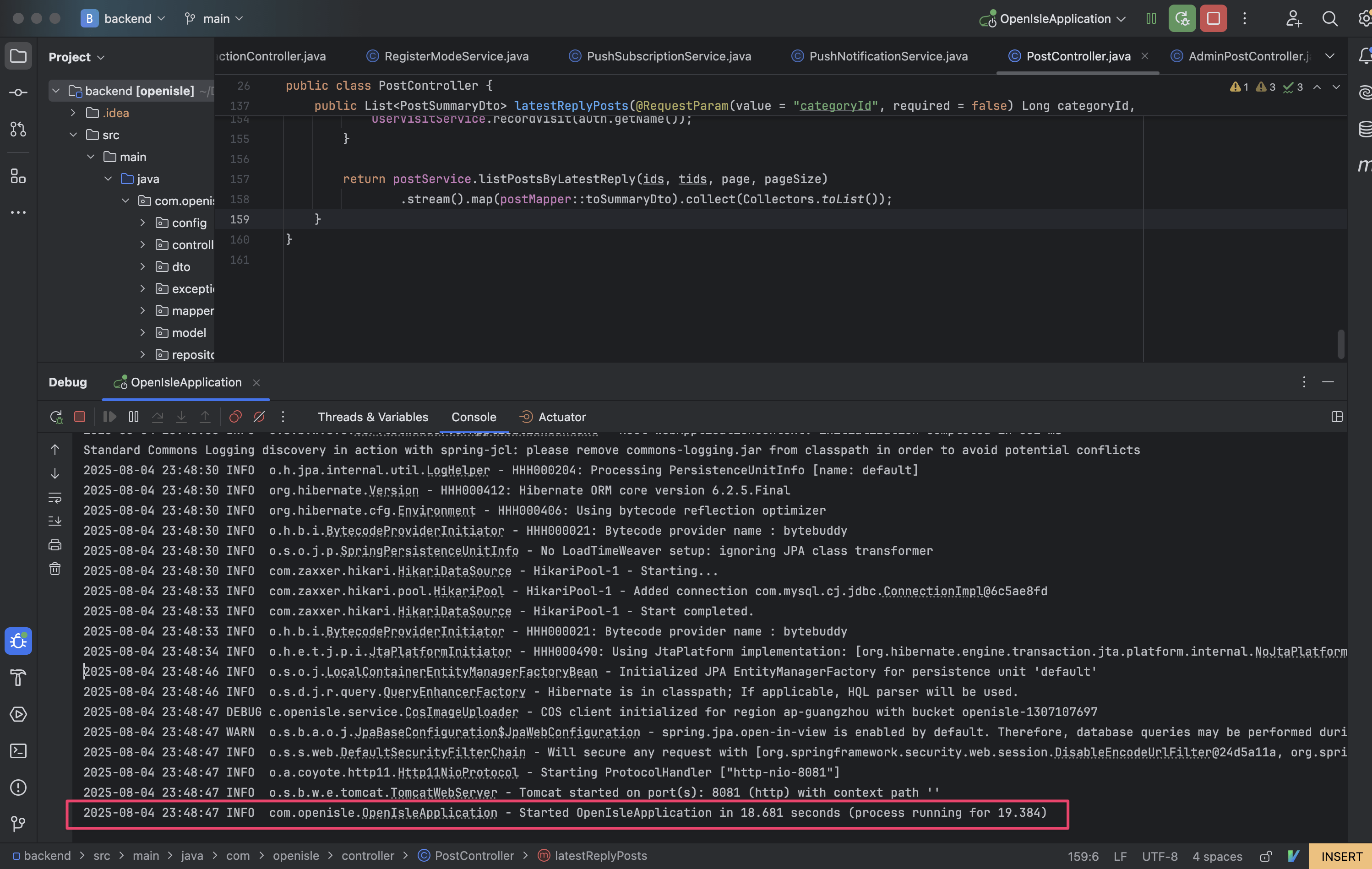
|
||||
|
||||
> Step3 前端部署
|
||||
|
||||
前端可以依赖本机部署的后端,也可以直接调用线上的后端接口
|
||||
|
||||
```shell
|
||||
cd ../frontend_nuxt/
|
||||
```
|
||||
|
||||
copy环境.env文件
|
||||
|
||||
```shell
|
||||
cp .env.staging.example .env
|
||||
```
|
||||
|
||||
1. 依赖本机部署的后端:打开本文件夹,修改.env 修改为瞄准本机后端端口
|
||||
|
||||
```yaml
|
||||
; 本地部署后端
|
||||
NUXT_PUBLIC_API_BASE_URL=https://127.0.0.1:8081
|
||||
; 预发环境后端
|
||||
; NUXT_PUBLIC_API_BASE_URL=https://staging.open-isle.com
|
||||
; 生产环境后端
|
||||
; NUXT_PUBLIC_API_BASE_URL=https://www.open-isle.com
|
||||
```
|
||||
|
||||
2. 依赖预发环境后台环境
|
||||
|
||||
**(⚠️强烈推荐只部署前端的朋友使用该环境)**
|
||||
|
||||
```yaml
|
||||
; 本地部署后端
|
||||
; NUXT_PUBLIC_API_BASE_URL=https://127.0.0.1:8081
|
||||
; 预发环境后端
|
||||
NUXT_PUBLIC_API_BASE_URL=https://staging.open-isle.com
|
||||
; 生产环境后端
|
||||
; NUXT_PUBLIC_API_BASE_URL=https://www.open-isle.com
|
||||
```
|
||||
|
||||
4. 依赖线上后台环境
|
||||
|
||||
```yaml
|
||||
; 本地部署后端
|
||||
; NUXT_PUBLIC_API_BASE_URL=https://127.0.0.1:8081
|
||||
; 预发环境后端
|
||||
; NUXT_PUBLIC_API_BASE_URL=https://staging.open-isle.com
|
||||
; 生产环境后端
|
||||
NUXT_PUBLIC_API_BASE_URL=https://www.open-isle.com
|
||||
```
|
||||
|
||||
```shell
|
||||
# 安装依赖
|
||||
npm install --verbose
|
||||
|
||||
# 运行前端服务
|
||||
npm run dev
|
||||
```
|
||||
|
||||
如此一来,浏览器访问 http://127.0.0.1:3000 即可访问前端页面
|
||||
37
README.md
37
README.md
@@ -1,45 +1,18 @@
|
||||
<p align="center">
|
||||
<img alt="OpenIsle" src="https://openisle-1307107697.cos.ap-guangzhou.myqcloud.com/assert/image.png" width="200">
|
||||
<br><br>
|
||||
<br>
|
||||
高效的开源社区前后端端平台
|
||||
<br><br>
|
||||
<a href="LICENSE"><img src="https://img.shields.io/badge/license-MIT-blue.svg?style=flat-square"></a>
|
||||
<br><br><br>
|
||||
<img alt="Image" src="https://openisle-1307107697.cos.accelerate.myqcloud.com/dynamic_assert/22752cfac5a04a9c90c41995b9f55fed.png" width="1200">
|
||||
</p>
|
||||
|
||||
## 💡 简介
|
||||
|
||||
OpenIsle 是一个使用 Spring Boot 和 Vue 3 构建的全栈开源社区平台,提供用户注册、登录、贴文发布、评论交互等完整功能,可用于项目社区或直接打造自主社区站点。
|
||||
|
||||
## 🚧 开发
|
||||
## 🚧 开发 & 部署
|
||||
|
||||
### 后端
|
||||
|
||||
1. 确保安装 JDK 17 及 Maven
|
||||
2. 信息配置修改 `src/main/resources/application.properties`,或通过环境变量设置数据库等参数
|
||||
3. 执行 `mvn clean package` 生成包,之后使用 `java -jar target/openisle-0.0.1-SNAPSHOT.jar`启动,或在开发时直接使用 `mvn spring-boot:run`
|
||||
|
||||
### 前端
|
||||
|
||||
1. 进入前端目录
|
||||
```bash
|
||||
cd frontend_nuxt
|
||||
```
|
||||
2. 安装依赖
|
||||
```bash
|
||||
npm install
|
||||
```
|
||||
3. 启动开发服务
|
||||
```bash
|
||||
npm run dev
|
||||
```
|
||||
|
||||
生产版本使用如下命令编译:
|
||||
|
||||
```bash
|
||||
npm run build
|
||||
```
|
||||
|
||||
会在 `.output` 目录生成文件,配合线上网站方式部署
|
||||
详细见 [Contributing](https://github.com/nagisa77/OpenIsle?tab=contributing-ov-file)
|
||||
|
||||
## ✨ 项目特点
|
||||
|
||||
|
||||
@@ -184,7 +184,7 @@ body {
|
||||
font-family: 'Maple Mono', monospace;
|
||||
font-size: 13px;
|
||||
border-radius: 4px;
|
||||
white-space: no-wrap;
|
||||
white-space: break-spaces;
|
||||
background-color: var(--code-highlight-background-color);
|
||||
color: var(--text-color);
|
||||
}
|
||||
|
||||
@@ -524,7 +524,7 @@ import {
|
||||
fetchNotifications,
|
||||
fetchUnreadCount,
|
||||
isLoadingMessage,
|
||||
markRead,
|
||||
markRead as markNotificationRead,
|
||||
notifications,
|
||||
markAllRead,
|
||||
hasMore,
|
||||
@@ -579,6 +579,14 @@ const togglePref = async (pref) => {
|
||||
}
|
||||
}
|
||||
|
||||
const markRead = async (id) => {
|
||||
await markNotificationRead(id)
|
||||
if (selectedTab.value === 'unread') {
|
||||
const index = notifications.value.findIndex((n) => n.id === id)
|
||||
if (index !== -1) notifications.value.splice(index, 1)
|
||||
}
|
||||
}
|
||||
|
||||
const approve = async (id, nid) => {
|
||||
const token = getToken()
|
||||
if (!token) return
|
||||
|
||||
@@ -17,7 +17,7 @@
|
||||
<div v-if="status === 'REJECTED'" class="article-block-button">已拒绝</div>
|
||||
<div v-if="closed" class="article-closed-button">已关闭</div>
|
||||
<div
|
||||
v-if="loggedIn && !isAuthor && !subscribed"
|
||||
v-if="!closed && loggedIn && !isAuthor && !subscribed"
|
||||
class="article-subscribe-button"
|
||||
@click="subscribePost"
|
||||
>
|
||||
@@ -27,7 +27,7 @@
|
||||
</div>
|
||||
</div>
|
||||
<div
|
||||
v-if="loggedIn && !isAuthor && subscribed"
|
||||
v-if="!closed && loggedIn && !isAuthor && subscribed"
|
||||
class="article-unsubscribe-button"
|
||||
@click="unsubscribePost"
|
||||
>
|
||||
@@ -168,6 +168,8 @@
|
||||
</div>
|
||||
</div>
|
||||
|
||||
<div v-if="closed" class="post-close-container">该帖子已关闭,内容仅供阅读,无法进行互动</div>
|
||||
|
||||
<ClientOnly>
|
||||
<CommentEditor
|
||||
@submit="postComment"
|
||||
@@ -874,12 +876,7 @@ const gotoProfile = () => {
|
||||
navigateTo(`/users/${author.value.id}`, { replace: true })
|
||||
}
|
||||
|
||||
onActivated(async () => {
|
||||
await refreshPost()
|
||||
await fetchComments()
|
||||
})
|
||||
|
||||
onMounted(async () => {
|
||||
const initPage = async () => {
|
||||
await fetchComments()
|
||||
const hash = location.hash
|
||||
const id = hash.startsWith('#comment-') ? hash.substring('#comment-'.length) : null
|
||||
@@ -887,6 +884,14 @@ onMounted(async () => {
|
||||
updateCurrentIndex()
|
||||
window.addEventListener('scroll', updateCurrentIndex)
|
||||
jumpToHashComment()
|
||||
}
|
||||
|
||||
onActivated(async () => {
|
||||
await initPage()
|
||||
})
|
||||
|
||||
onMounted(async () => {
|
||||
await initPage()
|
||||
})
|
||||
</script>
|
||||
|
||||
@@ -939,6 +944,18 @@ onMounted(async () => {
|
||||
gap: 10px;
|
||||
}
|
||||
|
||||
.post-close-container {
|
||||
padding: 40px;
|
||||
margin-top: 15px;
|
||||
text-align: center;
|
||||
font-size: 12px;
|
||||
color: var(--text-color);
|
||||
background-color: var(--background-color);
|
||||
border: 1px dashed var(--normal-border-color);
|
||||
border-radius: 10px;
|
||||
opacity: 0.5;
|
||||
}
|
||||
|
||||
.scroller {
|
||||
margin-top: 20px;
|
||||
margin-left: 20px;
|
||||
@@ -1053,6 +1070,7 @@ onMounted(async () => {
|
||||
white-space: nowrap;
|
||||
}
|
||||
|
||||
.article-closed-button,
|
||||
.article-subscribe-button-text,
|
||||
.article-unsubscribe-button-text {
|
||||
white-space: nowrap;
|
||||
|
||||
@@ -36,7 +36,7 @@
|
||||
class="signup-page-button-primary"
|
||||
@click="sendVerification"
|
||||
>
|
||||
<div class="signup-page-button-text">验证邮箱</div>
|
||||
<div class="signup-page-button-text">验证并注册</div>
|
||||
</div>
|
||||
<div v-else class="signup-page-button-primary disabled">
|
||||
<div class="signup-page-button-text">
|
||||
|
||||
Reference in New Issue
Block a user