mirror of
https://github.com/NanmiCoder/MediaCrawler.git
synced 2026-07-29 07:50:24 +08:00
Compare commits
7 Commits
feature/ex
...
feature/te
| Author | SHA1 | Date | |
|---|---|---|---|

|
f14242c239 | ||
|
|
29832ded91 | ||
|
|
11f2802624 | ||
|
|
ab19494883 | ||

|
2bc9297812 | ||
|
|
ba64c8ff9c | ||
|
|
ebbf86d67b |
18
.github/CODEOWNERS
vendored
Normal file
18
.github/CODEOWNERS
vendored
Normal file
@@ -0,0 +1,18 @@
|
||||
# 默认:仓库所有文件都需要 @NanmiCoder 审核
|
||||
* @NanmiCoder
|
||||
|
||||
|
||||
.github/workflows/** @NanmiCoder
|
||||
|
||||
|
||||
requirements.txt @NanmiCoder
|
||||
pyproject.toml @NanmiCoder
|
||||
Pipfile @NanmiCoder
|
||||
package.json @NanmiCoder
|
||||
package-lock.json @NanmiCoder
|
||||
pnpm-lock.yaml @NanmiCoder
|
||||
|
||||
|
||||
Dockerfile @NanmiCoder
|
||||
docker/** @NanmiCoder
|
||||
scripts/deploy/** @NanmiCoder
|
||||
57
README.md
57
README.md
@@ -129,15 +129,10 @@ uv sync
|
||||
uv run playwright install
|
||||
```
|
||||
|
||||
> **💡 提示**:MediaCrawler 目前已经支持使用 playwright 连接你本地的 Chrome 浏览器了,一些因为 Webdriver 导致的问题迎刃而解了。
|
||||
>
|
||||
> 目前开放了 `xhs` 和 `dy` 这两个使用 CDP 的方式连接本地浏览器,如有需要,查看 `config/base_config.py` 中的配置项。
|
||||
|
||||
## 🚀 运行爬虫程序
|
||||
|
||||
```shell
|
||||
# 项目默认是没有开启评论爬取模式,如需评论请在 config/base_config.py 中的 ENABLE_GET_COMMENTS 变量修改
|
||||
# 一些其他支持项,也可以在 config/base_config.py 查看功能,写的有中文注释
|
||||
# 在 config/base_config.py 查看配置项目功能,写的有中文注释
|
||||
|
||||
# 从配置文件中读取关键词搜索相关的帖子并爬取帖子信息与评论
|
||||
uv run main.py --platform xhs --lt qrcode --type search
|
||||
@@ -209,40 +204,9 @@ python main.py --help
|
||||
|
||||
## 💾 数据保存
|
||||
|
||||
支持多种数据存储方式:
|
||||
- **CSV 文件**:支持保存到 CSV 中(`data/` 目录下)
|
||||
- **JSON 文件**:支持保存到 JSON 中(`data/` 目录下)
|
||||
- **Excel 文件**:支持保存到格式化的 Excel 文件(`data/` 目录下)✨ 新功能
|
||||
- 多工作表支持(内容、评论、创作者)
|
||||
- 专业格式化(标题样式、自动列宽、边框)
|
||||
- 易于分析和分享
|
||||
- **数据库存储**
|
||||
- 使用参数 `--init_db` 进行数据库初始化(使用`--init_db`时不需要携带其他optional)
|
||||
- **SQLite 数据库**:轻量级数据库,无需服务器,适合个人使用(推荐)
|
||||
1. 初始化:`--init_db sqlite`
|
||||
2. 数据存储:`--save_data_option sqlite`
|
||||
- **MySQL 数据库**:支持关系型数据库 MySQL 中保存(需要提前创建数据库)
|
||||
1. 初始化:`--init_db mysql`
|
||||
2. 数据存储:`--save_data_option db`(db 参数为兼容历史更新保留)
|
||||
MediaCrawler 支持多种数据存储方式,包括 CSV、JSON、Excel、SQLite 和 MySQL 数据库。
|
||||
|
||||
|
||||
### 使用示例:
|
||||
```shell
|
||||
# 初始化 SQLite 数据库
|
||||
uv run main.py --init_db sqlite
|
||||
# 使用 SQLite 存储数据
|
||||
uv run main.py --platform xhs --lt qrcode --type search --save_data_option sqlite
|
||||
|
||||
# 使用 Excel 存储数据(推荐用于数据分析)
|
||||
uv run main.py --platform xhs --lt qrcode --type search --save_data_option excel
|
||||
```
|
||||
|
||||
```shell
|
||||
# 初始化 MySQL 数据库
|
||||
uv run main.py --init_db mysql
|
||||
# 使用 MySQL 存储数据(为适配历史更新,db参数进行沿用)
|
||||
uv run main.py --platform xhs --lt qrcode --type search --save_data_option db
|
||||
```
|
||||
📖 **详细使用说明请查看:[数据存储指南](docs/data_storage_guide.md)**
|
||||
|
||||
|
||||
[🚀 MediaCrawlerPro 重磅发布 🚀!更多的功能,更好的架构设计!](https://github.com/MediaCrawlerPro)
|
||||
@@ -251,11 +215,6 @@ uv run main.py --platform xhs --lt qrcode --type search --save_data_option db
|
||||
### 💬 交流群组
|
||||
- **微信交流群**:[点击加入](https://nanmicoder.github.io/MediaCrawler/%E5%BE%AE%E4%BF%A1%E4%BA%A4%E6%B5%81%E7%BE%A4.html)
|
||||
|
||||
### 📚 其他
|
||||
- **常见问题**:[MediaCrawler 完整文档](https://nanmicoder.github.io/MediaCrawler/)
|
||||
- **爬虫入门教程**:[CrawlerTutorial 免费教程](https://github.com/NanmiCoder/CrawlerTutorial)
|
||||
- **新闻爬虫开源项目**:[NewsCrawlerCollection](https://github.com/NanmiCoder/NewsCrawlerCollection)
|
||||
---
|
||||
|
||||
### 💰 赞助商展示
|
||||
|
||||
@@ -286,8 +245,6 @@ uv run main.py --platform xhs --lt qrcode --type search --save_data_option db
|
||||
- 💻 GitHub地址:[https://github.com/TikHubIO/](https://github.com/TikHubIO/)
|
||||
|
||||
|
||||
|
||||
|
||||
### 🤝 成为赞助者
|
||||
|
||||
成为赞助者,可以将您的产品展示在这里,每天获得大量曝光!
|
||||
@@ -295,9 +252,14 @@ uv run main.py --platform xhs --lt qrcode --type search --save_data_option db
|
||||
**联系方式**:
|
||||
- 微信:`relakkes`
|
||||
- 邮箱:`relakkes@gmail.com`
|
||||
|
||||
---
|
||||
|
||||
### 📚 其他
|
||||
- **常见问题**:[MediaCrawler 完整文档](https://nanmicoder.github.io/MediaCrawler/)
|
||||
- **爬虫入门教程**:[CrawlerTutorial 免费教程](https://github.com/NanmiCoder/CrawlerTutorial)
|
||||
- **新闻爬虫开源项目**:[NewsCrawlerCollection](https://github.com/NanmiCoder/NewsCrawlerCollection)
|
||||
|
||||
|
||||
## ⭐ Star 趋势图
|
||||
|
||||
如果这个项目对您有帮助,请给个 ⭐ Star 支持一下,让更多的人看到 MediaCrawler!
|
||||
@@ -305,7 +267,6 @@ uv run main.py --platform xhs --lt qrcode --type search --save_data_option db
|
||||
[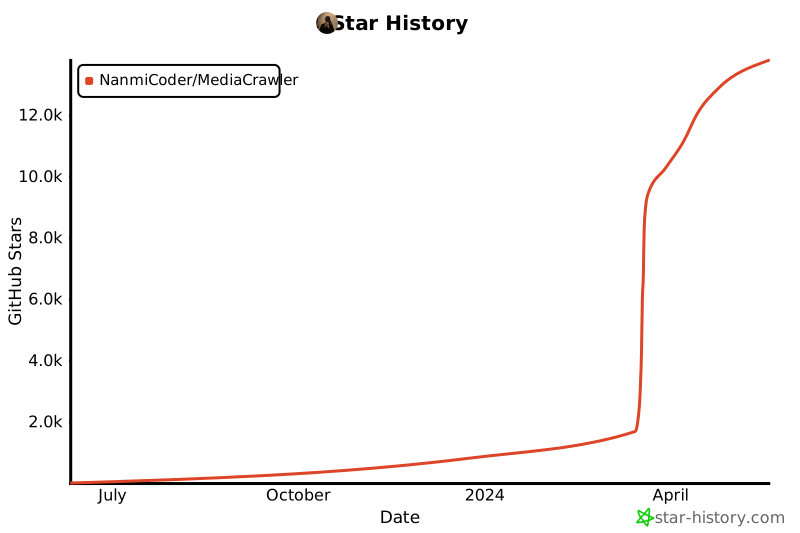](https://star-history.com/#NanmiCoder/MediaCrawler&Date)
|
||||
|
||||
|
||||
|
||||
## 📚 参考
|
||||
|
||||
- **小红书签名仓库**:[Cloxl 的 xhs 签名仓库](https://github.com/Cloxl/xhshow)
|
||||
|
||||
34
README_en.md
34
README_en.md
@@ -206,39 +206,9 @@ python main.py --help
|
||||
|
||||
## 💾 Data Storage
|
||||
|
||||
Supports multiple data storage methods:
|
||||
- **CSV Files**: Supports saving to CSV (under `data/` directory)
|
||||
- **JSON Files**: Supports saving to JSON (under `data/` directory)
|
||||
- **Excel Files**: Supports saving to formatted Excel files (under `data/` directory) ✨ New Feature
|
||||
- Multi-sheet support (Contents, Comments, Creators)
|
||||
- Professional formatting (styled headers, auto-width columns, borders)
|
||||
- Easy to analyze and share
|
||||
- **Database Storage**
|
||||
- Use the `--init_db` parameter for database initialization (when using `--init_db`, no other optional arguments are needed)
|
||||
- **SQLite Database**: Lightweight database, no server required, suitable for personal use (recommended)
|
||||
1. Initialization: `--init_db sqlite`
|
||||
2. Data Storage: `--save_data_option sqlite`
|
||||
- **MySQL Database**: Supports saving to relational database MySQL (database needs to be created in advance)
|
||||
1. Initialization: `--init_db mysql`
|
||||
2. Data Storage: `--save_data_option db` (the db parameter is retained for compatibility with historical updates)
|
||||
MediaCrawler supports multiple data storage methods, including CSV, JSON, Excel, SQLite, and MySQL databases.
|
||||
|
||||
|
||||
### Usage Examples:
|
||||
```shell
|
||||
# Use Excel to store data (recommended for data analysis) ✨ New Feature
|
||||
uv run main.py --platform xhs --lt qrcode --type search --save_data_option excel
|
||||
|
||||
# Initialize SQLite database (when using '--init_db', no other optional arguments are needed)
|
||||
uv run main.py --init_db sqlite
|
||||
# Use SQLite to store data (recommended for personal users)
|
||||
uv run main.py --platform xhs --lt qrcode --type search --save_data_option sqlite
|
||||
```
|
||||
```shell
|
||||
# Initialize MySQL database
|
||||
uv run main.py --init_db mysql
|
||||
# Use MySQL to store data (the db parameter is retained for compatibility with historical updates)
|
||||
uv run main.py --platform xhs --lt qrcode --type search --save_data_option db
|
||||
```
|
||||
📖 **For detailed usage instructions, please see: [Data Storage Guide](docs/data_storage_guide.md)**
|
||||
|
||||
---
|
||||
|
||||
|
||||
57
docs/data_storage_guide.md
Normal file
57
docs/data_storage_guide.md
Normal file
@@ -0,0 +1,57 @@
|
||||
# 数据保存指南 / Data Storage Guide
|
||||
|
||||
|
||||
### 💾 数据保存
|
||||
|
||||
MediaCrawler 支持多种数据存储方式,您可以根据需求选择最适合的方案:
|
||||
|
||||
#### 存储方式
|
||||
|
||||
- **CSV 文件**:支持保存到 CSV 中(`data/` 目录下)
|
||||
- **JSON 文件**:支持保存到 JSON 中(`data/` 目录下)
|
||||
- **Excel 文件**:支持保存到格式化的 Excel 文件(`data/` 目录下)✨ 新功能
|
||||
- 多工作表支持(内容、评论、创作者)
|
||||
- 专业格式化(标题样式、自动列宽、边框)
|
||||
- 易于分析和分享
|
||||
- **数据库存储**
|
||||
- 使用参数 `--init_db` 进行数据库初始化(使用`--init_db`时不需要携带其他optional)
|
||||
- **SQLite 数据库**:轻量级数据库,无需服务器,适合个人使用(推荐)
|
||||
1. 初始化:`--init_db sqlite`
|
||||
2. 数据存储:`--save_data_option sqlite`
|
||||
- **MySQL 数据库**:支持关系型数据库 MySQL 中保存(需要提前创建数据库)
|
||||
1. 初始化:`--init_db mysql`
|
||||
2. 数据存储:`--save_data_option db`(db 参数为兼容历史更新保留)
|
||||
|
||||
#### 使用示例
|
||||
|
||||
```shell
|
||||
# 使用 Excel 存储数据(推荐用于数据分析)✨ 新功能
|
||||
uv run main.py --platform xhs --lt qrcode --type search --save_data_option excel
|
||||
|
||||
# 初始化 SQLite 数据库
|
||||
uv run main.py --init_db sqlite
|
||||
# 使用 SQLite 存储数据
|
||||
uv run main.py --platform xhs --lt qrcode --type search --save_data_option sqlite
|
||||
```
|
||||
|
||||
```shell
|
||||
# 初始化 MySQL 数据库
|
||||
uv run main.py --init_db mysql
|
||||
# 使用 MySQL 存储数据(为适配历史更新,db参数进行沿用)
|
||||
uv run main.py --platform xhs --lt qrcode --type search --save_data_option db
|
||||
```
|
||||
|
||||
```shell
|
||||
# 使用 CSV 存储数据
|
||||
uv run main.py --platform xhs --lt qrcode --type search --save_data_option csv
|
||||
|
||||
# 使用 JSON 存储数据
|
||||
uv run main.py --platform xhs --lt qrcode --type search --save_data_option json
|
||||
```
|
||||
|
||||
#### 详细文档
|
||||
|
||||
- **Excel 导出详细指南**:查看 [Excel 导出指南](excel_export_guide.md)
|
||||
- **数据库配置**:参考 [常见问题](常见问题.md)
|
||||
|
||||
---
|
||||
Reference in New Issue
Block a user