mirror of
https://github.com/opsre/LiteOps.git
synced 2026-02-14 19:11:04 +08:00

286 lines
7.6 KiB
Markdown
286 lines
7.6 KiB
Markdown
<div align="center">
|
||
|
||
# 🚀 LiteOps - 轻量级DevOps平台
|
||
|
||
<img src="liteops-sidebar.png" alt="LiteOps Logo" width="200"/>
|
||
|
||
**简单、高效的CI/CD解决方案**
|
||
|
||
</div>
|
||
|
||
<p align="center">
|
||
<img src="https://img.shields.io/badge/Python-3.9-14354C.svg?logo=python&logoColor=white" alt="Python 3.9"/>
|
||
<img src="https://img.shields.io/badge/Vue.js-3-35495e.svg?logo=vue.js&logoColor=4FC08D" alt="Vue 3"/>
|
||
<img src="https://img.shields.io/badge/Django-4.2-092E20.svg?logo=django&logoColor=white" alt="Django"/>
|
||
<img src="https://img.shields.io/badge/mysql-8-00000f.svg?logo=mysql&logoColor=white" alt="MySQL"/>
|
||
<img src="https://img.shields.io/docker/pulls/liteops/liteops?logo=docker&logoColor=white" alt="Docker Pulls"/>
|
||
</p>
|
||
|
||
|
||
# 项目介绍
|
||
**注意根据GitHub源码内容为最新版本,官网和DockerHub更新稍慢**
|
||
|
||
## LiteOps CICD 平台概述
|
||
|
||
LiteOps 是一个专注实用性的 CI/CD 平台。只解决真问题 —— 自动化构建、部署 一体化平台。
|
||
|
||
## 项目特点
|
||
|
||
- **够用就好**:基于实际工作流程设计,没有复杂功能
|
||
- **上手简单**:界面直观,学习成本低,像 Jenkins 自由风格 Job 一样简单
|
||
- **针对痛点**:专门解决团队缺失的环节
|
||
|
||
## 功能预览
|
||
|
||
<table align="center" width="100%">
|
||
<tr>
|
||
<td align="center" width="50%">
|
||
<img src="image/dashboard.png" alt="仪表板" width="90%"/>
|
||
</td>
|
||
<td align="center" width="50%">
|
||
<img src="image/projects_list.png" alt="项目列表" width="90%"/>
|
||
</td>
|
||
</tr>
|
||
<tr>
|
||
<td align="center">
|
||
<img src="image/build_tasks.png" alt="构建任务" width="90%"/>
|
||
</td>
|
||
<td align="center">
|
||
<img src="image/build_execution.png" alt="构建需求" width="90%"/>
|
||
</td>
|
||
</tr>
|
||
<tr>
|
||
<td align="center">
|
||
<img src="image/build_tasks_log.png" alt="构建日志" width="90%"/>
|
||
</td>
|
||
<td align="center">
|
||
<img src="image/build_history1.png" alt="构建历史1" width="90%"/>
|
||
</td>
|
||
</tr>
|
||
<tr>
|
||
<td align="center">
|
||
<img src="image/build_history2.png" alt="构建历史2" width="90%"/>
|
||
</td>
|
||
<td align="center">
|
||
<img src="image/build_history3.png" alt="构建历史3" width="90%"/>
|
||
</td>
|
||
</tr>
|
||
<tr>
|
||
<td align="center">
|
||
<img src="image/system_basic.png" alt="系统设置" width="90%"/>
|
||
</td>
|
||
<td align="center">
|
||
<img src="image/cerdentials_kubeconfig.png" alt="凭据配置" width="90%"/>
|
||
</td>
|
||
</tr>
|
||
</table>
|
||
|
||
## 技术架构
|
||
|
||
LiteOps采用前后端分离的架构设计:
|
||
|
||
### 前端技术栈
|
||
|
||
- **Vue 3**:渐进式JavaScript框架
|
||
- **Ant Design Vue 4.x**:基于Vue的UI组件库
|
||
- **Axios**:基于Promise的HTTP客户端
|
||
- **Vue Router**:Vue官方路由管理器
|
||
- **echarts**:数据可视化图表库
|
||
|
||
### 后端技术栈
|
||
|
||
- **Django 4.2**:Python Web框架
|
||
- **Django Channels**:WebSocket支持
|
||
- **MySQL 8**:关系型数据库
|
||
- **GitPython**:Git操作库
|
||
- **Python-GitLab**:GitLab API客户端
|
||
- **JWT认证**:用户身份验证
|
||
|
||
## 项目目标
|
||
|
||
1. 把重复性、手动上传的构建部署工作自动化掉
|
||
2. 减少人为操作错误,标准化流程
|
||
3. 提供清晰的构建状态和日志,出问题能快速定位
|
||
|
||
## 🚀 快速部署
|
||
|
||
#### 1. 获取部署文件
|
||
|
||
你需要获取以下部署文件:
|
||
|
||
- `start-containers.sh` - 一键部署脚本
|
||
- `liteops_init.sql` - 数据库初始化文件
|
||
- `liteops` - Docker镜像
|
||
|
||
#### 2. 获取Docker镜像
|
||
|
||
```bash
|
||
# 拉取LiteOps镜像
|
||
docker pull liteops/liteops:[最新版本号]
|
||
```
|
||
|
||
#### 3. 准备部署文件
|
||
|
||
创建部署目录并放置必要文件:
|
||
|
||
```bash
|
||
# 创建部署目录
|
||
mkdir liteops-deploy
|
||
cd liteops-deploy
|
||
|
||
# 将以下文件放入此目录:
|
||
# - start-containers.sh
|
||
# - liteops_init.sql
|
||
```
|
||
|
||
#### 4. 一键部署
|
||
|
||
使用提供的启动脚本进行自动化部署:
|
||
|
||
```bash
|
||
# 给启动脚本执行权限
|
||
chmod +x start-containers.sh
|
||
|
||
# 执行一键部署
|
||
./start-containers.sh
|
||
```
|
||
|
||
启动脚本会自动完成以下操作:
|
||
|
||
#### 5. 验证部署
|
||
|
||
部署完成后,你可以通过以下方式验证:
|
||
|
||
```bash
|
||
# 检查容器状态
|
||
docker ps
|
||
|
||
# 检查日志
|
||
docker logs liteops
|
||
🐳 启动 Docker in Docker 环境...
|
||
🚀 启动 Docker daemon (轻量级CI/CD模式)...
|
||
⏳ 等待 Docker daemon 启动...
|
||
time="2025-06-13T02:15:10.086745884Z" level=warning msg="CDI setup error /etc/cdi: failed to monitor for changes: no such file or directory"
|
||
time="2025-06-13T02:15:10.086771075Z" level=warning msg="CDI setup error /var/run/cdi: failed to monitor for changes: no such file or directory"
|
||
✅ Docker daemon 启动成功
|
||
🔍 验证 Docker 功能...
|
||
✅ Docker daemon 版本: 28.2.2
|
||
✅ 存储驱动: vfs
|
||
🎉 Docker in Docker 环境启动完成 (轻量级CI/CD模式)
|
||
Starting nginx...
|
||
Starting nginx: nginx.
|
||
Starting backend service...
|
||
INFO: Started server process [188]
|
||
INFO: Waiting for application startup.
|
||
INFO: ASGI 'lifespan' protocol appears unsupported.
|
||
INFO: Application startup complete.
|
||
INFO: Uvicorn running on http://0.0.0.0:8900 (Press CTRL+C to quit)
|
||
docker logs liteops-mysql
|
||
```
|
||
|
||
### 访问应用
|
||
|
||
部署成功后,你可以通过以下地址访问:
|
||
|
||
- **前端界面**:http://localhost
|
||
- **后端API**:http://localhost:8900/api/
|
||
- **MySQL数据库**:localhost:3306
|
||
|
||
### 默认登录信息
|
||
|
||
- **用户名**:admin
|
||
- **密码**:admin123 (初始密码,可自行修改)
|
||
|
||
## 📋 手动部署(源码启动)
|
||
|
||
如果你想从源码运行 LiteOps,可以按照以下步骤操作:
|
||
|
||
### 环境要求
|
||
|
||
- **Python**:3.8+
|
||
- **Node.js**:16+
|
||
- **MySQL**:8.0+
|
||
- **Git**:用于克隆源码
|
||
|
||
### 1. 克隆项目
|
||
|
||
```bash
|
||
git clone https://github.com/opsre/LiteOps.git
|
||
cd LiteOps
|
||
```
|
||
|
||
### 2. 后端部署
|
||
|
||
```bash
|
||
# 进入后端目录
|
||
cd backend
|
||
|
||
# 安装 Python 依赖
|
||
pip3 install -r requirements.txt
|
||
|
||
# 配置数据库(请先创建数据库并导入 liteops_init.sql)
|
||
# 修改 backend/config.txt 中的数据库配置
|
||
|
||
# 启动后端服务
|
||
python3 -m uvicorn backend.asgi:application --host 0.0.0.0 --port 8900
|
||
```
|
||
|
||
### 3. 前端部署
|
||
|
||
```bash
|
||
# 新开终端,进入前端目录
|
||
cd web
|
||
|
||
# 安装依赖
|
||
npm i
|
||
# 或者
|
||
npm install
|
||
|
||
# 开发模式启动
|
||
npm run dev
|
||
|
||
# 生产环境构建
|
||
npm run build
|
||
```
|
||
|
||
### 4. 访问应用
|
||
|
||
- **开发模式**:
|
||
- 前端:http://localhost:8080
|
||
- 后端:http://localhost:8900
|
||
|
||
- **生产模式**:
|
||
- 配置 Nginx Web 服务器托管前端构建文件
|
||
- 后端继续使用 http://localhost:8900
|
||
|
||
### 注意事项
|
||
|
||
- 确保 MySQL 服务正常运行,并已导入初始化 SQL 文件
|
||
- 修改前端 API 地址配置以匹配后端服务地址
|
||
|
||
## 项目当前状态
|
||
|
||
LiteOps目前处于很多功能未完善状态,虽然核心功能已经初步实现,但仍有许多需求和功能有待完善,。我希望通过开源的方式收集更多的需求和建议,使这个项目能够更好地服务于实际开发场景。
|
||
|
||
### 需求征集
|
||
|
||
我诚挚邀请你在查看[功能介绍文档](https://liteops.ext4.cn)和了解LiteOps后,提供宝贵的意见和建议:
|
||
|
||
功能介绍文档:https://liteops.ext4.cn
|
||
|
||
- **功能需求**:你希望看到哪些新功能或改进?
|
||
- **用户体验**:界面和操作流程是否符合你的使用习惯?
|
||
- **实际场景**:在你的工作环境中,有哪些CI/CD痛点尚未解决?
|
||
|
||
## 📞 联系我
|
||
|
||
如果你对LiteOps有任何建议、问题或需求,欢迎通过以下方式联系我:
|
||
|
||
- **邮箱**:hukdoesn@163.com
|
||
- **GitHub Issues**:[提交问题或建议](https://github.com/hukdoesn/liteops/issues)
|
||
|
||
<img src="image/wechat.png" alt="Magic Gardens" width="300">
|
||
|
||
---
|
||
|
||
[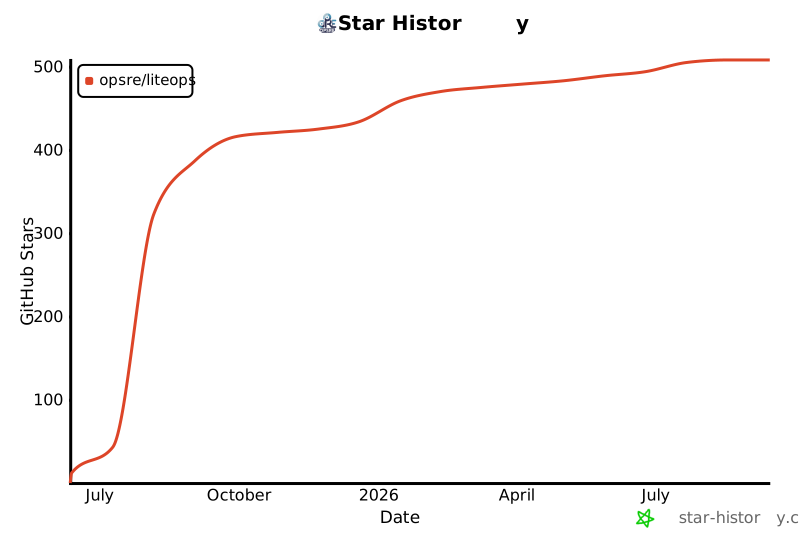](https://www.star-history.com/#opsre/LiteOps&Date) |